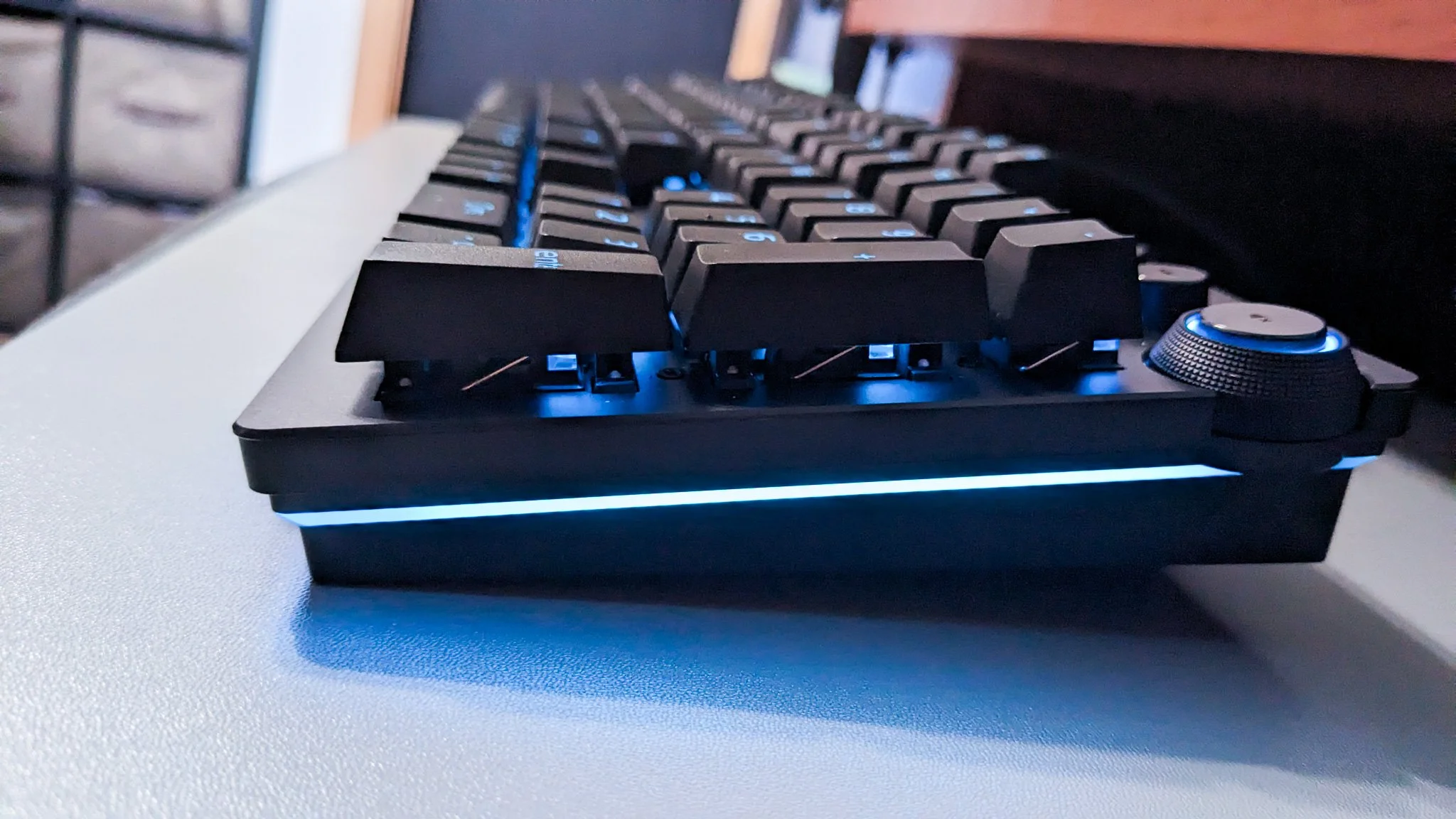

A keyboard can make a gaming desk feel cramped long before the mouse does. Full-size boards consume valuable room, compact boards hide familiar keys, and fast optical switches can feel wasted if you mainly type, chat, and play at a relaxed pace. The right choice depends on how much control, speed, and desk space you actually need.
The Best Razer Keyboard options below range from the compact Huntsman Mini to full-size esports boards with adjustable actuation, Rapid Trigger, and 8KHz polling. There are also sensible middle ground choices with low-profile mecha-membrane keys, dedicated controls, and conventional mechanical switches.
Our top pick is the Razer Huntsman V3 HE Magnetic TKL, with the BlackWidow V4 X the better fit for buyers who want a more traditional keyboard. The lineup covers compact, TKL, and full-size designs, plus quieter low-profile alternatives.
Best Razer Keyboard Compared
| # | Product | Award | Size | Switch or input type | Best for |
|---|---|---|---|---|---|
| 1 | Razer Huntsman V3 HE Magnetic TKL | Best overall | TKL | Hall Effect magnetic switches | Competitive FPS players |
| 2 | Razer BlackWidow V4 X | Best traditional mechanical | Full size | Yellow linear switches | Gaming and everyday typing |
| 3 | Razer Huntsman V3 TKL 8KHz | Best quiet esports TKL | TKL | Gen-2 analog optical switches | Fast play with controlled sound |
| 4 | Razer Huntsman V3 Pro TKL | Best adjustable actuation | TKL | Gen-2 analog optical switches | Competitive movement tuning |
| 5 | Razer Huntsman V3 Pro 8KHz | Best full-size speed | Full size | Gen-2 analog optical switches | Maximum speed with a full layout |
| 6 | Razer BlackWidow V4 Pro | Best for macros | Full size | Green tactile switches | Shortcut-heavy setups |
| 7 | Razer Ornata V3 TKL | Best low-profile TKL | TKL | Mecha-membrane switches | Comfortable everyday gaming |
| 8 | Razer Ornata V3 | Best low-profile full size | Full size | Mecha-membrane switches | Media controls and wrist support |
| 9 | Razer Huntsman Mini | Best compact keyboard | 60% | Linear optical switches | Small desks and travel |
| 10 | Razer Huntsman V3 Pro | Best full-size esports board | Full size | Gen-2 analog optical switches | Competitive gaming with a number pad |
1. Razer Huntsman V3 HE Magnetic TKL: Best Overall

Pros
- Hall Effect switches support adjustable actuation
- Rapid Trigger and Snap Tap target fast FPS movement
- True 8000Hz HyperPolling
- TKL layout leaves more room for the mouse
- Stores up to six profiles onboard
Cons
- Its advanced controls are aimed at competitive players
- TKL layout omits the number pad
- Wired use only
Best for: competitive FPS players who want the widest range of input tuning in a compact layout.
The Razer Huntsman V3 HE Magnetic TKL is the keyboard we'd keep for a serious gaming setup. It takes the fast-response idea behind Razer's esports boards and adds Hall Effect magnetic switches, which let you set actuation anywhere from 0.1 to 4.0 mm. That range matters because a shallow setting can make movement feel immediate, while a deeper setting gives ordinary typing more protection against accidental presses.
Rapid Trigger is the feature that gives this board its strongest identity. Instead of waiting for a key to travel back to a fixed reset point, the keyboard can respond as the key begins to rise. That is especially useful for repeated strafing and quick direction changes. Snap Tap prioritizes the latest input between two selected keys, and Dynamic Keystroke can assign up to four actions to one key. Those are specialized tools, but they are meaningful ones for players who spend most of their time in competitive shooters.
The 8000Hz HyperPolling rate is another headline feature. It is designed to report input more frequently than a standard gaming keyboard, while anti-ghosting helps keep simultaneous presses registered cleanly. The TKL design measures 14.2 inches long and weighs 1.9 pounds, so it gives a low-sensitivity mouse player much more lateral room than a full-size board. A detachable USB-C cable, customizable Chroma RGB, and onboard storage for up to six profiles make it easier to move between setups without starting from scratch.
The weakness is not a flaw in construction. It is the learning curve and the narrow purpose. Someone who mostly types, plays strategy games, or wants a relaxed mechanical feel will not get as much from these controls as a Counter-Strike 2 or Valorant player. The Razer BlackWidow V4 X is more straightforward, while the Huntsman V3 HE is the more capable tool when every movement input matters.
2. Razer BlackWidow V4 X: Best Traditional Mechanical

Pros
- Quiet linear Yellow switches with 1.2 mm actuation
- Six dedicated programmable macro keys
- Useful multifunction roller and media controls
- Doubleshot ABS keycaps resist fading
- Foam and lubricated stabilizers reduce unwanted noise
Cons
- Full-size design takes more desk space
- Lacks the adjustable actuation of the Huntsman boards
- No detachable cable is listed
Best for: players who want a conventional full-size mechanical keyboard with fast linear switches and practical controls.
The Razer BlackWidow V4 X feels like the sensible center of this group. It does not chase every esports specification, and that is precisely why it suits more people. The Yellow mechanical switches are linear, require 45 grams of force, and actuate at 1.2 mm. They feel quick without the click of a tactile or clicky switch, and built-in dampeners make the board less disruptive during late-night sessions.
Six dedicated macro keys sit along the left side. They are useful for MMO abilities, editing shortcuts, or any repeated command that does not deserve a layered key combination. The multifunction roller and secondary media keys make volume and playback adjustments easy without opening an overlay. This is a keyboard designed to be used outside the game as well, which gives it a broader role than the highly specialized Huntsman V3 Pro models.
The 18.36-inch length and 6.01-inch width give the BlackWidow V4 X a familiar full-size footprint, while its 2.51-pound weight keeps it planted better than an especially light compact board. Doubleshot ABS keycaps have extra-thick walls and legends molded to resist wear. Per-key Chroma RGB supports a large range of colors and effects, including dynamic lighting in compatible games. Under the circuit board, foam and lubricated stabilizers are intended to keep the sound cleaner than an untreated mechanical design.
The compromise is speed flexibility. The Yellow switches are fixed, so you cannot tune the actuation point or enable the kind of key release behavior found on the Razer Huntsman V3 HE Magnetic TKL. It also occupies more mouse space than a TKL. Still, for a reader who wants one keyboard for office work, ordinary typing, and gaming, the BlackWidow V4 X is easier to live with than a board built solely around tournament play. Readers comparing broader mechanical options can also consider the switch types that change a mechanical keyboard's feel.
3. Razer Huntsman V3 TKL 8KHz: Best Quiet Esports TKL

Pros
- 8000Hz HyperPolling
- 0.1 to 4.0 mm adjustable actuation
- Rapid Trigger and Snap Tap
- Lubricated switches and dense foam dampening
- Durable PBT keycaps and aluminum top plate
Cons
- No number pad
- Advanced settings may be excessive for casual play
- Onboard tuning favors competitive use over simplicity
Best for: players who want a fast TKL board with a more controlled acoustic profile.
The Razer Huntsman V3 TKL 8KHz is the cleanest fit for a player who wants the current esports formula without a bulky case. Its Gen-2 analog optical switches offer adjustable actuation from 0.1 to 4.0 mm, so the board can be set up for highly sensitive movement or a more deliberate typing feel. Rapid Trigger and Snap Tap focus that flexibility on fast direction changes, but the controls are not limited to one game genre.
The 8000Hz polling rate is built for low-latency competitive play. The practical advantage is most relevant when the rest of the system is already responsive and the player can make use of small timing differences. Onboard tuning lets you change actuation height and Rapid Trigger sensitivity using the number row, then save the settings without relying on software. That is a welcome distinction from keyboards that require a desktop application for every adjustment.
This TKL model measures 14.22 inches long and 5.48 inches wide, freeing space for wide mouse movements while keeping the essential navigation cluster. Its 1.09-inch height gives the case a relatively low profile. Individually lubricated switches and dense foam are used to produce a smoother, more controlled sound, while the aluminum top plate and doubleshot PBT keycaps are better suited to heavy use than thin, standard plastic caps.
The Razer Huntsman V3 Pro TKL offers a similar compact competitive shape and the same adjustable switch range, but the 8KHz model adds a clearer focus on high-speed polling and quieter operation. The Razer Huntsman V3 HE Magnetic TKL goes further with Hall Effect switching and Dynamic Keystroke. Skip this model if you want dedicated macros or a number pad, but choose it if a clean, restrained TKL layout matters more than extra layers of customization.
4. Razer Huntsman V3 Pro TKL: Best Adjustable Actuation

Pros
- Analog optical switches with 0.1 to 4.0 mm adjustment
- Rapid Trigger for quick key resets
- Snap Tap supports rapid directional changes
- Dedicated dial and control buttons
- Textured doubleshot PBT keycaps
Cons
- TKL layout removes the number pad
- Full competitive feature set is more than many players need
- The case is taller than the Huntsman V3 TKL 8KHz
Best for: FPS players who want direct onboard control over actuation and Rapid Trigger settings.
The Razer Huntsman V3 Pro TKL is built around the moment a key begins to move, rather than just the moment it reaches the bottom. Its Gen-2 analog optical switches allow actuation from 0.1 to 4.0 mm, and Rapid Trigger resets the key as soon as the finger lifts. That combination gives a competitive player more control over strafing, repeated inputs, and the balance between sensitivity and accidental presses.
Snap Tap is aimed at another very specific FPS problem. When two assigned directional keys are pressed, it prioritizes the latest input instead of requiring the first key to be released in the usual way. That can make counter-strafing feel more direct. The board also includes a multifunction digital dial and three dedicated control buttons for media, volume, analog settings, or custom macros.
Razer includes an LED array to guide actuation and sensitivity adjustments directly on the keyboard. That makes the board more usable at a tournament desk or any setup where software is inconvenient. The 16.42-inch length is compact enough for broad mouse movement, though the 10-inch width and 2.72-inch height give it a substantial presence. Textured doubleshot PBT keycaps and a magnetic firm leatherette wrist rest round out the equipment.
This model is a more focused instrument than the Razer BlackWidow V4 X. The BlackWidow gives you six macro keys and a full-size layout, while the Huntsman gives you much more control over the keys themselves. The newer Razer Huntsman V3 HE Magnetic TKL is the stronger pick for players who want magnetic switching and onboard profiles, but the Pro TKL remains a convincing choice when analog optical behavior is the priority. It is not the board we'd suggest to someone who wants simple plug in and play use.
5. Razer Huntsman V3 Pro 8KHz: Best Full-Size Speed

Pros
- Full-size layout with analog optical switches
- True 8000Hz HyperPolling
- Adjustable 0.1 to 4.0 mm actuation
- Rapid Trigger and Snap Tap
- Foam layer and lubricated switches
Cons
- Takes up substantial desk space
- Full-size layout is less convenient for low-sensitivity mouse play
- Its competitive features require setup and adjustment
Best for: esports players who need a number pad and want the fastest feature set in a full-size design.
The Razer Huntsman V3 Pro 8KHz is the unusual pick in this lineup because it combines tournament-focused input technology with a full-size layout. Most competitive players choose TKL specifically to create more room for sweeping mouse movements. This model is for the person who wants the number pad, navigation keys, and familiar full-width arrangement anyway.
Its Gen-2 analog optical switches offer the same 0.1 to 4.0 mm actuation range found on other Huntsman V3 Pro boards. Rapid Trigger responds to small upward movement, while Snap Tap handles the latest input between two selected keys. These features can be tuned on the keyboard, with an LED array providing a visual aid and onboard saving that avoids mandatory software adjustments.
The headline addition is true 8000Hz HyperPolling, which is designed to send keyboard updates eight times faster than the stated industry standard. That does not turn an ordinary player into a professional, but it gives a suitably responsive PC and monitor a specialized keyboard to match. Razer also uses individually lubricated switches and a dense foam layer to make the keystroke feel smoother and the acoustic profile cleaner. The magnetic firm leatherette wrist rest helps support the large 20 by 7-inch footprint.
The size is the obvious drawback. The Razer Huntsman V3 TKL 8KHz offers the same basic high-speed concept in a 14.22-inch-long case, making it a much easier fit for a mouse-heavy setup. The full-size Pro 8KHz makes sense for players who use number-pad commands, work at the same desk, or simply dislike compact layouts. Everyone else should think carefully before giving up that desk space.
6. Razer BlackWidow V4 Pro: Best for Macros
Pros
- Eight dedicated macro keys
- Tactile Green mechanical switches
- Command dial for custom functions
- Plush magnetic wrist rest with Chroma underglow
- Thick doubleshot ABS keycaps
Cons
- Large and heavy full-size design
- Tactile switches are not the quietest option
- No adjustable actuation range
Best for: players, creators, and power users who rely on many dedicated shortcuts.
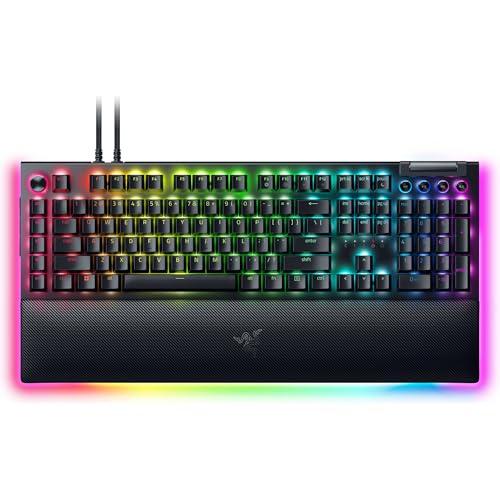
The Razer BlackWidow V4 Pro is the control-heavy alternative to Razer's speed-first Huntsman boards. Its eight dedicated macro keys give MMO players, streamers, and creators a row of easy-to-reach commands. That is a meaningful advantage over keyboards that force every shortcut through a function layer or software remap.
Green mechanical switches provide tactile feedback, so each press has a noticeable bump rather than the uninterrupted travel of the BlackWidow V4 X's Yellow switches. That feel can make deliberate commands and ordinary typing more satisfying, though it is less discreet in a shared room. The programmable command dial adds another physical control for a custom function, giving the keyboard a useful analog-style input without moving to a different switch technology.
At 18.36 inches long, 6.01 inches wide, and 3.61 pounds, this is a substantial board. The magnetic plush leatherette wrist rest adds comfort for long sessions and carries its own Chroma RGB underglow. Per-key lighting and a three-side underglow give the setup more visual presence, while thick doubleshot ABS keycaps are designed to keep the legends intact through repeated use.
This is not the keyboard we'd choose for a minimalist FPS desk. The Razer Huntsman V3 HE Magnetic TKL leaves more room for the mouse and gives you adjustable actuation, while the BlackWidow V4 Pro is better when macros and tactile feedback matter more than raw input tuning. Players who want one keyboard for gaming, creative applications, and shortcut-heavy work will appreciate the extra controls. Those who rarely use macros are carrying a lot of unused hardware.
7. Razer Ornata V3 TKL: Best Low-Profile TKL

Pros
- Slim keycaps and shorter switches
- Mecha-membrane feel balances feedback and softness
- Dedicated media keys
- Magnetic soft-touch wrist rest
- Eight-zone Chroma RGB lighting
Cons
- Not a true mechanical or analog optical board
- No number pad
- Snap Tap requires Synapse 4 and is off by default
Best for: everyday gamers who want a compact, comfortable keyboard with a low-profile feel.
The Razer Ornata V3 TKL is a good reminder that not every gaming keyboard needs to feel like a competition tool. Its low-profile keycaps and shorter switches keep the hand position relatively relaxed, while the mecha-membrane design adds a more defined response than a basic office keyboard. It is an easy board to settle into for a mixture of games, browsing, and writing.
The TKL layout removes the number pad and measures 10.89 inches long by 5.68 inches wide. That makes it substantially easier to position beside a large mouse area than a full-size board. It weighs only 0.66 pounds, so it is easy to move, though that lightness also means it does not feel as planted as the heavier BlackWidow models. Dedicated backlit media keys remain available for playback and volume adjustments.
Razer uses UV-coated keycaps to help protect the legends from wear, and the board has eight-zone Chroma RGB lighting with a broad color and effect range. Snap Tap is available through Razer Synapse 4, but it is off by default. The included magnetic soft-touch wrist rest is one of the more practical features here, especially for long sessions at a low desk.
The Ornata V3 TKL cannot match the adjustable actuation, Rapid Trigger, or 8000Hz polling of the Razer Huntsman V3 TKL 8KHz. It is also not the right choice if you specifically want the crisp feel of a conventional mechanical switch. Its appeal is comfort and familiarity. For someone deciding between a thin everyday keyboard and an aggressive esports board, this is the calmer, more accessible option. For a wider look at layouts and switch behavior, the features that matter in a gaming keyboard are useful to compare before choosing.
8. Razer Ornata V3: Best Low-Profile Full Size

Pros
- Low-profile keys support a flatter hand position
- Mecha-membrane switches provide clicky feedback
- Dedicated media controls
- Magnetic soft-touch wrist rest
- UV-coated keycaps
Cons
- Full-size footprint limits mouse room
- Heavier than the Ornata V3 TKL
- Mecha-membrane switches are less configurable than optical models
Best for: users who want a full-size layout and low-profile comfort for long sessions.
The Razer Ornata V3 is the full-size version of the low-profile idea. Its keycaps and shorter switches create a flatter, more natural hand position than a taller traditional mechanical board. The mecha-membrane switches combine a familiar membrane base with a snappy, clicky response, which makes the keyboard approachable for people who do not already have a strong preference for linear or tactile mechanical switches.
The full layout includes the number pad and dedicated media keys. The latter are especially handy when the board is also used for music, video, or general desktop work. At 17.46 inches long and 5.68 inches wide, it has a conventional desk presence, while the 1.23-inch height keeps it slimmer than many full-size gaming boards. Its 3.1-pound weight should help keep it steady during ordinary use.
UV-coated keycaps are designed to resist fading and wear, and the magnetic soft-touch wrist rest adds support without requiring a separate accessory. The feature set is practical rather than elaborate. There is no adjustable actuation range, analog input, or dedicated macro bank, so the Ornata V3 focuses on straightforward use and comfortable reach.
The Razer Ornata V3 TKL is the better fit for a small desk because it keeps the low-profile design while shrinking the footprint. The Razer BlackWidow V4 X feels more like a conventional mechanical keyboard and adds six macro keys, but it is taller and more specialized. Choose the Ornata V3 when you need the number pad, prefer a softer low-profile feel, and do not need the competitive features that define the Huntsman range.
9. Razer Huntsman Mini: Best Compact Keyboard

Pros
- Compact 60% layout saves substantial desk space
- Linear optical switches actuate at 1.0 mm
- Aluminum top frame
- Oil-resistant doubleshot PBT keycaps
- Fully programmable macros through Hypershift
Cons
- No dedicated function row, arrows, or number pad
- Snap Tap requires Razer Synapse 4
- Compact layout takes time to learn
Best for: players with small desks who prefer a light, uncluttered setup.
The Razer Huntsman Mini is the board to buy when desk space is the primary constraint. Its 60% layout measures only 11.56 inches long and 4.07 inches wide, leaving a generous area for the mouse even on a narrow surface. It weighs 1.1 pounds, so it is also the easiest model here to pack away or move between locations.
Linear optical switches are designed to register at a 1.0 mm actuation distance, which Razer describes as shorter than other linear switches. The feel is smooth and direct rather than tactile, making it well suited to repeated game inputs. Hypershift allows all keys and combinations to be remapped, but that flexibility comes with the usual compact-layout tradeoff: functions such as arrows and navigation are accessed through layers rather than dedicated keys.
The aluminum top frame adds structural support without turning the Mini into a heavy board. Oil-resistant doubleshot PBT keycaps have a textured surface and are intended to resist grime and fading over time. Per-key Chroma RGB supports individual lighting and synchronization with compatible games and hardware. Snap Tap is also available through Razer Synapse 4, and it must be toggled on there rather than being active by default.
The missing keys are the real weakness. If you regularly use a number pad, function row, or dedicated arrows, the Razer Huntsman V3 HE Magnetic TKL is a more comfortable compromise. The Mini also lacks the Huntsman V3 HE's adjustable actuation and 8000Hz polling. Still, for a player who wants a clean competitive desk and is happy with layers, this is the most space-efficient option in the roundup. A related guide can help if choosing a smaller layout for limited desk space is part of the decision.
10. Razer Huntsman V3 Pro: Best Full-Size Esports Board
Pros
- Full-size layout with analog optical switches
- Rapid Trigger and Snap Tap
- 0.1 to 4.0 mm actuation adjustment
- Onboard tuning without software
- Dedicated dial and control buttons
Cons
- Large 20-inch length
- No listed 8000Hz polling
- Full-size layout is less suited to wide mouse swings
Best for: competitive players who want adjustable analog input without giving up the number pad.
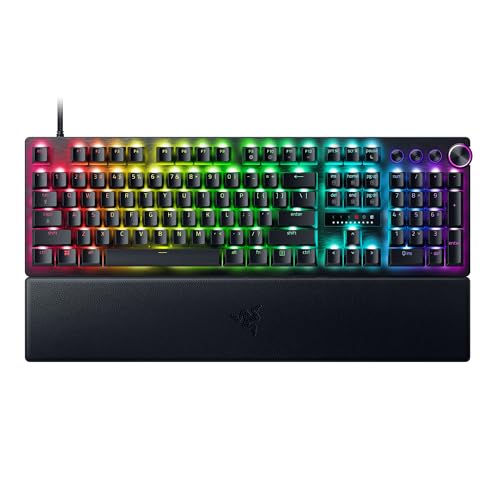
The Razer Huntsman V3 Pro brings the same competitive philosophy as the TKL version to a full-size layout. Its Gen-2 analog optical switches support actuation from 0.1 to 4.0 mm, and Rapid Trigger allows quick resets as the finger lifts. For FPS movement, that can be more useful than simply choosing a switch advertised as fast, because the player can decide how sensitive the key should be.
Snap Tap prioritizes the latest input between two selected keys, helping with rapid directional changes. The keyboard also has a digital dial and three dedicated buttons for media, volume, analog settings, and custom macros. Actuation and Rapid Trigger sensitivity can be changed with onboard controls, while the LED array provides visual guidance. This makes the board less dependent on software once it is configured.
The 20-inch length and 7-inch width are a reminder that this is a full-size board in every sense. It has room for the number pad and navigation cluster, but it leaves less space for a low-sensitivity mouse than the Razer Huntsman V3 Pro TKL. The board is 3 inches high according to the listed dimensions, and the magnetic firm leatherette wrist rest helps make its large format more manageable. Textured doubleshot PBT keycaps are suited to repeated competitive use.
The Razer Huntsman V3 Pro 8KHz adds the faster polling specification and a denser foam treatment, so it is the more advanced full-size choice. The standard Pro is still the better fit for someone who wants adjustable analog switches and the number pad without prioritizing the highest polling rate. It is too much keyboard for casual players, but it makes sense for a competitor whose desk and keybinds demand a full layout.

How to choose the best razer keyboard
The right Razer keyboard comes down to layout first, then the way its switches respond to your fingers and the controls you will actually use.
Layout and desk space
Full-size keyboards keep the number pad and a complete navigation cluster, but they can crowd the mouse area. The BlackWidow and full-size Huntsman models are the most familiar choices for mixed desktop use. TKL boards such as the Huntsman V3 HE and Ornata V3 TKL remove the number pad to create more room for mouse movement, while the Huntsman Mini removes even more keys for a 60% footprint.
Choose a compact board only if you are comfortable using function layers for arrows, navigation, and the function row. For low-sensitivity FPS play, TKL is often the easier compromise because it preserves the essential navigation keys without taking up the width of a full-size board.
Switch feel and actuation
Switch feel determines how the board behaves under ordinary typing as much as it affects gaming. Linear switches, such as the BlackWidow V4 X's Yellow switches and the Huntsman Mini's optical switches, move without a tactile bump. Green mechanical switches add tactile feedback, while Ornata mecha-membrane switches combine a membrane base with a more pronounced response.
Adjustable actuation is different from choosing a switch type. The Huntsman V3 Pro and Huntsman V3 HE models let you set actuation from 0.1 to 4.0 mm. A shallow setting favors rapid input, while a deeper setting can reduce unintended presses during writing or general desktop use.
Rapid Trigger and Snap Tap
Rapid Trigger changes when a key resets, which can help with repeated movement inputs in competitive shooters. Snap Tap prioritizes the latest input between two assigned keys, making it relevant to rapid directional changes. These features are specialized rather than universal upgrades, and some models require software or firmware settings before they are active.
Rapid Trigger matters most when your movement technique is already precise enough to use its extra sensitivity.
If you mainly play single-player games, strategy titles, or games where movement timing is less demanding, conventional mechanical switches may feel simpler and more predictable. The BlackWidow V4 X is a stronger fit for that kind of broad use.
Polling rate
The Huntsman V3 TKL 8KHz, Huntsman V3 Pro 8KHz, and Huntsman V3 HE Magnetic TKL list true 8000Hz HyperPolling. A higher polling rate is intended to reduce the time between input reports, but its practical effect depends on the rest of the gaming system and the player's ability to benefit from small timing differences.
Do not choose an 8KHz model simply because the number is larger. First decide whether you need adjustable actuation, Rapid Trigger, or a TKL layout. Those features are more central to the experience than the polling specification by itself.
Macros and controls
Dedicated controls can matter more than switch speed for some players. The BlackWidow V4 X has six macro keys, while the BlackWidow V4 Pro has eight plus a programmable command dial. The Huntsman V3 Pro models use a dial and dedicated buttons for media, volume, and keyboard settings, but they are not built around a large macro bank.
Think about the commands you use repeatedly. MMO abilities, editing shortcuts, streaming controls, and productivity actions are easier to manage on a board with physical macro keys. If you rarely use shortcuts, a cleaner TKL layout may give you more useful desk space.
Keycap and case construction
Doubleshot PBT keycaps resist shine and fading better than ordinary keycaps, and the Huntsman V3 models use textured PBT caps for competitive use. The BlackWidow boards use thick doubleshot ABS keycaps, while the Ornata models add UV coating to protect their legends.
Case size and weight affect stability. The BlackWidow V4 Pro weighs 3.61 pounds, while the Ornata V3 TKL weighs 0.66 pounds. A lighter board is easier to move, but a heavier board generally feels more planted when you make fast, repeated inputs.

Frequently asked questions
Which Razer keyboard is best for competitive FPS games?
The Razer Huntsman V3 HE Magnetic TKL is the strongest all-around option for competitive FPS play. Its Hall Effect switches support 0.1 to 4.0 mm adjustable actuation, and it combines Rapid Trigger, Snap Tap, 8000Hz HyperPolling, and onboard profiles in a TKL layout.
Is a TKL keyboard better than a full-size keyboard for gaming?
A TKL keyboard usually gives the mouse more room because it removes the number pad. That can be useful for low-sensitivity FPS players, but a full-size board remains the better fit if you use number-pad commands or want one keyboard for work and gaming.
What is the difference between Razer's optical and mechanical switches?
Razer's mechanical switches use a traditional mechanical design with linear or tactile feedback, while its optical switches register input through light-based actuation. The analog optical models also support adjustable actuation and Rapid Trigger, features that are not listed for the standard mechanical BlackWidow models here.
Do Razer keyboards support macros?
Several models do. The BlackWidow V4 X has six dedicated macro keys, the BlackWidow V4 Pro has eight, and the Huntsman Mini supports fully programmable macros through Hypershift. The Huntsman V3 Pro models provide custom macros through their dedicated controls, along with media and keyboard-setting functions.
Is the Razer Huntsman Mini too small for everyday use?
That depends on how often you use dedicated navigation keys, the function row, or a number pad. Its 60% layout saves a great deal of space, but those functions are accessed through layers. If you want a smaller board with a more familiar arrangement, a TKL model is easier to adapt to.
Are low-profile Razer keyboards good for typing?
The Ornata V3 and Ornata V3 TKL use low-profile keys and mecha-membrane switches, which create a flatter hand position and a familiar, clicky response. They are well suited to mixed typing and gaming, but they do not offer the adjustable actuation or Rapid Trigger controls found on the Huntsman V3 models.
The bottom line
The Razer Huntsman V3 HE Magnetic TKL is the Best Razer Keyboard for competitive players who want adjustable actuation, Rapid Trigger, Snap Tap, and 8000Hz polling without giving up the useful shape of a TKL board. It is the most complete option here, although its advanced controls are unnecessary for casual gaming.
For a more traditional experience, the Razer BlackWidow V4 X is the one we'd recommend to most mixed-use buyers. Its Yellow linear switches, six macro keys, media controls, and full-size layout are easier to understand and use every day. Choose the Razer Ornata V3 TKL instead if a low-profile feel and lighter, simpler design matter more than mechanical switch behavior.
If you are undecided, choose TKL for competitive mouse space, full size for the number pad, and the Huntsman V3 HE only if you will actually use its adjustable magnetic input.
As an Amazon Associate we earn from qualifying purchases.