

A PS4 that takes ages to boot, struggles with large games, or refuses to recognize its aging drive needs more than a random 2.5-inch disk. The replacement must fit the console bay, match the system's storage requirements, and leave you able to reinstall PlayStation firmware.
This guide covers the Best replacement hdd for ps4 choices across conventional hard drives, a faster SSD, and replacement bay covers for consoles with missing or damaged doors. Our top pick is the Western Digital 1TB PS4 HDD, while the range also includes a slim 7mm drive, a renewed option, and model-specific covers.
Comparison table
| # | Product | Award | Capacity or fit | Interface or material | Best for |
|---|---|---|---|---|---|
| 1 | Western Digital 1TB PS4 HDD | Best overall | 1TB, 9.5mm | SATA 6.0Gb/s, 5400RPM | Most PS4 upgrades |
| 2 | Toshiba 1TB PS4 HDD | Best straightforward replacement | 1TB, 9.5mm | SATA 3.0Gb/s, 5400RPM | PS3 or PS4 repairs |
| 3 | MaxDigitalData 7mm HDD | Best slim HDD | 1TB, 7mm | SATA 6.0Gb/s, 5400RPM | Slim drive clearance |
| 4 | MDD Renewed 1TB HDD | Best renewed option | 1TB, 9.5mm | SATA 3.0Gb/s, 5400RPM | Basic replacement |
| 5 | Addlink S20 SSD | Best for shorter load times | 1TB, 7mm | SATA III, up to 500MB/s read | Faster PS4 storage |
| 6 | Deal4GO PS4 Pro Cover | Best PS4 Pro cover | PS4 Pro CUH-7xxx | Plastic | Missing Pro bay cover |
| 7 | Tihebeyan PS4 Pro Cover | Best grippy cover | PS4 Pro | Silicone | Easy removable access |
| 8 | MOUDOAUER PS4 Slim Cover | Best Slim replacement | PS4 Slim | Plastic | Broken Slim door |
| 9 | Limentea Slim Cover | Best Slim and Pro fit check | PS4 Slim or Pro | Plastic | Matching a specific bay |
| 10 | Limentea CUH-1100 Cover | Best original PS4 cover | CUH-1100/1200 | Plastic | Original PS4 faceplate repair |
1. Western Digital 1TB PS4 HDD: Best Overall

Pros
- 1TB capacity for a large game library
- SATA 6.0Gb/s interface
- Compatible with original, Slim, and Pro consoles
- Installation and firmware instructions included
- Three-year reseller warranty
Cons
- Conventional hard drive, not an SSD
- 9.5mm height is less slim than some alternatives
- Runs at 5400RPM
Best for: most PS4 owners replacing a failed or undersized internal drive.
The Western Digital 1TB PS4 HDD is the least complicated recommendation here. It is a conventional 2.5-inch hard drive with the familiar 9.5mm height, so it matches the physical format expected by many PS4 replacements without asking the buyer to decipher an unusual form factor. Its 1TB capacity is also a sensible step up for a console that has started running short on room.
The drive spins at 5400RPM and uses a 16MB buffer. Those figures will not turn the PS4 into a modern solid-state system, but they describe a conventional console replacement that should behave much like the original type of storage. The SATA 6.0Gb/s interface gives it a current connection standard, although a mechanical drive will not approach that interface's theoretical ceiling in normal PS4 use.
Compatibility is the strongest practical point. The listing specifically identifies the original PS4, PS4 Slim, and PS4 Pro, and it includes installation and PlayStation firmware download instructions. The stated usable space on a PS4 is about 835GB after system allocation, which is a useful reminder that a drive labeled 1TB will not present the full capacity for games.
Compared with the Toshiba 1TB PS4 HDD, the Western Digital offers a larger 16MB buffer and SATA 6.0Gb/s rather than 8MB and SATA 3.0Gb/s. The MaxDigitalData 7mm HDD is physically slimmer, while the Addlink S20 SSD is the better pick if shorter load times matter more than retaining a mechanical drive. The weakness is simple: 5400RPM storage remains slower and noisier than the SSD, and the 9.5mm body is not the thinnest option.
Choose this one when you want a conventional internal replacement with broad PS4 compatibility and useful installation guidance. It is the drive we'd keep for a normal storage repair, provided you are comfortable reinstalling the system software.
2. Toshiba 1TB PS4 HDD: Best Straightforward Replacement

Pros
- 1TB capacity
- Compatible with PS3 and PS4 systems
- Standard 9.5mm 2.5-inch format
- Installation and firmware instructions included
- Three-year reseller warranty
Cons
- 8MB buffer is smaller than the Western Digital drive
- SATA 3.0Gb/s interface
- Mechanical 5400RPM performance
Best for: a conventional PS3 or PS4 drive swap with familiar dimensions.
The Toshiba 1TB PS4 HDD makes sense for owners who want a plain replacement rather than a performance experiment. It uses the standard 2.5-inch shape and 9.5mm height, with 1TB of capacity and a 5400RPM spindle. That combination is aimed squarely at console repair, and the listing explicitly includes PS3 and PS4 compatibility.
Its 8MB buffer and SATA 3.0Gb/s interface are more modest than the Western Digital model's 16MB buffer and SATA 6.0Gb/s connection. Those differences look meaningful on paper, but neither drive is an SSD, so the basic experience remains that of a mechanical disk. The Toshiba is best viewed as a direct replacement for a console that needs a working internal drive, not as a way to radically reduce loading.
The supplied installation and PlayStation firmware download instructions are useful because the physical swap is only part of the job. A PS4 replacement drive normally needs the system software restored before the console can return to normal use. The 9.5mm body should suit the usual bay dimensions, but buyers should still confirm their console model before opening it.
The Western Digital 1TB PS4 HDD is the stronger conventional choice because of its bigger buffer and newer interface. The MaxDigitalData 7mm HDD is preferable where a slimmer body is important, and the Addlink S20 SSD is much better for buyers chasing faster boot and game loading. The Toshiba's real weakness is that it has no special advantage beyond being a familiar, compatible hard drive.
Pick it when PS3 compatibility matters or when you want a straightforward 1TB mechanical replacement. Skip it if your main reason for upgrading is speed rather than restoring storage.
3. MaxDigitalData 7mm HDD: Best Slim HDD

Pros
- Slim 7mm height
- 1TB capacity
- 64MB cache
- SATA 6.0Gb/s interface
- Compatible with original, Slim, and Pro PS4 consoles
Cons
- Two-year reseller warranty
- Still a 5400RPM mechanical drive
- Less established naming than the mainstream alternatives
Best for: PS4 owners who want a slim 1TB hard drive with a larger cache.
The standout feature of the MaxDigitalData 7mm HDD is its height. At 7mm, it is slimmer than the 9.5mm Western Digital and Toshiba drives, which gives it a useful physical advantage for anyone checking clearance inside a PS4 bay. It remains a 2.5-inch 1TB mechanical hard drive, so the slimmer body does not change the fundamental storage category.
This model pairs a 5400RPM rotation speed with a 64MB cache and SATA 6.0Gb/s. The cache is considerably larger than the 8MB Toshiba and 16MB Western Digital figures in this group. That does not make it an SSD, and the PS4's own storage path limits how much the interface matters, but the specification gives this drive a stronger position among the conventional HDD choices.
The listing calls out compatibility with the original PS4, PS4 Slim, and PS4 Pro, as well as PS3 systems. It also says that the 1TB capacity can hold up to 80 games at 25GB each. That is an estimate rather than a promise for modern installs, since game sizes vary widely, but it communicates the intended role: adding room for a sizeable library.
The Western Digital 1TB PS4 HDD has the longer stated reseller warranty and more familiar mainstream branding. The MaxDigitalData 7mm HDD beats it on thickness and cache, while the Addlink S20 SSD beats both on quiet operation and claimed transfer speed. The main compromise is the two-year warranty, plus the fact that a mechanical drive will not provide the same loading improvements as solid-state storage.
This is the conventional drive to choose when the 7mm body matters. Confirm the exact console bay and mounting arrangement first, then choose it over the Toshiba when its slimmer profile and larger cache are more useful than the Toshiba's longer warranty.
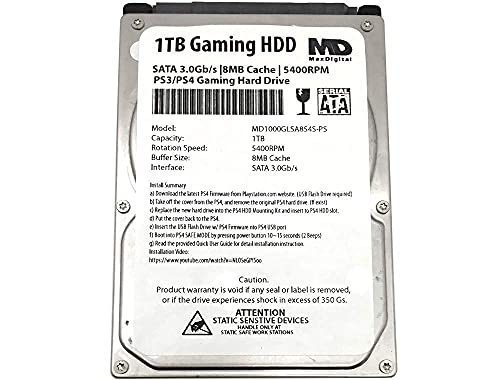
4. MDD Renewed 1TB HDD: Best Renewed Option
Pros
- 1TB capacity
- Compatible with original, Slim, and Pro PS4 systems
- Standard 2.5-inch format
- 5400RPM console-oriented design
- Two-year warranty stated in the title
Cons
- Renewed product
- 8MB cache
- SATA 3.0Gb/s interface
- No installation instructions listed in the features
Best for: restoring a PS4 with a basic 1TB replacement drive.
The MDD Renewed 1TB HDD is the practical fallback for a console that simply needs storage again. Its 1TB capacity, 5400RPM speed, and 9.5mm height put it in the same general shape as the Toshiba and Western Digital options. The listing identifies it for the original PS4, PS4 Slim, and PS4 Pro, so it is aimed at a broad range of console repairs.
This drive uses an 8MB cache and SATA 3.0Gb/s interface. Those are the same headline figures as the Toshiba, and they place both below the Western Digital and MaxDigitalData drives on paper. The difference is not a reason to expect dramatic changes in PS4 loading, since all three are mechanical drives. The more important question is whether the renewed condition suits your willingness to handle a replacement part that is not presented as new.
The product title states a two-year warranty, but the feature list does not include the installation and firmware guidance found with the Western Digital and Toshiba drives. Buyers should therefore plan to source the correct PlayStation system software instructions separately and back up anything possible before the swap.
The Toshiba 1TB PS4 HDD is the cleaner choice when you want a new drive with a three-year reseller warranty. The MaxDigitalData 7mm HDD offers a slimmer body and larger cache, while the Addlink S20 SSD avoids moving parts altogether. The MDD's weakness is its renewed status combined with relatively basic specifications, so it is not the pick for a speed-focused upgrade.
Choose it for a straightforward capacity replacement when the renewed designation is acceptable. Skip it if you want the clearest setup guidance or the greatest chance of a noticeable improvement in system responsiveness.
5. Addlink S20 SSD: Best for Shorter Load Times

Pros
- Solid-state storage with no moving parts
- 1TB capacity
- 7mm 2.5-inch form factor
- Up to 500MB/s sequential read speed
- SLC caching and 3D NAND
Cons
- Not a conventional hard drive
- No dedicated DRAM
- The listing's speed figures are maximum sequential values
Best for: PS4 owners who want faster storage access and quieter operation.
The Addlink S20 SSD is the one product here that changes the character of the upgrade. Instead of replacing one spinning disk with another, it uses solid-state storage with no moving parts. That means silent operation and better resistance to shock and vibration, but the more important reason to choose it is the potential for shorter boot and game loading times.
Addlink claims sequential read and write speeds of up to 500MB/s and 450MB/s through its SATA III 6Gb/s interface. Those are maximum sequential figures, not a guarantee that every PS4 task will run at those rates. Still, the SSD design removes the mechanical seek behavior that slows conventional hard drives, and the listing specifically positions it as a PS4, PS4 Slim, and PS4 Pro replacement.
The drive uses 3D NAND with SLC caching and comes in a 7mm 2.5-inch form factor. The slim body makes it easy to place in the same general space as the MaxDigitalData drive. SLC caching is intended to keep write activity responsive during larger transfers, while the absence of dedicated DRAM is a limitation buyers should understand. It is a console upgrade, not a high-end workstation SSD.
For a broader storage setup, it helps to understand how external SSD capacity changes a game library, since the internal drive is only one part of a PS4 storage plan. The Western Digital 1TB PS4 HDD is the better conventional replacement, and the MaxDigitalData 7mm HDD is the better choice for someone who specifically wants a mechanical disk. The Addlink's weakness is that it is still limited by the PS4's hardware and SATA path, so its improvement will not make every loading screen disappear.
Buy this when reduced loading, silence, and durability matter more than staying with a traditional HDD. It is the strongest upgrade in this roundup, though buyers seeking only a basic failure replacement may not need its solid-state design.
6. Deal4GO PS4 Pro Cover: Best PS4 Pro Cover

Pros
- Fits PS4 Pro CUH-7xxx models
- Tool-free clip-on installation
- Helps keep dust away from the bay
- Single replacement cover
- Designed to resemble the original cover
Cons
- Cover only, not an internal drive
- Compatibility is limited to PS4 Pro models
- Plastic replacement may not match every console perfectly
Best for: PS4 Pro owners missing the small hard-drive bay door.
The Deal4GO PS4 Pro Cover is not a storage upgrade, but it solves a common problem after a drive replacement: the small bay cover has gone missing or broken. It is designed for PS4 Pro CUH-7000, CUH-7100, and CUH-7200 families, with several regional model numbers listed as compatible.
The cover uses a clip-on design modeled after the original and requires no tools to install. That is exactly the right approach for this part. A bay door should be quick to fit and remove, particularly for owners who expect to access the internal drive again. The listed purpose is also practical, since closing the opening helps keep dust away from the console's drive area.
The package contains one black hard-drive cover shell. There is no drive, mounting hardware, or firmware component here, so it should not be confused with the Western Digital 1TB PS4 HDD or any other storage product in this guide. The product dimensions are listed, but the more important compatibility check is the CUH model printed on the console.
The Tihebeyan PS4 Pro Cover is another Pro-focused option, but it is described as silicone and emphasizes grip rather than a clip-on plastic shell. The MOUDOAUER PS4 Slim Cover is for Slim consoles, so it is not an alternative for a CUH-7xxx Pro. The weakness of the Deal4GO cover is the narrow fit range, and buyers with an original PS4 or Slim should skip it.
Choose it when your PS4 Pro's bay door is missing and the console model matches the listed CUH-7xxx series. It is a small repair part, not a replacement HDD.
7. Tihebeyan PS4 Pro Cover: Best Grippy Cover

Pros
- Designed for the PS4 Pro slot
- Silicone construction
- Anti-slip surface
- Easy to install and remove
- Lightweight
Cons
- No precise CUH model compatibility listed
- Cover only
- Silicone may feel different from the original plastic door
Best for: PS4 Pro owners who prefer a soft, removable slot cover.
The Tihebeyan PS4 Pro Cover takes a different approach to the missing bay-door problem. Its features describe silicone material, an anti-slip surface, and easy removal. That makes it less like a rigid replacement shell and more like a lightweight cover intended to stay secure while remaining easy to take off.
The listing says the design is accurately shaped for the PS4 slot and highlights resistance to wear and falling. Those claims point to a part meant for repeated handling, though the data does not provide exact dimensions or a detailed CUH compatibility list. Buyers should compare the product images and their console before ordering, especially because PS4 Pro revisions can have small physical differences.
This is a cover, not a drive. It will not add capacity or improve loading, and it has no connection to the internal storage itself. If the console needs a new disk, the Addlink S20 SSD is the relevant upgrade here. If the problem is simply an exposed or incomplete bay, this product is the one to evaluate.
The Deal4GO PS4 Pro Cover gives a more conventional clip-on plastic design and lists specific CUH-7xxx models. The Limentea Slim Cover mentions both Slim and Pro in its title, but its compatibility language is less precise. The Tihebeyan's weakness is that missing model details make fit harder to verify, so it is not the safest choice for buyers who need an exact revision match.
Pick it when a soft, grippy, easy-to-remove cover suits your PS4 Pro and the shape matches your console. Skip it when you need a documented CUH-specific fit.
8. MOUDOAUER PS4 Slim Cover: Best Slim Replacement

Pros
- Made for the PS4 Slim
- Durable plastic construction
- Replaces a broken or missing part
- Designed for a close fit
- Single cover included
Cons
- Not intended for the original PS4 or PS4 Pro
- Cover only
- Exact CUH compatibility is not specified
Best for: PS4 Slim owners repairing a damaged hard-drive bay door.
The MOUDOAUER PS4 Slim Cover is aimed at a very specific repair. It replaces the hard-drive bay door on a PS4 Slim, restoring the console's external finish after the original part has cracked, disappeared, or become badly worn. The product is made from plastic and is described as a spare part rather than a storage component.
The listed size is 115 by 95 by 18 millimeters. That gives buyers a useful physical reference, but it does not replace checking the console model. The features say the part is specially designed for a close fit with the intended device, yet they do not name individual CUH revisions.
Installation should be straightforward because this is a cover rather than an electrical component. You do not need to reinstall firmware or move game data to fit it. If the underlying issue is a failed internal disk, the Toshiba 1TB PS4 HDD or Western Digital 1TB PS4 HDD addresses that problem instead.
The Deal4GO PS4 Pro Cover is the clearer choice for a Pro because it lists CUH-7000, CUH-7100, and CUH-7200 models. The Limentea Slim Cover also targets Slim systems, while the Limentea CUH-1100 Cover is for the older original PS4. The MOUDOAUER cover's weakness is the lack of exact revision numbers, so buyers should compare the bay shape carefully.
Choose it for a PS4 Slim with a damaged or absent bay door. It is not a replacement HDD and should not be ordered as one.
9. Limentea Slim Cover: Best Slim and Pro Fit Check

Pros
- Intended for PS4 Slim or PS4 Pro use
- Plastic bay-door design
- Single cover included
- Lightweight and easy to store
- New replacement part
Cons
- Compatibility details are less specific
- Cover only
- Color is listed as Slim Black
Best for: buyers who have confirmed the pictured bay shape and need a basic replacement door.
The Limentea Slim Cover is a replacement hard-drive bay door for PS4 Slim and PS4 Pro consoles. Its role is purely cosmetic and protective, closing the opening around the internal drive after the original flap has been lost or damaged. The package includes one HDD bay door, with the product identified as Slim Black.
The features emphasize durability and easy storage rather than a detailed material specification beyond the plastic construction implied by the title. There are no electrical parts, so installation should be a simple physical replacement. The important work happens before ordering: the listing specifically asks buyers to check the picture, type, applicable model, and color.
That compatibility warning matters here. The Deal4GO PS4 Pro Cover names multiple CUH-7xxx Pro models, and the MOUDOAUER PS4 Slim Cover clearly identifies the Slim family. Limentea's broader Slim and Pro wording offers flexibility, but it gives less model-level certainty.
The weakness is the ambiguity. A bay cover can look close enough to order and still fail to seat correctly if the console revision differs. This product should be skipped by anyone who cannot identify the console family or compare the bay opening with the listing images.
Choose it when your PS4 is a Slim or Pro and the shape shown matches the damaged part. For an original CUH-1100 or CUH-1200 console, the dedicated Limentea CUH-1100 Cover is the more appropriate option.
10. Limentea CUH-1100 Cover: Best Original PS4 Cover

Pros
- Made for original PS4 CUH-1100 and CUH-1200 consoles
- Covers the hard-drive bay
- Plastic faceplate design
- Useful for scratched or damaged covers
- Single replacement cover included
Cons
- Not for PS4 Slim or PS4 Pro
- Cover only
- Exact fit should be checked before ordering
Best for: original PS4 owners restoring a scratched or missing HDD bay cover.
The Limentea CUH-1100 Cover is the most targeted accessory in this list. It is designed for the original PS4 faceplate family identified as CUH-1100 and CUH-1200, covering the hard-drive bay and helping restore the console's appearance after scratches or damage.
The product is a plastic shell cover, and the package includes one HDD bay cover. Limentea also presents it as a way to change the bay-cover color for a custom look. That is a cosmetic option rather than a storage feature, but it can be useful when the original panel is worn while the console itself remains functional.
There is no installation procedure or exact dimension listed in the features. As with every cover in this group, the model number matters more than the general phrase PS4. The Western Digital 1TB PS4 HDD is the relevant product if the console also needs a new internal drive, but this Limentea part will not affect capacity or load times.
The MOUDOAUER PS4 Slim Cover is the better match for Slim owners, and the Deal4GO PS4 Pro Cover is more appropriate for the CUH-7xxx Pro range. Limentea's weakness is the limited documentation around fit, so buyers should confirm their console says CUH-1100 or CUH-1200 before ordering.
Choose it when an original PS4 needs its bay cover restored. If your console is a Slim or Pro, use the model-specific options above instead.

How to choose best replacement hdd for ps4
Start by separating a real internal storage replacement from a cosmetic bay cover, then match the drive's physical format and performance to the PS4 model.
Storage type
A conventional HDD uses spinning platters and is suitable when the main goal is restoring internal capacity. The Western Digital, Toshiba, MaxDigitalData, and MDD models all use 5400RPM mechanical storage. An SSD such as the Addlink S20 has no moving parts and can reduce access and loading times, but the console still limits the maximum benefit.
Capacity
Every drive in this roundup has 1TB of stated capacity. A PS4 reserves part of the installed drive for system use, so the available game space is lower than the number on the label. Think about the size of the games you actually keep installed, not just the number of titles in your library.
Drive height
Height is a physical compatibility issue. The Western Digital and Toshiba drives are 9.5mm high, while the MaxDigitalData and Addlink S20 are 7mm. Check the console bay and mounting arrangement before choosing a thinner or thicker drive, especially if you are replacing a nonstandard part.
A faster interface cannot turn a spinning 5400RPM disk into an SSD, so choose storage type before comparing interface numbers.
Interface and cache
The drives list SATA 3.0Gb/s or SATA 6.0Gb/s interfaces, with cache sizes from 8MB to 64MB. These figures help describe the hardware, but the PS4 will not make a mechanical drive perform like a desktop NVMe system. Cache and interface differences are secondary to compatibility, condition, and whether you choose HDD or SSD.
Console model
Original PS4, Slim, and Pro consoles use different external bay covers, even though several internal drives are listed as compatible with all three. Covers require especially careful matching. For more storage planning, how external SSDs handle larger game libraries can help you decide whether internal or external expansion better suits your setup.

Frequently asked questions
Can any 2.5-inch drive replace a PS4 hard drive?
No. The drive must use a compatible SATA connection and fit the console's bay height and mounting arrangement. It also needs to be installed with the correct PlayStation system software before the console can use it normally.
Is an SSD better than an HDD in a PS4?
An SSD can reduce loading and boot times compared with a conventional mechanical HDD, and it operates silently because it has no moving parts. The improvement varies by game and task, since the PS4's own hardware limits the maximum benefit.
Do these drives work with PS4 Slim and PS4 Pro?
The Western Digital, Toshiba, MaxDigitalData, MDD, and Addlink listings identify compatibility with PS4 systems, including Slim and Pro models where stated. Always confirm the physical fit and follow the installation instructions for your console model.
Will a 1TB drive provide 1TB of game space?
No. The PS4 uses part of the drive for system data, so the available space shown by the console will be lower than the labeled capacity. The Western Digital listing specifically states that about 835GB is available on PS4.
Are the replacement covers hard drives?
No. Deal4GO, Tihebeyan, MOUDOAUER, and both Limentea products are bay covers or flaps. They close or replace the external door around the internal drive, but they do not add storage or improve loading.
How do I choose the right PS4 bay cover?
Identify whether the console is an original PS4, PS4 Slim, or PS4 Pro, then compare the CUH model and the cover shape. The Deal4GO listing names several CUH-7xxx Pro models, while the Limentea CUH-1100 Cover is intended for CUH-1100 and CUH-1200 systems.

The bottom line
The Western Digital 1TB PS4 HDD is the safest conventional recommendation for most console repairs because it combines broad PS4 compatibility, a 16MB buffer, SATA 6.0Gb/s, installation guidance, and a stated three-year reseller warranty. The Addlink S20 SSD is the stronger performance upgrade for anyone who wants quieter operation and shorter loading times.
For the Best replacement hdd for ps4, choose the Western Digital when restoring dependable 1TB mechanical storage, or choose the Addlink when speed matters more than staying with a traditional hard drive. If the problem is only a missing bay door, match the cover to the exact PS4 model instead of ordering a drive.
When undecided, buy the Western Digital for a conventional replacement and the Addlink S20 for the most noticeable upgrade.
As an Amazon Associate we earn from qualifying purchases.