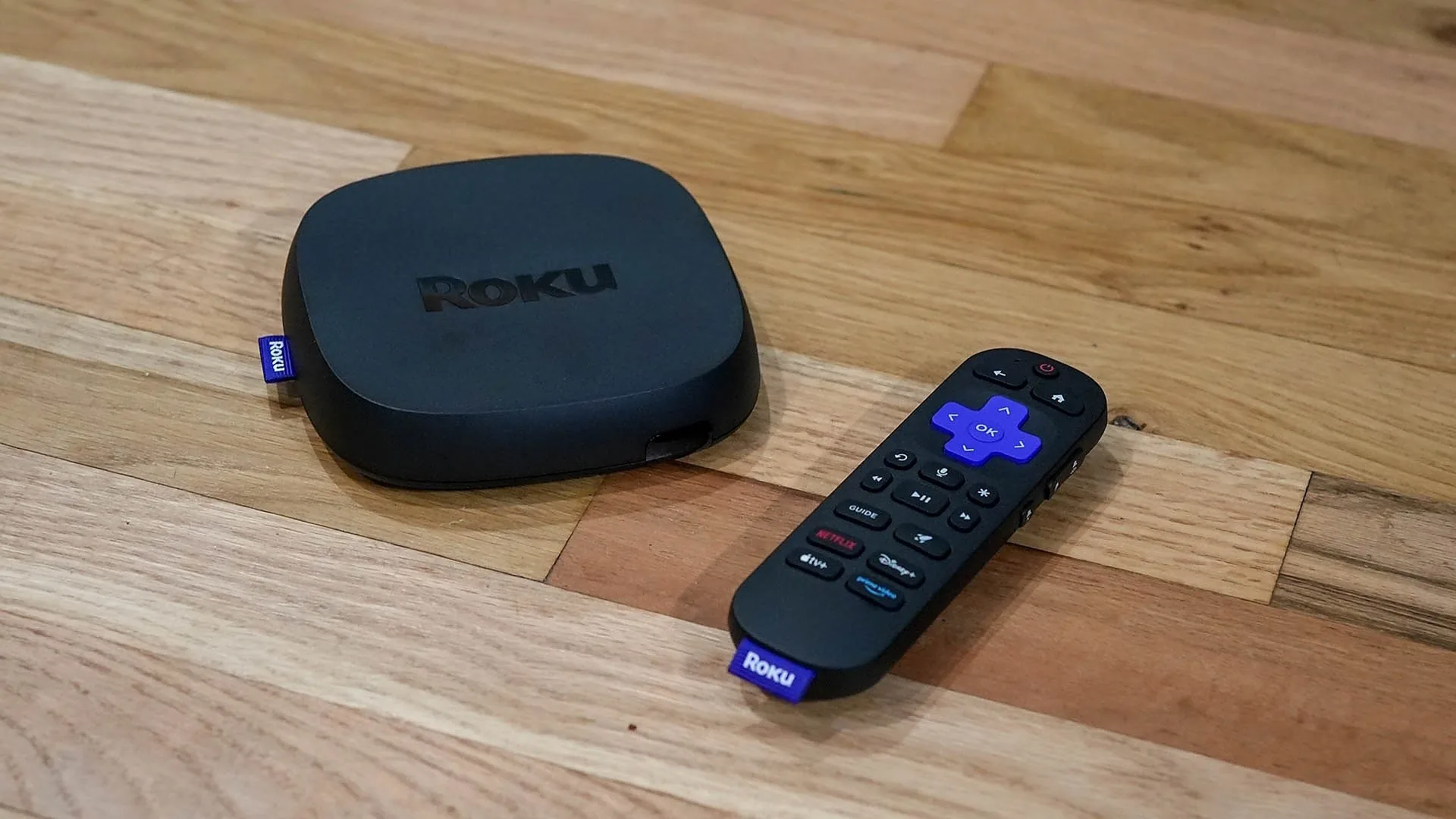

A slow interface, weak wireless signal, or a remote that disappears into the sofa can make a streaming upgrade feel harder than it should. The Best Roku device for streaming depends on the TV you have, the picture formats you need, and whether you want a hidden stick or a full player with wired networking.
We ranked these 10 Roku players by their capabilities and the kind of living room each one suits. The range runs from a compact HD stick to 4K players with Dolby Vision, Ethernet, private listening, and Roku's most capable remote.
For most people, the Roku Ultra is the best place to start. The other picks cover smaller TVs, older sets, difficult Wi-Fi locations, renewed hardware, and listeners who need a quieter way to watch.
| # | Product | Award | Resolution | HDR and audio | Connectivity | Best for |
|---|---|---|---|---|---|---|
| 1 | Roku Ultra | Best overall | 4K | HDR10+, Dolby Vision, Dolby Atmos | Wi-Fi 6, Ethernet, Bluetooth | Feature-focused home theaters |
| 2 | Roku Streaming Stick 4K | Best streaming stick | 4K | HDR10+, Dolby Vision | Long-range Wi-Fi | Hidden installations and distant routers |
| 3 | Roku Streaming Stick Plus | Best simple 4K stick | 4K | HDR10+ | Wi-Fi | Straightforward 4K TV upgrades |
| 4 | Roku Streaming Stick HD | Best for HD TVs | HD | HD streaming | TV-powered HDMI stick | Older or secondary TVs |
| 5 | Roku Ultra 2024 Renewed | Best renewed premium player | 4K | HDR10+, Dolby Vision, Dolby Atmos | Wi-Fi 6, Bluetooth | Buyers who want Ultra features |
| 6 | Roku Express 4K+ Renewed | Best for AirPlay | HD and 4K | HDR | Dual-band Wi-Fi | Apple households and flexible TVs |
| 7 | Roku Streaming Stick 4K Renewed | Best renewed stick | 4K | HDR10+, Dolby Vision | Long-range Wi-Fi | Remote rooms and travel |
| 8 | Roku Ultra LT | Best for private listening | 4K | HDR10+, Dolby Vision | Dual-band Wi-Fi, Ethernet | Quiet late-night viewing |
| 9 | Roku Premiere | Best compact basic player | HD and 4K | HDR | Wi-Fi | Simple streaming setups |
| 10 | Roku Ultra LT 2023 Renewed | Best renewed wired option | HD and 4K | HDR, Dolby Vision | Ethernet | Existing wired networks |
1. Roku Ultra: Best Overall

Pros
- 4K, HDR10+, Dolby Vision, and Dolby Atmos support
- Wi-Fi 6 and Ethernet give you two strong network options
- Rechargeable Voice Remote Pro has backlit buttons
- Bluetooth headphone mode supports quieter viewing
- Lost remote finder and hands-free voice control
Cons
- A separate box takes more space than a streaming stick
- Its advanced picture formats require a compatible TV and content
Best for: someone building a capable 4K living room setup with flexible network and remote options.
The Roku Ultra is the player we'd choose when the television is the center of the room. It feels less constrained than a stick because it combines a full-size player design with Wi-Fi 6, Ethernet, Bluetooth headphone mode, and a remote that is much more useful than the basic clicker included with several other Roku devices. Apps are designed to launch quickly, and the interface is claimed to be 30% faster than other Roku players.
Picture support is broad. It handles 4K, HDR10+, and Dolby Vision, so it can make use of a modern TV's higher-resolution panel and expanded HDR capabilities when the streaming service and television support them. Dolby Atmos support adds an object-based audio option for compatible sound systems. If the TV is part of a larger home theater, the Ultra makes more sense than the HD-only Roku Streaming Stick HD or the basic Roku Premiere.
The network choices are unusually practical. Wi-Fi 6 is useful when several devices share the home network, while Ethernet gives you a direct wired path when wireless performance is unreliable. Bluetooth headphone mode is also built into the player, which helps when you want to watch without filling the room with sound. Our guide to choosing the right network setup for a television is useful if the player will sit far from the router.
The Voice Remote Pro is the other major reason to choose it. Its buttons are backlit, it recharges instead of relying on replaceable batteries, it supports hands-free voice control with “Hey Roku, ” and it includes a lost remote finder. Those are small conveniences until you are searching for the remote in a dark room. The weakness is equally clear: this is not the discreet, behind-the-TV solution offered by the stick models, and many HD TV owners will not use its 4K and advanced audio features.
Choose the Roku Ultra if you want the fullest Roku experience and expect to use Ethernet, Bluetooth headphones, or a compatible 4K home theater. It is the strongest all-rounder here, though the Roku Streaming Stick 4K is easier to hide and better suited to a TV with limited shelf space.
2. Roku Streaming Stick 4K: Best Streaming Stick

Pros
- 4K picture with HDR10+ and Dolby Vision
- Long-range Wi-Fi helps in rooms distant from the router
- Compact design stays behind the television
- Voice remote controls power, volume, and searches
- Suitable for travel between compatible TVs
Cons
- Does not include the Ultra's Ethernet connection
- Remote features are less advanced than the Voice Remote Pro
Best for: anyone who wants 4K picture quality in a discreet stick that can handle a difficult wireless location.
The Roku Streaming Stick 4K is the most convincing alternative to the Ultra for a typical wall-mounted television. It plugs directly into the TV, hides behind it, and does not block neighboring HDMI ports according to the product details. That makes it a tidy fit for a bedroom, guest room, or wall-mounted display where a separate box would need a shelf.
It supports 4K, HDR10+, and Dolby Vision. The practical difference is visible on a compatible TV: 4K preserves finer detail, while HDR formats allow supported content to use a broader range of brightness and color. The TV and the content still need to support those standards, but this stick does not force a 4K owner to settle for a narrower format.
The long-range Wi-Fi receiver is the key feature. Roku says it is designed for rooms farther from the router, which makes this model a better fit than the Roku Streaming Stick Plus when the TV is at the end of a hallway or on another floor. It also starts channels quickly and includes voice search and control. For a wider look at compact Roku hardware, compare the trade-offs in a living room setup built around hidden streaming sticks.
The remote can power the TV, adjust volume, and control the Roku, which removes the usual two-remote shuffle. The stick can also travel with you, so you can use it on another TV without logging into someone else's device. That convenience has limits: it depends on available Wi-Fi and HDMI access, and it does not offer the Ultra's Ethernet, Bluetooth headphone mode, or rechargeable backlit remote.
For a 4K television that needs to stay uncluttered, this is the stick to buy. The Roku Ultra is faster and more versatile around a home theater, but the Streaming Stick 4K is the better physical design for most wall-mounted sets.
3. Roku Streaming Stick Plus: Best Simple 4K Stick

Pros
- 4K streaming with HDR10+
- Small design can use power from the TV
- Voice remote handles TV power and volume
- Personalized home screen and free live TV access
- Easy to move between compatible televisions
Cons
- No Dolby Vision support is listed
- No Ethernet or Bluetooth headphone mode is listed
- Less suited to a difficult wireless location than the Streaming Stick 4K
Best for: a 4K TV owner who wants a compact Roku with a straightforward remote and setup.
The Roku Streaming Stick Plus is a clean answer to a common upgrade problem: the TV works, but its built-in apps feel slow or awkward. The stick hides behind the screen, leaves neighboring HDMI ports clear, and can draw power from the TV alone. That reduces cable clutter and makes it a natural replacement for an aging smart-TV interface.
Its core picture capability is 4K with HDR10+. On a compatible 4K television, that means sharper detail than an HD player and more vivid supported HDR content. It is a meaningful step above the Roku Streaming Stick HD for a main-room TV. The Roku Streaming Stick 4K goes further by listing Dolby Vision and a long-range Wi-Fi receiver, so it is the stronger choice for a Dolby Vision television or a distant router.
The remote keeps the experience uncomplicated. It can turn on the TV, adjust volume, and accept voice searches, while the Roku home screen brings frequently used entertainment and personalized suggestions into one place. Roku also includes access to free live TV and a broad collection of free programming. If you are pairing a streaming device with a new screen, the questions that matter when choosing a television for regular viewing are worth answering first.
The limitations come from what is not listed. There is no Dolby Vision support, Ethernet connection, or Bluetooth headphone mode in the provided details. That makes the Plus less compelling for a home theater or a room with unreliable Wi-Fi. It also lacks the Ultra's premium remote, though its simpler voice remote is enough for everyday navigation.
Pick the Streaming Stick Plus when you want a neat 4K upgrade and your TV supports HDR10+ but does not require Dolby Vision. It is easier to recommend than a dated basic player, while the Streaming Stick 4K earns the step up for more demanding picture and wireless needs.
4. Roku Streaming Stick HD: Best for HD TVs

Pros
- Small 3.7-inch-long stick design
- HD streaming for older or secondary TVs
- Can power from the television
- Voice remote controls the TV and Roku
- Simple home screen and quick setup
Cons
- Limited to HD streaming
- No advanced HDR or 4K support is listed
- Does not include the Ultra's network and headphone features
Best for: an HD television in a bedroom, kitchen, guest room, or travel bag.
The Roku Streaming Stick HD gets the important small-TV decision right: it does not ask an older screen to pretend it is a home theater. The stick is about 3.7 inches long, 0.8 inches wide, and 0.5 inches high, so it disappears behind most televisions. It can plug into the rear HDMI port and use the TV for power, which keeps a secondary setup pleasantly uncluttered.
This model is limited to HD, but that is not automatically a problem. On an HD bedroom or guest-room television, a 4K output would not create extra panel detail. The simpler format also makes the choice easier than buying an Ultra for features the screen cannot show. Anyone with a 4K main TV should instead look at the Streaming Stick Plus, Streaming Stick 4K, or Roku Ultra.
Roku's software experience remains the draw. The home screen is designed to be easy to navigate, free and live programming is available, and voice search reduces typing with the directional buttons. The remote can power the TV and adjust its volume, so the device does not turn a simple room into a two-remote setup. It is also built to travel, which is useful for a compatible television away from home.
The weakness is future flexibility. There is no listed 4K, HDR, Dolby Vision, Ethernet, Bluetooth, or advanced Wi-Fi capability. It is also not the pick for a large living room where many devices compete for wireless bandwidth. The Roku Express 4K+ Renewed is more adaptable if the TV may be upgraded or if AirPlay matters.
This is the Best Roku device for streaming to an HD set when compactness and simplicity matter more than cinema features. Skip it for a new 4K television, but keep it in mind for the overlooked secondary screen that only needs reliable access to apps and free TV.
5. Roku Ultra 2024 Renewed: Best Renewed Premium Player

Pros
- 4K, HDR10+, Dolby Vision, and Dolby Atmos
- Wi-Fi 6 support
- Rechargeable Voice Remote Pro with backlit buttons
- Hands-free voice control and lost remote finder
- Compact full-player form
Cons
- Renewed condition requires more care when choosing
- Feature set is best matched with a compatible 4K setup
- The provided details do not list Ethernet or Bluetooth
Best for: someone seeking the Ultra experience in a renewed player and who wants premium remote features.
The Roku Ultra 2024 Renewed has the same central appeal as the new Roku Ultra: it is a full-featured 4K player rather than a concealed HDMI stick. Its listed dimensions are 5 inches long, 4.9 inches wide, and 1 inch high, giving it a small but visible footprint near the TV. That shape leaves room for a more capable remote and a broader connection strategy than the stick models.
The picture specification is strong. It supports 4K, HDR10+, and Dolby Vision, while Dolby Atmos is listed for compatible audio equipment. The result is a better match for a modern television and sound system than the HD Stick or Roku Premiere. Roku also describes this Ultra platform as 30% faster than other Roku players, which should matter when opening apps and moving through a heavily used home screen.
Wi-Fi 6 is listed, and the Voice Remote Pro brings the features that distinguish this product from a standard remote. Backlit buttons are easier to find after the lights go down. Hands-free control means you can say “Hey Roku” from across the room, and the remote finder addresses the familiar problem of a remote vanishing under cushions. It recharges and is designed to run for months on a charge.
The main caution is the renewed designation. The provided listing does not give us a battery history or condition details, so buyers should be comfortable checking the listing terms before ordering. The product details also do not list Ethernet or Bluetooth, both of which are explicitly listed for the new Roku Ultra. That makes the new model a safer pick for a wired network or direct headphone pairing.
Choose this renewed Ultra when the premium remote and advanced picture formats matter, but the exact condition is acceptable to you. Choose the new Roku Ultra when you want the clearest connection list and fewer unknowns. For a living room with a compatible 4K screen, this remains one of the more capable options in the roundup.
6. Roku Express 4K+ Renewed: Best for AirPlay

Pros
- Supports HD, 4K, and HDR
- Dual-band wireless connection
- AirPlay support for Apple devices
- Voice control and compatible voice assistants
- Premium HDMI cable included
Cons
- Renewed condition adds uncertainty
- No Dolby Vision support is listed
- No Ethernet or Bluetooth connection is listed
Best for: Apple households that want AirPlay alongside Roku's app and live-TV interface.
The Roku Express 4K+ Renewed is a practical middle ground. It supports HD, 4K, and HDR, so it can serve both an older television and a newer 4K screen. Unlike the stick designs, it sits as a small player near the TV. The listed body is 3 inches long, 1.6 inches wide, and 0.83 inches high, which is still easy to place without making the setup visually dominant.
Its best extra is AirPlay. People with iPhones, iPads, or other Apple devices can share video, photos, and music to the TV. That does not replace a full streaming app, but it makes personal media and compatible content easier to put on the big screen. Siri, Alexa, and Google Assistant support are also listed, giving households more than one voice-control route.
Dual-band wireless is the useful networking feature. It can help a busy home network by giving the player a better chance of maintaining a stable connection than a basic single-band design. Roku includes a Premium HDMI Cable and describes setup as a matter of connecting the player to the television and internet. The voice remote controls the device and TV functions, while voice input can search channels and turn captions on.
This model gives up some premium capabilities. Dolby Vision is not listed, and neither are Ethernet or Bluetooth. The Roku Ultra is the obvious upgrade for Dolby Vision, Dolby Atmos, wired networking, and private headphone listening. The Streaming Stick Plus is neater behind a wall-mounted screen, though it does not offer the Express 4K+'s clearly listed AirPlay feature.
The renewed label is the other point to weigh. Buyers should confirm the condition terms and included accessories before ordering. For an Apple-centered household with a 4K TV that uses HDR but not necessarily Dolby Vision, this player has a particularly sensible mix of features.
7. Roku Streaming Stick 4K Renewed: Best Renewed Stick

Pros
- 4K, HDR10+, and Dolby Vision support
- Long-range Wi-Fi for rooms farther from the router
- Hidden stick design
- Voice remote controls the TV and player
- Works with Siri, Alexa, and Google Assistant
Cons
- Renewed condition needs careful checking
- No Ethernet connection is listed
- Product dimensions are less clearly presented than the newer stick models
Best for: a 4K TV in a distant room when a renewed hidden stick is acceptable.
The Roku Streaming Stick 4K Renewed is a close relative of the new Streaming Stick 4K, and its feature list is the reason it ranks ahead of most basic players. It hides behind the TV, starts streaming quickly, and brings 4K, HDR10+, and Dolby Vision to a compatible display. For a wall-mounted TV, that clean installation is still more appealing than placing a box on a narrow shelf.
Long-range Wi-Fi is the standout feature. Roku says the connection is up to twice as fast, and the product is designed for smooth streaming in rooms where the router is not nearby. That makes it a better fit for a back bedroom or upstairs TV than the Roku Premiere. It is still wireless only in the supplied details, so a room with persistently poor Wi-Fi may be better served by an Ultra model with Ethernet.
The voice remote can search, play content, and control the television. It works with Siri, Alexa, and Google Assistant, which is helpful when the household already uses one of those ecosystems. Roku's free live and premium content options are also available, and the stick can move between TVs when traveling.
The compromise is the renewed condition. The provided data does not specify the cosmetic state, battery state, or exact accessory condition, so buyers should check those details rather than assume it is identical to a new package. The new Roku Streaming Stick 4K is the more straightforward choice when you want a current, unambiguous purchase. The renewed model makes sense when the long-range wireless and Dolby Vision support matter more than having new hardware.
This is the Best Roku device for streaming in a distant room if you want a discreet 4K stick and accept the renewed designation. It has the right core features, but the Roku Ultra remains more flexible for wired networks and private listening.
8. Roku Ultra LT: Best for Private Listening

Pros
- 4K, Dolby Vision, and HDR10+ support
- Ethernet option is listed
- Headphone listening through the remote or Roku mobile app
- Dual-band Wi-Fi
- Voice remote and HDMI cable included
Cons
- Larger box than a streaming stick
- Remote headphone jack is less seamless than Bluetooth headphones
- The listing identifies it as an Ultra LT 2021 model
Best for: late-night viewers who want wired networking and a simple private-listening setup.
The Roku Ultra LT is built around two practical features: a full player with Ethernet and a remote that supports headphone listening. That combination makes it more useful than a hidden stick for a household where the TV needs a stable network connection or where one person regularly watches after everyone else has gone to bed.
The player supports 4K, Dolby Vision, and HDR10+. On the right TV, that gives it the picture flexibility expected from a modern 4K streamer. Roku describes the interface as fast, and the device is intended to launch major channels quickly. It also includes an HDMI cable, while the supplied listing mentions a USB extension cord and HDMI accessories.
Private listening works through headphones plugged into the Roku remote or through a wireless pair using the Roku mobile app. The remote jack is an especially direct option because it keeps the audio tied to the person holding the remote. It is not the same as the Roku Ultra's direct Bluetooth headphone mode, but it solves the core problem without forcing the rest of the room to listen.
The Ultra LT also lists dual-band Wi-Fi and Ethernet. That is a meaningful advantage over the stick models when the router is close to the TV but wireless traffic is heavy, or when a wired connection is available. The body is listed at 6 inches long, 2 inches wide, and 2 inches high, so it needs more placement room than the Roku Streaming Stick Plus.
The drawback is age and naming ambiguity. The listing calls it an Ultra LT 2021 model, even though the product entry itself is current, so buyers should not confuse it with the newer Ultra. It also lacks the new Ultra's listed Wi-Fi 6 and rechargeable backlit Voice Remote Pro. For private listening with wired networking, though, it remains a focused and sensible choice.
9. Roku Premiere: Best Compact Basic Player

Pros
- Supports HD, 4K, and HDR
- Compact 3.3-inch-long player
- Premium HDMI cable included
- Automatic software updates
- AirPlay and mobile remote support
Cons
- Simple remote has no listed voice control
- No Dolby Vision support is listed
- Older design with fewer networking features
Best for: a basic TV setup where a small player and included cable matter more than premium remote functions.
The Roku Premiere is the oldest-feeling product in this group, but its role is easy to understand. It is a compact player that supports HD, 4K, and HDR, and its included Premium High Speed HDMI Cable removes one common setup question. The body is about 3.3 inches long, 1.4 inches wide, and 0.7 inches high, so it can sit unobtrusively beside a television.
Picture support is broad enough for a 4K set, though Dolby Vision is not listed. That puts it behind the Roku Streaming Stick Plus, Streaming Stick 4K, and Ultra choices for newer displays. It can still show sharp picture and vivid color in supported HD, 4K, and HDR content, but it is not the model to choose when matching a television with the latest HDR format is a priority.
The simple remote includes shortcut buttons to popular streaming channels. The Roku mobile app adds a second remote, voice search, private listening with wireless headphones, and other controls through a phone. AirPlay support also lets Apple users share compatible videos, photos, and music. Automatic software updates help keep the player current even though the hardware itself is from an older generation.
The plain remote is both its appeal and its limitation. People who dislike voice controls may prefer its direct, uncomplicated layout, but it will not power and adjust every television as elegantly as the voice remotes in the other picks. There is also no listed Ethernet, dual-band Wi-Fi, Bluetooth, or long-range wireless feature, so it is a weak choice for a demanding network environment.
The Roku Premiere makes sense for a straightforward setup with modest expectations. It is not the Best Roku device for streaming to a new Dolby Vision television, but it remains a compact option for someone who wants Roku's interface, AirPlay, and a supplied HDMI cable without a more elaborate player.
10. Roku Ultra LT 2023 Renewed: Best Renewed Wired Option

Pros
- HD, 4K, HDR, and Dolby Vision support
- Ethernet connection is listed
- Voice remote with private listening
- HDMI cable and headphones included
- Quad-core player design
Cons
- Renewed condition needs verification
- No feature details are listed beyond the title
- Larger than a hidden streaming stick
Best for: a wired home network where private listening and a renewed Ultra LT are the priorities.
The Roku Ultra LT 2023 Renewed is the most difficult product here to judge because the feature array is empty, while the title supplies the important details. It identifies a quad-core player with HD, 4K, HDR, and Dolby Vision support, plus Ethernet, an HDMI cable, headphones, and a voice remote with private listening. Those features give it a clear purpose even without a longer description.
The picture formats make it a better fit for a 4K television than the Roku Streaming Stick HD or the basic Premiere. Dolby Vision support is particularly relevant for a compatible display, while HD output keeps it usable with older sets. The title does not mention HDR10+, Dolby Atmos, or Wi-Fi 6, so buyers should not assume those features simply because they appear on the newer Roku Ultra.
Ethernet is the reason to choose it over a stick. A wired connection can avoid the uncertainty of a weak wireless signal, especially when the TV is near a router or network switch. The included headphones and private-listening remote also make this a convenient bedroom player. The Roku Ultra LT model above describes a similar headphone-focused setup and gives more detail about its remote and dual-band Wi-Fi, so that model is easier to assess.
The renewed designation deserves attention. The data does not tell us the prior use, accessory condition, or battery condition, and the feature list provides no independent detail to fill those gaps. The listed dimensions are 6 inches long, 4 inches wide, and 2 inches high, making it a conventional box rather than a behind-the-TV stick.
Choose this model when Ethernet, Dolby Vision, and private listening are the requirements and a renewed unit is acceptable. If you want a fully documented feature set, the new Roku Ultra or Roku Ultra LT offers a clearer decision. This one is a targeted pick, not the default recommendation.
How to choose best roku device for streaming
The Best Roku device for streaming comes down to matching the player to the TV, network, and way your household watches.
Resolution and HDR support
HD is suitable for an HD television, but a 4K player is the better match for a 4K display because it can preserve the screen's finer detail. HDR adds a wider range of brightness and color in compatible content. Dolby Vision and HDR10+ are separate HDR formats, so check which format the TV supports before paying attention to a player's label.
The Roku Ultra, Roku Streaming Stick 4K, Roku Ultra LT, and renewed Ultra models cover the broadest picture formats in this group. The Streaming Stick HD is intentionally limited to HD, while the Express 4K+ and Premiere list 4K and HDR without Dolby Vision.
Wireless performance
A streaming player needs a stable connection more than a dramatic-looking specification. Long-range Wi-Fi is useful when the television is far from the router. Dual-band Wi-Fi can help in a busy home, while Wi-Fi 6 is the most advanced wireless option listed here.
The Roku Streaming Stick 4K models emphasize long-range reception. The Express 4K+ lists dual-band wireless, and the Roku Ultra lists Wi-Fi 6. If wireless remains unreliable, choose a player with Ethernet rather than hoping a different app will fix a weak signal.
A newer picture format cannot rescue a player that keeps buffering in the room where you actually watch.
Player shape and power
Streaming sticks plug into HDMI and hide behind the television. They are ideal for wall-mounted screens, narrow furniture, and travel. The Roku Streaming Stick HD and Streaming Stick Plus can use power from the TV, which reduces cable clutter.
Box-style players take up more room but can offer Ethernet, headphone features, or a more capable remote. Measure the space near the TV if the set has no shelf or if the HDMI ports face an awkward direction.
Remote controls
A voice remote is useful for searches and for controlling TV power and volume from one handset. The Roku Ultra's Voice Remote Pro adds backlit buttons, hands-free control, a rechargeable battery, and a lost remote finder. The simpler voice remotes on the sticks cover the everyday functions without those extras.
Private listening is a separate consideration. The Roku Ultra supports Bluetooth headphone mode, while the Ultra LT models list headphone listening through the remote or mobile app. The Premiere can use the Roku mobile app for private listening, but its supplied remote is simpler.
New and renewed condition
The renewed products can offer the same headline model features as their original versions, but the supplied data does not identify battery history, cosmetic condition, or accessory status. Check the listing details carefully before choosing a renewed Roku, especially when the remote is rechargeable or when headphones and cables are important to your setup.

Frequently asked questions
Which Roku device is best for a 4K television?
The Roku Ultra is the strongest all-round choice because it supports 4K, HDR10+, Dolby Vision, Dolby Atmos, Wi-Fi 6, Ethernet, and Bluetooth headphone mode. The Roku Streaming Stick 4K is a better fit when you want the player hidden behind the television.
Is the Roku Streaming Stick HD suitable for a 4K TV?
It can connect to a 4K television, but it only lists HD streaming. Choose a 4K model if you want the television to display higher-resolution content from compatible services.
Which Roku player supports Dolby Vision?
The Roku Ultra, Roku Streaming Stick 4K, Roku Ultra 2024 Renewed, Roku Streaming Stick 4K Renewed, Roku Ultra LT, and Roku Ultra LT 2023 Renewed list Dolby Vision support. The TV and the content must also support Dolby Vision for it to be used.
Do any of these Roku devices support Ethernet?
Ethernet is listed for the Roku Ultra, Roku Ultra LT, and Roku Ultra LT 2023 Renewed. The supplied details do not list Ethernet for the stick models, Roku Premiere, or Roku Express 4K+ Renewed.
Which Roku device is best for private listening?
The Roku Ultra supports Bluetooth headphone mode. The Roku Ultra LT lists headphone listening through the remote or Roku mobile app, and the Premiere supports private listening through the mobile app.
Are renewed Roku devices worth considering?
A renewed Roku can make sense when it has the features your TV and network require, but check the condition and included accessories carefully. The dataset does not provide battery history or detailed condition information for the renewed units.
Can a Roku stick travel between televisions?
The Roku Streaming Stick HD and Streaming Stick 4K are specifically described as portable between compatible televisions. You still need an available HDMI port, a suitable power connection, and access to Wi-Fi at the destination.

The bottom line
The Roku Ultra is the Best Roku device for streaming for most people with a modern living room. Its combination of 4K, HDR10+, Dolby Vision, Dolby Atmos, Wi-Fi 6, Ethernet, Bluetooth headphone mode, and the backlit rechargeable Voice Remote Pro gives it the broadest range of useful features.
Choose the Roku Streaming Stick 4K when you want the player out of sight, especially if the TV is wall-mounted or far from the router. For an HD secondary TV, the Roku Streaming Stick HD is the simpler fit, while the Roku Ultra LT is the better targeted choice for Ethernet and remote-based private listening.
If you are undecided, match the player to the television first, then choose the network and remote features you will actually use.
As an Amazon Associate we earn from qualifying purchases.