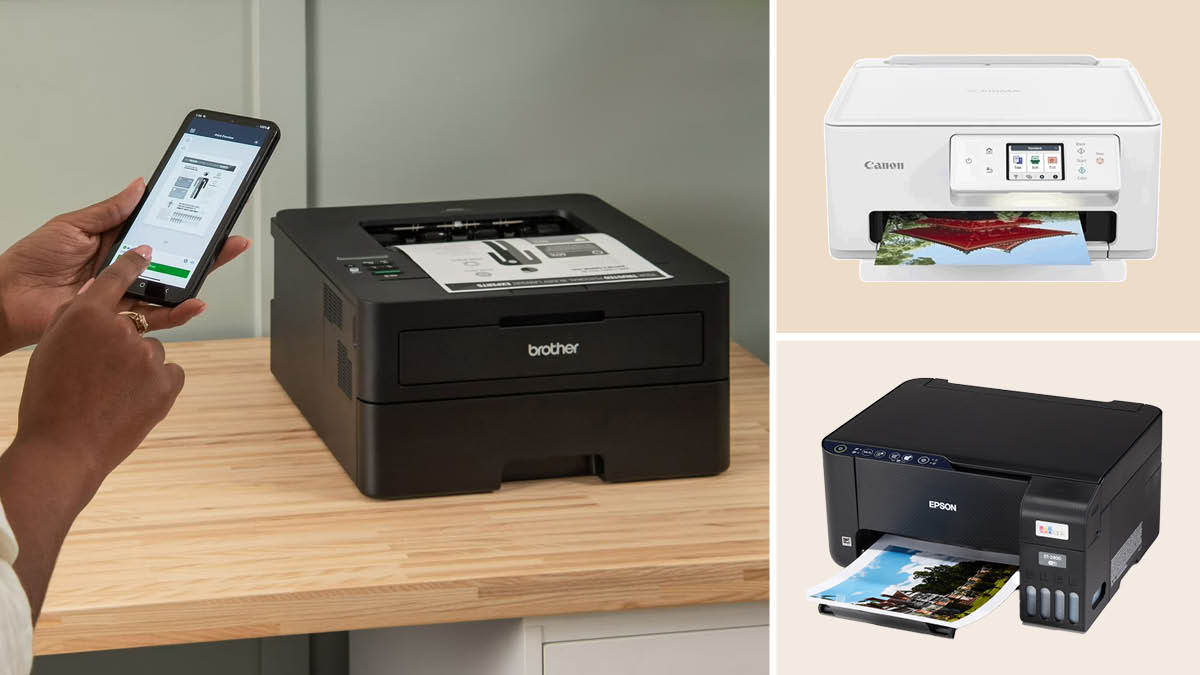

A printer that fits beside a monitor can still be frustrating if every scan requires a trip to the flatbed or every useful document needs a fresh connection. Small offices need more than a compact box. They need dependable scanning, sensible paper handling, quick copying, and controls that do not turn routine jobs into troubleshooting sessions.
Our Best best small office printer scanner copier picks cover inexpensive color all-in-ones, compact monochrome lasers, refillable ink tanks, and office-ready color lasers. The right choice depends on whether your desk handles occasional forms, stacks of reports, or a steady mix of documents and graphics.
The Canon PIXMA TS6520 is our top pick, with the Brother DCP-L2640DW close behind for faster monochrome work. The rest of the list ranges from very small home-office machines to serious color printing hardware.
| # | Product | Award | Print type | Duplex | Document handling | Best for |
|---|---|---|---|---|---|---|
| 1 | Canon PIXMA TS6520 | Best overall | Color inkjet | Automatic | Flatbed scanner | Mixed home-office work |
| 2 | HP DeskJet 2955 | Best compact basic model | Color inkjet | Not listed | Scanner and copier | Occasional documents |
| 3 | Brother DCP-L2640DW | Best monochrome laser | Black and white laser | Automatic | 50-sheet ADF | Reports and forms |
| 4 | Brother MFC-J1360DW | Best color productivity | Color inkjet | Automatic | 20-sheet ADF | Small home offices |
| 5 | HP DeskJet 2923 | Best basic wireless model | Color inkjet | Not listed | Scanner and copier | Light household use |
| 6 | Epson EcoTank ET-4800 | Best refillable ink tank | Color inkjet | Not listed | ADF and flatbed scanner | Frequent mixed-color printing |
| 7 | HP DeskJet 4255e | Best for simple ADF work | Color inkjet | Not listed | ADF and scanner | Forms and short batches |
| 8 | HP LaserJet Pro MFP 3101fdw | Best office monochrome speed | Black and white laser | Automatic | ADF and fax | Small teams |
| 9 | HP Envy 6155 | Best color touchscreen | Color inkjet | Automatic | Flatbed scanner | Photos and documents |
| 10 | HP Color LaserJet Pro MFP 3301sdw | Best office color laser | Color laser | Automatic | ADF and copier | High-volume color reports |
1. Canon PIXMA TS6520: Best Overall

Pros
- Compact footprint for a full color all-in-one
- Automatic two-sided printing
- Dual-band Wi-Fi supports 2.4GHz and 5GHz
- OLED display makes basic controls easy to see
Cons
- Two-cartridge ink system is less flexible than an ink tank
- No automatic document feeder is listed
- Monochrome OLED is small
Best for: a home office that needs color, scanning, copying, and wireless duplex printing in one compact machine.
The Canon PIXMA TS6520 gets the balance right for a small desk. It handles everyday documents and photos without the bulky shape of an office laser, and its 14-inch width, 14.8-inch depth, and 6.7-inch height make it easier to place near a laptop or shared work surface. At 15.3 pounds, it is not featherweight, but it is manageable when the workspace needs rearranging.
Its two-cartridge hybrid ink system is designed for sharp text and vivid color. That makes it a more versatile fit than the monochrome Brother DCP-L2640DW when reports include charts, presentation pages, or occasional borderless photos. Automatic two-sided printing is the feature that matters most for routine office work. It lets the printer handle both sides of a document without requiring manual paper rotation.
Wireless setup is one of the Canon's strongest practical features. Dual-band Wi-Fi supports both 2.4GHz and 5GHz networks, while Canon PRINT, Apple AirPrint, and Mopria support printing from phones and tablets. The 1.42-inch monochrome OLED display shows printer status and ink information, and the control panel is focused on the jobs most people actually run. It is not a large touchscreen, but it avoids making every simple copy job dependent on a computer.
The main limitation is document handling. The data lists an integrated scanner and copier, but no automatic document feeder, so multi-page scanning remains a page-at-a-time task. That is where the Brother MFC-J1360DW and Epson EcoTank ET-4800 are more convenient. The Canon also uses a two-cartridge arrangement rather than a refillable tank, so users who print color pages constantly should look carefully at the Epson's tank design.
For a desk that sees school forms, invoices, occasional photos, and two-sided documents, the Canon is the easiest recommendation. It is the pick we would keep for mixed work where compact dimensions and broad wireless support matter as much as print quality.
2. HP DeskJet 2955: Best Compact Basic Model

Pros
- Very light 7.55-pound design
- Color print, scan, and copy functions
- 60-sheet input tray
- Dual-band wireless connectivity
- HP app supports mobile printing and scanning
Cons
- Slow listed print speeds
- No automatic document feeder is listed
- Basic icon LCD limits on-device control
Best for: occasional color documents in a home office with limited desk space.
The HP DeskJet 2955 is aimed at the office that prints a few pages at a time and wants the printer to disappear when it is not needed. Its 11.97-inch depth and 6.06-inch height are unusually easy to accommodate, although its 16.73-inch width still needs a reasonably clear shelf. The 7.55-pound weight makes it the simplest model here to move between a desk and a storage area.
HP lists speeds up to 7.5 pages per minute in black and 5.5 pages per minute in color. Those figures are modest, but they fit the machine's intended role: letters, lists, recipes, financial documents, and other short jobs. A 60-sheet input tray reduces constant reloading for light work. The printer also includes color copying and scanning, so a separate scanner is unnecessary for everyday paperwork.
The HP app handles printing, scanning, copying, and faxing from a phone, while dual-band Wi-Fi is designed to detect and resolve connection problems. Its AI-capable formatting feature is intended to remove unwanted content from web pages and emails, which can help when a browser page would otherwise produce awkward output. The icon LCD keeps the physical interface simple, though it does not offer the visual guidance of the Canon's OLED or the Brother MFC-J1360DW's color display.
This is not the right DeskJet for a busy shared office. There is no listed automatic document feeder, the speeds are behind every laser model here, and the basic control panel is better suited to straightforward jobs than repeated copy workflows. The HP DeskJet 2923 has the same listed dimensions, tray capacity, and print speeds, so the 2955 mainly makes sense when its particular configuration fits your setup.
For occasional color work, the 2955 is smaller and lighter than the Canon PIXMA TS6520. Choose the Canon for automatic duplex printing and broader media flexibility. Choose this HP when minimal physical bulk and simple mobile operation are the priority.
3. Brother DCP-L2640DW: Best Monochrome Laser
Pros
- Fast black-and-white printing up to 36 ppm
- 50-sheet automatic document feeder
- Automatic two-sided printing
- Dual-band Wi-Fi, Ethernet, and USB
- Mobile management through Brother Mobile Connect
Cons
- Black-and-white output only
- Heavier and taller than the compact inkjets
- No fax function is listed
Best for: a small office that mostly produces text documents, forms, and reports.
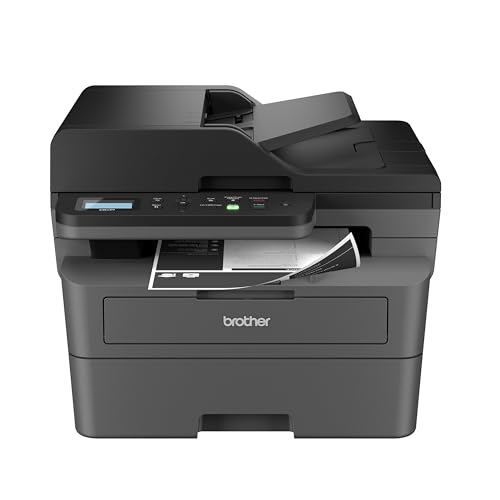
The Brother DCP-L2640DW is the point where a small printer starts to feel like office equipment rather than a home accessory. It is a monochrome laser all-in-one with a listed print speed of up to 36 pages per minute, so a multi-page report does not create the same wait as a color inkjet. The 50-page automatic document feeder is just as important. It allows multi-page scanning and copying without lifting the lid for every sheet.
Its automatic duplex printing supports more efficient handling of longer documents, and the machine offers a rare range of connection options for this group. Dual-band wireless supports 2.4GHz and 5GHz, Ethernet gives the office a wired alternative, and USB supports a direct computer connection. Brother Mobile Connect adds phone-based printing, scanning, device management, and toner tracking.
The DCP-L2640DW measures 15.7 inches deep, 16.1 inches wide, and 12.5 inches high. At 25 pounds, it needs a stable home and is not something most people will want to move frequently. That size buys useful productivity hardware, though. If your work involves signed forms, invoices, or recurring document packets, the ADF changes the daily experience far more than a small display would.
Compared with the Canon PIXMA TS6520, this Brother is dramatically better suited to repeated black-and-white pages, but it gives up color and photo flexibility. The HP LaserJet Pro MFP 3101fdw is similarly office-focused and slightly faster at its listed 35 black-and-white pages per minute, while adding fax and Bluetooth. The Brother remains the more compact monochrome choice and has Ethernet alongside its wireless options.
Skip it if color charts and photos are part of the normal workload. For text-heavy work, though, it is a much stronger tool than the basic HP DeskJet models. It suits a small business, study room, or home office where scanning and copying several pages at once is a regular task. Readers focused mainly on scanning workflows can also compare the features that make multi-page document handling easier before choosing.
4. Brother MFC-J1360DW: Best Color Productivity

Pros
- Automatic duplex printing
- 20-sheet automatic document feeder
- 150-sheet paper tray
- Color display supports cloud app connections
- Black speed up to 16 ppm
Cons
- Slower color speed of up to 9 ppm
- ADF is single-sided
- Larger than the smallest DeskJet models
Best for: a home office that needs color output and regular multi-page scanning.
The Brother MFC-J1360DW is a more serious color office machine than its compact shape suggests. It has a 150-sheet paper tray, automatic two-sided printing, and a 20-sheet single-sided ADF. Those features make it better suited to recurring paperwork than the Canon PIXMA TS6520, even though the Canon is the more broadly balanced pick for casual color use.
Brother lists speeds up to 16 pages per minute in black and 9 pages per minute in color. That is a useful split: black documents move along at a reasonable office pace, while color pages remain intended for moderate rather than heavy workloads. The ADF handles a small stack of originals for scanning and copying, but it is not a duplex ADF, so double-sided source pages still require more attention.
The 1.8-inch color display gives the printer a more useful local interface than the icon LCDs on the HP DeskJet 2955 and HP DeskJet 2923. It can connect to cloud services such as Google Drive, Dropbox, Box, and OneDrive, and Brother Mobile Connect supports printing, copying, scanning, and device management from a mobile device. Wireless and USB connections cover the basic ways a small office is likely to send a job.
At 13.5 inches deep, 15.4 inches wide, and 7.2 inches high, the MFC-J1360DW is still desk-friendly, though its 16.8-pound weight is noticeably above the lightest HP models. It uses the LC501 series of inks, which is an important detail for anyone standardizing supplies. The printer's strength is its combination of paper capacity and workflow features, not maximum color speed or photo specialization.
The Epson EcoTank ET-4800 is a better fit for someone who wants a cartridge-free tank system, while the Brother DCP-L2640DW is the clear step up for fast black-and-white output. The MFC-J1360DW occupies the useful middle ground for offices that need both color and a modest ADF. It is the one to choose when a printer must do more than occasional single-page copying but does not need laser throughput.
5. HP DeskJet 2923: Best Basic Wireless Model

Pros
- Compact 7.55-pound body
- Color print, scan, and copy functions
- 60-sheet input tray
- Dual-band wireless support
- HP app for mobile jobs
Cons
- Basic icon LCD
- Slow listed print speeds
- No automatic document feeder is listed
Best for: a small home workspace handling short color print and copy jobs.
The HP DeskJet 2923 is almost the mirror image of the DeskJet 2955 in the supplied specifications. It is a small color inkjet with a 60-sheet input tray, wireless printing, scanning, copying, and an icon LCD. Its 11.97-inch depth and 6.06-inch height help it fit in places where a laser machine would be impractical.
The listed print speeds are up to 7.5 pages per minute in black and 5.5 pages per minute in color. That is enough for a short letter or a handful of forms, but it is not the pace for a team sharing one printer. The machine is more comfortable with a few pages at a time than with a large packet. There is no listed ADF, so scanning and copying multiple originals involves placing each page on the scanner.
HP's app provides the main convenience advantage. A phone or tablet can send print, scan, copy, or fax jobs, and dual-band wireless is designed to maintain the connection automatically. HP also describes an AI-capable formatting feature for cleaning up web pages and emails, which is useful when the source document includes advertisements or unnecessary page elements.
The identical listed dimensions and speeds make the 2923 and 2955 difficult to separate on hardware alone. The 2923 is the better fit when its included configuration is the one available to the buyer, but neither should be mistaken for a productivity laser. The Canon PIXMA TS6520 is a more capable mixed-media choice because it adds automatic duplex printing and broader stated media support.
The 2923 makes sense for a home that prints recipes, lists, school paperwork, and occasional financial documents. It is also a reasonable choice when the printer needs to be moved or stored. Anyone who regularly scans a stack of documents should move up to the Brother MFC-J1360DW or a laser model with an ADF.
6. Epson EcoTank ET-4800: Best Refillable Ink Tank

Pros
- Cartridge-free high-capacity ink tanks
- Built-in scanner and copier
- Automatic document feeder
- Ethernet connectivity
- Heat-free Micro Piezo printing technology
Cons
- No automatic duplex printing is listed
- Larger document workflow hardware adds complexity
- Print speed is not listed in the supplied data
Best for: frequent color printing where refillable tanks and an ADF matter more than laser speed.
The Epson EcoTank ET-4800 takes a different approach from every cartridge-based inkjet here. Its high-capacity ink tanks are filled with EcoFit bottles, so the recurring task is filling a reservoir rather than replacing small cartridges. That design is most compelling for an office that prints often enough for convenience and cartridge waste to become a real annoyance.
Epson uses Micro Piezo heat-free technology and says the printer produces sharp text as well as color photos and graphics on virtually any paper type. The data does not include a print-speed figure, so this is not the model to choose based on a promised page rate. Its strengths are the refillable system, color output, and the built-in flatbed scanner and copier.
The ET-4800 also includes an automatic document feeder, fax, and Ethernet. Those additions make it more appropriate for a home office than a basic DeskJet, especially when originals arrive as a short stack. Ethernet is useful when a printer has a fixed location and the office prefers a wired network connection. The flatbed remains available for individual pages and items that should not go through a feeder.
At 14.8 inches wide, 11.8 inches deep, and 6.7 inches high, it has a compact footprint on paper, and its 11-pound weight is manageable. The missing automatic duplex feature is the catch. The Canon PIXMA TS6520 and Brother MFC-J1360DW can handle two-sided output automatically, while the Epson's listed feature set does not promise that convenience.
The ET-4800 is a better fit than the Canon for frequent color printing and multi-page scanning, but the Canon is more polished for automatic two-sided documents. It also cannot match the Brother DCP-L2640DW for fast monochrome reports. If you are comparing tank systems with other home-office machines, the ink and paper choices that shape a home-office workflow deserve attention before you commit.
7. HP DeskJet 4255e: Best for Simple ADF Work

Pros
- Automatic document feeder
- Color print, scan, and copy functions
- Compact design
- HP app supports mobile devices
- AI formatting features for web pages and emails
Cons
- Works only on 2.4GHz Wi-Fi
- No automatic duplex printing is listed
- HP chip and circuitry restrictions apply to cartridges
Best for: a home user who needs an ADF for short document batches and has a 2.4GHz wireless network.
The HP DeskJet 4255e is the small HP to choose when an automatic document feeder matters. It combines color printing, copying, scanning, and an ADF in a body measuring 13.07 inches deep, 16.85 inches wide, and 7.87 inches high. At 10.6 pounds, it remains easy to position, though it takes more shelf space than the DeskJet 2923 and 2955.
HP lists speeds up to 8.5 pages per minute in black and 5.5 pages per minute in color. Those figures suit short batches, especially forms or letters, but they remain below the laser models. The ADF makes the 4255e a more practical document tool than the similarly small HP DeskJets, even though the supplied data does not specify a feeder capacity.
Connectivity needs careful attention. This printer is only 2.4GHz capable, unlike the Canon PIXMA TS6520, Brother DCP-L2640DW, and HP Envy 6155, which list dual-band wireless. In a home with a mixed network, that restriction may require a network setting change or a separate 2.4GHz connection. It is a specific limitation that should be resolved before purchase, not discovered during setup.
The printer includes an icon LCD and HP's mobile app, with support for printing, scanning, copying, and faxing from a phone, tablet, or computer. HP also states that the printer is intended to work only with cartridges containing HP chips or circuitry, and firmware updates maintain those measures. That supply limitation is more significant for frequent users than for someone who prints only occasionally.
The 4255e is a better document feeder choice than the two basic DeskJets, but the Brother MFC-J1360DW adds automatic duplex printing, a 150-sheet tray, and dual connection options. Choose the HP when the ADF and compact body matter most and your network is comfortably 2.4GHz. Skip it for a busy office or a network built around 5GHz-only access points.
8. HP LaserJet Pro MFP 3101fdw: Best Office Monochrome Speed

Pros
- Black-and-white printing up to 35 ppm
- Automatic two-sided printing
- Automatic document feeder
- Fax included
- Ethernet, Bluetooth, and wireless printing
- HP Wolf Pro Security
Cons
- Much larger than the home inkjets
- Black-and-white output only
- No specific ADF capacity is listed
Best for: a small team that needs fast, secure black-and-white documents.
The HP LaserJet Pro MFP 3101fdw is built around team productivity. Its listed speed reaches 35 black-and-white pages per minute, and automatic two-sided printing, scanning, copying, and faxing cover the common duties of a small office. HP positions it for teams of up to seven people, which is a useful indication of the workload it is meant to handle.
The automatic document feeder removes the manual work from multi-page copying and scanning, though the supplied information does not state its capacity. A wired Ethernet connection joins wireless printing, and Bluetooth gives another way to connect compatible devices. Support for Microsoft, Mac, AirPrint, Android, and Chromebook environments makes it easier to share across a mixed office.
Security separates this model from the home-focused printers. HP Wolf Pro Security includes customizable settings intended to protect the printer and information moving through it. That matters when several people send documents to one shared machine. The Brother DCP-L2640DW also offers the connectivity a small office needs, but the HP adds fax, Bluetooth, and a more explicit security feature set.
The dimensions are the price of that office hardware. The 3101fdw measures 19.25 inches wide, 19.25 inches deep, and 15 inches high, and weighs about 23.15 pounds. It is not a printer for a narrow bookshelf or a small side table. It is better placed on a dedicated stand or a sturdy office surface with room around the paper path.
Compared with the color HP LaserJet Pro MFP 3301sdw, this machine is faster on its listed black-and-white rate and is more focused on text-heavy output. The Brother is smaller and reaches a listed 36 ppm, while the HP brings fax and stronger stated security. For teams producing mostly contracts, reports, and forms, the 3101fdw is the more complete shared-office tool. A separate guide to the security and connection needs of a shared office printer can help if several employees will use it.
9. HP Envy 6155: Best Color Touchscreen

Pros
- 2.4-inch color touchscreen
- Automatic two-sided printing
- 100-sheet input tray
- Dual-band wireless
- Color output up to 7 ppm
- P3 technology for vibrant documents and photos
Cons
- No automatic document feeder is listed
- Cartridge restrictions apply
- Unusual listed dimensions need careful placement planning
Best for: home offices that want polished color output and a clear touchscreen interface.
The HP Envy 6155 is the most inviting color inkjet in this group to operate from the printer itself. Its 2.4-inch color touchscreen is considerably more informative than the icon LCD on the HP DeskJet 4255e, and it makes copying and settings changes easier without reaching for a phone. The 100-sheet input tray is also a useful step up from the 60-sheet trays on the basic DeskJets.
HP lists speeds up to 10 pages per minute in black and 7 pages per minute in color. Automatic two-sided printing helps it handle everyday documents, while the printer's P3 technology is intended to keep documents and photos looking vibrant. The machine prints, scans, and copies, but no automatic document feeder is listed, so it is not the model for repeated multi-page scanning.
Dual-band wireless gives it a more flexible network profile than the 2.4GHz-only HP DeskJet 4255e. The HP app handles mobile print, scan, copy, and fax jobs, and the AI formatting feature is intended to remove unwanted material from web pages and emails. That combination makes it a comfortable personal office printer, particularly when the user prefers a visual interface and sends many jobs from a phone.
The Envy's listed dimensions require a little care. It is 17.05 inches long, 5.35 inches wide, and 14.21 inches high, while the product data lists an 11.2-pound weight. Those measurements do not resemble the usual front-to-back layout of a compact printer, so check the available surface and the paper path before setting it up. HP also states that the printer blocks cartridges without original HP chips or circuitry, with firmware updates maintaining that restriction.
The Canon PIXMA TS6520 is the better compact all-rounder, and the Brother MFC-J1360DW is the better choice for ADF-based workflows. The Envy 6155 earns its place with the touchscreen, 100-sheet tray, dual-band Wi-Fi, and color-focused feature set. It suits a user who wants a pleasant personal printer rather than a shared document engine.
10. HP Color LaserJet Pro MFP 3301sdw: Best Office Color Laser

Pros
- Color laser output up to 26 ppm
- Automatic two-sided printing
- Automatic document feeder
- 250-sheet input tray
- Scanning and copying for office workflows
Cons
- Heaviest printer in this roundup
- Largest physical footprint among the color models
- HP toner chip and circuitry restrictions apply
Best for: a small office that needs fast, consistent color reports and a large paper tray.
The HP Color LaserJet Pro MFP 3301sdw is the most office-oriented color machine here. It prints black and color pages at a listed rate of up to 26 pages per minute, and its automatic two-sided printing, ADF, scanner, copier, and 250-sheet input tray are designed for sustained shared use. This is the model for an office that regularly produces reports, proposals, and presentation material rather than a few pages each week.
HP's TerraJet toner is intended to produce vivid color, while the printer uses Original HP 218A standard and 218X high-yield LaserJet toner cartridges. The combination of laser output and a substantial paper tray means fewer interruptions during a workday. The automatic document feeder also makes it more practical for copying or scanning a packet than the flatbed-only inkjets.
The 3301sdw measures 13.44 inches wide, 16.46 inches deep, and 16.5 inches high. At 37.7 pounds, it is by far the heaviest product in this list, so placement should be permanent and the supporting surface should be strong. Its footprint is not enormous for an office laser, but the height and weight make it a poor match for a cramped home desk.
The HP LaserJet Pro MFP 3101fdw is the better fit for text-only teams because it is lighter and focused on black-and-white output. The Epson EcoTank ET-4800 is much easier to place and more suited to a personal color workspace, while the HP color laser is built for faster shared production and a larger paper reserve. The compromise is clear: you gain office-grade color workflow hardware and give up the easy mobility of a compact inkjet.
HP also states that this printer is intended to work only with cartridges containing HP chips or circuitry, with firmware updates maintaining that restriction. That matters when an office plans its supply process. Choose the 3301sdw when multiple people need reliable color reports, automatic duplexing, and batch scanning from one central machine.
How to choose best small office printer scanner copier
The right machine depends on the documents your office creates most often. Start with the print method, then look at paper handling, connection options, and the physical space available.
Print technology
Color inkjets are the most flexible choice for mixed documents, graphics, and occasional photos. Laser printers are better suited to frequent text output, with the Brother DCP-L2640DW and HP LaserJet Pro MFP 3101fdw built around fast black-and-white work. The HP Color LaserJet Pro MFP 3301sdw is the strongest fit when color reports are a regular office requirement.
Ink tanks such as the Epson EcoTank ET-4800 replace small cartridges with refillable reservoirs. That can make more sense for frequent color printing, while a cartridge inkjet is easier to understand for occasional jobs. Do not choose by color capability alone. Consider how often the printer will sit unused and whether the office needs photo output, sharp forms, or rapid text pages.
Automatic document feeder
An ADF is one of the most important differences between a personal printer and a small office machine. It lets you scan or copy a stack without placing every page on the glass. The Brother DCP-L2640DW has a 50-page ADF, the Brother MFC-J1360DW has a 20-sheet single-sided ADF, and the Epson ET-4800, HP DeskJet 4255e, HP LaserJet Pro MFP 3101fdw, and HP Color LaserJet Pro MFP 3301sdw also list ADF hardware.
A flatbed scanner is enough for occasional pages, photographs, or books. For invoices, signed forms, and multi-page reports, an ADF saves far more time than a slightly larger display.
If the office scans more than one document at a time, treat the ADF as core hardware, not a bonus feature.
Duplex printing
Automatic duplex printing turns two-sided documents into a normal one-step job. It reduces manual paper handling and is especially useful for reports, meeting packets, and forms. The Canon PIXMA TS6520, Brother DCP-L2640DW, Brother MFC-J1360DW, HP LaserJet Pro MFP 3101fdw, HP Envy 6155, and HP Color LaserJet Pro MFP 3301sdw list automatic duplex printing.
The absence of a listed duplex feature on the Epson ET-4800 and the basic HP DeskJet models does not make them unusable. It does mean that two-sided output takes more attention. If most work is single-page or one-sided, the difference may not matter. If the printer supports recurring reports, it will.
Paper capacity and speed
A small tray is fine for occasional printing, but it creates interruptions in a shared office. The HP Color LaserJet Pro MFP 3301sdw has a 250-sheet input tray, the Brother MFC-J1360DW has a 150-sheet tray, and the HP Envy 6155 has a 100-sheet tray. The basic HP DeskJets list 60-sheet trays.
Speed matters when several people share a printer. The Brother DCP-L2640DW reaches a listed 36 pages per minute in black and white, the HP LaserJet Pro MFP 3101fdw reaches 35, and the HP Color LaserJet Pro MFP 3301sdw reaches 26 in black and color. Inkjet speeds are more appropriate for personal or low-volume use, with the Brother MFC-J1360DW leading the listed color inkjet rates at up to 9 pages per minute in color.
Wireless and wired connections
Dual-band Wi-Fi is useful in offices with both 2.4GHz and 5GHz networks. The Canon PIXMA TS6520, Brother DCP-L2640DW, HP DeskJet 2955, HP DeskJet 2923, and HP Envy 6155 list dual-band support. The HP DeskJet 4255e is only 2.4GHz capable, which may require a network adjustment.
Ethernet is preferable when the printer will stay in one place and several computers need dependable access. The Brother DCP-L2640DW and Epson ET-4800 list Ethernet, while the HP LaserJet Pro MFP 3101fdw includes Ethernet and Bluetooth. Check the office network before buying, especially if wireless access points are configured for 5GHz-only operation.
Footprint and placement
Measure the shelf, including clearance for paper and the scanner lid. The lightest machines are the HP DeskJet 2955 and HP DeskJet 2923 at 7.55 pounds, while the HP Color LaserJet Pro MFP 3301sdw weighs 37.7 pounds. A printer with an ADF may be compact at the base but still need extra clearance above the scanner.
For more guidance on matching a machine to a shared workspace, consider how a printer has to serve several people without slowing down. The best small office printer scanner copier is not necessarily the smallest model. It is the one whose paper path, network connection, and scanning hardware match the daily workload.
Frequently asked questions
Do all of these printers scan and copy?
Yes. Every model in this roundup is listed as a printer, scanner, and copier. Several also include fax capability, including the Epson EcoTank ET-4800, HP LaserJet Pro MFP 3101fdw, and HP DeskJet models through their apps or listed functions.
Which model is best for black-and-white documents?
The Brother DCP-L2640DW is the strongest compact monochrome choice, with a listed speed of up to 36 pages per minute and a 50-page ADF. The HP LaserJet Pro MFP 3101fdw is also fast and adds fax, Bluetooth, and HP Wolf Pro Security for a small team.
Which printers have automatic document feeders?
The Brother DCP-L2640DW, Brother MFC-J1360DW, Epson EcoTank ET-4800, HP DeskJet 4255e, HP LaserJet Pro MFP 3101fdw, and HP Color LaserJet Pro MFP 3301sdw list ADF hardware. The Canon PIXMA TS6520, HP DeskJet 2955, HP DeskJet 2923, and HP Envy 6155 do not list an ADF in the supplied product information.
Which model supports automatic two-sided printing?
Automatic duplex printing is listed for the Canon PIXMA TS6520, Brother DCP-L2640DW, Brother MFC-J1360DW, HP LaserJet Pro MFP 3101fdw, HP Envy 6155, and HP Color LaserJet Pro MFP 3301sdw. It is not listed for the basic HP DeskJets or Epson EcoTank ET-4800.
Is the HP DeskJet 4255e compatible with 5GHz Wi-Fi?
No. The supplied features specifically state that the HP DeskJet 4255e is only 2.4GHz capable. Buyers with a 5GHz-only network should choose a dual-band model or adjust the network before setup.
Which printer has the largest paper tray?
The HP Color LaserJet Pro MFP 3301sdw has the largest listed input tray at 250 sheets. The Brother MFC-J1360DW follows with a 150-sheet tray, while the HP Envy 6155 lists a 100-sheet tray.
Which model uses refillable ink tanks?
The Epson EcoTank ET-4800 uses high-capacity ink tanks filled with Epson EcoFit ink bottles. The other inkjet models in this roundup use cartridge-based systems, while the Brother and HP laser models use toner.

The bottom line
The Canon PIXMA TS6520 is the Best best small office printer scanner copier for most compact workspaces because it combines color printing, scanning, copying, automatic duplexing, dual-band Wi-Fi, and a manageable footprint. It is a better all-round fit than the basic HP DeskJets and less specialized than the monochrome Brother laser.
Choose the Brother DCP-L2640DW when the office mostly produces black-and-white pages and needs a fast engine with a 50-page ADF. For a shared team that needs fast office color, the HP Color LaserJet Pro MFP 3301sdw is the more capable step up, while the Epson EcoTank ET-4800 makes sense for frequent color printing with refillable tanks.
If you are undecided, choose the Canon for mixed home-office work and the Brother for document-heavy work.
As an Amazon Associate we earn from qualifying purchases.