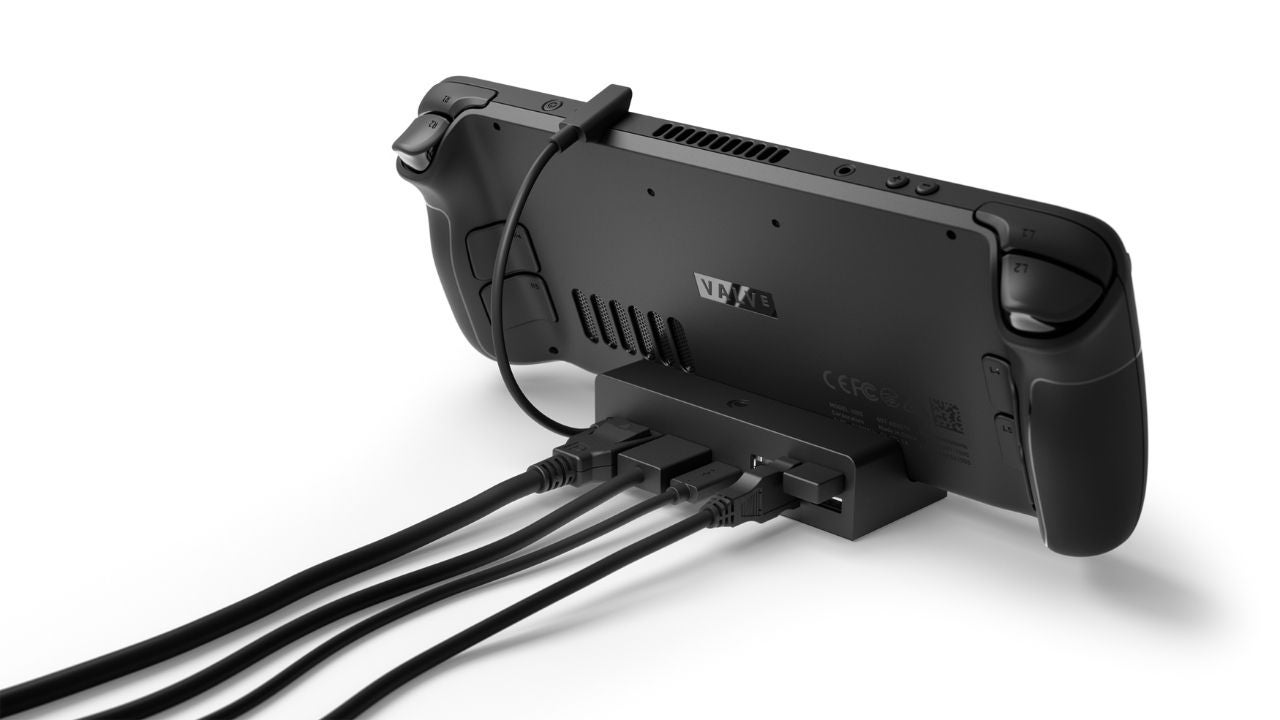

A handheld PC becomes much more useful when one cable turns it into a living-room console or a compact desktop. The problem is that many docks look interchangeable until you compare video bandwidth, USB speeds, charging support, Ethernet, and the way each stand handles airflow.
We compared 10 of the most relevant options to find the Best steam deck dock for different setups. Some are built around high refresh-rate displays, while others focus on extra ports, a foldable stand, cooling fans, or a small footprint.
Our top pick is the JSAUX 6-in-1 Docking Station, with the other nine covering nearly every practical Steam Deck docking setup.
| # | Product | Award | Video output | USB connectivity | Best for |
|---|---|---|---|---|---|
| 1 | JSAUX HB0603 | Best overall | 4K at 120Hz, HDMI 2.1 | 3 USB-A at 5Gbps | Most Steam Deck and handheld users |
| 2 | Anker Steam Deck Dock | Best straightforward dock | 4K at 60Hz | 2 USB-A and 1 USB-C at 5Gbps | Reliable everyday connections |
| 3 | JSAUX HB0602 | Best compact JSAUX dock | 4K at 120Hz, HDMI 2.1 | 2 USB-A at 480Mbps | A simple handheld setup |
| 4 | UGREEN Foldable 9-in-1 | Best adjustable stand | 4K at 60Hz | 2 USB-A and 1 USB-C at 10Gbps, 2 USB-A at 480Mbps | Flexible desk setups |
| 5 | UGREEN 4K 120Hz Dock | Best for VRR displays | 4K at 120Hz, HDMI 2.1 | 2 USB-A and 1 USB-C at 5Gbps | High refresh gaming |
| 6 | iVANKY 8-in-1 Dock | Best for extra USB-A | 4K at 144Hz, HDMI 2.1 | 3 USB-A at 5Gbps | Multiple wired peripherals |
| 7 | WAVLINK 4K 144Hz Dock | Best fast data hub | 4K at 144Hz, HDMI 2.1 | 2 USB-A and 1 USB-C at 10Gbps | External storage |
| 8 | B3 BIGTHREE Steam Deck Dock | Best for basic 4K output | 4K at 60Hz, HDMI 2.0 | 3 USB-A at 5Gbps | Older or simpler setups |
| 9 | YCBUENO 12-in-1 Dock | Best for maximum expansion | 4K at 60Hz, HDMI 2.0 | 3 USB-A at 5Gbps, 3 USB-A at 480Mbps, USB-C data | A full desk workstation |
| 10 | BENFEI Steam Deck Dock | Best simple aluminum dock | 4K at 60Hz | 2 USB-A and 1 USB-C at 5Gbps | A clean plug-and-play station |
1. JSAUX HB0603: Best Overall

Pros
- HDMI 2.1 supports 4K at 120Hz
- Three USB-A 3.0 ports cover common peripherals
- Gigabit Ethernet and 100W PD support
- Works with Steam Deck, ROG Ally, Legion Go, and MSI Claw
Cons
- USB-C data connectivity is not included
- A 100W charger is recommended for ROG Ally Turbo Mode
- Not compatible with ROG Xbox Ally or Xbox Ally X
Best for: someone who wants one well-rounded dock for Steam Deck and other handheld PCs.
The JSAUX HB0603 is the dock we would keep connected to a television or monitor. It avoids the most common compromises in this group: it has a high refresh-rate HDMI output, three fast USB-A ports, wired networking, and enough power-delivery headroom for demanding handhelds. The result is a practical setup for gaming, desktop work, and transferring files without constantly rearranging cables.
Its HDMI 2.1 output supports 4K at 120Hz. That does not mean every Steam Deck game will run at that resolution and refresh rate, but it gives a compatible display more room to show smooth motion. For games played at 1080p or another lower resolution, the higher refresh ceiling can still be useful. The dock also supports up to 100W PD input, while the product notes that the ROG Ally's 30W Turbo Mode is fully supported with a 100W charger. Steam Deck owners will not need that much host power, but the extra capacity helps when the same dock serves multiple handhelds.
The three USB-A 3.0 ports operate at 5Gbps, enough for a keyboard, mouse, controller, or external storage. Gigabit Ethernet gives online games and downloads a wired alternative to Wi-Fi. Compared with the Anker Steam Deck Dock, the JSAUX offers faster display output and one more USB-A port. The UGREEN 4K 120Hz Dock adds VRR support and USB-C data, but this JSAUX model is easier to recommend when three traditional USB ports matter more.
There are two limitations to keep in mind. There is no USB-C data port for a modern drive or accessory, and the compatibility list specifically excludes ROG Xbox Ally and Xbox Ally X. The dock itself is also a compact 0.37 pounds, so it is easy to move but not especially heavy on a desk. Skip it if you need USB-C data or one of the excluded handhelds.
For Steam Deck LCD or OLED owners, ROG Ally and Ally X users, Legion Go owners, and MSI Claw users who want a single cable to handle the essentials, the HB0603 is the most balanced choice here.
2. Anker Steam Deck Dock: Best Straightforward Dock
Pros
- 4K at 60Hz HDMI output
- Two USB-A and one USB-C data port
- 5Gbps USB connectivity across the data ports
- Includes an 8.66-inch built-in USB-C cable
- 18-month warranty
Cons
- HDMI output is limited to 60Hz at 4K
- USB-C data does not support screen mirroring
- No adjustable stand details are provided
Best for: a user who wants a familiar six-port layout and fast peripheral connections.
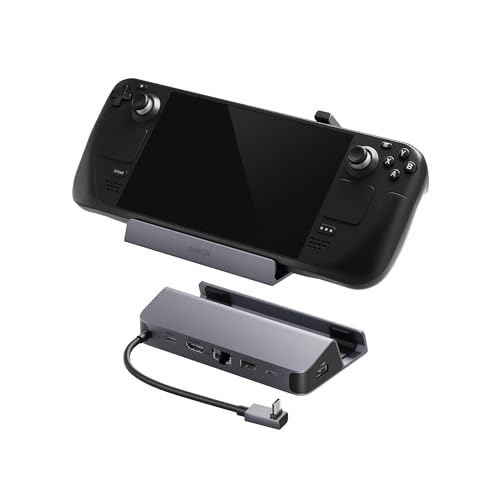
The Anker Steam Deck Dock takes a calmer approach than the high refresh-rate models. Its useful distinction is not headline video bandwidth, but a sensible port arrangement that includes both USB-A and USB-C data. That makes it a natural fit for a desk with a keyboard, mouse, controller, and one newer storage device.
The HDMI port supports 4K at 60Hz, which is appropriate for television play, desktop applications, video playback, and most conventional monitor setups. It will not make as much sense beside a 120Hz or 144Hz gaming monitor as the JSAUX HB0603 or WAVLINK 4K 144Hz Dock, but 60Hz remains a straightforward target for a Steam Deck connected to a television. The dock also has a 100W PD input and a 1Gbps Ethernet port, so charging and wired networking are covered.
Both USB-A ports and the USB-C data port run at 5Gbps. The USB-C port is useful for a portable SSD or a newer accessory, though Anker clearly states that it does not support screen mirroring. Its built-in USB-C cable measures 8.66 inches, giving some flexibility when the handheld is not sitting directly against the dock. The dock weighs about 0.33 pounds and measures roughly 5.2 by 2.9 inches, a compact footprint for a permanent desk station.
The weakness is specialization. The UGREEN Foldable 9-in-1 offers more expansion and faster 10Gbps ports, while the JSAUX HB0603 is better suited to high refresh gaming. Anker's advantage is a less complicated six-in-one arrangement and an included warranty, but buyers who want multiple fast storage connections should look elsewhere. The dock also does not include a USB-C video connection, so its display output remains HDMI only.
Choose the Anker when 4K at 60Hz is enough and you want one USB-C data port alongside the usual USB-A connections. It is a clean, sensible match for a living-room Steam Deck setup.
3. JSAUX HB0602: Best Compact JSAUX Dock
Pros
- HDMI 2.1 supports 4K at 120Hz
- Gigabit Ethernet for wired play
- 100W PD support
- Small, light design
Cons
- Only two USB-A ports
- USB-A ports are USB 2.0
- Not compatible with ROG Xbox Ally or Xbox Ally X
Best for: a Steam Deck owner who needs high refresh video without a large port array.
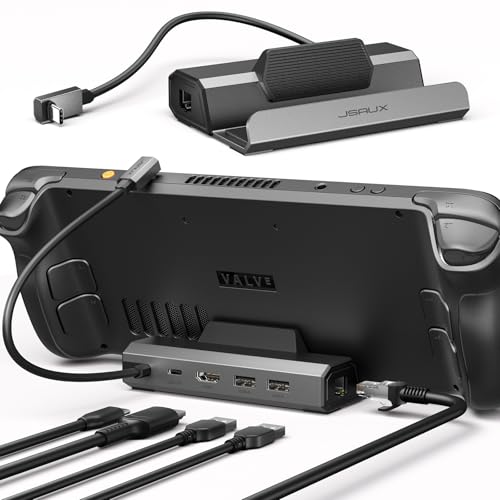
The JSAUX HB0602 is the stripped-down sibling to the HB0603. It keeps the part that matters most for a high refresh display, then trims the peripheral expansion. That makes it a good fit for a handheld that normally uses wireless input devices and only needs a wired keyboard, mouse, or controller occasionally.
The HDMI 2.1 output reaches 4K at 120Hz, matching the HB0603 and the newer UGREEN 4K 120Hz Dock on the headline refresh target. It also supports up to 100W PD input and includes Gigabit Ethernet. For ROG Ally owners, JSAUX says a 100W charger is recommended for 30W Turbo Mode. Steam Deck charging remains limited by the handheld itself, so the dock's larger input rating is mainly useful when the unit is shared across several devices.
The cutback is in the USB section. There are two USB-A ports, and they are USB 2.0 rather than the 5Gbps USB-A ports on the HB0603. That is fine for receivers, a keyboard, a mouse, or a gamepad. It is less suitable for moving large game files to an external drive. The dock measures about 4.45 by 2.64 by 1.1 inches and weighs about 0.31 pounds, so it takes little room beside a monitor or television.
That limited USB speed is the reason it sits below the HB0603. The extra port and faster USB connection on the larger JSAUX model are more useful for a desktop setup. The Anker Steam Deck Dock is also a better fit if you need USB-C data. The HB0602 makes more sense when the display and Ethernet connections are the priority, and the two USB-A ports are all you need.
Compatibility includes Steam Deck LCD and OLED, ROG Ally and Ally X, Legion Go and Go S, and MSI Claw, while ROG Xbox Ally and Xbox Ally X are excluded. Pick this model for a compact high refresh station, but skip it if external storage is part of your normal gaming routine.
4. UGREEN Foldable 9-in-1: Best Adjustable Stand

Pros
- Two-panel foldable stand helps clear ventilation outlets
- Two 10Gbps USB 3.2 Gen 2 ports
- Two additional USB-A 2.0 ports
- Supports several high refresh combinations
- 100W PD support
Cons
- HDMI output tops out at 4K at 60Hz
- Larger footprint than the smallest docks
- Not compatible with Switch 2
Best for: a desk setup where stand position, airflow, and port variety matter.
The UGREEN Foldable 9-in-1 is the most physically adaptable dock in this group. Its stand uses two foldable panels rather than a fixed rear wall, which helps avoid covering the heat outlet on a handheld. That is a meaningful design choice for long sessions, especially when the dock is used with devices of different sizes.
The display output supports 4K at 60Hz, 1440p at 60Hz, and 1080p at 120Hz. UGREEN also lists support for 1440p at 144Hz and 120Hz, plus 1080p at 240Hz and 144Hz. Those modes make it more flexible than the basic 4K label suggests, although the lack of 4K at 120Hz places it behind the JSAUX HB0603 for high resolution, high refresh displays.
Its strongest feature is the USB layout. Two USB 3.2 Gen 2 ports, one USB-A and one USB-C, reach 10Gbps. They are appropriate for external drives and fast file transfers. Two more USB-A 2.0 ports are aimed at keyboards, mice, and gamepad receivers, where raw throughput matters much less. The dock supports up to 100W power delivery, and UGREEN notes that Steam Deck charging tops out at 45W while ROG Ally charging reaches 65W.
At roughly 6.3 inches long and 4.5 inches wide, this is not the dock to hide behind a television. The broader base can be an advantage on a desk, but travelers will notice it more than they would the JSAUX HB0602 or WAVLINK 4K 144Hz Dock. It also does not support Switch 2, despite its broad compatibility with Steam Deck, ROG Ally models, Legion Go, MSI Claw, and other USB-C devices.
This is the choice for someone who wants the handheld held securely while preserving airflow and connecting both fast storage and slower accessories. If a 4K 120Hz monitor is the centerpiece, choose a different dock. If adjustability and varied USB connections are more important, the foldable design is the reason to buy it.
5. UGREEN 4K 120Hz Dock: Best for VRR Displays

Pros
- HDMI 2.1 supports 4K at 120Hz
- Supports VRR, FreeSync, and G-Sync
- USB-A and USB-C data ports run at 5Gbps
- Host output supports up to 85W
- Foldable aluminum alloy and PC plus ABS stand
Cons
- HDMI output is the only display connection
- Four total data ports may be limiting for a large desk
- Not compatible with Nintendo Switch 2
Best for: handheld owners with a compatible variable refresh-rate display.
The UGREEN 4K 120Hz Dock is the most display-focused option among the UGREEN models. Its reason to exist is the combination of HDMI 2.1 and variable refresh support. If the monitor supports VRR, FreeSync, or G-Sync, the dock is designed to help the screen adjust its refresh behavior instead of showing a fixed cadence during changing game performance.
The HDMI output supports 4K at 120Hz, with VRR, FreeSync, and G-Sync listed among its features. The handheld still determines the real resolution and frame rate in a game, but the dock does not impose the 60Hz ceiling found on the Anker Steam Deck Dock or the BENFEI Steam Deck Dock. This is a more appropriate match for a newer gaming monitor than for a basic television.
The port selection includes two USB-A 3.0 ports and one USB-C 3.0 data port, all rated at 5Gbps, plus Gigabit Ethernet. The 100W PD 3.0 input can provide up to 85W to the host while powering the dock. That is ample headroom for the Steam Deck's charging limits and useful for handhelds that support higher performance modes. The foldable stand uses aluminum alloy and PC plus ABS, and the listed dimensions are about 5.8 by 3.3 by 1.1 inches.
Compared with the JSAUX HB0603, this dock gives up one USB-A port but adds USB-C data and VRR support. Compared with the UGREEN Foldable 9-in-1, it has faster display output but fewer total connections. That trade-off is easy to understand, and it makes the dock less appealing for a desk with several wired accessories.
The compatibility list covers Steam Deck, ROG Ally variants, Legion Go, and several other USB-C devices, but it excludes Nintendo Switch 2. Choose it when your display can make use of variable refresh and 4K at 120Hz. Skip it if you need many ports more than you need display refinement.
6. iVANKY 8-in-1 Dock: Best for Extra USB-A

Pros
- HDMI 2.1 supports 4K at 144Hz
- Three USB-A ports at 5Gbps
- 1Gbps Ethernet
- Includes two joystick caps
- 18-month warranty
Cons
- Firmware update is recommended for some display behavior
- BIOS version 323 is mentioned for ROG Ally X Turbo Mode
- No USB-C data port is listed
Best for: a handheld setup built around several USB-A accessories and a high refresh monitor.
The iVANKY 8-in-1 Dock takes a familiar route: put three fast USB-A ports beside a high refresh HDMI output and wired networking. It is a useful arrangement for someone who has a controller receiver, keyboard, mouse, and external storage that all use USB-A. The included joystick caps are an unusual extra, though they do not change the dock's core role.
Its HDMI 2.1 output supports 4K at 144Hz. That is the highest stated refresh ceiling in this roundup, tied with the WAVLINK 4K 144Hz Dock. The practical benefit depends on the display and the game, but it gives this model plenty of room for a fast 1080p or 1440p monitor. It also supports up to 100W power delivery, with the notes specifying a 45W maximum for Steam Deck and 65W for ROG Ally.
The three USB-A 3.0 ports run at 5Gbps, while the Ethernet port reaches 1Gbps. There is a charging USB-C port, but the listed features do not provide a USB-C data port. That makes the iVANKY less convenient than the Anker Steam Deck Dock for someone who routinely uses newer USB-C storage. The dock weighs about 0.73 pounds, heavier than several compact rivals, which should help it stay planted when multiple cables are attached.
There is a little more setup caution here than with the simplest docks. iVANKY recommends updating the dock firmware to avoid HDMI mirroring issues and mentions BIOS version 323 for seamless ROG Ally X 30W Turbo Mode compatibility. Those instructions are not dealbreakers, but they matter to buyers who want a completely hands-off experience. The product also includes an 18-month warranty and covers Steam Deck, ROG Ally X, Legion Go, and MSI Claw.
Buy this model when three USB-A ports and 4K at 144Hz matter more than USB-C data. If your desk is centered on an external SSD with a USB-C connection, the Anker or UGREEN alternatives are better aligned.
7. WAVLINK 4K 144Hz Dock: Best Fast Data Hub

Pros
- HDMI 2.1 supports 4K at 144Hz
- Two USB-A and one USB-C port at 10Gbps
- Gigabit Ethernet
- Compact 5.1-inch design
- Two-year warranty
Cons
- Charger and charging cable are not included
- Charging USB-C and data USB-C have separate roles
- Not compatible with Nintendo Switch
Best for: moving large game files while gaming from a high refresh display.
The WAVLINK 4K 144Hz Dock is the specialist pick for fast wired data. Its three USB 3.2 Gen 2 ports are the headline feature, with two USB-A ports and one USB-C port all reaching 10Gbps. That makes it particularly suitable for an external SSD, where the difference between a basic peripheral port and a faster storage connection is easier to notice.
The HDMI 2.1 output supports 4K at 144Hz under DP 1.4 and DSC. As with the iVANKY dock, this is more capacity than a Steam Deck will use in many demanding games, but it is a useful match for a monitor that can run at a high refresh rate. Gigabit Ethernet completes the setup for wired multiplayer and downloads. The unit supports 100W input and 85W output to the host.
WAVLINK gives this dock a compact body measuring about 5.11 by 2.95 by 1.38 inches, with a listed weight of about 0.31 pounds. That is easy to carry, though the light construction may feel less anchored than the heavier YCBUENO 12-in-1 Dock. The dock supports Steam Deck, Legion Go, ROG Ally, Claw, and other USB-C devices. It specifically does not support Nintendo Switch.
The biggest catch is what is not in the box. The product notes say the charger and charging cable are not included, so the dock depends on a suitable charger already in your setup. It also separates the USB-C charging port from the USB-C data port. That is perfectly workable once the cables are understood, but it is less forgiving than a dock where every connection is obvious.
The WAVLINK is the right pick for a Steam Deck owner who stores games on a fast external drive and wants a 144Hz display connection. If you need three USB-A ports instead, the iVANKY 8-in-1 Dock is more convenient. If you want a more complete desk expansion station, look to the UGREEN or YCBUENO models.
8. B3 BIGTHREE Steam Deck Dock: Best for Basic 4K Output

Pros
- 4K at 60Hz HDMI 2.0 output
- Three USB-A ports at 5Gbps
- Gigabit Ethernet
- 100W PD support
- Works with Windows, macOS, Chrome, and Android
Cons
- Does not support Steam Deck OLED at 90Hz
- Requires a power adapter of at least 65W for optimal performance
- No USB-C data port
Best for: a basic television or monitor station with several USB-A accessories.
The B3 BIGTHREE Steam Deck Dock covers the familiar dock essentials without chasing the highest display refresh rates. It has HDMI, Ethernet, three USB-A ports, and USB-C power input. For a television setup with a wireless keyboard receiver, controller receiver, and perhaps a storage device, that arrangement is easy to understand.
Its HDMI 2.0 output supports 4K at 60Hz and can mirror or extend to a television, monitor, or projector. That is enough for standard big-screen play and general desktop use, but the product explicitly notes that it does not support the Steam Deck OLED's 90Hz mode. The JSAUX HB0603 and UGREEN 4K 120Hz Dock are better choices for a high refresh display.
The three USB 3.0 ports support transfers up to 5Gbps, and Gigabit Ethernet provides a wired connection for online games, streaming, and file transfers. The USB-C port supports up to 100W power delivery, though B3 recommends using at least a 65W power adapter for optimal performance. The adapter is not included. Compatibility extends beyond handhelds to Mac, Windows, Chrome, and Android devices.
The dock's limitations are straightforward. There is no USB-C data port, and the OLED refresh restriction rules it out for owners who specifically want to preserve that display capability on an external setup. The product information also lists unusually small dimensions, so buyers should rely on the actual dock fit and port layout rather than treating those measurements as a reason to choose it over a known compact rival.
This is a sensible choice for a conventional 4K at 60Hz television setup, especially when three USB-A ports are useful. Skip it for high refresh gaming, Steam Deck OLED 90Hz output, or a desk built around USB-C storage.
9. YCBUENO 12-in-1 Dock: Best for Maximum Expansion

Pros
- Twelve connections cover a full workstation
- Dual 5cm cooling fans with rear switch
- HDMI supports 4K at 60Hz
- Three USB-A 3.0 ports at 5Gbps
- Aluminum alloy construction
- Includes joystick caps and a USB-C extender
Cons
- Larger and heavier than simple docks
- HDMI output is limited to 60Hz at 4K
- Fan and RGB hardware may be unnecessary for some users
Best for: a permanent desk setup that needs cooling, storage, networking, and many peripherals.
The YCBUENO 12-in-1 Dock is less a simple cable station and more a small handheld workstation. It combines a device slot, active cooling, a large port selection, and a metal body. That is a lot of hardware for a dock, but it makes sense for someone who leaves a Steam Deck or another handheld connected to a monitor with several accessories attached.
The display connection is HDMI 2.0 with support for 4K at 60Hz. It is not competitive with the 120Hz and 144Hz options in this list, so this model is about expansion rather than display speed. The dock also provides Gigabit Ethernet, three USB 3.0 ports at 5Gbps, three USB 2.0 ports, and a USB-C PD 3.0 connection that the listing describes as supporting 100W charging and 40Gbps data.
The dual 5cm fans are the unusual part. A switch on the rear can disable both the fans and RGB lighting, so the cooling system does not have to run constantly. The open fan area is intended to improve airflow around the handheld, while the aluminum alloy body adds passive heat dissipation. The dock's dedicated slot fits devices up to 27mm thick, and the listing says laptops, tablets, and phones can use the included USB-C cable without the slot.
This much expansion brings practical tradeoffs. At about 7 inches long, 2.4 inches wide, and 2.8 inches high, with a listed weight of about 0.61 pounds, it takes more room than the Anker Steam Deck Dock or BENFEI Steam Deck Dock. The fans also add another moving component and another control to a setup that may not need active cooling. On the other hand, the joystick caps and sacrificial USB-C extender are thoughtful touches for frequent handheld use.
The YCBUENO is the dock to choose when the words “12-in-1” describe a real need, not just an attractive label. If you need only HDMI, Ethernet, charging, and a couple of peripherals, it is excessive. If a handheld is replacing a desktop for you, its cooling and expansion make it one of the most capable options here.
10. BENFEI Steam Deck Dock: Best Simple Aluminum Dock

Pros
- 4K at 60Hz HDMI output
- Two USB-A and one USB-C data port at 5Gbps
- Gigabit Ethernet
- Aluminum stand leaves cooling vents clear
- Plug-and-play design
- 18-month warranty
Cons
- No high refresh HDMI 2.1 output
- Only three data ports
- Charging adapter is not included
Best for: a tidy Steam Deck station with a stable stand and essential connections.
The BENFEI Steam Deck Dock is a straightforward aluminum stand with the ports most people expect. It does not try to compete with the largest docks or the highest refresh displays. Instead, it focuses on holding the handheld securely while providing HDMI, Ethernet, charging, and three data connections.
The HDMI output supports 4K at 60Hz, 1440p at 144Hz, and 1080p at 240Hz. That gives it more flexibility than the single 4K figure suggests, although it lacks the HDMI 2.1 features found on the WAVLINK 4K 144Hz Dock and UGREEN 4K 120Hz Dock. The dock also supports Gigabit Ethernet and 100W PD 3.0 charging, so it can handle the standard wired living-room setup.
For peripherals, there are two USB 3.0 ports and one USB-C data port, each supporting 5Gbps. That arrangement is similar to the Anker model, although Anker adds a second USB-A port layout around its own six-in-one design. BENFEI's all-aluminum stand uses silicone pads to prevent slipping and keeps the handheld's cooling vents clear. It is about 5.3 inches long, 2.7 inches wide, and 1.2 inches high.
The limitations are easy to identify. The dock is not built for 4K at 120Hz or 144Hz, and three data ports may not cover a workstation with many accessories. A charging adapter is not included, so buyers need a compatible power source. The 18-month warranty and no-driver setup do add reassurance, but they do not change the basic HDMI 60Hz ceiling.
Choose BENFEI when you want a clean aluminum stand for Steam Deck, Steam Deck OLED, ROG Ally, or Legion Go and do not need a high refresh HDMI 2.1 connection. It is a sensible final pick for a small, conventional setup, though the Anker dock is more compelling if its particular port layout suits your desk.
How to choose best steam deck dock
The Best steam deck dock depends less on the number printed in its name than on the display, peripherals, charger, and handheld you plan to use.
Video output
HDMI determines what the dock can send to a television or monitor. A dock rated for 4K at 60Hz is suitable for standard console-style play and desktop work, while HDMI 2.1 models that support 4K at 120Hz or 144Hz are better suited to high refresh displays. Check the refresh rate you actually plan to use, since a Steam Deck may not render every game at 4K and 120Hz.
Some docks list high refresh modes at 1440p or 1080p even when their 4K mode is 60Hz. That can be useful for competitive games and fast monitors. VRR, FreeSync, and G-Sync support can also help smooth uneven frame rates, but the handheld, dock, display, and game must all cooperate.
Pick the dock around the display mode you will use, not the largest resolution printed on the box.
USB speed and port type
USB-A 5Gbps ports are useful for external storage, while keyboards, mice, and wireless receivers generally do not need that much bandwidth. USB 3.2 Gen 2 ports rated at 10Gbps are more suitable for moving large game files. USB-C data is helpful if your storage or accessories use the newer connector.
Count the devices that stay connected at the same time. The JSAUX HB0602 has two USB-A 2.0 ports, which is enough for basic controls but less suitable for fast storage. The WAVLINK 4K 144Hz Dock and UGREEN Foldable 9-in-1 offer faster ports for data-heavy setups.
Power delivery
A dock's 100W PD input rating describes the power it can accept, not necessarily what the handheld receives. Steam Deck charging reaches 45W, while the product descriptions for several docks list 65W for ROG Ally and up to 85W host output on the UGREEN 4K 120Hz Dock.
You still need a suitable charger. The WAVLINK dock does not include a charger or charging cable, and the B3 BIGTHREE dock recommends at least a 65W adapter for optimal performance. Check the power requirements before planning to use Turbo Mode on a ROG Ally.
Ethernet
Gigabit Ethernet gives the handheld a wired network connection for online play, downloads, and streaming. It is especially useful when the dock sits beside a router or network switch. Every dock in this roundup that lists Ethernet specifies Gigabit or 1Gbps connectivity.
Ethernet will not fix a slow internet plan or server-side lag, but it removes the wireless link as one potential source of instability. If the dock is going into a television cabinet far from the router, wireless may still be the more practical choice.
Stand and cooling
A dock should support the handheld without covering its cooling outlets or pressing awkwardly against its case. Fixed stands are simple, while foldable designs such as the UGREEN Foldable 9-in-1 can adjust to different devices and positions. The YCBUENO model adds dual 5cm fans, which is useful for a permanent setup where heat is a concern but unnecessary for every user.
Check device thickness and compatibility, especially if you use a protective case. Some docks are designed around a slot, while others are better suited to a handheld placed directly on a shelf. The JSAUX products exclude ROG Xbox Ally and Xbox Ally X, so compatibility should be confirmed before buying.
Portability and desk footprint
A light dock is easy to move between a desk and a television, but a heavier base can stay put when several cables are attached. Compact models such as the JSAUX HB0602 and WAVLINK 4K 144Hz Dock suit travel, while the YCBUENO dock is better treated as permanent desk equipment.
For more accessories that can improve a handheld setup, consider the small additions that make a Steam Deck easier to use. The dock should solve your connection problem without turning a portable console into a cluttered workstation.
Frequently asked questions
Can a Steam Deck dock output 4K at 120Hz?
Some docks in this roundup list HDMI 2.1 output up to 4K at 120Hz, including the JSAUX HB0603 and UGREEN 4K 120Hz Dock. The Steam Deck and the game still determine the actual frame rate and resolution, so the dock's maximum is not a guarantee that every title will run at that setting.
Does a Steam Deck dock include a charger?
Not always. The WAVLINK dock explicitly says its charger and charging cable are not included, and the B3 BIGTHREE and BENFEI listings also indicate that a suitable charging adapter is needed. Check the box contents and the power requirements before assuming your current charger is sufficient.
Is Gigabit Ethernet useful for Steam Deck gaming?
It can be useful when the dock is near a wired network connection. Gigabit Ethernet offers a direct connection for online games, downloads, streaming, and file transfers, though it cannot improve a slow internet service or a distant game server.
Do Steam Deck docks work with ROG Ally?
Many do, including the JSAUX, UGREEN, iVANKY, WAVLINK, B3 BIGTHREE, YCBUENO, and BENFEI models listed here. Compatibility details vary, and the JSAUX HB0603 and HB0602 specifically exclude ROG Xbox Ally and Xbox Ally X. ROG Ally Turbo Mode may also require the right charger and, in iVANKY's case, a BIOS update.
Can a Steam Deck dock connect an external SSD?
Yes, but USB speed varies considerably. A 5Gbps USB-A or USB-C data port is suitable for many external drives, while 10Gbps ports on the WAVLINK dock and UGREEN Foldable 9-in-1 are better suited to faster file transfers. Do not confuse a USB-C charging port with a USB-C data port.
Does a dock improve Steam Deck cooling?
A dock cannot increase the handheld's processing power, but a stand that keeps ventilation openings clear can avoid obstructing airflow. The YCBUENO 12-in-1 Dock adds two 5cm fans, while the UGREEN Foldable 9-in-1 uses an adjustable two-panel stand to help clear the rear outlet.
Can these docks work with a television?
The models with HDMI output can connect to a compatible television, monitor, or projector. The most common target is 4K at 60Hz, while several HDMI 2.1 docks support higher refresh modes when the television and handheld support them. You may also need to select the correct input and display mode in SteamOS.
The bottom line
The Best steam deck dock for most people is the JSAUX HB0603. It combines 4K at 120Hz HDMI, three 5Gbps USB-A ports, Gigabit Ethernet, and 100W PD support in a broadly compatible design. The Anker Steam Deck Dock is the better alternative if you prefer a USB-C data port and 4K at 60Hz is enough.
For a high refresh monitor, the UGREEN 4K 120Hz Dock adds VRR support, while the WAVLINK 4K 144Hz Dock is the stronger choice for 10Gbps external storage. The YCBUENO 12-in-1 Dock is the specialist option for a permanent workstation with active cooling and many peripherals.
If you are undecided, choose the JSAUX HB0603 unless you specifically need VRR, 10Gbps storage, or a larger cooling-focused workstation.
As an Amazon Associate we earn from qualifying purchases.