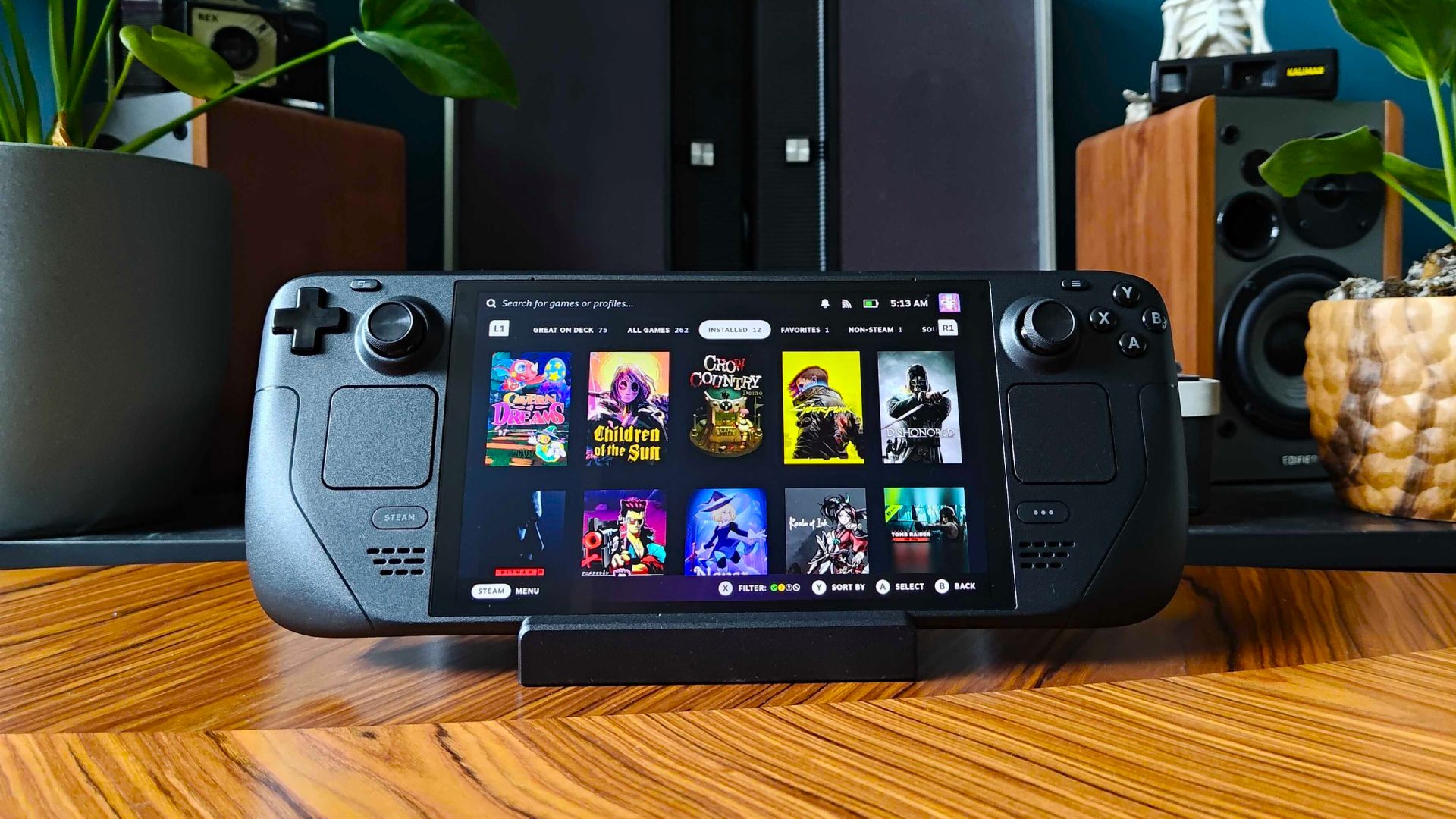

A Steam Deck setup can mean very different things. One player wants the OLED screen and enough storage for a large library. Another needs a dock for a monitor, a slim case for commuting, or protection for the display before the first trip. The Best Steam Deck options below include the main consoles and the accessories that make them easier to live with.
The OLED models are the clear starting point for most buyers, while the older 64GB model is a more limited choice. Among the add-ons, JSAUX covers the practical gaps with a dock, cases, a screen protector, and adjustable stand options.
The Valve Steam Deck OLED 1TB is our top pick, with choices ranging from a complete OLED bundle to focused travel, protection, and desktop accessories.
| # | Product | Award | Storage or display | Battery or connection | Best for |
|---|---|---|---|---|---|
| 1 | Valve Steam Deck OLED 1TB | Best overall | 1TB NVMe SSD, 7.4-inch HDR OLED, up to 90Hz | 50Wh, 3 to 12 hours | Most handheld players |
| 2 | Valve Steam Deck OLED 2TB Bundle | Best complete kit | 2TB SSD, 7.4-inch HDR OLED, 90Hz | Wi-Fi 6E | Buyers wanting extras included |
| 3 | Valve Steam Deck OLED 512GB | Best OLED alternative | 512GB NVMe SSD, 1280 x 800 HDR OLED | 50Wh, Wi-Fi 6E | OLED gaming with expandable storage |
| 4 | Valve Steam Deck 64GB | Best basic console | 64GB storage | Carrying case included | Players with modest libraries |
| 5 | JSAUX Screen Protector 2-Pack | Best screen protection | 7-inch tempered glass | 2 protectors | OLED and LCD owners |
| 6 | JSAUX 6-in-1 Docking Station | Best desktop expansion | HDMI 2.1, 4K at 120Hz | 100W PD, Gigabit Ethernet | Big-screen play |
| 7 | JSAUX ModCase Cooler Set | Best modular protection | Case, cover, bracket, strap | Cooling fan included | Players who customize their Deck |
| 8 | JSAUX Hard Shell Carrying Case | Best storage case | Thickened EVA shell | Charger and dock storage | Full travel kits |
| 9 | tomtoc Slim Carrying Case | Best slim case | Hard shell, padded interior | YKK zippers | Light daily carry |
| 10 | JSAUX PC0105 Kickstand Case | Best adjustable stand | Protective case | Four viewing angles | Desk and tabletop play |
1. Valve Steam Deck OLED 1TB: Best Overall

Pros
- Vibrant 7.4-inch HDR OLED display
- 1TB NVMe SSD leaves room for a large library
- Wi-Fi 6E and a 50Wh battery
- Removable case liner adds useful travel flexibility
Cons
- Battery life varies from 3 to 12 hours
- The carrying case is the only listed accessory
- OLED hardware costs more than the older LCD model
Best for: someone who wants the most balanced Steam Deck console without assembling a separate accessory bundle.
The Valve Steam Deck OLED 1TB is the one we would hand to a player who wants the uncomplicated answer. Its screen is the immediate upgrade you notice: the 7.4-inch HDR OLED panel uses a 1280 x 800 resolution and can run at up to 90Hz. That combination gives games stronger contrast, more convincing dark scenes, and smoother motion than a conventional handheld display, while keeping the resolution sensible for the hardware.
Storage is just as important here. The 1TB NVMe SSD gives a sizeable library room to grow without immediately reaching for a microSD card. Fast internal storage also makes the console feel less like a compromise when installing larger games. Valve lists a 50Wh battery with roughly 3 to 12 hours of gameplay, depending on the content, so demanding games can still shorten a session considerably. The OLED panel helps efficiency, but it does not turn the Deck into an all-day device.
Wireless performance is another quiet strength. Wi-Fi 6E adds access to the 6GHz band on compatible networks, which can help keep downloads and online play less crowded. The included carrying case has a removable liner, a small detail that makes it more adaptable when you want to carry the console with a little extra room or use a different protection setup.
The weakness is the narrow bundle. Unlike the Valve Steam Deck OLED 2TB Bundle, this model does not list a dock, controller, screen protector, or USB drive. The Valve Steam Deck OLED 512GB has the same attractive OLED format and expandable microSD support, but this 1TB version is the easier recommendation for people who want fewer storage decisions. It is also a better starting point than the Valve Steam Deck 64GB for anyone expecting to install modern, space-hungry games.
If your priority is a polished handheld rather than a collection of extras, this is the Best Steam Deck choice. Add a dock later if you want a monitor, or begin with the accessories that make a handheld setup easier to use.
2. Valve Steam Deck OLED 2TB Bundle: Best Complete Kit

Pros
- 2TB SSD is the largest listed storage capacity
- 7.4-inch HDR OLED display with 90Hz refresh rate
- Wi-Fi 6E and improved touchscreen response
- Includes a case, hub, controller, cases, protector, and USB drive
Cons
- The SSD was professionally upgraded after the original seal was opened
- The bundle adds accessories you may already own
- Battery life still depends heavily on the game
Best for: a buyer who wants a high-capacity OLED Deck and a ready-made accessory kit in one purchase.
The Valve Steam Deck OLED 2TB Bundle is built around excess storage and convenience. A 2TB SSD can hold a substantial Steam library, which matters on a handheld where swapping between games is part of the appeal. The listing says the original seal is opened for the professional SSD upgrade, so this is not the same buying experience as a factory-sealed configuration. That detail deserves attention before ordering.
The display is the same kind of reason to choose an OLED Deck in the first place. It is a 7.4-inch HDR OLED panel with a 90Hz refresh rate, designed to make movement look smoother and dark scenes more dramatic. The listing also calls out a more responsive touchscreen and faster haptics. Those changes are subtle beside the display, but they make the interface and touch controls feel less like a fallback.
Wi-Fi 6E gives this bundle modern wireless connectivity, and the included kit is unusually broad. It contains a carrying case, a hub, a controller, two protective cases, a screen protector, and a 32GB USB drive. That makes it more practical for a living-room setup than the Valve Steam Deck OLED 1TB, which includes a carrying case but no listed hub or controller.
The bundle is not automatically the right choice. If you already have a controller, dock, and case, its extras may create duplication rather than convenience. The Valve Steam Deck OLED 512GB offers the same 7.4-inch OLED format with a smaller internal drive and a clear microSD expansion path. The 2TB model is the stronger pick for a large installed library, but buyers who care about a straightforward original configuration should think carefully about the upgraded drive.
Choose this model when you want the most storage and a broad set of accessories from the start. It is especially suited to someone moving between handheld and television play, provided the opened-for-upgrade condition is acceptable.
3. Valve Steam Deck OLED 512GB: Best OLED Alternative

Pros
- 7.4-inch HDR OLED display at 1280 x 800
- Up to 90Hz refresh rate and 1, 000 nits HDR peak brightness
- Wi-Fi 6E and Bluetooth 5.3
- Supports microSD, SDXC, and SDHC cards
Cons
- 512GB fills faster than the 1TB and 2TB options
- Listed as an international UK version
- No accessory bundle is listed
Best for: players who want the OLED experience and broad connectivity while planning to expand storage with a memory card.
The Valve Steam Deck OLED 512GB makes the OLED hardware easier to approach without jumping straight to the largest storage configuration. Its 7.4-inch screen runs at 1280 x 800 and supports up to 90Hz, so the visual experience is not merely about deeper blacks. Fast motion, menus, and supported games can all feel more fluid.
The display specification is unusually detailed. HDR brightness is listed at up to 1, 000 nits, while SDR brightness is 600 nits. That gives HDR content more room for bright highlights, though the result still depends on the game and lighting around you. The screen also lists a response time below 0.1 milliseconds, a figure that supports the OLED panel's quick feel without changing the fact that game performance varies by title.
Inside, the console uses a 512GB NVMe SSD and 16GB of LPDDR5 memory at 5, 500 MT/s. The listed AMD APU combines four Zen 2 CPU cores with eight threads and eight RDNA 2 GPU compute units. The APU power range is 4 to 15W, which explains why this remains a handheld rather than a desktop replacement. Valve lists a 50Wh battery and 3 to 12 hours of gameplay, while demanding games remain the harder test for endurance.
Connectivity is strong for a mid-capacity configuration. Wi-Fi 6E, Bluetooth 5.3, a dedicated Bluetooth antenna, and video output over USB-C give it useful flexibility. The USB-C display connection can support up to 8K at 60Hz or 4K at 120Hz according to the listing, though the console and game still determine what resolution and frame rate are realistic. Compared with the Valve Steam Deck OLED 1TB, the main sacrifice is storage. Compared with the Valve Steam Deck 64GB, the screen, wireless hardware, and internal capacity are all much more compelling.
The international UK version is the point to investigate before buying. It is also not packaged with the broad extras found in the Valve Steam Deck OLED 2TB Bundle. Still, if you are comfortable adding a microSD card and sourcing accessories separately, this remains a well-equipped OLED handheld for library-first players.
4. Valve Steam Deck 64GB: Best Basic Console

Pros
- Familiar Steam Deck handheld design
- Carrying case included
- 64GB internal storage
- Lighter listed weight than many large accessory cases
Cons
- The 64GB capacity is restrictive for modern game libraries
- The listing provides very few technical details
- It lacks the OLED display and Wi-Fi 6E features of the newer models
Best for: a player who wants the basic Steam Deck format and expects to manage storage carefully.
The Valve Steam Deck 64GB is the simplest console here, and that simplicity is both its appeal and its limitation. It includes a carrying case, so it is ready to travel without an immediate accessory purchase. The product data does not provide a display resolution, refresh rate, battery specification, or wireless standard, so we would not choose it when those details are central to the decision.
The 64GB capacity needs realistic expectations. It can work for a small rotation of games, older titles, or a user who is comfortable uninstalling and reinstalling. It is not the natural fit for someone who wants a large collection available offline. The Valve Steam Deck OLED 512GB removes much of that friction while also adding a brighter HDR OLED panel, Wi-Fi 6E, Bluetooth 5.3, and microSD support.
The listing names HDMI and gives the console a black finish, but it does not describe a dock or expanded port selection. That means a desktop setup will need more planning than it would with the JSAUX 6-in-1 Docking Station. The included case is useful, yet the overall package is much less complete than the Valve Steam Deck OLED 2TB Bundle.
Its listed weight is about 1.46 pounds, with dimensions of 16 by 5 by 3 inches in the product information. Those measurements may reflect packaging or listing conventions rather than a helpful description of the handheld itself, so we would not use them as a reason to choose this model over the OLED consoles.
The key weakness is not subtle: 64GB leaves little room for a modern library. Choose it only if your game habits match that constraint or if expandable storage is part of your plan. For most people searching for the Best Steam Deck, one of the OLED models is a more complete long-term starting point.
5. JSAUX Screen Protector 2-Pack: Best Screen Protection

Pros
- Compatible with Steam Deck OLED and LCD models
- Two 7-inch tempered glass protectors
- Alignment frame simplifies installation
- Oleophobic coating helps resist fingerprints
Cons
- The listed compatibility is limited to the two Steam Deck display versions
- Tempered glass adds another surface between the player and the panel
- It protects the screen but does not replace a case
Best for: Steam Deck owners who want edge-to-edge display coverage and a spare protector for later.
The JSAUX Screen Protector 2-Pack addresses the most exposed part of a handheld. It is designed for both the Steam Deck LCD and OLED models, with full-screen coverage for the listed 7-inch display size. That cross-generation compatibility makes it a practical add-on whether you own the original console or one of the OLED versions.
Installation is where this protector makes its strongest case. The included guiding frame is meant to hold alignment steady instead of leaving you to judge each edge by eye. That matters on a large handheld screen, where a small misalignment can be visible every time you play. The second protector is useful insurance if dust, a dropped device, or a later replacement turns the first installation into a short-lived success.
JSAUX lists 99.99% transparency, so the intention is to preserve the original clarity rather than soften the display. An oleophobic coating helps reduce fingerprints, which is particularly useful on a touchscreen that gets handled constantly. The listing also describes glass reinforced at 500 degrees Celsius for several hours and calls it five times sturdier than protectors reinforced once, though those claims are not accompanied by an independent testing standard.
This is not a privacy filter or a replacement for the OLED display's own surface characteristics. It also cannot protect the corners, controls, or back of the console. Pair it with a travel case such as the JSAUX Hard Shell Carrying Case if the Deck regularly leaves the house. Players who prefer a minimal setup may appreciate the tomtoc Slim Carrying Case, which protects the console while keeping the travel profile smaller.
The main thing to check is the model. The protector is specifically presented for Steam Deck OLED and LCD, not a general-purpose handheld screen. For either of those consoles, the alignment frame, two-pack format, and fingerprint-resistant coating make it the sensible first protection step.
6. JSAUX 6-in-1 Docking Station: Best Desktop Expansion

Pros
- HDMI 2.1 output supports 4K at 120Hz
- Three USB-A 3.0 ports
- Gigabit Ethernet and 100W Power Delivery
- Compatible with Steam Deck LCD and OLED models
Cons
- A 100W charger is recommended for the full charging claim
- Compatibility exclusions include the ROG Xbox Ally models
- HDMI output capability does not guarantee every game will run at 4K and 120Hz
Best for: players who want to connect a Steam Deck to a monitor, television, wired network, and USB accessories.
The JSAUX 6-in-1 Docking Station changes the Steam Deck from a handheld into a small desktop gaming system. Its most important connection is HDMI 2.1, with support listed for 4K at 120Hz. That is useful when connecting to a modern television or monitor, although the Deck itself and the game determine the actual resolution and frame rate you will see.
The dock also supplies three USB-A 3.0 ports. That gives room for a keyboard, mouse, controller, storage device, or other wired peripheral without repeatedly swapping one accessory into the console. Gigabit Ethernet is the more meaningful upgrade for online play and large downloads. A wired connection can be more consistent than a busy wireless network, particularly when the Deck is used in a fixed location.
Power delivery is listed at up to 100W, and the product page recommends a 100W charger. That is a capability of the dock rather than a promise that the Steam Deck will draw the full amount. It is best understood as headroom for supported handhelds and demanding charging modes, not as a reason to expect desktop-class performance from the Deck.
Compared with the Valve Steam Deck OLED consoles, this is the accessory that adds the missing living-room convenience. The Valve Steam Deck OLED 2TB Bundle includes a hub in its kit, but its listing does not provide the same detailed port breakdown. The JSAUX dock is also compatible with the ROG Ally, Ally X, Legion Go, Legion Go S, and MSI Claw, though the listing specifically excludes the ROG Xbox Ally models.
Its limitation is that the dock does not make every game a 4K, 120Hz experience. It gives you the connection and power infrastructure, while the handheld supplies the rendering performance. If you regularly play at a desk or television, this is more useful than a simple stand. If your Deck stays in your hands, the JSAUX PC0105 Kickstand Case is the more relevant desktop accessory.
7. JSAUX ModCase Cooler Set: Best Modular Protection

Pros
- Protective case uses PC-ABS and silicone materials
- Modular slider supports compatible add-ons
- Includes front cover, strap, metal bracket, and cooling fan
- Cutouts are designed for the 2022 Steam Deck
Cons
- Listed fit is for the 2022 Steam Deck
- Adds weight and bulk to the handheld
- Cooling fan is an extra component to manage and power
Best for: owners of the 2022 Steam Deck who want protection, a stand, a cover, and active cooling in one modular system.
The JSAUX ModCase Cooler Set is aimed at the owner who wants the Deck to do more than sit inside a basic shell. It combines a protective back case with a front cover, metal bracket, strap, and cooling fan. That is a very different approach from the tomtoc Slim Carrying Case, which is designed to protect the console during transport without staying attached during play.
The case uses eco-friendly PC-ABS and silicone materials, according to the listing, with the goal of resisting scratches and cracks. Its cutouts are designed specifically for the Valve Steam Deck from 2022. That fit detail matters: this is not a universal handheld case, and buyers with an OLED model should verify compatibility rather than assume that a shared Steam Deck name guarantees a perfect fit.
The modular slider is the interesting part. It lets the owner attach compatible accessories, while the metal bracket provides a stand-like function and the strap gives another way to handle or secure the device. The included cooling fan is intended to increase airflow and reduce temperatures during gaming. That can be useful during sustained play, but a fan also introduces another piece of hardware, another source of noise, and another thing to keep charged or connected.
The JSAUX PC0105 Kickstand Case is a cleaner solution if your main goal is adjustable viewing angles. The ModCase Cooler Set wins when you want a more involved protective platform with multiple attachment points. It is also less travel-friendly than the JSAUX Hard Shell Carrying Case, which has dedicated space for the console and accessories rather than becoming part of the console itself.
The real weakness is fit and bulk. Owners of the 2022 Steam Deck are the clear audience, while OLED owners should be cautious. Pick this set if you like the idea of building a tailored handheld rig and want cooling included. Skip it if you prefer the lightest possible console or only need a case for transit.
8. JSAUX Hard Shell Carrying Case: Best Storage Case

Pros
- Thickened EVA shell helps resist impacts and compression
- Holds the console with a protective case attached
- Space for a charger, dock, power bank, and headphones
- Fleece compartment helps protect the screen
Cons
- Accessories are not included
- Larger and heavier than a slim travel case
- Not compatible with Legion Go models or the 2025 ROG Xbox Ally models
Best for: travelers who carry a Steam Deck alongside its charger, dock, and other accessories.
The JSAUX Hard Shell Carrying Case is the practical luggage option in this group. Its expanded interior is designed to hold the Steam Deck or ROG Ally without removing a protective case, while also making room for an original AC charger, docking station, small power bank, and headphones. That is the difference between a case that merely stores a console and one that can carry a complete gaming kit.
Protection comes from a thickened EVA shell intended to resist pressure, collisions, and falls. A grooved interior helps avoid pressing on the handheld's grips, and a fleece compartment separates the screen from other contents. Velcro straps hold the device in place, while the reinforced handle gives the case a more secure way to travel.
The double zipper design is another useful everyday detail. The concealed zipper is intended to close smoothly and keep accessories from falling out, while the handle is reinforced for repeated carrying. These features do not change how the Deck performs, but they reduce the small annoyances that make a travel case frustrating after a few weeks.
The trade-off is size. The product information lists dimensions of about 12.91 by 6.10 by 3.78 inches and a weight of about 1.63 pounds. That makes it far more capable than the tomtoc Slim Carrying Case, but also much less discreet in a small bag. The tomtoc case is the better match when you carry only the console and want a thin shell.
Compatibility needs a careful read. The listing supports Steam Deck OLED, Steam Deck, ROG Ally, ROG Ally X, and PlayStation Portal, but excludes the 2025 ROG Xbox Ally models and Legion Go series. Accessories are not included, so the roomy interior is an opportunity rather than a complete kit. For owners who carry the Deck, power, and peripherals together, it is the more organized choice.
9. tomtoc Slim Carrying Case: Best Slim Case
Pros
- Thin and lightweight travel design
- Hard shell protects against knocks and drops
- Raised areas help prevent accidental button presses
- Padded buffer protects shoulder buttons
- YKK zippers and splash-proof PU exterior
Cons
- Designed mainly for the console, not a full accessory kit
- Accessories are not included
- Slim format gives up the storage space of a larger case
Best for: commuters and travelers who want hard-shell protection without carrying a large case.
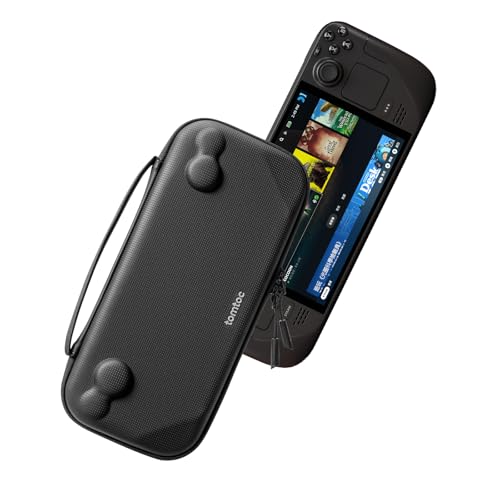
The tomtoc Slim Carrying Case understands that many Steam Deck owners do not need to transport a dock, headphones, power bank, and charger together. It is designed as a thin, lightweight travel bag for the Steam Deck and Steam Deck OLED, making it a better fit for a backpack or work bag than the larger JSAUX Hard Shell Carrying Case.
The hard shell is intended to protect against scratches, knocks, bumps, and drops. Inside, raised areas follow the shape of the console and help prevent the joysticks and buttons from being pressed accidentally. A padded buffer protects the shoulder buttons from compression. Those are the details that matter in a slim case, because reducing bulk is only useful if the handheld still has room around its controls.
Materials and hardware are reassuringly specific. The exterior uses splash-proof PU and felt hard-shell material, and the case has heavy-duty YKK zippers. It is not described as waterproof, so it should not be treated as protection against serious rain or spills. Its listed weight is about 0.73 pounds, noticeably lighter than the JSAUX case designed to carry a whole accessory load.
The limitation is obvious once you decide to bring more gear. There is no listed room for a dock, large power bank, or headphones, and the Steam Deck and accessories shown for demonstration are not included. The JSAUX Hard Shell Carrying Case is a better travel command center, while this tomtoc is the cleaner choice for a console-first commute.
A 12-month warranty and customer service are listed with the product. Choose it when thinness and protection matter more than storage capacity. If your usual trip involves only the handheld and perhaps a cable, this is the case that creates the least friction.
10. JSAUX PC0105 Kickstand Case: Best Adjustable Stand

Pros
- Four adjustable viewing angles
- Combines a protective shell with a stand
- Textured sides improve grip
- Openings at the back support heat dissipation
- Precise cutouts for the Steam Deck
Cons
- Not compatible with JSAUX or official docking stations
- Skins and decals may prevent a proper fit
- It does not provide active cooling
Best for: Steam Deck owners who want hands-free viewing and a more secure grip without a separate stand.
The JSAUX PC0105 Kickstand Case is the straightforward case-and-stand option. It protects the handheld while adding a rear kickstand, so you can set the Deck down for a video, tabletop game, or controller-based session. That is more convenient than carrying a separate stand, especially when the console is used in several rooms.
The kickstand has four listed adjustment angles: 35, 45, 55, and 65 degrees. Those positions give you practical control over the screen's tilt, whether the Deck is sitting on a desk or a table. The case also has textured sides intended to improve grip and reduce slipping during handheld play.
Fit is described as precise, with cutouts for the console's ports and openings at the back to help with heat dissipation. The product is designed for the Valve Steam Deck, and the listing says it is easy to install and remove. It also warns that a protective skin decal can prevent the case from fitting perfectly, so owners with a skin should account for that before ordering.
This case is not compatible with the JSAUX or official docking station. That is the key conflict in the lineup. If you use the JSAUX 6-in-1 Docking Station regularly, removing the case each time may erase the convenience of having it. The JSAUX ModCase Cooler Set is more expandable and includes a cooling fan, but it is also more elaborate and is listed for the 2022 Steam Deck.
The PC0105 makes sense for a player who values a built-in viewing angle more than modular attachments. It is not the most flexible choice for a dock-heavy desk, but it is a neat solution for tabletop play and relaxed viewing.
How to choose the best steam deck
The right Steam Deck setup depends on the console's screen and storage first, then on how you plan to carry, protect, and connect it.
OLED display
The OLED models in this roundup use a 7.4-inch display with 1280 x 800 resolution and refresh rates up to 90Hz. OLED gives dark scenes deeper contrast, while HDR support can make bright highlights more pronounced in compatible games. The Valve Steam Deck 64GB does not list these display details, so choose an OLED model when screen quality is a priority.
Internal storage
Storage determines how much of your library can stay installed. The options here range from 64GB to 512GB, 1TB, and 2TB. A 64GB console demands frequent management, while 512GB is more comfortable and can be expanded with a supported microSD card. The 1TB model is the easiest middle ground, and the 2TB bundle suits players who want the largest internal library.
Battery life
The OLED consoles list a 50Wh battery and 3 to 12 hours of gameplay, depending on the content. That is a wide range because demanding games use more power than lighter indie titles. Treat the upper figure as a content-dependent possibility, not a guarantee for every session. Brightness, refresh rate, wireless use, and performance demands all affect how long the Deck lasts.
A larger SSD changes how often you manage games, but an OLED screen changes every minute you spend playing.
Connectivity and docking
Wi-Fi 6E can use the 6GHz band on compatible networks, while Bluetooth 5.3 supports controllers, audio, and other accessories on the OLED 512GB listing. For television or monitor use, the JSAUX 6-in-1 Docking Station adds HDMI 2.1, three USB-A 3.0 ports, Gigabit Ethernet, and up to 100W Power Delivery. Remember that a dock exposes video capability, but it does not guarantee that the handheld can render every game at 4K and 120Hz.
Protection and portability
A screen protector is the first line of defense against scratches, while a case protects controls and the rear shell. The tomtoc Slim Carrying Case is the lightest listed travel option, while the JSAUX Hard Shell Carrying Case makes room for a charger, dock, power bank, and headphones. For attached protection, the PC0105 adds a stand, and the ModCase adds modular attachments and active cooling.

Frequently asked questions
Which Steam Deck should most people buy?
The Valve Steam Deck OLED 1TB is the most balanced choice in this group. It combines the 7.4-inch HDR OLED display, up to 90Hz refresh rate, 1TB NVMe SSD, Wi-Fi 6E, and a 50Wh battery. The Valve Steam Deck OLED 512GB is a sensible alternative if you are comfortable expanding storage with a microSD card.
Is the Steam Deck OLED better than the 64GB model?
The OLED models provide a more detailed display specification, including HDR, a 90Hz refresh rate, and a 7.4-inch panel. They also offer much more internal storage than the 64GB model. The older console can still suit a player with a small library, but it requires more careful storage management.
How much Steam Deck storage is enough?
The answer depends on the games you keep installed. The 64GB model is restrictive for a large library, while 512GB gives a more comfortable starting point and supports microSD expansion. The 1TB model reduces storage management, and the 2TB model is the strongest fit for someone who wants a large offline collection.
Can the JSAUX dock connect a Steam Deck to a television?
Yes. The JSAUX 6-in-1 Docking Station provides HDMI 2.1 output with support listed for 4K at 120Hz. It also includes three USB-A 3.0 ports, Gigabit Ethernet, and up to 100W Power Delivery. Actual game resolution and frame rate depend on the Steam Deck and the title being played.
Does the screen protector fit both Steam Deck versions?
The JSAUX Screen Protector 2-Pack is listed as compatible with both Steam Deck LCD and Steam Deck OLED models. It covers the 7-inch screen and includes an alignment frame. The pack contains two protectors, so there is a spare if the first installation does not go perfectly.
Which Steam Deck case is best for travel?
The tomtoc Slim Carrying Case is the better choice when you want a lightweight hard shell for the console itself. The JSAUX Hard Shell Carrying Case is better for a full kit because it has room for the charger, dock, small power bank, and headphones. The larger case is less compact, but it avoids carrying several loose accessories.
Can the PC0105 case stay on while using a dock?
The listing says the JSAUX PC0105 Kickstand Case is not compatible with JSAUX and official docking stations. If docking is a regular part of your setup, verify the fit before buying. The case is better suited to tabletop play, adjustable viewing, and handheld protection.
The bottom line
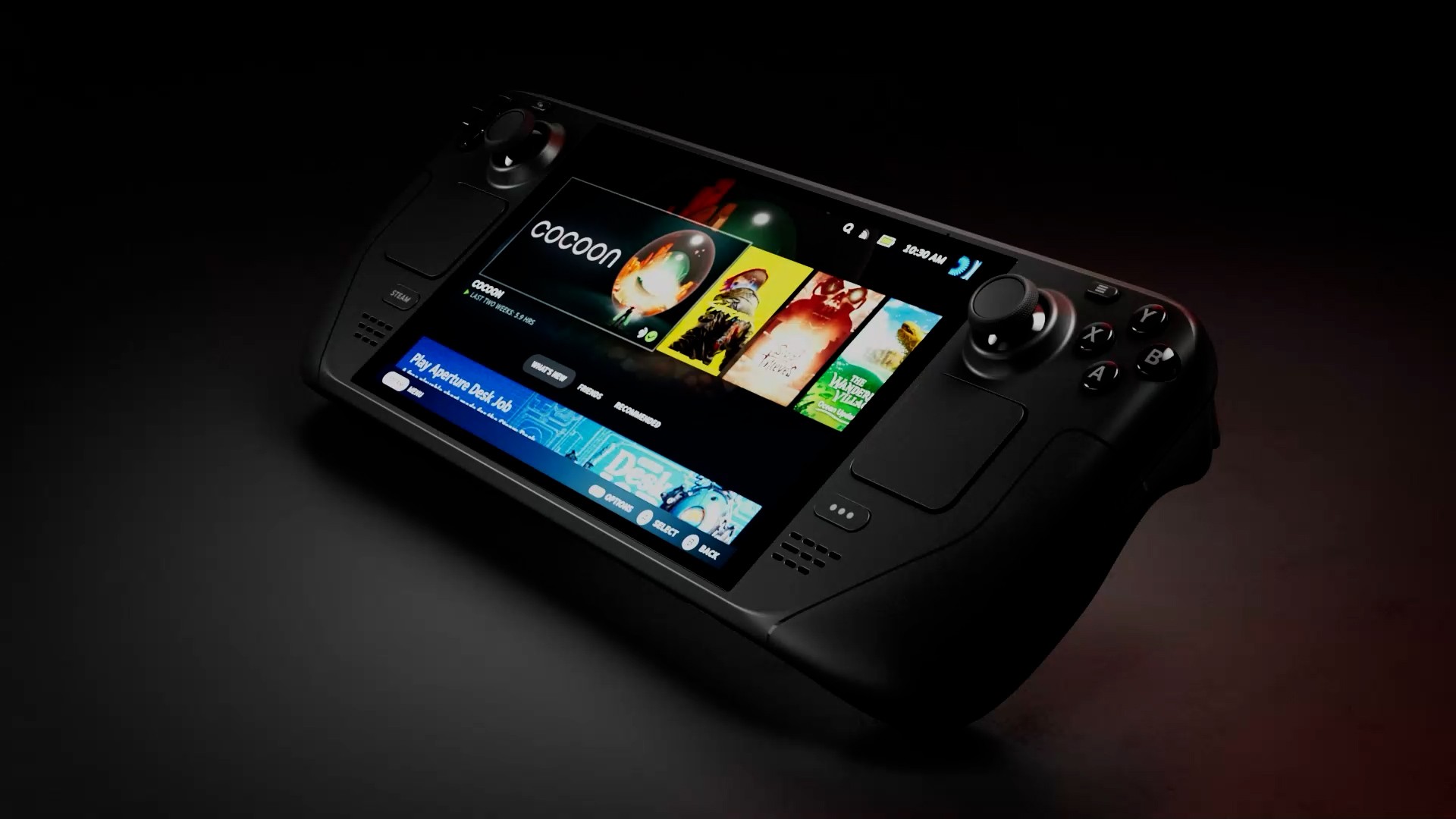
The Best Steam Deck choice here is the Valve Steam Deck OLED 1TB. It has the right combination of a 7.4-inch HDR OLED display, 90Hz capability, 1TB internal storage, Wi-Fi 6E, and a 50Wh battery without requiring a large accessory bundle. Choose the Valve Steam Deck OLED 2TB Bundle instead if you want the biggest internal drive and included accessories, and accept that its SSD was professionally upgraded after the original seal was opened.
For the rest of the setup, the JSAUX 6-in-1 Docking Station is the most useful desktop addition, while the tomtoc Slim Carrying Case is the easiest travel companion. The JSAUX screen protector is a sensible first layer of protection, and the PC0105 case is the better fit for adjustable tabletop viewing.
If you are undecided, get the Valve Steam Deck OLED 1TB, then add only the accessory that matches how you actually play.
As an Amazon Associate we earn from qualifying purchases.