

Three screens can transform a desk, but three factory stands can consume nearly every usable inch of it. The right arm clears that clutter while keeping the displays aligned, stable, and close enough that you are not constantly turning your neck. The wrong one leaves you fighting sagging screens, limited height, or a clamp that does not suit your desk.
The Best triple monitor setup depends on more than the number of arms. Screen size, monitor weight, VESA pattern, desk thickness, and the way you want the displays arranged all matter. We compared ten mounts that cover conventional side-by-side layouts, tall stacked arrangements, free-standing desks, and unusually large center screens.
Our top pick is the HUANUO Triple Mount, with the VIVO STAND-V300G close behind for smoother pneumatic adjustment. The rest range from a strong 49-inch center-screen mount to a free-standing option and compact choices for smaller displays.
Comparison table
| # | Product | Award | Screen fit | Capacity | Movement | Mounting | Best for |
|---|---|---|---|---|---|---|---|
| 1 | HUANUO Triple Mount | Best overall | 17 to 32 inches | 4.4 to 17.6 lb per arm | Tilt, swivel, rotation | C-clamp or grommet | Most three-screen desks |
| 2 | WALI 13 to 32 Mount | Best adjustability | 13 to 32 inches | Up to 17.6 lb per arm | ±45° tilt, ±90° swivel, 360° rotation | C-clamp | Frequent repositioning |
| 3 | VIVO STAND-V300G | Best pneumatic arms | 17 to 32 inches | Up to 17.6 lb per arm | ±90° tilt, 180° swivel, 360° rotation | C-clamp | Smooth arm movement |
| 4 | WALI Free-Standing Triple | Best free-standing design | 13 to 27 inches | Up to 22 lb per arm | Tilt, swivel, rotation | V-base or grommet | Desks that cannot be clamped |
| 5 | MOUNTUP 17 to 32 Mount | Best for heavier standard screens | 17 to 32 inches | 4.4 to 19.8 lb per arm | Tilt, swivel, rotation | C-clamp or grommet | Mixed-size monitors |
| 6 | MOUNT PRO 32 Mount | Best tall arrangement | 13 to 32 inches | 4.4 to 19.8 lb per arm | ±90° tilt, 180° swivel, 360° rotation | C-clamp or grommet | Sitting or standing desks |
| 7 | PUTORSEN 49-inch Mount | Best ultrawide center | Center up to 49 inches | Center up to 44 lb | ±35° tilt, ±90° swivel, 360° rotation | C-clamp | Large center display |
| 8 | ErGear 32-inch Mount | Best simple setup | 17 to 32 inches | 4.4 to 17.6 lb per arm | Tilt, swivel, rotation | C-clamp or grommet | Straightforward office layouts |
| 9 | WALI Stacked Triple | Best stacked design | 13 to 34 inches | Up to 19.8 lb per arm | ±70° to -45° tilt, 180° swivel, 360° rotation | C-clamp or grommet | High vertical layouts |
| 10 | MOUNTUP 27-inch Mount | Best compact choice | Up to 27 inches | 4.4 to 19.8 lb per arm | ±35° tilt, ±90° swivel, 360° rotation | C-clamp or grommet | Three smaller monitors |
1. HUANUO Triple Mount: Best Overall

Pros
- Fits three screens from 17 to 32 inches
- Includes C-clamp and grommet mounting
- Supports portrait or landscape orientation
- Broad adjustment range for a clean viewing angle
Cons
- Each arm is limited to 17.6 pounds
- It does not suit monitors larger than 32 inches
- Screen weight must be at least 4.4 pounds
Best for: most users building a conventional three-screen desk around standard monitors.
The HUANUO Triple Mount is the one we would start with for a normal three-monitor workstation. It covers the common 17 to 32-inch range without forcing you into a particular layout, and its arms can be swiveled, tilted, or rotated as your desk changes. That flexibility matters when the center screen needs to stay straight while the outer screens angle inward.
Each arm supports 4.4 to 17.6 pounds, so check the complete monitor weight rather than relying on screen size alone. The VESA requirement is also specific: your displays need 75 by 75mm or 100 by 100mm mounting holes. Those limits make it a sensible match for ordinary flat or curved computer displays, but not for oversized professional panels.
The mounting choices are unusually useful. The C-clamp suits desks from 0.39 to 3.15 inches thick, while the grommet mount works with surfaces from 0.39 to 2.36 inches. That gives it a better chance of fitting a real desk than a mount with only one base style. It also frees the desktop beneath the monitors, which is more useful than a large feature list when a keyboard, laptop, and notebook all need room.
The weakness is capacity. The WALI Free-Standing Triple accepts up to 22 pounds per arm, and the PUTORSEN 49-inch Mount is built for a much larger center display. Choose HUANUO instead when your screens fall within its limits and you want a balanced, conventional layout with fewer compatibility surprises.
2. WALI 13 to 32 Mount: Best Adjustability

Pros
- Wide 13 to 32-inch compatibility
- ±45° tilt and ±90° swivel
- Extends 27.2 inches from the base
- Cable guides keep wires along the arms
Cons
- C-clamp mounting only
- Maximum load is 17.6 pounds per arm
- Recommended for wooden desks
Best for: users who frequently change monitor angles, height, or desk position.
The WALI 13 to 32 Mount stands out when adjustment is the main reason for buying an arm. Its screens can extend up to 27.2 inches and rise as much as 17.2 inches above the desktop. That reach helps when a wide desk places the outer displays farther away, or when the center screen needs to move closer for a focused task.
Its movement range is generous: ±90° swivel, ±45° tilt, and 360° rotation. Rotation is particularly helpful for portrait documents, chat windows, and coding panels. The broad VESA head and tighter-fitting VESA panel are intended to reduce unwanted movement after adjustment, while the arm core is described as tested through more than 20, 000 cycles.
This model accepts flat or curved displays from 13 to 32 inches, provided each weighs no more than 17.6 pounds and uses a 75 by 75mm or 100 by 100mm VESA pattern. Cable management is built into the arms, so the rear of the desk should look less tangled once the screens are positioned.
The main limitation is the base. Unlike HUANUO Triple Mount and several other picks here, it offers a C-clamp rather than a grommet alternative, and the instructions recommend a wooden desk without an underside crossbeam. It is the better choice for active repositioning, but skip it if your desk cannot accept that clamp.
3. VIVO STAND-V300G: Best Pneumatic Arms

Pros
- Dual pneumatic arms counterbalance the screens
- Supports three screens up to 32 inches
- Includes C-clamp and grommet hardware
- 360° screen rotation
Cons
- Center bracket is fixed rather than pneumatic
- Maximum load is 17.6 pounds per screen
- No stated grommet thickness range
Best for: anyone who wants smoother movement on the two outer displays.
The VIVO STAND-V300G takes a different approach from the simpler spring-loaded designs. Its two side arms use pneumatic springs, which counterbalance the displays as you raise, lower, or reposition them. That is a meaningful advantage when the outer screens move often, while the fixed center bracket keeps the middle panel anchored.
It supports screens from 17 to 32 inches, up to 17.6 pounds each, with 75 by 75mm or 100 by 100mm mounting holes. The arms tilt from +90° to -90°, swivel 180°, and rotate 360°. Those numbers translate into a mount that can handle a straight three-screen row, angled side displays, or portrait orientation without requiring a separate stand.
The steel and aluminum construction is designed around three displays, and tension can be increased for heavier screens or reduced for lighter ones. The C-clamp mounts to a surface up to 3.25 inches thick. Hardware and step-by-step instructions are included, which should make installation less intimidating than assembling three independent arms.
HUANUO Triple Mount is more flexible about mounting details because it gives clear C-clamp and grommet ranges, while VIVO has the more interesting movement system. The fixed center arm also means this is not the right pick for someone who wants every screen floating independently. For a frequently adjusted desk, though, the pneumatic side arms are the reason to choose it.
4. WALI Free-Standing Triple: Best Free-Standing Design

Pros
- Works without clamping to the desk
- Supports up to 22 pounds per arm
- Fits screens up to 27 inches
- Includes a grommet-base alternative
Cons
- Supports smaller screens than most clamp mounts
- The V-base occupies desktop space
- Center tilt is limited to ±15°
Best for: desks where a clamp or drilled grommet cannot be used.
The WALI Free-Standing Triple solves the problem that many monitor arms ignore: some desks simply cannot take a clamp. Its V-shaped base sits on the desktop, so it can work on a surface where an underside frame, delicate edge, or unusual construction rules out a conventional mount.
The trade-off is footprint. The free-standing base uses desk space that HUANUO Triple Mount and MOUNTUP 17 to 32 Mount would leave open. Still, the 16-inch pole and height-adjustable arms create a more organized layout than three separate factory stands. The mount accepts screens up to 27 inches and supports up to 22 pounds per arm, the highest per-arm capacity among the conventional free-standing options here.
Movement varies by position. The center screen tilts ±15°, while the side screens tilt ±90° and swivel. All three can rotate 360° between landscape and portrait. The detachable mounting plates support 75 by 75mm and 100 by 100mm VESA patterns, and the included grommet base can fit desks from 0.3 to 2.4 inches thick if you later decide to use a hole-mounted arrangement.
This is less elegant for a narrow desk than a clamp arm, and the center panel has less tilt freedom. It is the sensible answer for a sturdy surface that cannot be clamped, especially when your screens are under 27 inches and weigh more than some lighter-duty arms allow.
5. MOUNTUP 17 to 32 Mount: Best for Heavier Standard Screens

Pros
- Holds up to 19.8 pounds per arm
- Fits screens up to 32 inches
- C-clamp and grommet mounting included
- Detachable VESA plates simplify setup
Cons
- Thin desks may need reinforcement
- No pneumatic arm system
- Large screens can still limit side-by-side spacing
Best for: mixed-size displays that need more capacity than a 17.6-pound arm offers.
The MOUNTUP 17 to 32 Mount is a practical middle ground for three standard displays. Its 4.4 to 19.8-pound capacity per arm gives it more headroom than HUANUO Triple Mount and WALI 13 to 32 Mount, while the 17 to 32-inch screen range covers the usual office and gaming monitor sizes.
Each arm supports height adjustment, swivel, tilt, and rotation, allowing portrait or landscape positioning. The VESA plates detach, which makes the awkward part of installation easier because you can attach each plate to the monitor before lifting it onto the arm. MOUNTUP says the setup can take less than 20 minutes with the included instructions and hardware.
The C-clamp fits desks from 0.39 to 3.15 inches thick, and the grommet mount works with desks from 0.39 to 1.97 inches thick. Cable covers and clips hide wires along the arms. The heavy-gauge steel construction is described as tested through more than 20, 000 exercises, and the product includes three years of support.
Its real caution is the desk itself. The listing recommends a reinforcement plate for thin surfaces, and that plate is not included. WALI Stacked Triple handles a taller layout and PUTORSEN 49-inch Mount handles much larger center screens, but MOUNTUP is the more sensible fit for three conventional monitors with slightly heavier bodies.
6. MOUNT PRO 32 Mount: Best Tall Arrangement

Pros
- 28-inch pole reaches up to 36.3 inches
- Supports side-by-side or triangular layouts
- 19.8-pound capacity per arm
- C-clamp and grommet options
Cons
- Not compatible with 1000R curved screens
- Tall pole needs suitable clearance
- The layout can take careful balancing
Best for: sitting or standing workstations that need substantial vertical adjustment.
The MOUNT PRO 32 Mount is the flexible layout specialist. Its 28-inch pole can reach a maximum height of 36.3 inches, giving the three arms room for a triangular arrangement or a higher screen position when switching between sitting and standing.
It supports three 13 to 32-inch flat or curved monitors, with each arm rated for 4.4 to 19.8 pounds. Tilt runs from +90° to -90°, swivel is 180°, and rotation is 360°. The arms can extend up to 18.1 inches, so a smaller display can sit beside another rather than forcing all three panels into one rigid row.
The compatibility warning matters: the listing specifically excludes 1000R curved screens. VESA support is 75 by 75mm or 100 by 100mm, and the C-clamp fits desks from 0.39 to 3.15 inches. The grommet base suits desks from 0.39 to 1.97 inches. Cable management at the bottom of the arm helps keep a tall installation from becoming visually messy.
MOUNT PRO gives you more vertical ambition than MOUNTUP 27-inch Mount, but a tall pole is only useful if the ceiling, shelf, and desk depth allow it. Skip this one for a simple low row on a compact desk. Choose it when the layout itself is the priority.
7. PUTORSEN 49-inch Mount: Best Ultrawide Center

Pros
- Center arm supports screens up to 49 inches
- Center capacity reaches 44 pounds
- Side gas-spring arms support up to 35-inch screens
- C-clamp and cable management included
Cons
- C-clamp range is limited to 0.4 to 1.8 inches
- Side arms support less than the center arm
- The design is excessive for three small screens
Best for: a workstation built around a very large center monitor and two side displays.
The PUTORSEN 49-inch Mount is not a conventional triple-arm stand with three equal positions. The center arm supports a display up to 49 inches and up to 44 pounds, while the two gas-spring side arms handle screens up to 35 inches and 26.4 pounds each. That makes it the obvious choice for a large ultrawide center panel with smaller supporting screens.
The center arm is height adjustable, and the side arms extend, retract, and move dynamically. All three arms tilt, swivel, and rotate, with ±35° tilt, ±90° swivel, and 360° rotation. That movement is useful when the side screens are angled toward the user rather than arranged as one flat wall.
The mount supports 75 by 75mm and 100 by 100mm VESA patterns. Its cast aluminum base and arms are designed for heavy displays, and removable cable management keeps the wiring behind the structure. The C-clamp fits desks from 0.4 to 1.8 inches thick, a narrower range than most mounts here, so desk compatibility deserves attention before ordering.
For a conventional three-screen row, HUANUO Triple Mount is easier to match to ordinary monitors. But if your setup revolves around an unusually large center screen, the other products simply do not offer the same capacity. Readers weighing a single ultrawide against several screens may also want to consider how a wider panel changes your desk layout.
8. ErGear 32-inch Mount: Best Simple Setup

Pros
- Fits three screens from 17 to 32 inches
- C-clamp and grommet mounting
- Each arm adjusts for height and viewing angle
- Supports portrait and landscape positioning
Cons
- Capacity stops at 17.6 pounds per arm
- The listing leaves movement angles unspecified
- Monitor and desk measurements need checking
Best for: a standard three-screen workstation without unusual layout requirements.
The ErGear 32-inch Mount keeps the proposition straightforward: lift three ordinary screens off the desk and adjust each one until the row feels natural. It supports 17 to 32-inch flat or curved displays weighing 4.4 to 17.6 pounds per arm, with 75 by 75mm or 100 by 100mm VESA holes.
The arms can swivel, tilt, rotate, and move in height. That is enough to create a straight work row, angle the side panels toward the chair, or turn one screen into portrait orientation. The listing does not provide exact movement angles, so buyers who need a precisely documented range should prefer WALI 13 to 32 Mount or MOUNT PRO 32 Mount.
Both mounting methods are available. The C-clamp fits desks from 0.39 to 3.15 inches thick, while the grommet base works with surfaces from 0.39 to 2.36 inches. Tension can be adjusted if a display rises or sinks after installation, a useful detail because monitor weights vary even when screen sizes match.
This is less specialized than VIVO STAND-V300G and less capable with heavier screens than MOUNTUP 17 to 32 Mount. Its appeal is the uncomplicated coverage of a common three-monitor setup. Verify the monitor weight and desk thickness first, then choose it when you do not need a tall pole or unusual center-screen arrangement.
9. WALI Stacked Triple: Best Stacked Design

Pros
- Fits screens up to 34 inches
- 32.1-inch pole reaches up to 41.4 inches
- Supports up to 19.8 pounds per arm
- Wide desk thickness range for the C-clamp
Cons
- Tall structure is not ideal for every desk
- Tilt range is asymmetric
- Stacked layouts need careful screen alignment
Best for: vertical or triangular three-screen arrangements.
The WALI Stacked Triple is the dedicated vertical-layout option in this group. Its 32.1-inch pole can reach up to 41.4 inches, creating room for screens above one another instead of demanding a very wide desk. That can be useful for monitoring dashboards, streaming controls, or a main display with two supporting panels.
It accepts three 13 to 34-inch flat or curved screens, with up to 19.8 pounds on each arm. The movement range includes 180° swivel, 360° rotation, and tilt from +70° to -45°. That is broad enough for portrait panels and stacked arrangements, though the tilt range is not symmetrical and should be considered when planning the exact angles.
The arms can extend up to 20.3 inches. Both a C-clamp and grommet base are included, with the C-clamp fitting desks from 0.2 to 4.3 inches thick and the grommet mount fitting surfaces from 0.2 to 2.2 inches. Those ranges make it one of the more adaptable picks for thick or thin desktops.
For a normal side-by-side layout, HUANUO Triple Mount is less imposing and easier to position. The WALI Stacked Triple wins when vertical space is more available than horizontal space, but it should be skipped if the desk has shelves or cabinets directly above it.
10. MOUNTUP 27-inch Mount: Best Compact Choice

Pros
- Designed for three screens up to 27 inches
- Supports up to 19.8 pounds per arm
- Full tilt, swivel, and rotation adjustment
- Quick-release VESA plates
Cons
- Does not suit screens larger than 27 inches
- Smaller compatibility range than the other MOUNTUP model
- Thin desks may need reinforcement
Best for: three smaller displays on a desk that needs more open surface area.
The MOUNTUP 27-inch Mount is the compact counterpart to MOUNTUP 17 to 32 Mount. It supports flat or curved screens up to 27 inches, with each arm carrying 4.4 to 19.8 pounds. That combination suits three smaller office monitors without paying for a mount built around unusually large panels.
The center screen can be height adjusted, while the arms tilt ±35°, swivel ±90°, and rotate 360°. The arms also extend and retract, so the outer displays can angle inward for a more comfortable viewing position. Quick-release VESA plates make it easier to attach the 75 by 75mm or 100 by 100mm mounting points before lifting the screens into place.
The C-clamp fits desks from 0.39 to 3.15 inches thick, and the grommet mount fits surfaces from 0.39 to 1.97 inches. Cable management is integrated into the arms, and the heavy-gauge steel structure is backed by three years of support. The listing recommends reinforcement for thin tables, and that reinforcement plate is not included.
Its 27-inch ceiling is the defining weakness. ErGear 32-inch Mount is more flexible if you may upgrade to larger displays, while WALI Free-Standing Triple is better when clamping is impossible. Choose MOUNTUP 27-inch Mount when the monitors are already within range and a tidy, compact three-screen row is the goal.
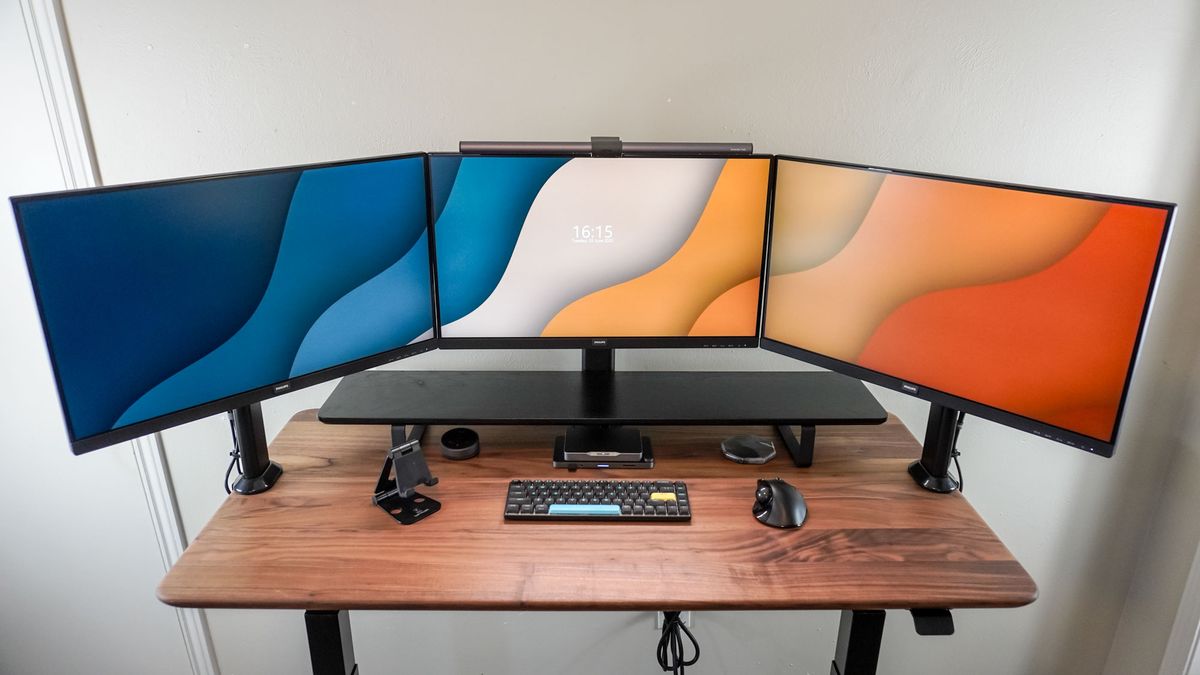
How to choose best triple monitor
A good triple-monitor arm should match the monitors, the desk, and the layout you actually intend to use. These are the factors that separate a stable workstation from a difficult installation.
Screen size and VESA pattern
Screen-size limits are not interchangeable with weight limits. A mount listed for 32-inch screens may still fail to suit a heavy 32-inch panel, and every display must also have 75 by 75mm or 100 by 100mm VESA holes. Confirm all three monitors individually before choosing a mount.
Arm capacity
Look at the capacity per arm, not just the headline capacity for the whole stand. Most products here support between 17.6 and 19.8 pounds per arm, while WALI Free-Standing Triple reaches 22 pounds and PUTORSEN 49-inch Mount supports a much heavier center display. Include the monitor body and stand hardware in your calculation.
The largest screen is not the deciding detail. Its weight, VESA holes, and position on the arm are.
Mounting method
A C-clamp preserves more desktop space but needs clear access beneath the desk edge. Grommet mounting can feel more planted, but it requires a suitable hole and a compatible surface thickness. A free-standing base avoids both requirements, though it uses some of the desk area the arm is meant to recover.
Movement and layout
Tilt, swivel, and rotation determine whether the screens can follow your seating position. Side-by-side displays usually benefit from angled outer arms, while a stacked layout needs a taller pole and enough vertical clearance. If you regularly change the arrangement, pneumatic or highly adjustable arms are more useful than a rigid center bracket.
Desk depth and clearance
An arm that extends more than 20 inches can place a screen comfortably in front of you, but it also needs rear clearance and a strong mounting point. Measure the desk depth, edge thickness, underside obstructions, and anything above the monitors. For a wider workstation, the desk space a multi-screen layout really needs is worth planning before installation.

Frequently asked questions
Do triple monitor mounts fit any three monitors?
No. Each monitor must meet the mount's size and weight range and use a compatible VESA pattern. Most mounts in this roundup require 75 by 75mm or 100 by 100mm mounting holes.
Is a clamp or grommet mount more stable?
Both can be stable when installed on a suitable desk. A clamp is easier to use without drilling, while a grommet can provide a more centered mounting point through the desk. Check the thickness range because the correct method depends on the surface.
Can these mounts hold curved monitors?
Several products support curved screens, including HUANUO Triple Mount, WALI 13 to 32 Mount, and ErGear 32-inch Mount. Curvature does not remove the need to check VESA holes and weight. MOUNT PRO 32 Mount specifically excludes 1000R curved screens.
Can three monitors be arranged vertically?
Yes, but a standard side-by-side arm may not provide enough pole height. WALI Stacked Triple and MOUNT PRO 32 Mount are better suited to stacked or triangular layouts because their poles and adjustment ranges allow more vertical placement.
Can one monitor be placed in portrait mode?
Most of these mounts support 360° rotation, so portrait orientation is possible when the monitor and surrounding desk space allow it. Rotate the display before final cable routing, since cables may need extra slack.
Will a monitor arm damage a desk?
A heavy triple mount can stress a thin or weak desktop, especially when the arms extend forward. MOUNTUP 17 to 32 Mount recommends a reinforcement plate for thin tables, and that plate is not included. Inspect the desk edge and underside before tightening the mount.
Are triple monitor mounts useful for gaming?
They can create a wider field of view and keep secondary applications visible, but the arrangement also needs a desk wide enough for comfortable viewing. Gamers planning around three displays should consider how to position screens for a more immersive setup before choosing the arm.

The bottom line
The Best triple monitor choice for most conventional desks is the HUANUO Triple Mount. It supports the common 17 to 32-inch range, includes both C-clamp and grommet mounting, and provides the adjustment needed for a straight row or angled side screens. The VIVO STAND-V300G is the better alternative when smooth pneumatic movement on the outer displays matters most.
Choose the PUTORSEN 49-inch Mount for a workstation centered on a very large display, or the WALI Stacked Triple when vertical screen placement saves more space than a wide row. For desks that cannot accept a clamp, the WALI Free-Standing Triple is the clear specialist option.
If you are undecided, match your heaviest monitor and your desk thickness first, then choose the mount whose layout fits the room.
As an Amazon Associate we earn from qualifying purchases.