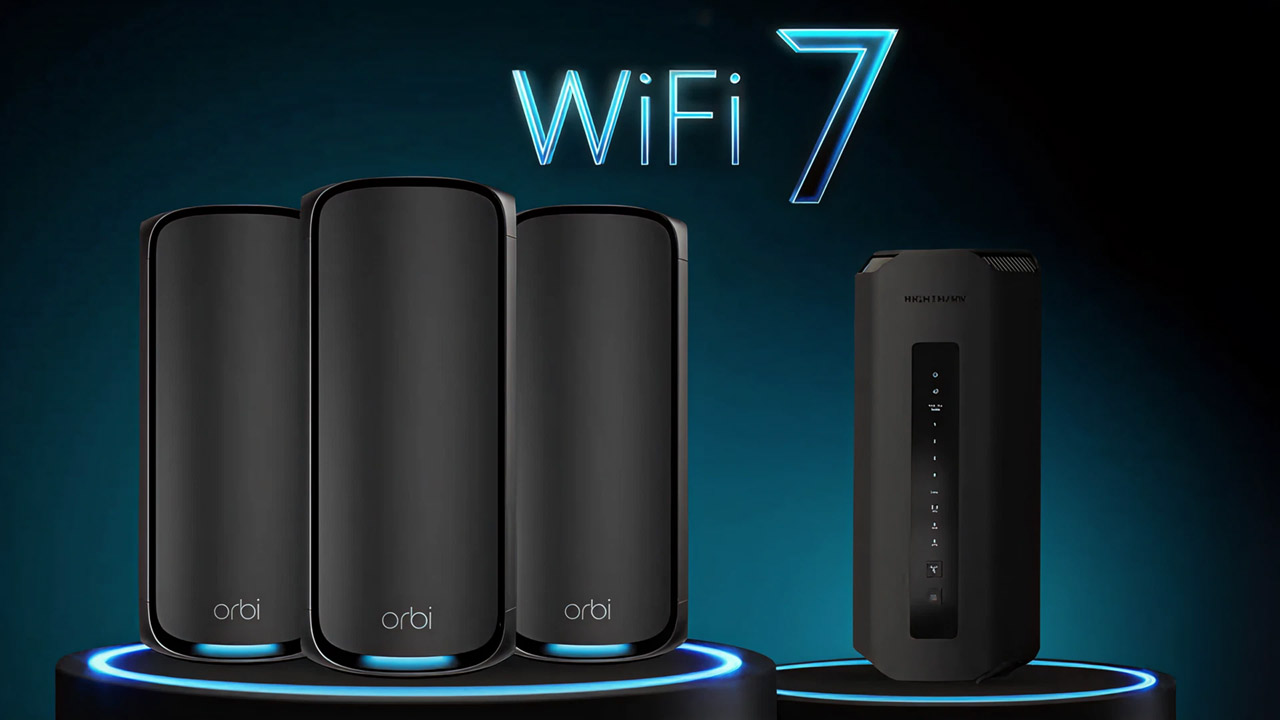

A game can feel broken when the real problem is a weak wireless link, crowded band, or router that lets a family member's stream overwhelm your match. The Best WiFi for Gaming is not always the router with the largest speed number. Stable coverage, sensible traffic controls, modern bands, and useful wired ports matter more.
This list includes high-end WiFi 7 hardware, practical WiFi 6E routers, a plug-in gaming accelerator, and two products for upgrading a gaming PC's wireless connection. Some picks are designed to replace your router, while others solve a more specific problem.
The GL.iNet Flint 2 is our top pick for its strong gaming fundamentals, useful VPN support, and unusually flexible software. The rest of the field ranges from compact WiFi 7 routers to a dedicated antenna and a motherboard with built-in wireless networking.
Comparison table
| # | Product | Award | Wireless standard | Wired connectivity | Best for |
|---|---|---|---|---|---|
| 1 | GL.iNet Flint 2 | Best overall | WiFi 6, up to 6 Gbps | Dual 2.5G ports | VPN control and busy homes |
| 2 | ASUS ROG Rapture GT-BE98 Pro | Best high-end WiFi 7 | Quad-band WiFi 7, up to 30 Gbps | Dual 10G, quad 2.5G | Maximum capacity |
| 3 | TP-Link Archer AXE75 | Best WiFi 6E | Tri-band, up to 5, 400 Mbps | 2.5 Gbps WAN | 6 GHz gaming |
| 4 | HYPEREV AX3000 | Best gaming accelerator | Dual-band WiFi 6, up to 2, 402 Mbps | Ethernet connection | Adding acceleration to an existing network |
| 5 | GL.iNet Flint 3e | Best long-range WiFi 7 | WiFi 7, up to 6.5 Gbps | Not specified | Larger homes and VPN use |
| 6 | GL.iNet Flint 3 | Best compact WiFi 7 | Tri-band WiFi 7, up to 9 Gbps | Five 2.5G ports | Multi-gig wired networks |
| 7 | ASUS ROG Strix B550-F Gaming WiFi II | Best motherboard upgrade | WiFi 6E | 2.5 Gb Ethernet | AM4 gaming PCs |
| 8 | Eightwood WiFi 6E Antenna | Best antenna upgrade | 2.4, 5, and 6 GHz | Dual RP-SMA | Improving a compatible PC adapter |
| 9 | TP-Link Archer GE400 | Best dual-band gaming router | Dual-band WiFi 7, up to 6, 500 Mbps | Two 2.5G, three 1G | Game traffic controls without 6 GHz |
| 10 | TP-Link Archer GE650 | Best dedicated gaming band | Tri-band WiFi 7, up to 11 Gbps | Two 5G, three 2.5G | Separating gaming from household traffic |
1. GL.iNet Flint 2: Best Overall

Pros
- WiFi 6 capacity rated up to 6 Gbps
- Dual 2.5G ports suit fast wired connections
- WireGuard and OpenVPN support
- AdGuard Home support and capacity for more than 100 devices
Cons
- Requires a firmware update during initial setup
- WiFi 6 is less future-facing than the WiFi 7 picks
- VPN throughput depends on network and server conditions
Best for: gamers who want a flexible router with serious software controls.
The Flint 2 is the router we'd install when the goal is dependable gaming without turning the network into a science project. It has the right balance of wireless capacity, multi-gig connectivity, and configuration control. The interface is aimed at people who want more than a basic app, but the setup can still begin through an Ethernet connection and the web admin panel.
Its eight-stream WiFi 6 design is rated for speeds up to 6 Gbps. That figure is not a promise of game downloads at that rate, but it gives the router room for several active clients, streaming, calls, and gaming at the same time. The 1GB of DDR4 memory and 8GB of eMMC storage also leave room for the router's software features and additional plugins. GL.iNet says it can support more than 100 devices, which makes it a stronger household router than its gaming label alone suggests.
The two 2.5G ports are useful if the gaming PC or console is wired and the rest of the network is moving large files. VPN support is a major differentiator. WireGuard is rated up to 900 Mbps and OpenVPN up to 880 Mbps, though the actual result depends on the internet connection, server location, and service used. AdGuard Home gives the owner another way to filter unwanted tracking and advertising at the DNS level.
Compared with the TP-Link Archer AXE75, the Flint 2 gives up the dedicated 6 GHz band but offers more enthusiast-oriented software control and faster stated VPN performance. The GL.iNet Flint 3 brings WiFi 7 and more multi-gig ports, while the Flint 2 remains the simpler recommendation for a home that does not yet need that upgrade. The main weakness is the initial firmware chore, which is not optional if you want the best experience from the device.
Choose the Flint 2 if your priority is a stable gaming network that you can tune over time. It is also the most convincing pick for someone who wants gaming performance and privacy tools in the same box.
2. ASUS ROG Rapture GT-BE98 Pro: Best High-End WiFi 7

Pros
- Quad-band WiFi 7 with speeds up to 30 Gbps
- 320 MHz channels on 6 GHz
- Dual 10G ports and four 2.5G ports
- Multi-Link Operation and triple-level game acceleration
Cons
- Large 4.4-pound design
- Most clients cannot use its full wireless capacity
- High-end features can be excessive for a small home
Best for: households with several newer WiFi 7 devices and demanding wired equipment.
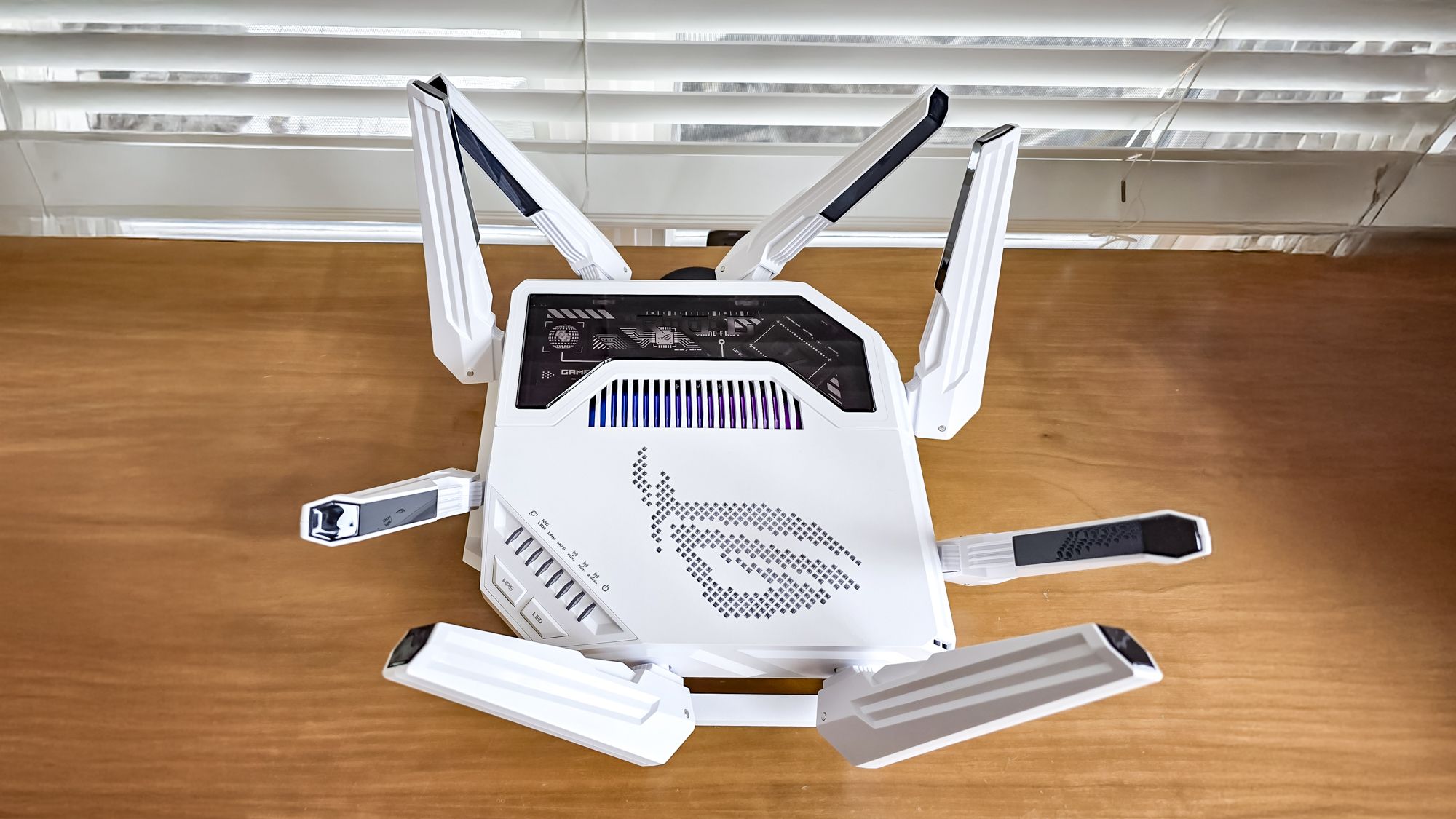
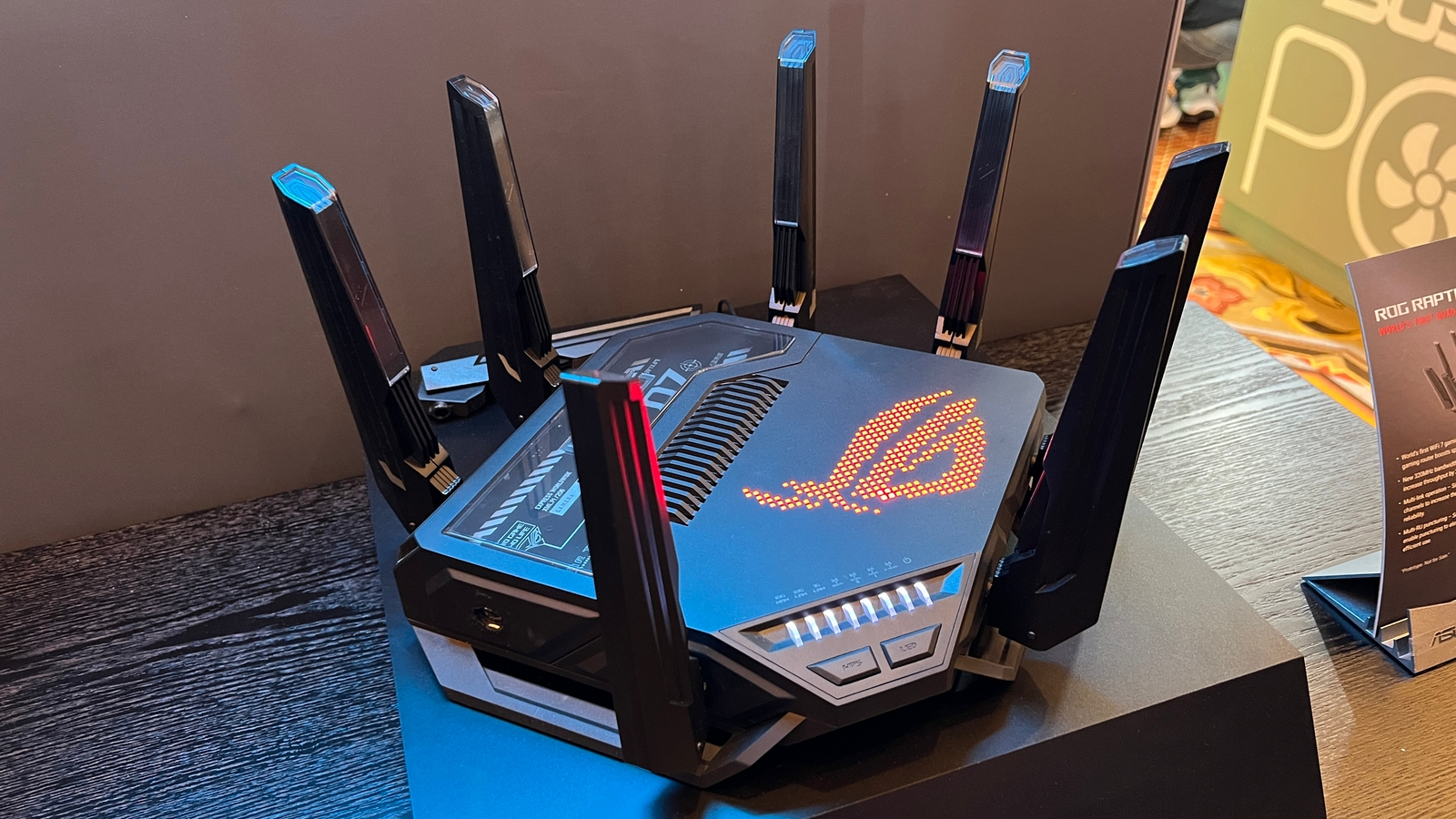
The ROG Rapture GT-BE98 Pro is a statement router, and it behaves like one. It is physically large at 13.7 inches square and weighs 4.4 pounds, so it needs a deliberate home rather than a hidden shelf. In return, it offers the biggest wireless and wired ceiling in this group.
Its quad-band WiFi 7 system is rated for up to 30 Gbps. The important pieces are the 320 MHz channels on 6 GHz, 4096-QAM, and Multi-Link Operation, which can use multiple bands together for a more stable connection. Those features matter most with compatible WiFi 7 clients. An older console will not suddenly turn into a WiFi 7 device, but a modern gaming PC, laptop, or phone can make better use of the additional capacity.
The port selection is unusually strong. Dual 10G ports give fast storage, workstation, or internet connections somewhere to go, while four 2.5G ports provide plenty of room for wired gaming hardware. ASUS also builds in triple-level game acceleration, designed to prioritize traffic from the gaming port through the network and toward the game server. External dual-feeding antennas are intended to improve signal strength and coverage.
The trade-off is scale. The GT-BE98 Pro beats the GL.iNet Flint 2 on wireless generation and port bandwidth, but it is harder to justify if the home has only one current-generation wireless client. The TP-Link Archer GE650 offers a more focused gaming layout with a dedicated 5 GHz gaming band, while the ASUS is the better fit for a mixed high-performance network.
This is the choice for someone building around WiFi 7 now rather than preparing for it later. Skip it if your gaming system is wired and the rest of your household uses older wireless devices.
3. TP-Link Archer AXE75: Best WiFi 6E

Pros
- Three bands include a less crowded 6 GHz option
- 160 MHz channels on 5 and 6 GHz
- 2.5 Gbps WAN port
- EasyMesh compatibility and VPN server and client modes
Cons
- WiFi 6E clients are needed to use 6 GHz
- Only one multi-gig port is specified
- 1 GHz dual-core processor is less ambitious than premium rivals
Best for: gamers who want a clean 6 GHz connection without moving to a large WiFi 7 router.
The Archer AXE75 is the sensible middle ground in this roundup. It adds 6 GHz without the size and complexity of the most extravagant WiFi 7 models, and its tri-band layout is easy to understand. The strongest reason to choose it is not the headline throughput. It is the extra wireless lane for compatible devices.
The 5 GHz and 6 GHz bands are each rated at 2, 402 Mbps, while 2.4 GHz is rated at 574 Mbps, for a combined AXE5400 class. The 6 GHz band can feel cleaner because it has more available spectrum and less legacy traffic, while 160 MHz channels give compatible devices wider lanes. That can help a nearby gaming PC maintain a responsive link, though walls and device compatibility still matter.
TP-Link pairs the wireless hardware with a 1.0 GHz dual-core CPU and 512MB of memory. OFDMA is intended to improve simultaneous transmission to multiple devices, and EasyMesh support allows compatible routers, extenders, or wireless powerline adapters to expand coverage. The router also supports OpenVPN, PPTP, and L2TP as server or client modes, plus basic HomeShield security features.
The GL.iNet Flint 2 is more appealing for VPN enthusiasts and home-network tinkering, while the AXE75 is friendlier for someone who wants a conventional setup. It also gives the HYPEREV AX3000 a serious alternative when the real problem is wireless congestion rather than game-route optimization. The weakness is its single specified 2.5 Gbps WAN port, which makes it less flexible for a home full of multi-gig wired devices.
For a gaming PC close to the router, the AXE75 is one of the clearest ways to gain a dedicated 6 GHz connection. It is also a good starting point for homes that may expand coverage later through EasyMesh.
4. HYPEREV AX3000: Best Gaming Accelerator

Pros
- Works alongside an existing router
- Supports PS5, Switch, Steam Deck, PC, and more
- GearUP routing is designed to reduce ping and packet loss
- App control over Ethernet or wireless
Cons
- Not compatible with Starlink
- Dual-band design has no 6 GHz band
- The acceleration plan is central to its pitch
Best for: console or PC players who want a focused gaming device without replacing their main router.
The HYPEREV AX3000 is different from every conventional router here. It is designed to connect to an existing network and put gaming acceleration in front of the console or PC. That makes it an unusual fit for renters, shared homes, or anyone who does not want to rebuild the household network around a new router.
Its dual-band WiFi 6 hardware is rated for up to 2, 402 Mbps across 5 GHz and 2.4 GHz. The product is aimed at more than raw wireless throughput, though. GearUP's optimized routes are intended to reduce ping and packet loss, with the claim that ping can drop by up to 50 percent in suitable conditions. That result will depend heavily on the game, route, ISP, and location, so it should be treated as a feature to evaluate rather than a guaranteed change.
The app supports acceleration settings for console and PC connections over Ethernet or WiFi. Compatibility includes PS5, Switch, Steam Deck, and more than 1, 000 games. The included 90-day GearUP VIP Core plan makes the setup immediately usable, but the continuing usefulness of the device depends on whether that service improves the games you actually play.
A conventional router such as the TP-Link Archer AXE75 is the better answer when the entire home needs stronger wireless capacity. The HYPEREV can be more targeted when the existing router covers the house well but online matches suffer from poor routes or unstable latency. It is not compatible with Starlink, and the lack of 6 GHz limits it as a general-purpose wireless upgrade.
Buy this when game-route optimization is the specific problem. It is not the first choice for someone replacing an old household router or building a multi-gig home network.
5. GL.iNet Flint 3e: Best Long-Range WiFi 7

Pros
- WiFi 7 rated up to 6.5 Gbps
- Claimed coverage up to 2, 500 square feet
- WireGuard and OpenVPN support up to 680 Mbps
- MLO, 4K-QAM, and EasyMesh-style capacity features
Cons
- Actual range depends on walls and placement
- VPN speed is below the Flint 2's stated rate
- Requires compatible WiFi 7 clients for its newest features
Best for: homes that need long-range wireless coverage and built-in VPN tools.
The Flint 3e is the GL.iNet model to consider when the gaming room is not close to the router. Its stated coverage reaches up to 2, 500 square feet, and the product is built around modern WiFi 7 features that aim to keep connections more reliable in busy wireless environments. Coverage claims are always dependent on construction and placement, but the intent here is clear.
WiFi 7 throughput is rated up to 6.5 Gbps. Multi-Link Operation can use more than one band for a connection, while 4K-QAM, enhanced OFDMA, preamble puncturing, and Multi-RUs are designed to improve efficiency and capacity. These features are most useful with compatible clients, so an older gaming console will benefit more from a stronger access point than from the WiFi 7 label itself.
GL.iNet includes the same enthusiast-friendly approach found on the Flint 2. AdGuard Home supports DNS-based filtering, and parental controls integrate with Bark for website filtering, safe search, and usage limits. WireGuard and OpenVPN are each rated up to 680 Mbps, with the usual caveat that the VPN server, service, ISP, and network conditions affect the real result. The router is also advertised for more than 100 connected devices.
The GL.iNet Flint 3 has a higher stated WiFi 7 ceiling and five 2.5G ports, but the Flint 3e claims broader coverage. The ASUS ROG Rapture GT-BE98 Pro is far more capable for a dense high-end setup, while the Flint 3e takes less space and asks less of the network. Its weakness is that long-range performance cannot be judged from the square-foot claim alone.
Choose it for a large home where VPN control and coverage matter as much as gaming. It is particularly suitable when a wired connection is not practical in the gaming room.
6. GL.iNet Flint 3: Best Compact WiFi 7

Pros
- WiFi 7 rated up to 9 Gbps
- Five 2.5G ports
- Tri-band design with MLO support
- AdGuard Home, parental controls, and VPN features
Cons
- Stated coverage is up to 2, 000 square feet
- VPN throughput is rated below the Flint 2
- Firmware should be updated before judging performance
Best for: multi-gig homes that want several fast wired connections in a compact router.
The Flint 3 is the more ambitious GL.iNet router, but it does not have the outsized footprint of the ASUS ROG model. Its compact design is useful when the router has to sit on a desk or shelf, and its five 2.5G ports make it easy to connect a gaming PC, console, access point, and storage device without immediately reaching for a separate switch.
The tri-band WiFi 7 system is rated up to 9 Gbps. Multi-Link Operation, 4K-QAM, enhanced OFDMA, preamble puncturing, and Multi-RUs are intended to improve throughput and reduce congestion. The practical benefit depends on client support, but the broad capacity gives this router more room for a busy household than a basic dual-band model.
GL.iNet includes AdGuard Home for DNS filtering and parental controls with Bark integration. VPN speeds for WireGuard and OpenVPN are each rated up to 680 Mbps. That is enough to make the VPN feature useful for many connections, but the GL.iNet Flint 2 has higher stated VPN figures. The Flint 3 also claims coverage up to 2, 000 square feet, less than the Flint 3e's stated 2, 500 square feet.
The five 2.5G ports are the reason to choose this over the Flint 3e. The TP-Link Archer GE650 has stronger game-specific software and a dedicated gaming band, while the Flint 3 is better for a network administrator who wants flexible VPN and filtering tools. As with the Flint 2, updating firmware early is important.
This is the GL.iNet pick for a wired-heavy home that wants WiFi 7 without a giant router. It is less compelling if you need the broadest possible coverage or want a highly guided gaming dashboard.
7. ASUS ROG Strix B550-F Gaming WiFi II: Best Motherboard Upgrade

Pros
- Built-in WiFi 6E
- Intel 2.5 Gb Ethernet with ASUS LANGuard
- Supports AMD Ryzen 3000 and 5000 series processors
- Dual M.2 slots, PCIe 4.0, and BIOS Flashback
Cons
- Only fits an AM4 ATX gaming PC build
- WiFi performance still depends on the router
- It is a motherboard, not a standalone router
Best for: upgrading an AM4 desktop that needs built-in WiFi 6E and fast Ethernet.
The ROG Strix B550-F Gaming WiFi II belongs in this roundup for a different reason. It does not improve the whole home network. It upgrades the network connection inside a compatible gaming desktop, which can be the cleaner fix when a PC has an old wireless card or an unreliable external adapter.
The board supports AMD Ryzen 3000 and 5000 series processors on the AM4 socket and uses the ATX format. Its built-in WiFi 6E adds access to the 6 GHz band when paired with a suitable router. That can provide a less congested wireless path for a nearby desktop, although the router still determines which bands are available. For a gaming PC that can use a cable, the Intel 2.5 Gb Ethernet port with ASUS LANGuard is the more direct option.
This is also a full platform upgrade rather than a wireless-only accessory. PCIe 4.0 support, dual M.2 slots, USB 3.2 Gen 2 Type-C, HDMI 2.1, and DisplayPort 1.2 make it a capable base for an AM4 system. The 12+2 teamed power stages, ProCool connector, alloy chokes, and durable capacitors are aimed at stable power delivery, while BIOS Flashback helps with firmware updates.
The Eightwood WiFi 6E Antenna can improve positioning for a compatible adapter, but it cannot replace a motherboard's missing radio. The TP-Link Archer AXE75 is the more relevant companion here because it provides a 6 GHz network for the board to use. The obvious limitation is platform age and compatibility. This is not a universal desktop upgrade.
Choose it only when you are building or refreshing an AM4 ATX PC. For an existing desktop with an available compatible adapter, an antenna or separate network card may be less disruptive.
8. Eightwood WiFi 6E Antenna: Best Antenna Upgrade

Pros
- Covers 2.4, 5, and 6 GHz bands
- 6.5-foot cords allow flexible placement
- Magnetic base can attach to a steel surface
- Supports WiFi 6 and WiFi 6E equipment
Cons
- Requires compatible RP-SMA female ports
- Includes one antenna
- Cannot add 6 GHz support to incompatible hardware
Best for: moving a compatible wireless adapter's antenna into a better signal position.
The Eightwood antenna is a targeted fix for a desktop whose wireless connection is being hurt by poor antenna placement. It is not a router and it does not create faster internet by itself. Its purpose is to let a compatible adapter or access point place the antenna away from the back of a metal PC case and closer to a clearer signal path.
It supports 2.4 GHz from 2, 400 to 2, 500 MHz, 5 GHz from 5, 150 to 5, 850 MHz, and 6 GHz from 5, 900 to 7, 125 MHz. That covers WiFi 6E's newer band, along with older wireless standards. The 6.5-foot cords make placement more practical, and the magnetic base can hold to a steel surface. The manufacturer recommends trying different locations and adjusting the two antenna stubs in multiple directions.
Compatibility is the detail that matters most. The antenna uses two RP-SMA male connectors and is intended for devices with RP-SMA female ports. It will not add WiFi 6E to a system that lacks a 6 GHz radio, and it cannot fix a router that is too far away or blocked by several walls. Verify the connector before ordering.
The ASUS ROG Strix B550-F Gaming WiFi II already includes WiFi 6E, but this antenna serves a different desktop setup with a compatible external or PCIe adapter. A router upgrade such as the TP-Link Archer AXE75 can address the network side, while the Eightwood addresses the last few feet between the adapter and the air.
Buy it when signal placement is the suspected weak point. It is a useful accessory for the right connector, but a poor choice if the computer's wireless hardware does not support the bands listed.
9. TP-Link Archer GE400: Best Dual-Band Gaming Router
Pros
- Dedicated multi-gig gaming port
- Game acceleration and WTFast support
- Up to 6, 500 Mbps class wireless throughput
- Two 2.5G ports and EasyMesh compatibility
Cons
- No 6 GHz band
- WiFi 7 benefit is limited to 2.4 and 5 GHz
- HomeShield features vary by service level
Best for: gamers who want gaming controls and multi-gig ports without using 6 GHz.
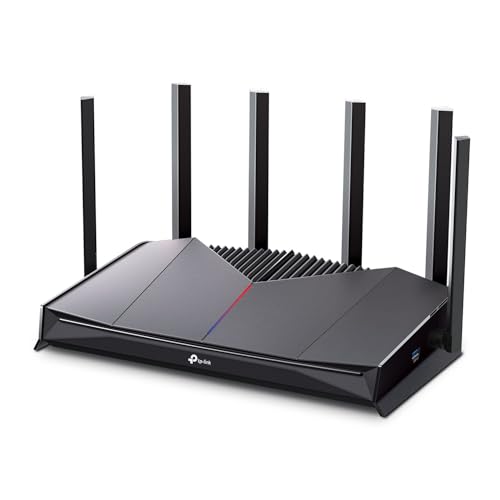
The Archer GE400 takes a straightforward approach: make the gaming controls visible and keep the router focused on the two bands most devices already use. Its dedicated gaming port and game panel are more useful than decorative gaming language because they give the owner a clear place to prioritize a console or PC.
The six-stream BE6500 wireless system is rated for up to 5, 765 Mbps on 5 GHz and 688 Mbps on 2.4 GHz. It uses Multi-Link Operation to connect across both bands for more stable data transfers, but there is no 6 GHz band. That omission is explicit and important. A WiFi 7 label does not make this a 6 GHz router, so it should not be selected by someone specifically seeking the least congested band.
Wired connectivity includes one 2.5 Gbps WAN or LAN port, one 2.5 Gbps LAN port, and three 1 Gbps LAN ports. TP-Link claims coverage up to 2, 600 square feet for up to 90 devices, with six antennas and beamforming aimed at hard-to-cover areas. The game panel exposes traffic priority, RGB settings, network information, and acceleration status, while WTFast is used for game server acceleration.
The TP-Link Archer GE650 is the obvious step up if you want a dedicated 5 GHz gaming band and a tri-band design. The GL.iNet Flint 2 is better for VPN and network customization, while the GE400 is easier to recommend for someone who wants a gaming-focused dashboard. Its biggest weakness is the missing 6 GHz band, especially beside the WiFi 6E and WiFi 7 alternatives.
Choose it for a gaming household built around 5 GHz devices. If 6 GHz is part of your plan, start with the AXE75 or a tri-band WiFi 7 model instead.
10. TP-Link Archer GE650: Best Dedicated Gaming Band

Pros
- Dedicated 5 GHz gaming band
- Tri-band WiFi 7 with 320 MHz support
- Two 5 Gbps and three 2.5 Gbps ports
- WTFast, game panel, RGB controls, and EasyMesh
Cons
- Large volcano-inspired design
- Game acceleration is only one part of latency
- Most clients cannot use the full wireless capacity
Best for: households that want gaming traffic separated from busy home streaming.
The Archer GE650's strongest idea is simple: give gaming its own 5 GHz band so household streaming does not have to share the same wireless lane. That makes it a more focused gaming router than the dual-band GE400, particularly in homes where several people are online at once.
Its tri-band BE11000 system is rated for up to 5, 764 Mbps on 6 GHz, 4, 320 Mbps on 5 GHz, and 574 Mbps on 2.4 GHz. The 6 GHz band adds up to 1, 200 MHz of spectrum and supports three additional 320 MHz channels. Multi-Link Operation can use all three frequency bands for more stable connections and efficient transfers, while the dedicated 5 GHz gaming band keeps the main gaming traffic away from a busy family network.
The wired layout is built for modern hardware. There is one 5 Gbps WAN port, one 5 Gbps LAN port, and three 2.5 Gbps LAN ports. WTFast is used to optimize traffic for games and applications including Steam, Twitch, and Origin. The game panel shows network and router information, identifies accelerated devices, and controls RGB lighting. EasyMesh support provides a path to extending coverage with compatible routers and extenders.
The TP-Link Archer GE400 is smaller in concept and avoids the missing 6 GHz question only by not offering it at all, while the GE650 provides all three bands and a clearer separation for gaming. The ASUS ROG Rapture GT-BE98 Pro has more total capacity and faster 10G connectivity, but it is a larger, more extreme option. The GE650's weakness is its gamer-centric styling and the fact that routing features cannot solve every source of latency.
This is the right pick for a family home with one serious gaming setup and many simultaneous wireless users. It is also a good candidate for anyone who wants game controls that are easy to find rather than buried in a general network menu.
How to choose the best wifi for gaming
The right gaming wireless setup depends on the devices in the home, the distance to the router, and whether the real problem is congestion, coverage, or the internet route itself.
Wireless generation and bands
WiFi 6 remains capable for gaming, while WiFi 6E adds a 6 GHz band and WiFi 7 adds features such as Multi-Link Operation and wider channels. A 6 GHz connection can be cleaner than 5 GHz, but it usually has less reach through walls. WiFi 7 matters most when the gaming PC, phone, or other clients also support WiFi 7.
Dual-band routers such as the Archer GE400 can still work well when most devices use 5 GHz. Tri-band models give you more ways to separate traffic. The GE650's dedicated gaming band is especially useful when several household devices are streaming at the same time.
Latency control
Raw throughput does not guarantee responsive play. Look for traffic prioritization, Quality of Service, game panels, or route optimization. The HYPEREV AX3000 takes a different approach by using GearUP to optimize game routes, while TP-Link's gaming routers expose device prioritization and WTFast acceleration.
A router cannot fix every lag spike. First separate wireless congestion from a poor game-server route.
Wired ports
Ethernet remains the most predictable connection for a stationary gaming PC or console. A 2.5G port is useful for a compatible computer, NAS, or multi-gig internet connection, while 5G and 10G ports make more sense in a network built around very fast storage or internet service.
The Flint 3 stands out with five 2.5G ports. The ROG Rapture GT-BE98 Pro goes further with dual 10G and quad 2.5G ports. If your gaming system sits beside the router, count ports before focusing on wireless speed.
Coverage and placement
A high-throughput router in the wrong room can perform worse than a slower model placed well. Antennas, wall materials, router height, and distance all affect the connection. The Flint 3e claims coverage up to 2, 500 square feet, while the Archer GE400 claims up to 2, 600 square feet, but those figures are not a substitute for thoughtful placement.
For more coverage, look for EasyMesh support or a compatible extension path. If one desktop is the problem, an external antenna such as the Eightwood can move the radio away from a metal case and into a better signal position.
Software and security
Gaming routers often add traffic controls, but the more useful software may be VPN support, DNS filtering, parental controls, and device management. GL.iNet's Flint models support WireGuard, OpenVPN, and AdGuard Home. TP-Link offers HomeShield features and app-based controls.
If you use a VPN while gaming, check the router's stated VPN performance and remember that the VPN server location can matter as much as the router. A gaming feature is only useful when it matches how your network is actually used. For broader household coverage questions, how to create a reliable connection across a larger home is a useful next step.
Frequently asked questions
Is WiFi 6E better for gaming than WiFi 6?
WiFi 6E adds a 6 GHz band, which can offer more bandwidth and less interference when the client supports it. It does not automatically provide lower ping if the internet route or game server is the problem. A nearby WiFi 6E gaming PC can benefit more than an older console.
Is WiFi 7 necessary for online gaming?
No. WiFi 7 can add more capacity, wider channels, and Multi-Link Operation, but a stable WiFi 6 or WiFi 6E router is enough for many gaming setups. The benefit is easier to justify when the home has several new WiFi 7 devices or a multi-gig wired network.
Should I connect my gaming PC by Ethernet?
Yes, when the router and PC are close enough for a practical cable run. Ethernet avoids many wireless interference and range problems and gives a more consistent connection. A router with a 2.5G, 5G, or 10G port can also support faster local transfers if the computer has matching hardware.
Can a gaming router lower ping?
A router can reduce local congestion through Quality of Service or traffic prioritization. Some products also optimize routes through services such as GearUP or WTFast. Those features cannot guarantee lower ping because distance, ISP routing, and game-server conditions remain outside the router.
Does a stronger antenna improve gaming?
It can improve signal quality when the existing antenna is poorly positioned or blocked by a computer case. It cannot add a missing wireless standard or fix an overloaded router. Check the connector type carefully, since the Eightwood model requires compatible RP-SMA female ports.
Can I use a gaming router with any internet provider?
Most routers can connect to a separate modem or gateway, but setup depends on the provider and connection type. The Archer AXE75 is listed as compatible with providers including AT&T, Verizon, Xfinity, Spectrum, Cox, and others, with a modem required for most services. Check whether your provider requires a specific modem or gateway setting.
The bottom line
The Best WiFi for Gaming in this group is the GL.iNet Flint 2. It combines WiFi 6 capacity, dual 2.5G ports, strong VPN support, AdGuard Home, and room for a busy household without forcing you into an oversized WiFi 7 design. The TP-Link Archer AXE75 is the better alternative when a clean 6 GHz band matters most.
For a newer, demanding network, choose the ASUS ROG Rapture GT-BE98 Pro or TP-Link Archer GE650. The ASUS is built around maximum capacity and fast wired connections, while the GE650 makes more sense when separating gaming traffic from household activity is the priority.
If you are undecided, choose the Flint 2 for flexibility, the AXE75 for 6 GHz, or the GE650 for a dedicated gaming band.
As an Amazon Associate we earn from qualifying purchases.