

Long typing sessions expose the weaknesses of a standard flat keyboard quickly. Wrists bend outward, shoulders creep forward, and a palm rest that looks comfortable in a product photo can feel useless by the end of a workday. The Best wireless ergonomic keyboard options solve that problem in different ways, from gently curved wave layouts to deeply split frames.
We ranked these 10 keyboards by their ergonomic shape, wrist support, connection options, battery approach, and the compromises that matter at a real desk. Some are better for switching between several devices, while others are simpler desktop tools or complete keyboard and mouse setups.
Our top pick is the Logitech Ergo K860, with the Logitech Wave Keys close behind for people who want a less dramatic transition from a conventional keyboard. The list also includes rechargeable split designs, backlit options, and several keyboard and mouse combos.
Comparison table
| # | Product | Award | Layout | Wireless connection | Battery approach | Best for |
|---|---|---|---|---|---|---|
| 1 | Logitech Ergo K860 | Best overall | Split, full size | Bluetooth, USB receiver | Battery powered | Long typing sessions |
| 2 | Logitech Wave Keys | Best compact comfort | Wave layout | Bluetooth, Logi Bolt | Up to 3 years | Everyday office use |
| 3 | Arteck Split Keyboard | Best simple split design | Split, 2-zone | 2.4GHz USB | Rechargeable, up to 6 months | Straightforward desktop setups |
| 4 | Nulea Split Keyboard | Best wrist support | Split | Bluetooth, 2.4GHz | Rechargeable, 206 hours | Cushioned palm support |
| 5 | Logitech Wave Keys Combo | Best keyboard and mouse set | Wave layout | Bluetooth | Rechargeable mouse and keyboard | A matched ergonomic desk |
| 6 | ProtoArc EK01 Plus | Best backlit option | Split, full size | Bluetooth, 2.4GHz USB | Rechargeable | Low-light typing |
| 7 | ProtoArc EKM01 Plus | Best full-size combo | Split, full size | Bluetooth, USB receiver | Rechargeable | Keyboard and mouse buyers |
| 8 | ULSOU Wave Combo | Best plug-and-play combo | Wave layout | 2.4GHz USB | One AA battery each | Simple Windows desks |
| 9 | X9 Performance Split Keyboard | Best extended layout | Split, 110 keys | 2.4GHz USB | Rechargeable | Users who need many keys |
| 10 | Logitech Wave Keys Rose | Best colorful compact option | Wave layout | Bluetooth, Logi Bolt | Up to 3 years | Smaller workspaces |
1. Logitech Ergo K860: Best Overall

Pros
- Curved split frame encourages a natural hand position
- Memory foam wrist rest feels substantial
- Three tilt settings work for sitting or standing
- Bluetooth and USB receiver connectivity
- Quiet, scooped keys with a familiar full-size layout
Cons
- Takes more desk space than a conventional keyboard
- Requires an adjustment period
- Does not use a rechargeable battery
Best for: people who type for hours and want the most complete ergonomic redesign.
The Logitech Ergo K860 is the keyboard we would keep for a long workday. Its split keyframe is curved rather than simply divided down the middle, so the hands sit at a more relaxed angle without forcing the dramatic separation of a specialist split keyboard. The padded wrist rest is part of the keyboard itself, which makes the whole setup feel deliberate instead of like a flat board with an accessory pushed underneath it.
The key design is unusually friendly to anyone moving from a standard office keyboard. Logitech calls the keys “Perfect Stroke” keys, and their scooped surfaces give fingertips a clear landing point. The full-size layout retains a number pad, function row, and Caps Lock indicator, so there is little missing for spreadsheets or general office work. The keys are also described as quiet, making this a more suitable shared-office choice than a loud mechanical board.
The tilt system is one of the K860's most useful details. Its legs provide 0, -4, and -7 degree positions, letting the user adjust the angle for a seated or standing desk. That flexibility matters because an ergonomic keyboard should not lock every body and desk into one posture. It connects through Bluetooth or a USB receiver, and Logitech Options software can customize function keys, create shortcuts, and show battery notifications.
The weakness is size and commitment. At 17.95 inches wide and 2.56 pounds, the K860 occupies a serious section of the desk, and the split shape can feel unfamiliar for the first several days. The Logitech Wave Keys is easier to approach, while the Arteck Split Keyboard offers a simpler split layout. Choose the K860 when wrist position and long-session comfort matter more than compactness.
2. Logitech Wave Keys: Best Compact Comfort

Pros
- Gentle wave shape is easy to adapt to
- Cushioned memory foam palm rest
- Bluetooth and Logi Bolt support
- Easy-Switch works across three devices
- Long stated battery life
Cons
- Less corrective than a deeply split keyboard
- No rechargeable battery listed
- Compact layout may not suit number-heavy work
Best for: office users who want ergonomic shaping without a steep learning curve.
The Logitech Wave Keys takes a softer approach than the K860. Instead of separating the left and right halves with a pronounced central gap, it bends the rows into a wave that guides the hands into a more natural position. That makes it a strong choice for someone who has tried flat keyboards and wants a change without relearning every key location.
Its cushioned palm rest is the main comfort feature. The memory foam gives the heels of the hands somewhere to settle, while the compact body keeps the mouse closer to the keyboard than a full-size design. That shorter reach can help keep the working shoulder position more neutral. The tradeoff is that the Wave Keys does not provide the same degree of separation or posture correction as the Ergo K860.
Connectivity is a clear strength. Bluetooth and the Logi Bolt receiver are both supported, and Easy-Switch lets the keyboard move between up to three devices. Compatibility includes Windows, macOS, iPadOS, and ChromeOS. Logitech states up to three years of battery life, an attractive arrangement for users who would rather avoid regular charging.
The Wave Keys is also easier to fit into a normal workspace. At 14.8 inches long and 8.62 inches wide, it is notably less imposing than the larger split models. The drawback is that users with significant wrist discomfort may need more separation than this wave profile provides. For a broader look at alternatives with different layouts, the everyday differences between wireless keyboard designs can help narrow the field.
3. Arteck Split Keyboard: Best Simple Split Design

Pros
- Two-zone split frame
- Soft cushioned wrist rest
- Plug-and-play USB receiver
- Rechargeable battery rated for up to six months
- USB-C charging cable included
Cons
- USB wireless only
- No Bluetooth device switching
- Larger than a compact wave keyboard
Best for: a desktop user who wants a direct, uncomplicated split keyboard.
The Arteck Split Keyboard keeps the ergonomic idea clear. Its two-zone design separates the key areas enough to encourage a more relaxed wrist and forearm position, but it does not add a long list of software features or connection modes. Insert the nano USB receiver, stored at the back of the keyboard, and it is ready for a compatible computer.
The cushioned palm rest runs across the front and gives the forearms a stable place to rest. This is useful for users who dislike narrow detachable rests that shift around during typing. The 16.5-inch length and 9.6-inch width make it a substantial board, though still easier to place than some of the full-size ProtoArc alternatives.
Arteck specifies a rechargeable lithium battery with up to six months of use based on two hours of continuous use per day. That is a practical arrangement for a stationary desktop because it avoids disposable batteries while keeping charging infrequent. The package includes a USB-C charging cable and a 24-month warranty, details that make the keyboard feel more like a complete work tool.
There are clear limits. This is a 2.4GHz USB design, not a Bluetooth keyboard for quickly moving between a laptop, tablet, and phone. Its layout also demands a short adjustment period, especially for anyone coming from a straight board. The Logitech Wave Keys is more flexible across devices, while the Arteck is the better fit for a single computer with an available USB port.
4. Nulea Split Keyboard: Best Wrist Support

Pros
- Distinctive split design
- Oversized leatherette wrist rest
- Bluetooth and 2.4GHz connectivity
- Three adjustable typing angles
- Rechargeable battery rated for 206 hours
Cons
- Less established software ecosystem
- Battery runtime is shorter than the Logitech Wave Keys
- Split layout takes time to learn
Best for: users who prioritize a large, soft wrist support area.
The Nulea Split Keyboard makes its wrist rest the centerpiece. The oversized support is covered in soft leatherette and extends broadly beneath the keys, so the hands do not have to hover over a narrow strip. For users who naturally rest their palms while typing, that extra surface is more consequential than a decorative curve in the key rows.
The split design is intended to align the hands and forearms more naturally. Nulea also includes three adjustable support angles, allowing the user to change the front-to-back position rather than accepting one fixed slope. That is helpful when the same keyboard moves between a seated desk and a higher work surface.
Connection flexibility is better than the Arteck's. The Nulea supports both Bluetooth and 2.4GHz wireless, making it suitable for a computer with a USB receiver as well as devices that rely on Bluetooth. Its stated battery life is 206 hours, and the keyboard is rechargeable. That figure is enough for many work sessions, but it requires more attention than the Logitech models that advertise multi-year battery life.
The Nulea's weakness is less about its physical design and more about its ecosystem. The data does not list companion software, shortcut customization, or multi-device switching details beyond the dual connection modes. The keyboard also has a learning curve typical of split boards. Someone who wants the largest wrist cushion should choose it, while a user focused on polished device switching should look to the Logitech Wave Keys.
5. Logitech Wave Keys Combo: Best Keyboard and Mouse Set

Pros
- Wave keyboard and vertical mouse work as one setup
- Cushioned memory foam palm rest
- Lift mouse uses a 57-degree vertical angle
- Quiet mouse clicks and SmartWheel
- Ergo-certified keyboard and mouse design
Cons
- Lift mouse suits small to medium hands
- Larger package than the keyboard alone
- Mouse shape requires its own adjustment period
Best for: buyers who want to address wrist position on both sides of the desk.
The Logitech Wave Keys Combo is the most coherent choice for someone whose discomfort does not stop at the keyboard. It pairs the Wave Keys layout with Logitech's Lift vertical mouse, so the keyboard encourages a more natural typing posture while the mouse raises the hand into a more upright position. Buying them together also avoids the awkward visual and ergonomic mismatch that can happen when a slim keyboard is paired with a conventional mouse.
The keyboard retains the compact wave profile and memory foam palm rest of the standalone Wave Keys. Logitech says its plunger key switches provide a tactile but discreet typing feel. The mouse has a softly textured grip, a thumb rest, and a 57-degree vertical angle intended to reduce forearm rotation. Its SmartWheel adjusts scrolling speed, and the clicks are designed to stay quiet in shared spaces.
The main caveat is hand size. Logitech specifically describes the Lift as comfortable for small to medium hands, so users with large hands should be cautious. The combo also takes up more room than the keyboard alone, with listed dimensions of 18.6 inches by 9.2 inches for the set. Those who want to compare complete setups can also consider how a matched keyboard and mouse shape the whole desk.
The standalone Logitech Wave Keys is the simpler pick if the mouse is already sorted. The combo is more persuasive for anyone starting over, particularly when the mouse causes as much tension as the keyboard. Its weakness is that neither device is completely neutral on day one. The Lift's upright grip needs a few work sessions before it feels automatic.
6. ProtoArc EK01 Plus: Best Backlit Option

Pros
- Full-size curved split frame
- Three-level white backlighting
- Bluetooth and 2.4GHz connectivity
- Switches between up to three devices
- Four tilt feet
Cons
- Backlight greatly reduces operating time
- Large footprint
- 2.4GHz mode has Mac function-key limitations
Best for: users who need ergonomic shaping and visible keys in dim rooms.
The ProtoArc EK01 Plus is the specialist pick for dim desks. Its soft white backlight has low, medium, and high brightness settings, and it can be switched off when illumination is unnecessary. That feature is uncommon among the other keyboards here, and it makes the EK01 Plus easier to use in a darker room without adding a separate desk light.
The underlying design is a full-size curved split frame with scooped keys and a cushioned wrist rest. Four tilt feet provide three different typing angles, so the user can tune the board for sitting or standing. The dimensions are substantial at 19.69 inches long and 10.43 inches wide, and ProtoArc explicitly warns that the full-size shape uses more desk space.
Battery behavior depends heavily on the backlight. ProtoArc lists approximately 12 to 13 hours in high mode, 18 to 20 hours in medium mode, and 34 to 36 hours in low mode. With the light off, the stated runtime extends to 90 to 100 days. The keyboard uses a 2, 000mAh battery and can connect to three devices through Bluetooth and 2.4GHz wireless.
That versatility has some fine print. In 2.4GHz mode, the keyboard is not fully compatible with Mac and iOS function behavior, so Bluetooth is the safer choice for Apple devices. The board also needs a week or two of adjustment for some users, and the backlight must be turned on again after sleep. Pick it over the X9 Performance Split Keyboard if lighting is essential, but skip it if desk space is tight.
7. ProtoArc EKM01 Plus: Best Full-Size Combo

Pros
- Full-size split keyboard and contoured mouse
- Up to three-device connectivity
- Four adjustable tilt legs
- Mouse includes thumb rest and navigation buttons
- USB-C rechargeable design
Cons
- Very large footprint
- Keyboard is not backlit
- Mouse and keyboard both need charging
Best for: a spacious desk that needs a keyboard and mouse together.
The ProtoArc EKM01 Plus takes the full-size ergonomic approach and adds a matching mouse. The keyboard's curved, split keyframe is paired with a soft memory foam palm rest and four tilt legs. It is designed for users who want a broad, traditional layout rather than the tighter shape of the Logitech Wave Keys.
The mouse is more than a basic bundled pointer. Its contoured body includes a palm and thumb rest, forward and backward buttons, and 2, 000 DPI tracking. That combination should appeal to people who spend much of the day browsing or working in documents. It is not a vertical mouse in the same dramatic sense as Logitech's Lift, but the support under the hand is more deliberate than on a standard compact mouse.
Bluetooth and a USB receiver can connect the set to up to three devices, with a button used to switch between them. The keyboard and mouse use built-in 500mAh rechargeable batteries, and ProtoArc states 250 hours of standby time after a two-hour charge. Both devices enter sleep mode after 30 minutes without operation.
The major drawback is physical scale. The keyboard measures 20.75 inches by 11 inches, and the complete set weighs about 4.2 pounds. It also lacks backlighting, separating it from the EK01 Plus. If the desk has room and a full-size number pad is important, this is the more complete option. For smaller workspaces, the practical limits of compact typing setups are worth considering before choosing it.
8. ULSOU Wave Combo: Best Plug-and-Play Combo

Pros
- Wave-shaped keyboard with adjustable stand
- One receiver connects keyboard and mouse
- Stated range up to 33 feet
- Forward and back mouse buttons
- Windows and Mac layout switching
Cons
- Requires one AA battery per device
- No Bluetooth
- Sleep mode activates quickly on the keyboard
Best for: users who want a basic wireless combo with minimal setup.
The ULSOU Wave Combo is built around simplicity. One 2.4GHz USB receiver handles both the keyboard and mouse, and no software download is required. The keyboard has a wave profile, a wrist rest, and an adjustable stand, while the mouse uses a contoured right-hand shape with forward and back buttons.
That arrangement suits a conventional Windows desktop especially well. The listed wireless range is up to 33 feet, though most desk users will care more about the plug-and-play receiver than the maximum distance. The keyboard and mouse can also be used separately, which is useful if one device eventually needs replacing.
Power is handled by one AA battery in each device. Both have automatic power saving, with the keyboard sleeping after 30 seconds of inactivity and the mouse after 15 minutes. A key press wakes the keyboard, but that short timeout may interrupt someone who pauses frequently to read or think.
The ULSOU does not offer Bluetooth, rechargeable power, or the refined multi-device tools found on the Logitech models. Its 17.6-inch by 8.7-inch body is also not especially small. Still, it is an uncomplicated choice for a desktop where a single USB receiver and a familiar wave shape matter more than advanced customization.
9. X9 Performance Split Keyboard: Best Extended Layout

Pros
- Split two-zone layout with 110 keys
- Cushioned wrist support
- USB wireless range rated up to 30 feet
- Rechargeable 600mAh battery
- Up to two years of warranty support
Cons
- USB receiver only
- Large 19-inch body
- Less connectivity flexibility than newer dual-mode models
Best for: users who want a broad split keyboard with a large key count.
The X9 Performance Split Keyboard is aimed at people who dislike giving up keys for an ergonomic shape. Its two-zone layout has 110 keys, so it keeps a broad set of functions while changing the angle of the hands. The soft wrist cushion adds support across the front, and the 19-inch body gives the board a substantial desktop presence.
Wireless operation uses a USB-A RF receiver with a stated range of 30 feet. That makes the X9 a straightforward companion for a laptop dock, desktop, or Chrome computer, but it is less adaptable than Bluetooth models when several devices are involved. There is no listed software layer or quick device switching.
The internal 600mAh battery is rechargeable, and the product description says it can last months between charges. A charging cable is included. The X9 also comes with support, hassle-free returns, and up to two years of warranty coverage, which may matter to a buyer choosing an unfamiliar ergonomic layout.
The weakness is that the X9 feels like an older, more focused design beside the Nulea and ProtoArc keyboards. It lacks their dual-mode connections, and the large frame can dominate a smaller desk. Choose it when 110 keys and a traditional extended layout are the priority. If multi-device use matters more, the Logitech Wave Keys is a cleaner fit.
10. Logitech Wave Keys Rose: Best Colorful Compact Option

Pros
- Compact wave design
- Cushioned memory foam palm rest
- Bluetooth and Logi Bolt connectivity
- Easy-Switch supports three devices
- Battery life rated up to three years
Cons
- Wave shape is less corrective than a split frame
- Compact design is not ideal for number-heavy work
- No rechargeable battery listed
Best for: laptop users and home offices that want a smaller ergonomic keyboard.
The Logitech Wave Keys Rose has the same basic ergonomic idea as the graphite Wave Keys, but its color gives a home office or personal workspace a less utilitarian appearance. More important than the finish is the compact wave layout, which lets the mouse sit closer to the body than it would beside a full-size split board.
The wavy key rows guide the hands and forearms into a less rigid position, while the memory foam palm rest supports the hands through longer sessions. This is a gentler intervention than the curved split frame of the Ergo K860. People who want an obvious center separation should choose the K860 instead, but those who want a familiar transition may prefer the Wave Keys shape.
Connectivity is one of the strongest reasons to choose it. Bluetooth and the Logi Bolt receiver are supported, Easy-Switch handles up to three devices, and compatibility includes Windows, macOS, iPadOS, and ChromeOS. Logitech states up to three years of battery life, so it is well suited to a laptop setup that moves between rooms or devices.
The product data lists a very compact physical footprint, though the listed dimensions differ from the graphite entry, so buyers should check the current listing carefully before arranging a tight desk. Like the graphite model, this Rose version is not a deep split keyboard and does not have a rechargeable battery listed. It is the right pick for someone who wants the Wave Keys experience with a more personal look.

How to choose best wireless ergonomic keyboard
The right ergonomic keyboard should change how your hands rest without creating new problems with layout, connectivity, or desk space.
Split and wave shape
A split keyboard separates the left and right key groups to reduce outward wrist angles. A wave keyboard uses a curved profile to guide the hands more gently. Deep split designs such as the Logitech Ergo K860 and Arteck Split Keyboard can offer a more noticeable posture change, while the Logitech Wave Keys is easier for newcomers to adapt to.
The most ergonomic shape is the one that changes your wrist position without making you fight the keyboard.
Wrist and palm support
A built-in cushion can reduce the need to hover your hands, but a wrist rest should support the heel of the palm rather than press directly into the wrist crease. The K860 and Nulea provide especially substantial support. A narrow or overly firm rest can undermine an otherwise well-shaped keyboard.
Connection options
A USB receiver is convenient for a desktop and usually works without setup. Bluetooth is more useful for laptops, tablets, and phones, especially when a keyboard can switch between several devices. The Logitech Wave Keys, Nulea, and ProtoArc models offer more flexibility than USB-only choices such as the Arteck and X9.
Battery design
Rechargeable keyboards eliminate disposable batteries but need periodic charging. The Nulea lists 206 hours, while the ProtoArc EK01 Plus changes dramatically depending on whether its backlight is on. The Logitech Wave Keys models list up to three years of battery life, which suits users who want to forget about charging.
Desk footprint and layout
Ergonomic keyboards are often wider and deeper than flat compact models. Full-size options retain number pads and more familiar spacing, but the ProtoArc EKM01 Plus measures 20.75 inches by 11 inches. A compact wave design keeps the mouse closer and leaves more room for a laptop or notebook.

Frequently asked questions
Are split keyboards difficult to learn?
They can be. The hands move to different angles, and some users need several days or up to a couple of weeks to stop reaching for familiar positions. A wave keyboard such as the Logitech Wave Keys usually creates a gentler transition.
Is Bluetooth better than a USB receiver?
Neither is universally better. A USB receiver is often simpler for one desktop, while Bluetooth is more convenient for laptops and multiple devices. Some keyboards, including the Logitech and ProtoArc models here, support both.
Do ergonomic keyboards help with wrist discomfort?
They can encourage a more neutral hand and forearm position, but they are not a medical treatment. Desk height, chair position, typing force, and regular breaks also matter. Anyone with persistent pain should seek professional medical advice.
Should the keyboard have a wrist rest?
A well-padded rest can make long typing sessions more comfortable by supporting the palms. It should not force the wrists upward or create pressure at the wrist crease. The broad rests on the Logitech Ergo K860 and Nulea are among the most substantial options in this group.
Are ergonomic keyboards suitable for gaming?
They can work for casual gaming, but split layouts may change the position of frequently used keys. Most keyboards in this roundup prioritize office typing, quiet operation, and posture rather than gaming-specific features. A conventional layout may be easier for games that depend on familiar key spacing.
Do backlit ergonomic keyboards use more battery?
Yes. The ProtoArc EK01 Plus lists much shorter operating times with its backlight at high brightness than with the light switched off. Backlighting is useful in dim rooms, but it adds a charging tradeoff.
The bottom line
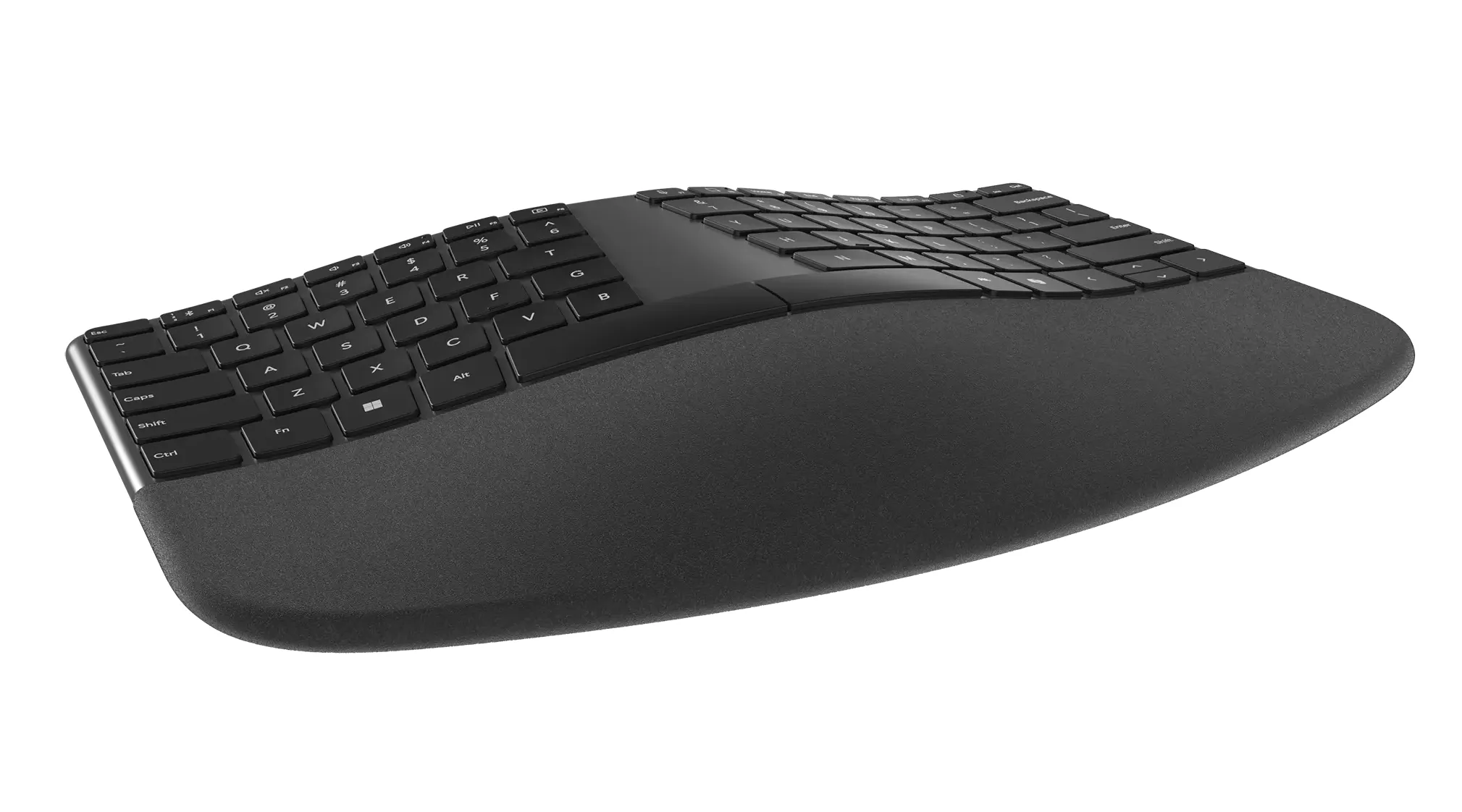
The Best wireless ergonomic keyboard here is the Logitech Ergo K860 because it combines a genuinely split, curved frame with a substantial memory foam rest, adjustable tilt, quiet keys, and both Bluetooth and USB connectivity. Its broad body and learning curve are real drawbacks, but they are reasonable compromises for users who spend much of the day typing.
For a less dramatic change, choose the Logitech Wave Keys. It occupies less space, keeps the mouse closer, supports three devices, and is easier to learn. The Wave Keys Combo is the stronger choice when the mouse also needs an ergonomic redesign.
If you are undecided, choose the K860 for maximum posture correction and the Wave Keys for the easiest everyday transition.
As an Amazon Associate we earn from qualifying purchases.