
A keyboard can make a desk feel wrong every time you sit down. Some are too wide for the mouse, some make enough noise to irritate everyone nearby, and some feel flat and vague after a long writing session. The right switch, layout, and connection matter more than a flashy design.
Our Best mechanical keyboard picks cover compact wireless boards, full-size gaming models, quiet office keyboards, and low-profile options. The AULA F75 Pro is the one we'd keep for its combination of layout, connection choices, hot-swap flexibility, and unusually thoughtful internal dampening. The rest of the list ranges from a simple wired Redragon to Logitech's polished work-focused boards.
| # | Product | Award | Layout | Connection | Switch or key feel | Best for |
|---|---|---|---|---|---|---|
| 1 | AULA F75 Pro | Best overall | 75%, 81 keys | Bluetooth 5.0, 2.4GHz, USB-C | Pre-lubed linear Reaper | Most people who want one versatile board |
| 2 | Redragon K671 | Best simple wired pick | Full size | Wired | Hot-swappable red linear | Straightforward PC gaming |
| 3 | AULA F99 | Best compact full layout | 96%, 99 keys | Bluetooth 5.0, 2.4GHz, USB-C | Pre-lubed linear | Wireless users who need a numpad |
| 4 | Logitech G413 SE | Best durable gaming classic | Full size | Wired | Tactile mechanical | A sturdy gaming desk |
| 5 | ASUS ROG Strix Scope II X | Best full-size gaming board | 100% | Wired USB-C | Pre-lubed linear, hot-swappable | Feature-heavy gaming and work |
| 6 | Logitech MX Mechanical | Best low-profile wireless | Full size | Bluetooth, Logi Bolt | Quiet tactile low profile | Multi-device office work |
| 7 | Logitech Alto Keys K98M | Best gasket-mounted office board | 98 keys | Bluetooth, Logi Bolt, USB-C | Clicky Marble | Writers who like a pronounced key feel |
| 8 | Cherry KC 200 MX | Best quiet office keyboard | Full size | Wired | MX2A Silent Red linear | Shared workspaces |
| 9 | AULA S98 Pro | Best keyboard with a display | 98 keys | Bluetooth 5.0, 2.4GHz, USB-C | Pre-lubed linear | Desk customization |
| 10 | Logitech MX Keys S | Best low-profile alternative | Full size | Bluetooth, Logi Bolt | Laptop-style | Quiet, precise everyday typing |
1. AULA F75 Pro: Best Overall

Pros
- Three connection modes and switching for up to five devices
- Compact 75% layout keeps arrow keys and function controls
- Hot-swappable 3-pin and 5-pin switch support
- Five layers of filling and a gasket-style structure soften the sound
- Useful control knob for lighting, media, and volume
Cons
- No number pad
- Software features are most useful on Windows
- Wireless battery life is not specified as a time estimate
Best for: someone who wants a compact board that can move between gaming, work, and several devices.
The AULA F75 Pro gets the important things right before it tries to impress you. Its 81-key 75% layout leaves room for the mouse without sacrificing arrow keys, and the knob gives everyday controls a physical home. Turn it in office mode for volume, or use it for brightness and lighting in gaming mode. That is more useful than a row of decorative controls that rarely get touched.
The board connects through Bluetooth 5.0, 2.4GHz wireless, or USB-C. It can save up to five devices and switch between them with shortcut keys or a side button, which makes it a natural fit for a desktop, laptop, tablet, and phone setup. The built-in 4000mAh battery adds useful flexibility, though the product information does not provide a specific runtime figure. N-key rollover and a Windows key lock cover the basics for fast games.
Typing feel is where the F75 Pro separates itself from the simpler boards here. Its pre-lubed Reaper switches and stabilizers are intended to give the linear keys a smooth, creamy response, while the gasket structure, integrated silicone pad, PCB single-key slotting, and five layers of fill work against hollow case noise. The side-printed PBT keycaps are made with double injection molding and heat sublimation, so the legends are designed to resist fading. RGB provides 16.8 million colors, 16 preset effects, and 10 music effects when controlled through the driver.
Compared with the Redragon K671, the F75 Pro is much more adaptable and feels more purpose-built for a custom keyboard enthusiast. The AULA F99 adds a number pad, but it takes up more desk space and weighs 3.31 pounds, compared with the F75 Pro's 2.25 pounds. The weakness is simple: anyone who enters lots of numbers may miss the pad, and anyone who wants a completely software-free experience will not use all of its programmable features. For everyone else, it is the balanced pick. If gaming is your main priority, the differences between a compact board and a full gaming layout are worth considering before you buy.
2. Redragon K671: Best Simple Wired Pick
Pros
- Hot-swappable red linear switch design
- Full-key anti-ghosting
- Eleven backlight modes with five brightness levels
- Double-injection ABS keycaps
- Macro editing and 12 multimedia shortcuts
Cons
- Wired only
- Backlight color cannot be changed
- ABS keycaps are less substantial than PBT alternatives
Best for: a PC or Mac user who wants a familiar full-size wired keyboard with linear switches.
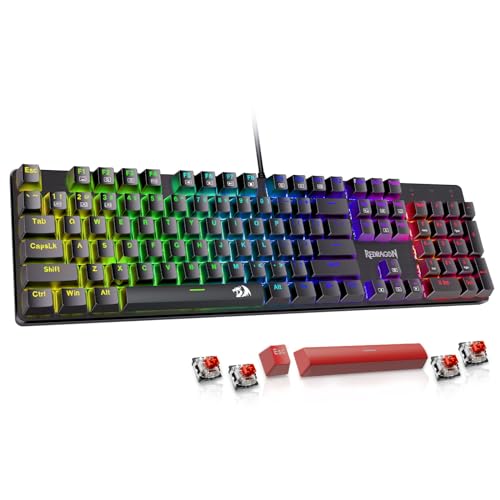
The Redragon K671 is the uncomplicated choice in this group. It uses a conventional full-size layout, so there is no adjustment period for the number pad or navigation cluster. Plug it in, choose a lighting mode, and start typing. That simplicity is its appeal, especially for a gaming computer that does not need Bluetooth or a rechargeable battery.
Its red switches are linear and require less force than a heavier tactile design, which suits rapid repeated inputs in role-playing, MMO, and similar games. The board supports full-key anti-ghosting, meaning simultaneous presses are read without conflicting input. Twelve multimedia shortcuts cover volume, playback, calculator, email, and related functions, while macro editing lets you remap keys or combine actions through the software.
The lighting system has 11 modes, five brightness levels, and adjustable speed. The product data says the color itself cannot be changed, so this is not the board for elaborate per-key RGB customization. The double-injection ABS keycaps allow the backlight to show through clearly, but the AULA F75 Pro and ASUS ROG Strix Scope II X use PBT keycaps that should feel more substantial over long use. Four spare switches and two red replacement keycaps are included for maintenance.
The K671 loses to the AULA F75 Pro on wireless flexibility, acoustics, layout compactness, and switch customization. It also lacks the more premium construction of the Logitech G413 SE, whose aluminum top case gives it a firmer physical presence. The Redragon's advantage is that it keeps the feature set easy to understand. Skip it if cable-free use or a quieter, more refined typing sound matters. Choose it if you want a no-nonsense full-size gaming keyboard with the option to replace a switch later.
3. AULA F99: Best Compact Full Layout

Pros
- 96% layout retains a number pad in a smaller footprint
- Tri-mode wireless and wired connectivity
- 8000mAh battery
- Hot-swappable 3-pin and 5-pin PCB
- PBT keycaps and multi-layer sound dampening
Cons
- Larger and heavier than the F75 Pro
- Linear switches may not suit tactile typists
- Customization depends on software for some features
Best for: someone who wants a wireless keyboard with a number pad without using a traditional full-size layout.
The F99 solves a common layout problem neatly. Its 99-key 96% design keeps the number area, arrow keys, and work-friendly controls while trimming some of the empty space around a conventional full-size keyboard. It is still a substantial board at 3.31 pounds, but the arrangement makes more sense for a crowded desk than the 17.1-inch-wide Redragon K671.
Like the F75 Pro, it supports Bluetooth 5.0, 2.4GHz wireless, and USB-C wired use. A shortcut combination can switch among up to five saved devices, so it can serve a desktop and portable devices without a second keyboard. The 8000mAh battery is considerably larger than the F75 Pro's 4000mAh unit, although the supplied information does not state how many days or hours that translates to.
The pre-lubed linear switches are smooth and ready for gaming or fast office typing, and the hot-swap PCB accepts both 3-pin and 5-pin replacements without soldering. Five layers of filling, an extended integrated silicone pad, and PCB single-key slotting are designed to give the board a softer, more stable sound. Its double-shot PBT keycaps should keep the legends clear, while 16 RGB effects and 16.8 million colors provide plenty of lighting control.
The F99 is the better choice than the F75 Pro when a number pad is non-negotiable. The F75 Pro remains more compact and easier to position beside a mouse, while the S98 Pro adds a screen and knob for users who want more visual customization. The F99's weakness is that its 96% layout can make unusual key spacing feel less immediately familiar than a standard full-size board. It is the one to buy for spreadsheet work, gaming, and multi-device use when a traditional compact board leaves too many keys behind. For a wider look at wireless layouts, the practical compromises of cutting the cable are useful to understand.
4. Logitech G413 SE: Best Durable Gaming Classic

Pros
- Rigid aluminum-magnesium alloy top case
- Wear-resistant PBT keycaps
- Tactile mechanical switches
- Six-key rollover anti-ghosting
- Dedicated FN media controls
Cons
- Wired only
- White lighting rather than full RGB
- No hot-swap switch support listed
Best for: a gamer who prefers a standard full-size layout and a firm, understated chassis.
The G413 SE is a refreshing counterpoint to the more elaborate boards here. It has a full-size layout, a black brushed aluminum top case, white backlighting, and tactile mechanical switches. There is no wireless mode, no display, and no colorful lighting system to configure. What you get is a familiar gaming keyboard that feels solid on the desk and keeps its controls close to the standard PC arrangement.
The tactile switches provide a bump that helps distinguish one press from the next. That is useful for general typing and games where deliberate key presses matter more than a completely smooth linear stroke. Six-key rollover anti-ghosting provides dependable simultaneous input, though the AULA and Cherry boards advertise full N-key rollover, which is a stronger specification for extensive multi-key commands.
PBT keycaps are a meaningful detail here. They are designed to resist heat and wear better than common ABS caps, and the aluminum-magnesium alloy top case serves as the keyboard's backbone with minimal flex. Twelve FN keys handle volume, playback, track skipping, mute, lighting, and Windows lock. The product is also available in a TKL version, but this specific model is the full-size board.
The G413 SE feels more restrained than the ASUS ROG Strix Scope II X, which adds hot-swappable switches, RGB, sound dampening, a wheel, macro programming, and a wrist rest. It is also less flexible than the Redragon K671 because the switches are not listed as hot-swappable. Its real drawback is the limited lighting and fixed wired setup. Choose it when build solidity and conventional controls matter more than customization, and skip it if you want to tune the switches or change the lighting color.
5. ASUS ROG Strix Scope II X: Best Full-Size Gaming Board

Pros
- Full 100% layout with number pad
- Hot-swappable pre-lubed switches
- PBT double-shot keycaps
- Sound-dampening foam and switch pads
- Wrist rest, control wheel, and macro programming
Cons
- Wired only
- Takes significant desk space
- Linear switches are not ideal for tactile fans
Best for: a gamer or streamer who wants a complete full-size control surface with room to customize it.
The ROG Strix Scope II X is the most fully equipped wired gaming board in this roundup. Its 100% layout includes a number pad, and the aluminum top plate gives the 17.2-inch-wide chassis a weighty feel. That width is a real consideration: it leaves less room for a low mouse sensitivity setup than the AULA F75 Pro, but it gives work and gaming users every standard key.
The included ROG NX Snow V2 linear switches are pre-lubed and hot-swappable. You can replace them without soldering, and the PCB also supports the alternate ROG NX Storm clicky switch design described in the product information. That makes the ASUS more useful to a long-term tinkerer than the Logitech G413 SE. PBT double-shot keycaps resist wear, while the switch design includes a dust-proof wall stem and an LED lens intended to improve RGB illumination.
Acoustics get more attention than they do on many gaming boards. Integrated sound-dampening foam and switch-dampening pads absorb some pinging and echo, so the keyboard should sound more controlled than a hollow, minimally filled case. The multifunction wheel handles media and lighting adjustments, F1 to F5 hotkeys cover Xbox Game Bar and recording functions, and every key is fully macro-programmable. Three angle adjustments and a detachable wrist rest help during longer sessions.
The ASUS beats the G413 SE on customization, lighting, switch replacement, and comfort accessories. The AULA F99 offers wireless freedom and a larger battery, but the ASUS feels more like a dedicated, polished gaming station. Its weakness is the footprint and cable. It is also the wrong fit for someone who wants a compact board or quiet office typing. Buy it when you need the number pad and want premium gaming controls without giving up the ability to alter the switch feel.
6. Logitech MX Mechanical: Best Low-Profile Wireless

Pros
- Quiet tactile low-profile switches
- Bluetooth and Logi Bolt connectivity
- Supports up to three devices
- Proximity-adjusting smart illumination
- USB-C charging
Cons
- Full-size footprint
- Not hot-swappable
- Backlight reduces the stated battery runtime
Best for: an office user who wants mechanical feedback without the height and noise of a conventional gaming board.
The MX Mechanical is aimed at people who like the feel of a mechanical switch but do not want a tall, loud gaming board on an office desk. Its low-profile tactile switches have a noticeable bump without the sharp sound of a clicky design. The full-size layout is familiar, though its 17.9-inch width makes it one of the larger keyboards here.
Wireless convenience is the main reason to choose it. Bluetooth Low Energy and the included Logi Bolt receiver can connect the keyboard to up to three devices across nearly any operating system. Switching between a work computer, personal laptop, and tablet is straightforward, and Logitech's Options+ software can customize function keys, lighting, and Flow features.
The smart illumination turns on when hands approach and adjusts to changing light. Logitech states up to 15 days of use with the backlight on, or up to 10 months with it off. USB-C charging means it does not need disposable batteries. Those figures are useful because they show the trade-off clearly: illumination is convenient, but turning it off dramatically extends the interval between charges.
Compared with the Logitech MX Keys S, the MX Mechanical supplies genuine mechanical switches and tactile feedback, while the MX Keys S is flatter and quieter. The AULA F75 Pro feels more customizable and gaming-oriented, but the MX Mechanical has a cleaner office workflow and a more restrained profile. Its main limitation is that the switches and layout are not aimed at enthusiasts who want to rebuild the board. Pick it for multi-device productivity, and skip it if RGB, hot-swapping, or a compact desk footprint matters most.
7. Logitech Alto Keys K98M: Best Gasket-Mounted Office Board

Pros
- Gasket mount softens vibration
- 98-key layout includes a number pad
- Hot-swappable Marble switches
- Bluetooth, Logi Bolt, and USB-C charging
- Up to 12 months of wireless use
Cons
- Clicky sound is not suitable for every office
- White backlight only
- Less compact than a 75% board
Best for: a typist who wants a softer gasket feel, a number pad, and a pronounced clicky response.
The Alto Keys K98M takes Logitech's office keyboard idea in a more mechanical direction. Its 98-key 1800-style layout keeps a number pad while reducing some of the width of a conventional 104-key board. The defining feature is UniCushion, a gasket mount designed to absorb vibration and give each press a softer, more elastic landing.
The Marble switches are hot-swappable, and the concave keys are shaped to support stable finger placement. The product describes the feel as clicky, so this is not the quiet alternative to the MX Mechanical. It is better suited to a private office or home workspace where the audible response is part of the appeal. Users who prefer a smooth, quiet press should choose the Cherry KC 200 MX or MX Mechanical instead.
Connectivity covers Bluetooth and Logi Bolt, with support for Windows and macOS. USB-C recharging works while typing, and Logitech states up to 12 months of wireless use. The keyboard has white backlighting only rather than RGB, which suits its restrained appearance but gives less control than the AULA boards or ASUS. Action Keys can be programmed through Logi Options+ to launch preferred functions, including AI-related shortcuts.
The K98M is more tactile and physically distinctive than the MX Mechanical, while the AULA F99 offers RGB, tri-mode connection, and a much larger 8000mAh battery. The Logitech counters with a more office-focused software environment and a compact number-pad layout. Its weakness is the click. Do not buy it for a shared desk where every keystroke may travel. Choose it if you want the satisfying rhythm of a typewriter-inspired board with wireless convenience and a softer gasket-mounted base.
8. Cherry KC 200 MX: Best Quiet Office Keyboard

Pros
- Quiet MX2A Silent Red linear switches
- Full N-key rollover and anti-ghosting
- Anodized metal plate
- Laser-etched abrasion-resistant keycaps
- Dedicated calculator and volume controls
Cons
- Wired only
- No backlight beyond white status LEDs
- No wireless or switch customization
Best for: a shared office or home workspace where quiet, consistent typing matters more than gaming extras.
The Cherry KC 200 MX is the quiet specialist. Its MX2A Silent Red switches use a smooth linear action with no click, making it far less disruptive than the Logitech Alto Keys K98M. The full-size layout is conventional and easy to live with, and four extra keys provide quick access to the calculator and volume controls.
Cherry gives this office board a sturdy foundation with an anodized metal plate, two non-slip fold-out feet, and molded keycaps. The laser-etched legends are designed to remain readable after years of use. It is not dressed up as a gaming centerpiece, but the restrained design makes more sense in a workplace than a board covered in animated effects.
The technical fundamentals are strong. Full N-key rollover means every key can be read simultaneously, and anti-ghosting helps prevent unintended entries. The switches are rated for more than 50 million actuations per key, according to the product information. White status LEDs appear in the Caps Lock, Scroll Lock, and Num Lock keys, but there is no RGB system or broad backlight customization.
The Cherry is a better fit than the Logitech G413 SE when noise and office manners matter, while the MX Mechanical is more convenient if you need wireless multi-device switching. The ASUS ROG Strix Scope II X is the stronger gaming board because it adds hot-swapping, macros, RGB, and a wrist rest. The KC 200 MX's weakness is its deliberately narrow mission. Skip it if you want wireless use or a custom switch hobby. Buy it when you want a dependable, quiet, full-size mechanical keyboard that stays out of the way.
9. AULA S98 Pro: Best Keyboard With a Display

Pros
- Built-in LCD screen and multifunction knob
- Tri-mode connection for up to five devices
- Hot-swappable 3-pin and 5-pin switches
- 19 RGB effects and programmable software
- 5000mAh battery and PBT keycaps
Cons
- Screen customization requires Windows and wired mode
- 98-key layout takes more room than a 75% board
- Extra features add setup complexity
Best for: someone who wants a compact number pad layout with a screen, knob, and extensive visual customization.
The S98 Pro is built around the small display above its keys. The home screen can show the date, time, battery level, system, connection mode, and status information. The knob can adjust volume, RGB effects, connection mode, language, and screen content, giving the board a more hands-on personality than the typical compact wireless keyboard.
Its 98-key layout includes a number pad while trimming the footprint of a standard full-size board. Bluetooth 5.0, 2.4GHz, and USB-C wired connections support up to five saved devices, and the keyboard works with Windows, Mac, iOS, and Android. The 5000mAh battery is suited to longer wireless sessions, though the supplied data does not give a specific runtime estimate.
The S98 Pro also follows the enthusiast formula closely. Its base accepts 3-pin or 5-pin switches without soldering, the switches and stabilizers are pre-lubed, and the side-engraved PBT keycaps are made with double injection molding and heat sublimation. Five layers of sound-dampening material, integrated silicone pads, and PCB single-key slotting aim to create a softer, more stable sound. RGB has 19 effects and more than 16.8 million colors.
The screen is not entirely effortless. Setting custom images or GIFs requires downloading the driver, using Windows, and keeping the keyboard wired during setup. That is a reasonable limitation, but it means the headline feature is less useful for Mac-only users. The F99 is the cleaner choice for someone who only wants a wireless compact board with a number pad, while the F75 Pro is easier to place on a small desk. Choose the S98 Pro when the display and knob are part of the fun, not merely decoration.
10. Logitech MX Keys S: Best Low-Profile Alternative

Pros
- Quiet, precise laptop-style typing
- Spherical dish keys guide fingertips
- Bluetooth and Logi Bolt support
- Smart proximity-based backlighting
- Smart Actions and multi-device workflow
Cons
- Not a conventional mechanical switch keyboard
- Full-size body is 18 inches wide
- Backlight reduces battery life
Best for: someone who values quiet, low-profile precision more than traditional mechanical key travel.
The MX Keys S is the outlier here, and it earns a place because many people searching for a mechanical keyboard are really trying to solve a different problem: they want accurate, comfortable typing without a tall case or loud switches. The MX Keys S uses a laptop-like profile and spherical dish keys that guide the fingertips toward the center of each cap. Its action is fluid, quiet, and precise rather than distinctly mechanical.
The full-size layout is familiar, but the 18-inch width makes it the largest keyboard in the roundup. Logitech offsets that footprint with a solid build and an angle designed to support a comfortable wrist position. Smart illumination lights the keys as hands approach and adjusts to the surrounding environment, so it is useful without requiring constant manual control.
Bluetooth Low Energy and the Logi Bolt receiver pair with up to three devices across Windows, macOS, Linux, and other compatible systems. The Options+ application adds Smart Actions, custom lighting controls, and the ability to move text and files between supported computers when paired with a compatible Logitech mouse. Battery life is stated at up to 10 days with backlighting or five months with it disabled, and USB-C handles charging.
The MX Keys S should not replace the AULA F75 Pro or Cherry KC 200 MX for someone specifically seeking mechanical switches. The Logitech MX Mechanical is the better compromise because it adds low-profile mechanical tactility while keeping the same kind of multi-device focus. Still, the MX Keys S is quieter and more laptop-like than any mechanical board here. Pick it when office silence, low key height, and cross-device workflow matter more than switch feel. If your priority is gaming rather than office typing, the controls that matter most during fast play point toward a different kind of board.
How to choose best mechanical keyboard
The right keyboard starts with the way you type, the amount of desk space available, and whether you need wireless convenience or gaming controls.
Switch feel and noise
Linear switches move smoothly without a tactile bump, which suits fast repeated presses and the AULA boards, Redragon, ASUS, and Cherry Silent Red. Tactile switches add a bump that helps you feel actuation, as found on the Logitech G413 SE and MX Mechanical. Clicky switches make the most pronounced sound, which is central to the Alto Keys K98M.
Quiet switches are a safer choice for shared rooms. A clicky board can be enjoyable in a private space but distracting beside another person. Low-profile switches reduce travel and height, while conventional switches provide a deeper, more traditional mechanical feel.
Layout and desk space
A 75% keyboard such as the AULA F75 Pro keeps the arrow keys and many important controls while leaving more room for a mouse. A 96% or 98% model, such as the AULA F99 and S98 Pro, adds a number pad without the full unused spacing of a standard full-size board. Full-size keyboards remain the easiest transition for office work because every key is where most users expect it.
Measure the space between your monitor stand, mouse, and desk edge before choosing. A wide board can force the mouse into an uncomfortable position, especially for low-sensitivity games.
Choose the layout that removes the keys you never use, not the keys you might need once a month.
Connection options
Wired USB keyboards are simple and do not need charging. Wireless boards are more convenient for multi-device desks, but check how many devices they store and whether switching is done with shortcuts, a button, or a knob. The AULA F75 Pro, F99, and S98 Pro offer Bluetooth, 2.4GHz, and USB-C, while Logitech's wireless models use Bluetooth and Logi Bolt.
A wired mode is also useful when changing switches or configuring software. The S98 Pro specifically requires Windows and a wired connection for custom screen images and GIFs.
Hot-swapping and customization
Hot-swap support lets you replace compatible switches without soldering. The AULA F75 Pro, AULA F99, AULA S98 Pro, ASUS ROG Strix Scope II X, Redragon K671, and Logitech Alto Keys K98M offer that flexibility in the supplied product information. It matters if you expect your preferences to change or want to repair a single failed switch.
A board with fixed switches can still be excellent. The Cherry KC 200 MX is focused on quiet, dependable office typing, and the Logitech G413 SE emphasizes a durable chassis. Do not choose hot-swapping simply because it appears on a feature list if you have no interest in changing switches.
Keycap material and case construction
PBT keycaps generally resist shine and wear better than ABS alternatives. The AULA, ASUS, Logitech G413 SE, and Cherry models specify PBT or abrasion-resistant keycap construction. Case dampening also affects the experience. Gasket structures, silicone pads, foam, and layered filling can reduce hollow resonance and soften the bottom of a press.
A rigid metal top plate adds stability, while a lighter compact board is easier to reposition. The best balance depends on whether you want a planted gaming keyboard or a board that moves between rooms and devices.
Frequently asked questions
Are mechanical keyboards better for gaming?
Mechanical keyboards can provide clearer switch feedback and consistent actuation, which many gamers prefer. Features such as N-key rollover, anti-ghosting, macro controls, and a Windows key lock are more directly relevant to games than lighting alone. The AULA F75 Pro and ASUS ROG Strix Scope II X combine those controls with switch customization.
Which mechanical keyboard is quietest?
The Cherry KC 200 MX is the quietest specialist in this roundup because it uses MX2A Silent Red linear switches. The Logitech MX Mechanical also keeps noise down with quiet tactile low-profile switches. Avoid the clicky Alto Keys K98M if sound is your primary concern.
Is a 75% keyboard large enough for everyday work?
For many people, yes. The AULA F75 Pro keeps arrow keys and a compact function row while removing the number pad and some navigation spacing. If your work involves frequent number entry, the 96% or 98% AULA models are more suitable.
What does hot-swappable mean?
A hot-swappable keyboard lets you remove and replace compatible switches without soldering. It gives you a way to change the feel later or replace an individual switch. Compatibility still matters, so check whether the board accepts 3-pin, 5-pin, or another switch format.
Do wireless mechanical keyboards work for gaming?
Tri-mode boards can work well for gaming through a 2.4GHz receiver or wired USB connection. Bluetooth is convenient for tablets and general use but is not usually the first choice for latency-sensitive play. The AULA F75 Pro, F99, and S98 Pro provide both wireless modes and USB-C.
What is the difference between mechanical and low-profile laptop-style keyboards?
Mechanical keyboards use individual switches under the keys, with a feel that can be linear, tactile, or clicky. Laptop-style boards such as the Logitech MX Keys S use shorter, flatter key mechanisms and feel quieter and more compact. The Logitech MX Mechanical sits between those approaches with low-profile mechanical switches.
The bottom line
The AULA F75 Pro is our top pick among the Best mechanical keyboard options because it combines a sensible 75% layout, three connection modes, a useful knob, hot-swap support, and a carefully damped case. It is the most broadly adaptable board here, though users who need a number pad should choose the AULA F99 instead.
For a full-size gaming setup, the ASUS ROG Strix Scope II X is the stronger choice, with hot-swappable switches, PBT keycaps, sound control, a wrist rest, macros, and a multifunction wheel. Office users who need quieter typing should look to the Cherry KC 200 MX, while multi-device workers will prefer the Logitech MX Mechanical.
If you are undecided, choose the AULA F75 Pro unless you specifically need a number pad, wireless office workflow, or near-silent typing.
As an Amazon Associate we earn from qualifying purchases.