

A MacBook trackpad is excellent until a long day of spreadsheets, photo work, or scrolling leaves your hand hovering over the same small surface. The right mouse adds physical buttons, a more relaxed grip, and a pointer you can place without repeatedly lifting your finger.
The Best Mouse For Mac depends on the kind of Mac setup you have. Apple’s Magic Mouse is the cleanest match for gesture control, while Logitech’s M240 is a quieter, compact alternative. The rest of this list covers ergonomic work mice, travel models, multi-device options, and one gaming mouse that works well with a Mac when you need speed.
For most Mac owners, the Apple Magic Mouse White is the best starting point. The list ranges from tiny Bluetooth mice to full-size productivity tools and a high-speed gaming model.
Comparison table
| # | Product | Award | Connection | Standout feature | Best for |
|---|---|---|---|---|---|
| 1 | Apple Magic Mouse White | Best overall | Bluetooth | Multi-Touch surface | Mac users who want Apple’s gestures |
| 2 | Logitech M240 Graphite | Best compact pick | Bluetooth | 90% reduced click sound | Quiet travel and office use |
| 3 | Apple Magic Mouse Black | Best dark finish | Bluetooth | Multi-Touch surface | Dark desk setups |
| 4 | Logitech MX Master 4 | Best for productivity | Bluetooth | Haptic Sense Panel | Heavy Mac workflows |
| 5 | Logitech MX Anywhere 3S | Best for travel | Bluetooth | 8K DPI sensor | Mobile Mac users |
| 6 | Logitech M720 Triathlon | Best multi-device design | Bluetooth or receiver | Three-device switching | Several computers and tablets |
| 7 | Logitech M240 Off White | Best light finish | Bluetooth | Ambidextrous shape | Compact light-colored setups |
| 8 | Logitech M240 Rose | Best colorful compact mouse | Bluetooth | Silent clicking | Quiet portable use |
| 9 | Logitech MX Master 3S | Best ergonomic classic | Bluetooth | 8K DPI tracking | Comfortable desk work |
| 10 | Logitech G305 Lightspeed | Best for gaming | Lightspeed wireless | 12, 000 DPI sensor | Mac gaming and precision |
1. Apple Magic Mouse White: Best Overall

Pros
- Multi-Touch gestures feel natural on macOS
- Pairs automatically with a Mac
- Smooth gliding foot design
- Rechargeable battery lasts about a month or more
- Includes a woven USB-C charge cable
Cons
- Low profile is not comfortable for every hand
- The flat shape offers less palm support than Logitech’s ergonomic mice
- Charging requires the mouse to be connected by cable
Best for: Mac owners who want the most Apple-like pointer and gesture experience.
The Apple Magic Mouse White is the mouse to choose when you want your accessory to behave like an extension of macOS rather than a generic pointer. Its top surface is not just a left and right click area. The Multi-Touch surface supports gestures such as swiping between web pages and scrolling through documents, so it preserves some of the trackpad’s feel while giving you a more controlled desktop position.
It is a remarkably clean desk companion. The mouse is wireless, pairs automatically with a Mac, and glides on an optimized foot design. Apple lists dimensions of 5.12 by 2.91 by 1.42 inches and a weight of 0.5 pounds. Those figures describe a long, low object rather than a rounded palm mouse. That shape looks excellent beside an iMac or MacBook dock, but it asks you to use a fingertip or claw-like grip instead of resting your whole hand over the shell.
The rechargeable battery is designed to last about a month or more between charges. The included woven USB-C cable can pair and charge it by connecting to a USB-C port on your Mac. The charging arrangement remains the obvious design compromise: the mouse has to be connected when it needs power, and the low underside placement is less convenient than a front-facing charging port. That matters most to people who use the mouse continuously and dislike interrupting a session.
Compared with the Logitech M240 Graphite, the Magic Mouse gives you far more Mac-specific control, but the M240 is smaller, quieter, and easier to pack. The Logitech MX Master 4 is a better physical fit for long hours because of its ergonomic shape and thumb controls. The Magic Mouse wins when scrolling and gestures matter more than hand support.
Skip it if you need a tall shell, multiple physical buttons, or a mouse that feels natural in a large hand. For someone who likes Apple’s restrained design and uses gestures throughout the day, this remains the clearest all-purpose recommendation.
2. Logitech M240 Graphite: Best Compact Pick

Pros
- Bluetooth pairing needs no dongle or occupied port
- Click sound is reduced by 90 percent
- Ambidextrous compact design
- Battery lasts up to 18 months
- Works with macOS, iPadOS, Windows, Linux, ChromeOS, and Android
Cons
- Small shell gives your palm little support
- No gesture surface or extra side buttons
- Uses a replaceable battery rather than USB-C charging
Best for: anyone who wants a quiet, simple Bluetooth mouse that disappears into a laptop bag.
The Logitech M240 Graphite gets the basics right without trying to turn a compact mouse into a miniature control panel. It pairs over Bluetooth in seconds, does not need a receiver, and makes very little noise during ordinary clicking. That combination is particularly useful with a MacBook in a shared office, library, or quiet room where the sharp sound of a conventional mouse becomes irritating.
Its compact dimensions, about 3.90 inches long, 2.36 inches wide, and 1.54 inches high, make it easy to carry. The ambidextrous shape also avoids forcing the hand into a right-handed contour. It is not the sort of mouse that supports the palm during a full workday, but that is not its purpose. The lower, slimmer shell is convenient for short sessions, travel, and desks where the mouse needs to move out of the way.
Logitech says the clicks are 90 percent quieter while retaining the same click feel. That is the important distinction here. This is not merely a small Bluetooth mouse with a soft shell. Its main appeal is reducing the small repeated noises that otherwise fill a work session. The rated Bluetooth range is up to 10 meters, while the battery can last up to 18 months with automatic sleep helping conserve power.
The Apple Magic Mouse White is more integrated with macOS because of its Multi-Touch surface, but it is flatter and less forgiving about grip. The M240 is a better choice for a reader who wants a conventional pointer and physical scroll wheel without installing anything or surrendering a USB port. It also comes in other finishes in this list, though the Graphite version is the least visually conspicuous.
There are limits. The small body may feel cramped to anyone accustomed to a full-size mouse, and there are no side buttons or software customization features to expand its role. If the priority is quiet, portable, uncomplicated control, the M240 Graphite is the Best Mouse For Mac for a lot of ordinary laptop use.
3. Apple Magic Mouse Black: Best Dark Finish

Pros
- Multi-Touch gestures support swiping and scrolling
- Automatic pairing with a Mac
- Rechargeable battery lasts about a month or more
- Smooth foot design
- Woven USB-C cable included
Cons
- Low profile provides limited palm support
- Black finish can show dust and fingerprints
- Charging still requires connecting the mouse by cable
Best for: Mac users who want Apple’s gesture controls in a dark desk setup.
The Apple Magic Mouse Black has the same basic personality as the white model, so the real distinction is visual rather than functional. It is the sleek option for a desk built around a dark MacBook, black keyboard, or darker monitor stand. The top surface remains a continuous Multi-Touch area, letting you swipe between web pages and scroll through documents without adding a row of visible buttons.
The shape is long and unusually low. Apple lists it at 5.25 inches long, 3 inches wide, and 1.5 inches high, with a weight of 0.6 pounds. That is a little larger and heavier than the white entry in this dataset, but it still feels like a flat gesture device rather than a conventional ergonomic mouse. The gliding foot helps it move smoothly, and the wireless connection keeps the desk free of a receiver.
Pairing is automatic with a Mac, which makes setup pleasantly brief. The rechargeable battery is specified to run for about a month or more between charges. A woven USB-C cable is included for pairing and charging through a Mac’s USB-C port. That cable is useful, but the need to connect the mouse for charging is still the part of the design most likely to frustrate someone who expects uninterrupted use.
The Logitech MX Anywhere 3S is a more practical travel mouse because its shape is easier to grip and its sensor is designed to track on a wider range of surfaces. The Apple Magic Mouse White offers the same controls in a lighter finish. Choose this black model when the visual match matters and you already know that Apple’s low profile suits your hand.
People who want a relaxed palm grip should look at the Logitech MX Master 3S or Logitech MX Master 4 instead. This model is for the Mac owner who values gesture control, a polished appearance, and automatic pairing more than extensive physical controls.
4. Logitech MX Master 4: Best for Productivity

Pros
- Ergonomic shape with natural tilt and thumb scroll wheel
- Haptic Sense Panel supports customizable feedback
- Actions Ring puts app shortcuts near the pointer
- MagSpeed wheel can scroll 1, 000 lines per second
- Quiet clicks reduce noise by 90 percent
Cons
- Larger design is less convenient for travel
- USB-C charging cable is not included
- Many advanced controls depend on Logitech software
Best for: Mac professionals who spend long days switching between documents, apps, and large pages.
The Logitech MX Master 4 is the most ambitious mouse here. It is built for someone who sees a mouse as a productivity tool rather than a basic cursor. The natural tilt, sculpted body, intuitive buttons, and thumb scroll wheel are all aimed at reducing the awkward wrist angle that a flat mouse can create. It is the model we would choose for a desk-bound workflow with large documents, creative software, and many repeated commands.
Its strongest new idea is the Haptic Sense Panel. Logitech says it can provide customizable haptic feedback for specific actions, shortcuts, and notifications. The Actions Ring adds a dynamic customizable overlay that places commonly used tools and shortcuts near the pointer. Those features will appeal to people willing to configure their mouse around the apps they use. They are less compelling for someone who wants to connect and work without learning another layer of software.
The MagSpeed scroll wheel is the other major reason to choose it. Logitech describes scrolling at up to 1, 000 lines per second, with the ability to stop precisely on a single pixel. That gives the mouse two useful personalities: fast movement through long pages and controlled navigation when you need to land on a specific point. Quiet clicks, described as 90 percent less click noise, make it better suited to shared spaces than a typical productivity mouse.
The dimensions in the product information are unusual, listing a length of 6.5 inches, width of 5.6 inches, and height of 0.039 inches. Those figures do not form a useful physical picture of the mouse, so the functional details are more informative here. It charges through USB-C while you work, but the cable is not included. The mouse supports macOS, iPadOS, and Windows, and the Mac version is designed to work with Logi Options+ functions for macOS.
Compared with the Logitech MX Master 3S, the MX Master 4 adds the Haptic Sense Panel, Actions Ring, and newer quiet productivity features. The Apple Magic Mouse White remains better for trackpad-like gestures, while the MX Anywhere 3S is much easier to carry. Skip this model if you prefer a small mouse or do not want to customize buttons and shortcuts.
For heavy desktop work, though, this is the most capable tool in the group. It is the Best Mouse For Mac for a person who wants the pointer, scroll wheel, and shortcuts to work together as part of a carefully tuned workflow.
5. Logitech MX Anywhere 3S: Best for Travel

Pros
- Compact body travels easily
- 8K DPI sensor tracks even on glass
- Quiet clicks reduce distractions
- MagSpeed wheel combines speed and precision
- Pairs with up to three devices
Cons
- Compact shape offers less palm support
- No USB receiver is listed for this Mac model
- More features require Logi Options+
Best for: MacBook owners who move between desks, cafés, offices, and other working surfaces.
The Logitech MX Anywhere 3S is the most convincing compromise between a travel mouse and a serious work mouse. It is compact enough to carry, but it does not feel stripped down. Its quiet clicks, precision scroll wheel, configurable buttons, and multi-device support give it considerably more range than the M240.
The sensor is the headline feature. Logitech specifies 8K DPI tracking and says the mouse can work on any surface, including glass. High DPI is not automatically better for every user, but it allows the pointer to cover more screen distance with smaller hand movements. That is useful with a high-resolution Mac display or a crowded temporary workspace where you cannot make large sweeping motions.
At 3.96 inches long, 1.35 inches wide, and 0.1 inches high according to the supplied product information, the dimensions are compact, though the reported height is not a practical description of the shell. The more useful point is that the mouse is designed to fit in a bag and move between locations. It pairs with up to three devices over Bluetooth Low Energy on macOS and iPadOS, so a MacBook and iPad can share one pointer without repeatedly entering pairing mode.
The MagSpeed wheel can scroll 1, 000 lines per second and still stop precisely on a pixel. That matters when a travel mouse is being used for real work rather than occasional navigation. Quiet clicks are also helpful on trains, in offices, and at a kitchen table. Readers comparing laptop accessories may also want to consider how different portable setups handle limited desk space, since the mouse’s small footprint is most useful when the rest of the workspace is small too.
The Apple Magic Mouse Black is slimmer and more visually integrated with a Mac, but the MX Anywhere 3S is easier to grip and more flexible across surfaces. The MX Master 4 is more comfortable for extended stationary work, while this mouse wins as the one to keep in a laptop bag. Choose it when travel, glass-surface tracking, and multi-device switching matter more than a full-size palm rest.
6. Logitech M720 Triathlon: Best Multi-Device Design

Pros
- Switches between up to three computers
- Bluetooth and Unifying receiver connectivity
- Full-size right-handed ergonomic shape
- Six customizable buttons
- Battery lasts up to 24 months
Cons
- Right-handed design is not suitable for everyone
- Older, less compact shape than the MX Anywhere 3S
- Unifying receiver connection uses a USB port
Best for: right-handed users who move between a Mac, another computer, and a tablet or laptop.
The Logitech M720 Triathlon is a practical workhorse with one particularly useful trick: it can switch between up to three computers with a button press. That makes sense for a desk where a MacBook, desktop, and secondary laptop share one keyboard and mouse. Logitech’s Flow feature can also move the cursor, text, and files between compatible computers, which is more useful than simply changing the active connection.
This is a full-size mouse with a sculpted right-handed shape and rubber body. The supplied dimensions are 4.53 inches long, 2.91 inches wide, and 1.77 inches high, with a weight of 0.2975 pounds. Those proportions give the palm more to hold than the M240 or MX Anywhere 3S. The trade-off is clear: it occupies more space in a laptop bag and does not accommodate left-handed use as naturally as an ambidextrous compact mouse.
The scroll wheel can move quickly through long documents and then switch to click-to-click scrolling when you need control. There are six customizable buttons, so the M720 can handle repeated commands without reaching for a keyboard. It supports macOS, iPadOS, Windows, ChromeOS, and Linux, and it can connect through Bluetooth or the Logitech Unifying receiver. That receiver can support up to six compatible Logitech peripherals through one USB connection.
The battery is rated for up to 24 months, which is a useful advantage for a mouse that may sit on a busy shared desk. It uses a conventional replaceable battery rather than USB-C charging. That is less elegant than the rechargeable systems on the Apple and MX models, but it also means you are not tethered to a cable when the battery is low.
The Logitech MX Master 4 is more advanced and better suited to a single demanding workstation. The MX Anywhere 3S is more portable and tracks on glass. The M720 makes the most sense when device switching is the priority and you want a familiar full-size shape. Skip it if you need a left-handed mouse, a very small travel companion, or a modern USB-C charging setup.
7. Logitech M240 Off White: Best Light Finish

Pros
- Compact ambidextrous design
- Bluetooth works without a receiver
- Click noise is reduced by 90 percent
- Up to 18 months of battery life
- Compatible with Mac and several other platforms
Cons
- Small body is not ideal for large hands
- Basic button layout lacks customization
- Uses a replaceable battery
Best for: MacBook users who want a quiet, light-colored mouse for travel or a minimalist desk.
The Logitech M240 Off White has the same useful formula as the Graphite version, with a lighter finish that suits white keyboards, silver laptops, and pale desk accessories. It is a straightforward Bluetooth mouse, not a miniature productivity console. That restraint is exactly why it works for people who want to stop using a trackpad without adding software or a receiver.
The shape is slim and ambidextrous, measuring about 3.90 inches long, 2.36 inches wide, and 1.54 inches high in the supplied product information. It can guide either hand into a natural position, though “natural” should not be confused with “palm-supporting.” The compact shell is better for fingertip use and short sessions than for resting a large hand on the mouse throughout an entire workday.
The click mechanism is designed to reduce sound by 90 percent while keeping a familiar click feel. That makes it a sensible office and library companion. Bluetooth range is listed at up to 10 meters, and the energy-efficient sleep feature helps the battery last up to 18 months. It works with macOS, iPadOS, Windows, Linux, ChromeOS, and Android, so it can follow you if your computing setup changes.
The Logitech M240 Graphite has the same controls and dimensions, so the choice between them is mostly about finish. The Apple Magic Mouse White looks more integrated with Apple hardware and adds Multi-Touch gestures, but it has a much flatter grip. If you are comparing compact Bluetooth options for a laptop, the practical differences between Bluetooth-only mice and receiver models can help clarify whether avoiding a dongle matters in your setup.
This model is not for someone who needs side buttons, fast horizontal navigation, or a tall ergonomic shell. It is for the Mac user who wants quiet clicks, simple pairing, a light finish, and a mouse small enough to carry every day.
8. Logitech M240 Rose: Best Colorful Compact Mouse

Pros
- Quiet Bluetooth operation
- Ambidextrous and easy to carry
- Up to 18 months of battery life
- Works without a USB receiver
- Rose finish adds personality to a portable setup
Cons
- Limited palm support
- No extra buttons or gesture controls
- Replaceable battery rather than rechargeable USB-C power
Best for: anyone who wants a small, quiet Mac mouse with a more distinctive finish.
The Logitech M240 Rose is the same compact, quiet mouse as the other M240 entries, but its finish gives it a clearer personality. That matters when a mouse lives beside a colorful laptop sleeve, a light keyboard, or a deliberately coordinated desk. The important part is that the color does not come at the expense of the useful fundamentals.
It connects over Bluetooth without a dongle or occupied USB port, which is convenient on MacBooks with limited ports. The ambidextrous body is slim enough to carry and comfortable for either hand during ordinary navigation. The product information lists dimensions of 3.89 inches long, 2.36 inches wide, and 1.53 inches high, with a listed weight of 0.03968320716 pounds. The extremely precise weight figure is less meaningful than the obvious portability: this is a light, compact mouse.
Logitech says the buttons produce 90 percent less click sound than a standard mouse while preserving the feel of a normal click. Battery life is rated at up to 18 months, with automatic sleep helping stretch the interval between changes. It can work with macOS, iPadOS, Windows, Linux, ChromeOS, and Android, and the stated Bluetooth range reaches up to 10 meters.
The M240 Rose is not a replacement for the Logitech MX Anywhere 3S if you need glass-surface tracking, 8K DPI sensitivity, or three-device pairing. It also cannot match the gesture control of either Apple Magic Mouse model. Its advantage is simplicity, and the Rose finish makes that simplicity less anonymous.
Choose it for quiet, casual, and portable use. Readers who spend many hours editing documents may prefer the full-size Logitech M720 Triathlon or an MX Master model, but anyone seeking a small Bluetooth mouse with a bit of color should find the M240 Rose easy to live with.
9. Logitech MX Master 3S: Best Ergonomic Classic

Pros
- Ergonomic shape supports a more natural wrist posture
- 8K DPI sensor tracks on any surface, including glass
- Quiet clicks reduce noise by 90 percent
- MagSpeed wheel is fast and precise
- Connects with up to three devices
Cons
- Bluetooth-only edition does not include a USB receiver
- Charging cable is not included
- Right-handed design is too specialized for some users
Best for: right-handed Mac users who want a comfortable, highly configurable desk mouse.
The Logitech MX Master 3S remains a strong alternative to the newer MX Master 4 because its core design is already very well considered. The sculpted silhouette supports a more natural wrist posture, and the thumb controls give the hand a place to rest rather than forcing it to hover over a flat surface. It is the mouse to reach for when comfort matters more than minimalism.
Its 8K DPI sensor can track on any surface, including glass, with customizable sensitivity. That makes the mouse less fussy about where it is used, whether the desk is a polished table or a temporary work surface. High sensitivity also helps when a large Mac display requires the pointer to travel a long distance. You can lower it when precision matters, so the feature is about flexibility rather than simply making the pointer move faster.
MagSpeed scrolling is designed to combine fast movement, precision, and near-silent operation. Logitech says it is 90 percent faster and 87 percent more precise than its earlier scrolling system. Those figures matter most when moving through long documents or timelines, where a slow wheel becomes a constant interruption. Quiet Clicks reduce click noise by 90 percent while retaining a satisfying press.
This Bluetooth edition pairs with up to three devices running macOS, Windows, ChromeOS, or Linux. Logitech Flow can move text, images, and files between Windows and macOS computers when configured through Logi Options+. The important limitation is in the package itself: this version does not include a USB receiver or charging cable. If your Mac setup depends on a receiver or you need a cable in the box, check that detail before ordering.
The Logitech MX Master 4 adds haptic feedback and the Actions Ring, so it is the more feature-heavy option. The Logitech MX Anywhere 3S is easier to carry, while the Apple Magic Mouse White is better for Multi-Touch gestures. The MX Master 3S is the balanced ergonomic choice for a right-handed user who wants quiet operation, configurable controls, and a reliable shape.
Skip it if your hands prefer small mice or if you need left-handed support. For a long desk session, it is one of the most comfortable routes to the Best Mouse For Mac experience without adopting Apple’s unusually flat design.
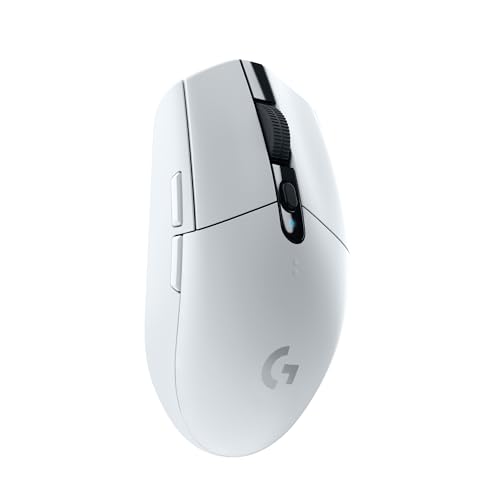
10. Logitech G305 Lightspeed: Best for Gaming
Pros
- 12, 000 DPI HERO optical sensor
- 1 ms Lightspeed wireless response time
- Up to 250 hours on one AA battery
- Lightweight mechanical design
- Stores the USB wireless receiver inside the mouse
Cons
- Gaming shape and controls are less suited to office work
- Uses a receiver rather than Bluetooth
- No rechargeable battery
Best for: Mac users who want a responsive wireless mouse for compatible games and precise pointer control.
The Logitech G305 Lightspeed is the outlier here. It is not designed to blend into an Apple workstation or imitate a trackpad. It is a gaming mouse with a classic shape, a high-speed wireless system, and a sensor designed for fast, accurate movement. That makes it a sensible choice for Mac gaming, especially when a trackpad or ordinary office mouse feels imprecise.
Its HERO optical sensor reaches 12, 000 DPI, while Lightspeed wireless is specified with a 1 ms response time. Those figures are useful for games that reward quick movement and controlled aim, but they also make the G305 responsive for general pointer work. The lightweight mechanical design is intended to improve maneuverability and durability. The supplied dimensions are 4.6 inches long, 2.45 inches wide, and 1.5 inches high, with a weight of 0.21 pounds.
Battery life is rated at up to 250 hours of continuous gaming from a single AA battery. That is a different approach from the rechargeable Apple and MX mice, but it avoids waiting for a charge. The included USB wireless receiver stores inside the mouse, which reduces the chance of losing it during travel. The catch is that the G305 uses its receiver rather than Bluetooth, so a MacBook user may need a suitable port arrangement or hub.
The Apple Magic Mouse Black is a better fit for gesture-heavy macOS navigation, and the Logitech MX Anywhere 3S is a more practical travel companion. For readers focused on gaming, the trade-off between gaming precision and everyday comfort is the key question. The G305 favors responsiveness and a familiar gaming shape over quiet office features and ergonomic palm support.
It is not the right choice for someone who wants a seamless Bluetooth connection or a mouse that looks at home in a formal office. Choose it when gaming performance comes first and the USB receiver is acceptable. For that specific job, it is the strongest specialist pick in this group.

How to choose best mouse for mac
The right Mac mouse comes down to the way your hand works, the surfaces you use, and how many devices you need to control.
Connection type
Bluetooth is the easiest connection for most MacBooks because it avoids a receiver and does not occupy a USB port. The Apple Magic Mouse and M240 models use Bluetooth, as do the MX Master and MX Anywhere mice. Bluetooth is especially useful with a thin laptop and a minimalist desk.
A receiver can still make sense for gaming or for a desk with several compatible peripherals. The G305 uses Logitech’s Lightspeed receiver, while the M720 can use Bluetooth or a Unifying receiver. Check your available ports before choosing a receiver-only mouse.
Shape and hand support
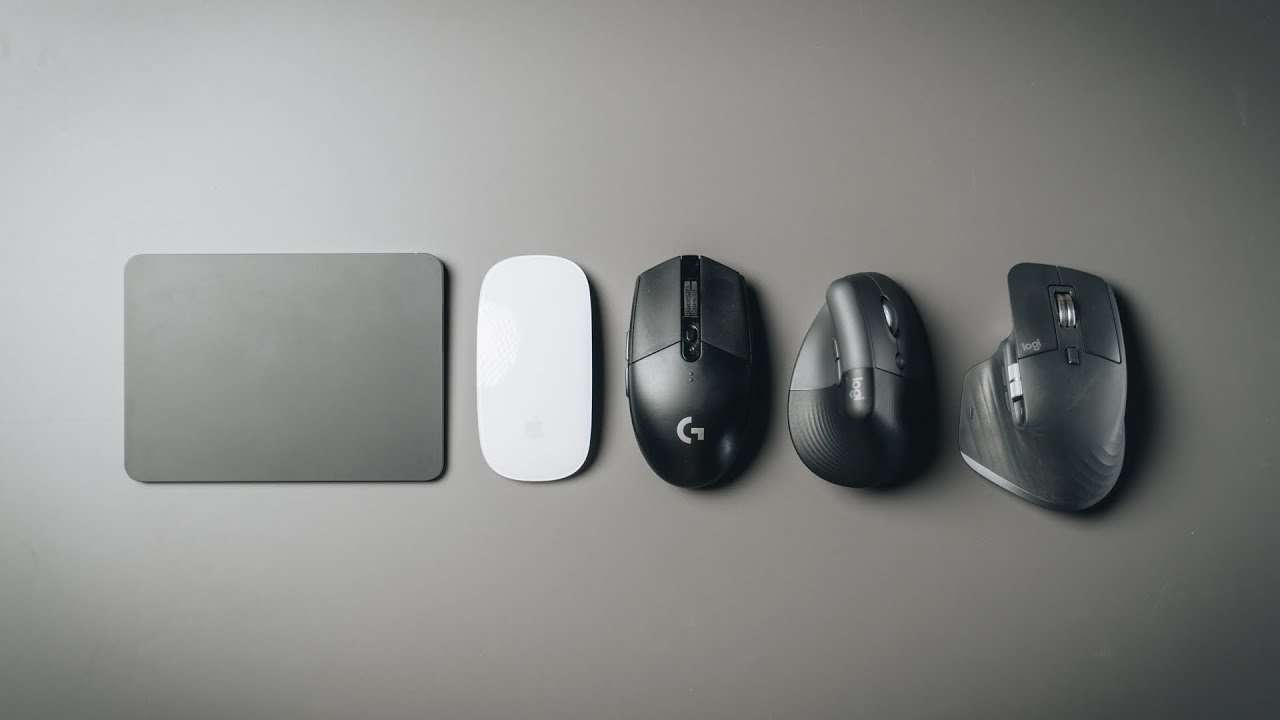
A low-profile mouse such as the Apple Magic Mouse is easy to move and visually unobtrusive, but it does not support the palm like the MX Master 3S or MX Master 4. Compact models such as the M240 and MX Anywhere 3S travel well but can feel cramped during long sessions.
A full-size ergonomic mouse should support the hand without forcing the wrist outward. Right-handed contours can be comfortable, but they exclude left-handed users. Ambidextrous designs offer more flexibility, though they usually sacrifice some palm support.
The best shape is the one that lets your hand stay relaxed while the pointer does the work.
Gestures and buttons
Apple’s Multi-Touch surface is useful if you frequently swipe between pages or scroll through documents. It keeps some of the trackpad experience without requiring a separate gesture surface.
Physical buttons are more useful for repeatable commands. The MX Master 4 adds customizable haptic actions and an Actions Ring, while the MX Master 3S offers app-specific profiles and thumb controls. The M720 has six customizable buttons. Basic mice such as the M240 keep the layout simple, which is often preferable when you do not want to configure software.
Tracking and sensitivity
A sensor with adjustable sensitivity lets you tune pointer movement to your display and working style. The MX Anywhere 3S and MX Master 3S both use 8K DPI sensors, and both are designed to track on glass. The G305 reaches 12, 000 DPI and is aimed at rapid gaming movement.
High DPI is not a guarantee of better control. It gives you a wider adjustment range. For ordinary office work, a dependable sensor and a comfortable shape matter more than the maximum number.
Battery and charging
Rechargeable mice reduce disposable battery changes and can charge through USB-C or another cable. Apple lists about a month or more for the Magic Mouse, while the MX Master 4 charges through USB-C during use. The MX Master 4 listing does not include a charging cable, so that detail matters when planning your setup.
Battery-powered mice have their own advantage. The M240 is rated for up to 18 months, the M720 for up to 24 months, and the G305 for up to 250 hours of continuous gaming on one AA battery. Decide whether you prefer charging interruptions or keeping a spare battery nearby.
Frequently asked questions
Do Mac mice need special software?
No. A Bluetooth mouse with standard buttons can work with macOS after pairing. Optional software becomes useful when you want to remap buttons, tune tracking, create app-specific profiles, or use features such as Logitech Flow.
Is the Apple Magic Mouse comfortable for long work sessions?
That depends on your grip and hand size. Its low profile is easy to move and supports Multi-Touch gestures, but it gives less palm support than the MX Master 3S, MX Master 4, or M720. Users who prefer a relaxed full-hand grip may find an ergonomic mouse more comfortable.
Can these mice connect to a MacBook without a USB adapter?
The Apple Magic Mouse, M240, MX Master 4, MX Anywhere 3S, M720 through Bluetooth, and MX Master 3S use Bluetooth. The G305 relies on a USB Lightspeed receiver. The M720 also supports a Logitech Unifying receiver, but Bluetooth is the simpler option when ports are limited.
Which mouse is best for switching between a Mac and an iPad?
The MX Anywhere 3S can pair with up to three devices over Bluetooth and is compact enough to carry. The M720 can switch among up to three computers and supports iPadOS, though its larger right-handed body is less travel-friendly. The MX Master 4 also supports macOS and iPadOS, with a shape better suited to a fixed desk.
Do any of these mice work on glass?
The MX Anywhere 3S and MX Master 3S are both described as tracking on any surface, including glass. The supplied product information does not make that same claim for the Apple Magic Mouse, M240, M720, MX Master 4, or G305, so choose one of the MX models when glass tracking is central to your setup.
Is a gaming mouse suitable for a Mac?
The G305 can be a good Mac mouse when gaming response and sensor precision matter. Its receiver-based connection and gaming-oriented shape are less convenient for a simple office setup. For general productivity, the MX Master, M720, or Apple Magic Mouse is usually a more natural fit.
Which mouse is easiest to use with a Mac?
The Apple Magic Mouse is the most closely integrated with macOS because it pairs automatically and supports Multi-Touch gestures. The M240 is simpler if you want a conventional shape and quiet clicking. The easiest choice depends on whether you prefer gestures or physical controls.

The bottom line
The Apple Magic Mouse White remains the Best Mouse For Mac for users who want automatic pairing, a polished Apple design, and Multi-Touch gestures. Its flat shape and charging arrangement are real compromises, so the Logitech MX Master 4 is the stronger choice for long desk sessions, extensive scrolling, and customizable productivity controls.
For travel, the Logitech MX Anywhere 3S gives you a much more capable compact design, including 8K DPI tracking and support for three devices. The Logitech M240 Graphite is the simpler quiet option, while the Logitech G305 Lightspeed is the specialist pick for Mac gaming.
If you are undecided, choose the Magic Mouse for gestures, the MX Master 4 for comfort and work, or the MX Anywhere 3S for a mouse that can follow your MacBook anywhere.
As an Amazon Associate we earn from qualifying purchases.