

A MacBook has excellent trackpad gestures, but a mouse still makes long spreadsheets, precise selections, and extended desk work more comfortable. The catch is finding one that pairs without a dongle, stays quiet in shared spaces, and does not leave your hand cramped after an hour.
Our Best Bluetooth Mouse for MacBook picks range from tiny travel models to full-size multi-device designs. The Logitech M240 Compact Silent, Graphite is the one we would buy first, while the rest cover rechargeable designs, extra buttons, dual connectivity, and larger hand-friendly shapes.
Comparison table
| # | Product | Award | Connectivity | Tracking | Battery | Best for |
|---|---|---|---|---|---|---|
| 1 | Logitech M240 Compact Silent, Graphite | Best overall | Bluetooth | Not specified | Up to 18 months | Quiet everyday MacBook use |
| 2 | Logitech M240 Compact Silent, Off White | Best light color | Bluetooth | Not specified | Up to 18 months | A clean travel setup |
| 3 | PEIBO Bluetooth Mouse, Silver | Best dual-mode compact pick | Bluetooth and 2.4G | 800, 1200, or 1600 DPI | Rechargeable | MacBook and mixed-device use |
| 4 | Logitech M240 Compact Silent, Rose | Best colorful compact pick | Bluetooth | Not specified | Up to 18 months | Quiet portable use |
| 5 | Logitech M196 Compact, Graphite | Best simple travel mouse | Bluetooth | Optical tracking | Up to 12 months | Basic MacBook navigation |
| 6 | Normdecos 4-Mode Mouse | Best rechargeable versatility | Bluetooth and 2.4G | 800, 1200, or 1600 DPI | 3 to 4 weeks | Switching across device types |
| 7 | TECKNET 6-Button Mouse | Best adjustable tracking | Bluetooth and USB A | 800 to 4800 DPI | Two AAA batteries | Sensitivity control |
| 8 | wegear WL300 Mouse | Best long-battery design | Bluetooth | 800, 1200, or 1600 DPI | Up to 24 months | Quiet full-size browsing |
| 9 | Logitech M720 Triathlon | Best multi-device mouse | Bluetooth and Unifying receiver | Not specified | Up to 24 months | MacBook and desktop workflows |
| 10 | ProtoArc EM15 | Best large-hand rechargeable pick | Bluetooth, USB, and USB-C | 1000, 1600, or 2400 DPI | 15 days per charge | Larger hands and USB-C setups |
1. Logitech M240 Compact Silent, Graphite: Best Overall

Pros
- Bluetooth pairing without a dongle
- Click sound reduced by 90%
- Ambidextrous compact shape
- Up to 18 months of battery life
- Works across macOS, iPadOS, Windows, and ChromeOS
Cons
- Compact shape may feel small for larger hands
- No adjustable DPI listed
- Uses a replaceable battery rather than charging by cable
Best for: MacBook owners who want a quiet, dependable mouse for everyday work.
The Logitech M240 Compact Silent, Graphite gets the important things right without making the mouse feel like another device to manage. It pairs over Bluetooth, so it does not occupy a port on a MacBook, and its small body slips easily into a laptop bag. The ambidextrous shape also makes it a sensible shared mouse for homes or offices where more than one person may use it.
The standout feature is the click treatment. Logitech says the M240 reduces click sound by 90% while preserving the same click feel. That matters in a library, meeting room, or quiet home office. The mouse is rated to work up to 10 meters from the computer, giving you plenty of room for a normal desk or a presentation setup.
Battery care is unusually low effort. The auto-sleep feature helps the included battery last up to 18 months, so the M240 is better suited to people who do not want another rechargeable gadget in the rotation. Its listed dimensions are about 3.90 by 2.36 by 1.54 inches, and the compact profile is easy to carry, though users with large hands may prefer the ProtoArc EM15 or Logitech M720 Triathlon.
The graphite finish is the practical choice among the three M240 versions, especially if the mouse will travel beside a darker laptop sleeve. The Off White and Rose versions have identical core features, so this model wins on presentation only because graphite is less likely to show everyday marks. Logitech also includes certified post-consumer recycled plastic in the construction.
There is no adjustable sensitivity control listed, and the compact body cannot provide the palm support of a full-size mouse. Skip it if small mice cause hand fatigue or if you need programmable buttons. For everyone else, it is the cleanest combination of quiet clicking, simple Bluetooth, long battery life, and travel-friendly size.
2. Logitech M240 Compact Silent, Off White: Best Light Color

Pros
- Quiet clicks with the same stated click feel
- No receiver or adapter required
- Ambidextrous portable design
- Up to 18 months of battery life
- Broad operating system support
Cons
- Small for extended palm-grip use
- No DPI settings listed
- Light finish may need more frequent cleaning
Best for: MacBook users building a bright, tidy desk setup.
The Logitech M240 Compact Silent, Off White is functionally the same mouse as the graphite version, but its light finish changes how it fits into a workspace. It looks at home beside a silver MacBook, a pale desk, or a shared office setup. More importantly, it retains the compact ambidextrous body that makes the M240 easy to carry and comfortable for either hand.
Pairing is direct Bluetooth, with no dongle required. Logitech lists compatibility with macOS, Windows, Linux, ChromeOS, iPadOS, and Android, so this is not limited to one MacBook. The 10-meter stated wireless range is more than enough for desk work, and the connection approach leaves every MacBook port available for charging or accessories.
The quiet switches are the main reason to choose the M240 family. A claimed 90% reduction in click sound makes a noticeable difference when other people are nearby. The scroll wheel and cursor control stay familiar, while auto sleep helps the battery last up to 18 months. That is a long interval between battery changes for a mouse intended for frequent travel.
At roughly 3.90 inches long and 2.36 inches wide, the M240 is compact rather than palm-filling. The listed weight is about 0.16 pounds, which keeps a bag light but does not give the mouse the planted feel of the Logitech M720 Triathlon. If you want a more substantial grip, the wegear WL300 Mouse is the more comfortable direction, though its Mac-specific side-button limitation matters.
The pale shell is the only meaningful difference from the graphite and rose models in this roundup. It contains certified post-consumer recycled plastic, with the listed proportion for the Off White version lower than graphite. Choose it for the appearance, not for different performance. It is a strong fit for quiet mobile work, provided you are comfortable with a compact shape.
3. PEIBO Bluetooth Mouse, Silver: Best Dual-Mode Compact Pick

Pros
- Bluetooth 5.2, Bluetooth 3.0, and 2.4G options
- USB receiver and USB-C adapter included
- Three DPI settings
- Rechargeable battery
- Silent design and compact dimensions
Cons
- Battery runtime is not specified
- More setup options mean more parts to keep track of
- Ergonomic claims are not backed by a detailed hand-size range
Best for: MacBook owners who also need a receiver-based connection for another computer.
The PEIBO Bluetooth Mouse, Silver is the practical choice when a MacBook is only one part of the setup. It can connect by Bluetooth or through a 2.4G USB receiver, and the listed package includes a USB-C adapter. That gives it a useful bridge between newer MacBooks and older desktops, provided you are comfortable storing the adapter and receiver together.
Its three DPI choices are 800, 1200, and 1600. The lower setting favors controlled cursor movement, while the higher settings reduce the physical distance needed to cross a large display. This is a modest range compared with the TECKNET 6-Button Mouse, which goes as high as 4800 DPI, but it covers ordinary writing, browsing, and office work.
The mouse uses an internal lithium-polymer battery and an automatic energy-saving system. It enters sleep mode after eight minutes of inactivity, according to the product information. Runtime is not specified, so buyers who want a precise charging schedule should look at the Normdecos 4-Mode Mouse or ProtoArc EM15, both of which list charging and use estimates.
The dimensions are about 4.65 by 2.28 by 0.91 inches. That gives it a relatively long, low profile compared with the M240 models. The product describes a skin-like surface and ergonomic design, while the mute construction should keep clicking unobtrusive around other people. Its broad compatibility includes macOS, iPadOS, Windows, Linux, and ChromeOS.
This is a more flexible tool than the Logitech M240, but it is not as simple. A direct Bluetooth-only mouse is easier to pack and pair, while the PEIBO makes more sense if you regularly move between machines with different ports. If your MacBook is your only computer, the extra connection hardware is less compelling. For a mixed-device desk, however, the silver PEIBO is unusually adaptable.
4. Logitech M240 Compact Silent, Rose: Best Colorful Compact Pick

Pros
- 90% reduced click sound
- Bluetooth connection needs no dongle
- Compact ambidextrous design
- Up to 18 months of battery life
- Supports MacBook and iPad use
Cons
- Not designed for large hands
- No sensitivity adjustment listed
- Uses a replaceable battery
Best for: MacBook users who want the M240 experience in a softer finish.
The Logitech M240 Compact Silent, Rose earns its place because color can matter when a mouse lives on the desk every day. Beyond the finish, it has the same straightforward design as the other M240 entries. It is slim, ambidextrous, and small enough to travel with a MacBook without taking over the laptop sleeve.
Bluetooth pairing is the uncomplicated kind MacBook users usually want. No receiver is required, and Logitech lists support for macOS, iPadOS, Windows, Linux, ChromeOS, and Android. The stated range reaches 10 meters, although most owners will use it within a fraction of that distance. The lack of a dongle is especially useful on MacBook models where ports are limited.
The M240's quiet click system reduces click sound by 90%, according to Logitech, without changing the advertised click feel. This makes it a good companion for shared offices and late-night work. Auto sleep contributes to a stated battery life of up to 18 months, which is more convenient than remembering a charging cable.
The listed dimensions are approximately 3.89 inches long, 2.36 inches wide, and 1.53 inches high. That is a friendly travel size, but not a shape that will satisfy everyone who prefers a full palm rest. The Logitech M196 Compact, Graphite is similarly portable, while the Logitech M720 Triathlon is much better for a relaxed right-handed palm grip.
The rose finish includes certified post-consumer recycled plastic, as do the other M240 colors. There is no performance reason to pick this model over graphite or Off White. Pick it because the finish suits your desk and because you want the M240's quiet, simple behavior. Users who need programmable controls, rechargeable power, or a larger shell should skip it.
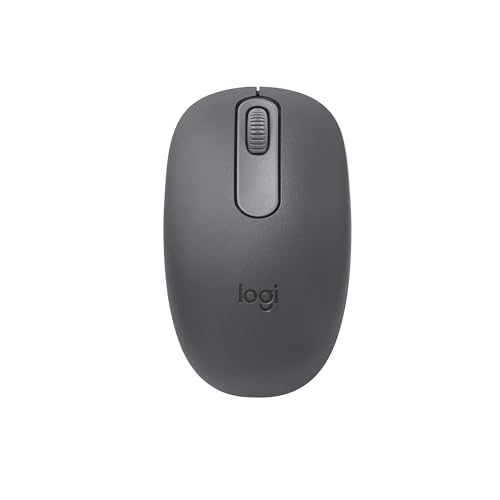
5. Logitech M196 Compact, Graphite: Best Simple Travel Mouse
Pros
- Quick Bluetooth pairing without a receiver
- Ambidextrous lightweight shape
- Optical tracking on nearly any surface
- Line-by-line scrolling
- Auto sleep and included AA battery
Cons
- Battery life is shorter than the M240's stated runtime
- No quiet-click claim is listed
- No adjustable DPI control listed
Best for: travelers who want a straightforward Bluetooth mouse for a MacBook or tablet.
The Logitech M196 Compact, Graphite is the uncomplicated travel option in Logitech's lineup here. It connects in seconds over Bluetooth, avoids a USB receiver, and has a contoured ambidextrous body that works for either hand. It is the mouse to choose when the priority is dependable navigation rather than silence or advanced controls.
Logitech lists optical tracking that works on nearly any surface, along with precise line-by-line scrolling. That combination suits laptop use, where a proper mouse pad is not always available. The M196's dimensions are listed at about 3.90 by 2.36 inches, and the product is described as lightweight and travel-ready.
An auto-sleep feature helps the included AA battery last up to 12 months. That is still a long service interval, but it is shorter than the up to 18 months listed for the M240 family and the up to 24 months listed for the wegear WL300 Mouse. The trade-off is sensible for users who want a basic mouse and do not need to think about charging.
The M196 is compatible with laptops and tablets across several operating systems, including macOS and iPadOS. It also contains certified post-consumer recycled plastic, with the graphite version listed at 67%. The graphite finish is understated and less visually distracting than some brighter alternatives.
The missing feature is quiet operation. Logitech does not make the same 90% reduced-click claim here that it makes for the M240, so this is not our first recommendation for libraries or shared offices. It also lacks listed DPI adjustment and extra buttons. Choose it when compact size, optical tracking, and simple Bluetooth matter more than customization.
6. Normdecos 4-Mode Mouse: Best Rechargeable Versatility

Pros
- Four connection modes
- USB-A and USB-C receiver options
- Rechargeable 800mAh battery
- Three DPI settings
- Quiet clicks and automatic sleep
Cons
- Listed working time is only 3 to 4 weeks
- Side button behavior on macOS is not specified
- More complex than a Bluetooth-only mouse
Best for: users who move between a MacBook, tablet, and desktop with different ports.
The Normdecos 4-Mode Mouse is built around flexibility. It supports Bluetooth 5.2, Bluetooth 3.0, 2.4GHz USB-A, and 2.4GHz USB-C connections. Its dual-port receiver is designed to cover both common USB formats, making it useful for a desk that includes a MacBook, an older computer, and perhaps a tablet.
Tracking sensitivity can be set to 800, 1200, or 1600 DPI. Those levels are appropriate for general productivity, with 800 DPI favoring fine movement and 1600 DPI helping the pointer travel more quickly across a wide display. The mouse also has a contoured shape, rubber scroll wheel, and soft-click design intended to reduce noise during long work sessions.
The built-in 800mAh lithium-polymer battery charges in two to four hours. The stated working time is above three to four weeks, based on eight hours of average daily use, while standby is listed at 90 days. An eight-minute sleep mode reduces idle drain. That is convenient compared with disposable batteries, though the runtime is less generous than the long battery claims of the M240 and M720.
At about 4.4 by 2.3 by 0.8 inches, it is longer than the M240 but still slim enough for a laptop bag. The shape should give the hand more surface to hold than a very small travel mouse, but it is not described as a full-size palm-rest design. If hand comfort is your main concern, the ProtoArc EM15 has a clearly stated medium-to-large-hand focus.
The Normdecos earns its place through connection choice rather than refinement. A Bluetooth-only MacBook owner may find the spare receiver modes unnecessary, and the side-button experience on macOS is not clearly established in the product details. Choose it when device switching and USB-C flexibility are more important than the lowest-maintenance setup.
7. TECKNET 6-Button Mouse: Best Adjustable Tracking

Pros
- Six DPI levels from 800 to 4800
- Bluetooth and USB-A connectivity
- Six buttons
- Quiet operation
- Automatic sleep and 36-month registered support
Cons
- Side buttons are not compatible with macOS
- Two AAA batteries are not included
- Compact design may not suit large hands
Best for: MacBook users who want a wide range of cursor sensitivity.
The TECKNET 6-Button Mouse looks attractive on paper because it gives the user more control than most compact office mice. It has six DPI levels, from 800 through 4800, so the pointer can be tuned for careful detail work or fast movement across a large display. That range is more useful than a single high number because it lets the mouse adapt to different desk layouts and tasks.
It connects through Bluetooth 5.0 or USB-A and can connect to two devices at once, switching with a slide control. For a MacBook, Bluetooth avoids the need for an adapter. The USB-A option remains useful with a desktop or older laptop, though MacBook owners will need suitable hardware if they want to use that connection.
There are six buttons, but the product information specifically says the side buttons are not compatible with macOS. That is an important limitation. The extra buttons may still be useful on other supported systems, but this should not be treated as a fully programmable MacBook productivity mouse. For macOS use, the DPI control and basic buttons are the safer reasons to choose it.
The mouse is intended for small to medium hands, although some larger-handed users may prefer its compact shape. It uses two AAA batteries, with automatic sleep intended to extend operating time. The quiet design suits offices and libraries, and the listed compatibility includes macOS, Windows, ChromeOS, and Linux.
TECKNET also lists a 36-month warranty for registered users. That is reassuring, but the macOS side-button restriction keeps this model behind the Logitech M720 Triathlon for Apple-focused workflows. Choose the TECKNET when adjustable tracking is the feature you will use. Skip it if forward and back buttons are central to your MacBook routine.
8. wegear WL300 Mouse: Best Long-Battery Design

Pros
- Up to 24 months from one AA battery
- Quiet left, right, and scroll-wheel buttons
- Sculpted medium-size grip
- Three DPI settings
- Rated click and scroll-wheel durability
Cons
- Forward and back buttons are not recognized on Mac
- AA battery is not included
- Larger than compact travel mice
Best for: MacBook owners who want a quieter, more substantial mouse with long battery life.
The wegear WL300 Mouse addresses the main weakness of compact MacBook mice: there is not much body to hold. Its sculpted grip is designed for all-day use, and the product lists a medium size rather than a pocket-sized build. That makes it more suitable for a desk than for a laptop sleeve, although it remains a wireless Bluetooth mouse.
Quiet operation extends beyond the two main buttons. The product says the left, right, and scroll-wheel buttons are silent, which is useful for someone who spends much of the day browsing or editing documents. It also claims compatibility with wood, leather, fabric, paper, and resin surfaces, giving the optical sensor flexibility away from a dedicated mouse mat.
Sensitivity can be changed between 800, 1200, and 1600 DPI. These settings are restrained compared with the TECKNET, but they suit normal MacBook productivity. A dedicated DPI button makes switching simple, while the stated click durability reaches up to 3 million clicks and the scroll wheel is rated for up to 300, 000 cycles.
The battery claim is one of the strongest here: up to 24 months from a single AA battery, with sleep mode after 30 seconds of inactivity. The battery is not included, so that should be planned for before use. The design supports macOS 10.10 and later, along with Windows, ChromeOS, and Android.
The major MacBook caveat is the side buttons. The product information says forward and backward buttons are not recognized on Mac, which removes much of the reason to buy a six-button mouse for Apple use. The Logitech M720 Triathlon handles multi-device work more convincingly, while the M240 is easier to travel with. Pick the WL300 for quiet full-size comfort and minimal battery changes, not for Mac side-button shortcuts.
9. Logitech M720 Triathlon: Best Multi-Device Mouse

Pros
- Switches among up to three computers
- Bluetooth and Unifying receiver support
- Logitech FLOW can move text and files
- Hyper-fast scroll wheel with instant stop
- Up to 24 months of battery life
Cons
- Right-handed full-size design
- Heavier and less portable than compact picks
- Some advanced controls require Logitech software
Best for: people who use a MacBook alongside multiple computers.
The Logitech M720 Triathlon is the specialist pick for a multi-computer desk. It can connect to up to three computers and switch between them with a button. Logitech FLOW can also move the cursor, text, and files across compatible computers, which is far more useful than simply pairing a mouse to several devices and reconnecting manually.
The mouse offers Bluetooth for a MacBook and a Logitech Unifying receiver for compatible computers. The receiver can connect up to six compatible Logitech peripherals through one USB connection. That makes the M720 particularly appealing if a desktop already uses compatible Logitech equipment and the user wants to reduce receiver clutter.
Its full-size body is sculpted for the right hand and covered with rubber for a more secure palm-rest grip. The listed dimensions are approximately 4.53 inches long, 2.91 inches wide, and 1.77 inches high, with a listed weight of about 0.30 pounds. It is substantially larger than the M240 and M196, but that extra material is exactly what makes it more comfortable for long sessions.
The scroll wheel is another reason to choose it. Hyper-fast scrolling lets you move through long documents and web pages quickly, while the instant-stop feature returns control when precision matters. The wheel can also switch to click-to-click scrolling. Six customizable buttons can be assigned through Logitech software, though users should expect to spend some time configuring the mouse to their preferred workflow.
A stated battery life of up to 24 months keeps maintenance low. The weakness is portability. The M720 is not the mouse to toss into a small sleeve, and its right-handed shape excludes left-handed use. The Normdecos 4-Mode Mouse is more flexible about connection types, but the M720 is more polished for switching among several computers. Choose it for a desk-based MacBook workflow, especially if files regularly move between machines.
10. ProtoArc EM15: Best Large-Hand Rechargeable Pick

Pros
- Bluetooth, USB, and USB-C connection options
- Connects to up to three devices
- 1000, 1600, and 2400 DPI settings
- Rechargeable battery
- Designed for medium to large hands
Cons
- Listed use time is 15 days per charge
- Scroll wheel is not quiet
- Larger body is less travel-friendly
Best for: MacBook users with medium to large hands who want rechargeable power and multiple connection options.
The ProtoArc EM15 is the antidote to the tiny travel mouse. ProtoArc describes it as a full-size design measuring 4.9 by 2.5 inches, with enough room for a natural palm grip and relaxed finger placement. It is intended for medium to large hands, so it should be considered a comfort-first mouse rather than a pocket accessory.
Connection flexibility is strong. The EM15 supports Bluetooth, USB, and USB-C, with the USB-A and USB-C receivers stored in a compartment on the underside. A button switches among up to three connected devices. For a MacBook user who also keeps a desktop or tablet nearby, this provides a more direct workflow than pairing and unpairing a small Bluetooth mouse.
Tracking settings are 1000, 1600, and 2400 DPI. That gives a little more speed than the Logitech M240 while retaining a lower setting for controlled cursor placement. Forward and backward buttons are included for web navigation, and the product says the mouse works with macOS, Windows, Android, iPad devices, Chromebooks, and other Bluetooth-enabled hardware.
The built-in battery charges in about two hours and is listed for 15 days of use, with up to 200 days of standby. Sleep mode helps reduce idle drain. ProtoArc also highlights a 68-gram lightweight design, though the listed product information gives a weight of about 0.44 pounds, so buyers should treat the product's stated 68-gram claim and the separate listing data as different published details rather than assume one precise figure.
The silent-click design is useful, but the middle scroll wheel is specifically not quiet. That makes the EM15 less suitable than the M240 for a silent library or shared room. Its size also works against travel. If hand comfort, rechargeable operation, and USB-C receiver support matter most, it is a capable alternative to the M720. For a small bag and simple Bluetooth, choose the M240 instead.

How to choose best bluetooth mouse for macbook
A good MacBook mouse should match the way you work, not just connect once and disappear from the Bluetooth menu. These are the capabilities that separate the picks.
Bluetooth and receiver options
Bluetooth is the cleanest connection for a MacBook because it does not use a USB port. The M240, M196, WL300, and M720 all offer Bluetooth, while the PEIBO, Normdecos, TECKNET, and ProtoArc add receiver-based options for desktops and devices without convenient Bluetooth.
A receiver is useful in a mixed setup, but it adds another small component to carry and store. USB-A and USB-C support also matter because MacBook accessories may require different adapters. If you only use one MacBook, direct Bluetooth is usually the least complicated route.
Hand size and shape
Compact mice are easier to carry, but they can force larger hands into a fingertip grip. The M240 and M196 are travel-friendly, while the WL300 and ProtoArc EM15 provide more surface for the palm. The M720 has the most substantial right-handed shape in this group.
Look at the listed dimensions and design description rather than assuming a mouse is comfortable because it is labeled ergonomic. A compact body is useful for travel. A full-size body is usually better for long desk sessions. If you switch hands, avoid the M720's right-handed design and consider an ambidextrous model.
For a MacBook, the right mouse is the one that leaves both your hand and your ports comfortable.
Tracking sensitivity
DPI controls how far the pointer moves for a given physical movement. Lower settings can help with careful selections, while higher settings move the cursor across a large display with less hand travel. The PEIBO and Normdecos offer 800, 1200, and 1600 DPI, while the TECKNET reaches 4800 DPI and the ProtoArc offers up to 2400 DPI.
Most writing, browsing, and spreadsheet work does not require a very high setting. Adjustable DPI becomes more useful when the same mouse moves between a laptop screen and a larger external display. If a product does not list DPI settings, do not assume that adjustment is available.
Battery and charging
Battery design changes how much maintenance the mouse needs. The M240 lists up to 18 months, the M196 up to 12 months, and the WL300 and M720 up to 24 months. The TECKNET, PEIBO, and other battery-powered or rechargeable models have different maintenance requirements.
Rechargeable mice remove the need for spare disposable batteries, but they need a charging routine. The Normdecos lists 3 to 4 weeks of use, while the ProtoArc lists 15 days per charge. For a travel mouse, a replaceable battery can be easier than carrying a cable. For a permanent desk setup, either approach can work.
Mac button support
Extra buttons are only useful when macOS recognizes them as intended. The WL300 and TECKNET listings specifically say their forward and backward buttons are not recognized on Mac. That makes their extra controls less valuable for Apple users.
The M720 is the strongest choice for customizable controls because Logitech software supports assigning shortcuts, while the ProtoArc includes forward and backward buttons for navigation. Check Mac compatibility before choosing a mouse mainly for side buttons.
For more guidance on compact Apple setups, the trade-offs between portable and comfortable mouse shapes are useful to consider before choosing a travel model. If the mouse will move between several computers, how different connection types affect a mixed-device desk can help narrow the field.

Frequently asked questions
Do these mice connect to a MacBook without a USB adapter?
The Logitech M240, Logitech M196, Logitech M720, and wegear WL300 support Bluetooth, so they can connect without using a USB port. The PEIBO, Normdecos, TECKNET, and ProtoArc models also offer receiver-based modes, but those are optional when Bluetooth is available.
Which mouse is quietest for a shared office?
The Logitech M240 family is the clearest choice because Logitech states that its click sound is reduced by 90%. The WL300 also lists silent left, right, and scroll-wheel buttons. The ProtoArc EM15 has quiet clicks, but its middle scroll wheel is specifically not quiet.
Is a compact mouse better for a MacBook?
A compact mouse is easier to carry and works well with fingertip or lighter grips. It may feel cramped for larger hands during long sessions. The M240 and M196 favor portability, while the ProtoArc EM15 and Logitech M720 offer more substantial hand support.
Which pick works with both a MacBook and a desktop?
The PEIBO, Normdecos, TECKNET, Logitech M720, and ProtoArc EM15 all offer Bluetooth plus a receiver or additional connection mode. The M720 is the strongest option for switching among several computers, while the PEIBO and Normdecos are useful when USB-A and USB-C ports are both part of the setup.
Do the side buttons work on macOS?
Not always. The TECKNET listing says its side buttons are not compatible with macOS, and the WL300 listing says its forward and backward buttons are not recognized on Mac. Check the stated Mac support before choosing a model for browser navigation shortcuts.
Are rechargeable mice better for travel?
Rechargeable models avoid carrying spare batteries, but they add a charging cable and require periodic charging. The Normdecos lists 3 to 4 weeks of use, while the ProtoArc lists 15 days per charge. A battery-powered M240 or M196 may be easier for travelers who want long intervals between maintenance.
Can one mouse work with multiple devices?
Yes, several picks support multiple connections. The Logitech M720 can switch among up to three computers, the Normdecos supports four connection modes, and the ProtoArc can connect to up to three devices. The PEIBO and TECKNET also provide Bluetooth and receiver-based flexibility.

The bottom line
The Best Bluetooth Mouse for MacBook here is the Logitech M240 Compact Silent, Graphite. It pairs directly, clicks quietly, works with either hand, and lists up to 18 months of battery life. The compact shell is its real limitation, so larger-handed users should choose the ProtoArc EM15 or the more substantial Logitech M720 Triathlon.
The M720 is the better desk mouse for people who move between a MacBook and other computers, thanks to three-device switching, FLOW support, customizable buttons, and hyper-fast scrolling. For a simple travel setup, the M196 is the cleaner basic alternative, while the PEIBO and Normdecos make more sense when USB-A or USB-C receiver support matters.
If you are undecided, choose the M240 for quiet everyday MacBook use, or the M720 if your desk includes more than one computer.
As an Amazon Associate we earn from qualifying purchases.