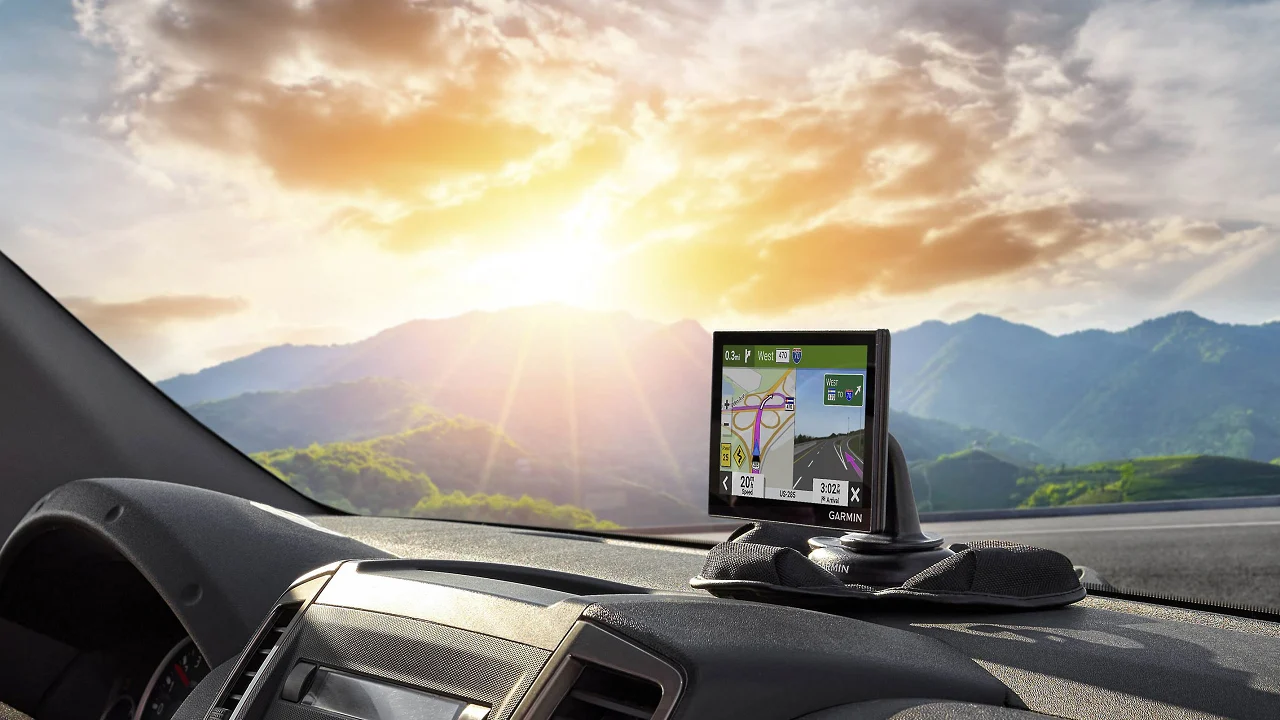

A dedicated navigator earns its place when a phone is hard to see, cellular service disappears, or a truck route cannot simply follow the same roads as a sedan. The right unit should make turns easy to follow without burying the driver in menus, while vehicle-specific routing can prevent a much more serious mistake.
Our Best GPS Navigation picks range from compact car units to large-screen truck navigators. Garmin leads for polished maps, voice tools, and connected features, while several less familiar models focus on offline maps, vehicle dimensions, and straightforward routing.
The Garmin DriveSmart 66 is the single best pick for most drivers, with a bright 6-inch display, voice assist, Wi-Fi updates, and useful connected road-trip features. The list also includes large-screen models, truck-focused devices, and simpler offline navigators.
| # | Product | Award | Screen | Routing and maps | Best for |
|---|---|---|---|---|---|
| 1 | Garmin DriveSmart 66 | Best overall | 6-inch high-resolution | North America maps, connected traffic | Most drivers |
| 2 | Garmin DriveSmart 76 | Best 7-inch Garmin | 7-inch high-resolution | North America maps, connected traffic | Drivers who want more screen |
| 3 | Garmin DriveSmart 86 | Best large display | 8-inch high-resolution | North America maps, connected traffic | Easy viewing from a distance |
| 4 | Garmin Drive 53 | Best compact Garmin | 5-inch glass capacitive | North America maps | Smaller dashboards |
| 5 | Garmin dēzl OTR720 | Best for professional truckers | 7-inch high-resolution | Custom truck routing, truck services | Long-haul drivers |
| 6 | OHREX N700 | Best offline truck navigator | 7-inch touchscreen | 2026 North America maps, custom routing | Cellular dead zones |
| 7 | LMCOWRE 7-Inch Navigator | Best for mixed vehicles | 7-inch touchscreen | 2026 maps, car, truck, and RV routing | Families with multiple vehicles |
| 8 | Wrynthyl 7-Inch Navigator | Best route-mode variety | 7-inch HD touchscreen | 2026 maps, multiple vehicle modes | Drivers who want route choices |
| 9 | HINYFVOZ 9-Inch Navigator | Best oversized screen | 9-inch HD touchscreen | 2026 maps, custom truck routing | RV and truck visibility |
| 10 | LMCOWRE 7-Inch GPS | Best simple navigator | 7-inch touchscreen | 2026 maps, car, truck, and RV modes | Basic turn-by-turn guidance |
1. Garmin DriveSmart 66: Best Overall

Pros
- Bright 6-inch high-resolution display
- Garmin voice assist and hands-free calling
- Wi-Fi map and software updates
- Useful traffic, weather, parking, and road-trip tools
Cons
- Connected features require a compatible smartphone
- Larger than a truly compact navigator
- Some voice features depend on pairing with the Garmin Drive app
Best for: drivers who want the most complete car navigation experience without moving to the largest screen.
The Garmin DriveSmart 66 feels like the sensible center of this group. Its 6-inch display is large enough to make the next turn, lane guidance, and surrounding roads readable without taking over the dashboard. It is also a practical size for drivers who move the navigator between vehicles. The high-resolution map presentation gives it a cleaner, more settled appearance than the simpler 7-inch units here.
The useful distinction is not just screen quality. DriveSmart 66 combines spoken directions with Garmin voice assist, hands-free calling over Bluetooth, and a connection to the Garmin Drive app. With a compatible phone paired, it can provide live traffic, fuel information, parking, weather, and smart notifications. Built-in Wi-Fi handles map and software updates without requiring a computer, which removes one of the annoying maintenance steps associated with older standalone GPS units.
Garmin also gives this model more to do on a road trip. The device includes a HISTORY database of notable sites, a U.S. national parks directory, Tripadvisor traveler ratings, and millions of Foursquare points of interest. Driver alerts cover school zones, sharp curves, and speed changes. Real Directions landmark guidance helps turn spoken instructions into something more recognizable than a street name alone. Drivers who spend weekends exploring can also use the road-trip navigation features that help find useful stops without treating the GPS as a bare route calculator.
The weakness is its dependence on a compatible phone for the connected extras. The core navigation works as a standalone device, but live information, Alexa Built-in, and several convenience tools are tied to the Garmin Drive app and Bluetooth connection. The Garmin Drive 53 is smaller and simpler, while the DriveSmart 76 provides more screen area. The 66 is the better balance for most dashboards and drivers who want a full feature set without a bulky display.
Choose the Garmin DriveSmart 66 if you want a polished car navigator that can grow into a connected travel companion. It is the one our team would keep for ordinary commuting, interstate trips, and family road travel.
2. Garmin DriveSmart 76: Best 7-Inch Garmin

Pros
- Larger 7-inch high-resolution display
- Voice assist, hands-free calling, and Alexa Built-in
- Wi-Fi updates without a computer
- Strong collection of road-trip databases and alerts
Cons
- Takes more dashboard space than the DriveSmart 66
- Connected tools require a compatible smartphone
- Not designed around truck-specific dimensions
Best for: car drivers who prefer a spacious map while keeping Garmin’s connected feature set.
The Garmin DriveSmart 76 is the larger-screen version of the same basic idea that makes the DriveSmart 66 so appealing. Its 7-inch high-resolution display gives map labels, turns, and route context a little more breathing room. That matters if the navigator is mounted farther away or if small text is a recurring frustration. The screen is noticeably more commanding than the 5-inch Garmin Drive 53.
Its feature set is broad without becoming difficult to understand. Garmin voice assist lets drivers ask for destinations, and Bluetooth supports hands-free calling with a compatible phone. Pairing the device with the Garmin Drive app adds live traffic, weather, parking, fuel information, and smart notifications. Alexa Built-in can handle music, audiobooks, news, and other requests when used safely and with the required phone connection.
The road-trip tools make this more than a screen showing arrows. DriveSmart 76 includes the HISTORY database of notable sites, a national parks directory, Tripadvisor traveler ratings, and Foursquare points of interest. Alerts for school zones, sharp curves, and speed changes add context to the route. Wi-Fi updates are a particularly welcome touch because the navigator can update maps and software without being connected to a computer.
Its main trade-off is physical rather than navigational. A 7-inch display occupies more of the windshield or dashboard, and the feature set is still aimed at ordinary cars rather than commercial trucks. The DriveSmart 66 is easier to place in a smaller cabin, while the DriveSmart 86 goes further if maximum readability is the priority. For drivers who want a large but not oversized Garmin, this is the natural middle ground.
The DriveSmart 76 suits someone who reads maps more comfortably on a generous display and wants connected road information. It is also a good choice for frequent road trippers who will actually use the included travel databases.
3. Garmin DriveSmart 86: Best Large Display

Pros
- Spacious 8-inch high-resolution display
- Dual-orientation viewing
- Full Garmin voice and connected feature set
- Strong tools for road trips and unfamiliar destinations
Cons
- Largest car-focused Garmin in this group
- Requires a compatible smartphone for live connected information
- More screen than some compact dashboards need
Best for: drivers who prioritize map readability and want a flexible large-screen layout.
The Garmin DriveSmart 86 is the clearest choice when the map needs to be easy to read at a glance. Its 8-inch high-resolution display presents the route with more space than the DriveSmart 66 or 76, and its dual-orientation design lets the screen work in either landscape or portrait position. That flexibility is useful when the mounting position or dashboard shape makes one orientation easier to see.
The larger canvas gives Garmin’s interface room for route information, nearby roads, and alerts without making every element feel crowded. Spoken directions remain central, with Garmin voice assist available for destination searches and other commands. Bluetooth hands-free calling keeps phone conversations separate from the navigation screen when a compatible phone is paired.
DriveSmart 86 carries the same connected character as the smaller DriveSmart models. Through the Garmin Drive app, it can access live traffic, weather, parking, fuel information, and smart notifications. Wi-Fi handles map and software updates independently of a computer. Its road-trip database includes notable HISTORY sites, a national parks directory, Tripadvisor ratings, and Foursquare points of interest. For unfamiliar arrivals, that broader context can be more useful than simply knowing which exit comes next.
The obvious limitation is size. An 8-inch navigator can be easier to read, but it also commands more visual space and may be awkward in a compact vehicle. It is not the right pick for someone who wants a discreet unit, and it does not offer the truck-specific arrival and parking tools found on the dēzl OTR720. The DriveSmart 76 is the better compromise if the 86 feels too imposing.
For a large family vehicle, motorhome, or driver who consistently struggles with small map text, the DriveSmart 86 is the strongest car navigator here. Its display is the reason to buy it, while the connected Garmin software makes that display useful beyond basic directions.
4. Garmin Drive 53: Best Compact Garmin

Pros
- Compact 5-inch glass capacitive touchscreen
- Bright, high-resolution route display
- Clear spoken directions with Real Directions
- Helpful driver alerts and road-trip points of interest
Cons
- Smaller screen than every other Garmin here
- Lacks the DriveSmart line’s listed smartphone features
- Less suited to drivers who want extensive connected tools
Best for: drivers who want Garmin navigation in a compact package with a clean, focused interface.
The Garmin Drive 53 is the navigator to choose when dashboard space matters more than connected extras. Its 5-inch glass capacitive touchscreen is bright and high-resolution, and the compact body is easier to place without blocking as much of the driver’s view. At about 4.97 inches long and 3.33 inches wide, it is substantially less imposing than the 7-inch and 8-inch models.
The smaller screen does not mean Garmin has stripped away the basics. Drive 53 provides spoken turn-by-turn directions and Garmin Real Directions landmark guidance, so instructions can refer to recognizable places rather than relying only on road names. Alerts cover school zones, speed changes, sharp curves, and other driving situations. That combination keeps the unit focused on the task of making the next maneuver clear.
Its map and travel information are useful for more than commuting. North America map updates are included, and the device can show food, fuel, and rest areas along an active route. It also displays upcoming cities and milestones, Tripadvisor traveler ratings for restaurants, hotels, and attractions, and a directory of U.S. national parks with entrances, visitor centers, and landmarks. Drivers who often travel through parks may appreciate that focused directory more than a generic points-of-interest list.
The compromise is the feature set. Unlike the DriveSmart 66, 76, and 86, the data does not list Wi-Fi updates, smartphone-connected traffic, Bluetooth calling, or Alexa Built-in. The smaller screen can also make dense urban maps less comfortable to inspect. Still, it is a better fit than those larger models for a driver who wants a dedicated navigator that stays out of the way.
Pick the Drive 53 for a compact car, a secondary vehicle, or anyone who prefers direct spoken guidance over a long list of connected functions. The DriveSmart 66 is more capable, but the Drive 53 is easier to live with when space is tight.
5. Garmin dēzl OTR720: Best for Professional Truckers

Pros
- 7-inch bright, high-resolution display
- Custom truck routing based on truck size and weight
- Truck parking, loading dock, and service information
- PrePass, CAT Scale, and break-planning tools
Cons
- Several connected features require a phone or active account
- Truck routing is not available in all areas
- More specialized than a typical car driver needs
Best for: professional truck drivers who need routing and arrival information beyond ordinary car navigation.
The Garmin dēzl OTR720 is the clear specialist in this roundup. It is built around the decisions that matter after a truck leaves the highway: bridge clearances, loading docks, truck entrances, parking, weigh stations, and trailer services. Its 7-inch touchscreen has a bright, high-resolution display that should be easy to read in the cab without needing the oversized footprint of an 8-inch or 9-inch unit.
Custom truck routing uses the truck’s size and weight to shape the route. The device also provides alerts for upcoming bridge heights and sharp curves. That does not replace posted signs or current road conditions, but it puts the relevant information in front of the driver sooner. For a commercial driver, that kind of context is more important than a long list of general tourist attractions.
The arrival tools are where the OTR720 separates itself from the DriveSmart range. BirdsEye Direct Satellite Imagery provides overhead views of destinations, helping with loading docks, security gates, and truck entrances. The dēzl community can identify truck parking and shared arrival information when paired with the dēzl app. CAT Scale locations in the United States and Canada help drivers check legal weight, while the Truck & Trailer Services directory can search by brand or amenity.
Some of its strongest functions require a connection. Wind speed overlays and high-wind alerts require the dēzl app, and PrePass notifications require an active PrePass account plus the app and Bluetooth. Truck routing is also not available in every area. Those conditions are important for operators who need a fully self-contained device. The OHREX N700 works offline and offers truck dimensions, but it does not match the OTR720’s specialized arrival and service ecosystem.
The OTR720 is the right tool for a working trucker, not simply a driver who occasionally tows or takes an RV trip. If your day includes freight yards, weigh stations, parking searches, and unfamiliar delivery points, its specialized information justifies choosing it over a general car navigator. For a broader look at routing concerns in larger recreational vehicles, planning around the size and restrictions of an RV is a useful next step.
6. OHREX N700: Best Offline Truck Navigator

Pros
- Works without cellular service
- Preloaded 2026 North America maps
- Truck and RV routing based on vehicle dimensions
- Speed camera and driver alerts
Cons
- Map updates require a Windows computer or external TF card
- Less connected information than Garmin’s DriveSmart models
- The interface is aimed at function rather than polish
Best for: truck and RV drivers who need offline navigation and vehicle-specific route planning.
The OHREX N700’s strongest argument is simple: it is designed to navigate without cellular service. It comes with 2026 North America maps covering the United States, Canada, and Mexico, and its satellite positioning provides turn-by-turn directions even in areas where a phone may lose its connection. That makes it particularly relevant for remote routes, long RV trips, and drivers who do not want navigation to depend on a mobile data signal.
The 7-inch touchscreen provides enough room for route information, current speed, and estimated arrival time. The N700 can plan routes around a vehicle’s weight, length, height, and width, with the ability to avoid roads restricted by width, height, or weight. It is not limited to cars, so a truck or motorhome driver can enter the dimensions that affect where the vehicle can safely go.
The device also includes speed camera and real-time alerts, along with spoken guidance. Its route planning offers fast and economical choices, while the map system includes points of interest and regular navigation information. Drivers who are weighing a dedicated unit against phone navigation should first consider how navigation changes when mobile coverage disappears, especially for remote travel.
Updating the N700 is less convenient than updating the Garmin DriveSmart models. The listing says map updates can be handled through a Windows PC or an external TF card, and it mentions support for Mac and Windows systems through the card method. That is workable, but it is not the same as Wi-Fi updating. The N700 also lacks the OTR720’s specialized truck parking, loading dock, CAT Scale, and PrePass functions.
Choose the N700 when offline use and vehicle dimensions matter more than a polished connected ecosystem. It is a practical fit for a trucker or RV owner traveling beyond reliable cellular coverage, provided that updating maps through a computer or card is acceptable.
7. LMCOWRE 7-Inch Navigator: Best for Mixed Vehicles

Pros
- 7-inch display with 2026 North America maps
- Car, truck, and RV route customization
- Multiple route options
- FM transmitter for sending guidance through vehicle speakers
Cons
- FM transmission is audio only, not an FM radio tuner
- Connected Garmin features are not listed
- Truck routing depends on entering the vehicle information accurately
Best for: households or drivers who switch between cars, trucks, and RVs.
The LMCOWRE 7-Inch Navigator is built around flexibility. It is not tied to one type of vehicle, and its route planning can account for height, width, and weight restrictions across sedans, large trucks, and RVs. That makes it a sensible match for someone who uses one navigator in more than one vehicle and does not want a car-only route profile.
Its 7-inch touchscreen gives the map a comfortable working area, while voice announcements cover turns, lane changes, speed zones, intersections, and school zones. The device supports destination searches by address, point of interest, postal code, or coordinates. Route choices include fastest, shortest, eco-friendly, and easiest, so the driver can choose whether time, simplicity, or efficiency matters most on a particular trip.
The built-in FM transmitter can broadcast spoken guidance through the vehicle’s speakers, a useful feature in a noisy truck or large cabin. It is important to understand what that feature does: the listing describes it as a transmitter for navigation audio, not a standalone FM radio. The unit also includes a windshield mount and car power adapter for a straightforward installation.
The trade-off is that the feature list is focused on core navigation rather than a connected travel ecosystem. There is no listed Wi-Fi updating, smartphone traffic service, hands-free calling, or travel database comparable to the DriveSmart models. The 7-inch LMCOWRE is more versatile for vehicle types than the compact Garmin Drive 53, but the Garmin DriveSmart 66 is a better fit for a car driver who wants richer connected information.
This navigator makes the most sense when one unit must cover a changing fleet of personal vehicles. It is also a reasonable pick for an RV owner who wants dimensions-based routing and a large screen without moving to a truck-specialist model.
8. Wrynthyl 7-Inch Navigator: Best Route-Mode Variety

Pros
- 7-inch HD touchscreen
- Day and night display modes
- Car, truck, RV, pickup, and commercial vehicle routing
- Four route choices and FM audio transmission
Cons
- Many features depend on entering vehicle dimensions correctly
- FM function transmits audio but is not a radio tuner
- Less road-trip information than Garmin models
Best for: drivers who want several vehicle profiles and route styles on one dedicated navigator.
The Wrynthyl 7-Inch Navigator is notable for how many driving situations it tries to cover. Its 7-inch HD touchscreen supports cars, trucks, RVs, pickups, and commercial vehicles, while the routing system can use vehicle height, weight, and width to help avoid low bridges, restricted roads, and weight-limited areas. That range makes it more adaptable than a basic car-only navigator.
The screen has 2D and 3D map views, plus automatic day and night modes. Those options matter because a map that looks comfortable during daylight can become distracting after dark. Voice guidance covers turns and route progress, while alerts include speed limits, red-light cameras, sharp curves, lane guidance, school zones, and dangerous road conditions.
Route planning offers four choices: fast, green, shortest, and relaxed. That is a useful spread for drivers who do not always want the quickest route. Address, ZIP code, and point-of-interest searches make destination entry flexible, and the built-in FM transmission can send voice prompts through the car speakers for louder guidance.
The limitations are familiar among the non-Garmin models. Vehicle-specific routing is only as useful as the dimensions entered into the device, and there is no listed Garmin-style database for national parks, notable history sites, or community truck parking. The LMCOWRE 7-Inch Navigator offers similar mixed-vehicle appeal, while the OHREX N700 has a clearer offline focus. Wrynthyl is the more interesting choice for drivers who want route-mode variety and day or night display controls.
It is a good fit for an RV owner who changes route preferences from trip to trip or a driver who alternates between ordinary car use and larger vehicles. Choose it for its flexible modes, not for a connected information service.
9. HINYFVOZ 9-Inch Navigator: Best Oversized Screen
Pros
- Large 9-inch HD touchscreen
- 2026 North America maps with listed lifetime updates
- Custom routing for cars, trucks, and RVs
- Speed, red-light camera, and school-zone alerts
Cons
- Large screen may be difficult to place in smaller vehicles
- FM feature is for audio transmission only
- Less specialized truck information than the dēzl OTR720
Best for: RV and truck drivers who want the largest map display in this group.
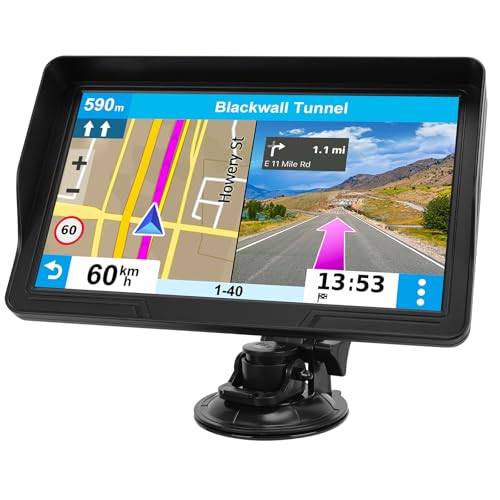
The HINYFVOZ 9-Inch Navigator is built for visibility. Its 9-inch HD touchscreen gives map graphics and menus more room than every other product here, which can be helpful in a large RV or truck cab where the navigator is mounted farther away. It is also the most likely model in this list to feel oversized in a compact car, so the vehicle’s cabin should be part of the decision.
The device comes with 2026 North America maps and listed lifetime map updates. Voice guidance provides turn-by-turn instructions, while alerts cover speed limits, red-light cameras, and school zones. Destination searches can use an address, ZIP code, or point of interest, keeping the basic workflow familiar for ordinary car travel.
Its custom routing supports cars, trucks, and RVs. By entering vehicle dimensions, the navigator can help avoid low bridges, weight-restricted roads, and narrow passages. That gives it a clear advantage over a standard car navigator for larger vehicles. The built-in FM transmitter can also send voice guidance through the vehicle audio system, although it is an audio transmission function rather than a separate FM radio.
The HINYFVOZ does not match the Garmin dēzl OTR720 for professional truck tools. It does not list truck parking information, loading dock planning, CAT Scale locations, or PrePass notifications. The DriveSmart 86 offers a more polished connected experience for car drivers, but its screen is 8 inches rather than 9. The HINYFVOZ is the more direct choice when maximum screen area and mixed-vehicle routing matter most.
Pick this model for an RV, bus, or truck where a very large map is easier to read and mount. Skip it if the dashboard is compact or if you need professional freight-arrival information rather than broad vehicle routing.
10. LMCOWRE 7-Inch GPS: Best Simple Navigator
Pros
- 7-inch touchscreen with 2026 North America maps
- Car, truck, bus, RV, bicycle, and pedestrian modes
- Clear voice alerts and trip data
- FM transmission to vehicle speakers
Cons
- Map updates require the listed update process rather than Wi-Fi
- FM transmission is not a radio tuner
- Fewer connected and destination features than Garmin models
Best for: drivers who want straightforward offline-style navigation with several transport modes.
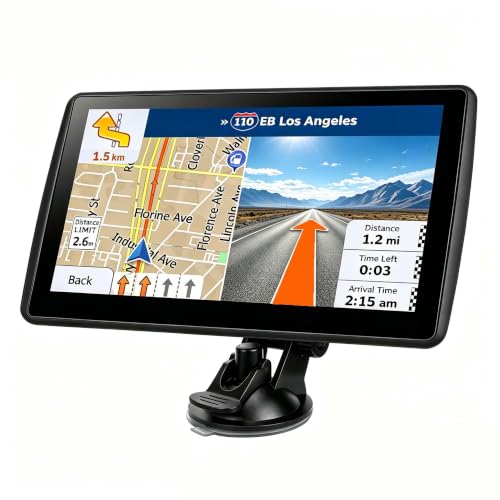
This LMCOWRE model keeps its pitch simple: a 7-inch screen, North America maps, voice guidance, and several route modes. It is aimed at drivers who want a dedicated device rather than a phone-based navigation setup. The high-definition display shows current speed, remaining distance, and other trip information while the route is active.
The range of modes is unusually broad. It supports car, truck, bus, RV, bicycle, and pedestrian navigation, and its truck or RV mode can avoid low bridges, weight-restricted roads, and narrow lanes. That makes it more adaptable than the Garmin Drive 53, which is focused on ordinary car use. It also supports address, postal code, coordinate, and point-of-interest searches.
The route planner offers fastest, shortest, most economical, and simplest choices. Voice alerts cover turns, speed limits, and school zones. Its FM transmitter can send those prompts to the vehicle’s speakers, which may be useful when the dashboard unit is competing with road noise. The listing specifically describes the FM feature as a transmitter only, so it should not be treated as a radio receiver.
Its straightforward design also defines the limits. The data does not list Garmin’s smartphone traffic, weather, hands-free calls, Wi-Fi updates, national parks directory, or road-trip databases. The LMCOWRE 7-Inch Navigator is a close alternative with car, truck, and RV routing plus an FM transmitter, while the Wrynthyl adds 2D and 3D views and more safety alerts. This LMCOWRE is the cleaner choice for a driver who wants fewer layers around the basic route.
Choose it when broad transport modes and uncomplicated guidance are more important than connected features. It can cover a surprising number of uses, but drivers who want live information or professional truck services should move up to a Garmin model.
How to choose best gps navigation
A good dedicated navigator should match the vehicle, the roads it will encounter, and the amount of connected information the driver actually needs.
Screen size and placement
A 5-inch screen, such as the one on the Garmin Drive 53, is easier to place in a small car and keeps the dashboard less crowded. A 6-inch or 7-inch display gives map labels and turns more room, while an 8-inch or 9-inch screen is most useful when the unit sits farther away in a large cab.
Bigger is not automatically better. Measure the mounting area and consider whether the screen could obstruct the driver’s view. A large display should improve glanceability, not become another object competing for attention.
Vehicle-specific routing
Car navigation can send a sedan onto roads that are unsuitable for a tall, heavy, or wide vehicle. Truck and RV modes let the driver enter dimensions such as height, width, length, and weight, then use those details to avoid restrictions.
The dēzl OTR720 goes further with truck-focused information, while the OHREX N700, Wrynthyl, LMCOWRE, and HINYFVOZ models offer broader mixed-vehicle routing. Treat these systems as a planning aid, not a substitute for posted signs, temporary closures, or current road conditions.
The most important routing setting is the one that reflects the vehicle behind the windshield.
Map updates and connectivity
Several models include 2026 North America maps and listed lifetime updates. Garmin’s DriveSmart models use built-in Wi-Fi for map and software updates, while the OHREX N700 describes updates through a Windows computer or an external TF card.
Connected features are a separate concern. Garmin DriveSmart models can pair with a compatible phone for live traffic, weather, parking, fuel information, and notifications. A navigator with offline maps may be preferable for remote travel, but check how updates are performed before choosing one.
Voice guidance and alerts
Spoken turn-by-turn directions let the driver keep attention on the road instead of looking down repeatedly. Look for guidance that includes lane changes, recognizable landmarks, and clear timing. Garmin Real Directions is useful because it can describe landmarks, while other models emphasize speed zones, school zones, curves, cameras, and red-light alerts.
Alerts should support attention, not overwhelm it. The best device is one that makes important changes understandable without requiring constant screen checks.
Truck and road-trip information
A car navigator may include fuel, rest areas, attractions, parks, and restaurants. Truck-focused models add information about loading docks, truck entrances, parking, weigh stations, and trailer services.
The choice depends on the trip. A family road trip may benefit more from the Garmin DriveSmart databases and connected weather tools. A professional driver may get more from the dēzl OTR720’s truck parking, CAT Scale, and PrePass-related features.

Frequently asked questions
Do dedicated GPS navigators work without a phone?
Yes. Several devices in this roundup include built-in maps and provide standalone turn-by-turn guidance. Connected features such as live traffic, weather, smart notifications, or Alexa may require pairing with a compatible smartphone.
Which navigator is best for an RV?
The Garmin dēzl OTR720 is the strongest specialist for commercial truck-style needs, while the HINYFVOZ 9-Inch Navigator offers a large display and routing for cars, trucks, and RVs. The OHREX N700 is a good fit when offline use and vehicle dimensions are central concerns.
Does a larger GPS screen make navigation safer?
A larger screen can make map labels and turns easier to see with brief glances, especially in a large cabin. It can also take up more dashboard or windshield space, so placement and visibility matter as much as the diagonal measurement.
Can these GPS units avoid low bridges?
Models with custom truck or RV routing are designed to use entered vehicle dimensions to help avoid low bridges, narrow roads, and weight-restricted routes. Drivers must still follow posted signs and account for temporary road conditions.
Are map updates included?
The product listings for the LMCOWRE, Wrynthyl, HINYFVOZ, and OHREX models specify 2026 North America maps and free lifetime updates. Garmin models list North America map updates, while the DriveSmart units include Wi-Fi for map and software updates.
Can GPS voice directions play through car speakers?
Some models include an FM transmitter that sends navigation audio to the vehicle’s speakers. The listed FM functions are transmitters for guidance audio, not standalone FM radio tuners. Garmin DriveSmart models also support phone-connected audio and hands-free functions when paired as described.
Is a Garmin car navigator suitable for a commercial truck?
The Garmin DriveSmart line can provide ordinary navigation and connected travel tools, but the dēzl OTR720 is the better fit for professional truck work. It adds truck routing, loading dock and entrance information, truck parking, CAT Scale locations, and other commercial driving tools.
The bottom line
The Best GPS Navigation pick for most drivers is the Garmin DriveSmart 66. Its 6-inch high-resolution screen, voice assist, Wi-Fi updates, hands-free calling, and connected traffic and travel tools make it the most balanced car navigator in this group. Choose the Garmin DriveSmart 76 instead if a larger display is easier to read, or the Garmin DriveSmart 86 if maximum screen area matters more than compact placement.
For professional truckers, the Garmin dēzl OTR720 is the clear specialist because its routing and arrival tools address the realities of commercial driving. The OHREX N700 is the better offline-oriented alternative, while the HINYFVOZ and LMCOWRE models suit drivers who need large screens or broad car, truck, and RV modes.
If you are undecided, choose the DriveSmart 66 for a car, the dēzl OTR720 for commercial trucking, and the OHREX N700 for remote travel without dependable cellular service.
As an Amazon Associate we earn from qualifying purchases.