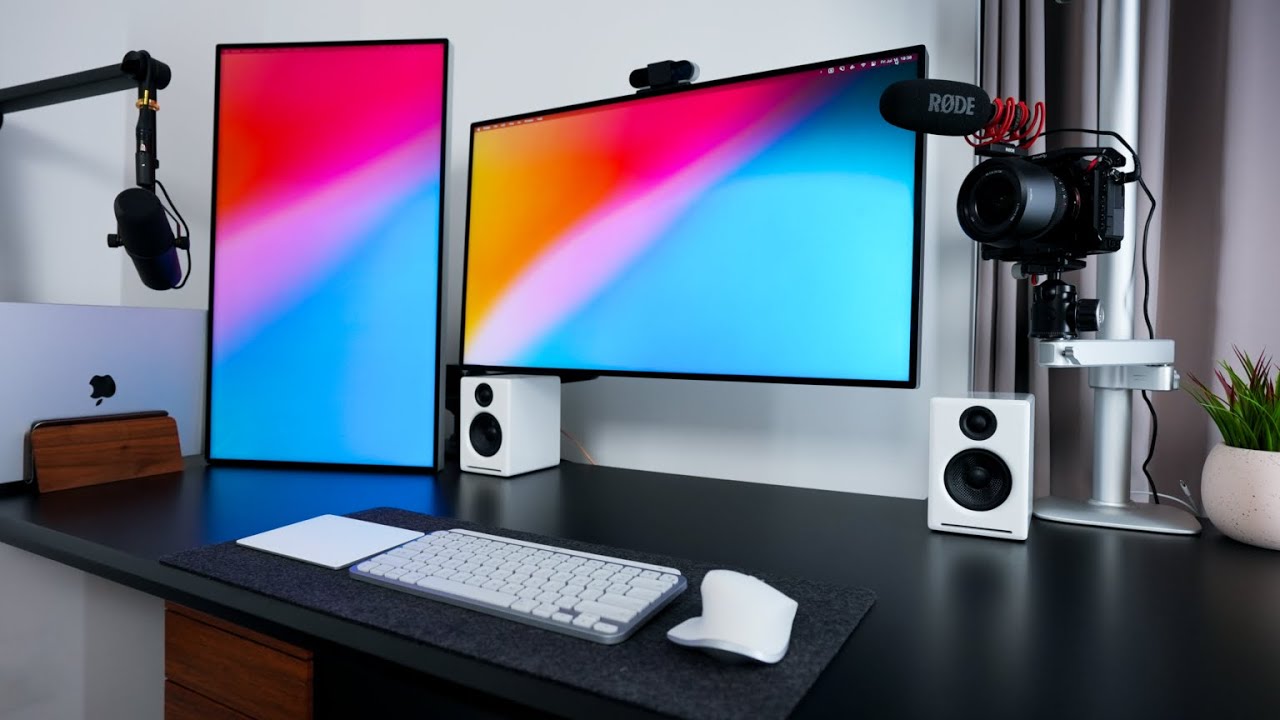

A dual-screen desk can go wrong in surprisingly small ways. One display sits higher, the bezels fail to meet, or a bulky base takes away the space the second screen was meant to create. The right stand also depends on whether you are mounting two standard displays, stacking ultrawides, or adding a portable screen to a laptop.
This Best dual monitor setup guide covers full monitor mounts, freestanding stands, screen alignment accessories, and portable extenders. The products are not interchangeable, so the ranking favors the option that solves the widest range of real desk problems without hiding an important limitation.
HUANUO Power Outlet Mount is the best overall pick, with options ranging from alignment tools to 57-inch stacked-screen hardware and portable laptop displays.
Comparison table
| # | Product | Award | Type | Screen support | Adjustment | Best for |
|---|---|---|---|---|---|---|
| 1 | HUANUO Power Outlet Mount | Best overall | Freestanding dual mount | 13 to 32 inches, 22 lbs each | Tilt, swivel, rotation, height | Flexible home-office desks |
| 2 | VIVO V038FG Ultrawide Stand | Best for ultrawides | Freestanding dual mount | Up to 38 inches, 22 lbs each | Tilt, swivel, rotation, height | Two large screens |
| 3 | VIVO V002K Mechanical Mount | Best desk clamp | C-clamp or grommet mount | 17 to 32 inches, 19.8 lbs each | Tilt, swivel, rotation, height | Saving desk depth |
| 4 | VIVO V257R Stacked Mount | Best stacked setup | C-clamp or grommet mount | Up to 57 inches, 59.4 lbs flat | Tilt, swivel, rotation, height | Vertical ultrawide arrays |
| 5 | Suptek ML6802 Tall Stand | Best tall freestanding stand | Freestanding dual mount | Up to 32 inches, 22 lbs each | Tilt, swivel, rotation, height | Elevated vertical layouts |
| 6 | Anyking 14-inch Extender | Best laptop add-on | Portable laptop monitor | 13 to 17.3-inch laptops | Plug and play | Mobile workstations |
| 7 | ZUMWALT 16.1-inch Extender | Best rotating portable screen | Portable laptop monitor | Laptop and USB-C devices | 360-degree rotation | Portrait and landscape work |
| 8 | Zofianna Alignment Tool | Best positioning aid | Alignment accessory | Two-piece set | Screen positioning guide | Matching two displays |
| 9 | Brvqxwt Alignment Connectors | Best adhesive connector | Alignment accessory | Two-piece set | Hinge positioning | Reducing bezel gaps |
1. HUANUO Power Outlet Mount: Best Overall
Pros
- Built-in USB-A, USB-C, and three AC outlets
- Full-motion arms with wide positioning range
- Freestanding tempered-glass base needs no drilling
- Supports landscape or portrait arrangements
Cons
- Large base occupies meaningful desk space
- Portrait support is limited to displays up to 29 inches
- Cable management is not described in the supplied specifications
Best for: someone building a flexible two-screen workstation without drilling into the desk.
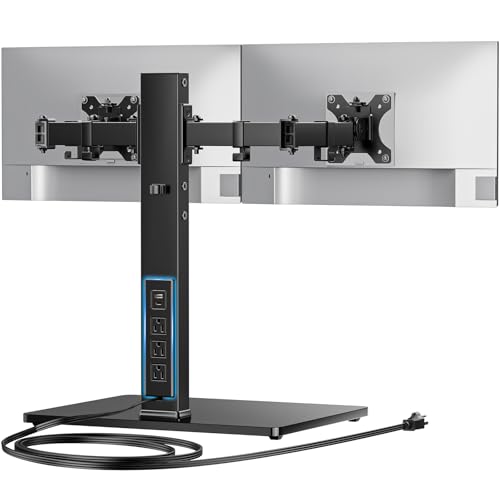
The first thing that makes the HUANUO Power Outlet Mount practical is that it solves two desk problems at once. It raises two monitors off their individual stands, then puts charging and power connections directly into the mount. That matters on a crowded home-office desk, where a separate power strip and loose charging leads can quickly become part of the clutter.
Its integrated outlet includes one USB-A port, one USB-C port, and three AC outlets, supplied through a 6.5-foot power cord. The mount accepts displays from 13 to 32 inches in landscape mode, with a maximum of 22 pounds per arm. The VESA compatibility is 75 by 75mm and 100 by 100mm, so checking the hole pattern on both displays remains essential before ordering.
The adjustment range is unusually broad for a freestanding dual mount. Each arm supports 45 degrees of tilt, 90 degrees of swivel, and 360-degree rotation, while the arms can extend as far as 31.5 inches. Four height positions run from 9.27 to 16.9 inches. In practice, that gives you room to create a conventional side-by-side pair, turn one screen vertically, or pull a display forward for collaboration.
The weakness is the base. Its tempered-glass platform measures 15.77 by 10.24 inches, and the 1.57 by 2.76-inch rectangular column adds a solid visual and physical presence. It is easier to move than a clamp-mounted stand, but it does not create as much usable desk depth as the VIVO V002K Mechanical Mount. Users with very large ultrawides should also look at the VIVO V038FG instead.
For a general two-monitor desk, though, this is the most complete package in the group. The built-in power hardware is useful, the arm movement is genuinely flexible, and the weight limit covers a broad range of standard displays. It is the mount we would keep for a mixed home-office setup where convenience matters as much as screen positioning.
2. VIVO V038FG Ultrawide Stand: Best for Ultrawides
Pros
- Supports two screens up to 38 inches
- Holds up to 22 pounds per arm
- Arms allow portrait or landscape positioning
- Detachable VESA plates simplify installation
Cons
- The 17 by 12.8-inch base needs substantial desk room
- Pulling screens far forward can affect stability
- No integrated power outlets or charging ports
Best for: users who want two large ultrawide-compatible displays on a movable freestanding base.
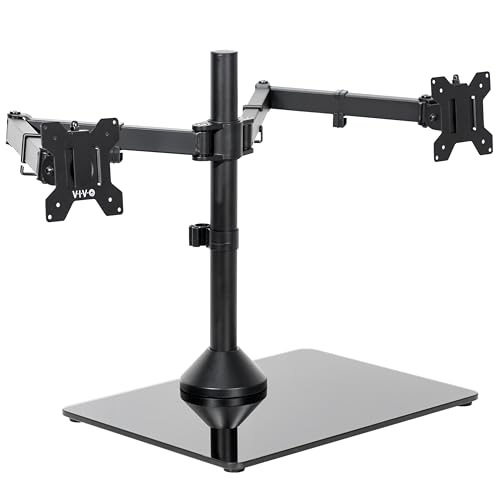
The VIVO V038FG Ultrawide Stand is the obvious choice when ordinary dual-monitor mounts feel too constrained. It supports two screens from 13 to 38 inches and allows up to 22 pounds on each arm. That makes it a more natural match for large ultrawides than the VIVO V002K, whose stated screen range stops at 32 inches.
The stand uses a tempered-glass base measuring 17 by 12.8 inches, with padding underneath, and a steel pole and arms. That footprint is not a minor detail. It gives the stand a stable foundation for large panels, but it also occupies an area that a clamp mount would leave available for a keyboard, notebook, or other desk equipment.
Positioning is generous. The arms provide 90 degrees of tilt in either direction, 180 degrees of swivel, 360-degree rotation, and height adjustment along the center pole. You can run both displays horizontally, rotate one into portrait orientation, or adjust the screens independently for a more comfortable corner arrangement. The 75 by 75mm and 100 by 100mm VESA support covers the patterns listed for this stand.
The supplied guidance includes an important limitation: do not pull the monitors too far forward or backward unless the base is bolted down. That makes this a poor fit for someone who frequently swings heavy screens around the desk. The base also needs to fit within the available surface, so measure before committing, especially on a shallow desk.
Compared with the HUANUO Power Outlet Mount, the V038FG gives large screens more room but loses the built-in power features. Compared with the VIVO V257R Stacked Mount, it is designed for a side-by-side arrangement rather than a vertical wall of screen space. Choose it when broad horizontal viewing is the priority and a substantial freestanding base is acceptable.
3. VIVO V002K Mechanical Mount: Best Desk Clamp

Pros
- C-clamp and grommet mounting options
- Mechanical spring arms counterbalance the displays
- Supports displays up to 19.8 pounds each
- Frees the desk surface beneath the monitors
Cons
- Limited to screens from 17 to 32 inches
- Requires a suitable clamp or grommet location
- Tension needs adjustment for different monitor weights
Best for: anyone who wants to reclaim desk space with a drilled or drill-free clamp mount.
The VIVO V002K Mechanical Mount takes a more traditional route than the glass-base stands. It attaches to a desk up to 3.3 inches thick with a heavy-duty C-clamp, or it can use the included grommet approach. The result is a cleaner surface under the screens and less visual bulk than a freestanding platform.
Its two tension-spring arms are the main reason to choose it. They counterbalance each monitor and allow smooth height changes, with tension adjustable for heavier or lighter displays. Each arm supports up to 19.8 pounds, and the mount accepts 17 to 32-inch monitors with 75 by 75mm or 100 by 100mm VESA holes.
The arms provide tilt, swivel, and full rotation, so the mount can handle the usual side-by-side arrangement as well as a portrait display. The range is more useful than a fixed dual bracket because you can move a screen closer for reading, angle one toward another person, or rotate a monitor without lifting it off the stand.
The trade-off is compatibility. Displays below 17 inches and larger ultrawides fall outside the stated screen range, while the 19.8-pound arm limit is slightly below the 22-pound rating of the HUANUO and VIVO V038FG. Installation also depends on the structure of the desk. A very thin, fragile, or awkwardly shaped surface may not provide the right foundation for a clamp or grommet.
For a standard pair of office monitors, this mount is more space-efficient than the HUANUO Power Outlet Mount and easier to justify when the desk is already crowded. It does not include the HUANUO's power outlets, but the spring arms make frequent height and angle changes easier. If you want a tidy, anchored installation and your desk can accept the hardware, this is the strongest conventional clamp option here.
4. VIVO V257R Stacked Mount: Best Stacked Setup

Pros
- Supports two ultrawide screens up to 57 inches
- Rated for 59.4 pounds with flat screens
- Broad VESA pattern compatibility
- Integrated clips help organize cables
Cons
- Vertical positioning requires a tall, deep viewing setup
- Curved-screen capacity is lower than flat-screen capacity
- Clamp and grommet mounting need compatible desk thickness
Best for: people building a vertical dual-ultrawide workstation or control-room-style display.
The VIVO V257R Stacked Mount is not a normal dual-monitor stand with a taller pole. It is built around the idea of placing two very large screens one above the other. The mount supports ultrawides up to 57 inches, making it the only option in this group aimed directly at unusually large stacked displays.
Capacity depends on the screen shape. The stand supports up to 59.4 pounds for flat screens and up to 48.4 pounds for curved screens. Those figures are useful only after confirming the display's weight and VESA pattern. This mount supports 75 by 75mm, 100 by 100mm, 200 by 100mm, 100 by 200mm, and 200 by 200mm patterns, which is broader than the patterns on the smaller VIVO mounts.
The movement options are extensive. The bottom arm tilts from 55 degrees upward to 35 degrees downward, swivels through 132 degrees, and rotates 180 degrees. The top arm offers 360-degree swivel and 360-degree rotation. Both adjust along the center pole, and cable clips keep power and AV leads from hanging loose around the frame.
This format has a clear ergonomic cost. A 57-inch ultrawide placed above another screen can demand considerable viewing distance, and the desk must be able to handle a C-clamp up to 1.45 inches thick or a grommet installation up to 1.26 inches. It is also not the right answer for two ordinary monitors that simply need to sit beside each other.
The V257R beats the VIVO V038FG on screen size and vertical flexibility, while the V038FG is the easier choice for a conventional horizontal layout. Choose the V257R only when stacking is the point of the setup. For simulation desks, monitoring stations, and creators who need a large upper canvas, its capacity is the reason to accept the more demanding installation.
5. Suptek ML6802 Tall Stand: Best Tall Freestanding Stand

Pros
- Extra-tall 31.5-inch pole
- Freestanding base is easy to relocate
- Supports two screens up to 32 inches
- Includes cable holders
Cons
- The supplied dimensions are not a simple description of the full assembled height
- No clamp or grommet mounting option
- Less generous screen support than the ultrawide-focused VIVO stands
Best for: users who need a tall, movable stand for standard displays.
The Suptek ML6802 Tall Stand earns its place through height rather than elaborate extras. Its 31.5-inch pole is designed for an elevated dual-screen arrangement, and the free-standing base lets you move both displays without undoing a clamp or grommet. That can be useful in a shared office or a desk that changes purpose during the day.
It supports two monitors up to 32 inches and 22 pounds each, with 75 by 75mm or 100 by 100mm mounting holes. The arms rotate 360 degrees, tilt 45 degrees up and down, and swivel 45 degrees left and right. Height adjustment runs along the center pole, allowing a conventional side-by-side pair or a higher vertical arrangement.
Cable holders on the stand keep power and AV cables closer to the pole. That is a small feature, but it makes a difference on a freestanding design because loose cables can otherwise make the entire setup look unfinished. The stated product weight is about 11 pounds, which suggests a substantial base, though the supplied data does not give the base dimensions in a way that makes desk planning straightforward.
The main limitation is the absence of the larger compatibility envelope found on the VIVO V038FG and V257R. This is a standard-monitor stand, not an ultrawide specialist. It also does not offer the HUANUO's integrated power outlets or the VIVO V002K's desk-anchored footprint.
The Suptek makes the most sense when mobility and extra pole height matter more than maximum screen size. It is less specialized than the VIVO V257R and less desk-efficient than the V002K, but its freestanding design is convenient. For a pair of ordinary displays that need to sit higher and move together, it is a sensible, straightforward choice.
6. Anyking 14-inch Extender: Best Laptop Add-On

Pros
- 14-inch 1080p IPS display
- One-cable USB-C video and power connection
- 100% sRGB color coverage is specified
- Supports laptops from 13 to 17.3 inches
Cons
- Requires a compatible full-featured USB-C port
- 60Hz refresh rate is aimed at ordinary work
- Adds a separate screen instead of mounting two desk displays
Best for: laptop users who need a second screen at home, in an office, or while traveling.
The Anyking 14-inch Extender is the most portable interpretation of a dual-monitor setup in this roundup. It attaches to a laptop-sized workflow rather than a desk, giving users a second canvas for documents, dashboards, code, or a meeting window. That makes it relevant to people who cannot dedicate space to two full-size displays.
The 14-inch IPS panel has 1920 by 1080 resolution, 300 nits of brightness, a 60Hz refresh rate, and a 1000:1 contrast ratio. The listed 100% sRGB coverage should appeal to users who want consistent color for ordinary creative and office work, though the supplied data does not identify a color calibration process. The display is also described as anti-glare and equipped with low-blue-light technology.
Connection is simple when the laptop has a full-featured USB-C port. One cable carries video and power, and the extender is intended for laptops from 13 to 17.3 inches running Windows or macOS. That compatibility claim still needs a port check, since not every USB-C connector supports video output. The 1.9-pound form factor is manageable for travel, while the listed dimensions are 13.38 inches wide, 7.87 inches high, and 0.35 inches deep.
The Anyking is less flexible than the ZUMWALT 16.1-inch Extender because the supplied details do not mention a rotating stand or HDMI connection. It does, however, offer a more compact 14-inch format and a clear 100% sRGB specification. For a permanent desktop, the HUANUO Power Outlet Mount is more capable. For a laptop bag, this is a far more sensible direction.
People planning a mobile workstation should also consider how a travel display fits beside a laptop, since screen placement and cable reach can matter as much as the panel itself. The Anyking is the right pick for a compact second screen that favors quick deployment over elaborate positioning.
7. ZUMWALT 16.1-inch Extender: Best Rotating Portable Screen

Pros
- 1920 by 1200 IPS screen with a 16:10 layout
- Detachable stand rotates through 360 degrees
- Landscape and portrait modes
- USB-C and HDMI connections are specified
Cons
- Larger and heavier than the Anyking extender
- A 16:10 screen may not match every laptop's proportions
- Brightness is listed at 300 nits, so very bright rooms may be challenging
Best for: laptop users who need a portable screen that can switch between portrait and landscape work.
The ZUMWALT 16.1-inch Extender is the more adaptable portable monitor. Its detachable magnetic stand rotates through 360 degrees, so the display can sit horizontally beside a laptop or vertically for contracts, documents, and long code files. That flexibility is more meaningful than it sounds because portrait mode can reduce scrolling without requiring a second desk mount.
The IPS panel runs at 1920 by 1200, giving it a 16:10 shape and a little more vertical workspace than a conventional 16:9 full HD screen. It is rated at 300 nits with a 1000:1 contrast ratio and a 178-degree viewing angle. Those figures suit office work and general media, while the 1200-pixel vertical resolution gives spreadsheets and browser pages a bit more breathing room.
Connectivity is broader than on the Anyking. The ZUMWALT supports a single full-featured USB-C cable for video and power, and HDMI is supported with the included cable. It works with Windows, macOS, Android phones with full-featured USB-C ports, Switch, and mini PCs. A plug-and-play design without driver installation keeps the setup uncomplicated, but the host device still needs the right video output.
At 1.48 pounds and 0.31 inches thick, it remains travel-friendly, though the 16.1-inch panel takes more bag space than the Anyking's 14-inch display. The detachable magnetic stand and included cover add flexibility, but they also introduce more pieces to keep track of. Its 300-nit rating is adequate for many offices and rooms, not a guarantee of effortless visibility beside a sunny window.
The ZUMWALT is the better portable choice when orientation and connection options matter. The Anyking is smaller and emphasizes one-cable laptop use, while the ZUMWALT is more comfortable as a general-purpose second display. If your work shifts between spreadsheets, reading, coding, and travel, its rotating stand is the feature to prioritize.
8. Zofianna Alignment Tool: Best Positioning Aid

Pros
- Two-piece set for dual-screen alignment
- Helps match height and angle
- Useful during installation and later adjustment
- Fits office, gaming, and creative desks
Cons
- It is an alignment aid, not a monitor stand
- The supplied details do not specify dimensions or materials
- It does not add mechanical adjustment to the screens
Best for: anyone who already owns a dual mount and wants cleaner screen positioning.
The Zofianna Alignment Tool addresses the frustrating final stage of a dual-monitor installation. A mount can hold both displays securely and still leave one screen slightly higher or angled differently. This two-piece accessory is intended to guide positioning so the screens meet more evenly and look like a deliberate pair.
Its stated purpose is simple: help place two monitors at the same height and angle while reducing repeated measuring and manual comparison. That makes it useful during installation, but also after an arm has been moved or a display has been replaced. It is a small accessory with a narrow job, yet that job can make a larger setup feel much more polished.
There are no supplied dimensions, material details, or claims about a particular mount interface. The listing describes it as compatible with desktop computer displays and suitable for home offices, gaming stations, and creative workspaces. It is also identified as a third-party replacement accessory, so buyers should not interpret the compatibility language as manufacturer endorsement.
The limitation is obvious beside the hardware in this list. The Zofianna cannot support a monitor, create desk clearance, manage cables, or correct a weak mount. If the screens wobble or the arms cannot hold their position, an alignment guide is treating the symptom rather than the cause. The HUANUO Power Outlet Mount or VIVO V002K Mechanical Mount is the more important purchase when you are starting from scratch.
For owners who already have a functional dual-screen mount, though, this is the more direct positioning solution than repeatedly measuring bezel height by eye. It belongs in a setup guide because alignment is part of the finished result. Choose it when the hardware works but the final screen relationship still looks slightly off.
9. Brvqxwt Alignment Connectors: Best Adhesive Connector

Pros
- Low-profile connector design stays behind the screens
- Adhesive pads allow tool-free installation
- Reinforced hinge is designed to resist positional drift
- Two-piece option suits a basic dual setup
Cons
- Adhesive installation is less forgiving than a loose positioning guide
- The supplied details do not state monitor-size limits
- It cannot replace a proper stand or arm
Best for: users who want to hold two flat displays in a consistent relationship after alignment.
The Brvqxwt Alignment Connectors take a more permanent approach to the gap between two displays. The two-piece kit uses adhesive pads and a hinge structure to help reduce bezel misalignment and uneven spacing. Instead of simply helping you find the correct position, it is meant to help the displays stay in that relationship.
Installation is tool-free. The low-profile design sits behind the monitors, keeping the visible part of the desk clean, while the reinforced hinge is described as providing stronger positional holding force than adhesive-only connectors. That could be useful when two flat screens are already aligned and tend to drift apart during ordinary adjustments.
The listing also describes two-, four-, and six-pack options for larger multi-monitor layouts, while this product entry is a two-piece set. It does not provide screen-size limits, dimensions, material specifications, or a stated compatibility list. Those omissions make it important to inspect the monitor backs and the available flat surfaces before attaching anything.
Adhesive is the central weakness. Once installed, repositioning is less convenient than with the Zofianna Alignment Tool, and the connector is not a substitute for a stable arm. It is also a poor answer for a setup where the screens are frequently moved, rotated, or separated. The VIVO V002K Mechanical Mount offers much more control if the desk and monitors need regular adjustment.
This is a finishing accessory, not the foundation of a dual-monitor system. It makes the most sense after the screens are already supported and carefully aligned. If the goal is a clean, consistent seam between two flat displays, the Brvqxwt connector is the more secure option. If flexibility matters more than keeping the bezels together, choose the Zofianna instead.
How to choose best dual monitor setup guide
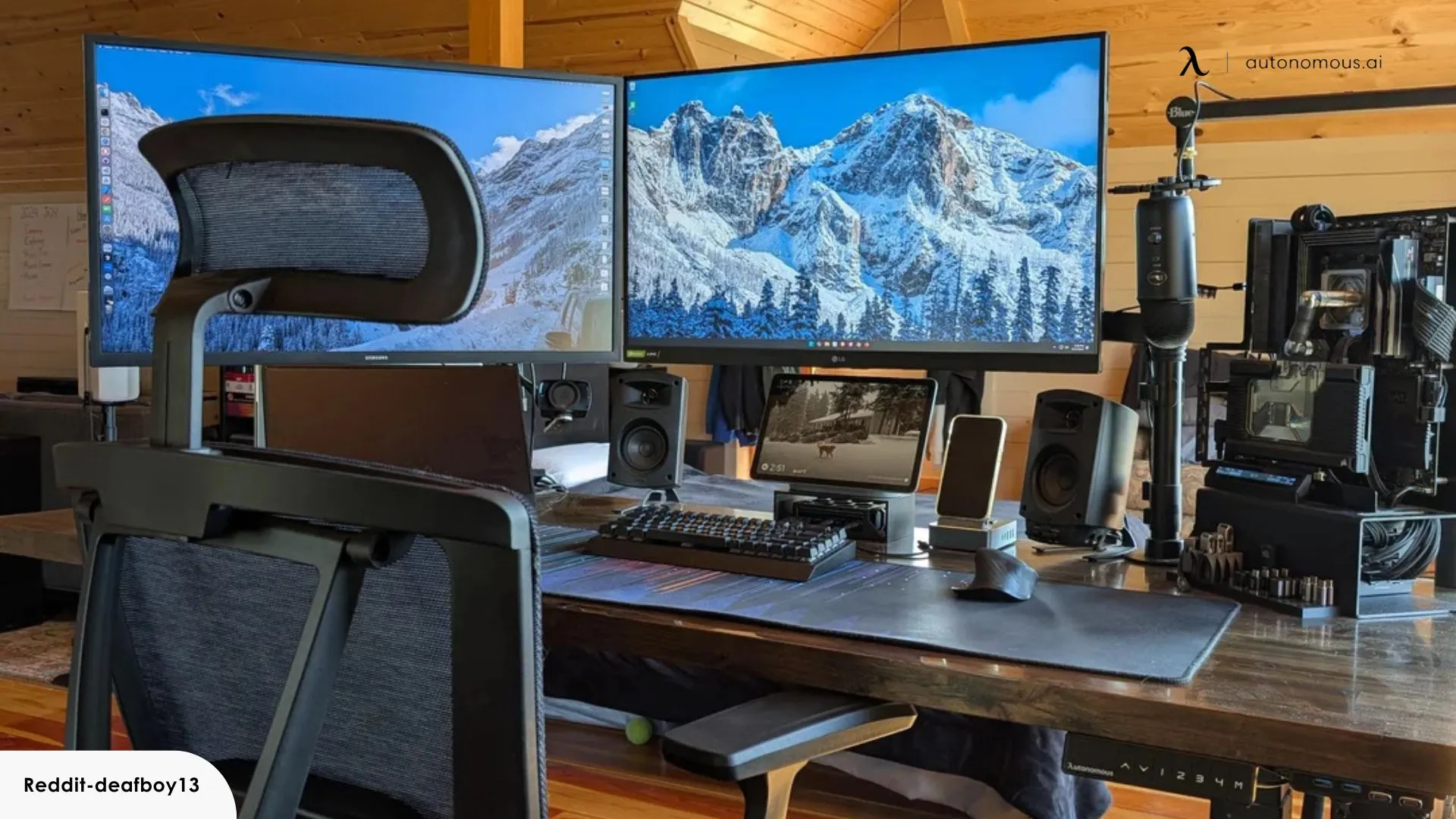
The right dual-monitor hardware depends first on the displays and desk you already have. These are the specifications and design choices that determine whether a setup feels stable and comfortable or becomes a permanent adjustment project.
Mounting method
Freestanding stands are the easiest to move and do not require a suitable clamp edge or grommet hole. Their bases consume desk space, but they work on more surfaces. The HUANUO Power Outlet Mount, VIVO V038FG, and Suptek ML6802 all use this approach.
C-clamp and grommet mounts transfer the load into the desk and leave more surface clear. They need a desk that can accept the hardware, with thickness limits that vary by product. The VIVO V002K accepts a surface up to 3.3 inches thick with its C-clamp, while the VIVO V257R lists a 1.45-inch limit for its C-clamp.
Screen size and weight
Check both diagonal size and weight per arm. A mount rated for two 32-inch displays is not automatically suitable for two heavy ultrawides. The VIVO V038FG supports screens up to 38 inches and 22 pounds each, while the VIVO V257R is designed for much larger stacked ultrawides with separate limits for flat and curved screens.
VESA hole spacing matters just as much. Many products here support 75 by 75mm and 100 by 100mm patterns, but the VIVO V257R also supports 200 by 100mm, 100 by 200mm, and 200 by 200mm. Confirm the pattern before thinking about arm movement.
Adjustment range
Tilt, swivel, rotation, and height adjustment determine whether the two screens can sit at the same eye level. Full rotation is useful for portrait mode, while a long arm extension helps when the screens need to sit around a laptop or a deep desk.
Mechanical spring arms, such as those on the VIVO V002K, are useful when you expect to change height often. A fixed or less flexible arrangement can be fine for a permanent setup, but it should be aligned carefully before tightening everything.
A dual-monitor mount should be chosen by the display's weight and VESA pattern first, then by the screen size printed on the box.
Desk footprint
Measure the depth and width available before choosing a freestanding base. The HUANUO base measures 15.77 by 10.24 inches, while the VIVO V038FG base measures 17 by 12.8 inches. Those dimensions can affect keyboard placement and how far you sit from the screens.
A clamp mount generally returns more usable surface, but it creates a different installation constraint. Check the rear edge, desk thickness, and clearance underneath before assuming a clamp will work.
Laptop connection
Portable extenders need a compatible video connection, not merely a USB-C-shaped port. The Anyking uses a full-featured USB-C connection for video and power, and the ZUMWALT also supports HDMI with its included cable.
Screen size and orientation matter for mobile work. The Anyking is a compact 14-inch 1080p display, while the ZUMWALT uses a 16.1-inch 1920 by 1200 panel and rotates through 360 degrees. For more advice on arranging a mobile workstation, the trade-offs between laptop and external screen space are worth considering before you choose.
Frequently asked questions
Do both monitors need the same size?
No. A dual mount can hold different screen sizes if each display fits the arm's stated size, weight, and VESA limits. Matching size and aspect ratio usually makes alignment easier, but it is not a requirement for the mount to function.
Is a freestanding stand better than a desk clamp?
Neither method is universally better. Freestanding bases are easier to move and work without a suitable desk edge, while clamps leave more desk surface clear and can feel more anchored. Choose based on the desk structure, available depth, and how often you expect to move the setup.
Can these mounts hold portrait-oriented monitors?
Several can. The HUANUO supports displays up to 29 inches in portrait mode, and the VIVO V038FG lists both portrait and landscape positioning. Always check the screen-size and weight limits for the intended orientation rather than assuming the landscape rating applies unchanged.
What does VESA compatibility mean?
VESA compatibility refers to the spacing of the mounting holes on the back of the monitor. Common patterns in this roundup include 75 by 75mm and 100 by 100mm. A monitor can be within the correct screen-size range and still fail to attach if its VESA pattern is unsupported.
Are portable laptop extenders the same as desktop monitor mounts?
No. A portable extender adds a display to a laptop and is designed around USB-C or HDMI connections, travel, and a smaller footprint. A desktop mount physically supports two separate monitors and is better suited to a permanent workstation.
Do alignment tools support the weight of a monitor?
No. The Zofianna and Brvqxwt products are positioning accessories, not load-bearing monitor stands. The displays still need a compatible stand, arm, or original support, and the alignment accessory should be used only after the screens are securely mounted.
How much desk space does a dual monitor stand need?
The answer depends on the mounting style. A freestanding stand needs room for its base, such as the HUANUO's 15.77 by 10.24-inch footprint or the VIVO V038FG's 17 by 12.8-inch base. Clamp mounts use less surface area but need clear access to the desk edge or a suitable grommet location.
The bottom line
The Best dual monitor setup guide points first to the HUANUO Power Outlet Mount for most standard home-office arrangements. It supports two displays up to 32 inches and 22 pounds each, offers full-motion adjustment, and adds USB-A, USB-C, and AC outlets without requiring a drilled installation. Its glass base takes space, but the combination is more useful than a basic fixed stand.
Choose the VIVO V038FG Ultrawide Stand for two large side-by-side screens, the VIVO V002K Mechanical Mount for a cleaner anchored desk, or the VIVO V257R Stacked Mount when two massive ultrawides need to sit one above the other. Laptop users should choose between the compact Anyking and the more flexible rotating ZUMWALT, while the Zofianna and Brvqxwt are finishing accessories for an existing mount.
If you are undecided, measure the desk and check the monitors' VESA pattern and weight before choosing the stand.
As an Amazon Associate we earn from qualifying purchases.