
A laptop can have a modern Intel badge and still feel cramped when a browser, video call, spreadsheet, and several background apps are open together. The processor matters, but so do the memory, storage, cooling, display, and the kind of work you expect to do.
Our Best Intel Processors For Laptops picks cover efficient N-series machines, mainstream Core systems, Core Ultra models with AI-focused hardware, and one serious gaming laptop. The MALLRACE i5-12600H Laptop is our top pick for broad everyday performance, while the lineup ranges from compact student notebooks to the much faster ASUS ROG Strix G16.
Comparison table
| # | Product | Award | Processor | Display | Memory and storage | Best for |
|---|---|---|---|---|---|---|
| 1 | MALLRACE i5-12600H Laptop | Best overall | Intel Core i5-12600H, 12 cores | 15.6-inch Full HD | 24GB LPDDR5, 512GB NVMe SSD | Multitasking and schoolwork |
| 2 | HP 14 N150 Laptop | Best compact option | Intel N150, up to 4.4GHz | 14-inch HD, 250 nits | 4GB DDR5, 128GB SSD | Basic home and student tasks |
| 3 | HP 15.6 i5-1334U Touch Laptop | Best touchscreen work laptop | Intel Core i5-1334U, 10 cores | 15.6-inch Full HD IPS touch | 8GB DDR4, 512GB SSD | Touchscreen productivity |
| 4 | Dell 15.6 Core Ultra 7 Laptop | Best premium productivity pick | Intel Core Ultra 7 255U | 15-inch FHD, up to 300 nits | 1TB SSD | AI-assisted office work |
| 5 | HP 15.6 i5 Touch Laptop | Best keyboard layout | Intel Core i5, 10 cores | 15.6-inch touchscreen | 16GB RAM, 512GB SSD | Office work with numeric entry |
| 6 | ASUS ROG Strix G16 | Best gaming performance | Intel Core i7-14650HX | 16-inch FHD+, 165Hz, 3ms | 16GB DDR5, 1TB Gen 4 SSD | Gaming and demanding creation |
| 7 | HP 14 N150 Student Laptop | Best for light study | Intel N150, up to 3.6GHz | 14-inch HD, 1366 x 768 | 16GB DDR4, 128GB UFS plus expansion | Browsing and online classes |
| 8 | HP 15.6 Core 5 Touch Laptop | Best quiet business laptop | Intel Core 5 120U, 10 cores | 15.6-inch Full HD touch, 300 nits | 16GB RAM, 512GB SSD | Quiet office computing |
| 9 | Dell 15.6 Core Ultra 5 Laptop | Best balanced Dell option | Intel Core Ultra 5 225U | 15-inch FHD, up to 300 nits | 16GB RAM, 512GB SSD | Everyday productivity |
1. MALLRACE i5-12600H Laptop: Best Overall

Pros
- Strong 12-core processor for demanding multitasking
- 24GB of LPDDR5 memory
- Full HD display and a broad port selection
- Physical webcam privacy switch
- Two M.2 slots and stated expansion support
Cons
- Plastic construction feels less premium than the processor suggests
- Webcam is limited to 1MP
- The display specification does not include a brightness figure
Best for: someone who wants a capable Intel laptop for work, study, and heavier multitasking.
The MALLRACE i5-12600H Laptop is the most convincing all-rounder here because it puts the right amount of memory behind a genuinely capable processor. The Intel Core i5-12600H has 12 cores and 16 threads, with a maximum speed of 4.5GHz. That is a meaningful step above the N150 systems in this list when you are moving between office documents, large browser sessions, video calls, and light creative work.
Its 24GB of LPDDR5 memory is just as important as the processor. Many mainstream laptops feel slow because they run out of working memory before the CPU runs out of ability. This model has more breathing room, and the 512GB M.2 NVMe PCIe 3.0 SSD should make Windows startup and application loading feel responsive. The listing also describes dual M.2 slots and support for up to 4TB of total storage, though buyers should confirm the upgrade arrangement before opening the machine.
The 15.6-inch Full HD display gives documents and web pages a practical amount of room, while the 180-degree hinge is useful when sharing a screen across a table. It weighs 1.65kg, or about 3.53 pounds, so it is portable without being an ultra-light design. Connectivity is a real strength: three USB 3.2 ports, HDMI 1.4, two USB Type-C ports, Wi-Fi 6, and Bluetooth 5.2 cover most desk setups without immediately reaching for a hub.
The compromises are clear. The durable plastic chassis is functional rather than luxurious, and the 1MP webcam is merely adequate for calls. Intel Iris Xe graphics are suitable for video playback, presentations, and light graphics work, not modern high-end gaming. Compared with the HP 15.6 Core 5 Touch Laptop, the MALLRACE has less emphasis on office polish but gives you more memory and a more explicitly specified high-performance CPU. Compared with the ASUS ROG Strix G16, it is far less capable for games and GPU-heavy creation.
This is the laptop we would keep for a mixed workload that needs more headroom than a basic student machine. It is the strongest match for readers comparing the Best Intel Processors For Laptops for general performance rather than chasing a gaming GPU.
2. HP 14 N150 Laptop: Best Compact Option

Pros
- Compact 14-inch format
- N150 processor reaches up to 4.4GHz
- Anti-glare display with stated 250-nit brightness
- Useful USB Type-C, USB Type-A, and HDMI ports
- Microsoft 365 is included for one year
Cons
- 4GB of memory limits heavier multitasking
- 128GB SSD leaves little room for a large local library
- HD resolution is less spacious than the Full HD alternatives
Best for: a student or home user focused on browsing, documents, and uncomplicated daily computing.
The HP 14 N150 Laptop is built around simplicity. Its 14-inch screen and 3.24-pound listed chassis make it easier to carry than the larger notebooks here, while the 0.71-inch profile keeps the shape reasonably slim. It is the kind of laptop that makes sense for a desk, a classroom, or a kitchen table where portability matters more than a large working canvas.
Intel’s N150 processor has four cores and four threads and is listed with a maximum speed of 4.4GHz. That specification sounds lively, but this is still an entry-level platform. It should handle web browsing, word processing, streaming, email, and online classes well when the workload stays modest. The limitation is the 4GB of DDR5 memory. A few browser tabs and a document are fine, but many open tabs, video conferencing, and heavier applications at the same time will expose the ceiling quickly.
The 14-inch HD panel has a 1366 by 768 resolution, 250 nits of brightness, and an anti-glare coating. Those details matter more than the processor name for everyday comfort. The anti-glare finish should help in bright rooms, while the modest resolution means text and spreadsheets do not have the same room as they do on a Full HD screen. Ports include USB 3.0 Type-C, USB 3.0 Type-A, HDMI, and a combined headphone and microphone jack.
The listing pairs the laptop with a 128GB SSD and one year of Microsoft 365. That storage is enough for documents and essential applications, but users who keep photos, downloaded media, or large school projects locally may need external storage. The HP 14 N150 Student Laptop offers more memory and a different storage arrangement, so it is the better HP 14 for multitasking. The MALLRACE i5-12600H Laptop is in another performance class altogether, but it is also larger and heavier.
Choose this HP when the priorities are a manageable size, a familiar Windows setup, and light tasks. Skip it if you regularly work with many applications at once or need a spacious display for large spreadsheets.
3. HP 15.6 i5-1334U Touch Laptop: Best Touchscreen Work Laptop
Pros
- 13th Generation Core i5 processor
- 10 cores and up to 4.6GHz
- Full HD IPS touchscreen
- 512GB SSD
- Good selection of USB and HDMI ports
Cons
- 8GB of DDR4 memory is less generous than several rivals
- Display is listed at 250 nits
- 45 percent NTSC color coverage is modest
Best for: work and study users who specifically want touch input on a large Full HD screen.
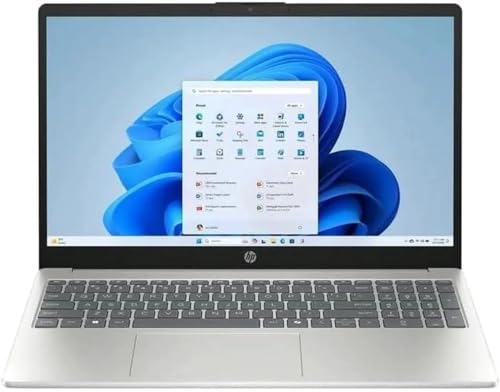
The HP 15.6 i5-1334U Touch Laptop has one of the clearest use cases in this group. Its large touchscreen makes it easier to scroll through long pages, annotate compatible documents, and navigate presentations without relying on the trackpad for every action. The 15.6-inch chassis is less convenient to carry than the HP 14 models, but it gives office work and split-window use a more comfortable layout.
The 13th Generation Intel Core i5-1334U has 10 cores, a stated maximum speed of 4.6GHz, and 12MB of Intel L3 cache. That is a sensible mainstream processor for documents, communication, browsing, and moderate multitasking. It should feel much more comfortable than the N150 machines when applications are open together, although the 8GB of DDR4 memory is the part most likely to become restrictive over time.
The Full HD resolution is a better fit for a 15.6-inch panel than basic HD. The IPS specification points to more consistent viewing angles, while the 250-nit brightness is suitable for ordinary indoor use. The 45 percent NTSC color gamut tells creative users to temper expectations. It can show photos and video, but this is not the right display for color-critical editing. Storage is more straightforward: the 512GB SSD offers enough room for a normal set of applications and documents without immediately requiring an external drive.
Ports include two USB 3.2 Gen 1 Type-A ports, one USB 3.2 Gen 2 Type-C port, HDMI, and a headphone and microphone combo jack. That is a practical set for a home or school desk. The HP 15.6 Core 5 Touch Laptop has twice the listed memory and a brighter 300-nit display, so it is the stronger choice for longer office sessions. The HP 15.6 i5 Touch Laptop adds a numeric keypad, which makes it more attractive for data entry.
The weakness is the balance between the capable CPU and the less expansive memory. This laptop suits someone who values the touch display and wants a familiar mainstream Core i5 platform, not someone who plans to run demanding creative software. It is also a useful reference point for readers deciding how much screen space makes study work easier.
4. Dell 15.6 Core Ultra 7 Laptop: Best Premium Productivity Pick

Pros
- Intel Core Ultra 7 255U processor
- NPU support for compatible AI workloads
- Up to 300 nits of display brightness
- Dedicated Copilot key
- Lifted hinges and ComfortView features
Cons
- Touch capability is not listed
- Detailed memory specifications are not provided
- The processor is aimed at productivity, not serious gaming
Best for: office users who want a polished large-screen laptop with newer Core Ultra features.
The Dell 15.6 Core Ultra 7 Laptop takes a quieter approach to performance. Instead of advertising a gaming-focused design, it centers the experience on a spacious 15-inch display, a lifted hinge, eye-comfort features, and Intel Core Ultra hardware. It is the kind of machine that should fit naturally into an office or home workspace where comfortable typing and long viewing sessions matter.
The Intel Core Ultra 7 255U brings an NPU to the platform, which can handle compatible AI tasks more efficiently than sending every workload through the main CPU. That does not make every application faster, and buyers should not confuse an NPU with a dedicated graphics processor. It is most relevant to software that has been designed to use local AI acceleration. The laptop also includes a dedicated Copilot key for quick access to Microsoft’s assistant.
Dell lists the display at up to 300 nits with a three-sided narrow bezel. That brightness gives it more useful headroom than the 250-nit panels on the HP 15.6 i5-1334U Touch Laptop and HP 14 N150 Laptop, particularly under strong indoor lighting. ComfortView reduces blue-light emissions, while the lifted hinges raise the typing angle and help airflow. The product information lists a 1TB SSD, giving it more local storage than the 512GB configurations elsewhere in this roundup.
The available data does not specify the memory capacity, so we would confirm that detail before buying. It also does not list a touchscreen, which means the Dell is a conventional clamshell rather than a touch-first design. The Dell 15.6 Core Ultra 5 Laptop follows the same general design with a Core Ultra 5 225U and 16GB of RAM, making it the clearer option when memory capacity is a deciding factor. The Core Ultra 7 model is the more ambitious pick for users interested in the higher-tier processor and larger SSD.
This Dell is not aimed at gaming or heavy video production. It is better suited to office applications, communication, research, and AI-assisted productivity. Readers comparing which Windows setup fits a work laptop will find its combination of Windows 11 Home, modern Intel hardware, and ergonomic details appealing.
5. HP 15.6 i5 Touch Laptop: Best Keyboard Layout

Pros
- 16GB of memory
- 512GB SSD
- Full-size 15.6-inch touchscreen format
- Numeric keypad for data entry
- Intel Iris Xe graphics
Cons
- Listed weight is 7 pounds
- Processor model is not identified more precisely
- Display brightness and resolution are not specified
Best for: spreadsheet work, form entry, and home office tasks that benefit from a numeric keypad.
The HP 15.6 i5 Touch Laptop makes its case through the keyboard. A numeric keypad is easy to overlook until a job involves columns of figures, inventory records, accounting forms, or frequent number entry. That extra block of keys can matter more to a home office user than a small difference in processor generation.
The listing identifies a 10-core Intel Core i5 processor with a maximum burst frequency of 4.4GHz and Intel Iris Xe graphics. It does not give a more specific Core i5 model, so buyers should not assume that it matches the i5-1334U in the other HP. Still, the combination should be suitable for common productivity applications, browser work, streaming, and communication. The 16GB of memory is welcome, especially when the laptop is used with many documents and browser tabs.
Storage is covered by a 512GB SSD, which is a practical capacity for Windows, office applications, and a local collection of files. The touchscreen can make navigation more direct, though the available information does not specify the panel resolution or brightness. That missing display detail is a genuine drawback for anyone who spends all day looking at spreadsheets or works near a bright window.
The physical size is the main concern. The listed weight is 7 pounds, considerably more than the HP 14 systems and the Dell laptops in this group. This is a laptop for a mostly stationary desk, not one we would want to carry across campus every day. The HP 15.6 Core 5 Touch Laptop is a better fit for users who want a stated Full HD resolution, 300 nits, Wi-Fi 6, and a quieter design. The HP 15.6 i5-1334U Touch Laptop gives you a more precisely identified processor and IPS panel.
Choose this HP when the numeric keypad is central to the job. Skip it if portability, display transparency, or a clearly documented processor model matters more than data-entry convenience.
6. ASUS ROG Strix G16: Best Gaming Performance

Pros
- Intel Core i7-14650HX processor
- GeForce RTX 5060 Laptop GPU
- 165Hz display with 3ms response time
- 16GB DDR5 memory and 1TB Gen 4 SSD
- Vapor chamber, tri-fan cooling, and liquid metal thermal compound
Cons
- Much heavier than the productivity laptops here
- Gaming hardware is excessive for basic office work
- RGB lighting may not suit every workspace
Best for: gamers and creators who need a high-performance Intel laptop with a dedicated GPU.
The ASUS ROG Strix G16 is the obvious outlier in this roundup, and that is precisely why it earns a place. It is not simply a faster office laptop. It pairs an Intel Core i7-14650HX with an NVIDIA GeForce RTX 5060 Laptop GPU, so it is designed for games, 3D work, rendering, and other workloads that benefit from dedicated graphics.
The 14th Generation Core i7-14650HX is supported by 16GB of DDR5-5600 memory. That gives games and creative applications a more appropriate platform than the integrated graphics used by the other products here. The 1TB PCIe Gen 4 SSD also gives a substantial amount of room for a game library and large projects. If gaming is the priority, this is the only laptop in the group that should be considered before the mainstream productivity machines.
The 16-inch display uses a 16:10 aspect ratio with a 165Hz refresh rate and a 3ms response time. Higher refresh makes motion look smoother in fast games, while the 16:10 shape gives office applications and timelines a little more vertical room than a traditional 16:9 panel. ASUS also describes an ACR film intended to improve contrast and reduce glare. The RTX 5060 supports NVIDIA’s current Blackwell architecture, DLSS 4, and Max-Q technologies according to the listing.
Gaming performance requires cooling, and ASUS gives this model an end-to-end vapor chamber, tri-fan design, and Conductonaut Extreme liquid metal on the chipset. Those components are more meaningful than RGB decoration because sustained workloads can expose weak thermal designs quickly. The tradeoff is portability. At roughly 5.84 pounds and 0.9 inches thick, it is manageable to move between rooms but not a lightweight travel companion. The 360-degree RGB light bar can be switched to a stealth mode when the lighting is inappropriate.
For a gaming-focused reader, this is far ahead of the MALLRACE i5-12600H Laptop, whose Intel Iris Xe graphics are aimed at lighter visual work. For ordinary documents, though, the Dell and HP models are more sensible shapes to live with. Readers choosing between processor classes should also consider how Intel CPU features affect modern gaming.
Buy the ASUS when you need frame rates, graphics acceleration, and sustained performance. Skip it if your day is mostly email, spreadsheets, and web browsing, because the extra bulk and gaming-focused hardware will not help those tasks much.
7. HP 14 N150 Student Laptop: Best for Light Study

Pros
- Compact 3.24-pound design
- 16GB DDR4 memory
- Wi-Fi 6 and Copilot support
- 128GB UFS storage with 256GB expansion
- One year of Microsoft 365
Cons
- HD resolution is limited
- N150 is intended for light workloads
- Windows 11 S Mode may restrict installation choices
Best for: students and first-time laptop users who need a portable machine for essential tasks.
The HP 14 N150 Student Laptop is more interesting than its simple name suggests because it combines the entry-level N150 processor with 16GB of memory. That is a much more comfortable memory allocation than the 4GB configuration in the other HP 14. For a student moving between a browser, a document, an online classroom, and a music stream, the extra memory should help prevent the machine from feeling immediately cramped.
The Intel N150 is listed at up to 3.6GHz in this model and uses built-in Intel graphics. It is intended for browsing, streaming, documents, and light multitasking, not demanding editing or modern games. The processor can be perfectly adequate when expectations are set correctly. The 16GB DDR4 memory helps with application switching, but it cannot turn an entry-level CPU into a workstation.
Storage uses 128GB of UFS storage plus a stated 256GB expansion, for 384GB of combined capacity. That arrangement differs from a conventional 512GB SSD, so users who frequently install large applications should look closely at how the expansion is implemented. It does give students more room for documents, projects, and media than a bare 128GB drive would.
The 14-inch HD anti-glare display has a 1366 by 768 resolution. It is easy to carry at 3.24 pounds, and the 0.71-inch profile suits a backpack or small desk. Wi-Fi 6, Microsoft Copilot, and a one-year Microsoft 365 subscription add useful everyday features. Windows 11 Home in S Mode is the catch. S Mode emphasizes security and simplicity but can limit which applications you install unless you switch out of it.
The HP 14 N150 Laptop has a faster listed peak speed and a brighter 250-nit display, but this student model has the more useful memory capacity. The HP 15.6 i5-1334U Touch Laptop is the better choice for heavier applications and a Full HD workspace. For students weighing portability against a larger display, this model fits the same practical questions explored in choosing a laptop for classes and campus life.
8. HP 15.6 Core 5 Touch Laptop: Best Quiet Business Laptop

Pros
- Intel Core 5 120U with 10 cores
- 16GB of memory and 512GB SSD
- Full HD touchscreen rated at 300 nits
- Wi-Fi 6 and Bluetooth 5.3
- Ultra-quiet design is listed
Cons
- Office software is web-based rather than a full desktop suite
- Exact battery capacity is not provided
- The chassis is less portable than a 14-inch laptop
Best for: quiet office work, remote work, and home users who want touch input.
The HP 15.6 Core 5 Touch Laptop is the most balanced conventional office machine in the lineup. It pairs a large Full HD touchscreen with 16GB of memory and a 512GB SSD, then adds an ultra-quiet design for users who work in shared rooms or prefer a calmer desk. It is not as portable as the HP 14 notebooks, but the larger panel is more comfortable for documents and side-by-side windows.
Intel’s Core 5 120U has 10 cores and 12 threads, with a listed maximum speed of 4.6GHz. That puts it closer to the mainstream Core i5 systems than to the N150 laptops. It should be comfortable for communication, web research, office applications, and moderate multitasking. The 16GB of memory is enough to avoid the most obvious limitations of an entry-level configuration, while the 512GB SSD gives the operating system and everyday files sensible room.
The display is one of the more clearly documented panels here. It is a 15.6-inch Full HD touchscreen with up to 300 nits of brightness and an anti-glare coating. That combination gives it a better working surface than the HD screens on both HP 14 models. Connectivity is also solid, with USB Type-C, USB Type-A, HDMI, an AC smart pin, a headphone and microphone combo jack, Wi-Fi 6, and Bluetooth 5.3.
The phrase “long battery life” appears in the title, but the dataset does not provide a battery capacity or runtime figure. We would not treat that claim as a measured guarantee. Microsoft 365 is available online through Office.com without a subscription, which is useful for browser-based work but is not the same as a full installed desktop suite. The HP 15.6 i5 Touch Laptop offers a numeric keypad, while this HP provides the stronger documented display and wireless specifications.
This is the HP to choose for quiet shared-space work and touch-friendly office routines. It is a better fit than the HP 15.6 i5-1334U Touch Laptop for someone who wants more memory and a brighter stated screen, but the Dell models are more compelling if Core Ultra features and a lighter chassis take priority.
9. Dell 15.6 Core Ultra 5 Laptop: Best Balanced Dell Option

Pros
- Intel Core Ultra 5 225U processor
- 16GB of memory and 512GB SSD
- Up to 300 nits of brightness
- NPU-powered AI features
- ComfortView and lifted-hinge design
Cons
- No touchscreen is listed
- Core Ultra 5 is less ambitious than the Dell Core Ultra 7
- Not intended for dedicated-GPU workloads
Best for: everyday work users who want a newer Intel platform in a comfortable Dell chassis.
The Dell 15.6 Core Ultra 5 Laptop is the sensible middle ground between the mainstream HP machines and the higher-tier Dell Core Ultra 7. Its Intel Core Ultra 5 225U is aimed at modern productivity, and the included 16GB of memory gives it a better foundation for multitasking than the lower-memory entry-level laptops.
The Core Ultra platform includes an NPU for compatible AI features. That matters for supported local processing, but it should not be treated as a substitute for the dedicated GPU in the ASUS. For normal work, the more noticeable benefits are likely to come from the overall system balance, Windows 11 Home, and the ability to keep several ordinary applications open without immediately running into memory limits.
Dell lists a 15-inch display with up to 300 nits of brightness and a three-sided narrow bezel. ComfortView is intended to reduce blue-light emissions, and the lifted hinge raises the typing angle while supporting airflow. The product information specifies a 512GB SSD, which is enough for a regular office setup, school documents, and applications without requiring an immediate storage plan.
The lack of a listed touchscreen separates this Dell from the two HP touch models. It is also not a gaming machine, and the data does not identify a dedicated graphics processor. The Dell 15.6 Core Ultra 7 Laptop steps up to a Core Ultra 7 255U and a 1TB SSD, making it the stronger choice for users who want more processor and storage headroom. This Core Ultra 5 model is the cleaner fit for everyday productivity when 512GB and 16GB meet the workload.
Choose it for a comfortable work laptop with current Intel platform features, a bright-enough Full HD display, and a straightforward office design. Skip it if touch input, gaming graphics, or a numeric keypad is central to your routine.
How to choose best intel processors for laptops
The right Intel laptop depends on the workload around the processor, not just the name printed on the box. These are the factors that separate the nine options.
Processor class and core count
Intel N-series processors such as the N150 are designed for browsing, documents, streaming, and other light tasks. They can be a good fit for a student or home user, but their limits appear sooner when many applications are open. Core i5 and Core 5 models sit higher in the mainstream range, while the Core Ultra chips add an NPU for compatible AI workloads.
A high maximum clock speed alone does not tell the whole story. Core count, thread count, cooling, and the intended power range all shape sustained performance. The Core i7-14650HX in the ASUS is the clear choice for demanding work, but it is unnecessary for simple office routines.
Choose the processor for the heaviest task you do every week, not the lightest task you do every day.
Memory capacity
Memory determines how comfortably a laptop keeps applications available at the same time. The 4GB configuration in the HP 14 N150 Laptop is suited to basic use, while 8GB is workable for ordinary productivity. The 16GB models provide a safer margin for browser-heavy work, video calls, documents, and longer ownership.
The MALLRACE i5-12600H Laptop stands out with 24GB of LPDDR5 memory. That is especially useful when the processor is capable enough to handle heavier multitasking. DDR5 and LPDDR5 can offer bandwidth advantages, but capacity remains the first thing to check for an everyday laptop.
Storage type and capacity
A 512GB SSD is a practical starting point for Windows, applications, documents, and a moderate media library. The 1TB SSD in the Dell Core Ultra 7 model and the ASUS gives more room for large files and games. UFS storage, as used in the HP 14 N150 Student Laptop, is a different arrangement from a conventional NVMe SSD, so check the expansion details if you plan to install large applications.
Storage also affects responsiveness. An NVMe SSD should make booting and application launches feel much quicker than older hard-drive designs. The MALLRACE listing also describes dual M.2 slots and potential expansion, which may be useful for users who expect their storage needs to grow.
Display size, resolution, and brightness
A 14-inch screen is easier to carry, but a 15.6-inch display gives spreadsheets, timelines, and side-by-side windows more room. Full HD is preferable on a larger screen because it keeps text and interface elements sharper than basic HD. The HP 14 models use HD panels, while most of the larger laptops use Full HD.
Brightness matters when working near windows or under strong overhead lighting. The HP 15.6 Core 5 and both Dell models list up to 300 nits, while the HP 14 N150 Laptop lists 250 nits. Touch input can make navigation and annotation easier, but it is not essential for every workflow.
Graphics and cooling
Integrated Intel graphics are suitable for office work, streaming, presentations, and light creative tasks. They are not comparable to the GeForce RTX 5060 Laptop GPU in the ASUS ROG Strix G16. If gaming, 3D work, or GPU-accelerated creation is central to your routine, look for a dedicated graphics processor rather than relying on the CPU label.
Cooling becomes more important as performance rises. The ASUS uses a vapor chamber, tri-fan design, and liquid metal thermal compound because its Core i7 and RTX graphics can sustain much heavier loads. A thin office laptop has different priorities, with lower noise, portability, and comfortable surfaces taking precedence.
Frequently asked questions
Which Intel processor is best for a laptop?
For broad everyday use in this group, the Intel Core i5-12600H in the MALLRACE i5-12600H Laptop offers the strongest mix of processor capability and memory. For gaming and demanding graphics work, the Intel Core i7-14650HX in the ASUS ROG Strix G16 is the more suitable option.
Is Intel N150 suitable for students?
Intel N150 is suitable for browsing, documents, streaming, email, and online classes. It is less suitable for demanding editing, extensive multitasking, or modern gaming. The 16GB configuration in the HP 14 N150 Student Laptop is more comfortable for multiple open applications than the 4GB HP 14 configuration.
How much laptop memory do I need?
8GB can handle ordinary office work, but 16GB gives a better margin for browser tabs, video calls, documents, and longer ownership. The 24GB configuration in the MALLRACE is useful for heavier multitasking. Memory capacity should be considered alongside the processor because extra RAM cannot fully compensate for a weak CPU.
Are Intel Core Ultra laptops better for office work?
Core Ultra laptops add an NPU for compatible AI features and use a newer platform than the N-series systems in this roundup. The Dell Core Ultra 5 and Core Ultra 7 models also include bright Full HD displays, ComfortView, and lifted hinges. They are strong office choices, though a Core i5 or Core 5 laptop may already be sufficient for basic tasks.
Is a touchscreen useful on a laptop?
A touchscreen can make scrolling, navigation, and document interaction more direct. It is most useful for users who regularly work with touch-friendly applications or prefer tapping through presentations and web pages. It can be skipped if you mainly use a keyboard, mouse, and external monitor.
Can these laptops handle gaming?
The ASUS ROG Strix G16 is the only product here designed around serious gaming because it includes an RTX 5060 Laptop GPU and a 165Hz display. The other models use integrated graphics or do not list a dedicated GPU, so they are better suited to casual games and productivity.
Is 512GB enough laptop storage?
For Windows, office applications, documents, and ordinary personal files, 512GB is a practical capacity. Large games, video projects, and extensive media libraries can use it quickly. The ASUS and Dell Core Ultra 7 provide 1TB, while the HP 14 models offer smaller or differently arranged storage.
The bottom line
The MALLRACE i5-12600H Laptop is our leading choice among the Best Intel Processors For Laptops because its 12-core processor, 24GB of memory, Full HD display, and broad connectivity cover the widest range of everyday workloads. The HP 15.6 Core 5 Touch Laptop is a strong alternative for quiet office work and touch-based productivity, while the Dell Core Ultra 5 is a cleaner choice for users who want newer AI-focused platform features.
For gaming, demanding creation, or GPU-heavy work, choose the ASUS ROG Strix G16 instead. Its Core i7, RTX 5060, fast display, and dedicated cooling make it a different class of machine, though its weight and gaming design are unnecessary for basic office tasks.
If you are undecided, buy the MALLRACE for general multitasking, the ASUS for gaming, and an HP 14 only when portability and light workloads matter most.
As an Amazon Associate we earn from qualifying purchases.