

A small business laptop has to handle more than a browser and a word processor. It may be the device used for client calls in the morning, spreadsheet work after lunch, and remote access to business files before the day ends. A poor choice shows its limits through cramped storage, weak multitasking, an awkward display, or an operating system that does not fit the work.
The Best laptop for small business depends on how demanding that work is. The list below includes practical Windows machines, a renewed business-class Dell, large-screen HP models, and a ChromeOS option for browser-first workflows. Our top pick is the Dell Latitude 5420, while the other nine cover bigger displays, newer processors, more storage, and lighter everyday duties.
Comparison table
| # | Product | Award | Display | Memory and storage | Best for |
|---|---|---|---|---|---|
| 1 | Dell Latitude 5420 | Best overall | 14-inch FHD | 16GB, 256GB SSD | Windows business work |
| 2 | Lenovo V15 Gen 4 | Best for demanding office work | 15.6-inch FHD | 16GB, 512GB SSD | Heavy multitasking and data entry |
| 3 | Dell 15.6-inch Core Ultra Laptop | Best modern Dell | 15-inch | 16GB, 512GB SSD | AI-assisted daily work |
| 4 | HP 17.3-inch Ryzen 5 Laptop | Best large screen | 17.3-inch FHD | 16GB, 512GB SSD | Spreadsheets and desk work |
| 5 | HP 17-inch Ryzen 5 Pro Laptop | Best for storage-heavy work | 17.3-inch FHD IPS | 32GB, 1TB SSD | Large files and multitasking |
| 6 | Lenovo 15.6-inch N100 Laptop | Best portable Windows laptop | 15.6-inch FHD | 8GB, 256GB SSD | Mobile office basics |
| 7 | HP Essential 15.6-inch Laptop | Best straightforward HP | 15.6-inch FHD | 8GB, 256GB SSD | General office productivity |
| 8 | HP 14-inch N150 Laptop | Best bundled Windows laptop | 14-inch HD | 4GB, 128GB UFS plus 500GB external | Basic work with included accessories |
| 9 | HP 14-inch ChromeOS Laptop | Best for browser-based work | 14-inch HD | 4GB, 64GB eMMC | Google Workspace and video calls |
| 10 | HP 14-inch N150 Ultrabook | Best compact Windows option | 14-inch | 4GB, 128GB SSD | Light home and office tasks |
1. Dell Latitude 5420: Best Overall

Pros
- 16GB of RAM suits busy office multitasking
- Compact 14-inch FHD business format
- Windows 11 Pro and HDMI output
- Core i5 processor is a sensible workhorse
Cons
- Renewed product requires more careful condition expectations
- 256GB SSD leaves less room for large local files
- Older processor generation than newer Dell and Lenovo models
Best for: a small-business owner who wants a compact Windows Pro laptop with capable multitasking.
The first thing to know about the Dell Latitude 5420 is that it feels like a work machine rather than a consumer laptop dressed up for the office. Its 14-inch FHD display keeps the chassis manageable, and the listed dimensions of 12.76 by 8.35 inches make it easier to carry between a desk, meeting room, and home office. That smaller screen is a useful compromise for people who travel with their computer but still want a properly sharp 1920 by 1080 workspace.
The Intel Core i5-1145G7 is an older generation processor, but it remains a sensible match for email, browser applications, documents, invoicing, video meetings, and ordinary spreadsheet work. The 16GB of DDR4 RAM is more important to the day-to-day feel than a newer processor label alone. It gives the Latitude room for a large collection of browser tabs and several office applications without the immediate memory constraint found in the 4GB HP models. Its 256GB SSD is responsive for startup and application loading, though businesses storing photos, design files, or extensive local archives will need an external drive or cloud storage plan.
Windows 11 Pro makes this the clearest business-focused choice in the first half of the list. The included camera and HDMI connection also suit a small office setup, particularly when the laptop needs to join a larger display or conference room screen. Compared with the HP 14-inch ChromeOS Laptop, the Dell is the safer fit for Windows-specific accounting, administration, and desktop software. Compared with the Lenovo V15 Gen 4, it gives up screen size, storage, and newer processor hardware in exchange for a more compact format.
There is one important qualification. The title identifies this as renewed, so buyers should pay attention to the condition policy and included accessories rather than assuming it will arrive like a factory-sealed current model. The processor is also not the strongest here, and the 256GB drive can fill quickly. Skip it if you need a large local media library or want the freshest platform in the group.
For a small business that needs Windows 11 Pro, useful memory, and a portable chassis, this is the most balanced machine in the roundup. It is the one we'd keep for mixed office work, travel, and regular video calls.
2. Lenovo V15 Gen 4: Best for Demanding Office Work
Pros
- Eight-core Core i5-13420H processor
- 16GB RAM and 512GB SSD
- Windows 11 Pro
- HDMI, RJ45, webcam, and numeric keypad
Cons
- The listing contains conflicting memory and storage details
- Larger chassis is less convenient for commuting
- No exact Wi-Fi generation is provided
Best for: spreadsheet-heavy office work that benefits from a numeric keypad, strong processor, and ample storage.
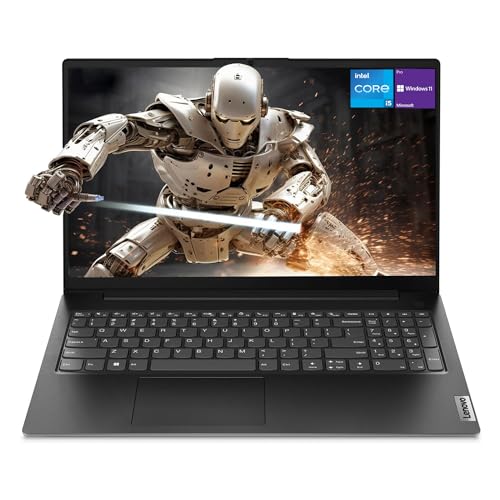
The Lenovo V15 Gen 4 is the practical powerhouse of this group. It has the shape of a conventional office laptop, with a 15.6-inch FHD display and a numeric keypad, but its Intel Core i5-13420H processor gives it more headroom than the lower-power N-series chips in several of the smaller HP machines. For bookkeeping, inventory sheets, browser-based dashboards, and multiple business applications, that extra processing capacity is a meaningful reason to choose it.
The processor is listed with eight cores, 12 threads, a maximum turbo frequency of 4.6GHz, and 12MB of Intel Smart Cache. Those figures do not turn it into a workstation, but they point to a laptop that should cope more comfortably with sustained office multitasking than the Lenovo 15.6-inch N100 Laptop. The title and product information identify 16GB of RAM and a 512GB SSD, a useful combination for keeping more working files on the machine while leaving breathing room for applications. One feature entry conflicts with those figures and describes 4GB of RAM and 128GB of storage, so shoppers should verify the shipped configuration carefully.
Connectivity is unusually useful for a small office. HDMI handles an external monitor or meeting-room display, while RJ45 gives you a wired network option when wireless is congested or a business network requires a cable. The webcam covers ordinary calls, and the numeric keypad is a genuine advantage for invoices, spreadsheets, payroll entries, and stock counts. Windows 11 Pro adds a more business-oriented operating system than the Home editions on some alternatives.
The Lenovo's main weakness is physical rather than computational. At 3.64 pounds and about 14.13 by 9.29 inches, it is portable enough for occasional travel but not the easiest choice for daily commuting. The Dell Latitude 5420 is more appealing when a compact 14-inch chassis and established business format matter most. The Lenovo wins when the laptop will spend most of its time on a desk and the work involves numbers, large sheets, and many simultaneous applications.
This is a strong fit for a small business that wants one computer to serve as a desk-based main machine. Choose it over the Dell when storage and sustained office performance matter more than compactness, but confirm the memory and drive configuration before ordering.
3. Dell 15.6-inch Core Ultra Laptop: Best Modern Dell

Pros
- Core Ultra 5 225U platform with NPU-powered features
- 16GB RAM and listed 512GB SSD
- Bright 15-inch display with up to 300 nits
- ComfortView and dedicated Copilot key
Cons
- Windows 11 Home is less business-specific than Pro
- The listing does not provide a full port specification
- Larger than the 14-inch Latitude
Best for: a small-business user who wants a current Dell platform and a comfortable 15-inch screen.
The Dell 15.6-inch Core Ultra Laptop is the modern alternative to the older Latitude 5420. Its 15-inch display gives documents and spreadsheets more breathing room, while the narrow three-sided bezel keeps the overall design from becoming excessively bulky. Dell lists brightness up to 300 nits, which should be more comfortable than a dim basic panel when the laptop is used near a window or under strong office lighting.
Its Intel Core Ultra 5 225U processor brings a newer platform and an NPU for AI-focused features. The dedicated Copilot key is easy to understand: it provides a direct shortcut to Microsoft's assistant rather than requiring a search through menus. That may be useful for organizing information, drafting or summarizing text, and finding settings, though it does not replace sound business judgment or a proper document workflow. The 16GB of RAM is appropriate for everyday multitasking, and the product information lists a 512GB SSD, giving it a more comfortable local storage position than the Latitude's 256GB drive.
Dell also highlights ComfortView, which reduces blue-light emissions, and lifted hinges intended to improve typing angle and airflow. Those details matter during long work sessions more than flashy appearance does. The laptop weighs 3.67 pounds, so it is still manageable to carry, but it is not as compact as the Latitude. The available information does not spell out the complete port selection, which makes it harder to recommend for a desk that depends on specific connections.
The trade-off is Windows 11 Home. It is perfectly workable for many sole proprietors and small teams, but the Lenovo V15 Gen 4 and Dell Latitude 5420 are stronger choices when Windows 11 Pro is a deliberate requirement. The Dell also does not have the Latitude's compact 14-inch footprint or the Lenovo's clearly described RJ45 port and numeric keypad.
Pick this model when the newer Core Ultra platform, a brighter 15-inch display, and Dell's comfort features matter more than Pro-level Windows management. It is a polished daily office laptop, provided your peripherals do not require ports that are not specified in the listing.
4. HP 17.3-inch Ryzen 5 Laptop: Best Large Screen

Pros
- Large 17.3-inch FHD anti-glare display
- 16GB RAM and 512GB SSD
- Full-size keyboard with numeric keypad
- Copilot shortcut and webcam with digital microphones
Cons
- Large chassis is less travel-friendly
- The exact Ryzen 5 model is not specified
- Office access is described as web-based
Best for: desk-based work where a large screen and full-size keyboard reduce scrolling and cramped typing.
The HP 17.3-inch Ryzen 5 Laptop makes the strongest case for a large screen without moving into a specialized workstation category. A 17.3-inch FHD anti-glare panel is simply easier for side-by-side documents, long spreadsheets, and wide web dashboards. Its slim bezel design keeps the visual area prominent, and the anti-glare treatment should help when overhead lights reflect across the screen.
The title identifies an AMD Ryzen 5 processor, while the feature copy does not provide the exact model. That means this laptop should be judged by the capabilities clearly stated rather than by assumptions about a particular Ryzen generation. The 16GB of RAM and 512GB SSD are a good pairing for business work, giving it a comfortable multitasking baseline and more room for local documents than the 8GB and 256GB machines lower down. The full-size keyboard includes a 10-key pad, an excellent match for finance, inventory, and administrative work.
HP includes a 720p Wide Vision camera and digital microphones for video chats. Windows 11 is preloaded, and the listing describes Office 365 for the web plus built-in Copilot. That combination suits browser-led work and cloud documents, but buyers who require a full locally installed desktop Office suite should check the exact software arrangement before committing. Fast Charge and long battery life are advertised, although no battery capacity or runtime figure is supplied.
The obvious limitation is size. At about 15.78 by 10.15 inches, it takes more desk space than the Dell 15.6-inch Core Ultra Laptop, and the large display is less attractive for someone who moves between client sites. The HP 17-inch Ryzen 5 Pro Laptop has more RAM, a 1TB SSD, and Windows 11 Pro, so it is the stronger option for storage-heavy work. This HP is the more straightforward pick when the display is the priority.
It belongs in a fixed home office or small-business desk where the screen can remain open all day. If spreadsheets and document comparison are central to the job, the larger panel is more useful than a compact chassis.
5. HP 17-inch Ryzen 5 Pro Laptop: Best for Storage-Heavy Work

Pros
- 32GB RAM for demanding multitasking
- 1TB SSD for substantial local storage
- 17.3-inch FHD IPS display
- Windows 11 Pro and numeric keypad
Cons
- Heaviest laptop in this roundup at 4.6 pounds
- Large footprint limits portability
- Exact port list is not fully detailed
Best for: a desk-based business user who keeps large files local and runs many applications together.
The HP 17-inch Ryzen 5 Pro Laptop is the most expansive system here. Its 17.3-inch FHD IPS display provides a broad work surface, and the 178-degree viewing angle should keep the picture consistent when someone is looking over your shoulder at a presentation or spreadsheet. The anti-glare finish is a sensible office detail, while the full-size keyboard and numeric keypad make it well suited to data entry.
This model's defining advantage is its 32GB of RAM and 1TB SSD. That is substantially more working memory than the 8GB and 4GB systems elsewhere in the list, so it is better prepared for large browser sessions, business applications, video calls, and background utilities running at once. The 1TB drive also gives a small business more room for documents, locally stored project folders, and other files without immediately reaching for external storage. Its AMD Ryzen 5 7430U processor has six cores, 12 threads, and speeds up to 4.3GHz, which gives the specification a clear performance foundation.
The laptop includes Windows 11 Pro, a dedicated Copilot key, Wi-Fi 6, Bluetooth 5.4, USB-C, USB-A, and HDMI. HP also describes Fast Charge as restoring up to 50 percent of the battery in about 45 minutes. These features point toward a capable workstation replacement for an office, although the 4.6-pound weight means it is better moved occasionally than carried throughout the day.
Compared with the HP 17.3-inch Ryzen 5 Laptop, this model is the more serious choice for large files and demanding multitasking. The other HP has a similar screen size and 16GB of RAM, but the Pro model doubles that memory and doubles the listed SSD capacity. The Lenovo V15 Gen 4 is easier to carry and has a useful RJ45 connection, so it remains more practical for a mixed desk and travel routine.
Choose this HP when the laptop will live mainly on a desk and local storage matters. Skip it if you need a light commuter machine, since its size and weight undermine the convenience of a portable office.
6. Lenovo 15.6-inch N100 Laptop: Best Portable Windows Laptop

Pros
- 15.6-inch FHD anti-glare display
- 8GB DDR5 RAM and 256GB PCIe 4.0 NVMe SSD
- Wi-Fi 6 and Gigabit Ethernet
- Physical webcam shutter and TPM 2.0
- 3.33-pound design
Cons
- N100 processor is aimed at everyday workloads
- 8GB RAM gives less headroom than the leading picks
- No Windows Pro edition is specified
Best for: mobile office basics where a full-size display, privacy shutter, and broad connectivity matter.
The Lenovo 15.6-inch N100 Laptop is unusually easy to recommend for a small business that wants a straightforward Windows machine with useful connections. It weighs 3.33 pounds and has a 0.78-inch profile, so it is lighter than many 15-inch laptops while retaining a full-size FHD display. The anti-glare 1920 by 1080 panel is a sensible fit for documents, browser work, and video meetings.
Intel's N100 is a quad-core processor with speeds up to 3.4GHz. That places it below the Core i5 and Core Ultra systems in this roundup, but it is a reasonable match for email, invoicing, web applications, document editing, and routine video conferencing. The 8GB of DDR5 memory is enough for ordinary work, and the 256GB PCIe 4.0 NVMe SSD should make startup and application launches feel responsive. It is not the system to choose for extensive multitasking or demanding creative applications.
Connectivity is a major strength. The laptop includes Wi-Fi 6, Bluetooth 5.2, Gigabit Ethernet, two USB-A 3.2 ports, two USB-C ports with Power Delivery and DisplayPort, HDMI 1.4b, and an audio jack. That is a more flexible selection than the sparse detail provided for some competitors. A 720p webcam with physical privacy shutter, TPM 2.0, and a Kensington lock slot also show attention to small-office security. Businesses handling confidential client information will appreciate those details, even though the listing does not identify Windows 11 Pro.
The HP Essential 15.6-inch Laptop offers a similar memory and SSD combination, but Lenovo gives you a lighter listed chassis and more explicit connectivity. The Dell Latitude 5420 remains the better choice for 16GB multitasking and Windows 11 Pro, while the Dell 15.6-inch Core Ultra Laptop is the more current platform. The Lenovo makes its case through portability, ports, and practical privacy hardware.
This is the pick for a worker who moves between home, office, and occasional travel but still wants a 15.6-inch screen. Keep expectations realistic about processor performance, and it becomes a well-defined business companion rather than an overstated all-purpose machine.
7. HP Essential 15.6-inch Laptop: Best Straightforward HP

Pros
- Intel N100 processor with four cores
- 8GB RAM and 256GB PCIe NVMe SSD
- 15.6-inch FHD anti-glare display
- Wi-Fi 6, USB-C, USB-A, and HDMI
- Numeric keypad and listed 8-plus-hour battery life
Cons
- Not as capable for heavy multitasking as 16GB models
- Windows edition is not specified beyond Win11
- Product information contains a conflicting size entry
Best for: routine documents, video meetings, browsing, and office tasks on a familiar 15.6-inch layout.
The HP Essential 15.6-inch Laptop takes a familiar approach and executes the basics clearly. Its 15.6-inch FHD anti-glare screen is a comfortable size for office documents, presentations, and entertainment after work. Narrow bezels give the display a cleaner appearance, while the numeric keypad helps anyone who spends time entering figures rather than just writing emails.
The Intel N100 processor has four cores and can reach up to 3.4GHz. It is designed for the same broad class of daily tasks as the Lenovo N100 laptop, including document editing, video conferencing, online learning, and streaming. The stated 8GB of DDR4 RAM is adequate for normal office multitasking, but the 16GB systems such as the Dell Latitude 5420 will remain more comfortable with extensive browser tabs and several business programs. A 256GB PCIe NVMe SSD gives the HP quick local storage, though it is not a large archive.
HP lists Wi-Fi 6, Bluetooth 5.3, USB-C, two USB-A ports, HDMI, and a headphone jack. That gives the laptop enough flexibility for a mouse, external screen, headset, and other common accessories. The feature list also identifies an 8-plus-hour battery life claim, fast charging, and a full-size keyboard with numeric keypad. Microsoft Office 365 is described in the features, but the exact licensing arrangement should be checked if desktop applications are essential to the business.
This HP is a little heavier than the Lenovo N100 at a listed 3.64 pounds, and it lacks Lenovo's explicitly listed Gigabit Ethernet, webcam shutter, and TPM details. On the other hand, its display, keyboard, and stated battery information make it an uncomplicated option for general office use. The product information contains a conflicting size entry, so configuration details should be confirmed before purchase.
Choose it when you want a conventional 15.6-inch HP for ordinary business work and do not need the performance reserve of a Core i5 system. It is a sensible middle pick for home offices, family businesses, and administrative work.
8. HP 14-inch N150 Laptop: Best Bundled Windows Laptop

Pros
- Windows 11 Pro
- Intel N150 quad-core processor
- 500GB external drive included in the bundle
- Wi-Fi 6 and 720p camera
- Several included accessories
Cons
- Only 4GB of RAM
- 14-inch display is HD rather than FHD
- Storage arrangement is less convenient than a single large SSD
Best for: basic Windows work where included peripherals and extra external storage are useful.
The HP 14-inch N150 Laptop is built around a low-demand office brief: documents, web applications, email, remote meetings, and light administrative work. Its compact dimensions are appealing for a small desk, and the 14-inch anti-glare display is easier to carry than the 15.6-inch and 17.3-inch alternatives. The trade-off is resolution. This is an HD panel, not the FHD screen found on the Lenovo 15.6-inch N100 Laptop or the HP Essential model, so text and spreadsheets will not have the same amount of workspace.
The Intel N150 is listed with four cores, four threads, a maximum turbo speed of 3.6GHz, and 6MB of cache. Those specifications support everyday web and office tasks, but the 4GB of LPDDR5 memory is the more important limitation. It can handle a focused workload, yet larger browser sessions and multiple desktop applications will put it under pressure sooner than the 8GB and 16GB laptops above. The built-in 128GB UFS storage is supplemented by a listed 500GB portable external drive, which expands capacity but is less seamless than a larger internal SSD.
Windows 11 Pro is a strong feature for this class of machine. HP also lists a 720p camera, dual-array microphones, Wi-Fi 6, and an accessory bundle containing wireless earbuds, a USB extension cord, HDMI cable, mouse pad, and wireless mouse. A lifetime Microsoft Office inclusion is described in the feature data. These extras may make setup easier for a new home office, but they do not remove the underlying memory limit.
The HP 14-inch ChromeOS Laptop is a better fit for browser-first work because ChromeOS is designed around lighter cloud applications, while this HP's Windows 11 Pro makes it more suitable for someone who specifically needs Windows. The HP 14-inch N150 Ultrabook has the same 4GB memory constraint but offers a 128GB SSD and a more compact format. Choose this bundled model when the included accessories and external storage solve a real setup problem.
It is not the right choice for heavy spreadsheets, local creative work, or constant multitasking. For a new sole proprietor handling email, web forms, and occasional documents, however, Windows 11 Pro and the bundle give it a clear purpose.
9. HP 14-inch ChromeOS Laptop: Best for Browser-Based Work

Pros
- ChromeOS with automatic updates and built-in protection
- Compact 14-inch design
- Wi-Fi 6 and Bluetooth 5.3
- HDMI, USB-C, and two USB-A ports
- 720p camera with dual microphones
Cons
- 4GB RAM limits multitasking
- HD display is less spacious than FHD alternatives
- 64GB eMMC storage is modest
Best for: browser-based businesses using Google Workspace, web meetings, and cloud storage.
The HP 14-inch ChromeOS Laptop is the clearest specialist in the roundup. It is not trying to be a traditional Windows office computer. ChromeOS boots quickly, updates automatically, includes built-in virus protection, and works naturally with Google Docs, Sheets, Slides, Gmail, and browser-based services. For a small business that already runs its work in the cloud, that simplicity can be more useful than a larger processor specification.
The Intel Celeron N4500 is a dual-core chip with burst speeds up to 2.8GHz and 4MB of L3 cache. It is suited to web browsing, streaming, document editing, and online learning, but it is not a strong multitasking platform. The 4GB of LPDDR4x RAM reinforces that limit. Keep the workload focused and ChromeOS should feel appropriate; open many demanding tabs alongside video conferencing and the laptop will have less room to spare.
Storage is 64GB of eMMC, with automatic Google Drive backup described as part of the ChromeOS workflow. That is enough for a cloud-centered setup, but it is not comparable with the 256GB and 512GB SSDs in the Windows models. The 14-inch HD anti-glare display has a 1366 by 768 resolution, and the compact body weighs 3.35 pounds. Ports are well covered for a basic machine, with USB-C supporting Power Delivery and DisplayPort, two USB-A ports, HDMI, and a headphone and microphone jack.
The 720p HP True Vision camera and integrated dual-array microphones make it suitable for Meet, Zoom, and ordinary virtual meetings. Wi-Fi 6 and Bluetooth 5.3 are useful modern connections. Still, the Dell Latitude 5420 is a much safer choice for Windows applications, while the HP 14-inch N150 Laptop offers Windows 11 Pro and more external storage for users who need a conventional desktop environment.
Before choosing ChromeOS, confirm that your accounting, printing, document, and remote-access tools work in a browser or have ChromeOS support. If your business is already cloud-first, this is the simplest laptop here. If you need Windows software, skip it.
10. HP 14-inch N150 Ultrabook: Best Compact Windows Option

Pros
- Compact 14-inch design
- Quad-core Intel N150 processor
- 128GB SSD
- Wi-Fi 6
- Windows 11 Home and web-based Office access
Cons
- 4GB RAM is restrictive
- Storage is limited for local business files
- The feature data does not describe ports or display resolution
Best for: light office work in a compact laptop that is easy to move around the house or office.
The HP 14-inch N150 Ultrabook is the smallest-feeling Windows option in this group, with dimensions of about 12.76 by 8.86 inches and a listed weight of 3.24 pounds. That makes it attractive for a kitchen table, small reception desk, or home office where a 15.6-inch chassis feels unnecessarily large. HP positions it for business, study, and home use, with Windows 11 Home and Office for the web.
Its Intel N150 processor is listed as a quad-core chip with four threads, speeds up to 3.6GHz, and 6MB of L3 cache. That is a better starting point than the dual-core Celeron in the HP 14-inch ChromeOS Laptop, but the 4GB of memory remains the limiting factor. Email, focused browser work, document editing, and light administrative software are the natural workload. A 128GB SSD should be more responsive than eMMC storage, but it will not provide much room for a large local file collection.
The listing identifies Wi-Fi 6, which is useful for a modern home or small office network. It does not provide a full port list, display resolution, camera details, or battery figures, so this laptop is harder to evaluate for a more elaborate workstation setup. The Lenovo 15.6-inch N100 Laptop is a much safer recommendation when external displays, wired networking, privacy hardware, and port flexibility matter.
The HP is also less capable than the HP 14-inch N150 Laptop, which pairs a similar N150 processor with Windows 11 Pro and a larger external storage arrangement. That bundled model has its own 4GB memory constraint, but it is more useful for a small business that needs accessories and additional storage immediately. This Ultrabook's advantage is its simpler, more compact profile.
Pick it only for genuinely light work. It suits a user who values a smaller Windows laptop and keeps most files in the cloud, but businesses expecting many browser tabs, large spreadsheets, or desktop applications should move up to an 8GB or 16GB model.
How to choose best laptop for small business
A good business laptop should match the software, files, and physical work habits of the person using it. These are the specifications that matter most in this group.
Processor capability
The processor sets the ceiling for application responsiveness and multitasking. Intel Core i5 and Core Ultra systems, along with the AMD Ryzen 5 models, have more headroom than Intel N100, N150, and Celeron chips. For email and browser work, an N-series processor can be sufficient. For large spreadsheets, many open applications, or sustained office workloads, choose a Core i5, Core Ultra, or Ryzen 5 model.
Memory capacity
RAM affects how gracefully a laptop handles multiple programs and browser tabs at once. The 4GB models are best reserved for focused, light work, particularly when using ChromeOS or cloud applications. 8GB is a more comfortable starting point for ordinary Windows office work, while 16GB is the safer choice for a business laptop that may stay in service for years. The HP 17-inch Ryzen 5 Pro Laptop stands out with 32GB for unusually broad multitasking.
For a Windows work laptop, 16GB of RAM is the point where busy office days stop feeling unnecessarily constrained.
Storage type and capacity
An SSD makes startup and application launches feel much faster than older mechanical storage, and every Windows model here uses some form of solid-state storage. Capacity matters just as much. A 128GB drive can become cramped after updates and local documents, while 256GB works for a basic office system. A 512GB SSD gives more useful room for business folders, and the HP 17-inch Ryzen 5 Pro Laptop's 1TB SSD is the clearest fit for large local collections. The HP ChromeOS model's 64GB eMMC storage assumes that most files stay in the cloud.
Operating system
Windows 11 Home is suitable for many solo operators, but Windows 11 Pro is the better fit when the business needs more professional management, security, or organization features. ChromeOS is appealing when the work lives in Google Workspace and browser applications. Do not choose based on memory and processor figures alone if a required accounting, printing, or remote-access application only supports Windows.
Display and portability
A 14-inch screen keeps a laptop easier to carry, while 15.6-inch and 17.3-inch displays make spreadsheets and side-by-side documents more comfortable. FHD resolution is preferable for dense office layouts, while the HD panels on the smaller HP models offer less workspace. Weight also changes how often a laptop gets moved. The Dell Latitude 5420 and Lenovo 15.6-inch N100 Laptop are more travel-friendly than the 17-inch HP systems.
Ports and office hardware
HDMI is useful for a meeting-room screen or second display. RJ45 Ethernet matters in offices with wired networks, and a numeric keypad helps with accounting and inventory work. USB-C can support charging, data, or display output, but the exact capabilities vary. A webcam, microphone, privacy shutter, and comfortable keyboard are just as relevant to a small business as processor speed.
For a second screen at a shared desk, how much workspace a portable display really adds can help you decide whether a 14-inch laptop is enough. A separate office setup may also benefit from the practical features that simplify everyday document handling.
Frequently asked questions
Is 16GB of RAM enough for a small business laptop?
Yes, 16GB is enough for most office work, including browser applications, documents, spreadsheets, email, and video meetings running together. It gives more breathing room than the 4GB systems in this list. The 32GB HP model is better for unusually large workloads or many applications used at once.
Should a small business choose Windows 11 Pro or Home?
Windows 11 Pro is preferable when the business needs more professional security and management features or wants a consistent work environment across several machines. Windows 11 Home can handle ordinary office tasks for a sole proprietor. The Dell Latitude 5420, Lenovo V15 Gen 4, HP 17-inch Ryzen 5 Pro Laptop, and HP 14-inch N150 Laptop use Windows 11 Pro according to their listings.
Is a 14-inch laptop large enough for spreadsheets?
A 14-inch FHD display can work well for ordinary spreadsheets, especially when portability matters. The 14-inch HD screens in the HP models provide less room for columns and text, so they are better for focused tasks. Choose a 15.6-inch or 17.3-inch model if spreadsheets are central to the job.
Is ChromeOS suitable for a small business?
ChromeOS is suitable when the business relies on Google Workspace, web-based accounting, browser applications, and cloud storage. It is less suitable when the work requires Windows-only desktop software. The HP 14-inch ChromeOS Laptop is the relevant choice here, but check compatibility with every essential business application first.
What storage capacity should a business laptop have?
A 256GB SSD is a reasonable starting point for documents, applications, and normal office files. A 512GB SSD provides more room for locally stored projects, while 1TB is more comfortable for large file collections. The 64GB eMMC storage in the ChromeOS model assumes that files are primarily stored online.
Do business laptops need an Ethernet port?
Not always. Wi-Fi 6 is sufficient for many small offices and home workspaces, but an Ethernet port can be valuable for stable transfers, wired office networks, or locations with unreliable wireless coverage. The Lenovo V15 Gen 4 and Lenovo 15.6-inch N100 Laptop are the clearest choices in this list for wired networking.
The bottom line
The Best laptop for small business in this group is the Dell Latitude 5420. Its 16GB of RAM, Windows 11 Pro, compact 14-inch FHD format, camera, and HDMI connection create the most balanced setup for everyday business work. Its renewed status and older processor mean it is not perfect, but it covers the widest range of practical office needs.
Choose the Lenovo V15 Gen 4 instead if the laptop will stay mostly at a desk and your work involves large spreadsheets, frequent numeric entry, or many local files. The HP 17-inch Ryzen 5 Pro Laptop is the more expansive alternative for 32GB multitasking and a 1TB SSD, while the HP ChromeOS model makes sense only for a browser-first operation.
If you are undecided, buy the Dell Latitude 5420 for balanced Windows work, or move to the Lenovo V15 Gen 4 when performance and storage matter more than portability.
As an Amazon Associate we earn from qualifying purchases.