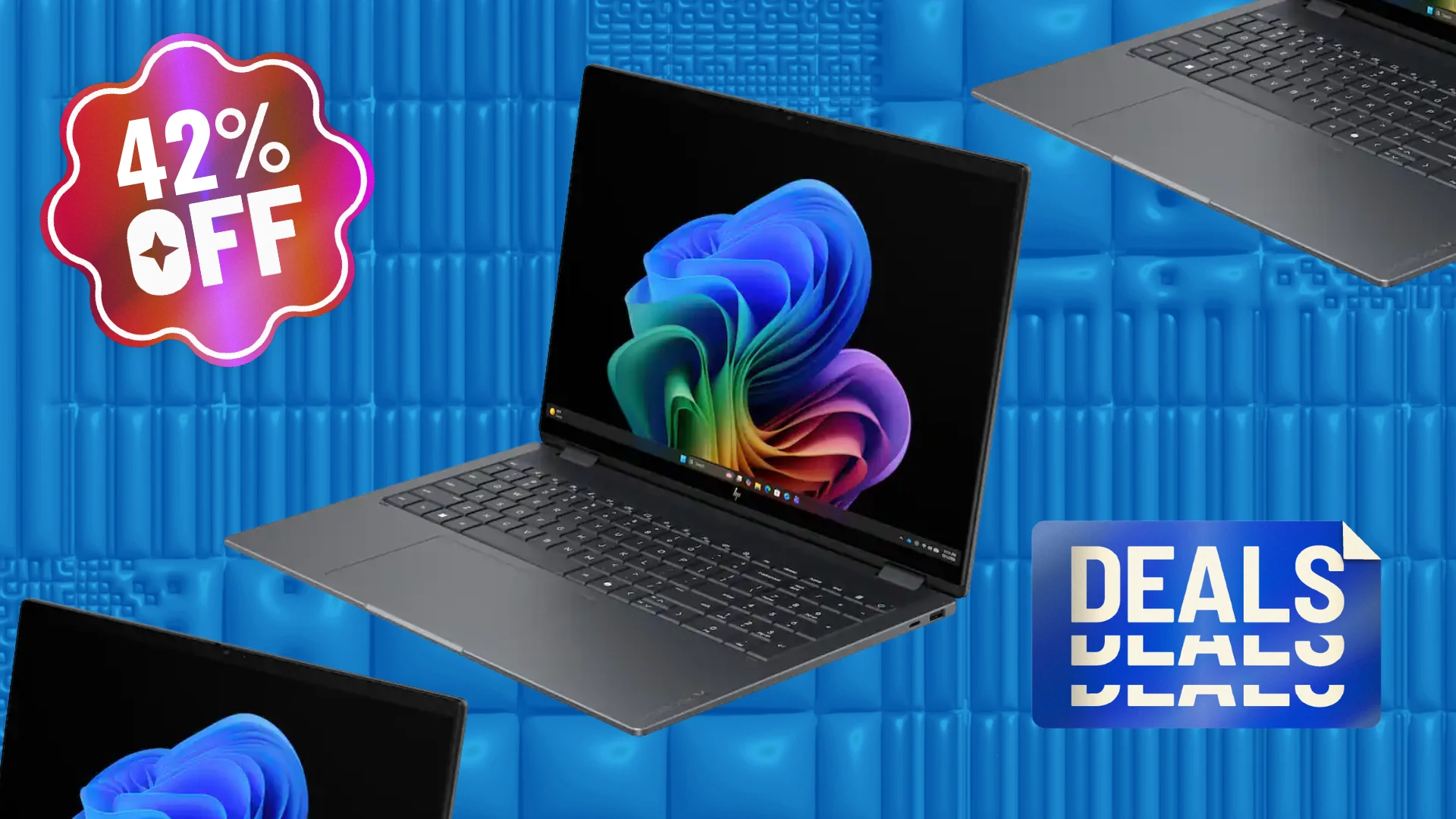

A convertible laptop has to do two jobs without making either one feel compromised. A hinge that folds smoothly is only the start. The screen needs to be comfortable for reading, the keyboard must remain useful after long work sessions, and the tablet mode should be practical rather than a novelty. This guide to the Best 2 in 1 laptop options focuses on those daily trade-offs.
The strongest choices here range from compact 14-inch machines to roomy 16-inch convertibles, with Windows laptops, a Chromebook, renewed business hardware, and several models that include pen support. Our top pick is the HP OmniBook X Flip 14, while the rest cover large-screen productivity, portability, business use, and lighter everyday workloads.
Comparison table
| # | Product | Award | Screen | Processor | Memory and storage | Best for |
|---|---|---|---|---|---|---|
| 1 | HP OmniBook X Flip 14 | Best overall | 14-inch 1920 x 1200 IPS touch | Intel Core Ultra 5 226V | 16GB, 512GB SSD | Portable work and study |
| 2 | EYY 15.6-inch Convertible | Best large-screen basic pick | 15.6-inch 1920 x 1080 IPS touch | Intel Core m3-8100Y | 16GB, 512GB SSD | Everyday office tasks |
| 3 | Lenovo ThinkPad X1 2-in-1 | Best for business | 14-inch FHD+ touch | Intel Core Ultra 7 258V | 32GB, 1TB SSD | Business multitasking |
| 4 | HP 14 Chromebook | Best Chromebook | 14-inch FHD IPS touch | Intel N100 | 4GB, 64GB storage | Web-based computing |
| 5 | Lenovo IdeaPad 5 16-inch | Best for home productivity | 16-inch WUXGA IPS touch | AMD Ryzen 7 8845HS | 16GB, 512GB SSD | Multitasking at home |
| 6 | HP OmniBook 7 Flip | Best large-screen premium pick | 16-inch 1920 x 1200 IPS touch | Intel Core Ultra 7 258V | 32GB, 2TB SSD | Pen work and large-screen use |
| 7 | LG gram Pro 2-in-1 | Best lightweight premium pick | 16-inch WQXGA+ OLED touch | Intel Core Ultra 7 255H | 16GB, 1TB SSD | Travel and creative work |
| 8 | Dell Latitude 7420 | Best renewed business laptop | 14-inch 1920 x 1080 touch | Intel Core i5-1145G7 | 16GB, 512GB SSD | Office basics |
| 9 | Dell Plus 16-inch | Best for included expansion | 16-inch 2K touch | Intel Core Ultra 7 256V | 16GB, 1TB SSD plus docking storage | Desktop-style setups |
| 10 | Lenovo Flex 5i 16-inch | Best for bundled accessories | 16-inch WUXGA IPS touch | Intel Core Ultra 7 255U | 32GB, 1TB SSD plus docking storage | Pen-enabled productivity |
1. HP OmniBook X Flip 14: Best Overall

Pros
- Strong modern processor and integrated Arc graphics
- 14-inch touch display folds into tablet mode
- Thunderbolt 4 and a useful selection of ports
- Stylus pen included
- Claimed battery life of up to 22 hours 45 minutes
Cons
- Five-pound listed weight is high for a 14-inch model
- Stylus bundle details depend on the listing
- No discrete graphics for demanding creative work
Best for: someone who wants one compact Windows machine for work, notes, streaming, and light creative tasks.
The HP OmniBook X Flip 14 is the easiest laptop here to recommend because it does not lean too hard into one role. Folded flat, its 14-inch touchscreen is manageable for reading and handwritten notes. Open, it has the proportions and port selection of a proper work laptop. The 360-degree design also supports tent and stand positions, which makes presentations and watching video more comfortable than balancing a conventional laptop on its edge.
Its Intel Core Ultra 5 226V processor, 16GB of memory, and 512GB SSD form a sensible everyday combination. The integrated Intel Arc 130V graphics are more capable than basic integrated graphics for light creative work and casual games, though this is not a substitute for a laptop with a dedicated GPU. The 1920 x 1200 IPS panel gives slightly more vertical room than a standard 16:9 display, while the stated 400-nit brightness should help in ordinary indoor spaces.
The port selection is unusually practical for a thin convertible. There are two Thunderbolt 4 connections, two USB-A 3.1 ports, USB-C 3.1, and HDMI 2.1. That makes it easier to connect older accessories, a monitor, or fast external storage without immediately reaching for an adapter. HP also lists security and convenience features such as wake on approach, automatic screen dimming, and a backlit keyboard.
The claimed battery figure of up to 22 hours 45 minutes is a major attraction, though real use will vary with brightness, applications, and wireless activity. The weakness is portability in the strictest sense: the listed five-pound weight is substantial beside the lighter LG gram Pro 2-in-1. Still, the HP is the more balanced choice for most buyers, especially anyone who wants Windows, modern connectivity, touch, and a pen without moving to a very large chassis.
2. EYY 15.6-inch Convertible: Best Large-Screen Basic Pick

Pros
- Large 15.6-inch Full HD touchscreen
- 360-degree hinge supports four modes
- 16GB memory and 512GB SSD
- Numeric keypad and three USB 3.0 ports
- Listed weight of approximately 3.6 pounds
Cons
- Older Core m3-8100Y processor
- Wi-Fi 5 rather than a newer wireless standard
- USB-C port is for data, according to the listing
Best for: students or home users who mainly browse, write, stream, and use office applications.
The EYY 15.6-inch Convertible is built around a straightforward idea: provide a large touch display and plenty of memory for routine computing. Its 360-degree hinge enables laptop, tablet, tent, and stand modes, so it has the flexibility expected from a convertible. The larger panel is useful for split-screen documents and video, although a 15.6-inch tablet is naturally less comfortable to hold than a 14-inch model.
Inside, the Intel Core m3-8100Y runs at up to 3.4GHz and uses Intel UHD Graphics 615. That hardware is suited to web browsing, online classes, video conferencing, documents, and streaming. It is not the right match for heavy photo or video work. The 16GB dual-channel memory and 512GB M.2 SSD are more generous than the processor, which means multitasking and file access should feel less constrained than the basic CPU suggests.
The 1920 x 1080 IPS touchscreen uses a familiar 16:9 layout. It does not provide the extra vertical space found on the HP OmniBook X Flip 14, but the wide shape works well for video and two-window layouts. A numeric keypad gives this EYY an advantage for spreadsheets and data entry. Its connectivity includes three USB 3.0 ports, HDMI, a USB-C data port, a headphone jack, Wi-Fi 5, and Bluetooth 5.0.
The listed dimensions are 14.09 by 9.17 by 0.86 inches, with an approximate weight of 3.6 pounds. That is reasonable for a large convertible, but the older processor and wireless hardware limit its useful lifespan compared with the Lenovo IdeaPad 5 16-inch. Choose the EYY when screen area and a numeric keypad matter more than high performance, and skip it if demanding applications are part of the plan.
3. Lenovo ThinkPad X1 2-in-1: Best for Business

Pros
- 32GB memory and 1TB PCIe SSD
- Intel Core Ultra 7 258V processor
- Wi-Fi 7 and two Thunderbolt 4 ports
- Fingerprint reader and ThinkShield security
- 1080p IR camera
Cons
- No pen is specifically listed
- Bundle and upgraded components add purchase complexity
- 14-inch display may feel small for large spreadsheets
Best for: professionals who need strong multitasking, business security features, and modern connectivity.
The Lenovo ThinkPad X1 2-in-1 feels aimed at people who treat a convertible as a serious work computer first and a tablet second. Its 14-inch FHD+ touchscreen keeps the footprint sensible, while the ThinkPad name brings a business-oriented feature set. The hinge supports the usual convertible positions, but the standout qualities here are memory, storage, security, and connectivity.
The Intel Core Ultra 7 258V has eight cores, a maximum turbo frequency of 4.8GHz, and integrated Intel Arc graphics. Paired with 32GB of memory, it is better suited than the EYY to large spreadsheets, browser-heavy workflows, business software, and frequent application switching. The 1TB PCIe M.2 SSD also gives more room for working files than the HP OmniBook X Flip 14, and fast access should make booting and opening large documents feel responsive.
This Lenovo is particularly well equipped for a desk setup. It has two USB-A ports, two USB-C Thunderbolt 4 ports, HDMI, and a combined headphone and microphone jack. Wi-Fi 7 is a newer wireless standard than the Wi-Fi 6 found on the Lenovo IdeaPad 5 16-inch. The fingerprint reader, 1080p IR camera, Windows 11 Pro, and ThinkShield security features reinforce its business role.
The listing says the original seal is opened for memory and storage upgrades, with one-year coverage on the remaining original components and one-year coverage on the upgraded parts from the seller. That is a detail buyers should examine carefully before ordering. The Lenovo is not the pick for someone who wants an included stylus or the lightest possible machine, but it is the stronger professional tool than the older Dell Latitude 7420.
4. HP 14 Chromebook: Best Chromebook

Pros
- 14-inch FHD IPS touchscreen
- 360-degree convertible design
- Intel N100 processor with four cores
- Wi-Fi 6 and Bluetooth 5
- Compact ChromeOS workflow
Cons
- 4GB memory limits multitasking
- 64GB storage is restrictive for local files
- Renewed product requires closer condition checks
Best for: web browsing, schoolwork, streaming, and users already committed to ChromeOS.
The HP 14 Chromebook is the simplest machine in this group, and that is its appeal. ChromeOS keeps the experience focused on browser applications, cloud documents, streaming, and Android-compatible tasks. The 360-degree hinge lets the 14-inch touchscreen work as a laptop, tablet, or stand-mounted screen, which is useful for classrooms and casual media use.
Its Intel N100 processor has four cores and can reach 3.40GHz. That is a more current entry-level platform than the EYY's Core m3-8100Y, but the 4GB of DDR5 memory is the limiting factor when many browser tabs and applications are open. The 64GB of storage is enough for a cloud-first setup, but local media collections and large downloads will fill it quickly.
The display is a 14-inch FHD IPS touchscreen with Intel 4K graphics. Wi-Fi 6 and Bluetooth 5 are useful modern touches, and the port selection includes one USB-C, one USB-A, and a headphone and microphone jack. A 720p webcam with dual-array digital microphones covers basic video calls, though it does not match the 1080p camera on the Lenovo ThinkPad X1 2-in-1.
This renewed HP is best understood as a focused Chromebook rather than a Windows replacement. It cannot run every Windows application, and the modest memory and storage make it a poor fit for demanding work. For families, students, or anyone whose day lives in a browser, it is more coherent than a low-powered Windows laptop. Readers comparing operating systems should also consider which Windows 11 features matter for everyday laptop work before choosing.
5. Lenovo IdeaPad 5 16-inch: Best for Home Productivity

Pros
- Strong Ryzen 7 8845HS processor
- Spacious 16-inch WUXGA IPS touchscreen
- Fingerprint reader and backlit keyboard
- Full numeric keypad
- Wi-Fi 6 and a privacy-shutter webcam
Cons
- Larger chassis is less comfortable as a handheld tablet
- No stylus is listed
- 512GB storage is less generous than several larger models
Best for: home offices, study, and people who want a large workspace with capable everyday performance.
The Lenovo IdeaPad 5 16-inch is the practical large-screen alternative to the HP OmniBook X Flip 14. It gives you more room for documents, timelines, and side-by-side windows, while the 360-degree hinge preserves the ability to use touch and tablet modes. In practice, the 16-inch size is most convincing on a desk or lap. It is less natural to hold in one hand after folding.
The AMD Ryzen 7 8845HS is the most clearly performance-oriented processor among the conventional home productivity models here. With Radeon graphics, 16GB of DDR5 memory, and a 512GB PCIe NVMe SSD, it is positioned for multitasking, office work, streaming, and light content creation. It should feel considerably more capable than the EYY, while the HP OmniBook 7 Flip offers more memory and storage for heavier file-based work.
Lenovo adds several features that matter in daily use. The backlit keyboard includes a full numeric keypad, which is useful for budgets and spreadsheets. A fingerprint reader speeds sign-in, Wi-Fi 6 handles current wireless networks, and the Full HD webcam includes a privacy shutter. The listed 57Wh battery supports Rapid Charge, though the supplied information does not give a runtime figure.
This is not the most travel-friendly option, and the lack of a listed pen makes it less attractive for handwritten notes than the HP OmniBook X Flip 14 or LG gram Pro 2-in-1. For a fixed home office, though, the spacious screen and Ryzen processor make a convincing combination. It is also a good place to start if you are deciding between a single flexible machine and a workspace built around a separate large display.
6. HP OmniBook 7 Flip: Best Large-Screen Premium Pick

Pros
- 16-inch 1920 x 1200 IPS touchscreen
- 32GB memory and 2TB PCIe NVMe SSD
- Intel Arc 140V graphics
- Rechargeable active pen included
- Wi-Fi 7 and 5MP IR camera
Cons
- Four-point-three-pound listed weight
- Professionally upgraded configuration needs warranty attention
- Large tablet mode is not especially compact
Best for: users who want a roomy touchscreen for notes, creative work, and multitasking.
The HP OmniBook 7 Flip takes the basic convertible formula and scales it up. Its 16-inch screen gives documents and creative applications much more breathing room than a 14-inch panel, while the 360-degree hinge still lets it become a tablet or stand-mounted display. The size makes it a desk-first convertible, but that is a sensible trade for people who want a larger canvas.
The Intel Core Ultra 7 258V, Intel Arc 140V graphics, 32GB of memory, and 2TB PCIe NVMe SSD make this one of the most capable configurations in the roundup. The built-in AI NPU is listed at up to 47 TOPS, while the processor can reach 4.8GHz. Those numbers do not turn it into a workstation, but the generous memory and storage are useful for large projects, many applications, and keeping files close at hand.
The 1920 x 1200 IPS touchscreen has 400 nits of listed brightness, edge-to-edge glass, and micro-edge bezels. HP includes an MPP 2.0 Tilt Pen that supports writing, sketching, and annotation. A 5MP IR camera with temporal noise reduction, dual-array microphones, and a dedicated Copilot key make it better prepared for video meetings than the HP 14 Chromebook.
HP lists a 68Wh battery with up to 14 hours of mixed-use runtime and fast charging to approximately 50 percent in 45 minutes. The listed 4.3-pound weight is the catch, especially next to the 3.08-pound LG gram Pro 2-in-1. This is the right pick for someone who values screen area, pen input, storage, and a more substantial work surface over effortless one-handed tablet use.
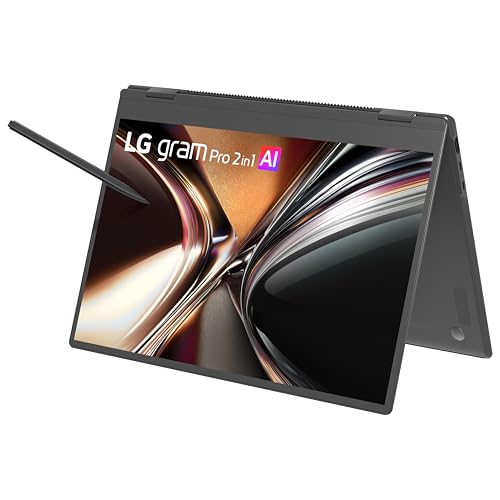
7. LG gram Pro 2-in-1: Best Lightweight Premium Pick
Pros
- Listed weight of 3.08 pounds
- 16-inch OLED touchscreen
- Variable refresh rate up to 120Hz
- 77Wh battery with claimed video playback up to 27 hours
- Pressure-sensitive stylus with 4, 096 levels
Cons
- 16GB memory is less than several rivals
- OLED can favor image quality over maximum battery life
- Large screen still takes up substantial desk space
Best for: travelers and creative users who want a large display without a heavy convertible.
The LG gram Pro 2-in-1 is the standout when carrying comfort matters. Despite its 16-inch screen, the listed weight is just 3.08 pounds and the profile is 0.51 inches thick. That changes the experience of a large convertible. It remains a sizable tablet, but it is far easier to move between rooms or pack for travel than the heavier Dell Plus 16-inch or HP OmniBook 7 Flip.
The display is the star. LG specifies a WQXGA+ OLED panel with a 16:10 aspect ratio, deep blacks, vibrant color, anti-glare technology, and a variable refresh rate from 30Hz to 120Hz. Higher refresh rates make scrolling and motion look smoother, while the lower range can reduce power use during static work. The Intel Core Ultra 7 255H and 16GB of memory provide a strong base for everyday multitasking and light creative work.
The included stylus has 4, 096 levels of pressure sensitivity, which is a meaningful advantage for handwriting and drawing. It charges wirelessly when attached magnetically to the laptop, so it is less likely to disappear into a bag. The 360-degree hinge supports laptop and tablet modes, and the OLED panel makes the machine especially appealing for viewing photos, video, and design work.
LG lists a 77Wh battery with up to 27 hours of video playback, though mixed work will produce a different result. The main compromise is memory capacity: the HP OmniBook 7 Flip and Lenovo ThinkPad X1 2-in-1 both provide 32GB. The LG is still the one to choose for frequent travel, pen use, and display quality. If your work involves editing footage, compare the demands of your applications with the hardware features that make long video projects manageable.
8. Dell Latitude 7420: Best Renewed Business Laptop

Pros
- 14-inch FHD touchscreen
- 16GB memory and 512GB SSD
- Windows 11 Pro
- Core i5 processor reaches 4.4GHz
- Compact business-oriented design
Cons
- Older 11th-generation processor
- Renewed condition can vary
- No pen or camera detail beyond the supplied listing
Best for: office work and learning when a compact business convertible is the priority.
The Dell Latitude 7420 is a conventional business convertible with a useful specification balance. Its 14-inch FHD touchscreen and folding hinge support working in laptop mode, sharing content, or holding the machine as a tablet. It does not have the visual ambition of the LG gram Pro 2-in-1, but the familiar 16:9 display shape remains practical for office software and video.
Its Intel Core i5-1145G7 is an older processor than the Core Ultra chips used by the top-ranked models. It runs from 2.6GHz to 4.4GHz and is paired with 16GB of DDR4 memory and a 512GB SSD. That is enough for documents, browser work, video calls, and routine business applications, but it gives the Dell less headroom for demanding multitasking than the Lenovo ThinkPad X1 2-in-1.
Windows 11 Pro and a stated selection of rich ports make it appropriate for office environments. The 1920 x 1080 touchscreen provides straightforward touch control, and the listed weight is approximately 1.5 kilograms. That is a manageable figure for commuting, though the renewed status deserves attention when checking the condition and included accessories.
The Dell's real weakness is age. It lacks the newer wireless and AI hardware found in the Lenovo ThinkPad X1 2-in-1, and the product information does not specify a pen. It makes sense for buyers who need a practical Windows 11 Pro convertible for ordinary tasks, but skip it if you want a long runway for advanced creative software or heavy multitasking.
9. Dell Plus 16-inch: Best for Included Expansion

Pros
- 16-inch 2K touchscreen
- Intel Core Ultra 7 256V and Intel Arc graphics
- Wi-Fi 7
- Backlit keyboard
- Docking station set includes extra storage
Cons
- Listed weight is 4.52 pounds
- Included storage is split between the laptop and docking set
- Port selection is less extensive than the Lenovo ThinkPad X1
Best for: users building a flexible desk setup around a large touchscreen laptop.
The Dell Plus 16-inch is designed around screen area and expansion. Its 16-inch touch display is listed as 2K, and the 16:10 class format gives work documents more vertical room than the Dell Latitude 7420. The convertible design makes it possible to use the screen for presentations, media, or touch-first tasks when the keyboard is folded away.
An Intel Core Ultra 7 256V processor, Intel Arc graphics, and 16GB of LPDDR5X memory give it a modern platform for everyday productivity and light creative work. The laptop includes a 1TB SSD, while the package adds a docking station with another 1TB of storage, a 32GB microSD card with adapter, and several cables. That arrangement is useful for a desk, but the extra capacity is not all internal laptop storage.
The backlit keyboard, Windows 11 Pro, and Wi-Fi 7 make the Dell suitable for mixed home and office use. The listed ports are one USB-A 3.2, one USB-C 3.2, and HDMI 2.1. That is workable, but the Lenovo ThinkPad X1 2-in-1 has two USB-A ports, two Thunderbolt 4 ports, HDMI, and a headphone and microphone jack, making it the more flexible direct-connect machine.
At 4.52 pounds, this Dell is not an especially light tablet, and the docking station set adds to the desk-oriented character. There is also some ambiguity in the listing's dimensions and storage wording, so buyers should confirm what arrives in the box. Pick it when the large display and bundled expansion matter more than portability or a built-in pen.
10. Lenovo Flex 5i 16-inch: Best for Bundled Accessories

Pros
- 32GB LPDDR5X memory
- 16-inch WUXGA IPS touchscreen
- Lenovo Digital Pen 2 included
- Backlit keyboard and broad port selection
- Windows 11 Pro
Cons
- Wi-Fi 6 rather than Wi-Fi 7
- Listed weight is 4.41 pounds
- Extra storage is supplied through the docking station set
Best for: users who want a large convertible with a pen and generous memory.
The Lenovo Flex 5i 16-inch is a large-format convertible that puts accessories and memory near the center of the package. Its 16-inch WUXGA IPS touchscreen provides a spacious canvas for documents, presentations, and casual entertainment. The 360-degree format supports tablet and tent use, though the 4.41-pound listed weight makes it more comfortable on a desk than held for a long reading session.
The Intel Core Ultra 7 255U is designed for modern multitasking, and the 32GB of LPDDR5X memory gives this Lenovo plenty of room for simultaneous applications. Intel graphics are aimed at browsing, media playback, and light creative work rather than demanding graphics workloads. The laptop has a 1TB SSD, while the included docking station set adds another 1TB of storage along with a 32GB microSD card and adapter.
The Lenovo Digital Pen 2 is the most important extra. Pressure-sensitive input makes handwritten notes, annotations, and sketches more natural than ordinary finger touch. The backlit keyboard helps in dim rooms, and the port selection includes two USB-C ports, two USB-A ports, HDMI, a microSD reader, and a combined headphone and microphone jack. Wi-Fi 6 and Bluetooth provide the wireless connections.
Compared with the Dell Plus 16-inch, the Flex 5i has twice the listed memory and a specifically named Lenovo pen, while the Dell has Wi-Fi 7 and a Core Ultra 7 256V processor. The Lenovo is not a light travel tablet, and the extra storage lives partly in the docking accessory rather than entirely inside the laptop. It suits buyers who want a generous memory configuration and a ready-to-use pen for a large-screen Windows setup.

How to choose best 2 in 1 laptop
The right convertible depends on how often you will use tablet mode, how much screen space your work needs, and whether you need Windows software or a browser-first Chromebook.
Hinge and tablet usability
A 360-degree hinge should move smoothly between laptop, tent, stand, and tablet positions without making the machine feel unstable. Smaller 14-inch models such as the HP OmniBook X Flip 14 are easier to hold, while 16-inch models such as the Lenovo Flex 5i 16-inch are better viewed as desk-friendly tablets. Check the weight before assuming a large touchscreen will be comfortable in your hands.
Display size and resolution
A 14-inch screen is easier to carry and still gives enough room for documents and browser work. A 16-inch panel is more comfortable for spreadsheets, timelines, and side-by-side windows. Resolutions in this group range from Full HD to WUXGA and 2K, while the LG gram Pro 2-in-1 adds OLED contrast and refresh rates up to 120Hz.
A convertible is only as useful as its tablet mode, so choose the screen size you can comfortably hold, not just the largest panel you can fit on a desk.
Processor and graphics
Intel Core Ultra and AMD Ryzen 7 processors provide more headroom for multitasking and light creative applications than the Intel N100 or older Core m3-8100Y. Integrated graphics are suitable for office work, streaming, and light creative tasks, but none of these configurations replaces a dedicated graphics laptop for demanding games or advanced 3D work. Intel Arc graphics in several newer models offer more capability than basic integrated graphics.
Memory and storage
At least 16GB of memory is a sensible target for Windows multitasking. The HP 14 Chromebook has 4GB and is designed for a lighter ChromeOS workload, while the Lenovo ThinkPad X1 2-in-1, HP OmniBook 7 Flip, and Lenovo Flex 5i 16-inch provide 32GB. Internal SSD capacity ranges from 64GB in the Chromebook to 2TB in some Windows configurations. Be careful with packages that describe extra storage in a docking station, since that capacity is not the same as an internal drive.
Pen support and ports
A pen can make tablet mode useful for notes, signatures, sketches, and annotations. The LG gram Pro 2-in-1 includes a pressure-sensitive stylus, the HP OmniBook 7 Flip includes an MPP 2.0 Tilt Pen, and the Lenovo Flex 5i 16-inch includes a Lenovo Digital Pen 2. For desk use, count the connections you actually need. Thunderbolt 4, HDMI, USB-A, USB-C, and a headphone jack can reduce adapter clutter.

Frequently asked questions
Is a 2 in 1 laptop good for everyday work?
Yes. A good convertible can handle documents, browser tabs, video calls, streaming, and presentations while adding touch and tablet modes. Models with 16GB of memory, such as the HP OmniBook X Flip 14 and Lenovo IdeaPad 5 16-inch, are better suited to regular multitasking than entry-level configurations.
Are 2 in 1 laptops good for drawing?
They can be, provided the screen supports a compatible active pen. The LG gram Pro 2-in-1 includes a stylus with 4, 096 pressure levels, while the HP OmniBook 7 Flip and Lenovo Flex 5i 16-inch include pen accessories. Finger touch alone is fine for navigation but less suitable for controlled drawing or handwriting.
Is a 14-inch or 16-inch convertible better?
A 14-inch model is easier to carry and use in tablet mode. A 16-inch model gives you more room for spreadsheets, documents, and creative applications but is heavier and less comfortable to hold. The best choice depends on whether tablet use or desktop workspace matters more.
Can these laptops run demanding creative software?
The newer Intel Core Ultra and AMD Ryzen 7 models can handle light creative workloads and general editing. Integrated graphics limit performance in advanced video, 3D, and professional effects applications. For demanding work, choose a machine with stronger graphics hardware than the configurations listed here.
Is ChromeOS different from Windows 11?
Yes. ChromeOS is centered on web applications, cloud storage, and Android-compatible software, while Windows 11 supports a much wider range of desktop applications. The HP 14 Chromebook is a good fit for browser-first use but is not a direct substitute for a Windows laptop when specialized software is required.
Do all of these laptops include a stylus?
No. A stylus is listed with the HP OmniBook X Flip 14, HP OmniBook 7 Flip, LG gram Pro 2-in-1, and Lenovo Flex 5i 16-inch. The other product listings either do not mention a pen or focus on a separate bundle, so confirm the included accessories before ordering.

The bottom line
The Best 2 in 1 laptop in this group is the HP OmniBook X Flip 14 because it combines a manageable 14-inch touchscreen, modern Intel performance, useful ports, integrated Arc graphics, and a stated long battery-life target. The Lenovo ThinkPad X1 2-in-1 is the better choice for business users who need 32GB of memory, 1TB of storage, Wi-Fi 7, security features, and a strong port selection.
For a large screen, choose the Lenovo IdeaPad 5 16-inch for home productivity or the LG gram Pro 2-in-1 when low weight, OLED quality, and pen input matter most. The HP 14 Chromebook remains the sensible option for browser-first computing.
If you are undecided, choose the HP OmniBook X Flip 14 unless you specifically need a 16-inch display, ChromeOS, or business-class memory and security features.
As an Amazon Associate we earn from qualifying purchases.