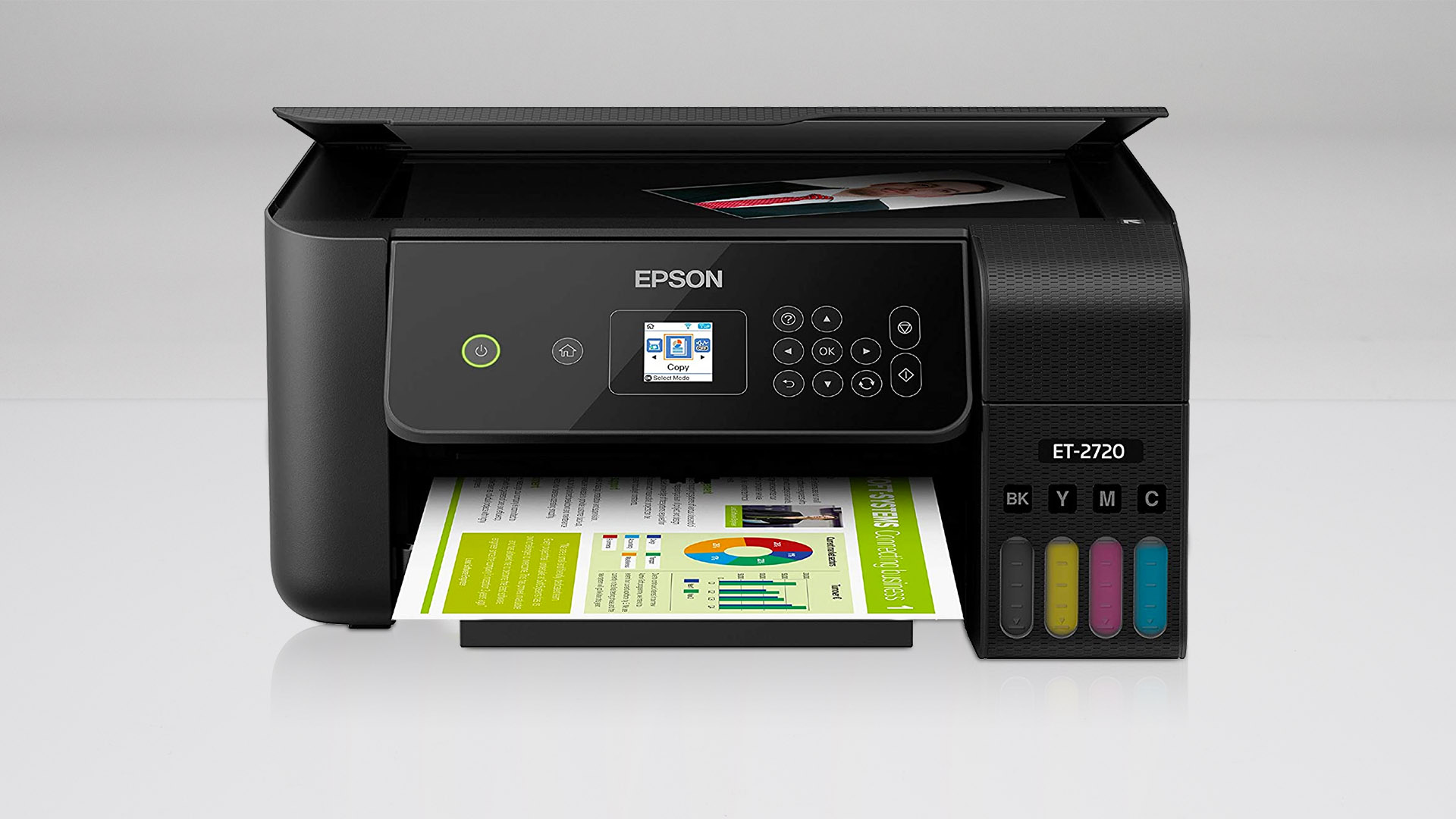

A home printer becomes frustrating when every small job turns into an ink warning, a paper reload, or a trip back to the computer. The Best Epson Printers for Home should make ordinary documents easy while handling scans, copies, photos, and wireless jobs without demanding constant attention.
Epson's EcoTank models are the natural starting point for households that print regularly, but cartridge models still make sense for lighter use, and the Workforce Pro machines are better suited to paperwork-heavy home offices. We compared all 10 options by their ink system, speed, paper handling, scanning features, connectivity, and physical footprint.
The Epson EcoTank ET-4800 is our top pick for most home offices, with the Epson EcoTank ET-2800 close behind for simpler everyday printing. The list also covers compact cartridge printers, faster Workforce Pro models, a renewed EcoTank, and one HP alternative for basic home tasks.
| # | Product | Award | Ink system | Print speed | Paper handling | Best for |
|---|---|---|---|---|---|---|
| 1 | Epson EcoTank ET-4800 | Best overall | Refillable ink tanks | Not specified | ADF, scanner, copier, fax, Ethernet | Home office all-in-one use |
| 2 | Epson EcoTank ET-2800 | Best for most homes | Refillable ink tanks | 10 ISO ppm | Scanner and copier | Routine documents and photos |
| 3 | Epson Workforce Pro WF-3820 | Best for productivity | Epson cartridges | 21 black, 11 color ISO ppm | 250-sheet tray, 35-page ADF, duplex | Frequent paperwork |
| 4 | Epson EcoTank ET-2903 | Best newer EcoTank | Refillable ink tanks | 11 black, 6 color ISO ppm | 100-sheet tray | Compact modern home printing |
| 5 | Epson Expression Home XP-5200 | Best cartridge model | Individual cartridges | Not specified | 150-sheet tray, duplex | Occasional photo and document printing |
| 6 | HP DeskJet 2955 | Best basic alternative | Not specified | 7.5 black, 5.5 color ppm | 60-sheet tray | Light household printing |
| 7 | Epson Workforce Pro WF-3823 | Best touchscreen workflow | Epson cartridges | 21 black, 11 color ISO ppm | 250-sheet tray, 35-page ADF, duplex | Connected home offices |
| 8 | Epson EcoTank ET-2400 | Best high-yield basic model | Refillable ink tanks | Not specified | Scanner and copier | High-volume household printing |
| 9 | Epson EcoTank ET-2803 | Best voice-printing option | Refillable ink tanks | Not specified | Scanner and copier | Mobile and hands-free printing |
| 10 | Epson EcoTank ET-2988 Renewed | Best for duplex EcoTank printing | Refillable ink tanks | 15 black, 8 color ISO ppm | 100-sheet tray, auto duplex | Efficient two-sided documents |
1. Epson EcoTank ET-4800: Best Overall

Pros
- Refillable EcoTank system avoids small ink cartridges
- Includes an automatic document feeder
- Built-in scanner, copier, fax, and Ethernet
- Micro Piezo Heat-Free printing handles documents and color graphics
Cons
- Slower than the Workforce Pro models
- Larger and heavier than the most basic EcoTank options
- The listing does not specify print speed
Best for: a home office that needs one printer for documents, scanning, copying, faxing, and wireless work.
The Epson EcoTank ET-4800 is the printer we would choose when home printing includes more than school worksheets and the occasional return label. Its defining advantage is not a flashy feature. It is the way the refillable tank system, scanner, copier, fax, automatic document feeder, and Ethernet connection combine into a genuinely useful home office machine.
The EcoTank design replaces conventional small cartridges with Epson EcoFit ink bottles and high-capacity tanks. That makes the refill process more deliberate than swapping a cartridge, but it also suits a household that prints regularly and does not want frequent ink changes. Epson's Micro Piezo Heat-Free technology is designed to produce sharp text along with color photos and graphics on a wide range of paper types.
The automatic document feeder is the feature that separates the ET-4800 from the Epson EcoTank ET-2800 and Epson EcoTank ET-2803. Feeding a stack of pages for scanning or copying is much less tedious than placing each sheet on the flatbed. Ethernet is another practical advantage for a fixed home-office setup, while the color display keeps basic copying and navigation on the printer itself.
The weakness is speed. Epson does not specify a print-speed figure in the supplied information, and this model is not the right choice when a home office regularly pushes large batches. The Epson Workforce Pro WF-3820 and Epson Workforce Pro WF-3823 are clearly stronger for fast workloads, with 21 black and 11 color ISO pages per minute plus larger paper capacity.
Choose the ET-4800 when the printer needs to act as the household document hub. It is more capable than the simpler EcoTanks, and its combination of an ADF and fax makes it the most complete all-in-one here.
2. Epson EcoTank ET-2800: Best for Most Homes

Pros
- Cartridge-free refillable ink system
- Scanner and copier included
- Up to 4, 500 black and 7, 500 color pages specified
- Up to two years of ink included
- Wireless printing for everyday home jobs
Cons
- No automatic document feeder listed
- 10 ISO pages per minute is modest
- Epson recommends genuine ink for performance and warranty support
Best for: families that print regularly but do not need office-grade paper handling.
The Epson EcoTank ET-2800 gets the fundamentals right without trying to be an office machine. It prints, scans, copies, and connects wirelessly, while the visible tank system makes it clear when ink needs attention. For homework, forms, recipes, shipping documents, and occasional photos, that is the combination most households actually use.
Its capacity figures explain why it ranks so highly among the Best Epson Printers for Home. Epson specifies up to 4, 500 black pages and 7, 500 color pages, with up to two years of ink in the box. Those are manufacturer claims rather than a promise about every household's results, but they show the ET-2800's intended role: print regularly from bottles instead of repeatedly replacing small cartridges.
The printer uses Micro Piezo Heat-Free technology, which Epson says produces vivid, detailed documents and images. The listed print speed is up to 10 ISO pages per minute, enough for normal household jobs but not a reason to buy this model for batch printing. Its wireless setup also supports printing from mobile devices, making it easy to send a document without moving to a desktop computer.
The central compromise is document handling. Unlike the Epson EcoTank ET-4800, the ET-2800 is not listed with an automatic document feeder, fax, or Ethernet. A single-page scan is fine, but a multi-page packet requires more manual work. Epson also recommends genuine ink, and the product information warns that non-genuine ink can affect performance and warranty coverage.
For a broader look at how tank models compare with other home machines, the features that matter for routine household printing are a useful place to start. Pick the ET-2800 when a family wants high-capacity ink and an uncomplicated all-in-one, not a full document workflow.
3. Epson Workforce Pro WF-3820: Best for Productivity

Pros
- Fast 21 black and 11 color ISO ppm
- Automatic two-sided printing
- 250-sheet paper capacity
- 35-page automatic document feeder
- Pigment-based DURABrite Ultra inks dry quickly
Cons
- Uses cartridges rather than refillable tanks
- Large 19.4-pound body
- Epson specifies use of genuine cartridges
Best for: a home office that prints frequent document batches and needs efficient scanning.
The Epson Workforce Pro WF-3820 is the practical choice when waiting for a home printer is more annoying than refilling one. It is built around productivity rather than compactness, with a 250-sheet paper capacity, automatic two-sided printing, and a 35-page automatic document feeder.
Speed is the main reason to choose it. Epson lists 21 black and 11 color ISO pages per minute, along with fast first-page output from PrecisionCore Heat-Free technology. That makes a meaningful difference when printing forms, multi-page reports, or several sets of household paperwork. The pigment-based DURABrite Ultra inks are described as instant-dry, which is useful when pages need to be handled quickly.
The WF-3820 is a better document tool than the Epson EcoTank ET-2800, even though the EcoTank is more appealing for high-capacity refill printing. The tank model is the calmer choice for routine mixed printing, while the Workforce Pro is the one to choose when a larger input tray and faster output matter more. It also has the ADF that the ET-2800 lacks.
This is not a small printer. The listed dimensions are 16.7 inches long, 19.4 inches wide, and 9.8 inches high, and it weighs 19.4 pounds. Measure the intended shelf carefully, especially because the paper handling is part of the reason to buy it. The cartridge system also means this model is a poor fit for someone specifically trying to move away from cartridges.
Choose the WF-3820 for a busy home office, tax paperwork, school administration, or any household that prints in batches. If your output is mostly occasional pages and snapshots, the Epson Expression Home XP-5200 is easier to justify. If documents dominate, the WF-3820's speed and feeder earn its place.
4. Epson EcoTank ET-2903: Best Newer EcoTank

Pros
- Up to three years of ink included
- Refillable tanks with keyed EcoFit bottles
- 1.44-inch color display
- Wireless mobile printing with AirPrint and Mopria support
- Compact 9.3-pound design
Cons
- No automatic document feeder listed
- 100-sheet tray is smaller than Workforce Pro capacity
- Color speed is 6 ISO pages per minute
Best for: a compact home setup that wants a current EcoTank design and simple mobile printing.
The Epson EcoTank ET-2903 is a neat fit for a home printer shelf because it keeps the refillable tank concept while staying relatively light. The listed weight is 9.3 pounds, and its dimensions are 14.2 inches wide, 12.5 inches long, and 6.4 inches high. That is notably easier to place than either Workforce Pro model.
Epson specifies up to three years of ink in the box, with output figures of up to 3, 600 black pages and 6, 500 color pages. The uniquely keyed EcoFit bottles are intended to make refilling straightforward and reduce the chance of mixing colors. The 100-sheet paper tray is enough for ordinary home use, though it will need more attention than the 250-sheet tray on the Epson Workforce Pro WF-3823.
The ET-2903 lists 11 black and 6 color ISO pages per minute, with zero warmup time. It also has a 1.44-inch color display, a flatbed scanner, and support for the Epson Smart Panel app, Apple AirPrint, Mopria Print Service, and Mopria Scan. The stated 5760 x 1440 dpi resolution is aimed at detailed text and photos across a range of media.
Its limitation is workflow depth. There is no ADF listed, and the small display is intended for basic navigation rather than a rich control panel. The Epson EcoTank ET-4800 is a better match for scanning several pages, while the Epson EcoTank ET-2988 Renewed is faster and adds automatic two-sided printing.
The ET-2903 makes sense for a household that wants a compact, modern tank printer and relies heavily on phones and tablets. It is less convincing for a home office with frequent multi-page scanning or two-sided document jobs.
5. Epson Expression Home XP-5200: Best Cartridge Model

Pros
- Individual cartridges replace only the color needed
- 150-sheet paper tray
- Automatic two-sided printing
- 2.4-inch color display
- Borderless photo printing and mobile connectivity
Cons
- Uses Epson cartridges rather than refillable tanks
- No print-speed figure is supplied
- Epson advises using genuine cartridges
Best for: occasional home printing where photos, easy controls, and duplex documents matter.
The Epson Expression Home XP-5200 is the strongest cartridge option in this group. It is aimed at people who want a conventional home printer with a straightforward control screen, wireless setup, and enough paper capacity for routine work. Its individual cartridges also mean the printer can replace only the color that runs out, rather than treating all colors as one unit.
Epson describes it as the fastest Expression Home printer, though the supplied information does not give a pages-per-minute figure. The 150-sheet paper tray is more accommodating than the 60-sheet tray on the HP DeskJet 2955, and automatic two-sided printing helps reduce paper use during longer document jobs.
Photo printing is a meaningful part of the XP-5200's appeal. Epson highlights crisp documents, vibrant borderless photos, and rich colors from PrecisionCore technology. The 2.4-inch color display makes setup and basic operation less dependent on a phone, while the Epson Smart Panel app handles installation and printing from Android or iOS devices. Alexa and Siri voice-activated printing are also listed.
The trade-off is the cartridge system. A household that prints often will likely find the refillable Epson EcoTank ET-2800 or Epson EcoTank ET-2803 more suitable. Epson also says its printing system is designed exclusively for genuine cartridges and warns that non-genuine ink may affect performance and warranty coverage.
The XP-5200 is the sensible pick for lighter printing, especially when photos and easy two-sided documents matter more than long-run tank capacity. Readers focused on image output can also compare the paper and color features that help with family photos before choosing.
6. HP DeskJet 2955: Best Basic Alternative

Pros
- Compact 7.55-pound design
- Prints, scans, and copies
- Mobile and wireless printing
- 60-sheet input tray
- HP AI formatting tools for web pages and emails
Cons
- Slowest listed print speeds in this roundup
- Small paper tray
- The included Instant Ink trial becomes a subscription unless canceled
Best for: basic lists, letters, recipes, and occasional household documents.
The HP DeskJet 2955 is the one non-Epson model here, and it earns its place by targeting a different kind of household. It is built for simple printing, scanning, and copying rather than high-volume work. The compact design weighs 7.55 pounds, making it easier to move or fit into a small home workspace than the larger Workforce Pro machines.
Its 60-sheet input tray signals the intended workload. HP lists speeds of up to 7.5 black pages per minute and 5.5 color pages per minute, so this is not the printer for a stack of reports. It is better for a recipe, school form, short letter, or occasional color document. Wireless printing and the HP app keep basic jobs accessible from a phone.
The unusual feature is HP AI formatting. The supplied information says it can remove unwanted content from web pages and emails, helping avoid awkward layouts and wasted pages. That could be useful for household users who frequently print online material without first cleaning it up in a document editor. The icon LCD keeps controls intentionally simple.
The compromises are clear beside the Epson EcoTank ET-2903 and Epson Expression Home XP-5200. Both Epson models offer a more substantial paper setup, while the EcoTank models use refillable tanks and the XP-5200 offers automatic two-sided printing. The DeskJet includes a three-month Instant Ink trial, after which a monthly fee applies unless canceled, so buyers should understand that service before activating it.
Choose the DeskJet 2955 only when basic output and a small footprint are the priorities. For a household printing regularly, the Epson EcoTank ET-2800 is a more capable long-term tool. For occasional pages with minimal setup demands, this HP is the uncomplicated alternative.
7. Epson Workforce Pro WF-3823: Best Touchscreen Workflow

Pros
- Fast 21 black and 11 color ISO ppm
- 2.7-inch color touchscreen
- 250-sheet paper capacity
- 35-page ADF and automatic two-sided printing
- Ethernet, Wi-Fi Direct, and wireless connectivity
Cons
- Large 19.4-pound chassis
- Cartridge-only printing system
- No duplex scanning is listed
Best for: a connected home office that wants fast output and a more capable control panel.
The Epson Workforce Pro WF-3823 is very close to the WF-3820, but its interface and connectivity make it the more appealing choice for a user who works from the printer as well as from a phone or computer. The 2.7-inch color touchscreen gives setup and routine tasks a clearer control surface than a small basic display.
Its core hardware is built for paperwork. Epson lists 21 black and 11 color ISO pages per minute, a 250-sheet tray, automatic two-sided printing, and a 35-page automatic document feeder. PrecisionCore Heat-Free technology and DURABrite Ultra pigment inks are intended to support fast, precise, quick-drying document output.
Connectivity is unusually complete for a home all-in-one. The WF-3823 includes built-in wireless, Wi-Fi Direct, Ethernet, Bluetooth Low Energy for setup, and the Epson Smart Panel app. Epson ScanSmart is included for scanning and editing, while secure wireless features and Secure Data Erase address households that handle sensitive documents.
Like the Epson Workforce Pro WF-3820, this machine is physically substantial. The listed width is 16.7 inches, the length is 19.4 inches, and the weight is 19.4 pounds. It also uses Epson Genuine Cartridges, with a warning that non-genuine ink could cause damage not covered by the limited warranty. That makes it a poor match for buyers specifically seeking a tank system.
The WF-3823 is the better pick over the WF-3820 when the touchscreen, Ethernet, Wi-Fi Direct, and security features matter. The WF-3820 remains a strong productivity choice, while the Epson EcoTank ET-4800 is better for someone who wants refillable tanks and fax capability.
8. Epson EcoTank ET-2400: Best High-Yield Basic Model

Pros
- Refillable high-capacity ink tanks
- Up to 4, 500 black and 7, 200 color pages specified
- Up to two years of ink included
- Scanner and copier built in
- Micro Piezo Heat-Free print technology
Cons
- Large 22.8-inch listed length
- No automatic document feeder listed
- No print-speed figure is supplied
Best for: households that print frequently but need only basic scan and copy functions.
The Epson EcoTank ET-2400 focuses on the part of EcoTank ownership that matters most to frequent home printers: high-capacity tanks and fewer interruptions. Epson specifies output of up to 4, 500 black-and-white pages and 7, 200 color pages, along with up to two years of ink in the box.
It is an all-in-one with printing, scanning, and copying, and Epson's Micro Piezo Heat-Free technology is described as producing sharp text plus color photos and graphics on virtually any paper type. The EcoFit bottles are designed to make refilling easier, while the tank format avoids the routine of replacing small cartridges.
The ET-2400 is not as complete a document machine as the Epson EcoTank ET-4800. There is no ADF, fax, Ethernet, or print-speed figure listed in the supplied information. A single scan or copy is straightforward, but a home office working through multi-page paperwork will be better served by either Workforce Pro model.
Its physical measurements deserve attention. The listed length is 22.8 inches, with a width of 14.8 inches and height of 10 inches. Despite a listed weight of 8.6 pounds, that long footprint may make placement more difficult than the lighter number suggests. Measure the available surface rather than assuming a small tank printer will fit anywhere.
Choose the ET-2400 when high-yield refillable printing is the priority and scanning is occasional. It is less attractive for a compact shelf or a document-heavy office, but it remains a straightforward option for households that print often and want a basic scanner and copier included.
9. Epson EcoTank ET-2803: Best Voice-Printing Option

Pros
- Refillable EcoTank ink system
- Up to 4, 500 black and 7, 500 color pages specified
- Scanner and copier included
- AirPrint and Epson Smart Panel support
- Hands-free voice-activated printing
Cons
- No automatic document feeder listed
- No print-speed figure is supplied
- Long 22.8-inch listed length
Best for: households that want tank printing with mobile and voice control.
The Epson EcoTank ET-2803 is a close relative of the ET-2800, with the same basic appeal: a wireless color all-in-one that uses refillable tanks instead of small cartridges. Epson specifies up to 4, 500 black pages and 7, 500 color pages, plus up to two years of ink in the box.
The printer includes a flatbed scanner and copier, and the Micro Piezo Heat-Free system is intended to produce sharp text and colorful graphics. Epson's EcoFit bottles are keyed for easier refilling, and the manufacturer recommends genuine ink for optimal performance. Those details matter more here than headline extras because the ET-2803 is designed around routine, low-intervention household printing.
Connectivity is the main distinction worth considering. The ET-2803 supports wireless printing, Apple AirPrint, the Epson Smart Panel app, and hands-free voice-activated printing. That makes it useful for a family that starts jobs from phones or wants to print without navigating a desktop interface. It does not, however, add the ADF found on the Epson EcoTank ET-4800.
The footprint is also not especially compact on paper. Epson lists a 22.8-inch length, 14.8-inch width, and 10-inch height, with a weight of 8.8 pounds. There is no print-speed figure in the supplied information, so this model should be treated as a general home printer rather than a known fast batch machine.
The ET-2803 is a good fit when mobile access and voice printing are more important than advanced paper handling. The Epson EcoTank ET-2903 offers a smaller listed body and a specified print speed, while the ET-2803 keeps the simpler EcoTank formula for users who want familiar wireless control.
10. Epson EcoTank ET-2988 Renewed: Best for Duplex EcoTank Printing

Pros
- Automatic two-sided printing
- 15 black and 8 color ISO ppm
- 1.44-inch color display
- Refillable EcoTank tanks
- Mobile printing with AirPrint, Mopria, and Epson Smart Panel
Cons
- Renewed condition
- No automatic document feeder listed
- 100-sheet paper tray is smaller than Workforce Pro capacity
Best for: buyers who want a faster EcoTank with automatic duplex printing and mobile controls.
The Epson EcoTank ET-2988 Renewed is the most productivity-minded of the smaller tank printers here. Automatic two-sided printing is its key advantage, turning it into a better fit for households that regularly print multipage documents and want to use both sides of the paper without manually flipping pages.
Epson lists speeds of 15 black and 8 color ISO pages per minute, which puts it ahead of the ET-2903's listed 11 black and 6 color ISO pages per minute. It also has a 1.44-inch color display, a built-in scanner, and a 100-sheet paper tray. The 4800 x 1200 dpi print resolution is specified for detailed photos and text.
The refillable tanks use keyed EcoFit bottles, and Epson specifies up to 6, 600 black pages and 5, 500 color pages. The product information also supports Epson Smart Panel, Apple AirPrint, Mopria Print Service, and Mopria Scan. That is a well-rounded feature set for a household that works from phones and wants a printer that can handle routine duplex documents.
The major caveat is the renewed condition. Buyers who want a new unit should look at the Epson EcoTank ET-2903 or Epson EcoTank ET-2800 instead. The ET-2988 also lacks the ADF and 250-sheet tray of the Epson Workforce Pro WF-3823, so it is not the right replacement for a full home-office document machine.
Choose the ET-2988 when automatic duplex printing and a quicker tank platform matter more than having a new unit or an ADF. It is a focused pick for two-sided household documents, not the universal choice for every home.
How to choose best epson printers for home
The right printer depends less on a long feature list than on how often you print, how many pages you scan at once, and whether you prefer refillable tanks or cartridges.
Ink system
EcoTank models use refillable tanks and bottles, while the Expression Home XP-5200 and Workforce Pro models use Epson cartridges. Tank printers make the most sense for regular printing because their high-capacity design is built around fewer ink changes. Cartridge printers suit lighter use or buyers who prefer replacing individual cartridges.
Pay attention to the manufacturer's stated page figures, but treat them as estimates tied to particular testing conditions. The ET-2800, ET-2803, ET-2400, and ET-2988 all list substantial black and color page capacities.
A refillable tank helps most when the printer is used regularly, not when it sits untouched for months.
Print speed
Speed matters when printing school packets, invoices, forms, or several copies at once. The Workforce Pro WF-3820 and WF-3823 are the clear speed leaders here at 21 black and 11 color ISO pages per minute. The ET-2988 follows with 15 black and 8 color ISO pages per minute, while the ET-2903 lists 11 black and 6 color ISO pages per minute.
For occasional pages, a lower listed speed is rarely a problem. For a home office, compare the black and color figures separately because color documents can run more slowly.
Paper handling
A larger input tray means fewer interruptions. The Workforce Pro models have 250-sheet trays, the XP-5200 has a 150-sheet tray, and the ET-2903 and ET-2988 each list 100-sheet trays. The HP DeskJet 2955 has a 60-sheet input tray.
Automatic two-sided printing is another useful distinction. It appears on the WF-3820, WF-3823, XP-5200, and ET-2988. Choose a model with duplex printing if you frequently produce multipage documents or want to reduce paper use.
Scanning workflow
A flatbed scanner handles single pages, photos, and occasional copies. An automatic document feeder is much better for contracts, tax forms, and multipage packets. The ET-4800 has an ADF, as do the WF-3820 and WF-3823.
If scanning is rare, an ADF may not justify the larger machine. If scanning is part of weekly home-office work, it quickly becomes one of the most useful features on the printer.
Connectivity and controls
Wireless printing is standard across the main choices, but the details differ. The WF-3823 adds Ethernet, Wi-Fi Direct, Bluetooth Low Energy setup, a 2.7-inch touchscreen, and security features. The ET-2903 and ET-2988 support AirPrint, Mopria, and Epson Smart Panel. The ET-2803 also supports voice-activated printing.
For more guidance on choosing a machine for a dedicated work area, the features that make a printer easier to manage in a home office are worth considering before you buy.
Frequently asked questions
Are EcoTank printers good for home use?
EcoTank printers are a strong fit for homes that print regularly because they use refillable tanks and high-capacity ink bottles. Models such as the Epson EcoTank ET-2800 and ET-4800 also include scanning and copying. Occasional users may prefer a cartridge model with a simpler replacement routine.
Which Epson printer is best for a home office?
The Epson EcoTank ET-4800 is the most complete choice because it includes an ADF, scanner, copier, fax, Ethernet, and refillable tanks. The Epson Workforce Pro WF-3820 and WF-3823 are better for faster document batches, with 250-sheet trays, duplex printing, and 35-page ADFs.
Do Epson EcoTank printers scan and copy?
Yes. The EcoTank models in this roundup include built-in scanning and copying features. The ET-4800 goes further with an automatic document feeder, while the ET-2800, ET-2803, ET-2400, ET-2903, and ET-2988 are listed with flatbed scanning.
Which printer is fastest for home documents?
The Epson Workforce Pro WF-3820 and WF-3823 have the highest listed speeds at 21 black and 11 color ISO pages per minute. The Epson EcoTank ET-2988 follows at 15 black and 8 color ISO pages per minute.
Are refillable ink tanks difficult to fill?
The EcoTank models use Epson EcoFit bottles, and the supplied features describe them as keyed to make filling easier and help prevent ink mix-ups. Refilling still requires more involvement than replacing a cartridge, but the design is intended to keep the process controlled and low-mess.
Which home printer has automatic two-sided printing?
Automatic duplex printing is listed for the Epson Workforce Pro WF-3820, Epson Expression Home XP-5200, Epson Workforce Pro WF-3823, and Epson EcoTank ET-2988 Renewed. It is not listed for every EcoTank model in this roundup.
Should I choose a renewed printer?
A renewed printer can make sense if its specific features fit your needs, but its condition is different from a new unit. The Epson EcoTank ET-2988 Renewed is attractive for its 15 black and 8 color ISO ppm speeds and automatic duplex printing. Choose one of the new EcoTank models if you want to avoid the renewed designation.
The bottom line
The Best Epson Printers for Home start with the Epson EcoTank ET-4800 for households that need a complete home office hub. Its ADF, scanner, copier, fax, Ethernet, and refillable tanks make it more versatile than the simpler EcoTank models.
For regular family printing, the Epson EcoTank ET-2800 is the easier recommendation. Choose the Epson Workforce Pro WF-3820 or Epson Workforce Pro WF-3823 when speed, a 250-sheet tray, and an ADF matter more than tank refilling. The ET-2988 Renewed is the specialist pick for faster EcoTank output with automatic two-sided printing.
If you are undecided, choose the ET-4800 for office tasks, the ET-2800 for everyday home printing, and a Workforce Pro model for frequent document batches.
As an Amazon Associate we earn from qualifying purchases.