

A missing optical drive becomes a problem at the least convenient moment, such as when an old software disc, music collection, family video, or backup archive is the only copy you have. The right USB drive should read and burn common discs without demanding a separate power brick, while still working with the ports on a newer laptop.
The Best external CD DVD drive for most people is the Amicool External DVD Drive. It combines USB 3.0 and USB-C connectivity, supports common CD and DVD formats, and keeps its cable attached. The rest of this list ranges from the slim ASUS ZenDrive U9M to hub-equipped models with card slots and Ethernet.
| # | Product | Award | Interface | DVD/CD speed | Best for |
|---|---|---|---|---|---|
| 1 | Amicool External DVD Drive | Best overall | USB 3.0, USB-C | 8x DVD read, 24x CD read/write | Most laptops and desktops |
| 2 | ASUS ZenDrive U9M | Best slim design | USB 2.0, USB-C cables | 8x DVD | Mac and Windows users |
| 3 | Rioddas External DVD Drive | Best for stable playback | USB 3.0 | Up to 5Gbps transfer | Regular disc playback |
| 4 | BPAKDU 8-in-1 Drive | Best for ports | USB 3.0, USB-C, USB hub, SD/TF | 8x DVD, 24x CD | Laptops short on connections |
| 5 | ASHDOL 8-in-1 Drive | Best for broad format support | USB 3.0, USB-C | 8x DVD, 24x CD | Mixed disc and computer use |
| 6 | ORIGBELIE Slim Drive | Best lightweight pick | USB 3.0, USB-C | 8x DVD, 24x CD | Travel |
| 7 | Alronly External DVD Drive | Best simple dual-port drive | USB 3.0, USB-C | 8x DVD, 24x CD | Basic reading and burning |
| 8 | GODBPNYMU 5-in-1 Drive | Best for card transfers | USB 3.0, USB-C, SD/TF | Not specified | Camera media and discs |
| 9 | ORIGBELIE 9-in-1 Drive | Best full-featured hub | USB 3.0, USB-C, Ethernet | 8x DVD, 24x CD | One-cable desktop expansion |
1. Amicool External DVD Drive: Best Overall

Pros
- USB 3.0 and USB-C connectivity
- Built-in cable is easy to keep track of
- Reads DVDs at up to 8x and CDs at up to 24x
- Supports common CD and DVD recordable formats
- Plug-and-play operation on supported computers
Cons
- Requires a direct computer connection for reliable power
- Does not support Blu-ray, DVD-RAM, ChromeOS, or mobile devices
- Mac users need suitable playback software
Best for: anyone who wants a straightforward optical drive that works with both traditional USB ports and USB-C laptops.
The Amicool External DVD Drive is the one we'd keep for a mixed collection of laptops and desktops. Its appeal is not a flashy extra feature. It is the simple fact that the drive has both USB 3.0 and USB-C connectivity, a built-in cable, and support for the disc types people most often need. Plug it directly into the computer, insert a disc, and the operating system should detect it without an extra driver.
Its published maximum DVD read speed is 8x, while CD read and write can reach 24x. Those figures matter when installing software from a DVD or copying a music disc, though the actual result depends on the disc and the computer. The drive supports DVD+R, DVD-R, CD-R, and CD-RW, along with other common formats listed by the manufacturer. It is a reader, writer, and burner, not just a playback accessory. The 5Gbps USB 3.0 interface gives the connection plenty of bandwidth, even though an optical disc itself remains the limiting factor.
The compact body measures about 5.5 by 5.5 inches and is roughly 0.67 inches high. That is small enough for a laptop bag, and the attached cable removes one small but persistent annoyance: hunting for the right lead when an old disc suddenly becomes important. Amicool also includes intelligent error correction and anti-shock features intended to reduce read problems during normal use.
There are important limits. This is for computers, not televisions, tablets, phones, game consoles, car stereos, or standalone Blu-ray players. It also does not handle Blu-ray or DVD-RAM. Mac users should know that Apple DVD Player is not supported, and the listing points to VLC for media playback. On some Apple Silicon Macs, a powered USB-C hub may be needed if the computer cannot provide enough power. A direct port is the right first step, and desktop users should favor a rear motherboard port.
Compared with the Rioddas External DVD Drive, the Amicool has a more useful port mix for newer laptops. The ASUS ZenDrive U9M has a slimmer, more established design and M-Disc support, but its USB 2.0 data connection is less flexible. Choose the Amicool if you want a capable general-purpose drive without giving up USB-C.
2. ASUS ZenDrive U9M: Best Slim Design

Pros
- Slim 13mm profile
- Includes USB 2.0 and USB-C cables
- Works with Mac and Windows
- Supports M-Disc media
- Includes DISC Encryption II and Nero BackItUp functions
Cons
- USB 2.0 is less capable than the USB 3.0 connections on most rivals
- DVD speed is specified, but CD speed is not listed
- The feature set is more specialized than some hub-equipped alternatives
Best for: Mac and Windows owners who prioritize a thin drive and extra disc security features.
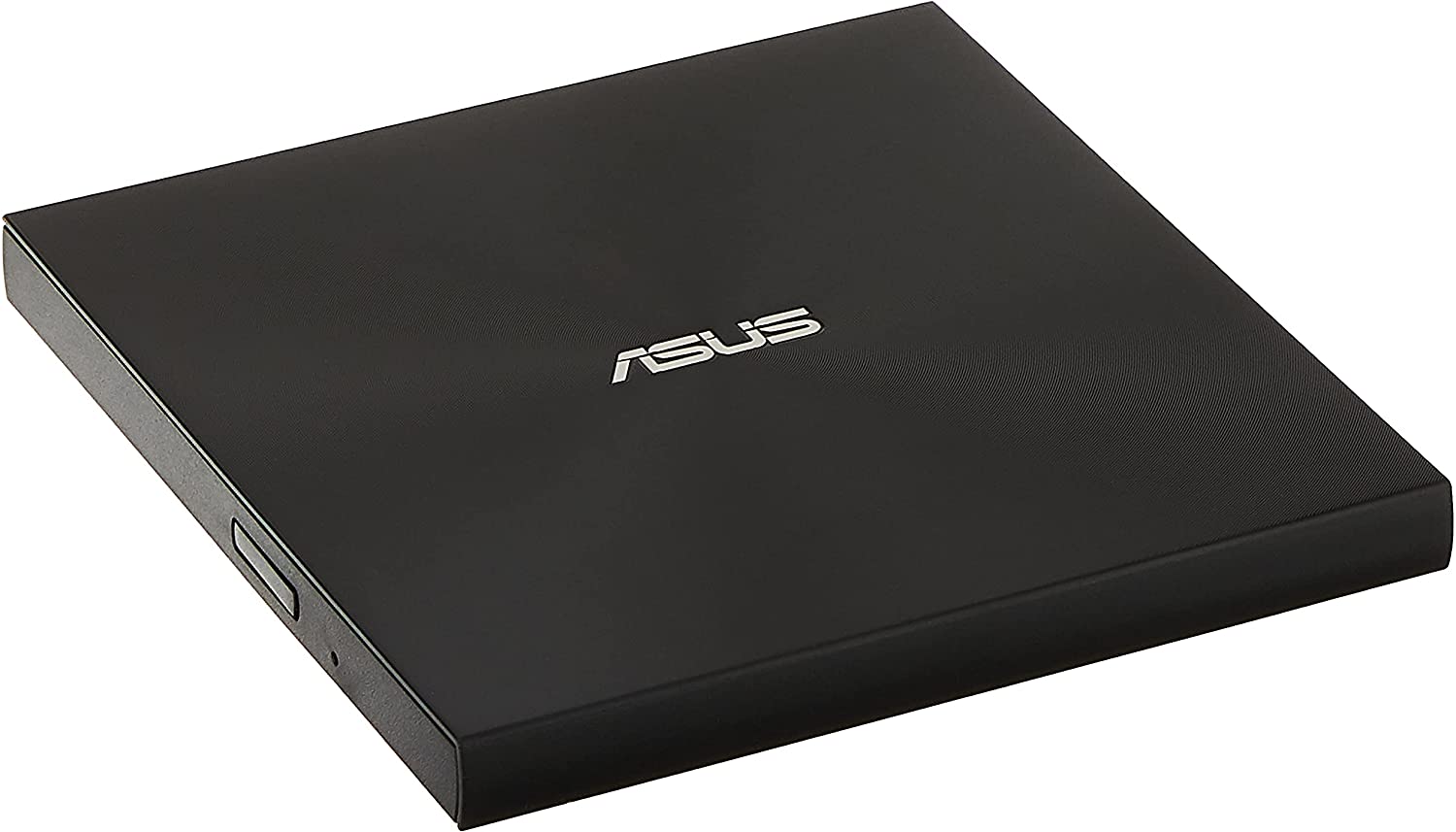
The ASUS ZenDrive U9M feels like the most deliberately designed product in this group. Its 13mm thickness makes it particularly easy to slide beside a laptop, and the included USB 2.0 and USB-C cables cover the two connection styles that matter most. The cables are separate rather than part of a built-in storage system, but that also means a damaged cable can be replaced without losing the drive's attached lead.
ASUS specifies an 8x DVD drive and support for both Mac and Windows. The listing does not provide a CD read or write speed, so it is not possible to compare its CD performance directly with the 24x claims made by several competing drives. It supports DVD burning and includes M-Disc support, a useful distinction for people creating archival discs with compatible media. That does not turn optical media into an infallible backup, but it gives this model a capability the Amicool and Alronly listings do not claim.
The software-oriented extras are another reason to consider it. DISC Encryption II is designed for password control and hidden-file functionality, while Nero BackItUp is listed for Android devices. Those tools are more relevant to someone creating protected data discs than to a person who simply wants to play a movie or open an old folder. The drive remains compatible with ordinary computer workflows, but its identity is less generic than the Rioddas External DVD Drive.
The main compromise is the USB 2.0 interface. An optical drive does not need the full theoretical bandwidth of USB 3.0 for every task, yet USB 3.0 models offer a newer connection standard and can be more convenient when moving larger batches of files. The ASUS also does not provide the card slots or extra USB ports found on BPAKDU 8-in-1 Drive and ORIGBELIE 9-in-1 Drive.
Choose the ZenDrive U9M when thinness, M-Disc, and data protection features are more important than maximum connectivity. It is also a sensible choice for someone who wants a recognizable computer accessory with both cable types in the box. For routine disc access on a newer laptop, Amicool External DVD Drive is the more flexible pick.
3. Rioddas External DVD Drive: Best for Stable Playback

Pros
- USB 3.0 with backward compatibility
- Physical eject button
- Built-in cable storage
- Error correction and copper mesh technology
- Broad Windows, Linux, and macOS support
Cons
- No USB-C connector is listed
- Not compatible with ChromeOS, tablets, televisions, or Blu-ray
- Desktop users should connect to a rear USB port
Best for: people who want a conventional USB drive with a physical eject control and playback-focused stability features.
The Rioddas External DVD Drive is a practical, familiar-looking choice for a computer that still has a USB-A port. Its strongest detail is the physical eject button. If the computer fails to recognize a disc or the operating system becomes unresponsive, having a button that releases the media is more useful than it sounds. That is the kind of small convenience that separates a tolerable optical drive from a frustrating one.
Rioddas lists USB 3.0 support with backward compatibility to USB 2.0, along with transfer speeds up to 5Gbps. It supports CD-ROM, CD-R, CD-RW, DVD-ROM, DVD±R, DVD±RW, DVD±DL, and VCD formats. The manufacturer also describes strong fault tolerance intended to reduce freezing, skipping, and errors during reading or burning. Those claims cannot guarantee perfect behavior with scratched or poorly recorded discs, but the feature emphasis makes sense for playback and routine data access.
The drive has a brushed-texture shell and an embedded cable that stores against the body. Its dimensions are about 6.5 by 6.4 inches and 1 inch high, with a listed weight of 0.4375 pounds. That is still portable, though it is not as thin as the 13mm ASUS ZenDrive U9M or ORIGBELIE Slim Drive. The copper mesh technology is described as helping maintain a stable connection, another detail aimed at dependable transfers rather than accessory expansion.
The catch is the lack of a listed USB-C data connector. Owners of a USB-C-only MacBook or Windows laptop will need an appropriate adapter or hub, while Amicool External DVD Drive connects directly to either USB 3.0 or USB-C. Rioddas also excludes ChromeOS, smartphones, tablets, TVs, vehicles, and Blu-ray or 4K discs. Its compatibility is broad within the computer category, but not outside it.
For listening to discs, installing older software, or copying files from a conventional laptop or desktop, the Rioddas is a sound alternative to the top pick. It gives up newer-port convenience, but its eject button, cable storage, and stability-focused design are worthwhile. If you need built-in ports for cards or peripherals, BPAKDU 8-in-1 Drive is the more useful companion.
4. BPAKDU 8-in-1 Drive: Best for Ports

Pros
- USB 3.0 and USB-C connectivity
- One USB 3.0 hub port and three USB 2.0 ports
- SD and TF card slots
- Up to 8x DVD and 24x CD read and write speeds
- Supports DVD-RAM and dual-layer DVD formats
Cons
- SD and TF cards cannot be used at the same time
- Extra power may be needed on some Windows laptops
- The hub makes it less minimal than a basic optical drive
Best for: laptop owners who need disc access and a small collection of extra ports in one device.
The BPAKDU 8-in-1 Drive makes sense when a laptop has lost more than just its optical drive. It combines the disc mechanism with one USB 3.0 hub port, three USB 2.0 ports, a USB-C port, and SD or TF card reading. That gives it a very different role from the Amicool External DVD Drive. Amicool is easier to think about as a disc tool, while BPAKDU can act as a compact desk-side expansion point.
Its optical performance is clearly specified. Maximum DVD read speed is 8x, and maximum CD read and write speed is 24x. The listing says it supports CD±R/RW, CD-ROM, DVD±R/RW, DVD-RAM, VCD, and SVCD. DVD-RAM support is notable because several other drives here explicitly exclude that format. The extra ports are useful for moving photographs from an SD card, connecting a mouse, or temporarily attaching another USB accessory.
The USB 3.0 connection is backward compatible with USB 2.0, and the drive also provides USB-C connectivity. BPAKDU describes plug-and-play operation without an additional driver, though it also includes an extra power cable for situations where a Windows 10 or Windows 11 laptop cannot provide enough power through one port. The power lead supplies power rather than data, so it does not replace the main data connection.
At roughly 6.57 by 6.56 inches and 0.98 inches high, it is not a tiny travel accessory. That footprint is understandable given the built-in hub and card slots, but it takes more room than the ORIGBELIE Slim Drive. SD and TF cannot be used simultaneously, which limits the card reader when two cards need to be compared or copied in one session. The product also excludes Blu-ray, tablets, phones, televisions, cars, and projectors.
BPAKDU is the better choice for a photographer, home office, or laptop user with too few ports. The ASHDOL 8-in-1 Drive offers a similar idea with two USB interfaces and an extra power cable, but BPAKDU explicitly gives you more USB ports and support for DVD-RAM. If all you need is occasional disc reading, its extra hardware is unnecessary.
For users comparing optical storage with other removable media, the differences between portable disc and flash storage can help clarify which device belongs in a travel bag. BPAKDU is at its most useful when you need both types of access from one computer connection.
5. ASHDOL 8-in-1 Drive: Best for Broad Format Support
Pros
- USB 3.0 and Type-C connectivity
- Up to 8x DVD and 24x CD read and write speeds
- SD and TF card reader plus USB ports
- Supports DVD-RAM and dual-layer formats
- Includes an extra power cable
Cons
- SD and TF slots cannot operate together
- Does not support Blu-ray, tablets, TVs, or in-car systems
- The listed weight is higher than several basic drives
Best for: users who want an optical drive with card reading, USB expansion, and wide operating-system support.
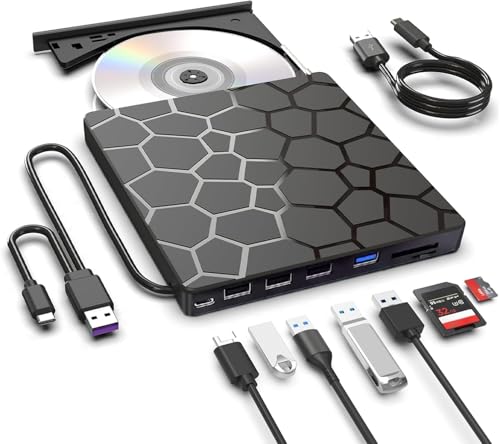
The ASHDOL 8-in-1 Drive is built around versatility rather than the smallest possible footprint. It reads and burns discs, adds card access, and provides extra USB connections for a laptop that has been pared down to a few ports. The integrated cable tucks into the body, so the device remains reasonably easy to carry even though it has more hardware than a simple external DVD reader.
The optical specifications are among the clearest in the group. ASHDOL lists 8x maximum DVD read speed and 24x maximum CD read and write speed. It supports DVD+R, DVD-R, CD-R, and CD-RW, but the listing specifically says it does not support DVD-RAM, Blu-ray, or proprietary formats. That makes it less suitable than BPAKDU 8-in-1 Drive for someone with DVD-RAM media, despite the similar 8-in-1 naming.
Its extra connectivity includes two USB 2.0 ports, an SD and TF card slot, and dual USB 3.0 and Type-C interfaces for the computer. The card reader can move photographs and videos from camera or phone cards, while the USB ports can handle peripherals such as a mouse or keyboard. The SD and TF slots cannot be used at the same time. ASHDOL also includes a power cable for drives that need more power, but that cable is for power only and does not carry data.
The body measures about 6 by 5.63 inches and 0.63 inches high, with a listed weight of 0.7 pounds. That makes it fairly slim but heavier than the ORIGBELIE Slim Drive and ASUS ZenDrive U9M. The product supports Windows systems from older releases through Windows 11, Linux, and macOS, but it is intended for laptops, desktops, all-in-one PCs, and mini PCs. It is not a solution for a television, tablet, phone, Chromebook, or car system.
ASHDOL is a more sensible pick than Alronly External DVD Drive when a card reader or spare USB port matters. It is also a good alternative to BPAKDU if you prefer a thinner body and do not need DVD-RAM. The limitation is that the extra ports add bulk without changing the basic speed of the optical mechanism.
The drive suits a home office that moves files from discs and memory cards. For someone who only wants to watch a DVD or install software once in a while, the simpler Amicool External DVD Drive is easier to justify and easier to pack.
6. ORIGBELIE Slim Drive: Best Lightweight Pick
Pros
- 13mm thick and about 0.2kg
- USB 3.0 and USB-C data connectivity
- Up to 8x DVD and 24x CD read and write speeds
- Supports DVD-RAM and dual-layer DVDs
- Includes a storage bag and extra charging cable
Cons
- USB power may be insufficient on some computers
- Mac users need to insert and read a disc before the device appears
- Not compatible with Blu-ray, Chromebook, phones, or tablets
Best for: travelers who want a thin, light drive with both major USB connector types.
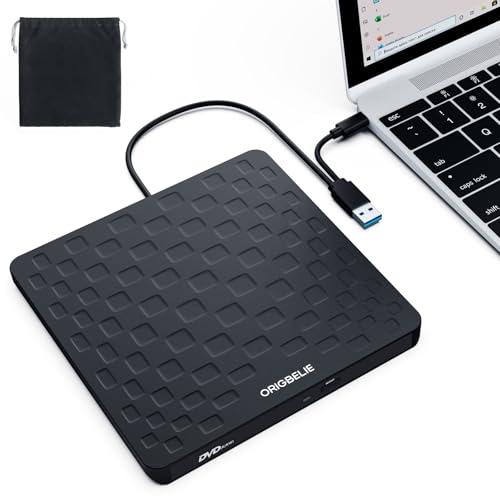
The ORIGBELIE Slim Drive is the easiest model here to imagine carrying every day. It is 13mm thick, weighs about 0.2kg according to the listing, and has an integrated data cable. A storage bag is included, which helps protect the drive and keeps the separate charging lead from disappearing into a desk drawer. It is a focused accessory, with no hub or card-reader hardware competing for space.
ORIGBELIE lists USB 3.0 with backward compatibility to USB 2.0 and USB 1.1. Maximum DVD read and write speed is 8x, while maximum CD read and write speed is 24x. Supported formats include CD±R/RW, CD-ROM, DVD±R/RW, DVD-ROM, DVD-RAM, DVD+R DL, DVD-R DL, VCD, and SVCD. That is a broad format list, and DVD-RAM support gives it an advantage over ASHDOL 8-in-1 Drive and Amicool External DVD Drive for users with that particular media.
The drive also claims error correction, noise reduction, shock resistance, and low power consumption. These features are useful in principle for a portable mechanism that may be moved between desks, though they cannot compensate for a damaged disc or an underpowered USB port. ORIGBELIE includes a USB-A to DC 5V charging cable for computers that need supplementary power. The primary USB-A or USB-C data connection still has to be attached to the computer.
Mac behavior needs a little patience. The listing says the drive icon will not appear until a disc has been inserted and read successfully. It also notes that the drive is not compatible with cars, TVs, tablets, phones, iPads, PlayStation systems, Xbox, Switch, projectors, Chromebook, some Surface models, Ubuntu, or Blu-ray discs. Those exclusions are easy to overlook when the compatibility list is otherwise broad.
Compared with the ASUS ZenDrive U9M, the ORIGBELIE offers USB 3.0 and a wider list of disc formats, while ASUS counters with M-Disc support and its own software features. The ORIGBELIE is also lighter than the 0.4409-pound ASUS listing. Choose it when travel size and direct USB-C access matter more than bundled data-security tools.
This is the right pick for a student, mobile worker, or anyone archiving discs away from a permanent desk. For a home setup that needs Ethernet, card slots, and several peripheral ports, the ORIGBELIE 9-in-1 Drive is far more capable, though much less minimal.
7. Alronly External DVD Drive: Best Simple Dual-Port Drive

Pros
- USB 3.0 and USB-C interfaces
- Up to 8x DVD and 24x CD read and write speeds
- Built-in cable
- Plug-and-play design
- Portable 0.55-pound body
Cons
- No card reader or USB hub
- Not compatible with Chromebook, tablets, TVs, or car systems
- The listing does not identify specific disc formats as fully as some rivals
Best for: buyers who want a basic dual-port drive without hub features or a separate cable to pack.
The Alronly External DVD Drive keeps the assignment simple. It reads, writes, and burns CDs and DVDs, connects through either USB-A or USB-C, and stores its cable in the body. There are no card slots, Ethernet controls, or extra USB ports to explain. For a person who only wants access to optical media on a newer laptop, that restraint can be useful.
Alronly specifies up to 8x DVD rewrite and read speed and up to 24x CD write and read speed. The USB 3.0 and USB-C connection combination is designed for up to 5Gbps data transfer, although the disc mechanism remains the practical limit for most tasks. Plug-and-play operation is advertised without a separate driver, and the drive is intended for PCs and Macs rather than general-purpose media devices.
The dimensions are approximately 6.7 by 6.5 inches and 0.79 inches thick in the feature description, with a listed weight of 0.55 pounds. That puts it in the middle of this group for portability. It should fit in a laptop bag, but the ASUS ZenDrive U9M and ORIGBELIE Slim Drive are thinner. The built-in cable is a good touch for travel, especially when the drive will spend most of its life in a drawer or accessory pouch.
Compatibility is broad across PC and Mac systems, but the listing excludes Chromebook, car platforms, tablets, televisions, and other non-computer devices. It also does not claim Blu-ray support. The product data is less detailed about the individual disc formats than the Amicool and ORIGBELIE listings, so users with unusual media should check the specific format before ordering.
Alronly is a cleaner choice than the 5-in-1 and 8-in-1 models when those extra ports would sit unused. It is similar in role to Amicool External DVD Drive, though Amicool provides more explicit format information and a more detailed Mac compatibility note. The Alronly earns its place by giving both USB connection types without adding a hub.
Pick it for ordinary CD and DVD reading or burning on a laptop and leave the expansion-heavy models to people who actually need card or network access. If your computer has only USB-C ports and you want a compact, uncomplicated optical accessory, it is a sensible fit.
8. GODBPNYMU 5-in-1 Drive: Best for Card Transfers

Pros
- USB 3.0 and USB-C connectivity
- SD and TF card reader
- Two USB 2.0 ports
- Integrated cable storage
- 24-month warranty listed
Cons
- The listing does not specify optical read and write speeds
- SD and TF cannot be used simultaneously
- No Blu-ray or non-computer device support
Best for: people transferring camera or phone-card files who also need occasional CD and DVD access.
The GODBPNYMU 5-in-1 Drive is less about optical speed than about combining several older and newer forms of storage access. It adds SD and TF card slots and two USB 2.0 ports to a CD and DVD reader-writer. That makes it useful beside a laptop with limited connections, particularly when a camera card and an optical disc both appear in the same workflow.
The listing confirms compatibility with Windows 7, 8.1, 10, and 11, older Windows versions, Linux, and all versions of macOS. It supports CD and DVD reading and burning, but it does not provide maximum DVD or CD speeds in the product data. That omission matters if you are comparing throughput directly with Amicool External DVD Drive or ORIGBELIE Slim Drive. The drive's practical appeal is the combination of functions, not a documented speed advantage.
Its integrated cable can connect through USB-A or USB-C, and the body stores the cable underneath. The two USB 2.0 ports are suitable for peripherals such as a mouse, keyboard, or other low-bandwidth accessory. The SD and TF slot accepts cards for moving photos and videos, but the two card types cannot be used at the same time. A supplementary power cable is included for drives that need more power, and the listing says it can connect to a 5V/2A device.
The drive measures about 6.1 by 5.87 inches and 0.59 inches high. It is slim enough for a bag, although the hub and card hardware make it less spare than Alronly External DVD Drive. Compatibility stops at computers, all-in-one PCs, and mini PCs. The product is not intended for TVs, tablets, phones, in-car entertainment systems, or Blu-ray discs.
The 24-month warranty listed for this model is a useful ownership detail, but it does not remove the need to check the format of the discs and cards you use. If optical speed is a priority, BPAKDU 8-in-1 Drive gives more explicit 8x DVD and 24x CD figures. If card transfers are central and discs are occasional, GODBPNYMU's layout is easier to live with.
Photographers and home users with older media should consider how removable storage fits alongside longer-term backups before choosing a single device. This drive handles convenient transfers, while a separate backup plan remains sensible for important files.
9. ORIGBELIE 9-in-1 Drive: Best Full-Featured Hub

Pros
- Optical drive, hub, card reader, and Ethernet in one unit
- USB-A and USB-C host connections
- Up to 8x DVD and 24x CD read and write speeds
- 100Mbps Ethernet adapter
- Includes storage bag, carrying case, and supplementary power cable
Cons
- Largest and most feature-heavy option here
- Mac eject button does not work as expected
- Ethernet is limited to 100Mbps
- Not compatible with Blu-ray, tablets, TVs, phones, or game consoles
Best for: USB-C laptop users who need optical media, wired networking, card access, and several peripheral ports from one accessory.
The ORIGBELIE 9-in-1 Drive is not merely an external optical drive. It is a small computer dock built around a CD and DVD mechanism. Alongside disc reading and burning, it provides Ethernet, two card slots, USB-A and USB-C ports, and a supplementary power input. That makes it the most capable product in this roundup, but also the least sensible if all you need is to open one old DVD.
The optical side supports CD±R/RW, CD-ROM, DVD±R/RW, DVD-ROM, DVD-RAM, VCD, and SVCD. Maximum DVD read and write speed is 8x, and maximum CD read and write speed is 24x. The host connection uses USB 3.0 and is backward compatible with older USB standards. The 100Mbps Ethernet adapter can help a laptop join a wired network, while the USB ports can connect storage or input devices. SD and TF slots are included for card transfers.
The full port layout is unusually detailed: USB-A 3.0 and USB-C 3.0 host connectors, an RJ45 network port, one USB-A 3.0 port, one USB-A 2.0 port, one USB-C port, SD and TF slots, and a DC input for supplementary power. The listing calls it a 9-in-1 device. That collection can replace several small adapters on a desk, though a single USB connection still has to share bandwidth among the attached functions.
The body is approximately 6.1 by 5.8 inches and 0.68 inches high, with a listed weight of about 0.73 pounds. It includes a storage bag and carrying case, but it is still less travel-friendly than ORIGBELIE Slim Drive because there is more to carry and more to manage. The RGB indicator is decorative rather than functional, and some users may prefer a quieter, less conspicuous design.
Mac owners should pay attention to the eject limitation. The listing says the physical eject button does not work because of macOS limitations, so the disc must be ejected from the desktop icon or the File menu. The device also excludes cars, TVs, projectors, tablets, phones, Chromebooks, game consoles, and Blu-ray discs. Ethernet is capped at 100Mbps, so this is not a replacement for a faster network adapter when high-speed wired transfers are the main task.
Compared with BPAKDU 8-in-1 Drive, this ORIGBELIE adds Ethernet and another layer of hub functionality. Compared with Amicool External DVD Drive, it is dramatically more useful for a port-starved desk but needlessly elaborate for occasional disc reading. Pick it when the combination is the point, not when you want the smallest optical drive.
A wired connection can still be valuable in a home office, and the practical trade-offs of connecting a Mac to wired network hardware are worth considering before you make this your main desk adapter. For a laptop that needs several older peripherals at once, this is the most complete option in the list.
How to choose the best external cd dvd drive
The right drive depends less on the disc mechanism than on the computer, media formats, available power, and extra connections you actually need.
Host connection
USB-A remains common on desktops and older laptops, while USB-C is standard on many newer portable computers. A drive with both USB 3.0 and USB-C, such as Amicool External DVD Drive or Alronly External DVD Drive, avoids a separate adapter.
USB 3.0 supports a higher theoretical transfer rate than USB 2.0, but optical media is slower than the connection standard. USB 3.0 is still the more flexible choice for a modern computer and for drives that also carry hub or card-reader traffic. The ASUS ZenDrive U9M includes both cable types, but its data connection is USB 2.0.
Disc formats and speeds
Check the formats before ordering if you have anything beyond ordinary CDs and DVDs. CD-R, CD-RW, DVD-R, DVD+R, and rewritable DVD formats cover most everyday tasks. DVD-RAM support is more specialized and appears on BPAKDU 8-in-1 Drive, ORIGBELIE Slim Drive, and ORIGBELIE 9-in-1 Drive.
An 8x DVD rating and a 24x CD rating are common in this group. Those are maximum figures, not promises for every disc. A scratched, poorly recorded, or unusual disc can read more slowly or fail regardless of the headline speed.
A faster USB label cannot rescue a disc format the drive does not support.
Power requirements
Most of these drives draw power through USB, which keeps the setup simple. Optical mechanisms can still be sensitive to insufficient power, especially on laptops, hubs, and front-panel desktop ports. A direct connection is usually the best first step.
Some models include a separate power cable. BPAKDU, ASHDOL, GODBPNYMU, ORIGBELIE Slim Drive, and ORIGBELIE 9-in-1 Drive describe supplementary power options. Remember that these leads provide power only when the listing says they do, not data.
Portability and cable storage
A slim drive is easier to keep with a laptop, but a built-in hub makes a device thicker or heavier. ASUS ZenDrive U9M and ORIGBELIE Slim Drive are among the thinnest options, while the hub-equipped models take more room.
Built-in cables prevent a common travel problem, but separate cables can be easier to replace. A storage bag or carrying case also helps protect the drive, particularly when it will be moved between home, office, and travel locations.
Extra ports and network access
A basic optical drive is enough for playing discs, burning files, or installing software. Card slots help photographers and anyone moving files from SD or TF media. Extra USB ports are useful when a laptop has limited connections.
The ORIGBELIE 9-in-1 Drive goes furthest by adding a 100Mbps Ethernet adapter. That is useful for wired access and desk expansion, but it adds bulk and complexity. Choose a hub-equipped drive only when those ports solve a real problem.

Frequently asked questions
Can these external drives play Blu-ray discs?
No. The products in this roundup are CD and DVD drives, and the listings specifically exclude Blu-ray on the models that describe their limitations. A Blu-ray disc requires a compatible optical mechanism and suitable playback software.
Do these drives need a separate power adapter?
Most are designed to draw power from a computer's USB port. Some include an extra power cable for situations where the computer does not provide enough power, but that cable is separate from the data connection. Connecting directly to a computer port is preferable to using an unpowered hub.
Can I use an external CD DVD drive with a television or tablet?
These products are intended for laptops, desktops, all-in-one PCs, and mini PCs. The listings generally exclude televisions, tablets, phones, cars, projectors, and game consoles, so they should not be treated as universal USB media players.
Do USB-C laptops need an adapter?
Not if you choose a model with a USB-C data connection or a supplied USB-C cable. Amicool External DVD Drive, ORIGBELIE Slim Drive, and Alronly External DVD Drive offer direct USB-C connectivity. The ASUS ZenDrive U9M includes a Type-C cable, while Rioddas does not list a USB-C data connection.
Can these drives burn CDs and DVDs?
Yes, the products are described as readers, writers, burners, or rewriters for supported CD and DVD formats. Burning still requires compatible blank media and operating-system or third-party software. The drive itself does not guarantee that every disc brand or format will work.
Do Macs recognize these external optical drives?
The listings identify Mac compatibility for several models, including Amicool, ASUS, Rioddas, BPAKDU, and ORIGBELIE drives. Mac behavior can require an extra step: Amicool notes that Apple DVD Player is not supported, while ORIGBELIE Slim Drive says the drive icon may not appear until a disc is inserted and read.
Is DVD-RAM supported?
Not by every model. BPAKDU 8-in-1 Drive, ORIGBELIE Slim Drive, and ORIGBELIE 9-in-1 Drive list DVD-RAM support. Amicool and ASHDOL specifically exclude it, so check the format when working with older archival or specialized discs.
The bottom line
The Best external CD DVD drive for most people is the Amicool External DVD Drive. It has USB 3.0 and USB-C, a built-in cable, clear support for common CD and DVD formats, and a compact design that works for ordinary laptop and desktop use. Its lack of Blu-ray support and need for direct USB power are real limitations, but they also apply to most of the category.
Choose the ASUS ZenDrive U9M if a 13mm profile, M-Disc support, and included cable options matter more than USB 3.0. Choose BPAKDU 8-in-1 Drive for card slots and extra USB connections, or ORIGBELIE 9-in-1 Drive when Ethernet and a larger hub are central to your setup.
If you are undecided, buy the Amicool unless you specifically need M-Disc, DVD-RAM, card access, or wired networking.
As an Amazon Associate we earn from qualifying purchases.