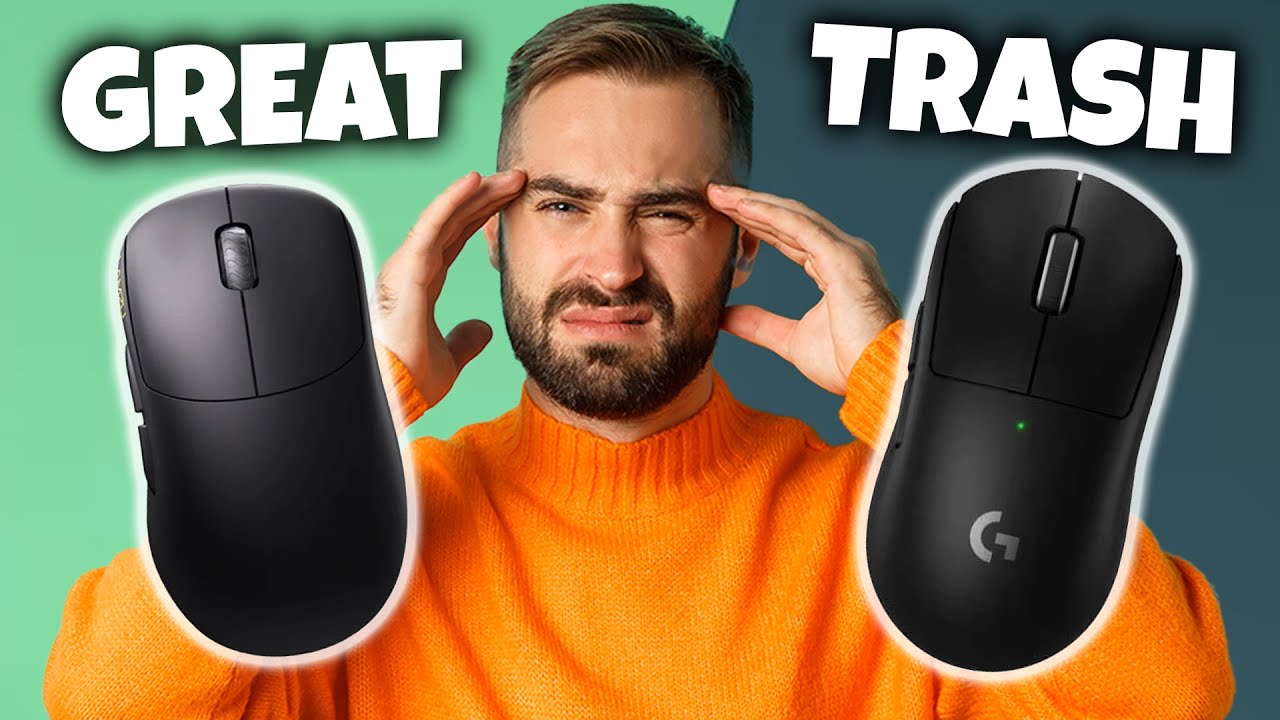

A mouse that is too short or narrow forces a large hand into a cramped claw, with the fingers hanging over the buttons and the wrist doing more work than it should. The right shape lets the palm settle naturally, keeps the thumb supported, and makes ordinary scrolling less tiring.
The Best mouse for large hands is not necessarily the biggest model. A broad office mouse, a high-control gaming model, and a vertical design solve different problems. We compared nine real options, from quiet Bluetooth mice to programmable wired hardware and compact ergonomic shapes.
Our top pick is the Logitech Signature M550 L Black, with the Logitech M650 L close behind for users who want customizable side buttons. The list also covers a palm-cushioned model, a vertical mouse, a gaming specialist, and simpler wireless choices.
Comparison table
| # | Product | Award | Size and shape | Connection | Best for |
|---|---|---|---|---|---|
| 1 | Logitech Signature M550 L Black | Best overall | Full-size, contoured | Bluetooth or Logi Bolt | Quiet everyday work |
| 2 | Logitech Signature M650 L | Best for shortcuts | Large, contoured | Bluetooth or Logi Bolt | Office productivity |
| 3 | Logitech Signature M550 L Blue | Best color option | Full-size, contoured | Bluetooth or Logi Bolt | Quiet workspaces |
| 4 | E-YOOSO X-31 | Best for extra controls | Large ergonomic shell | 2.4GHz USB | Big hands needing six buttons |
| 5 | Logitech Comfort Plus M850 L | Best palm cushion | Right-handed, palm-cushioned | Bluetooth | Long office sessions |
| 6 | Razer Basilisk V3 | Best for gaming | Large ergonomic gaming shape | Wired USB | Programmable gaming |
| 7 | ProtoArc EM11 NL | Best vertical design | Vertical, small to medium fit | Bluetooth or USB-A receiver | Wrist-conscious users |
| 8 | Acer Wireless Mouse | Best simple option | Medium to large shell | 2.4GHz USB | Basic laptop use |
| 9 | Logitech Lift | Best vertical comfort | 57-degree vertical | Bluetooth or Logi Bolt | Small to medium right hands |
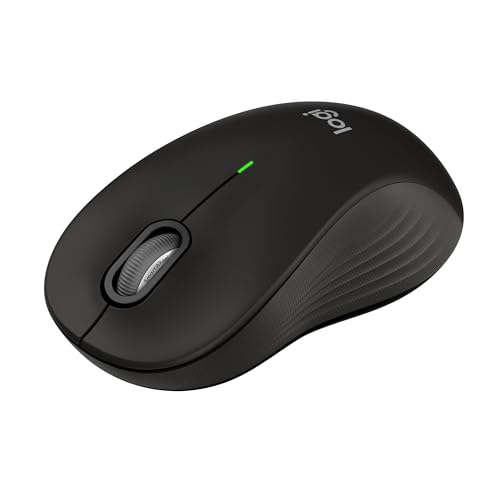
1. Logitech Signature M550 L Black: Best Overall
Pros
- Full-size shape made for larger hands
- Quiet SilentTouch clicks
- SmartWheel switches between precise and fast scrolling
- Bluetooth and Logi Bolt support
- Two-year single-battery life
Cons
- Side buttons are not customizable
- No rechargeable battery
- Less control than a gaming mouse
Best for: someone who wants a quiet, full-size wireless mouse for everyday work.
The Logitech Signature M550 L Black gets the basic shape right, which is more important than a long feature list when your hand is large. Its contoured body gives the palm somewhere to rest, while the soft thumb area and rubber side grips stop the mouse from feeling like a small object being pinched between the fingers. It is a straightforward office mouse, but it feels deliberately sized rather than merely oversized.
The full-size design weighs about 0.245 pounds, so it stays easy to move without feeling flimsy. Logitech's SmartWheel is particularly useful at a desk shared between documents and long web pages. Its tactile mode moves line by line, while a flick switches to faster scrolling. That is a better arrangement for general work than a wheel that is locked into one behavior.
The M550 L connects through Bluetooth Low Energy or the included Logi Bolt USB receiver. That gives it a useful balance between a clean laptop setup and conventional receiver-based connection. It works with Windows, macOS, Linux, Chrome OS, iPadOS, and Android, so it can move between different computers and tablets without being tied to one operating system. For more laptop-specific connection advice, the practical differences between receiver and Bluetooth setups are worth considering before you choose.
SilentTouch reduces click noise by 90 percent, according to Logitech. The muted switches are a strong fit for a shared office, library, or late-night desk, though they do not have the crisp mechanical feel that some people prefer. The single AA battery is rated for up to 24 months, which means this is a mouse you can leave on a desk and largely forget about.
The limitation is just as clear. There are no customizable side buttons, and the M550 L is not designed for gaming macros, high-speed competitive tracking, or onboard profiles. The Logitech M650 L adds shortcut customization, while the Razer Basilisk V3 is far more capable for games. Choose the M550 L when comfort, quiet operation, and simple wireless use matter more than extra controls.
2. Logitech Signature M650 L: Best for Shortcuts

Pros
- Large shape with supportive side grips
- Customizable side buttons
- Quiet SilentTouch clicking
- SmartWheel scrolling
- Bluetooth and Logi Bolt connections
Cons
- Uses a replaceable AA battery
- Side buttons are not available on every operating system in the same way
- Not intended for gaming-grade customization
Best for: office users with large hands who rely on back, forward, copy, or paste shortcuts.
The Logitech Signature M650 L is the office mouse to choose when two extra buttons will genuinely improve your day. Its large, contoured body has the same kind of palm support and rubber side grip that makes the M550 L comfortable for bigger hands. The shape is familiar and restrained, with no sharp gaming angles or aggressive thumb shelf.
Its most useful advantage is Logitech Options+ support on Windows and macOS. The side buttons can be assigned to actions such as browser back and forward, copy, or paste. That makes a measurable difference for people who jump between browser tabs, spreadsheets, documents, and file folders. The controls are not as extensive as the Razer Basilisk V3's 11 programmable buttons, but they are easier to understand and less distracting for office work.
The SmartWheel gives the M650 L two scrolling personalities. It can move with line-by-line precision through a document, then spin quickly through a long page when needed. SilentTouch reduces click noise by 90 percent, keeping the mouse suitable for a shared workspace. The full-size version is also a better physical fit for a large hand than a compact travel mouse, even though the overall control layout remains familiar.
Connection choices are flexible. Bluetooth Low Energy works well with a laptop that has limited USB ports, while the Logi Bolt receiver provides a traditional wireless connection. Logitech lists support for Windows, macOS, Linux, ChromeOS, iPadOS, and Android, with Works with Chromebook certification. Battery life is rated at up to 24 months from one AA battery.
The M650 L does not have a rechargeable cell, a tilt wheel, or a gaming sensor. Its side-button customization is also tied to Logitech's software and is not the same across every platform. The M550 L Black is the quieter, simpler pick if you never use shortcuts, while the Comfort Plus M850 L offers a palm cushion and three-device switching. Pick the M650 L when the extra buttons are the reason you are replacing your current mouse.
3. Logitech Signature M550 L Blue: Best Color Option

Pros
- Large-hand shape in a blue finish
- Quiet clicks for shared spaces
- Precise or fast SmartWheel scrolling
- Bluetooth and Logi Bolt support
- Up to 24 months from one AA battery
Cons
- No programmable side buttons
- No rechargeable battery
- Same basic controls as the black M550 L
Best for: anyone who wants the M550 L shape and features without a black desk accessory.
The Logitech Signature M550 L Blue is functionally the same mouse as the black M550 L, and that is exactly why it belongs here as a separate option. It has the same full-size shape for larger hands, contoured palm support, soft thumb area, and rubber side grips. The blue finish gives it a little more presence on a desk without changing the restrained office design.
The SmartWheel is the star feature for routine computing. Its line-by-line mode makes document work controlled, while the faster mode handles long pages without repeated wheel turns. The wheel does not tilt and the mouse does not offer a row of shortcut buttons, so the focus stays on the core pointer, click, and scroll experience.
SilentTouch technology reduces click noise by 90 percent. That makes the M550 L Blue suitable for an office where loud clicking becomes irritating, though users who like a pronounced switch response may find the sound and feel subdued. The mouse weighs about 0.245 pounds, light enough for regular repositioning without making the large shell feel difficult to control.
Bluetooth Low Energy and Logi Bolt give it two useful connection routes. It supports Windows, macOS, Linux, Chrome OS, iPadOS, and Android, and the single AA battery is rated for up to 24 months. That combination makes it a sensible companion for a desktop computer and a laptop, especially if you sometimes need to work across different operating systems. Users comparing Apple setups can also weigh which connection features matter when moving between computers before settling on a wireless model.
There is no performance reason to choose the blue version over the M550 L Black. The distinction is visual, and the M650 L remains the better Logitech option if you want software-assigned side buttons. Still, the M550 L Blue gets the important physical details right for a large hand and avoids turning a simple office mouse into an overcomplicated accessory.
4. E-YOOSO X-31: Best for Extra Controls

Pros
- Broad ergonomic shell for big hands
- Six-button layout with forward and back controls
- Five DPI settings up to 4800 DPI
- 125Hz and 250Hz polling options
- 18-month battery rating
Cons
- Side buttons are not available on Mac
- Uses a 2.4GHz USB receiver rather than Bluetooth
- Heavier than the Logitech office picks
Best for: large-handed users who want extra navigation buttons and adjustable sensitivity without a gaming shape.
The E-YOOSO X-31 is noticeably more assertive than the Logitech mice. It spreads the hand across a wide, contoured body with finger rests on both sides, and its anti-slip, anti-sweat material is aimed at long sessions. At about 0.37 pounds, it is also heavier than the M550 L and M650 L, which gives it a planted feel but makes quick repositioning less effortless.
The six-button layout is the reason to consider it. Forward and back buttons sit within reach of the thumb, making browser navigation and file browsing faster than repeated keyboard shortcuts. The shape is more accommodating for a broad hand than many compact wireless mice, but the additional controls also make it less minimal. It is a better match for someone who wants the mouse to take on more of the workflow.
Sensitivity can be set to 800, 1200, 1600, 2000, or 4800 DPI. Lower settings give the cursor a slower, more deliberate feel for precise desktop work, while the higher settings reduce the physical distance needed to cross a large screen. The polling rate can switch between 125Hz and 250Hz. Those settings are useful adjustments, though this is still a general-purpose wireless mouse rather than a direct competitor to the Razer Basilisk V3 for serious gaming.
The X-31 uses a 2.4GHz USB nano receiver with a stated range of up to 33 feet. The receiver stores inside the mouse, and the connection is plug and play on compatible USB-equipped systems. Battery life is rated at 18 months, and an automatic sleep mode starts after eight minutes of inactivity. The trade-off is compatibility: the side buttons are not available on Mac, and there is no Bluetooth option for a receiver-free laptop setup.
The broad body will not suit every large hand. Some people will like the finger rests, while others may find the width encourages a palm grip when they prefer fingertip control. The M650 L feels more polished for quiet office work, and the Razer offers far more software control. Choose the X-31 if physical size, extra navigation buttons, and adjustable DPI matter more than a refined multi-device ecosystem.
5. Logitech Comfort Plus M850 L: Best Palm Cushion

Pros
- Built-in palm cushion
- Quiet SmartWheel scrolling
- Easy-Switch for up to three devices
- Customizable buttons and DPI through Logi Options+
- Up to 24 months of battery life
Cons
- Right-handed shape
- Bluetooth only according to the listed connection details
- Palm cushion will not suit users who prefer a low profile
Best for: right-handed users who want a softer resting point for the palm during long workdays.
The Logitech Comfort Plus M850 L takes the familiar large office mouse and adds a built-in palm cushion. That cushion is the first thing to consider. It gives the heel of the hand a defined resting spot, which can feel more comfortable during long sessions than the simpler shell of the M550 L. It also makes the M850 L feel more like a dedicated desk mouse than a travel accessory.
Its contoured shape is designed for right-handed users and is described as suitable for most hand sizes. The listed dimensions are about 4.8 inches long and 2.93 inches wide, with a weight of about 0.238 pounds. Those measurements give it a substantial footprint without making it unusually heavy. The side grips help maintain control, while the cushion supports a relaxed palm position.
The SmartWheel switches between precise line-by-line scrolling and faster movement through long pages. Logitech also provides customizable buttons and DPI adjustments through Logi Options+. Those controls make the M850 L more adaptable than the M550 L, although it still has a calmer office layout than the Razer Basilisk V3. Its main advantage is reducing hand contact pressure, not adding a large collection of gaming commands.
The M850 L pairs over Bluetooth and can switch between up to three devices using Easy-Switch. That is useful for a desk with a desktop computer, laptop, and tablet, particularly because switching happens with a tap and does not require moving a receiver. Logitech lists compatibility with Windows, macOS, Chrome OS, Linux, iPadOS, and Android. Battery life is rated at up to 24 months.
The palm cushion is also the model's biggest risk. If you prefer to move the mouse from the fingers or keep the palm hovering, its raised support may feel intrusive. It is right-handed only in the listed design, and it is less suitable for gaming than the Razer. For a large-handed office user who wants a cushioned palm and frequent device switching, though, it is the most comfort-focused Logitech in this group.
6. Razer Basilisk V3: Best for Gaming

Pros
- Large ergonomic shape with thumb rest
- 11 programmable buttons
- 26, 000 DPI Focus Plus optical sensor
- Dual-mode HyperScroll tilt wheel
- 11-zone Chroma RGB lighting
Cons
- Wired only
- Gaming shape and software are excessive for basic office use
- Right-handed thumb-rest design
Best for: large-handed PC gamers who need macros, high tracking sensitivity, and a thumb rest.
The Razer Basilisk V3 is the clear outlier here. It is not trying to disappear into an office setup. The large ergonomic shell, thumb rest, pronounced controls, and lighting are built around games, where quick access and repeatable hand placement matter more than silent clicking or a wireless connection.
Its 11 programmable buttons open up a wide range of uses. A player can assign push-to-talk, ping, weapon, or skill commands without reaching across the keyboard. Those buttons can also be useful for editing and productivity, but they take time to configure and are easier to hit accidentally than the restrained two-button layouts on the Logitech models.
The HyperScroll Tilt Wheel offers tactile scrolling for controlled movement or free-spinning scrolling for quickly moving through long pages. It also tilts, adding another pair of inputs. The Focus Plus optical sensor reaches 26, 000 DPI and is designed for tracking without smoothing. Very high DPI settings are not automatically better, but the sensor gives players room to tune sensitivity around a preferred low or high movement style.
The optical switches have a stated 0.2ms actuation speed and are rated for up to 70 million clicks. Razer also includes 11 Chroma RGB lighting zones with more than 16.8 million colors and support for dynamic effects in more than 150 integrated games. These features are meaningful to someone building a gaming setup, while they are mostly unnecessary for email, spreadsheets, and browsing.
The cable is the central compromise. It removes battery management and wireless interference, but it also adds a physical tether that the other major picks avoid. The Basilisk V3 is about 5.12 inches long and weighs about 0.223 pounds, so it is long enough for many large hands without being especially heavy. Skip it if you want a quiet, cable-free office mouse. Choose it when programmable controls, a thumb rest, and gaming software matter more than simplicity.
7. ProtoArc EM11 NL: Best Vertical Design

Pros
- Vertical grip encourages a more natural wrist position
- Rechargeable 500mAh battery
- Supports up to three devices
- Bluetooth and USB-A receiver connections
- Quiet left and right clicks
Cons
- Intended for hands under 7.5 inches long
- Forward and back buttons do not work on Mac
- Requires a learning period
Best for: users who want a vertical mouse but whose hands are small to medium rather than exceptionally large.
The ProtoArc EM11 NL deserves attention because hand size and wrist position are separate issues. Its vertical design turns the hand into a handshake-like posture instead of laying the palm flat across a conventional mouse. That can reduce the urge to rotate the forearm inward, but it also changes how the thumb, index finger, and scroll wheel work together.
ProtoArc explicitly designs this model for small to medium hands under 7.5 inches long. That is an important warning for this roundup. Someone with large hands may find the upright grip helpful but still feel cramped at the buttons or unsupported at the palm. The Logitech Lift has the same general hand-size limitation, so neither vertical mouse should be treated as a universal large-hand solution.
The EM11 NL offers 1000, 1600, and 2400 DPI settings. These are sensible sensitivity steps for office work, where a controlled pointer is usually more useful than extreme cursor speed. Forward and back buttons help with navigation, though they are not programmable and are not compatible with Mac OS. The left and right clicks are quiet, but the scroll wheel and forward and back buttons are not silent.
Connection flexibility is a strength. The mouse supports two Bluetooth connections plus a 2.4GHz USB-A receiver, allowing up to three devices to be connected. A built-in 500mAh lithium-ion battery recharges through the included Type-C cable. The cable is for charging only, and a USB-C receiver is not included, so laptop owners should check the available ports before choosing it. The trade-off between a natural wrist angle and familiar mouse control is worth thinking through alongside the keyboard on your desk.
The learning curve is real rather than a footnote. ProtoArc recommends allowing one to two weeks to get used to the grip, and that adjustment period may be inconvenient for someone who needs an immediately familiar pointer. The EM11 NL is the more practical vertical pick for users who fit its stated hand range and want a rechargeable, three-device design. Large-handed buyers should measure first and should not assume that a taller shell is automatically a larger shell.
8. Acer Wireless Mouse: Best Simple Option

Pros
- Designed for medium to large hands
- Long 5.1-inch body
- Three DPI settings
- Forward and back buttons
- Receiver stores in the battery compartment
Cons
- AAA batteries are not included
- Side button does not work on Mac
- 2.4GHz USB connection only
Best for: someone who wants a basic, long-bodied wireless mouse for a USB-equipped computer.
The Acer Wireless Mouse keeps the brief simple: make a long, broad mouse that works without drivers. Its listed size is 5.1 by 3.2 inches, and Acer describes it as suitable for medium to large hands. That footprint is larger than several models here, so it may give a relaxed palm grip to users who find standard laptop mice too short.
There are three DPI settings: 800, 1200, and 1600. The red indicator flashes once, twice, or three times to show the selected setting, making the adjustment easy to understand without software. The lower setting is more deliberate for precise pointer work, while 1600 DPI lets the cursor cross more screen area with less hand movement.
Forward and back buttons make web browsing and file navigation easier. The side button does not work on Mac, which limits the appeal for Apple users, and the mouse does not offer the Logitech M650 L's software customization. It is a USB receiver mouse with 2.4GHz connectivity and a stated range of up to 32 feet, so it is best suited to a desktop, dock, or laptop with a free USB-A port.
A smart sleep mode starts after 10 minutes of inactivity, and two or three clicks wake the mouse. The buttons and wheel are tested for 10 million clicks, according to the product information. AAA batteries are not included, and the receiver stores inside the battery compartment. That storage detail is useful for travel, but it also means the mouse needs accessible batteries when you first set it up.
The Acer is not as quiet or refined as the M550 L, and it lacks Bluetooth, rechargeable power, and multi-device switching. Its large outer dimensions also do not guarantee that every large hand will find the contours comfortable. Still, it is a sensible straightforward pick for a USB-equipped computer, especially for users who want a long shell and only the controls needed for browsing.
9. Logitech Lift: Best Vertical Comfort
Pros
- 57-degree vertical design
- Soft textured grip and thumb rest
- Quiet clicks and SmartWheel
- Bluetooth and Logi Bolt support
- Up to two years of battery life
Cons
- Designed for small to medium right hands
- Not a good fit for very large hands
- Vertical shape takes adjustment
Best for: right-handed users with small to medium hands who want a gentle vertical design.
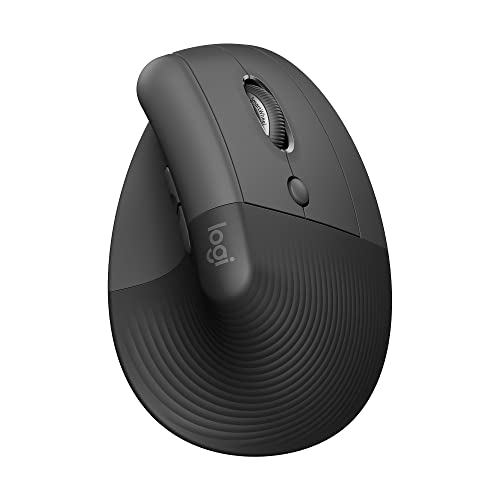
The Logitech Lift is comfortable in the way a vertical mouse can be comfortable, with the hand turned inward rather than flattened over the desk. Its 57-degree angle encourages a more natural forearm posture, and the softly textured grip and thumb rest make the upright position easy to maintain. The shape feels deliberate rather than improvised.
The problem for this particular roundup is size. Logitech describes the Lift as a fit for small to medium right hands, and the listed dimensions are about 5.6 inches long, 3.4 inches wide, and 3 inches high. The width and height can look promising on paper, but the grip and button placement are not intended for very large hands. A large-handed buyer should treat this as a wrist-posture option first and a large-mouse option second.
The SmartWheel supports controlled line-by-line scrolling and smoother movement through longer pages. Easy-to-reach customizable buttons add some flexibility, while whisper-quiet clicks keep the mouse suitable for an office. It is less configurable than the Basilisk V3, but the controls are more approachable for routine work and do not overwhelm the vertical design.
Lift connects over Bluetooth Low Energy or with a Logi Bolt USB receiver. It works with Windows, macOS, iPadOS, Chrome OS, and Linux, and Logitech rates battery life at up to two years. That combination makes it easy to move between a laptop and desktop, though the right-handed shape rules out left-handed users.
The adjustment period is the same challenge faced by other vertical mice. Pointer movements and clicking feel different until the hand learns the new angle, and the Lift is not the model to buy if you need a large palm cavity above all else. The ProtoArc EM11 NL offers rechargeable power and three-device connectivity, while the Lift has the more polished Logitech software and connection experience. Choose it only if your hand fits the stated range and wrist posture is your main priority.
How to choose best mouse for large hands
The right mouse should support the palm without forcing the fingers to reach, while its connection and controls should match the computer and work you actually do.
Length and width
Length determines whether the palm is supported or hangs off the back. Width affects how tightly the thumb and little finger are squeezed toward the center. Large-handed users should look for a full-size or explicitly large shell, then check the shape of the palm curve rather than relying on length alone.
A long mouse can still feel narrow, and a wide mouse can place the buttons too far apart. The M550 L and M650 L take a balanced approach, while the E-YOOSO X-31 and Acer have broader listed dimensions. Vertical models use a different grip, so their outer width is not directly comparable to a conventional mouse.
Palm and thumb support
A good palm shape lets the hand rest instead of hovering in a claw. Rubber side grips help maintain control without squeezing, and a thumb rest can reduce the effort needed to steer the mouse. The M850 L adds a built-in palm cushion, while the Basilisk V3 uses a gaming-oriented thumb rest.
Look for support that matches your grip. A palm gripper may appreciate a high rear and cushioned surface, while a fingertip user may prefer a lower, less intrusive shell. If your current mouse causes pressure at the base of the thumb, changing the button count will not solve the underlying shape problem.
For large hands, the right width matters as much as the headline length.
Connection type
Bluetooth is convenient for laptops and tablets because it does not occupy a USB port. A 2.4GHz receiver can feel simple and dependable on a desktop, but it requires USB-A access. Logi Bolt offers a receiver-based option on several Logitech models, while the ProtoArc EM11 NL combines Bluetooth with a USB-A receiver.
Check the computers you will actually use. A receiver stored in the mouse is helpful for travel, but it is less useful if your laptop has only USB-C ports and no adapter. Multi-device switching is also worth considering if you regularly move between a desktop, laptop, and tablet.
Scroll wheel and button layout
The scroll wheel is used constantly, so its behavior matters more than decorative features. SmartWheel mice can switch between controlled line movement and faster scrolling. The Razer Basilisk V3 adds free-spin, tactile, and tilt functions, which are useful for gaming and heavy navigation but unnecessary for a simpler desk setup.
Side buttons are valuable for browser navigation and file management. The M650 L and Acer include forward and back controls, while the E-YOOSO X-31 adds a six-button layout. Check operating-system support carefully, since some side buttons do not work on Mac.
Sensitivity and gaming controls
DPI controls change how far the pointer moves for a given physical movement. Office mice such as the Acer and ProtoArc offer practical ranges for ordinary displays. The E-YOOSO X-31 reaches 4800 DPI, and the Razer Basilisk V3 reaches 26, 000 DPI with a gaming sensor.
High DPI is most useful when it can be tuned to your desk space, screen size, and game. It is not a guarantee of better accuracy. Gamers should also consider programmable buttons, actuation behavior, polling options, and whether a cable is preferable to battery management.

Frequently asked questions
Are large mice automatically better for large hands?
No. A mouse can be physically long but have a narrow grip, short buttons, or an awkward palm curve. Large-handed users should consider length, width, height, and the position of the thumb rest together.
Which mouse in this roundup is quietest?
The Logitech M550 L Black, Logitech M550 L Blue, Logitech M650 L, Logitech Comfort Plus M850 L, and Logitech Lift all include quiet-click features. The M550 L models specifically list SilentTouch technology with 90 percent less click noise.
Do these mice work with Mac computers?
Most support Mac in some form. The E-YOOSO X-31 and Acer list side-button limitations on Mac, while the ProtoArc EM11 NL says its forward and back buttons are not compatible with Mac OS. Check the connection and button details before choosing one for an Apple computer.
Is a vertical mouse suitable for very large hands?
Not always. The ProtoArc EM11 NL is designed for hands under 7.5 inches long, and the Logitech Lift is described as a fit for small to medium right hands. Large-handed users may find a conventional full-size shell more supportive.
Is Bluetooth better than a USB receiver?
Neither connection is universally better. Bluetooth saves a USB port and works well with compatible laptops, while a 2.4GHz receiver offers a familiar plug-and-play connection. Choose based on the ports and devices you use most often.
Which model is best for gaming?
The Razer Basilisk V3 is the gaming specialist here. It has 11 programmable buttons, a 26, 000 DPI optical sensor, a tilt and free-spin wheel, optical switches, and customizable RGB lighting.
Do any of these mice use rechargeable batteries?
The ProtoArc EM11 NL has a built-in 500mAh lithium-ion battery and recharges through its included Type-C cable. The Logitech models and the Acer use replaceable batteries, while the Razer Basilisk V3 is wired.
The bottom line
The Best mouse for large hands is the Logitech Signature M550 L Black for most people. Its full-size contour, quiet clicking, SmartWheel, two connection options, and long battery rating cover the essentials without adding needless complexity. Choose the blue version if its finish suits your desk, since the listed features are the same.
The Logitech Signature M650 L is the better office tool for anyone who uses side-button shortcuts, while the Razer Basilisk V3 is the clear choice for gaming and macros. Large-handed users considering a vertical design should be cautious, because both the ProtoArc EM11 NL and Logitech Lift target smaller hand ranges.
If you are undecided, start with the M550 L unless you specifically need programmable shortcuts, a vertical grip, or gaming controls.
As an Amazon Associate we earn from qualifying purchases.