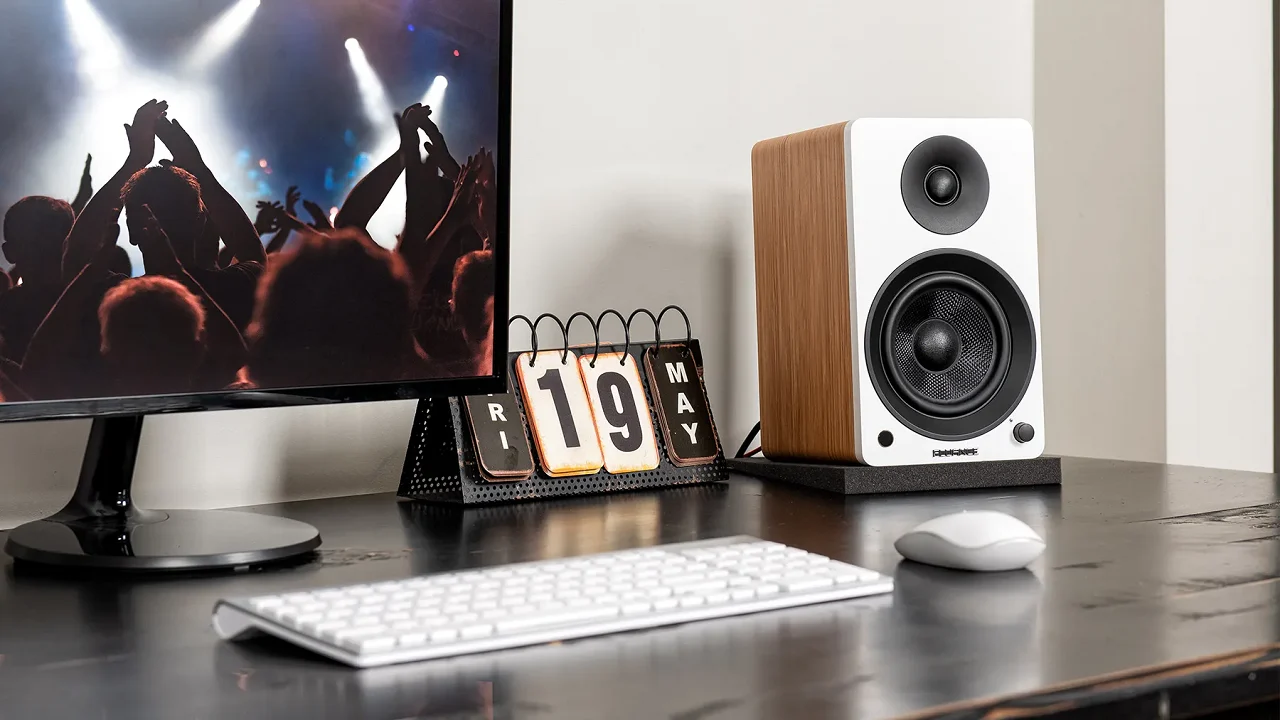

A laptop's built-in speakers can make dialogue sound thin, while a monitor's audio often has little authority at all. The right pair of desktop speakers can give music, games, video calls, and movies a proper stereo image without taking over the desk.
The Best desktop speakers range from compact USB models to serious powered monitors with room-filling output. We ranked these 10 picks by sound potential, connectivity, physical design, and how well each one fits a real computer setup. The Edifier M60 is our top pick, with the PreSonus Eris 3.5, Creative Pebble V3, and Logitech Z313 covering very different needs.
Comparison table
| # | Product | Award | Output | Connectivity | Best for |
|---|---|---|---|---|---|
| 1 | Edifier M60 | Best overall | 66W RMS | Bluetooth 5.3, USB-C, AUX | Premium desktop listening |
| 2 | Logitech Z207 | Best for easy switching | Not specified | Bluetooth 4.2, 3.5mm | Switching between devices |
| 3 | OHAYO 60W | Best bookshelf-style option | 60W | Bluetooth 5.3, RCA, AUX, USB | Music and gaming |
| 4 | XKX Monitor Soundbar | Best space saver | Not specified | USB, USB-C adapter | Clip-on monitor audio |
| 5 | Amazon Basics Stereo 2.0 | Best simple wired pair | Not specified | USB power, 3.5mm AUX | Basic computer audio |
| 6 | Creative Pebble V3 | Best compact USB speakers | 8W RMS | USB-C, Bluetooth 5.0, AUX | Small desks |
| 7 | Edifier R1280T | Best bookshelf sound | 42W RMS | Dual AUX | Tunable desktop listening |
| 8 | PreSonus Eris 3.5 | Best studio-style pair | 50W | TRS, RCA, AUX, headphone jack | Detailed music and production |
| 9 | Edifier G2000 | Best for gaming setups | 16W RMS, 32W peak | Bluetooth, USB, AUX | Gaming desks and RGB |
| 10 | Logitech Z313 | Best compact 2.1 system | 25W RMS | Wired input | Bass-focused computer audio |
1. Edifier M60: Best Overall
Pros
- 66W RMS output from a compact stereo pair
- USB-C, AUX, and Bluetooth 5.3 connectivity
- LDAC support for compatible Android devices
- Angled aluminum stands aim sound toward ear level
- Touch controls and app support
Cons
- Larger and heavier than compact USB models
- No dedicated subwoofer
- Some advanced wireless features depend on the source device
Best for: someone who wants polished sound and modern connectivity without adding a separate amplifier.
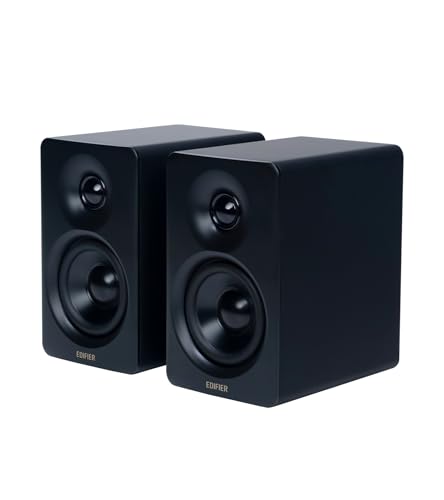
The Edifier M60 is the pair we'd keep on a serious everyday desk. It looks compact rather than imposing, but the 66W RMS system has substantially more headroom than the small USB speakers here. The two-way design uses a 1-inch silk dome tweeter and a 3-inch long-throw aluminum diaphragm mid-low driver in each speaker, giving the pair a more deliberate approach to detail and scale than one-box desktop audio.
Edifier includes a digital signal processor, a Class-D amplifier, and a two-way active crossover. Those details matter because the speakers are not simply pushing a full-range signal through a tiny driver. The system can divide high and lower frequencies more carefully, while dynamic range control helps keep the presentation composed as the volume rises. The M60 also carries Hi-Res Audio certification for wired and wireless transmission, though the practical benefit will depend on the source and recording.
Connectivity is unusually strong. USB-C and AUX cover a computer and a conventional analog source, while Bluetooth 5.3 handles wireless playback. LDAC support allows compatible Android devices running Android 8.0 or later to stream up to 24-bit/96kHz with a maximum transmission bitrate of 990 kbps. That is a real advantage for people who move between desktop listening and phone playback. The touch panel adds a cleaner front face than physical buttons, and the EDIFIER ConneX app adds further functions.
The supplied aluminum stands angle each speaker 15 degrees upward, which helps direct the sound toward a seated listener instead of firing across the desk. Each speaker measures 100mm wide, 168mm high, and 147mm deep, so the footprint is manageable, though the pair weighs 9.7 pounds. The weakness is equally clear: there is no dedicated subwoofer, and the M60 takes more space and setup attention than the Creative Pebble V3 or XKX Monitor Soundbar. Choose it over the Edifier R1280T when modern wireless and USB audio matter more than a traditional bookshelf design. Skip it if you want the smallest possible speaker or a separate low-frequency enclosure.
2. Logitech Z207: Best for Easy Switching

Pros
- Bluetooth and 3.5mm wired inputs
- Easy-Switch feature for moving between audio devices
- Passive radiators add bass extension
- Headphone jack on the speaker
- Straightforward onboard controls
Cons
- Bluetooth 4.2 is older than several alternatives
- Output is not specified
- Tall cabinets may compete with a monitor
Best for: households or workspaces where speakers need to serve several Bluetooth and wired devices.
The Logitech Z207 is a practical pair built around convenience rather than elaborate audio hardware. Its most useful feature is Easy-Switch, which lets you move between connected devices by pausing audio on one and pressing play on another. That is handy when a computer, phone, and tablet all share a desk, and it avoids the constant cable swapping that makes simple speaker systems frustrating.
Each speaker uses one active powered driver for full-range audio and one passive radiator for bass extension. Logitech does not specify an output figure in the supplied information, so this is not the pair to choose by chasing a wattage number. The passive radiator can give low frequencies more presence than a bare small enclosure, but it is still a compact stereo design rather than a system with a dedicated subwoofer.
The connection choices are broad enough for normal computer use. Bluetooth 4.2 handles wireless devices, while the 3.5mm input works with a computer, television, smartphone, tablet, or music player. A headphone jack on the speaker is a welcome touch for late-night listening. Physical controls provide access to pairing, power, and volume without sending you into an operating system menu.
At 9.5 inches high, 3.5 inches wide, and 4.9 inches deep, the Z207 has a taller shape than the Creative Pebble V3 and the Amazon Basics Stereo 2.0. It may fit neatly beside a monitor, but measure the area if you use a low shelf or a monitor arm. The Logitech Z207 is a better fit than the Logitech Z313 for a desk shared with wireless devices, while the Z313 makes more sense if low-end impact is the priority. Its main limitation is age: Bluetooth 4.2 is functional, but newer systems offer more current wireless standards and stronger wired connectivity.
3. OHAYO 60W: Best Bookshelf-Style Option

Pros
- 60W total output
- 3-inch carbon fiber full-range drivers
- Separate 0.75-inch carbon fiber silk dome tweeters
- MDF wooden enclosure
- Bluetooth 5.3, RCA, AUX, and USB inputs
Cons
- Larger footprint than most computer speakers
- No dedicated subwoofer included
- The feature set may be more than a basic desk needs
Best for: listeners who want a traditional stereo presentation for music, games, and general room audio.
The OHAYO 60W feels closer to a small bookshelf system than a typical computer speaker pair. It uses a pair of 3-inch carbon fiber full-range drivers alongside 0.75-inch carbon fiber silk dome tweeters, so the design has dedicated attention on both the midrange and treble. That should give voices, guitars, effects, and game audio more separation than a compact soundbar can manage.
The speakers produce 30W per channel for 60W total output, and a rear bass port is intended to add depth to the low end. The MDF wooden enclosure is another meaningful choice. It is designed to reduce box resonance, which can help keep the cabinet from adding unwanted coloration when the speakers are played loudly. The front volume knob is easy to reach during a game or music session, a small detail that often matters more than a remote.
The OHAYO is also one of the more flexible options in this group. Bluetooth 5.3 covers wireless streaming, while RCA, AUX, and USB inputs support different computer, television, phone, turntable, mixer, and streaming-device arrangements. That makes it easier to use the speakers beyond a single PC. If you are comparing it with more traditional models, the trade-off between compact computer audio and larger bookshelf cabinets explains why a bigger pair can make sense even on a desk.
The compromise is physical. The supplied dimensions are 11.54 inches high, 6.89 inches deep, and 9.37 inches wide, and the pair will need more desk depth than the Edifier M60 or Creative Pebble V3. The data lists a rear bass port but no separate subwoofer, so listeners who want pronounced low-end effects may prefer the Logitech Z313. The OHAYO is the stronger choice for someone who values a fuller stereo pair, several input types, and a cabinet that feels at home in a small room as well as beside a monitor.
4. XKX Monitor Soundbar: Best Space Saver
Pros
- Clips to the top, side, or bottom of a monitor
- USB connection with included USB-C adapter
- G-sensor keeps left and right channels correctly positioned
- Front touch controls
- Dual drivers and passive radiators in a narrow body
Cons
- USB connection is intended for computers, not monitors, TVs, or projectors
- Output is not specified
- Less stereo separation than two separate speakers
Best for: a clean desk where a conventional left and right speaker pair will not fit.
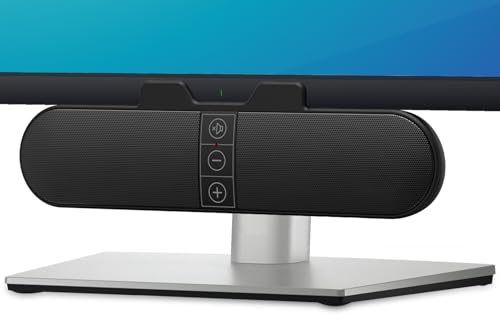
The XKX Monitor Soundbar solves a very specific problem: there is no room for speakers on either side of the screen. Its clamp can attach to the top, side, or bottom of a monitor, and the clamp can also sit on the desk. That makes it a natural match for narrow work surfaces, dual-monitor arrangements, and setups where a keyboard already uses most of the available depth.
Inside the 9.17-inch-wide body are dual ultra-magnetic drivers and dual passive radiators. The supplied information does not specify output, frequency response, or driver size, so it should not be judged against the Edifier M60 or PreSonus Eris 3.5 on technical detail. Its appeal is placement. A narrow bar can provide a noticeable step up from built-in monitor audio while avoiding the cable spread and footprint of separate stereo cabinets.
A G-sensor automatically keeps the left and right channels correctly positioned when the bar is clamped to the top or bottom of the monitor. That is a thoughtful feature because channel reversal is an easy mistake with a device that can be mounted in several orientations. Three touch buttons on the front handle muting and volume adjustment. The connection is USB, and the included USB-C to USB adapter extends compatibility to newer computers with USB-C ports.
There is an important limitation in the compatibility notes. The speakers work with Windows, macOS, ChromeOS, and Linux computers, but the supplied information lists monitors, televisions, and projectors as incompatible devices. You may also need to check the computer's audio driver, audio settings, and playback-device selection if the bar is not recognized immediately. The XKX is a better space-saving answer than the Amazon Basics pair, but a worse choice for wide stereo imaging. Pick it when desk space is the deciding factor, not when music detail is the main goal.
5. Amazon Basics Stereo 2.0: Best Simple Wired Pair

Pros
- Two-speaker stereo design
- USB-powered operation
- 3.5mm AUX input
- Inline volume control
- Padded bases and metal finish
Cons
- No Bluetooth
- Output is not specified
- Blue LED lighting may not suit every workspace
Best for: replacing weak built-in computer audio with a simple pair that needs very little setup.
The Amazon Basics Stereo 2.0 is the uncomplicated option in this roundup. It is a pair of small external speakers designed to amplify PC or laptop audio, with USB supplying power and a 3.5mm AUX connection carrying the audio signal. There is no wireless pairing, app, or input-selection routine to learn. Connect the cables, set the level with the inline control, and the system is ready for ordinary computer use.
The speakers use a bottom radiator to add what the product information calls springy bass. That can give music, video dialogue, and casual games more body than a laptop speaker, but the data does not provide an output rating or detailed driver information. It is therefore a poor match for anyone who wants to tune a system around power or frequency response. It is better understood as a compact stereo upgrade with a short list of jobs.
The design includes a metal finish, scratch-free padded bases, and blue LED lights. The bases are useful on a desk because they help protect the surface and keep the cabinets from sliding as easily. USB power also means there is no separate power brick in the supplied feature list, though the audio cable still needs to reach the computer's 3.5mm output.
At 2.88 inches high, 3.94 inches long, and 2.6 inches wide, each speaker occupies little space. That makes it easier to place than the Edifier R1280T or OHAYO 60W, while the Creative Pebble V3 offers more connection flexibility in a similarly compact category. The Amazon Basics pair is the one to choose when simple wired operation matters more than wireless playback, powerful output, or a separate bass enclosure. Skip it if your computer lacks a 3.5mm output or if you want to stream directly from a phone.
6. Creative Pebble V3: Best Compact USB Speakers

Pros
- USB-C audio with USB-A adapter
- Bluetooth 5.0 and 3.5mm AUX input
- 2.25-inch full-range drivers
- 8W RMS output with up to 16W peak power
- 45-degree elevated drivers
Cons
- AUX cable is not included
- Less output than the larger powered pairs
- Gain switch requires a suitable 10W USB port for amplified audio
Best for: small desks that need USB audio, Bluetooth, and clear spoken dialogue from a compact pair.
The Creative Pebble V3 makes a convincing case for small speakers that do more than simply save space. Its 2.25-inch custom-tuned full-range drivers are aimed upward at 45 degrees, directing sound toward the listener instead of straight across the desktop. That orientation is especially useful when the speakers sit below a monitor and the listener is close to the desk.
Creative rates the pair at 8W RMS, with peak power up to 16W. A gain switch can push the audio further, but the feature notes specify that amplified operation requires a 10W USB-C or USB-A port. The speaker pair therefore has a little more flexibility than its size suggests, although it cannot match the 50W PreSonus Eris 3.5 or the 66W Edifier M60 for room-filling output.
USB-C provides both power and audio with one cable on newer computers, while the included USB-C to USB-A converter helps with older ports. Bluetooth 5.0 handles wireless playback, and a 3.5mm AUX input provides analog compatibility. The AUX cable is not included, so anyone planning a wired analog connection should account for that extra cable. Clear Dialog processing is designed to make speech easier to understand without stripping away background effects, which makes the Pebble V3 particularly appealing for shows, videos, and calls.
The pair measures roughly 5.12 inches high, 10.24 inches long, and 5.51 inches wide according to the supplied product information, though the shared-cabinet dimensions do not describe the footprint as intuitively as the speaker design itself. The longer cable between the speakers gives more placement flexibility. Compared with the XKX Monitor Soundbar, it offers better separation because the speakers are physically apart. Compared with the Amazon Basics Stereo 2.0, it adds Bluetooth and cleaner USB-C integration. Its weakness is modest scale, so choose it for a compact desk and near-field listening rather than a large room.
7. Edifier R1280T: Best Bookshelf Sound

Pros
- 42W RMS powered stereo pair
- 4-inch full-range units
- 13mm silk dome tweeters
- Two AUX inputs
- Side bass and treble controls
- Remote control included
Cons
- No Bluetooth or USB audio
- Large and heavy for a computer desk
- Traditional cabinet design needs more room
Best for: listeners who want fuller bookshelf-style sound and physical tone controls beside a computer.
The Edifier R1280T is the old-school choice, and that is precisely why it remains appealing. These are powered bookshelf speakers rather than tiny computer satellites, with a 4-inch full-range unit and a 13mm silk dome tweeter in the design. The larger cabinet gives the pair a more substantial physical presence than the Creative Pebble V3, while the wood-effect MDF enclosure suits a desk that doubles as a living-room listening station.
The system is rated at 42W RMS. That is enough information to place it between the compact options and the more powerful Edifier M60, though wattage alone does not describe tonal balance. More useful are the side-panel bass and treble controls, which let you adjust the presentation without software. If your desk is against a wall or the room has a bright, reflective character, being able to make a basic correction from the speaker itself is valuable.
Connectivity is deliberately traditional. Two AUX inputs allow two devices to remain connected at once, so a computer and another analog source can share the speakers without constant plugging and unplugging. The remote handles volume from a distance, while the side controls handle bass and treble. There is no Bluetooth, USB audio, or built-in wireless codec support, so the R1280T is a weaker fit for people who expect their desktop speakers to double as a wireless phone system.
The cabinets measure 5.8 inches high, 6.9 inches deep, and 9.5 inches wide according to the supplied data, and the pair weighs 10.8 pounds. That is a significant commitment beside a monitor. The PreSonus Eris 3.5 offers more connection types and acoustic tuning, while the OHAYO 60W brings Bluetooth 5.3 and USB. The R1280T makes more sense when you prefer a warm, conventional powered bookshelf format, a remote, dual analog inputs, and hands-on EQ controls.
8. PreSonus Eris 3.5: Best Studio-Style Pair

Pros
- 50W of built-in amplification
- 3.5-inch woven-composite woofers
- 1-inch silk dome tweeters
- High- and low-frequency acoustic tuning
- TRS, RCA, AUX, and headphone connections
- Complete stereo pair
Cons
- Larger than compact desktop speakers
- No Bluetooth listed
- Studio-oriented controls may be unnecessary for casual listeners
Best for: music listeners, creators, and gamers who want a more controlled monitor-style presentation.
The PreSonus Eris 3.5 is the most studio-minded pair here. It uses 3.5-inch woven-composite woofers and 1-inch silk dome tweeters, with a stated frequency range of 80Hz to 20kHz. That range does not promise subwoofer-level bass, but it does describe a speaker designed to cover the core musical and spoken-audio range with separate drivers for lower and higher frequencies.
PreSonus includes 50W of built-in amplification and describes the system as capable of clear sound across different listening levels. The more important feature for a real room is the pair of acoustic tuning controls. High- and low-frequency adjustments let you tailor the speakers to the desk and surrounding surfaces without needing extra treatment or an external equalizer. That is a meaningful advantage over the Logitech Z207 and Amazon Basics Stereo 2.0.
The connection panel is unusually complete for a desktop pair. Balanced TRS, RCA, and front-panel AUX inputs cover a computer, audio interface, mixer, game console, phone, or turntable. A front headphone jack provides private listening without reaching behind the speakers. Bluetooth is not listed, so the Eris 3.5 is less convenient than the Edifier M60 or OHAYO 60W for wireless phone playback. For people deciding between clean sound and convenience, the features that shape sound quality at a desk are more important than a single output number.
Each speaker measures 8.3 inches high, 5.5 inches deep, and 6 inches wide, and the pair weighs 6.4 pounds. That is manageable, but these are not speakers to hide behind a monitor. They are a stronger pick than the Edifier R1280T for users who need acoustic tuning and a headphone jack, while the M60 is more appealing for wireless listening and a smaller modern design. Skip the Eris 3.5 if you want a simple Bluetooth speaker with minimal setup. Choose it when balanced connections, room adjustment, and detailed near-field listening are the priority.
9. Edifier G2000: Best for Gaming Setups

Pros
- Bluetooth, USB sound card, and AUX inputs
- Game, music, and movie modes
- 12 RGB lighting effects
- 16W RMS and 32W peak power
- Subwoofer output interface
- 10-degree elevated cabinet design
Cons
- No separate subwoofer included
- Less neutral than studio-oriented options
- Gaming styling is not subtle
Best for: a gaming desk where lighting, simple sound modes, and multiple inputs matter as much as audio.
The Edifier G2000 is designed to be seen. Its column-shaped cabinets have a 10-degree elevation, matte panels, metal laser engraving, and 12 RGB lighting effects. That styling will appeal to a gaming setup, but it is not neutral desk furniture. The anti-slip feet and angled design are practical touches that help keep the pair pointed toward the listener.
The speaker system uses 2.75-inch full-range units, a backward bass port, and 16W RMS power with 32W peak power listed in the features. The rear port is intended to strengthen bass, while the three EQ modes cover game, music, and movie use. These modes make the G2000 easier to tailor quickly than the Amazon Basics pair, though the PreSonus Eris 3.5 and Edifier R1280T give more direct control over tonal balance.
The G2000 connects through Bluetooth, AUX, and a USB sound card input. That covers a PC, Mac, PlayStation 4, Xbox, laptop, television, CD player, or phone, according to the supplied compatibility information. A subwoofer output interface is included, but the product is a pair of speakers rather than a bundled 2.1 system. That distinction matters if your main goal is strong low-frequency impact. The Logitech Z313 has a dedicated compact subwoofer in the box, while the G2000 keeps the desk cleaner and leaves the upgrade path open.
The cabinets measure about 9.09 inches high, 5.47 inches deep, and 8.31 inches wide, with a listed pair weight of 4.21 pounds. They take more vertical space than the Creative Pebble V3 but less of a traditional bookshelf footprint than the OHAYO 60W. The G2000 is the clear pick for synchronized-looking gaming hardware and quick EQ modes. It is not the first choice for neutral music listening or a discreet office setup, where the M60 or Eris 3.5 makes more sense.
10. Logitech Z313: Best Compact 2.1 System

Pros
- Dedicated compact subwoofer
- 25W RMS output
- Convenient control pod
- Simple 2.1 configuration
- Compact satellite speakers
Cons
- Takes more floor or desk space than a 2.0 pair
- Connectivity details are limited
- No Bluetooth listed
Best for: computer users who want a dedicated subwoofer and simple wired controls.
The Logitech Z313 takes a different route from nearly every other product here. Rather than asking two small cabinets to handle the entire range, it adds a compact subwoofer to the system. That gives games, films, and music a more obvious low-frequency foundation, even though the supplied information does not provide a frequency response or subwoofer driver size.
The system is rated at 25W RMS, and Logitech includes a control pod for convenient operation. A separate control pod is useful when the speakers are tucked beside a monitor or the subwoofer is placed under a desk. It keeps volume adjustment within reach without putting a large control panel on one of the satellite speakers.
The Z313 is a straightforward wired system. Bluetooth, USB audio, and multiple analog inputs are not listed in the supplied data, so it lacks the flexibility of the Edifier M60, OHAYO 60W, and Creative Pebble V3. Its advantage is the dedicated bass enclosure. For readers specifically comparing how a dedicated bass enclosure changes computer audio, this layout is easier to understand than a pair that relies on passive radiators or a rear bass port.
The listed system dimensions are 6.2 inches high, 12.9 inches long, and 9.4 inches wide, with a listed weight of 1 pound. The size figures do not clearly separate the satellites from the subwoofer, so check the available space before committing to the 2.1 layout. The Logitech Z313 is a better choice than the Logitech Z207 when bass impact matters more than Bluetooth switching, but the Z207 is tidier for a shared desk. Pick the Z313 for simple wired entertainment audio, and avoid it if you want a clean two-speaker setup with wireless playback.
How to choose best desktop speakers
The right desktop speakers should match the space around your monitor, the sources you plan to connect, and the kind of sound you prefer. These are the factors that separate a useful upgrade from a pair that creates new desk problems.
Speaker layout
A 2.0 pair uses two full speaker cabinets, while a 2.1 system adds a dedicated subwoofer. Separate left and right speakers usually create a wider stereo image than a soundbar, especially when they can sit on either side of the monitor. A subwoofer can add stronger low-end effects, but it needs somewhere to go.
The Logitech Z313 is the only 2.1 system in this group. The Edifier M60, OHAYO 60W, PreSonus Eris 3.5, and Edifier R1280T are 2.0 pairs with different cabinet sizes and driver arrangements. The XKX Monitor Soundbar is the most compact placement solution, but a narrow bar cannot create the same physical separation as two speakers.
Output and driver size
Output figures provide a rough idea of headroom, but they do not tell the complete story. The Edifier M60 has 66W RMS, the OHAYO 60W has 60W total output, the PreSonus Eris 3.5 has 50W of built-in amplification, and the Edifier R1280T lists 42W RMS. Those models are better suited to louder listening or a larger desk area than the 8W RMS Creative Pebble V3.
Driver arrangement matters too. A dedicated tweeter can handle high frequencies separately from a midrange or woofer driver, while a full-range driver keeps the design simpler. A passive radiator or rear bass port can add low-end presence, but neither is the same as a dedicated subwoofer.
Bigger output helps, but placement and driver design decide whether that output sounds useful at a desk.
Connectivity
USB audio is convenient because the computer sends sound directly to the speaker system, while AUX remains useful for older computers, monitors with analog output, phones, and other devices. Bluetooth is the simplest route for wireless phone playback, but different models support different versions and codecs.
The Edifier M60 offers Bluetooth 5.3, USB-C, and AUX, while the Creative Pebble V3 combines USB-C, Bluetooth 5.0, and AUX. The Logitech Z207 uses Bluetooth 4.2 and 3.5mm input, and the Edifier R1280T relies on two AUX inputs. Check the ports on the computer before choosing, especially if it has USB-C but no 3.5mm headphone jack.
Desk footprint and placement
Measure the space beside the monitor, not just the open area in front of it. Tall speakers such as the Logitech Z207 and Edifier G2000 may fit on a narrow desk but interfere with a monitor arm or shelf. Larger cabinets such as the OHAYO 60W, Edifier R1280T, and PreSonus Eris 3.5 need more depth and clear space around them.
Angled drivers can help at close range. The Creative Pebble V3 uses 45-degree elevated drivers, and the Edifier M60 includes 15-degree aluminum stands. The XKX soundbar takes a different approach by clamping directly to a monitor, which is useful when the desk has no room for separate cabinets.
Sound adjustment
Some speakers let you tune the sound physically, while others rely on presets or leave the signal untouched. The Edifier R1280T has side-panel bass and treble controls. The PreSonus Eris 3.5 provides high- and low-frequency acoustic tuning, which can help compensate for a bright room or a desk positioned near a wall.
The Edifier G2000 uses game, music, and movie modes for quick changes, while the M60 adds digital processing and app support. If you mainly listen to speech, Creative's Clear Dialog processing in the Pebble V3 may be more useful than a large output figure. Choose adjustment features based on the problem you are trying to solve, not the number of modes alone.
Frequently asked questions
Do desktop speakers need a subwoofer?
No. A well-designed 2.0 pair can provide satisfying music, dialogue, and game audio without a separate subwoofer. A subwoofer becomes more useful when you want stronger low-frequency effects and have room for another enclosure, as with the Logitech Z313.
Are USB desktop speakers better than AUX speakers?
USB speakers can be simpler because the computer sends digital audio directly to them and often supplies power through the same connection. AUX speakers work with a wider range of analog devices and do not depend on a particular computer port. Models such as the Creative Pebble V3 support both approaches.
Can these speakers connect to a phone?
The Edifier M60, Logitech Z207, OHAYO 60W, Creative Pebble V3, and Edifier G2000 list Bluetooth connectivity. The Amazon Basics Stereo 2.0, Edifier R1280T, and Logitech Z313 list wired connections instead. The XKX Monitor Soundbar is designed for USB computer audio rather than general wireless playback.
Are powered speakers suitable for a computer desk?
Yes. Powered speakers include their own amplification, so they can connect directly to a computer or other source without a separate amplifier. Every stereo pair in this roundup is designed for direct use with a computer, though the available inputs differ.
What is the difference between 2.0 and 2.1 speakers?
A 2.0 system has two speakers, one for the left channel and one for the right. A 2.1 system adds a separate subwoofer for low frequencies. The 2.0 models usually take less space and can offer better stereo placement, while the 2.1 Logitech Z313 is aimed at listeners who want dedicated bass.
Do desktop speakers work with USB-C laptops?
Many do, but the exact connection varies. The Edifier M60 and Creative Pebble V3 support USB-C, while the XKX Monitor Soundbar includes a USB-C to USB adapter for computers that use that port. Always confirm whether USB-C carries audio and power for the specific model, rather than assuming every USB-C port works the same way.
The bottom line
The Best desktop speakers for most people are the Edifier M60. Its 66W RMS output, two-way driver design, USB-C, AUX, Bluetooth 5.3, LDAC support, and angled aluminum stands give it the most complete combination of sound hardware and everyday convenience. The lack of a dedicated subwoofer is its main limitation, but the compact two-speaker layout is easier to live with than a 2.1 system.
The PreSonus Eris 3.5 is the better specialist pick for music-focused listening, acoustic tuning, and studio-style connections. For small desks, the Creative Pebble V3 is easier to place, while the Logitech Z313 is the clearest choice when a dedicated subwoofer matters more than wireless features.
If you are undecided, choose the Edifier M60 unless your desk size, studio connections, or need for a subwoofer points clearly elsewhere.
As an Amazon Associate we earn from qualifying purchases.