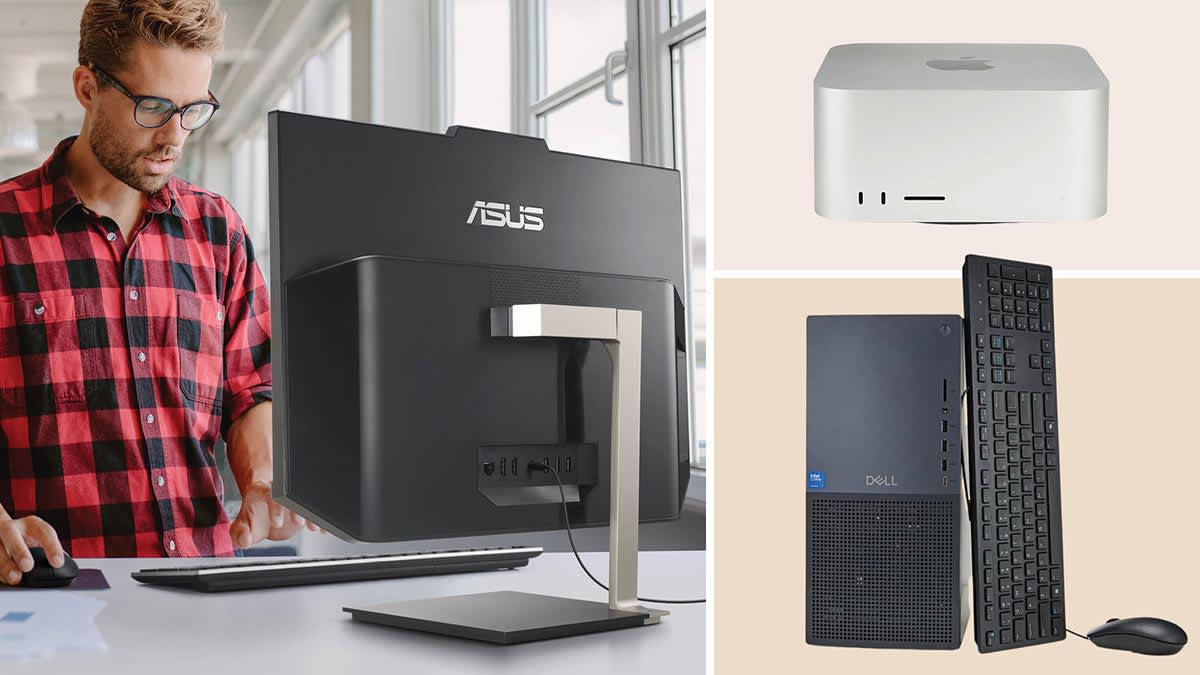

A home computer has to handle more than a browser and a document. It may sit through video calls, store years of photos, drive two monitors, or serve as the shared family machine. The wrong format can leave you with a cramped display or a tower that takes over the desk.
This guide to the Best home desktop computer options covers compact towers, spacious all-in-ones, and refurbished complete setups. The Dell OptiPlex 3060 is our top pick for its combination of memory, fast storage, wireless connectivity, and flexible desktop format. The other nine picks cover newer processors, larger built-in screens, multi-monitor work, and ready-to-use bundles.
| # | Product | Award | Processor | Memory and storage | Best for |
|---|---|---|---|---|---|
| 1 | Dell OptiPlex 3060 | Best overall | Intel Core i5-8500 | 32GB RAM, 1TB SSD | Everyday work and home multitasking |
| 2 | Dell Slim Desktop Ultra 5 | Best modern slim tower | Intel Core Ultra 5-225 | 512GB SSD | Compact desks and multiple displays |
| 3 | Lenovo IdeaCentre V100 | Best compact all-in-one | Intel N100 | 8GB RAM, 512GB SSD | Study spaces and basic home computing |
| 4 | Dell Tower Ultra 7 | Best for demanding workloads | Intel Core Ultra 7-265 | 32GB RAM, 1TB storage | Heavy multitasking and expansion |
| 5 | Lenovo 24-inch IdeaCentre AIO | Best business all-in-one | Intel N100 | 16GB RAM, 256GB SSD | Home offices and schoolwork |
| 6 | Dell 27-inch All-in-One | Best large-screen all-in-one | Intel Core 7 150U | 16GB RAM | Video calls and streaming |
| 7 | Dell OptiPlex 5060 | Best dual-storage tower | Intel Core i5-8500 | 16GB RAM, 500GB SSD plus 1TB HDD | Files, media, and office work |
| 8 | Dell OptiPlex 7010 Package | Best complete starter setup | Intel Core i5 | 8GB RAM, 500GB HDD | A ready-made family workstation |
| 9 | Dell OptiPlex 3050 SFF | Best small dual-display tower | Intel Core i5-6500 | 16GB RAM, 256GB SSD | Small desks and two monitors |
| 10 | HP ProDesk 24-inch Bundle | Best family bundle | Intel Core i5, 8th Gen | 16GB RAM, 500GB SSD | Video calls and family use |
1. Dell OptiPlex 3060: Best Overall

Pros
- 32GB of memory for heavy everyday multitasking
- 1TB SSD provides quick starts and generous working space
- Wi-Fi, Bluetooth, and RGB side-panel lighting included
- Compact tower footprint
Cons
- Older Intel processor than the newest Dell towers
- Renewed configuration may not suit buyers seeking a new machine
Best for: home users who want a capable tower with substantial memory and storage.
The Dell OptiPlex 3060 is the kind of desktop that makes sense for a shared home office. It is not trying to be an all-in-one or a showpiece gaming machine. Instead, it gives you a conventional black tower with enough headroom for many browser tabs, office applications, photo libraries, and video calls without making memory capacity the first limitation you encounter.
Its Intel i5-8500 processor is paired with 32GB of DDR4 RAM, which is the strongest memory provision among the older refurbished Dell towers here. That extra RAM matters when several applications stay open at once. The 1TB solid-state drive also gives the system a useful balance of fast boot and application loading with room for documents, media, and household files. The drive is more spacious than the 256GB SSD in the Dell OptiPlex 3050 SFF and the Lenovo 24-inch IdeaCentre AIO.
Wireless connectivity is covered by a Wi-Fi adapter and Bluetooth, so the tower does not require a wired network or a separate accessory for compatible peripherals. The 6-inch height, 13.8-inch length, and 10.8-inch width make it a reasonably manageable case for a desk or shelf, although an all-in-one still creates less cable clutter. A side-panel RGB lighting kit with 13 modes adds personality, but it is decoration rather than a reason to choose this computer.
The compromise is age. The Dell Slim Desktop Ultra 5 and Dell Tower Ultra 7 use newer Intel Core Ultra processors and offer more current platform features, while this OptiPlex is a refurbished older design. Buyers who want the latest processor architecture or a factory-new machine should look at those Dell models instead. The 3060 remains the more balanced pick for someone who wants useful memory and storage without moving to a large tower.
For a home office, family computer, or general productivity station, this is the Dell we would keep. It offers more breathing room than the lower-memory refurbished options and avoids tying the user to a built-in screen.
2. Dell Slim Desktop Ultra 5: Best Modern Slim Tower
Pros
- Intel Core Ultra 5-225 platform
- Slim 3.74-inch-wide chassis
- Supports up to four FHD monitors
- Tool-less access for internal upgrades
- Hardware TPM and lock options
Cons
- Less memory than the top pick
- Built-in graphics are not specified in the listing
- Tower format still needs a separate display
Best for: users who need a modern desktop platform in a narrow workspace.
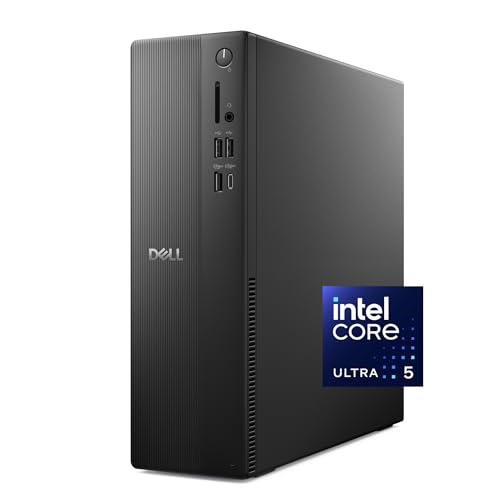
The Dell Slim Desktop Ultra 5 is the cleanest fit for a desk where width matters. Its chassis is listed at 3.74 inches wide, with a height of 11.95 inches and a length of 11.54 inches. That makes it easier to place beside a monitor than the larger Dell Tower Ultra 7, while retaining the upgrade-friendly design that many all-in-ones cannot provide.
Inside is Intel's Core Ultra 5-225, a newer processor family than the Intel chips in the refurbished OptiPlex models. The listing highlights built-in AI capabilities, though it does not provide a detailed memory specification beyond the 512GB SSD configuration. That storage is a sensible starting point for documents, applications, and regular home files, but buyers with large photo or video collections may eventually want external storage.
Its display flexibility is unusually strong for a slim home tower. Dell says it can connect up to four FHD monitors using DisplayPort 1.4a and daisy chaining, or two 4K displays through HDMI 2.1 and DisplayPort 1.4a. That gives it a clear advantage over the Lenovo IdeaCentre V100, whose listing describes HDMI-out and support for two displays total including the built-in screen. It is a practical choice for spreadsheets, reference material, communications, and a second work area.
The case is designed for access rather than sealed simplicity. Tool-less entry and a removable side panel make component work less intimidating, and the hardware TPM, lock slot, and padlock loop add useful security features for a home office. Dell also includes one year of onsite service and six months of its Migrate tool according to the listing. The weakness is that a monitor, keyboard, and mouse are not part of the described configuration, so the system is less immediate than the complete bundles.
Choose this over the Dell OptiPlex 3060 if a newer processor platform, monitor support, and a slim case matter more than the 3060's stated 32GB of RAM and 1TB SSD. It is the right direction for someone setting up a modern workstation that may grow over time.
3. Lenovo IdeaCentre V100: Best Compact All-in-One

Pros
- 23.8-inch FHD IPS anti-glare display
- 512GB PCIe SSD
- Wi-Fi 6, Bluetooth 5.2, and Gigabit Ethernet
- HDMI output for another display
- Integrated camera, microphone, and speakers
Cons
- 8GB RAM is the lowest capacity among the newer all-in-ones
- Intel N100 is aimed at everyday work, not demanding workloads
- No optical drive
Best for: students, kitchens, bedrooms, and tidy home office desks.
The Lenovo IdeaCentre V100 solves the setup problem elegantly. The computer lives behind a 23.8-inch display, so there is no tower to find space for and fewer cables crossing the desk. It is especially well suited to a study area or shared family station where a clean footprint matters more than internal expansion.
The screen is a 1920 by 1080 IPS panel with an anti-glare surface, 250 nits of brightness, and 99% sRGB coverage. Those figures point to a comfortable general-purpose display for documents, web pages, schoolwork, and streaming. The anti-glare finish should help with reflections near a window, though 250 nits is not an especially bright specification for a room with strong direct sunlight. The built-in HD camera, mono microphone, HD audio, and dual 2W speakers make video calls possible without assembling extra desk hardware.
An Intel N100 processor with four cores and four threads, reaching up to 3.4GHz turbo according to the listing, is a sensible match for browsing and office applications. It is not the processor to select for demanding creative software or sustained heavy multitasking. The 8GB of DDR4-3200 RAM is adequate for a straightforward home setup, and Lenovo says the system supports up to 32GB total, which leaves an upgrade path. The 512GB PCIe SSD is a more comfortable starting point than the 256GB drive in the Lenovo 24-inch IdeaCentre AIO.
Connectivity is a strong point. Wi-Fi 6 AX203, Bluetooth 5.2, Gigabit Ethernet, USB-C at 10Gbps, two USB-A ports at 10Gbps, two USB-A 2.0 ports, HDMI-out, Ethernet, and a headset jack cover the needs of a typical home workstation. It includes a USB Calliope keyboard, but the listing does not describe a bundled mouse. That is a small distinction from the more complete Lenovo 24-inch setup.
The Lenovo is easier to live with than a tower and more capable as a display than the Dell OptiPlex machines, but it gives up memory capacity and processor strength. Buyers who keep many demanding applications open should step up to the Dell 27-inch All-in-One or a tower. For a student, parent, or casual home user who wants the screen and computer in one unit, the V100 is the neatest fit.
4. Dell Tower Ultra 7: Best for Demanding Workloads

Pros
- Intel Core Ultra 7-265 processor
- 32GB RAM
- 1TB of listed storage
- Tool-less internal access
- Supports two 4K displays or up to four FHD monitors
Cons
- Larger than the slim Dell tower
- Separate display and peripherals are required
- Windows 11 Home rather than Pro
Best for: users who need the strongest processor and more room for future desktop upgrades.
The Dell Tower Ultra 7 is the performance pick in this group, but its appeal is broader than a processor name. This is a conventional tower for someone who wants a desktop that can sit at the center of a serious home workstation. The case measures about 6.06 inches wide, 12.77 inches high, and 11.54 inches long, so it needs more breathing room than the Dell Slim Desktop Ultra 5.
Intel's Core Ultra 7-265 is paired with 32GB of RAM, giving this system a much more comfortable starting point for demanding multitasking than the 8GB all-in-one models. The listing identifies 1TB of storage, though it does not specify the storage type in the available product details. That distinction matters to buyers who are choosing between the quick SSD-based designs and a more traditional storage arrangement, so it is worth checking the current configuration before ordering.
Multi-monitor support is a major reason to choose this tower. Dell lists support for up to four FHD monitors through DisplayPort and daisy chaining, or two 4K screens using HDMI 2.1 and DisplayPort. That makes it more suitable than the Dell OptiPlex 5060 for a broad workspace with several windows, and it gives it more flexibility than any of the all-in-ones with their fixed primary screen.
The removable side panel and tool-less entry are welcome for a tower that may evolve. A hardware TPM, lock slot, and padlock loop are useful if the computer will hold household records or work files. Dell also lists one year of onsite service. The absence of a bundled monitor is the practical downside, and Windows 11 Home may not be the preferred edition for someone specifically managing a business environment.
This is not the tidy choice for a small desk, nor is it the most sensible pick for email and occasional streaming. The Dell Tower Ultra 7 earns its place for people who want modern processing hardware, substantial memory, several display options, and a case that remains accessible. If those needs are not yours, the slimmer Ultra 5 or the Dell OptiPlex 3060 is easier to justify.
5. Lenovo 24-inch IdeaCentre AIO: Best Business All-in-One

Pros
- 23.8-inch FHD IPS anti-glare display
- 16GB RAM
- Wi-Fi 6 and Bluetooth 5.2
- Wireless keyboard and mouse included
- Windows 11 Pro
Cons
- 256GB SSD leaves less room for local files
- Intel N100 is modest for demanding applications
- Large footprint compared with a slim tower
Best for: home offices that want a tidy, ready-to-use workstation with Windows 11 Pro.
The Lenovo 24-inch IdeaCentre AIO is a more work-focused alternative to the Lenovo IdeaCentre V100. Both use an Intel N100 processor and a 23.8-inch Full HD IPS display, but this model doubles the memory to 16GB and includes a wireless keyboard and mouse. Those details make the machine feel better prepared for a home office that stays active all day.
The panel is listed at 1920 by 1080, with anti-glare treatment, 250 nits brightness, and 99% sRGB coverage. That is a sensible specification for documents, web work, lessons, and video. It is non-touch, so interaction remains keyboard and mouse based. A 21.23-inch width and 16.65-inch height give the display a substantial presence, while the 7.3-inch depth means the stand needs a reasonably deep surface.
The Intel N100 has four cores, four threads, a 6MB cache, and a maximum turbo frequency of 3.40GHz according to the listing. The 16GB of DDR4 RAM helps the system feel less constrained when switching between office programs and browser tabs, but the processor is still aimed at routine productivity. The 256GB PCIe SSD should make Windows and applications responsive, though a user with a large media library will likely need external storage sooner than with the Lenovo IdeaCentre V100's 512GB drive.
Wireless networking uses Intel Wi-Fi 6 AX203 with 802.11ax 2x2, and Bluetooth 5.2 handles compatible accessories. The port selection includes two USB-A 2.0 ports, two USB-A 10Gbps ports, HDMI-out, Ethernet, and a combined headphone and microphone jack. Windows 11 Pro gives this configuration a more suitable profile for business and managed work than the V100's Windows 11 Home. The included wireless keyboard and mouse also save space on a crowded desk.
The weakness is performance ceiling. The Dell 27-inch All-in-One has a stronger Core 7 processor and a more substantial display, while the Dell Slim Desktop Ultra 5 offers more monitor flexibility and easier component access. The Lenovo is better than both for someone who wants a compact, complete all-in-one with Windows 11 Pro and does not plan to run demanding software.
6. Dell 27-inch All-in-One: Best Large-Screen All-in-One

Pros
- Spacious 27-inch FHD IPS display
- Intel Core 7 150U processor
- 5MP plus IR pop-up camera
- ComfortView Plus and higher refresh rate than the prior generation
- Integrated Bluetooth speakers with Dolby Atmos
Cons
- Windows 11 Home
- Built-in display limits component upgrades
- Very wide desk footprint
Best for: households that prioritize a large screen and polished video-call features.
The Dell 27-inch All-in-One is the desktop here that most clearly treats the display as part of the experience. Its 27-inch FHD IPS screen gives documents, timelines, video chats, and streaming more physical room than the 23.8-inch Lenovo panels. The narrow border also keeps the front of the computer from feeling excessively bulky, even though the listed width is 24.2 inches.
Dell describes the screen as covering 99% of the sRGB color space and offering 50% higher contrast than the previous generation. It also includes ComfortView Plus to reduce blue light emissions and a refresh rate that Dell says is 66% higher than the prior generation. The exact refresh rate is not provided, so this should be understood as a smoother-generation claim rather than a specific gaming specification. This is a display for comfortable everyday use, not a high-refresh gaming monitor.
The camera is a standout feature. A 5MP plus IR HDR camera adjusts to difficult lighting, and the pop-up design lets you hide it physically by pushing it down. The screen tilts from 0 to 20 degrees, making it easier to find a comfortable angle. Dual Bluetooth speakers with Dolby Atmos spatial sound are built in for calls, music, and films. Those features give it a more finished feel than the basic webcam and dual 2W speaker arrangement in the Lenovo IdeaCentre V100.
The Intel Core 7 150U and 16GB configuration should suit home office applications, browsing, streaming, and video calls. The available listing does not provide a storage capacity, so buyers with large local libraries should confirm that detail before purchasing. There is also no tower to open and upgrade, which is the trade-off for a cleaner setup. The screen and computer are a single unit, and that convenience limits how much can be changed later.
The Dell 27-inch All-in-One is less flexible than the Dell Tower Ultra 7 and less compact than the Lenovo 24-inch IdeaCentre AIO. It wins on screen area, camera quality, viewing comfort features, and integrated audio. Skip it if you already own a preferred monitor or need extensive internal upgrades. Choose it if the computer will live in a family room or home office where the display and call experience matter as much as the tower underneath.
7. Dell OptiPlex 5060: Best Dual-Storage Tower

Pros
- Intel Core i5-8500 six-core processor
- 16GB DDR4 RAM
- 500GB SSD plus 1TB HDD
- Wi-Fi, Bluetooth, and LAN
- Slim tower profile
Cons
- Older refurbished platform
- Hard drive is slower than the SSD
- No display or peripherals listed
Best for: users who need both quick system storage and a separate space for files.
The Dell OptiPlex 5060 has a useful storage arrangement that many basic desktops lack. A 500GB SSD handles Windows and frequently used applications, while a 1TB hard drive provides additional capacity for photos, videos, documents, and less frequently opened files. That split makes sense for a home computer that needs to remain responsive without putting every file on the faster drive.
Its Intel Core i5-8500 is a six-core processor with turbo speed listed up to 4.3GHz, and the system has 16GB of DDR4 RAM. That is enough foundation for regular office tasks, browsing, streaming, and everyday multitasking. The Dell OptiPlex 3060 has the same processor family but doubles the stated memory and uses a 1TB SSD, making it the stronger all-round configuration. The 5060's advantage is its dedicated hard-drive capacity.
The tower measures 11.4 inches high, 11.5 inches wide, and 3.6 inches deep according to the listing. That slim profile should be easier to position beside a monitor than a conventional full-size tower. Wi-Fi, Bluetooth, and LAN are all included, which gives the user a choice between wireless convenience and a wired connection. Integrated Intel UHD Graphics 630 is intended for everyday visuals and video playback rather than demanding graphics work.
The main caution is the age of the platform and the two different storage behaviors. The HDD provides capacity, but applications installed there will not feel as quick as those on the SSD. The newer Dell Slim Desktop Ultra 5 brings a more current processor platform and stronger multi-monitor support, while the Dell OptiPlex 3050 SFF is smaller in spirit but has only a 256GB SSD. Buyers should also remember that this is a tower configuration, so a monitor and input devices need to be supplied separately.
For households managing a mix of work files and media, the 5060 is a practical layout. It is not the fastest or newest desktop in this roundup, but it has a clear purpose. Choose it when two-tier storage matters more than the latest platform or the larger memory capacity of the Dell OptiPlex 3060.
8. Dell OptiPlex 7010 Package: Best Complete Starter Setup

Pros
- Includes a 19-inch LCD monitor
- Keyboard and mouse included
- Wi-Fi adapter and DVD drive
- Windows 11 Pro
- 500GB hard drive
Cons
- Only 8GB of RAM
- HDD storage is slower than an SSD
- Older quad-core platform
- Monitor is smaller than the all-in-one displays
Best for: families and first-time desktop buyers who need the basic workstation pieces together.
The Dell OptiPlex 7010 Package is less about individual component ambition and more about removing setup decisions. It includes the desktop, a 19-inch LCD, DVD drive, Wi-Fi, keyboard, mouse, and Windows 11 Pro. For a family that does not already have a monitor or peripherals, that completeness is the main attraction.
The Intel Core i5 processor is described as a quad-core chip running at 3.2GHz. It is paired with 8GB of RAM and a 500GB HDD. Those specifications cover documents, web browsing, schoolwork, and ordinary home administration, but they leave less room for heavy multitasking than the 16GB systems above it. The hard drive also cannot match the quick application launches associated with the SSD-based Dell OptiPlex 3060 or HP ProDesk 24-inch Bundle.
The 19-inch LCD is smaller than the 23.8-inch Lenovo displays and the 27-inch Dell all-in-one, so it provides less room for side-by-side windows. On the other hand, the included keyboard and mouse mean the computer can be placed into service without assembling a separate set of accessories. The Wi-Fi adapter handles network access, and the onboard video connections can connect to large or multiple monitors according to the listing.
Windows 11 Pro is a useful inclusion for buyers who prefer its feature set for a home office. The product is also listed as renewed and includes a 90-day warranty and technical support. That is reassuring, but the older platform and mechanical hard drive remain genuine limitations. The Dell OptiPlex 3050 SFF has twice the memory and an SSD, though it does not include a display in the described package.
This is the pick for a straightforward, all-in-one purchase rather than a high-performance workstation. If you already have a monitor, the Dell OptiPlex 5060 or 3060 makes better use of the desktop format. If you need every basic component in one box and your workload is light, the 7010 package keeps the decision simple.
9. Dell OptiPlex 3050 SFF: Best Small Dual-Display Tower

Pros
- Compact 3.75-inch-wide case
- 16GB DDR4 RAM
- 256GB SSD
- Supports dual 4K displays
- DisplayPort, HDMI, Wi-Fi, and USB ports
Cons
- Older Intel Core i5-6500 processor
- Smaller SSD than most other picks
- Refurbished computer with limited expansion room
Best for: compact workstations that need two high-resolution screens.
The Dell OptiPlex 3050 SFF is an unassuming little tower with one especially useful capability: dual-display support at up to 4K resolution. Its case is only 3.75 inches wide, 11.5 inches high, and 11.2 inches long, so it can fit in a narrow desk area where a larger desktop would be awkward.
The Intel Core i5-6500 is an older quad-core processor with speed up to 3.6GHz listed by the seller. The system has 16GB of DDR4 RAM, which is a better multitasking baseline than the 8GB Dell OptiPlex 7010 Package. Its 256GB SSD should keep Windows and frequently used programs responsive, but it offers much less local storage than the 1TB SSD in the Dell OptiPlex 3060 or the combined drives in the Dell OptiPlex 5060.
The rear panel includes DisplayPort, HDMI, USB 3.0, USB 2.0, and RJ-45, while the front adds more USB connections. The listing specifically says it supports two 4K displays, allowing users to expand a spreadsheet across screens, keep reference material visible, or mirror content. Wi-Fi is provided through a USB adapter, and a USB keyboard and mouse are included. That is an unusually useful set of connections for a small refurbished machine.
The trade-off is that the processor is the oldest in this group, and the compact case is not the best starting point for major internal changes. The Dell Slim Desktop Ultra 5 is a stronger modern choice for several displays, while the Dell OptiPlex 3050 SFF is more attractive when desk width and dual 4K output are the priorities. The SSD capacity also means a large media collection will need another destination.
For a home office built around two monitors, this compact Dell has a clear role. It is not a general recommendation for demanding software, but it is a sensible small-footprint workstation for documents, administration, browsing, and screen-heavy workflows.
10. HP ProDesk 24-inch Bundle: Best Family Bundle

Pros
- 16GB RAM and 500GB SSD
- Includes a 24-inch LCD monitor
- Webcam, speakers, keyboard, and mouse included
- Wi-Fi 6 and Bluetooth
- Windows 11 Pro
Cons
- Monitor model and brand may vary
- Older refurbished hardware
- RGB accessories are not useful to everyone
- Bundle takes more desk space than an all-in-one
Best for: families that need a computer, display, camera, and accessories in one setup.
The HP ProDesk 24-inch Bundle is the most complete conventional desktop package in the roundup. It combines an HP ProDesk small-form-factor computer with a refurbished 24-inch monitor, RGB keyboard and mouse, speakers, and a webcam. That makes it a natural fit for a family workstation where video calls, homework, and general computing all need to happen from the same desk.
The computer uses an Intel Core i5 processor from the eighth generation, 16GB of DDR4 RAM, and a 500GB SSD. That gives it a more comfortable multitasking setup than the Dell OptiPlex 7010 Package, while the SSD should make everyday starts and application launches feel much quicker than the 7010's HDD. Windows 11 Pro and built-in Wi-Fi and Bluetooth cover the basic home office requirements.
The accessories are the real differentiator. The listing describes a 24-inch LCD, new RGB speakers, a new 2K webcam, and an RGB keyboard and mouse. Those extras mean a buyer does not need to source a separate camera for online classes or family calls. The monitor's exact model and brand may vary, however, so anyone who cares about a particular panel specification should treat the display as an included convenience rather than a known, fixed monitor model.
The small-form-factor case is described as suitable for desks, counters, and compact workspaces. It still uses more separate components and cables than the Lenovo IdeaCentre V100 or Dell 27-inch All-in-One. The Dell OptiPlex 3060 has more memory and a larger SSD, while the HP counters with the display and complete accessory set. This is also refurbished hardware, so buyers seeking a current processor platform should consider the newer Dell slim tower.
The HP makes the most sense when the goal is a working family station rather than a bare computer. It handles schoolwork, streaming, applications, and video chats without requiring a long accessory hunt. Skip it if you already own a good display or want a clean all-in-one installation.
How to choose the best home desktop computer
The Best home desktop computer for one household may be a compact tower, while another needs a large all-in-one screen or a complete bundle. Focus on the workload, available desk space, and the parts you may want to replace later.
Processor class
The processor affects how quickly a desktop opens applications, handles multiple tasks, and responds when several demanding programs run together. Intel Core Ultra 7 and Core Ultra 5 systems such as the Dell Tower Ultra 7 and Dell Slim Desktop Ultra 5 are the newest processor platforms in this group. Older Core i5 systems remain suitable for routine work, but they have less long-term headroom.
Intel N100 desktops are aimed at browsing, documents, video, and light productivity. They are a good match for the Lenovo all-in-ones, but not the right choice for sustained demanding workloads. Match the processor to what you actually do rather than assuming every desktop should have the biggest chip.
Memory capacity
RAM determines how much can stay active without the computer slowing as applications compete for working space. The 8GB configurations in the Lenovo IdeaCentre V100 and Dell OptiPlex 7010 Package are workable for basic tasks, but 16GB is a more comfortable starting point for a shared home computer. The Dell OptiPlex 3060 and Dell Tower Ultra 7 go further with 32GB.
Check whether the desktop can be upgraded. Lenovo says the IdeaCentre V100 supports up to 32GB, while tower designs generally provide more practical access than all-in-ones. If the computer will serve several people, extra memory is particularly useful because browser tabs and accounts tend to accumulate.
Storage type and capacity
An SSD makes Windows startup, application launches, and file access feel quicker than a traditional hard drive. The 256GB SSD in the Lenovo 24-inch IdeaCentre AIO and Dell OptiPlex 3050 SFF is fast but leaves less room for local files. The 512GB and 1TB SSD configurations provide a more relaxed starting point.
A combined SSD and HDD setup, as seen in the Dell OptiPlex 5060, can be useful when speed and capacity both matter. Put Windows and active applications on the SSD, then use the HDD for larger files. Do not assume a large hard drive will respond like an SSD.
Desktop format
A tower lets you choose the display and usually makes future service or upgrades easier. It also requires separate peripherals and creates more cables. An all-in-one puts the computer behind the display, which saves space and makes setup cleaner, but the screen and internal hardware are tied together.
For a compact desk, the Dell Slim Desktop Ultra 5 and Dell OptiPlex 3050 SFF are easier to place than the wider all-in-ones. For a shared room, the Lenovo IdeaCentre V100 or Dell 27-inch All-in-One keeps the workstation visually simple. If you are comparing tower and all-in-one layouts, the sizes that still work in tight spaces can help clarify how much room the complete setup needs.
A faster processor cannot fix a cramped screen, and a large display cannot compensate for a desktop that runs out of memory.
Display and camera features
All-in-one buyers should inspect the panel size, resolution, brightness, surface treatment, and camera. The Lenovo displays use 23.8-inch FHD IPS panels with anti-glare treatment and 250 nits brightness. The Dell all-in-one provides a larger 27-inch FHD IPS screen, ComfortView Plus, a higher refresh rate than its previous generation, and a pop-up 5MP plus IR camera.
Tower buyers have more freedom because the monitor is separate. That is useful if you already own a display or need two screens. The Dell OptiPlex 3050 SFF supports dual 4K displays, while the newer Dell slim and tower desktops offer broader multi-monitor configurations.
Ports and wireless connections
Wi-Fi and Bluetooth make a home computer easier to position and connect to wireless accessories. Wired Ethernet is useful when consistent network performance matters. Count the USB ports and check for HDMI or DisplayPort if you plan to add another screen.
The Lenovo IdeaCentre V100 and 24-inch IdeaCentre AIO include Wi-Fi 6, Bluetooth 5.2, USB-C or high-speed USB-A connections, Ethernet, and HDMI-out. The Dell OptiPlex 3050 SFF has both DisplayPort and HDMI and is the clearest fit for a two-screen arrangement. For more workspace advice, how a second screen changes your desk setup is worth considering before selecting a tower.
Frequently asked questions
Is an all-in-one or tower better for home use?
An all-in-one is easier to place because the computer and screen share one enclosure. A tower offers more freedom to choose a monitor and generally makes upgrades or replacements easier. The right format depends on whether clean setup or long-term flexibility matters more.
How much RAM does a home desktop need?
8GB can handle basic browsing, documents, and streaming, but 16GB is a more comfortable target for a shared household computer. Choose 32GB if you regularly keep many browser tabs and applications open or want more headroom for demanding work.
Is an SSD important in a desktop computer?
Yes. An SSD usually makes Windows startup, application launches, and everyday file access feel faster than a hard drive. A hard drive can still be useful as secondary storage, particularly in a two-drive desktop such as the Dell OptiPlex 5060.
Can these desktops run two monitors?
Several can. The Dell OptiPlex 3050 SFF is listed with dual 4K display support, while the Dell Slim Desktop Ultra 5 and Dell Tower Ultra 7 support multiple monitor arrangements using DisplayPort and HDMI. All-in-ones vary, so check whether the HDMI connection is output for an additional screen.
Are refurbished desktops suitable for a home office?
A refurbished desktop can be suitable for ordinary office work when its processor, memory, storage, and warranty meet your needs. Refurbished models in this roundup include older Dell and HP platforms, so they should be selected for their specific configuration rather than treated as equivalent to newer systems.
Do all-in-one desktops include a webcam?
Not all of them do, but the Lenovo IdeaCentre V100 includes an HD camera, and the Dell 27-inch All-in-One includes a pop-up 5MP plus IR camera. The HP ProDesk 24-inch Bundle includes a webcam as part of its accessories. Confirm the listed bundle before assuming a camera is included.
Which desktop is easiest to set up?
The all-in-ones require fewer separate components, while complete packages such as the Dell OptiPlex 7010 Package and HP ProDesk 24-inch Bundle include a display and peripherals. A tower without accessories gives you more choice but requires more planning before the workstation is ready.

The bottom line
The Best home desktop computer here is the Dell OptiPlex 3060 for most households. Its 32GB of RAM, 1TB SSD, Wi-Fi, Bluetooth, and compact tower design give it a useful balance for work, study, browsing, and family files. The Dell Slim Desktop Ultra 5 is the better alternative for a newer platform, narrow chassis, and several displays, while the Dell Tower Ultra 7 is the clear step up for heavier workloads.
Choose the Lenovo IdeaCentre V100 or Lenovo 24-inch IdeaCentre AIO if you want a tidy all-in-one, and choose the HP ProDesk 24-inch Bundle when a complete display, camera, speakers, keyboard, and mouse setup matters most. The Dell 27-inch All-in-One is the most comfortable pick for a large-screen, video-call-focused workstation.
If you are undecided, choose the Dell OptiPlex 3060 unless you specifically need an all-in-one screen or a newer Core Ultra platform.
As an Amazon Associate we earn from qualifying purchases.