

A wireless mouse should remove a cable without adding hesitation, missed clicks, or another device that needs constant charging. The hard part is separating genuinely responsive models from mice that simply add RGB lighting and a long feature list.
Our Best wireless gaming mouse picks cover everything from the light 54 g Razer Viper V3 Pro to the button-heavy Logitech G502 range, plus practical options such as the Logitech G305 and Redragon M810 Pro. The right shape and control layout matter as much as sensor numbers.
The Logitech G502 Lightspeed is our top pick, with the Razer Viper V3 Pro taking the lead for competitive players and the Logitech G305 offering the simplest portable design.
Comparison table
| # | Product | Award | Sensor | Weight | Battery or connectivity | Best for |
|---|---|---|---|---|---|---|
| 1 | Logitech G502 Lightspeed | Best overall | HERO 25K, up to 25, 600 DPI | 0.81 pounds | LIGHTSPEED, POWERPLAY compatible | Players who want versatile controls |
| 2 | Logitech G305 Black | Best lightweight everyday pick | HERO, up to 12, 000 DPI | 3.4 oz | LIGHTSPEED, one AA battery | Portable gaming and general use |
| 3 | Razer Viper V3 Pro | Best for esports | Focus Pro 35K Gen-2 | 54 g | HyperSpeed, up to 95 hours | Fast flicks and competitive aim |
| 4 | Logitech G703 | Best ergonomic comfort | HERO 25K, up to 25, 600 DPI | 95 g | LIGHTSPEED, up to 35 hours with RGB | Palm grip players |
| 5 | Logitech G502 X Plus | Best feature-rich design | HERO 25K | 0.23 pounds | LIGHTSPEED, POWERPLAY compatible | Macro-heavy setups |
| 6 | Razer Basilisk V3 X HyperSpeed | Best battery life | 5G Advanced, up to 18, 000 DPI | 0.24 pounds | HyperSpeed or Bluetooth | Long sessions and multiple devices |
| 7 | Razer Basilisk V3 Pro | Best premium ergonomic option | Focus Pro 30K | 0.24 pounds | HyperSpeed or Bluetooth | Customization and RGB |
| 8 | Logitech G PRO X2 SUPERSTRIKE | Best adjustable click system | HERO 2, up to 44, 000 DPI | 0.134 pounds | LIGHTSPEED, 8 kHz polling | Players who tune actuation |
| 9 | Redragon M810 Pro | Best for programmable controls | PAW3325 | 0.25 pounds | 2.4 GHz, rechargeable battery | Extra buttons on a simple setup |
| 10 | Logitech G305 White | Best compact alternative | HERO, up to 12, 000 DPI | 3.4 oz | LIGHTSPEED, one AA battery | A clean white desk setup |
1. Logitech G502 Lightspeed: Best Overall

Pros
- Eleven customizable buttons
- HERO 25K sensor with 1:1 tracking
- Hyper-fast and ratcheting scroll control
- POWERPLAY wireless charging compatibility
Cons
- Heavy compared with the Viper V3 Pro and G305
- Charging system is sold separately
- Large body is not ideal for every grip
Best for: players who want one mouse for shooters, strategy games, productivity, and macros.
The Logitech G502 Lightspeed is the mouse we would hand to someone who wants broad capability without changing peripherals between games. Its shape is substantial, the thumb area gives your hand a clear resting place, and the button layout makes abilities, push-to-talk, and application shortcuts easy to reach. It feels more like a command center than a minimalist pointer.
Its HERO 25K sensor tracks at up to 25, 600 DPI, with 1:1 tracking, more than 400 IPS, and no smoothing, filtering, or acceleration listed in the specifications. Those figures matter less than the consistency they imply. At a sensible sensitivity, the cursor should follow deliberate hand movement predictably, while the high ceiling leaves room for unusual setups. Logitech’s LIGHTSPEED wireless connection is designed around a 1 ms report rate, so the wireless link is not the reason to avoid this mouse in a fast game.
The eleven customizable buttons are the real differentiator. Logitech G HUB can assign macros and shortcuts, and the scroll wheel switches between precise ratcheting and a fast free-spin mode. That makes the G502 Lightspeed especially useful for games with inventory wheels, abilities, or lots of commands. It is a much more flexible tool than the Logitech G305, while the Razer Viper V3 Pro is the better instrument for a player who cares primarily about rapid, low-effort aim.
The weakness is its 0.81-pound listed weight. That is a lot of mouse to move when a game demands repeated wide flicks, and the body can feel excessive for fingertip or claw grips. The optional POWERPLAY system can keep it charged while resting on a compatible surface, but that accessory is separate. Players who want the lightest possible competitive mouse should skip it.
For mixed gaming, work, and creative shortcuts, the G502 Lightspeed remains the most complete option here. If you are also comparing a wired model, the important question is what you give up moving from wired to wireless rather than whether the sensor number is larger.
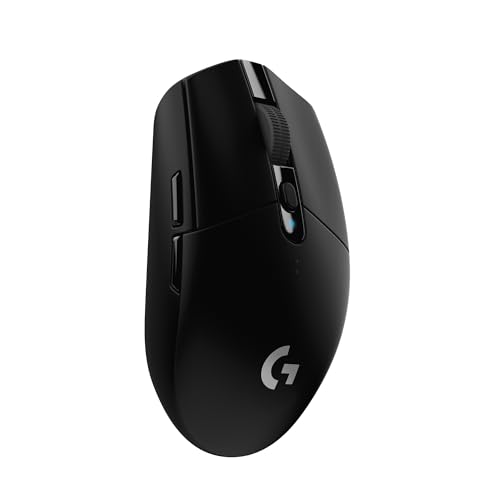
2. Logitech G305 Black: Best Lightweight Everyday Pick
Pros
- 3.4 oz lightweight mechanical design
- Up to 250 hours from one AA battery
- 1 ms LIGHTSPEED report rate
- Receiver storage inside the mouse
Cons
- Fewer controls than the G502 Lightspeed
- Uses a replaceable AA battery
- Basic shape lacks ergonomic thumb support
Best for: players who want a compact mouse that works equally well with a gaming desktop or laptop.
The Logitech G305 Black gets the fundamentals right and leaves out the distractions. It has a familiar compact shape, a small wireless receiver that stores in the mouse, and a weight of 3.4 oz. That combination makes it easy to move between a desk and a laptop bag. It is also the kind of mouse that does not demand a charging routine.
The HERO optical sensor reaches 12, 000 DPI and tracks at up to 400 IPS. The headline number is not as high as the G502 Lightspeed’s 25, 600 DPI, but most players will never need that extra range. The more useful detail is the 1 ms LIGHTSPEED report rate, which keeps cursor updates quick and predictable for everyday play. Logitech claims up to 250 hours of continuous gameplay from one AA battery, while an Endurance mode in G HUB can extend battery life up to nine months.
The G305’s compact shell is durable and portable, but it does not mold around the hand like the Logitech G703 or either Razer Basilisk. It suits players who hold a mouse with their fingertips or use a lighter claw grip better than people who want their palm fully supported. Its controls are straightforward, so it feels uncluttered in a shooter and less intimidating on a shared home computer.
That simplicity is also the main limitation. There are not eleven programmable controls like the G502 Lightspeed, and the AA battery adds a different kind of maintenance from a rechargeable design. The G305 Black is also not the lightest mouse here. The Viper V3 Pro is dramatically lighter, though it is aimed more squarely at competitive play.
The G305 is our practical recommendation for someone who wants reliable wireless performance without a large body or charging cable. It is a particularly sensible travel companion, and the black finish is a quiet choice for a traditional setup.
3. Razer Viper V3 Pro: Best for Esports

Pros
- Extremely light 54 g design
- Focus Pro 35K Gen-2 sensor
- Up to 8, 000 Hz polling
- Optical switches rated for 90 million clicks
Cons
- Fewer buttons than ergonomic alternatives
- Battery life is shorter than the Basilisk V3 X
- High-end features require careful software setup
Best for: competitive FPS players who prioritize fast, precise movement over extra controls.
The Razer Viper V3 Pro is the clearest specialist in this group. At 54 g, it resists the sluggish feeling that can appear when a mouse has a large shell, a heavy battery, and several extra controls. A fast flick takes less effort, and lifting and repositioning the mouse feels less disruptive during low-sensitivity play.
Its Focus Pro 35K Gen-2 optical sensor supports up to 35, 000 DPI, with 1 DPI step adjustments and tracking designed to work across a wider range of surfaces, including glass. Few players need 35, 000 DPI, but the fine adjustment can help someone match a precise sensitivity between games. The more relevant benefit is stable tracking when the mouse is moving quickly and the player is making small corrections.
Razer’s HyperPolling and HyperSpeed systems support a true polling rate of up to 8, 000 Hz. That can make cursor updates appear smoother, particularly on a high-refresh display and a system with enough performance headroom. It is not a magic accuracy switch, and it can affect battery life and system load, but it gives competitive players more control over the response profile. The optical Gen-3 switches add a stated 0.2 ms actuation and a 90-million-click lifecycle.
Compared with the Logitech G305, the Viper V3 Pro is lighter and more technically ambitious. Compared with the Logitech G502 Lightspeed, it gives up nearly all of the comfort and macro flexibility in favor of fast movement. Battery life is listed at up to 95 hours, which is respectable, but the Razer Basilisk V3 X can last far longer when used over Bluetooth.
The Viper V3 Pro is not the right pick for someone who needs a thumb rest, a large set of shortcuts, or a mouse that can disappear for months without battery attention. It is the one to choose when your hand speed, aim, and low drag matter more than convenience features.
4. Logitech G703: Best Ergonomic Comfort

Pros
- Comfortable ergonomic design with rubber side grips
- HERO 25K sensor
- Six programmable buttons
- Optional 10 g weight and POWERPLAY support
Cons
- 95 g weight is not ultralight
- Up to 35 hours with default RGB lighting
- Right-handed shape limits hand positions
Best for: right-handed palm grip players who want a comfortable, supportive shell.
The Logitech G703 is built around comfort rather than minimum weight. Its ergonomic shape and rubber side grips give the thumb and palm a more settled position than the compact Logitech G305. For long sessions, that support can matter more than shaving a few grams from the shell.
The HERO 25K sensor offers 1:1 tracking, more than 400 IPS, and sensitivity from 100 to 25, 600 DPI. That puts it on the same sensor tier as the G502 Lightspeed, with the same basic advantage of consistent movement without smoothing, filtering, or acceleration. LIGHTSPEED wireless provides the pro-level connection Logitech targets for gaming, while the six programmable buttons give enough room for common abilities and shortcuts without making the side of the mouse busy.
The G703 also has a metal-spring button tensioning system for the primary buttons. That design is intended to keep the buttons poised for a consistent press with less force. RGB lighting can react to game action, audio, or screen color through LIGHTSYNC, and the software offers a wide color range. These features make it feel more substantial and expressive than the plain G305.
Its main compromise is weight. The listed 95 g is reasonable for an ergonomic mouse, but it is nowhere near the 54 g Viper V3 Pro or the light Logitech G PRO X2 SUPERSTRIKE. Battery life is listed at up to 35 hours with default LIGHTSYNC RGB lighting, so it needs more frequent attention than the G305. The optional 10 g weight is useful only for people who prefer an even heavier feel.
Choose the G703 if your hand wants a palm rest and a secure side grip. Skip it if you use a fingertip grip, play at very low sensitivity, or want the least resistance during wide mouse movements.
5. Logitech G502 X Plus: Best Feature-Rich Design

Pros
- HERO 25K sensor
- Hybrid LIGHTFORCE switches
- Removable and reversible DPI-shift button
- Tilt, free-spin, and ratcheting scroll modes
- Eight-zone RGB lighting
Cons
- Large feature-heavy body
- POWERPLAY system is sold separately
- Not suited to players who want a minimal mouse
Best for: players who want many controls and a highly adjustable button layout.
The Logitech G502 X Plus keeps the recognizable G502 idea but updates nearly every interaction point. It is a broad, control-heavy mouse for someone who wants to bind game commands, move quickly through documents, and adjust the shape of the button layout. The first impression is not speed through low weight. It is access.
The HERO 25K sensor provides high-precision tracking with no smoothing, filtering, or acceleration listed in the product details. Logitech also says the updated LIGHTSPEED protocol has a 68 percent faster response rate than the previous generation. The practical reason to care is that the wireless link is designed to stay responsive while the rest of the mouse focuses on controls and lighting.
LIGHTFORCE switches combine optical and mechanical elements for fast actuation and a crisp press. The DPI-shift button can be reversed or removed depending on grip and preference, which is more useful than a permanently fixed sniper button. The scroll wheel toggles between free spin and precise ratcheting, and it tilts left and right for two additional customizable commands.
Against the older Logitech G502 Lightspeed, the G502 X Plus offers a more modern switch system and a more adjustable layout. The older model remains a strong choice for someone who wants a proven eleven-button arrangement and does not need the newer lighting design. Both are too substantial for anyone seeking the quick, almost weightless feel of the Viper V3 Pro.
The body is listed at 0.23 pounds, but its dimensions still make it a large mouse in the hand. The feature-rich design can be wasted if you mainly play games that need two side buttons and a scroll wheel. It is also POWERPLAY compatible, though the charging surface is separate.
The G502 X Plus belongs on a desk where customization is part of the experience. It is a strong fit for MMO, strategy, simulation, and mixed-use players who want each finger to have a job.
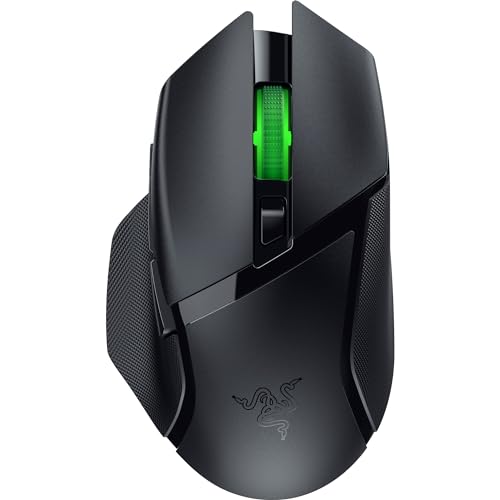
6. Razer Basilisk V3 X HyperSpeed: Best Battery Life
Pros
- Up to 285 hours over HyperSpeed
- Up to 535 hours over Bluetooth
- Nine customizable controls
- HyperSpeed and Bluetooth connectivity
- 18, 000 DPI optical sensor
Cons
- Heavier than the Viper V3 Pro
- Mechanical switches rather than optical switches
- RGB features require software customization
Best for: players who want an ergonomic shape and very long battery intervals.
The Razer Basilisk V3 X HyperSpeed is the sensible choice for a player who dislikes charging reminders. It uses Razer HyperSpeed wireless for low-latency gaming, but it can switch to Bluetooth when battery longevity and multi-device use matter more. That flexibility makes it a useful desk and laptop mouse, not just a gaming accessory.
Razer lists up to 285 hours of battery life over HyperSpeed and up to 535 hours over Bluetooth. Actual use varies, but the difference between the two modes tells you how to think about the design. HyperSpeed is the mode for play where response matters. Bluetooth is the mode for long stretches of ordinary work and travel.
The 5G Advanced optical sensor reaches 18, 000 DPI and is designed to track movement without spinouts. It is below the Viper V3 Pro’s 35, 000 DPI ceiling, though that should not be a deciding factor for most people. The Basilisk’s more important advantage is its ergonomic form and nine customizable controls. Macros and tactical commands are easier to reach than they are on the Viper, while the shape offers more support than the compact G305.
The second-generation mechanical switches are rated for up to 60 million clicks and use gold-plated contact points intended to resist degradation. Chroma RGB can be customized across a broad color range and can react to compatible games. Those features add personality, but the Basilisk V3 X is fundamentally about shape, connection choices, and endurance.
The compromise is the weight and the less specialized sensor platform. If you are training for esports and want the lightest mouse available here, the Viper V3 Pro is a better fit. If you need an ergonomic mouse that can switch between devices and stay away from a charger, the Basilisk V3 X makes more sense. Readers comparing a mouse for office and travel use may also care about how a compact shape handles different computer setups.
7. Razer Basilisk V3 Pro: Best Premium Ergonomic Option

Pros
- Focus Pro 30K optical sensor
- Ten plus one programmable buttons
- Thirteen-zone Chroma lighting with underglow
- HyperScroll tilt wheel
- Up to 110 hours over HyperSpeed
Cons
- 8, 000 Hz operation reduces battery life
- Extra dongle or dock required for 8 kHz polling
- Large ergonomic shape is not for every grip
Best for: players who want a polished ergonomic mouse with extensive controls and lighting.
The Razer Basilisk V3 Pro is the more ambitious counterpart to the Basilisk V3 X HyperSpeed. It has the same general ergonomic idea, but adds a higher-end sensor, more elaborate lighting, optical switches, and a more configurable scroll wheel. It feels designed for someone who wants the mouse to be part of a carefully built gaming station.
Its Focus Pro 30K optical sensor is specified to track across a wider variety of surfaces, including glass. The 30, 000 DPI ceiling leaves substantial room for sensitivity tuning, while the sensor’s intelligent functions are intended to help with aim and control. Razer’s optical Gen-3 switches are rated for 90 million clicks and list a 0.2 ms actuation with no debounce delay.
The control layout is the reason to choose this over the Viper V3 Pro. The Basilisk V3 Pro has ten plus one programmable buttons, while its HyperScroll tilt wheel can spin freely for fast movement or switch to a tactile mode for feedback. It also has thirteen lighting zones with a full underglow and compatibility with more than 150 Chroma-integrated games. The result is a mouse that can handle shortcuts, macros, and visual customization without needing a second peripheral.
Battery life depends heavily on how you use it. Razer lists up to 150 hours over Bluetooth and up to 110 hours over HyperSpeed at 1, 000 Hz. With the separate HyperPolling Wireless Dongle and Mouse Dock Pro at 8, 000 Hz, the listed figure drops to up to 32 hours. That makes the highest polling mode a specialist setting rather than the default for every session.
The Basilisk V3 X offers a simpler route to the same broad ergonomic category, and the Viper V3 Pro is much lighter for competitive aim. The Basilisk V3 Pro is for someone who wants the most adjustable and visually expressive version of this shape. Avoid it if you dislike software tuning or prefer a plain, low-weight shell.
8. Logitech G PRO X2 SUPERSTRIKE: Best Adjustable Click System

Pros
- Customizable click actuation
- Ten actuation levels and five rapid-trigger reset levels
- Haptic feedback system
- HERO 2 sensor with up to 44, 000 DPI
- 8 kHz LIGHTSPEED polling
Cons
- Advanced features require Logitech G HUB
- Battery life is listed at 60 to 90 hours
- Some benefits are aimed at highly competitive players
Best for: esports players who want to tune click feel and reset behavior.
The Logitech G PRO X2 SUPERSTRIKE takes a different approach from the other Logitech mice here. Rather than adding a long row of side buttons, it concentrates on what happens when the main buttons are pressed. Its Haptic Inductive Trigger System provides haptic feedback, while the click system allows deeper adjustment of actuation and reset behavior.
The mouse offers ten actuation-point levels and five rapid-trigger reset levels. That gives competitive players a way to decide how far a button should travel before registering and how quickly it should reset for another input. The benefit is control over click behavior, but it also means more time in Logitech G HUB if you want to tune it properly.
The HERO 2 sensor reaches up to 44, 000 DPI, with tracking listed at more than 888 IPS and 88 g-force. Those numbers place it above the other Logitech models in this list on paper. More important for play is the combination of accurate tracking and the mouse’s large UHMWPE feet, which are designed to reduce resistance across the pad. The case uses a 0.7 mm thin-wall construction, and the mouse remains light at a listed 0.134 pounds.
LIGHTSPEED wireless supports 8 kHz polling, and Logitech lists battery life of 60 to 90 hours. It is rechargeable, with a USB-A to USB-C cable included. The mouse also supports POWERPLAY 2, allowing a compatible charging setup to reduce interruptions. Battery life is shorter than the Logitech G305 and Razer Basilisk V3 X, so this is not the model for someone who wants to forget about charging.
The G PRO X2 SUPERSTRIKE is more specialized than the Logitech G502 Lightspeed and less forgiving if you do not care about click tuning. The Viper V3 Pro remains the simpler light esports mouse, while the SUPERSTRIKE is for players who want to experiment with actuation and haptic feedback. It is a compelling choice for competitive users who know exactly how a click should feel.
9. Redragon M810 Pro: Best for Programmable Controls

Pros
- Eight programmable buttons
- Five onboard DPI levels
- 2.4 GHz wireless connection
- Rechargeable battery
- Customizable RGB effects
Cons
- Sensor is less advanced than the Logitech and Razer alternatives
- Battery life is listed at up to 45 hours in eco mode
- Software is needed for full customization
Best for: players who want extra buttons and RGB without a complicated high-end design.
The Redragon M810 Pro focuses on practical gaming controls. Its eight programmable buttons provide room for macros, rapid-fire commands, and side actions, while the 2.4 GHz nano receiver keeps the desktop free of a cable. It is a straightforward alternative to the more elaborate Logitech G502 and Razer Basilisk designs.
The PAW3325 optical Pixart sensor runs with a 1, 000 Hz polling rate in dual mode. Sensitivity can be set through five onboard levels of 500, 1, 000, 2, 000, 3, 000, and 10, 000 DPI, with additional customization through the software. That range covers ordinary desktop use and common gaming sensitivities, though the sensor does not offer the same high-end tracking claims as the Focus Pro or HERO sensors above.
The M810 Pro uses a rechargeable battery, with up to 45 hours listed in eco mode. That is enough for several long sessions, but it will need more attention than the AA-powered Logitech G305 or the Bluetooth mode of the Basilisk V3 X. The mouse also supports adjustable RGB effects, including dynamic, breathing, and waving patterns through the Redragon Pro driver.
At 0.25 pounds, the M810 Pro is not a lightweight specialist. Its dimensions and feature set make it better suited to a general claw or palm grip than to a player who wants a stripped-down aim mouse. The Logitech G502 Lightspeed offers a more refined sensor and scroll wheel, while the M810 Pro’s appeal is its accessible set of eight remappable buttons.
This is the pick for someone who wants programmable controls and a rechargeable design without stepping up to a large premium mouse. Skip it if your priority is the lowest possible weight, the highest polling rate, or the most developed sensor platform.
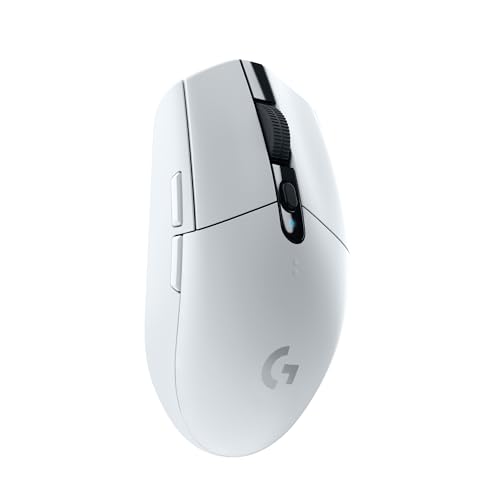
10. Logitech G305 White: Best Compact Alternative
Pros
- 3.4 oz lightweight design
- Up to 250 hours from one AA battery
- 12, 000 DPI HERO sensor
- 1 ms LIGHTSPEED wireless
- Receiver storage inside the shell
Cons
- Limited control layout
- Uses a replaceable AA battery
- Compact shape may not support larger palms
Best for: players who want the G305 design in a clean white finish.
The Logitech G305 White is functionally the same kind of mouse as the black G305, but the finish gives it a clear place on a lighter desk setup. Its compact shape, receiver storage, and 3.4 oz weight make it easy to move from a desktop to a laptop without the bulk associated with an ergonomic wireless mouse.
The HERO optical sensor reaches 12, 000 DPI, and LIGHTSPEED wireless is specified with a 1 ms response time. That is plenty for fast games and ordinary work. The sensor does not need to compete with the Viper V3 Pro’s 35, 000 DPI ceiling because the G305 is aimed at simple, consistent control rather than extreme tuning.
Battery life is one of its strongest traits. Logitech lists up to 250 hours of continuous gaming from a single AA battery. The design is not rechargeable, but that can be an advantage for travel because a spare battery can restore operation immediately. The receiver also stores inside the mouse, reducing the chance of losing the small wireless adapter.
The G305 White has the same limitations as the black version. Its control layout is basic, and the compact shell may feel undersized for a large palm grip. Players who need macros should move to the G502 Lightspeed or Razer Basilisk V3 Pro, while players focused on low weight should consider the Viper V3 Pro. The white G305 is about simplicity and portability.
Choose this model when appearance matters and the shape already suits your hand. If you are setting up a laptop station, the shape that travels without taking over your bag is a more useful priority than a long list of desktop-only features.

How to choose best wireless gaming mouse
The right mouse starts with hand position and movement style, then narrows down by sensor behavior, wireless mode, controls, and battery design.
Shape and grip
A mouse should support the way your hand naturally rests rather than forcing your fingers into a new position. Ergonomic models such as the Logitech G703 and both Razer Basilisk models suit right-handed palm and relaxed claw grips. Compact models such as the Logitech G305 can work better for fingertip use and travel.
Large shells can feel comfortable during long sessions, but they also take more effort to reposition. A low-weight symmetrical design is usually easier to lift and flick. There is no universal ideal shape, so pay attention to the listed dimensions and whether the mouse has a thumb rest or rubber side grip.
Sensor tracking
DPI describes sensitivity range, not automatic accuracy. The Logitech G305’s 12, 000 DPI sensor is sufficient for most players, while the Razer Viper V3 Pro and Logitech G PRO X2 SUPERSTRIKE provide much higher ceilings for unusual sensitivity preferences and fine adjustment.
Look for details such as IPS tracking, 1:1 movement, and the absence of smoothing or acceleration. Sensor numbers should support a stable cursor at the sensitivity you actually use. A mouse with 44, 000 DPI is not inherently more controllable than one with 12, 000 DPI.
For most players, a comfortable shape and consistent wireless link matter more than a DPI number they will never use.
Weight and movement
Weight changes how quickly the mouse starts, stops, and changes direction. The 54 g Razer Viper V3 Pro is built for fast flicks, while the 3.4 oz Logitech G305 offers a lighter everyday feel without becoming a specialist esports mouse. The Logitech G502 Lightspeed and G703 are heavier because they prioritize controls, support, and battery hardware.
Players using low sensitivity often notice weight more because they move the mouse across a larger part of the pad. Palm grip users may prefer some heft, especially when a larger shell keeps the hand planted.
Wireless polling and connection
LIGHTSPEED and HyperSpeed are the primary low-latency wireless modes represented here. The G305 uses a 1 ms report rate, while the Viper V3 Pro and Logitech G PRO X2 SUPERSTRIKE support polling up to 8 kHz. High polling can produce smoother cursor updates on a high-refresh display, but it can also increase battery use and system demands.
Bluetooth is useful for long battery life and multiple devices, not for the lowest-latency competitive play. The Basilisk V3 X can last up to 535 hours over Bluetooth, while the Basilisk V3 Pro lists up to 150 hours in that mode.
Controls and software
Extra buttons are valuable only when they are reachable and easy to distinguish. The G502 Lightspeed, G502 X Plus, Basilisk V3 X, Basilisk V3 Pro, and M810 Pro all provide more control options than the G305 or Viper V3 Pro.
Software adds another layer. Logitech G HUB handles macros, sensor settings, and advanced SUPERSTRIKE adjustments. Razer Synapse controls sensor and lighting settings, while the Redragon driver manages its button assignments and RGB. If you want a mouse that works with minimal setup, choose a simpler layout.
Battery and charging
Rechargeable mice need a charging habit, while AA-powered models trade a cable for replaceable batteries. The G305 models list up to 250 hours from one AA, and the Basilisk V3 X lists up to 285 hours over HyperSpeed or up to 535 hours over Bluetooth.
High polling and RGB can shorten those figures. The Viper V3 Pro lists up to 95 hours, and the PRO X2 SUPERSTRIKE lists 60 to 90 hours. POWERPLAY compatibility can reduce charging interruptions on several Logitech models, but the compatible charging system is separate.

Frequently asked questions
Does a wireless gaming mouse have input delay?
The Logitech LIGHTSPEED and Razer HyperSpeed systems in this list are designed for low-latency gaming. The G305 specifies a 1 ms report rate, while some models support polling up to 8 kHz. The actual experience also depends on receiver placement, software settings, and the computer.
Is a lighter mouse better for FPS games?
A lighter mouse generally takes less effort to lift and move during wide flicks, which can help low-sensitivity FPS players. The Razer Viper V3 Pro is the lightest option here at 54 g. Heavier models can still be preferable if you want a supportive palm shape or extra buttons.
Do I need a mouse with 20, 000 DPI or more?
No. A 12, 000 DPI sensor such as the one in the Logitech G305 already covers common gaming sensitivities. Higher limits can offer more adjustment, but they do not automatically improve aim or tracking.
Are AA batteries better than rechargeable batteries?
Neither design is universally better. AA batteries make the Logitech G305 easy to restore during travel, while rechargeable models avoid buying replacement batteries and can work with charging systems such as POWERPLAY. Your preference depends on whether you want cable-free maintenance or a built-in battery.
Is Bluetooth suitable for gaming?
Bluetooth can work for casual games and general use, but the dedicated 2.4 GHz modes are the better choice for competitive play. The Basilisk V3 X and Basilisk V3 Pro support both, allowing you to use Bluetooth for battery-conscious multi-device work and HyperSpeed for gaming.
Do extra mouse buttons help in every game?
Extra buttons help most in games with abilities, inventory commands, macros, or frequent shortcuts. They can be unnecessary in simple shooters, where a lighter shell and uncluttered grip may be more useful. The G502 and Basilisk models make the most sense when you already know which commands you want to bind.

The bottom line
The Best wireless gaming mouse for most players is the Logitech G502 Lightspeed. Its HERO 25K sensor, LIGHTSPEED connection, eleven programmable buttons, and versatile scroll wheel cover more games and work tasks than any other model here. It is heavy, so the Razer Viper V3 Pro is the better choice for competitive players who want 54 g movement and up to 8, 000 Hz polling.
The Logitech G305 Black and White models are the practical alternatives. They offer a compact 3.4 oz shell, 1 ms LIGHTSPEED wireless, and up to 250 hours from one AA battery. Choose the black version for a traditional setup, the white version for a lighter desk, and the Razer Basilisk V3 X if ergonomic support, Bluetooth, and longer battery life matter more.
If you are undecided, choose the Logitech G502 Lightspeed for versatility, or the Razer Viper V3 Pro if fast, low-effort movement is your first priority.
As an Amazon Associate we earn from qualifying purchases.