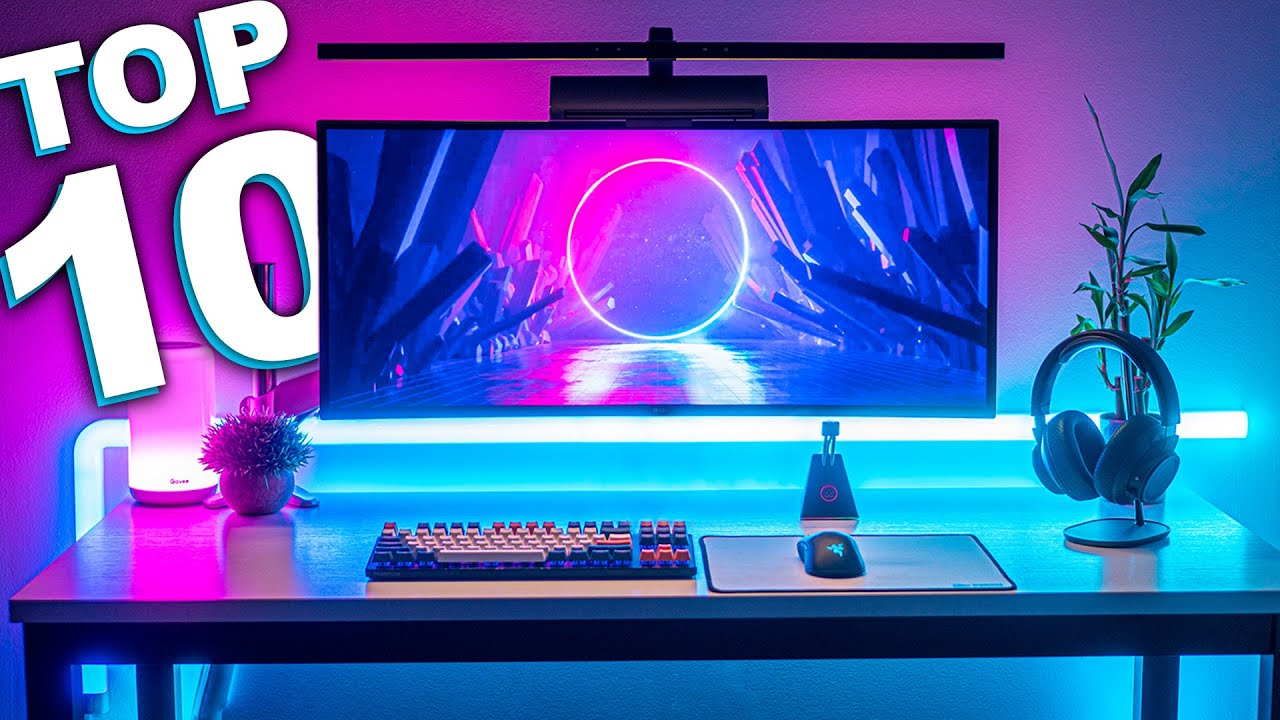

A gaming desk can feel crowded long before it looks impressive. Drinks compete with controllers, headphones have nowhere to go, and a tangle of cables can undo the effect of an otherwise carefully planned setup. Lighting brings its own problems, since some options are bright and useful while others are mainly decorative.
The Best gaming setup accessories in this roundup cover the practical gaps first, then add room atmosphere where it makes sense. We ranked the Ledagic IC+RGBW Light Bar as the top pick for its unusually broad lighting controls, while the list also includes charging stands, a wall organizer, display lighting, a phone holder, and a desk cup holder.
Comparison table
| # | Product | Award | Main function | Size or capacity | Best for |
|---|---|---|---|---|---|
| 1 | Ledagic IC+RGBW Light Bar | Best overall | RGBW light bars, app, remote | 2 bars, 12.8 inches each | Flexible desk and room lighting |
| 2 | VELENTI Gamer Chair Stand | Best phone holder | Phone and Kindle stand | Devices up to 19 cm tall | Keeping notifications visible |
| 3 | OOKUU Metal Cup Holder | Best desk utility | Clamp-on cup and bottle holder | 3.95-inch diameter | Moving drinks off the desktop |
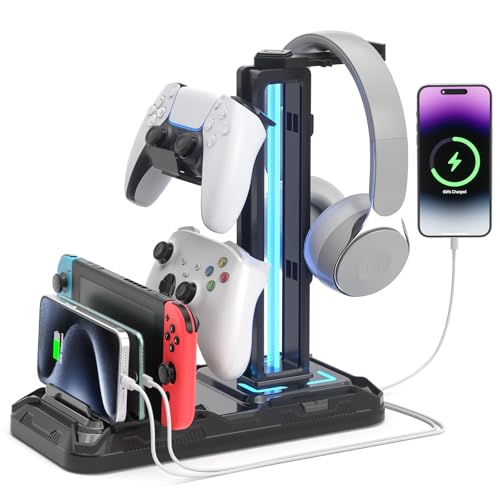
| 4 | KDD Charging Headset Stand | Best charging station | Headset and controller storage | 1 headset and 2 controllers | A central charging and storage point |
| 5 | One Fire Galaxy Projector | Best room atmosphere | Galaxy projection and speaker | 15 light combinations | Relaxed ambient lighting |
| 6 | Paladone PlayStation Icon Light | Best licensed decor | PlayStation symbol lighting | About 30 cm wide | PlayStation themed rooms |
| 7 | Grupo Erik Zombie Holder | Best character stand | Controller, headset, and phone holder | 10.6 inches tall | A distinctive display piece |
| 8 | KDD RGB Controller Stand | Best rotating stand | Headset and controller storage | 1 headset and 2 controllers | Flexible storage with RGB lighting |
| 9 | Divoom Pixoo Pixel Panel | Best pixel display | App-controlled pixel art | 16 by 16 pixel display | Custom animated desk decor |
| 10 | Keepo Gaming Pegboard | Best wall storage | Pegboard organization system | 33 by 22 inches | Clearing gear from a small desk |
1. Ledagic IC+RGBW Light Bar: Best Overall

Pros
- Two compact 12.8-inch light bars
- App, remote, and inline button controls
- White lighting and RGB effects in one unit
- Audio syncing with more than 64 patterns
Cons
- USB power requires a nearby powered port
- The many modes can take time to sort through
- No hub is included or required, but app use adds another control method
Best for: anyone who wants one lighting kit that can switch between useful white light and animated room effects.
The Ledagic IC+RGBW Light Bar is the most adaptable lighting option here. It is not limited to being a glowing strip behind a monitor. The two bars can sit next to a television or console, work as ambient lighting around a desk, or add color to a display shelf. Their compact 12.8-inch size makes them easier to place than a long continuous strip, especially when the desk is already occupied by a monitor stand and speakers.
The useful distinction is the combination of RGB and white light. The white mode is designed for brighter illumination when working, while the RGB mode offers 16 million colors for a more theatrical gaming room. Brightness is adjustable from 1 percent to full brightness, so the lights can sit behind a screen without dominating a dark room. A 60-inch cord gives some freedom to position the bars, although the USB cable still needs to reach a powered port on a monitor, computer, television, charger, or power bank.
Control is unusually well covered. The LotusLamp X app handles brightness, colors, scenes, modes, and timers, while the included 24-button remote offers quick changes from across the room. There is also a button on the USB power control, which is handy when a phone is not nearby. The built-in music sensor can react to game, film, and music audio, and the more than 64 listed patterns include chasing, gradient, strobe, running, and other effects.
That breadth is also the main weakness. Someone who wants a simple light that turns on and stays one color may find the options excessive. USB power keeps installation straightforward, but it means this is not a fully independent wall light. Compared with the Paladone PlayStation Icon Light, the Ledagic is less of a branded statement piece and more of a flexible lighting tool. It also offers more practical control than the One Fire Galaxy Projector when the goal is to illuminate the desk rather than the whole room.
The Ledagic is the one we'd keep for a setup that needs to change moods. It is the strongest match for a player who wants functional white lighting during the day and animated color after dark.
2. VELENTI Gamer Chair Stand: Best Phone Holder

Pros
- Keeps a phone upright and visible
- Holds smartphones or Kindles up to 19 cm tall
- Distinctive gaming chair design
- Small footprint for a crowded desk
Cons
- Holds one device
- It is a stand, not an adjustable charging dock
- The playful design will not suit every setup
Best for: gamers who want to see notifications without leaving a phone flat on the desk.
The VELENTI Gamer Chair Stand solves a minor problem that becomes surprisingly annoying during a long session. A phone lying flat disappears under a keyboard, controller, or charging cable. This stand raises it into view, so notifications can be checked without reaching across the desk or picking up the device.
Its gamer chair shape gives it more personality than the plain stands in an office supply drawer. That makes it a decor choice as much as a utility item, which is useful for a setup built around a particular visual theme. The stand is small enough to sit beside a monitor or at the edge of a desk without competing with the main controls.
Compatibility is expressed by device height rather than a list of phone models. It accepts smartphones and Kindle devices up to 19 cm tall. That makes it more flexible than a holder shaped around a single handset, but the fit of a particularly thick case is not specified. The stand is intended to support the device while it is being viewed, not to provide charging or cable management.
This is a simpler accessory than the Grupo Erik Zombie Holder. The Grupo Erik has more presence and is designed to hold gaming equipment, while the VELENTI makes more sense when the phone itself is the priority. It is also less ambitious than the KDD stands, which combine device storage with charging ports, but that simplicity keeps the VELENTI focused.
The limitation is obvious: it holds one device and has no documented adjustment or charging function. Skip it if your phone is normally hidden behind a monitor or if you want one station for controllers and a headset. For anyone who wants a visible phone in a fun form, it is an easy addition.
3. OOKUU Metal Cup Holder: Best Desk Utility

Pros
- Clamp-on installation requires no drilling
- 3.95-inch diameter suits many large drinks
- Metal construction with anti-slip protection
- U-shaped slot accommodates cups with handles
Cons
- Needs a suitable desk edge for the clamp
- It occupies space beside the desk rather than under it
- The holder is designed for drinks, not a general storage bin
Best for: players who want to move large cups and bottles away from keyboards and electronics.
The OOKUU Metal Cup Holder is one of the least glamorous products here, and one of the easiest to justify. A drink beside a keyboard is a bad arrangement. Moving it to the side of the desk creates a cleaner play area and removes one source of accidental spills from the immediate workspace.
The holder has a 3.95-inch diameter and is intended for bottles and cups from 18 to 40 ounces. That covers the larger containers many players keep nearby during long sessions. Its U-shaped slots are useful for handled mugs, while the bottom has non-slip pads and spill-resistant lines. Those features can reduce movement and dripping, though no desk cup holder makes an open drink impossible to spill.
Installation is handled by a clamp and hand-tightened knob. Five installation directions give the holder more flexibility when two units need to sit side by side or when the desk layout leaves little room. Protective pads between the clips help prevent scratches and improve grip. The metal construction should also be better suited to heavy bottles than a thin plastic clip, based on the product's stated material and support design.
The main issue is desk compatibility. The clamp needs an accessible edge, and the holder extends outside the main work surface. It is not a hidden drawer or a replacement for a drink coaster. Compared with the VELENTI Gamer Chair Stand, this accessory makes a larger physical change to the desk, but it solves a more consequential problem. It is also more immediately practical than decorative lights if the setup is cluttered.
The OOKUU is a good example of how small changes that free up desk space can improve a setup more than another decorative object. Choose it when drink placement is the recurring nuisance, especially with a large tumbler or bottle.
4. KDD Charging Headset Stand: Best Charging Station
Pros
- Stores a headset and two controllers
- Can hold four controllers instead
- Two USB ports and one Type-C port
- Nine lighting modes with memory mode
- Rubber protection on the base and hangers
Cons
- Type-C charging is not compatible with iPhone charging
- The wide 11.42-inch footprint needs desk room
- Plastic construction is less characterful than a resin stand
Best for: a shared desk that needs one place for a headset, controllers, and several charging cables.
The KDD Charging Headset Stand is the most practical storage hub in the first half of this list. It replaces the loose pile of headset, controllers, and charging leads with one dedicated station. The layout can hold one headset and two controllers, or up to four controllers, which gives it a useful advantage for households with more than one gamepad.
Its charging hardware includes two USB ports and one Type-C port. The product describes these as suitable for devices such as smartphones, tablets, headphones, Kindles, and power banks. The important caveat is that the Type-C port is not compatible with iPhone charging. Buyers with an iPhone should check their existing cables and plan to use the available USB connection where appropriate.
The stand is 11.42 inches long and 7.4 inches wide, so it is not a tiny desktop hanger. That footprint buys stability, though. Six rubber pads sit underneath the base, and soft protective rubber on the hangers helps separate the stored equipment from the stand. A built-in button can connect or disconnect the circuits, making it possible to shut down the charging ports without pulling the power cable.
The nine lighting modes are more than a single RGB accent, with fast flashing, breathing, and individual red, green, blue, purple, light blue, yellow, and white modes. Memory mode keeps a preferred setting. These effects make the stand fit a themed room, but the lighting is secondary to the storage. The Paladone PlayStation Icon Light is a stronger decorative statement, while the KDD is the better answer to a desk covered in hardware.
The weakness is its size and generic appearance. It needs a clear section of desk, and people looking for a sculptural display piece may prefer the Grupo Erik Zombie Holder. It suits a buyer who wants charging and organization first, with lighting as a bonus.
5. One Fire Galaxy Projector: Best Room Atmosphere

Pros
- 15 nebula and star combinations
- Seven brightness levels and three fluid speeds
- Two projection angles
- Bluetooth speaker and white noise functions
- Timer options plus automatic shutoff
Cons
- It is room decor rather than desk storage
- Projection depends on having a suitable wall or ceiling
- The lighting effects are less targeted than a pair of light bars
Best for: players who want a relaxed galaxy effect across the room rather than focused desk lighting.
The One Fire Galaxy Projector changes the atmosphere of a room more dramatically than a small desk lamp. Its nebula-style colors and green stars are aimed at walls and ceilings, making it a natural fit for a gaming room, dorm, or a corner used for films and music. The compact body measures about 4.13 inches across, so it does not consume much shelf or desk space.
There are 15 light combinations, seven brightness levels, and three fluid speeds. That gives the projection some range, from a subdued background glow to a more active room effect. Two projection angles help direct the image, although the best result still depends on where the projector sits and how much clear wall or ceiling area is available.
This model also adds a Bluetooth speaker and 15 white noise options. Those functions broaden its use beyond gaming sessions, especially for relaxing with quieter background sound. Timers can be set for two, four, or six hours, and the unit has an eight-hour automatic shutoff. The product describes it as USB powered, which keeps placement relatively flexible as long as a suitable USB power source is nearby.
The trade-off is control. The Ledagic IC+RGBW Light Bar gives more detailed lighting control around a desk, including app access, a remote, white illumination, and audio-reactive patterns. The One Fire is the better room effect, but not the better choice for lighting a keyboard or creating a precise monitor backlight. It also cannot replace the organizational function of either KDD stand.
Choose the One Fire when the room itself needs a mood change. It is especially appealing for someone who wants lighting, sound, and timed relaxation features in one compact object.
6. Paladone PlayStation Icon Light: Best Licensed Decor

Pros
- Officially licensed PlayStation design
- Standard, color phasing, and sound-reactive modes
- USB or battery powered
- About 30 cm wide
- Recognizable themed decoration
Cons
- AAA batteries are not included
- It offers less lighting control than the Ledagic
- The wide shape needs a visible display space
Best for: PlayStation fans who want a recognizable centerpiece rather than general-purpose task lighting.
The Paladone PlayStation Icon Light earns its place through identity. The familiar symbols are instantly recognizable, and the light looks like a deliberate part of a PlayStation themed room rather than a generic RGB accessory. It is a conversation piece for a game night and a straightforward way to make a shelf or desk feel tied to a specific console family.
There are three modes: standard lighting, dynamic color phasing, and sound-reactive lighting. The latter responds to nearby music or game audio, while the phasing mode brings movement without requiring the room to be loud. This is less configurable than the Ledagic's app and more than 64 patterns, but the controls are easier to understand because the product is built around a small number of effects.
The light is approximately 30 cm wide and 10 cm tall, with a USB cable included. It can also run from three AAA batteries, though those batteries are not included. USB operation is the sensible choice for a permanent desk or shelf installation, while battery power gives more freedom when the display is away from a convenient port.
The large horizontal footprint is the catch. It needs a shelf, console unit, or open section of desk, and its illumination is primarily decorative. The One Fire Galaxy Projector covers more of a room, while the Divoom Pixoo offers far more customization. The Paladone wins when recognizable branding matters more than changing artwork or full-room coverage.
Skip it if you want neutral lighting or a small device that can move between several setups. For a PlayStation fan building a themed space, its clear visual identity is the reason to choose it.
7. Grupo Erik Zombie Holder: Best Character Stand

Pros
- Hand-painted resin construction
- Holds a controller, headset, or phone
- Strong character design
- 10.6-inch height makes equipment easy to display
- Suitable for many controller and headset types
Cons
- The zombie theme is not a neutral design
- Its tall shape needs vertical clearance
- It does not provide charging ports
Best for: gamers who want their storage accessory to look like a display sculpture.
The Grupo Erik Zombie Holder is the most distinctive stand in this roundup. Rather than hiding the accessory behind a plain plastic hanger, it turns the headset or controller into part of a character display. The hand-painted resin construction gives it more visual weight than the KDD stands, and the zombie design makes the purpose immediately clear.
Functionally, it is built to hold almost any gaming controller while it charges, according to the product description, and it can also act as a phone holder. It is suitable for official controllers and most headsets on the market. That broad positioning is useful, but buyers should still consider the shape of their particular headset because the product does not provide a detailed measurement for the supported headband.
At about 10.6 inches tall, the stand has a noticeable presence on the desk. Its footprint is approximately 6.7 inches long by 7.3 inches wide, and it weighs about 1.54 pounds. Those dimensions make it less likely to disappear behind a monitor, but they also make it a poor fit for a very narrow shelf or shallow desk.
Compared with the KDD Charging Headset Stand, the Grupo Erik offers character instead of integrated charging and multi-device capacity. The VELENTI Gamer Chair Stand is a smaller and more focused phone holder, while the Grupo Erik is the stronger option when a controller and headset should be part of the room's visual design. The lack of charging ports is its clearest functional limitation.
This stand should be skipped by anyone who wants discreet storage or a lighting feature. It belongs in a themed setup where the accessory itself is meant to attract attention, especially for someone who appreciates gaming decor with a collectible feel.
8. KDD RGB Controller Stand: Best Rotating Stand

Pros
- Stores one headset and two controllers
- Can hold four controllers instead
- Two Type-C ports and one USB port
- 360-degree rotation and cable organizer
- Nine RGB lighting effects with memory
Cons
- The listed USB and Type-C ports are not compatible with iPhone charging
- It requires assembly
- The RGB colors cycle individually rather than forming a rainbow gradient
Best for: players who want rotating access to stored controllers and a headset.
The second KDD stand is close to the Charging Headset Stand in purpose, but it has a different emphasis. Its 360-degree rotation makes the stored equipment easier to reach from different seating positions, and the integrated cable organizer keeps charging leads from spreading across the desk. That flexibility is helpful on a shared gaming surface.
Storage follows the same useful arrangement: one headphone set and two controllers, or four controllers. The stand is designed to fit most headset sizes and a wide range of controllers. Four anti-slip rubber bases support the stand, while soft protective rubber around the contact points helps reduce the chance of scratches.
Charging is handled by two Type-C ports and one USB port. The product lists phones, tablets, headphones, e-readers, and power banks among the supported devices, but it specifically notes that the ports are not compatible with iPhone charging. That warning matters more here because the multiple ports may look like a universal charging solution when they are not.
The RGB system provides nine lighting effects, including fast flashing, breathing, and seven individual colors. Its memory function recalls the previous mode, but the product says the colors cycle one by one rather than creating a rainbow gradient. Assembly is described as a five-part process taking about 30 seconds, which is not a major hurdle but is still one more step than a ready-made character stand.
The KDD Charging Headset Stand is the better pick if its wider storage arrangement and circuit button matter more. This model makes more sense when rotation and cable tidiness are the priorities. It is a practical stand with a stronger desk-interaction feature, not a replacement for a dedicated charging dock for every phone.
9. Divoom Pixoo Pixel Panel: Best Pixel Display

Pros
- 16 by 16 pixel display
- App-based custom artwork and animations
- 16 million colors
- Music sync and gallery access
- Retro display style
Cons
- It is decorative rather than organizational
- The wide panel needs wall or shelf space
- Customization depends on using the app
Best for: gamers who want changing pixel art instead of a fixed light or sign.
The Divoom Pixoo is the most creative lighting product here. It is not just a panel that changes color. The 16 by 16 pixel display can show pixel art and animations, giving the desk a retro arcade quality that a conventional RGB bar cannot reproduce. It works as a desk piece or as a display on a shelf.
The Divoom app is central to the experience. It provides a drawing board for DIY artwork, access to a gallery, and music synchronization. Users can upload custom animations from the app gallery or add their own designs. That makes the display more personal than the fixed PlayStation Icon Light, though it also means the appeal depends on whether the buyer wants to spend time choosing or creating content.
The panel measures about 18.27 inches wide and 9.06 inches high, with a listed depth of 1.18 inches. Those proportions make it a substantial horizontal display, not a small accent tucked beside a mouse pad. Its 16 million colors help animations appear lively, but the pixel grid remains part of the look. That is the point for some rooms and a distraction for others.
The Ledagic IC+RGBW Light Bar is more useful when the goal is illumination around a monitor, and the One Fire Galaxy Projector is better for broad atmospheric coverage. The Divoom sits between those ideas as a piece of animated decor. It does not help store controllers, hold a drink, or reduce cable clutter.
The key weakness is its reliance on customization for its full appeal. Someone who wants to plug in a light and leave it alone may prefer the Paladone. Choose the Pixoo if personal artwork, retro graphics, and a changing desk backdrop matter more than practical utility.
10. Keepo Gaming Pegboard: Best Wall Storage

Pros
- Large 33 by 22-inch organizer
- Includes hooks, bins, and a cable organizer
- Includes headphone and console holders
- Adhesive and screw mounting options
- Flexible layouts for changing gear
Cons
- Wall mounting requires careful planning
- The large panel needs clear wall space
- It is less portable than a desktop stand
Best for: anyone whose desk is overloaded with controllers, cables, headsets, and display pieces.
The Keepo Gaming Pegboard addresses the largest organizational problem in this group: gear that has nowhere to live. Instead of adding another object to the desk, it moves storage onto the wall. The panel measures 33 by 22 inches, providing enough visible area for controllers, headphones, cables, bins, and decorative items.
The kit includes hooks, bins, a headphone holder, a console holder, and a cable organizer. That mix is more useful than a bare pegboard because it supports several kinds of equipment from the beginning. The layout can also be changed as the setup evolves, which is important for players who add or remove controllers and accessories over time.
Mounting options include adhesives and screw mounts. Adhesive installation can be useful when drilling is not possible, but wall condition and the weight of the stored gear will matter. Screw mounting is the more permanent route. The panel itself is listed at about four pounds, so installation deserves more care than attaching a small decorative light.
Compared with the KDD stands, the Keepo uses wall space instead of desk space and can separate more categories of equipment. The KDD models remain easier for a renter or anyone who moves equipment frequently. The OOKUU cup holder solves one specific source of clutter, while the Keepo can address controllers, cables, headsets, and props in one visible arrangement.
The weakness is commitment. A large organizer changes the wall and needs a layout that looks intentional, particularly in a small room. It is the right choice when clutter is the problem that keeps returning, not when the buyer only wants an RGB accent.
How to choose best gaming setup accessories
The right accessory should solve a visible problem in the setup, not merely add another glowing object. Start with the type of clutter or atmosphere you want to improve, then match the accessory's capacity and controls to the space available.
Storage capacity
A controller stand should state how many controllers it can hold and whether it also supports a headset. The KDD models can hold one headset and two controllers, or four controllers, while the Keepo pegboard spreads storage across hooks, bins, and holders.
Look at the equipment you actually own. A compact stand is sufficient for one player with one headset, but a shared setup benefits from a multi-controller arrangement or wall storage. Avoid choosing a stand based only on its appearance if it cannot hold the devices that currently occupy your desk.
Lighting control
Lighting products vary from fixed themed decor to app-controlled color systems. Ledagic's bars combine white illumination, RGB effects, brightness adjustment, app control, remote control, timers, and audio syncing. The Paladone light keeps things simpler with three modes, while the Divoom focuses on pixel art and custom animations.
The best gaming setup accessories make the desk easier to use before they make it more colorful.
Decide whether the light should illuminate a work surface, add a glow behind a screen, project across a room, or display artwork. A galaxy projector is not a substitute for focused desk lighting, and a decorative sign is not a storage solution.
Desk footprint
Measure the open area before adding a stand or display. The KDD Charging Headset Stand is 11.42 inches long and 7.4 inches wide, while the Grupo Erik holder is about 10.6 inches tall. The Paladone light is approximately 30 cm wide, and the Divoom panel is about 18.27 inches wide.
A small phone stand or clamp-on cup holder can work when the central desk area is full. Larger stands need a stable, visible section of the surface. For more guidance on how much room a complete gaming area needs, think about chair clearance and cable reach as well as the tabletop.
Power and charging
USB-powered lights are easy to place near a monitor, television, computer, charger, or power bank, but they still depend on a nearby port. Charging stands add convenience, yet their ports are not always universal. Both KDD listings call out limitations with iPhone charging, so check connector compatibility before treating a stand as a complete charging station.
Battery operation can make a decorative light easier to position. The Paladone can use three AAA batteries, although they are not included. That flexibility is useful for shelves without a cable route, while permanent desk lighting generally benefits from USB power.
Mounting and materials
Clamp-on accessories should match the thickness and edge shape of the desk. The OOKUU uses a hand-tightened clamp with protective pads, while the Keepo offers adhesive and screw mounting. Wall storage needs more planning because a large panel must be level, secure, and positioned where the stored equipment is easy to reach.
Materials also affect the character of the setup. The OOKUU uses metal, the Grupo Erik uses hand-painted resin, and the KDD stands use plastic casing with rubber protection. Choose based on whether the item is mainly supporting equipment, organizing cables, or acting as a permanent display piece.
Frequently asked questions
What are the most useful gaming setup accessories?
The most useful choice depends on the problem. A cup holder can remove drinks from the keyboard area, a charging stand can organize controllers and headphones, and a pegboard can move a larger collection of gear off the desk. Lighting is useful when it improves visibility or creates the atmosphere you want without adding clutter.
Which accessory is best for a small gaming desk?
The VELENTI Gamer Chair Stand takes up less space than the larger controller stands and keeps a phone upright. The OOKUU cup holder can also preserve tabletop room by clamping outside the desk edge. If the wall is available, the Keepo pegboard moves storage away from the work surface entirely.
Can the KDD stands charge an iPhone?
The product information for both KDD stands says their listed USB and Type-C charging arrangements are not compatible with iPhone charging. Buyers should not assume that a Type-C port supports every device. Check the required cable and charging compatibility before relying on either stand for an iPhone.
Are gaming light bars better than a galaxy projector?
They serve different purposes. The Ledagic light bars are better for targeted desk or monitor lighting, white illumination, and detailed app or remote control. The One Fire Galaxy Projector is better for spreading a nebula and star effect across a wall or ceiling, with added speaker and white noise functions.
Does the Keepo pegboard require drilling?
The Keepo includes adhesive and screw mounting options. Adhesive mounting avoids drilling, but the wall surface and the weight of the stored accessories still matter. Screw mounting is the more permanent approach and should be planned carefully before the panel is loaded.
How many devices can the KDD Charging Headset Stand hold?
It can hold one headset and two controllers at the same time, or four controllers instead. Its slots can also hold devices such as a smartphone, iPad, or Switch according to the product information. The stand is designed as a storage hub rather than a simple single-headset hanger.
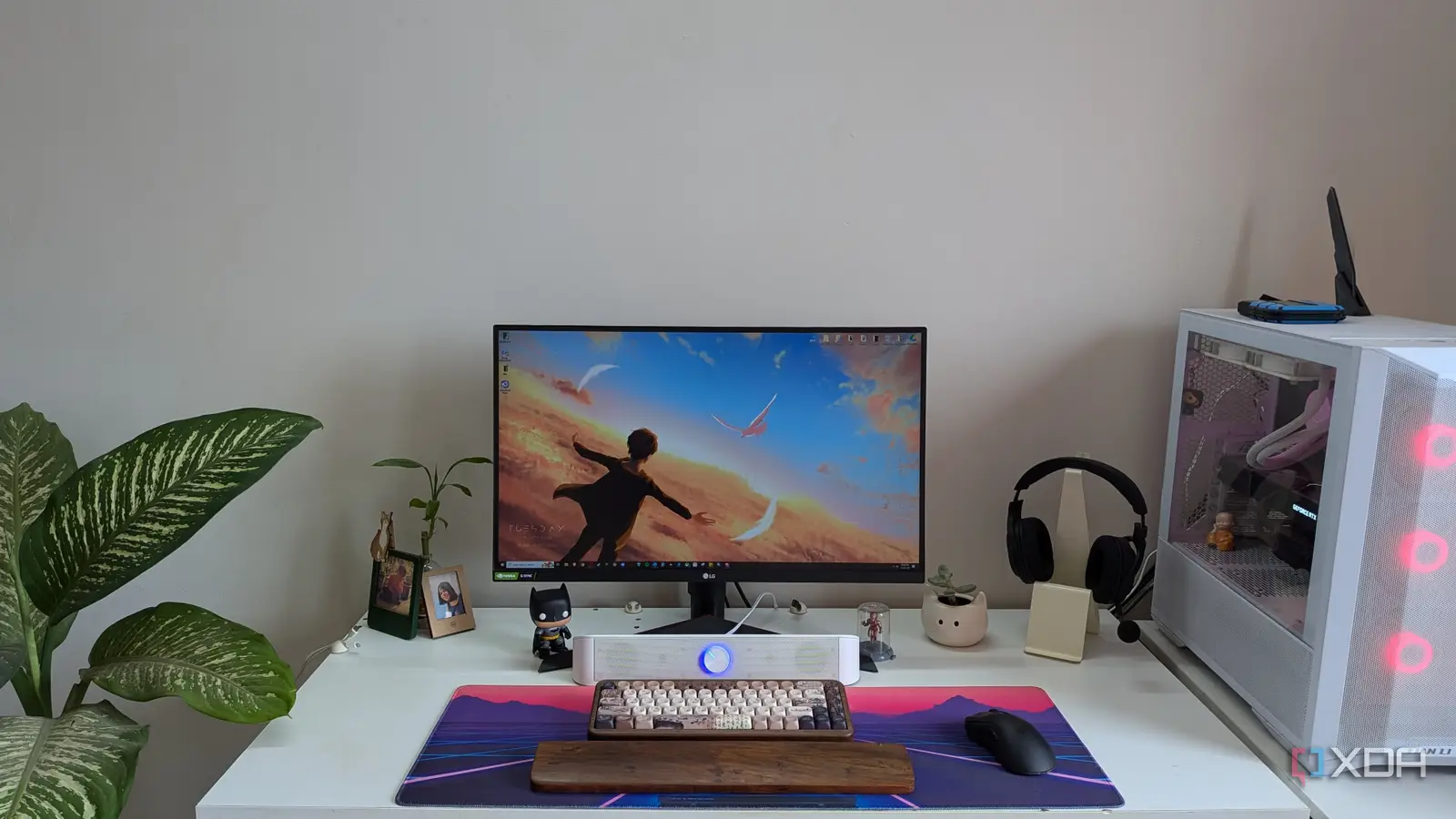
The bottom line
The Best gaming setup accessories do not all need to perform the same job. Ledagic IC+RGBW Light Bar is the strongest all-around pick because it combines two compact bars with white lighting, app and remote control, adjustable brightness, audio syncing, and a large selection of effects.
For a more practical setup, choose KDD Charging Headset Stand when controllers and headphones need one organized home. Choose Keepo Gaming Pegboard when the desk is already overloaded and wall storage is available. The One Fire Galaxy Projector, Paladone PlayStation Icon Light, and Divoom Pixoo each make more sense when room atmosphere and personal style matter most.
If you are undecided, start with the accessory that removes the most persistent source of clutter, then add lighting once the desk is easier to use.
As an Amazon Associate we earn from qualifying purchases.