
A printer can be the most useful device in a home office or the most irritating one, depending on how often it jams, how quickly it prints, and whether it handles the jobs you actually do. A compact color all-in-one is ideal for schoolwork and photos, while a monochrome laser model makes far more sense for stacks of documents.
Our Best best selling printer picks cover cartridge inkjets, a refillable ink tank, a laser all-in-one, and one genuinely portable thermal model. The Canon PIXMA TS6520 is the strongest all-around choice, while the rest target specific needs such as faxing, high-volume inkjet printing, mobile use, and black-and-white documents.
Comparison table
| # | Product | Award | Printing type | Duplex | ADF | Best for |
|---|---|---|---|---|---|---|
| 1 | Canon PIXMA TS6520 | Best overall | Color inkjet | Automatic | No | Home documents and photos |
| 2 | HP DeskJet 2955 | Best compact basic printer | Color inkjet | Not specified | No | Light home printing |
| 3 | Epson EcoTank ET-2800 | Best ink tank | Color ink tank | Not specified | No | Frequent color printing |
| 4 | HP OfficeJet Pro 8139 | Best home office | Color inkjet | Automatic | Yes | Workloads and document batches |
| 5 | Canon PIXMA TS4320 | Best for straightforward setup | Color inkjet | Automatic | No | Everyday home use |
| 6 | Brother DCP-L2640DW | Best monochrome laser | Monochrome laser | Automatic | 50 sheets | Fast black-and-white work |
| 7 | Brother MFC-J1360DW | Best color home office inkjet | Color inkjet | Automatic | 20 sheets | Mixed home-office tasks |
| 8 | Canon PIXMA TR4720 | Best with fax | Color inkjet | Automatic | Yes | Home paperwork and faxing |
| 9 | HP Envy 6155 | Best for photos | Color inkjet | Automatic | No | Photos and family documents |
| 10 | NDYIN N80 | Best portable printer | Thermal | Not specified | No | Travel and mobile paperwork |
1. Canon PIXMA TS6520: Best Overall

Pros
- Automatic two-sided printing
- Dual-band Wi-Fi
- Scanner and copier built in
- Compact footprint
- OLED status display
Cons
- Uses a two-cartridge ink system
- No automatic document feeder
- Heavier than some compact home models
Best for: home users who want one color printer for documents, scans, copies, and photos.
The Canon PIXMA TS6520 is the printer we would put in the largest number of homes. It is not built around one dramatic specialty. Instead, it gets the common jobs right: wireless color printing, scanning, copying, automatic two-sided output, and photo printing on media up to 8.5 by 11 inches. That combination makes it easier to recommend than a printer that excels at only one type of task.
Canon uses a two-cartridge hybrid ink system here, with one cartridge handling black and the other handling color. The design produces sharp text and vivid color according to the supplied specifications, and it avoids the more complicated individual-cartridge arrangements found on some models. The tradeoff is that a depleted color component can affect the whole color cartridge, so frequent color users may prefer the Epson EcoTank ET-2800 instead.
The 1.42-inch monochrome OLED display is small, but it has a useful purpose. It shows printer status and ink information without requiring a phone for every basic check. Canon also gives the TS6520 dual-band Wi-Fi, supporting both 2.4GHz and 5GHz connections. That is a practical advantage in a busy home network, especially when the printer is placed away from the main computer.
The integrated scanner and copier make it more useful than a single-function printer, though the absence of an automatic document feeder limits multi-page work. Its 14.8-inch length, 14-inch width, 6.7-inch height, and 15.3-pound weight make it compact enough for a shelf or desk, but not especially light. The features that matter most in a home document setup are all here, with automatic duplexing doing more to improve daily convenience than the small screen does.
Choose the TS6520 if you want a balanced color all-in-one and do not regularly scan or copy long stacks. The HP OfficeJet Pro 8139 is the better office tool, and the Epson is better for sustained color volume, but the Canon is the more natural fit for mixed household printing.
2. HP DeskJet 2955: Best Compact Basic Printer

Pros
- Print, scan, and copy functions
- Dual-band wireless connectivity
- Compact home-friendly design
- 60-sheet input tray
- HP app support
Cons
- Slower than the other full-size inkjets
- No automatic document feeder
- Intended for basic workloads
Best for: occasional home printing such as recipes, letters, forms, and school documents.
The HP DeskJet 2955 is deliberately uncomplicated. It is a small color all-in-one for people who print a few pages, scan the occasional form, and want a device that does not dominate a home workspace. Its 60-sheet input tray suits light use, and the icon LCD keeps the printer's own controls simple.
HP lists speeds of up to 7.5 pages per minute for black printing and 5.5 pages per minute for color. Those figures place it behind the Canon PIXMA TS6520 and far behind the Brother DCP-L2640DW, but that is not necessarily a problem for a recipe, short letter, or handful of homework pages. It becomes limiting when several people are waiting for a document batch.
The printer supports color printing, copying, scanning, mobile printing, and wireless operation. Its dual-band Wi-Fi is designed to detect and resolve connection issues automatically, while the HP app handles printing, scanning, copying, and fax functions from a smartphone. The supplied data does not identify automatic duplex printing, so buyers who specifically want two-sided output should look at the Canon PIXMA TS4320 or HP Envy 6155 instead.
HP also highlights an AI-assisted formatting feature for web pages and emails. That can help remove unwanted content and avoid awkward layouts when printing directly from online material. The design uses at least 70 percent recycled plastic and carries ENERGY STAR and EPEAT certifications, while its dimensions are 16.73 inches wide, 11.97 inches long, and 6.06 inches high. At 7.55 pounds, it is the easiest full-size home model here to move.
The weakness is capacity and pace, not its basic feature set. The DeskJet 2955 is the wrong choice for frequent multi-page printing, and the Brother MFC-J1360DW offers more productivity hardware. For occasional users who want a compact color printer with a straightforward control panel, the HP is a sensible, focused pick.
3. Epson EcoTank ET-2800: Best Ink Tank

Pros
- Cartridge-free ink tank system
- High stated black and color page yields
- Scanner and copier included
- Heat-free Micro Piezo printing
- Wireless color operation
Cons
- Slower than the office-focused models
- Requires careful bottle refilling
- Epson recommends genuine ink
Best for: households that print color regularly and want fewer ink replacement interruptions.
The Epson EcoTank ET-2800 is the clear alternative to the cartridge-based printers in this roundup. Its central idea is simple: ink goes into built-in tanks rather than a series of small cartridges. That changes the ownership routine. Instead of replacing a cartridge whenever one runs dry, the user monitors the reservoirs and refills them from bottles.
Epson says the included ink can print up to 4, 500 black pages and 7, 500 color pages, with the exact result depending on the documents being printed. Those figures make the ET-2800 a better match for a household that prints regularly than the HP DeskJet 2955. Epson also says the ink supplied can last up to two years, which is useful for reducing the number of interruptions between refills.
The printer uses Micro Piezo Heat-Free Technology and is rated for up to 10 ISO pages per minute. That is respectable for a home ink tank model, though the HP OfficeJet Pro 8139 reaches up to 20 black pages per minute and 10 color pages per minute. The ET-2800 is therefore more about steady color output and refill frequency than rapid document handling.
It combines printing, scanning, copying, and wireless connectivity in a body measuring roughly 17 inches long, 16 inches wide, and 9.3 inches high. At 11.4 pounds, it is manageable but taller than the Canon PIXMA TS6520. There is no stated automatic document feeder or automatic duplex feature in the supplied information, so scanning a stack or printing two-sided documents requires more manual involvement.
Epson strongly recommends genuine ink and warns that non-genuine ink can damage the printer in ways not covered by its limited warranty. That is an important limitation for anyone attracted to the tank design but unwilling to follow the manufacturer's supply guidance. If regular color printing is the priority, the ET-2800 is the strongest fit. If convenience means fast controls and automatic document handling, the HP OfficeJet Pro 8139 is more capable.
4. HP OfficeJet Pro 8139: Best Home Office

Pros
- Up to 20 black pages per minute
- Automatic document feeder
- Automatic two-sided printing
- 225-sheet input tray
- Fax, scan, copy, and print functions
Cons
- Large and heavy
- Uses cartridges with original HP chips or circuitry
- More printer than casual users need
Best for: home offices that handle frequent documents, scans, copies, and occasional faxing.
The HP OfficeJet Pro 8139 is the practical step up when a basic home all-in-one starts feeling cramped. Its 225-sheet input tray, automatic document feeder, duplex printing, and fax function address the friction points that appear during real office work. You can load a larger stack, scan several pages, and print on both sides without treating every job as a manual process.
HP lists print speeds of up to 20 pages per minute in black and 10 pages per minute in color. The black speed is substantially ahead of the Canon PIXMA TR4720 and HP DeskJet 2955, making this a better choice for reports, forms, and work documents. The automatic document feeder is just as important as the speed because it lets the scanner and copier handle multi-page work with less supervision.
A 2.7-inch color touchscreen gives the printer a more usable control surface than the icon display on the DeskJet 2955. Dual-band Wi-Fi and the HP app support printing, scanning, copying, and faxing from a mobile device. HP also includes an AI-assisted feature intended to clean up web pages and email layouts before printing, which should help when the source document was not designed for paper.
The physical footprint reflects its office hardware. It measures 18.12 inches wide, 13.29 inches long, and 9.17 inches high, and weighs 17.6 pounds. HP says it contains more than 45 percent recycled plastic and includes HP Wolf Essential Security. The printer is also intended to work only with cartridges using original HP chips or circuitry, with firmware updates maintaining those restrictions. That supply limitation is a reason to consider the Brother DCP-L2640DW if your work is almost entirely black and white.
The OfficeJet Pro 8139 is too large for a rarely used side table, and it is not the pick for people who mainly print photos. For a home office that needs color, duplexing, scanning, copying, faxing, and a useful paper tray in one unit, it is the most complete inkjet here. Readers comparing office hardware may also want to consider how automatic document feeding changes office printing before choosing a smaller model.
5. Canon PIXMA TS4320: Best for Straightforward Setup

Pros
- Automatic two-sided printing
- Print, scan, and copy functions
- Dual-band Wi-Fi
- Mobile printing support
- Compact design
Cons
- No automatic document feeder
- Two-cartridge ink system
- Less suited to document batches
Best for: home users who want a simple color all-in-one for documents and photos.
The Canon PIXMA TS4320 is closely related in spirit to the TS6520, but it has a slightly lighter body and a more stripped-back feature set. It is a compact wireless printer for people who want to print, scan, copy, and make two-sided documents without adding office-oriented hardware such as an automatic document feeder.
Its two-cartridge hybrid ink system is designed for sharp text and vivid color. Canon supports document and photo printing up to 8.5 by 11 inches, including borderless output. That makes it a more flexible household tool than a monochrome laser model, especially for school projects, forms, and occasional images.
Automatic duplex printing is the important feature for everyday use. It can reduce the amount of manual page flipping when a document needs output on both sides. The TS4320 also supports the Canon PRINT App, Apple AirPrint, and Mopria Print Service, so printing from a phone or tablet does not require transferring files to a desktop first.
Wireless operation uses dual-band Wi-Fi across 2.4GHz and 5GHz networks. The printer measures 14 inches wide, 14.8 inches long, and 6.7 inches high, with a listed weight of 14.8 pounds. It is slightly lighter than the TS6520, but the supplied specifications do not identify the TS4320's print speed or a dedicated display. Buyers who want printer-side status information should step up to the TS6520.
The TS4320 is a good fit when setup simplicity and routine two-sided printing matter more than document automation. The Canon PIXMA TR4720 adds an automatic document feeder and fax, while the HP Envy 6155 adds a touchscreen and photo-oriented P3 technology. Choose the Canon TS4320 for a quieter, simpler home workflow with no need to process a stack of originals.
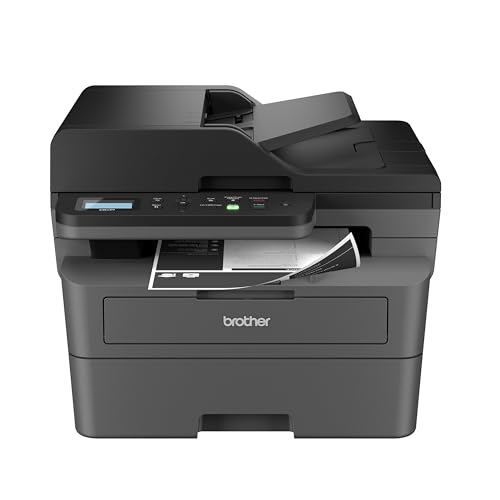
6. Brother DCP-L2640DW: Best Monochrome Laser
Pros
- Up to 36 pages per minute
- 50-sheet automatic document feeder
- Automatic duplex printing
- Ethernet, Wi-Fi, and USB
- Print, scan, and copy functions
Cons
- Black-and-white output only
- Large 25-pound body
- No color printing or fax function
Best for: small offices and households that print mostly black-and-white documents.
The Brother DCP-L2640DW is the obvious specialist in this group. It gives up color and faxing to focus on fast, repeatable black-and-white document work. For forms, invoices, reports, shipping labels, and school pages, laser printing is a better match than a color inkjet when speed and crisp text matter most.
Brother rates it at up to 36 pages per minute, with scanning speeds up to 23.6 images per minute in black and 7.9 images per minute in color. The 50-page automatic document feeder makes a major difference when copying or scanning several originals. The HP OfficeJet Pro 8139 is the more versatile office machine because it prints color and faxes, but the Brother is faster for a document stream that stays monochrome.
Connection options are unusually flexible for a compact multifunction laser printer. It supports dual-band wireless, Ethernet, and USB, so it can join a home network, connect directly to a router, or work with a single computer. Brother's Mobile Connect app handles printing, scanning, device management, and toner tracking from a mobile device.
The unit measures 16.1 inches wide, 15.7 inches long, and 12.5 inches high, and weighs 25 pounds. That is a substantial object for a home desk, particularly because its height is greater than the inkjet models here. It supports automatic duplex printing, which helps keep longer documents manageable, but it cannot print color images or photos.
The Brother also works with TN830 and TN830XL genuine toner, and its Refresh EZ Print Subscription Service can monitor supply needs. The central question is not whether it has the most functions, but whether you need color. If you do not, the tradeoffs between laser speed and inkjet flexibility point strongly toward this model. If color photos or presentations are part of the routine, choose the Canon PIXMA TS6520 or HP OfficeJet Pro 8139.
7. Brother MFC-J1360DW: Best Color Home Office Inkjet

Pros
- Automatic duplex printing
- 20-sheet automatic document feeder
- 150-sheet paper tray
- Cloud app connections
- 1.8-inch color display
Cons
- Slower than the Brother laser
- Smaller ADF than the HP OfficeJet Pro 8139
- Uses the LC501 ink series
Best for: homes and small offices that need color printing with light document automation.
The Brother MFC-J1360DW occupies the middle ground between a casual home printer and a full office machine. Its appeal is the collection of practical features: color printing, copying, scanning, automatic duplexing, a paper tray that holds 150 sheets, and a 20-sheet automatic document feeder.
Brother lists speeds of up to 16 pages per minute in black and 9 pages per minute in color. That is quicker than the HP DeskJet 2955 and competitive with the Epson EcoTank ET-2800 in color, though it falls short of the HP OfficeJet Pro 8139 for black document work. The 20-sheet ADF is useful for short forms and small batches, but the 50-sheet feeder on the Brother DCP-L2640DW is better for sustained scanning.
The 1.8-inch color display supports menu navigation and cloud connections to services including Google Drive, Dropbox, Box, and OneDrive. Brother's Mobile Connect app handles printing, scanning, copying, and device management, while its Page Gauge feature helps track ink use. Wireless and USB connections give it enough flexibility for a shared home workspace.
The printer measures 15.4 inches wide, 13.5 inches long, and 7.2 inches high, with a listed weight of 16.8 pounds. It is shorter than the Brother laser and offers more useful paper handling than the Canon PIXMA TS4320. The printer uses Brother's LC501 series inks, which is important to know before buying because it determines which replacement supplies fit.
The limitation is that it is a compromise. It does not have the HP OfficeJet Pro 8139's 225-sheet tray, larger touchscreen, fax function, or 50-page-class document handling, and it is not as quick as the monochrome Brother laser. Still, for a home office that prints both color and black-and-white documents and occasionally scans a few pages, the MFC-J1360DW has the right balance.
8. Canon PIXMA TR4720: Best With Fax

Pros
- Print, scan, copy, and fax functions
- Automatic document feeder
- Automatic two-sided printing
- Mobile printing
- 100-sheet paper capacity
Cons
- Slow color document speed
- No touchscreen listed
- Larger footprint than some compact models
Best for: home users who need faxing and occasional multi-page scanning.
The Canon PIXMA TR4720 earns its place by offering a feature many modern home printers omit: a built-in fax. It is a wireless four-function all-in-one that prints, copies, scans, and faxes, so it makes sense for paperwork-heavy homes, small businesses, and anyone who still exchanges documents by fax.
Its automatic document feeder is the other major advantage. The feeder can take on a stack of originals for copying or scanning, while automatic two-sided printing handles duplex output. Canon lists a 100-sheet paper capacity, which is enough for routine home work but smaller than the 225-sheet tray in the HP OfficeJet Pro 8139.
The speed figures are modest. Canon lists up to 8.8 images per minute for black letter documents and 4.4 images per minute for color letter documents. A borderless 4 by 6-inch photo is listed at approximately 65 seconds. Those figures make the TR4720 a poor choice for waiting staff or a large print run, but they are adequate for a home printer used in short sessions.
It supports mobile printing, automatic duplexing, and borderless documents and photos up to 8.5 by 11 inches. The body measures 17.2 inches wide, 11.7 inches long, and 7.5 inches high, and weighs 12.7 pounds. Canon lists ENERGY STAR certification and an advertised one-year limited warranty. Alexa integration can provide low-ink notifications and support smart reordering if the user enrolls.
The TR4720 is less polished than the Canon PIXMA TS6520 for general use and much slower than the HP OfficeJet Pro 8139. Its reason to exist is the ADF and fax combination in a home-oriented color printer. If those features are irrelevant, the TS4320 is a simpler choice. If they are essential, the TR4720 remains one of the most targeted picks in this roundup.
9. HP Envy 6155: Best for Photos

Pros
- Automatic two-sided printing
- 2.4-inch color touchscreen
- P3 color technology
- Wireless dual-band connectivity
- Print, scan, and copy functions
Cons
- No automatic document feeder
- Slower than office-focused printers
- Cartridge restrictions apply
Best for: families printing photos, homework, and everyday color documents.
The HP Envy 6155 is aimed at the mixed household where photos matter as much as forms and homework. HP describes its P3 technology as producing documents and photos that look vibrant compared with the source display. That makes it more photo-oriented than the HP DeskJet 2955, even though both are built for home use.
HP lists speeds of up to 10 pages per minute in black and 7 pages per minute in color. Those figures are adequate for everyday output but trail the Brother MFC-J1360DW and HP OfficeJet Pro 8139. Automatic two-sided printing helps with longer documents, while the 100-sheet input tray supports normal household sessions.
The 2.4-inch color touchscreen is a meaningful usability improvement over a basic icon panel. Dual-band Wi-Fi is designed to maintain a stable connection, and the HP app provides mobile printing, scanning, copying, and fax access. The supplied information does not identify an automatic document feeder, so this remains a flatbed-style home workflow rather than a stack-processing office machine.
HP lists the body at 17.05 inches long, 5.35 inches wide, and 14.21 inches high, with a weight of 11.2 pounds. The unusual dimensions make it important to check the orientation and available shelf space before setting it up. The printer contains at least 60 percent recycled plastic, but it is intended to work only with cartridges that use original HP chips or circuitry. Firmware updates can maintain those restrictions.
The Envy 6155 makes sense for a household that wants a pleasant touchscreen and attractive color output, not a high-throughput document engine. The Canon PIXMA TS6520 is the more balanced recommendation, while the Epson EcoTank ET-2800 is better for sustained color volume. Pick the HP when family photos and easy phone-based operation are central to the decision.
10. NDYIN N80: Best Portable Printer

Pros
- Ink-free direct thermal printing
- Built-in rechargeable battery
- Bluetooth phone and tablet support
- USB-C computer connection
- Supports letter and A4 thermal paper
Cons
- Cannot use ordinary paper
- Produces monochrome thermal output
- Computers require USB and a driver
Best for: travelers who need occasional documents, contracts, invoices, or boarding passes away from a desk.
The NDYIN N80 is not a conventional home all-in-one. It is a portable thermal printer designed for people who need paper while traveling, working in a car, or moving between sites. It has no ink cartridges, toner, scanner, copier, or fax. Its appeal is mobility and the ability to print documents without carrying a full-size printer.
The N80 uses direct thermal technology at a stated 203 dpi resolution. It supports US Letter and A4 thermal paper, including roll, folded, and tattoo transfer paper. The paper restriction is fundamental: ordinary printer paper will not work. That makes the N80 a specialized tool rather than a substitute for the Canon PIXMA TS6520 or another home color printer.
A built-in 1, 500mAh rechargeable battery is rated for up to 160 sheets of 8.5 by 11-inch thermal paper after a full charge. The printer weighs 1.5 pounds according to the feature description, while the product information lists 1.7 pounds, so buyers should treat the exact weight as approximate. Its listed dimensions are 11 inches wide, 3.3 inches long, and 2 inches high.
Phones and tablets connect through Bluetooth using the Nada Print app. A laptop or desktop must connect through USB-C, and the computer requires a driver because computer Bluetooth printing is not supported. The package includes a roll of US Letter paper, a Type-C cable, an adapter, and documentation, but the supplied information says the charging adapter is not included.
Thermal output is useful for contracts, invoices, boarding passes, and simple documents, but it is not the right format for color photos or polished presentations. Anyone who needs a printer that fits in a bag should first consider what to expect from a printer built for travel. For a fixed home or office, every other product here is more versatile. The N80 earns this final position because it solves a different problem exceptionally well.
How to choose best selling printer
Start with the type of work you do most often. A printer that is excellent for family photos may be a poor fit for a stack of forms, while a fast monochrome laser cannot produce color pages.
Print technology
Color inkjet printers such as the Canon PIXMA TS6520, Canon PIXMA TS4320, and HP Envy 6155 suit documents and photos. A monochrome laser such as the Brother DCP-L2640DW is better for fast black-and-white output. Ink tank designs such as the Epson EcoTank ET-2800 replace cartridges with refillable reservoirs, while the NDYIN N80 uses special thermal paper instead of ink.
Choose the technology around your most common document, not the occasional job you might print once a year.
Duplex printing
Automatic duplex printing turns a two-sided document into a largely hands-off job. It is present on the Canon PIXMA TS6520, Canon PIXMA TS4320, HP OfficeJet Pro 8139, Brother DCP-L2640DW, Brother MFC-J1360DW, Canon PIXMA TR4720, and HP Envy 6155. The supplied information does not specify it for the HP DeskJet 2955, Epson EcoTank ET-2800, or NDYIN N80.
Automatic document feeder
An ADF matters when you scan or copy several pages at once. The HP OfficeJet Pro 8139 has an ADF, as do the Brother DCP-L2640DW, Brother MFC-J1360DW, and Canon PIXMA TR4720. The Brother laser's 50-sheet feeder is the largest stated capacity in this group, while the Brother inkjet lists 20 sheets.
Print speed
Speed matters more as the size of your document batches grows. The Brother DCP-L2640DW reaches up to 36 pages per minute in black, and the HP OfficeJet Pro 8139 reaches up to 20 black pages per minute and 10 color pages per minute. The HP DeskJet 2955 is listed at up to 7.5 black pages per minute and 5.5 color pages per minute, making it more appropriate for short jobs.
Connectivity and controls
Wireless printing is useful when the printer sits away from a desk. Several models support dual-band Wi-Fi, including both Canon TS models, the HP printers, and the Epson. A touchscreen or color display makes printer-side controls easier, while apps such as Canon PRINT, HP's app, and Brother Mobile Connect support phone-based printing and scanning. The NDYIN N80 is different because Bluetooth works with phones and tablets, but computers require USB-C and a driver.

Frequently asked questions
Which printer is best for normal home use?
The Canon PIXMA TS6520 is the most balanced choice for a typical home. It prints in color, scans, copies, supports automatic duplexing, and works with both 2.4GHz and 5GHz Wi-Fi. Its main limitation is the lack of an automatic document feeder.
Which model is fastest for black-and-white documents?
The Brother DCP-L2640DW has the highest stated black printing speed, at up to 36 pages per minute. It also includes automatic duplexing and a 50-sheet automatic document feeder. It only prints in black and white, so it is not suitable for color work.
Should I choose an ink tank or cartridge printer?
The Epson EcoTank ET-2800 is designed for users who print color frequently and want large stated page yields from refill bottles. Cartridge printers can be simpler for occasional users because they do not require tank refilling. Epson recommends genuine ink and warns that non-genuine ink can damage the printer.
Which printer has a fax?
The Canon PIXMA TR4720 and HP OfficeJet Pro 8139 include fax functions. The Canon is a home-oriented model with an automatic document feeder, while the HP adds a larger paper tray, faster printing, and a larger touchscreen.
Can the NDYIN N80 print on regular paper?
No. The NDYIN N80 supports special thermal paper in US Letter and A4 formats, along with other listed thermal media. Ordinary printer paper cannot be used.
Which printer is best for photos?
The HP Envy 6155 is the most specifically photo-focused model in this selection, with HP's P3 technology and support for color documents and borderless photos. The Canon PIXMA TS6520 is a stronger all-around alternative because it combines photo printing with a more balanced home feature set.
The bottom line
The Canon PIXMA TS6520 is our leading Best best selling printer recommendation because it combines automatic duplex printing, color output, scanning, copying, dual-band Wi-Fi, and a compact design without becoming a full office machine. The HP OfficeJet Pro 8139 is the better pick for a home office that needs speed, an ADF, faxing, and a 225-sheet tray.
The Brother DCP-L2640DW deserves the alternative recommendation for black-and-white document work, while the Epson EcoTank ET-2800 is the better fit for frequent color printing and fewer ink replacement interruptions. The NDYIN N80 is worth considering only when portability and ink-free thermal output matter more than conventional printer versatility.
If you are undecided, choose the Canon PIXMA TS6520 for mixed household printing, or the Brother DCP-L2640DW when nearly every page is black and white.
As an Amazon Associate we earn from qualifying purchases.