

Printing at home gets complicated when one machine has to handle school worksheets, shipping labels, family photos, and the occasional multipage document. Some printers are compact but slow. Others are fast but take over the desk. A few avoid cartridges altogether, while one laser model here is built almost entirely around black-and-white productivity.
The Best home printer for most people is the Canon PIXMA TS6520, thanks to its automatic duplex printing, compact body, useful OLED display, and support for both documents and photos. The rest of the lineup covers simple everyday printing, high-volume ink tanks, home-office workloads, and monochrome laser work.
| # | Product | Award | Print type | Notable capacity or speed | Best for |
|---|---|---|---|---|---|
| 1 | Canon PIXMA TS6520 | Best overall | Color inkjet | Automatic duplex, up to 8.5 by 11 inches | Most homes |
| 2 | HP DeskJet 2955 | Best simple printer | Color inkjet | 60-sheet tray, 7.5 ppm black, 5.5 ppm color | Basic documents |
| 3 | Canon PIXMA TS4320 | Best compact Canon alternative | Color inkjet | Automatic duplex, up to 8.5 by 11 inches | Small workspaces |
| 4 | Epson EcoTank ET-2800 | Best ink tank | Color ink tank | Up to 4, 500 black or 7, 500 color pages | Frequent printing |
| 5 | HP OfficeJet Pro 8139 | Best home office | Color inkjet | 225-sheet tray, 20 ppm black, 10 ppm color | Heavy mixed workloads |
| 6 | Brother Work Smart 1360 | Best midrange all-in-one | Color inkjet | 150-sheet tray, 16 ppm black, 9 ppm color | Families and home offices |
| 7 | HP Smart Tank 5003 | Best cartridge-free HP | Color ink tank | Up to 6, 000 black or color pages included | High-volume color |
| 8 | HP OfficeJet Pro 8125e | Best office features in a smaller range | Color inkjet | 225-sheet tray, 20 ppm black, 10 ppm color | Home-office documents |
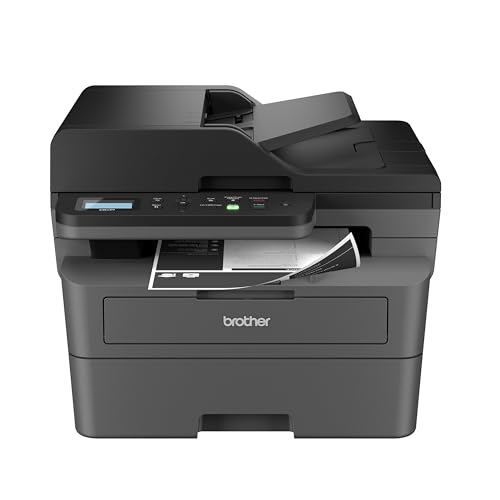
| 9 | Brother DCP-L2640DW | Best monochrome laser | Monochrome laser | 36 ppm, 50-page ADF | Black-and-white documents |
| 10 | HP Envy Photo 7975 | Best for photos | Color inkjet | 15 ppm black, 10 ppm color | Photos and creative projects |
1. Canon PIXMA TS6520: Best Overall

Pros
- Automatic two-sided printing
- Dual-band Wi-Fi supports 2.4GHz and 5GHz
- Compact all-in-one design
- OLED display shows status and ink levels
- Handles documents and photos
Cons
- Uses a two-cartridge hybrid ink system
- No automatic document feeder listed
- Heavier than the smaller HP DeskJet 2955
Best for: households that want one compact color printer for everyday documents, scanning, copying, and occasional photos.
The Canon PIXMA TS6520 is the printer we would put in the most homes because it avoids the two common compromises in this category. It is not limited to plain black text, and it does not make you turn every double-sided document by hand. Automatic two-sided printing matters when worksheets, forms, and recipes start piling up, especially in a household that prints often enough for paper handling to become annoying.
Canon gives it a 1.42-inch monochrome OLED display, which is small but more useful than a row of unlabeled buttons. It can show printer status and ink levels, and the control panel is designed for basic adjustments without reaching for a phone. The integrated scanner and copier cover the everyday all-in-one jobs, while the two-cartridge hybrid ink system is intended to produce sharp text and vivid color. It supports borderless or bordered output up to 8.5 by 11 inches.
Wireless support is unusually flexible for a compact model. Dual-band Wi-Fi can use either 2.4GHz or 5GHz, and mobile printing works through the Canon PRINT app, Apple AirPrint, and Mopria Print Service. The printer measures 14.8 inches long by 14 inches wide and 6.7 inches high, so it is compact enough for a shelf or modest desk, though its 15.3-pound weight makes it less appealing to move around frequently. The right amount of space for a small home printer is still worth measuring before ordering.
The weakness is the cartridge design. This is not an ink tank printer, and there is no listed automatic document feeder for handling a stack of originals. The Epson EcoTank ET-2800 and HP Smart Tank 5003 make more sense for sustained high-volume color printing, while the Brother DCP-L2640DW is the obvious alternative for fast black-and-white work. For mixed home use, though, the TS6520 has the most balanced feature set.
2. HP DeskJet 2955: Best Simple Printer

Pros
- Small, light design
- Prints, scans, and copies
- 60-sheet input tray
- Automatic dual-band Wi-Fi support
- HP app and mobile printing
Cons
- Slower than the office-oriented models
- No automatic duplex printing listed
- Limited paper capacity
Best for: occasional home printing such as recipes, forms, lists, and school documents.
The HP DeskJet 2955 is built for people who want a printer to disappear until they need it. At 7.55 pounds, it is far easier to place on a narrow desk or move between a home office and a storage shelf than the larger all-in-ones here. It prints, scans, and copies, and its compact design suits the kind of light-duty home setup where a printer may sit unused for days at a time.
Its 60-sheet input tray is enough for normal household tasks, but it establishes the machine's limits. The rated speeds are up to 7.5 pages per minute in black and 5.5 pages per minute in color. Those figures are fine for a few pages, yet a long report will take noticeably longer than it would on the Brother Work Smart 1360 or either HP OfficeJet Pro.
The icon LCD keeps operation straightforward, and HP's app handles printing, scanning, copying, and faxing from a smartphone. The printer also supports dual-band Wi-Fi, with automatic detection and troubleshooting for connection issues. HP's AI-assisted formatting is aimed at cleaning up web pages and emails before they are printed, which can help when a browser page contains sidebars or other unwanted material.
The key omission is automatic two-sided printing. If duplex documents are part of your routine, the Canon PIXMA TS6520 or Canon PIXMA TS4320 is a better fit. The DeskJet 2955 is also not the right choice for someone who routinely fills a tray or prints a large batch. It makes the most sense for light, uncomplicated use, particularly when a small footprint matters more than speed.
3. Canon PIXMA TS4320: Best Compact Canon Alternative

Pros
- Automatic two-sided printing
- Dual-band Wi-Fi
- Scanner and copier included
- Supports borderless and bordered output
- Mobile printing through major services
Cons
- Two-cartridge ink system
- No display size or ADF listed
- Not designed for high-volume work
Best for: users who want a compact Canon all-in-one with duplex printing and photo support.
The Canon PIXMA TS4320 is a close relative in spirit to the TS6520, but it is the quieter recommendation for someone who wants the core Canon feature set without needing the TS6520's OLED status display. It prints, scans, and copies in a compact body, and automatic two-sided printing gives it a practical edge over entry-level models that still require manual paper flipping.
The two-cartridge hybrid ink system is designed for sharp text and vivid color. Canon lists support for documents and photos up to 8.5 by 11 inches, with bordered or borderless output. That makes it a reasonable fit for household projects, school pages, and casual photo printing, although the data does not list a dedicated photo tray or a specialized photo workflow.
Connectivity is one of its strongest points. Dual-band Wi-Fi supports both 2.4GHz and 5GHz networks, and mobile users can print through the Canon PRINT app, Apple AirPrint, or Mopria Print Service. At 14.8 inches long, 14 inches wide, and 6.7 inches high, it occupies the same general desk footprint as the TS6520. Its listed weight is 14.8 pounds.
The TS6520 remains the more complete pick because its OLED display makes on-device status checks easier. The HP DeskJet 2955 is lighter and simpler, but it gives up automatic duplex printing. The TS4320's real limitation is capacity: there is no listed automatic document feeder or high-volume ink system. Choose it when compact two-sided color printing matters, and skip it if you need to process stacks of pages.
4. Epson EcoTank ET-2800: Best Ink Tank

Pros
- Cartridge-free refillable ink system
- Up to 4, 500 black or 7, 500 color pages
- Up to two years of ink included
- Scanner and copier built in
- Heat-free Micro Piezo technology
Cons
- Slower 10 ISO pages-per-minute rating
- Larger and taller than compact cartridge models
- Epson recommends genuine ink
Best for: homes that print color frequently and want to refill tanks rather than replace small cartridges.
The Epson EcoTank ET-2800 changes the ownership experience more than the other color printers in this group. Instead of swapping small cartridges, you fill an integrated tank system from bottles. That is a better match for a family printing regularly than for someone who only needs a page every few weeks, since the main advantage is avoiding frequent ink replacement.
Epson says the included ink can cover up to 4, 500 black pages or 7, 500 color pages, with up to two years of ink in the box. Those are substantial capacity claims, and they make the ET-2800 the clearest choice for sustained color output. The printer also uses Micro Piezo Heat-Free technology, which Epson says produces vivid, detailed documents and photos.
The compromise is speed. Its listed rate is 10 ISO pages per minute, slower than the HP OfficeJet Pro 8139, HP OfficeJet Pro 8125e, and Brother Work Smart 1360. It still includes wireless printing, scanning, and copying, but the body is 17 inches long, 16 inches wide, and about 9.3 inches high. At 11.4 pounds, it is not especially heavy, but its footprint and height need more deliberate placement than the Canon models.
Epson strongly recommends genuine ink and warns that non-genuine ink could damage the printer in a way not covered by its limited warranty. That guidance is part of the ownership decision, not a detail to ignore. The HP Smart Tank 5003 is the closer rival for a cartridge-free HP setup, while the Canon PIXMA TS6520 is better for occasional mixed printing in a smaller body. Pick the ET-2800 for volume and tank capacity, not for quick short jobs.
5. HP OfficeJet Pro 8139: Best Home Office

Pros
- 20 ppm black and 10 ppm color
- 225-sheet input tray
- Automatic document feeder
- Automatic two-sided printing
- Print, scan, copy, and fax functions
Cons
- Large and heavy
- Works only with cartridges using original HP chips or circuitry
- More machine than occasional users need
Best for: home offices that need fast color documents, copying, scanning, faxing, and multipage handling.
The HP OfficeJet Pro 8139 is the first printer in this list that feels built around a real home-office workload rather than occasional household tasks. Its 225-sheet input tray means fewer interruptions, while the automatic document feeder can take on multipage scanning and copying. Automatic duplex printing adds another useful layer for reports, forms, and business documents.
Speed is the headline specification. HP lists up to 20 pages per minute in black and 10 pages per minute in color, which puts it well ahead of the DeskJet 2955 and closer to the Brother DCP-L2640DW for everyday document work. It also prints, scans, copies, and faxes, so it can replace several separate office tasks.
The 2.7-inch color touchscreen is substantially easier to navigate than the tiny displays on simpler printers. Dual-band Wi-Fi and the HP app support wireless printing and mobile control, while HP's AI formatting feature is intended to remove unwanted content from web pages and emails before printing. HP Wolf Essential Security is included to help protect the network connection.
This is a large unit, measuring 18.12 inches wide, 13.29 inches long, and 9.17 inches high, with a listed weight of 17.6 pounds. HP also states that it blocks cartridges without original HP chips or circuitry, with firmware updates maintaining those measures. That makes the printer less appealing to people who want maximum flexibility with supplies. The Brother Work Smart 1360 is smaller and less office-heavy, while the 8139 is the better choice when speed, tray capacity, and an ADF matter more.
6. Brother Work Smart 1360: Best Midrange All-in-One

Pros
- Automatic duplex printing
- 20-sheet single-sided ADF
- 150-sheet paper tray
- 16 ppm black and 9 ppm color
- Cloud app connections
Cons
- ADF is single-sided
- Uses the LC501 series of inks
- Larger than basic compact printers
Best for: families and home offices that need an ADF without moving up to a larger office-class printer.
The Brother Work Smart 1360 occupies a useful middle ground. It has more office-oriented hardware than the Canon PIXMA TS4320, but it is not as imposing as the HP OfficeJet Pro models. Automatic duplex printing handles two-sided output, and the 20-sheet single-sided ADF makes short stacks of originals much easier to copy or scan.
Brother lists speeds up to 16 pages per minute in black and 9 pages per minute in color. That is enough to make a home office feel responsive without putting the printer in the same performance class as the monochrome laser model. The 150-sheet tray also gives it more breathing room than the HP DeskJet 2955's 60-sheet tray.
The 1.8-inch color display supports on-device navigation and connections to cloud services such as Google Drive, Dropbox, Box, and OneDrive. The Brother Mobile Connect app handles printing, copying, scanning, and device management from a mobile device. Wireless and USB connections are both available, and the Page Gauge feature helps monitor ink usage.
The ADF is single-sided, so users scanning double-sided originals will still need to turn pages manually. Its listed dimensions are 15.4 inches wide, 13.5 inches long, and 7.2 inches high, with a weight of 16.8 pounds. The HP OfficeJet Pro 8139 is faster and has a larger tray, while the Canon PIXMA TS6520 is more compact. The Brother makes the most sense when an ADF and cloud access are important but a full office machine would be excessive.
7. HP Smart Tank 5003: Best Cartridge-Free HP

Pros
- Refillable cartridge-free ink system
- Up to 6, 000 black or color pages included
- Borderless printing
- Print, copy, and scan functions
- Mess-free refill design
Cons
- No automatic duplex or ADF listed
- Ink tank setup is less compact than a basic cartridge printer
- Speed information is not listed
Best for: households that print a lot of color and want an HP tank system with substantial included ink.
The HP Smart Tank 5003 is aimed at a different household than the DeskJet 2955. Its cartridge-free refillable system is designed for sustained printing, and HP says it includes enough ink for up to 6, 000 black or color pages. That makes it a strong candidate for families printing schoolwork, forms, creative projects, and color documents on a regular basis.
Refilling is designed to be mess-free. The bottles plug into the tank and drain without squeezing, which should make replenishment less intimidating than older refill systems. The printer supports borderless output, wireless and mobile printing, scanning, and copying. Those functions give it a broader role than a simple document-only machine.
Its body measures 17.11 inches wide, 14.23 inches long, and 6.19 inches high. At 11.09 pounds, it is lighter than many office-focused all-in-ones, though the width still calls for a reasonably deep surface. HP does not list a print speed in the supplied details, and there is no listed ADF or automatic duplex feature, so it is not the right tool for fast multipage office workflows.
The Epson EcoTank ET-2800 offers similarly high-volume tank printing and lists specific black and color page capacities, while the HP's selling point is its simple refill design and large included supply. For scanning a stack of originals or regularly printing double-sided documents, the Brother Work Smart 1360 is better equipped. Choose the Smart Tank 5003 when cartridge-free color printing is the priority.
8. HP OfficeJet Pro 8125e: Best Office Features in a Smaller Range

Pros
- 20 ppm black and 10 ppm color
- Automatic document feeder
- Automatic two-sided printing
- 225-sheet input tray
- Dual-band wireless printing
Cons
- Large 17.64-pound body
- No fax function listed in the supplied details
- HP+ and subscription terms require attention
Best for: home-office users who need fast color printing, an ADF, and a large paper tray.
The HP OfficeJet Pro 8125e has the same basic office priorities as the 8139: speed, paper capacity, automatic duplexing, and hands-off document feeding. HP lists up to 20 pages per minute in black and 10 pages per minute in color, along with a 225-sheet input tray. That combination is much better suited to reports, invoices, homework packets, and other recurring jobs than the compact entry-level printers.
It includes print, scan, copy, and an automatic document feeder. The supplied details do not list fax functionality for this model, so readers who specifically need faxing should look at the OfficeJet Pro 8139 instead. Wireless printing supports dual-band Wi-Fi, and the HP app handles jobs from a smartphone, computer, or tablet.
HP also highlights AI-assisted formatting for web pages and emails. In practical terms, the feature is meant to remove unwanted content and improve page layout before a job starts. Automatic two-sided printing helps reduce manual handling, though the printer itself is still a substantial object at 18.11 inches wide, 13.29 inches long, and 9.17 inches high.
The OfficeJet Pro 8139 adds faxing, a 2.7-inch touchscreen, and stronger stated security features, so it is the more complete office pick. The 8125e remains a sensible choice for users who mainly need printing, scanning, and copying. It is too much printer for occasional lists, and its HP+ and Instant Ink terms deserve a careful read before activation.
9. Brother DCP-L2640DW: Best Monochrome Laser
Pros
- Up to 36 ppm black-and-white printing
- 50-page automatic document feeder
- Automatic duplex printing
- Ethernet, USB, and dual-band wireless
- Scans and copies
Cons
- Black-and-white output only
- Heavier and taller than the inkjet models
- No color printing for photos or graphics
Best for: households and home offices that primarily print fast, clean black-and-white documents.
The Brother DCP-L2640DW is the outlier here, and that is precisely why it deserves a place in the roundup. It gives up color to focus on fast black-and-white documents. At up to 36 pages per minute, it is substantially faster on text-heavy jobs than the color inkjet models, and laser output is a better fit for forms, reports, labels, and work documents than casual photo printing.
Its 50-page ADF is the largest listed feeder in this group. That capacity makes multipage scanning and copying far less tedious than using the 20-sheet feeder in the Brother Work Smart 1360 or relying on a flatbed scanner. Automatic duplex printing helps with two-sided documents, while the printer also includes copying and scanning.
Connection options are unusually broad. Dual-band wireless supports 2.4GHz and 5GHz networks, Ethernet is available for a wired office setup, and USB handles a direct connection to one computer. Brother's Mobile Connect app supports printing, scanning, and printer management from a mobile device. The supplied details also mention compatibility with Alexa.
This is not a general-purpose family photo printer. It produces black-and-white output only, and its 25-pound body measures 16.1 inches wide, 15.7 inches long, and 12.5 inches high. The HP OfficeJet Pro 8139 is more versatile for color office documents, while the DCP-L2640DW is the clear choice for speed and large black-and-white jobs. If your household mainly needs text, the trade-offs of choosing a laser machine are worth considering before choosing an inkjet.
10. HP Envy Photo 7975: Best for Photos

Pros
- Borderless photo printing
- Separate photo tray
- Automatic two-sided printing
- Automatic document feeder
- Color touchscreen
Cons
- Large footprint
- Inkjet design is not aimed at high-volume document speed
- No listed print resolution
Best for: families that want a home all-in-one for photos, schoolwork, documents, and creative projects.
The HP Envy Photo 7975 is the most photo-focused printer in this group without abandoning normal household duties. HP describes it as a multipurpose color printer for borderless photos, homework, office documents, and creative projects. The separate photo tray is the feature that most clearly separates it from the Canon PIXMA TS6520 and TS4320, since it is designed to make photo handling less of a compromise.
HP lists speeds up to 15 pages per minute in black and 10 pages per minute in color. Those figures are respectable for everyday pages, but the printer's real appeal is flexibility rather than rapid document production. Automatic two-sided printing helps with regular work, while the ADF handles multipage originals and the scanner and copier cover routine household tasks.
A large color touchscreen makes on-device navigation easier, and wireless plus mobile printing keeps the printer useful from phones and computers. HP's AI formatting feature is intended to clean up web pages and emails before they are printed. The printer measures 18.11 inches wide, 15.08 inches long, and 9.17 inches high, with a listed weight of 17.9 pounds.
The HP OfficeJet Pro 8139 is faster and better suited to a business-heavy workload, while the Canon PIXMA TS6520 takes up less space. The Envy Photo 7975 is the better fit when borderless photos, a separate photo tray, and a touchscreen matter more than a compact body. For a deeper look at choosing a printer around image output, the details that matter for printing photos at home should be settled before buying.
How to choose best home printer
The right home printer depends less on a long feature list than on the kinds of pages you actually print and how often you handle originals.
Ink system
Cartridge inkjet printers such as the Canon PIXMA TS6520 are convenient for mixed, occasional jobs, while ink tank models such as the Epson EcoTank ET-2800 and HP Smart Tank 5003 are designed for higher output with refillable reservoirs. Tank systems make more sense when color printing is a regular part of household life. For occasional pages, the smaller cartridge models are easier to understand and place.
Automatic duplex printing
Automatic duplexing prints both sides without requiring manual paper rotation. It is one of the most useful features for schoolwork, forms, and longer documents. The Canon PIXMA TS6520, Canon PIXMA TS4320, Brother Work Smart 1360, HP OfficeJet Pro 8139, HP OfficeJet Pro 8125e, and HP Envy Photo 7975 include it. The HP DeskJet 2955 does not list automatic duplexing.
A printer that feeds both sides automatically saves more frustration than a printer with a larger menu of rarely used features.
Automatic document feeder
An ADF is important when scanning or copying multiple pages. The Brother DCP-L2640DW has a listed 50-page ADF, the HP OfficeJet Pro models have ADFs, the Brother Work Smart 1360 has a 20-sheet single-sided ADF, and the HP Envy Photo 7975 also includes one. Models without a listed ADF are better for single sheets and occasional flatbed scanning.
Print speed and paper capacity
Speed matters when a home printer handles batches instead of isolated pages. The Brother DCP-L2640DW leads this group for black-and-white work at up to 36 ppm. The HP OfficeJet Pro 8139 and 8125e list up to 20 ppm in black and 10 ppm in color. A larger input tray, such as the 225-sheet trays in those HP models, also reduces interruptions.
Photo handling
For photos, look for borderless support, a separate photo tray, and explicit photo capability. The HP Envy Photo 7975 includes a separate photo tray and supports borderless photos. The Canon PIXMA TS6520 and TS4320 support bordered and borderless output up to 8.5 by 11 inches. A monochrome laser printer is not suitable for color photos.

Frequently asked questions
Should a home printer be an inkjet or laser?
Inkjet printers are the more flexible choice for color documents and photos. Laser printers are better for fast, consistent black-and-white documents. The Brother DCP-L2640DW is the specialist choice here, while the color inkjets suit mixed household work.
Is automatic duplex printing important?
It is important if you regularly print forms, schoolwork, or multi-page documents. Duplexing saves manual page turning and can make a compact printer much more convenient. The Canon PIXMA TS6520 and Brother Work Smart 1360 are good examples of models that combine duplexing with all-in-one functions.
What does an automatic document feeder do?
An automatic document feeder pulls multiple pages through the scanner for copying or scanning. It is useful for contracts, school packets, and office paperwork. The Brother DCP-L2640DW has the largest listed ADF capacity in this group at 50 pages.
Are ink tank printers better for frequent color printing?
They are designed for frequent printing and use refillable reservoirs instead of standard cartridges. The Epson EcoTank ET-2800 lists capacity of up to 4, 500 black or 7, 500 color pages, while the HP Smart Tank 5003 lists up to 6, 000 black or color pages included. They are less compelling if you print only a few pages every month.
Which printer is best for photos?
The HP Envy Photo 7975 is the strongest photo-focused option here because it includes a separate photo tray and supports borderless photos. The Canon PIXMA TS6520 and TS4320 are also suited to casual photo printing. The Brother DCP-L2640DW prints only in monochrome.
Do home printers need wireless connectivity?
Wireless printing is useful when several people need to print from phones, tablets, or computers. Most models here use dual-band Wi-Fi, and several also support dedicated mobile apps or services such as AirPrint and Mopria. A wired Ethernet option is especially useful for a permanent home-office setup, as provided by the Brother DCP-L2640DW.

The bottom line
The Best home printer for most households is the Canon PIXMA TS6520. Its automatic duplex printing, dual-band Wi-Fi, scanner, copier, OLED status display, and support for documents and photos create the most balanced package. The Epson EcoTank ET-2800 is the better pick for regular high-volume color printing, while the Brother DCP-L2640DW is the clear specialist for fast black-and-white work.
Choose the HP OfficeJet Pro 8139 or Brother Work Smart 1360 if an automatic document feeder is central to your routine. If photos matter most, the HP Envy Photo 7975 has the most purposeful photo features. For an undecided buyer, start with the Canon PIXMA TS6520 unless your workload clearly points to an ink tank, office model, or monochrome laser.
As an Amazon Associate we earn from qualifying purchases.