

A printer can be compact on paper and still consume an entire shelf once you account for its paper tray, scanner lid, and the space needed to reach its controls. The Best small printer for home should fit the room you actually have while still handling the documents, photos, and occasional copies that sent you shopping.
The Canon PIXMA TS6520 is our top pick because it combines automatic two-sided printing, scanning, copying, dual-band Wi-Fi, and a small footprint without giving up photo support. The rest of the list ranges from simple HP all-in-ones and a fast monochrome laser printer to genuinely portable thermal machines.
Our top pick is the Canon PIXMA TS6520, with options below for basic home printing, mobile work, black-and-white documents, and inkless travel printing.
Comparison table
| # | Product | Award | Print type | Duplex | Key size or capacity | Best for |
|---|---|---|---|---|---|---|
| 1 | Canon PIXMA TS6520 | Best overall | Color inkjet | Automatic | 14.8 x 14 x 6.7 inches | Most homes |
| 2 | HP Envy 6155 | Best touchscreen | Color inkjet | Automatic | 100-sheet tray | Touchscreen control |
| 3 | HP DeskJet 2955 | Best basic all-in-one | Color inkjet | Not specified | 60-sheet tray | Everyday documents |
| 4 | HP DeskJet 2923 | Best for occasional use | Color inkjet | Not specified | 60-sheet tray | Light home printing |
| 5 | Canon PIXMA TS4320 | Best Canon alternative | Color inkjet | Automatic | 8.5 x 11-inch media | Photos and documents |
| 6 | Canon PIXMA TR160 | Best portable inkjet | Color inkjet | Not specified | 50-sheet tray | Printing away from home |
| 7 | HP LaserJet M110w | Best monochrome laser | Black-and-white laser | Not specified | 13.63 x 7.45 x 6.26 inches | Fast text documents |
| 8 | TATTMUSE A285M | Best thermal flexibility | Black-and-white thermal | Not specified | 1.5 pounds | Travel documents |
| 9 | HP Envy 6555e | Best for batch scanning | Color inkjet | Automatic | 35-sheet document feeder | Home paperwork |
| 10 | Gloryang Portable Printer | Best travel kit | Black-and-white thermal | Not specified | 8.5-inch thermal paper | Mobile printing kits |
1. Canon PIXMA TS6520: Best Overall

Pros
- Automatic two-sided printing
- Scans, copies, and prints photos
- Dual-band Wi-Fi supports 2.4GHz and 5GHz
- Compact design with a useful OLED display
Cons
- Heavier than the portable models
- Monochrome display is smaller than HP's touchscreen
- Two-cartridge ink system offers less color separation
Best for: households that want one compact machine for documents, photos, scanning, and copying.
The Canon PIXMA TS6520 is the printer we would keep in a home where several people need different things. It is not the smallest printer here, but its 14.8-inch length, 14-inch width, and 6.7-inch height make it much easier to place than a full office-style all-in-one. The combination of a scanner, copier, automatic two-sided printing, and wireless operation means you do not need a second device for routine paperwork.
Canon uses a two-cartridge hybrid ink system, which is designed to produce sharp text and vivid color. That matters when the same machine handles a school worksheet in the morning and a borderless photo later in the day. It supports documents and photos up to 8.5 by 11 inches, with or without borders. The automatic duplex feature is the practical standout because it turns multi-page documents into a mostly hands-off job and uses both sides of the sheet.
The 1.42-inch monochrome OLED display shows ink levels, printer status, and settings without forcing every task through a phone. Wireless printing works over either 2.4GHz or 5GHz Wi-Fi, and the Canon PRINT app, Apple AirPrint, and Mopria Print Service cover the common mobile platforms. The screen is not as spacious as the 2.4-inch color touchscreen on the HP Envy 6155, but the Canon is more balanced as an all-purpose home machine.
Its weakness is weight. At 15.3 pounds, the TS6520 is compact rather than portable, and the two-cartridge design is less flexible than a system with separate color tanks. Someone who prints only occasional black text may prefer the HP LaserJet M110w, while someone who needs a machine in a backpack should choose the Canon PIXMA TR160. For most households, though, the TS6520 gets the important mix of color, duplex printing, mobile support, and scanning right.
2. HP Envy 6155: Best Touchscreen

Pros
- Clear 2.4-inch color touchscreen
- Automatic two-sided printing
- 100-sheet input tray
- Color printing, scanning, and copying
Cons
- Tallest footprint in the comparison by listed height
- Uses original HP chip or circuitry cartridges
- No document feeder is listed
Best for: families that want simple printer control from the front panel.
The HP Envy 6155 is the easiest model here to operate without reaching for a phone. Its 2.4-inch color touchscreen gives menus and settings more room than the icon LCD panels on the HP DeskJet 2955 and HP DeskJet 2923. That difference is small until you are changing copy settings, checking status, or trying to recover from a paper or connection prompt.
It is a full color all-in-one with automatic duplex printing and a 100-sheet input tray. HP lists speeds up to 10 pages per minute in black and 7 pages per minute in color. Those figures place it ahead of the DeskJet models for routine document work, though they do not turn it into a high-volume office printer. The P3 technology is intended to keep documents and photos looking vibrant, which makes the Envy a sensible fit for homework, forms, and borderless photos.
The listed dimensions are 17.05 inches long, 5.35 inches wide, and 14.21 inches high, with a weight of 11.2 pounds. That unusually narrow listed width needs some care when planning a shelf because the other dimensions still require meaningful space. Dual-band Wi-Fi is designed to detect and resolve connection issues, and the HP app handles printing, scanning, copying, and faxing from a phone.
The main limitation is HP's cartridge restriction. The listing says the printer is intended to work only with cartridges containing original HP chips or circuitry, with firmware updates maintaining that measure. That may be acceptable for a household already committed to HP's system, but it is an important ownership constraint. The Canon PIXMA TS6520 has the stronger all-round balance, while the Envy 6155 makes more sense for anyone who values its touchscreen and larger paper tray.
3. HP DeskJet 2955: Best Basic All-in-One

Pros
- Print, scan, and copy functions
- Dual-band wireless connectivity
- 60-sheet input tray
- Compact, lightweight design
Cons
- No automatic duplex feature is listed
- Slower than the HP Envy 6155
- Icon LCD is basic
Best for: simple color documents, recipes, lists, and occasional copies.
The HP DeskJet 2955 is the uncomplicated option in this group. It covers the jobs that cause most people to buy a home printer in the first place: letters, recipes, financial documents, lists, color worksheets, scans, and copies. Its compact design is aimed at home spaces, and the 7.55-pound weight makes it easier to move than the larger Canon and Envy all-in-ones.
HP lists a 60-sheet input tray and speeds up to 7.5 pages per minute in black and 5.5 pages per minute in color. That is enough for short household jobs, but long packets will require patience. There is no automatic duplex printing feature listed, so two-sided documents require more intervention than they do with the Canon PIXMA TS6520 or HP Envy 6155.
The control panel uses an icon LCD rather than a full touchscreen. That keeps the interface focused on basic actions, while the HP app expands the printer's capabilities from a phone. Dual-band Wi-Fi is included, and HP's formatting tools can remove unwanted content from web pages and emails before printing. The printer is also listed as ENERGY STAR and EPEAT certified and uses at least 70 percent recycled plastics.
The DeskJet 2955 is a better fit for light duties than for a household printing every day. Its HP cartridge restrictions are the same sort of consideration found on the Envy models, and its basic panel will feel limited beside the Envy 6155. Choose it when the core requirement is a small color printer with scanning and copying, not a faster machine or a richer front-panel interface.
4. HP DeskJet 2923: Best for Occasional Use

Pros
- Small all-in-one design
- Prints, scans, and copies
- Dual-band Wi-Fi and mobile support
- 60-sheet input tray
Cons
- No automatic duplex printing is listed
- Basic icon LCD
- Slowest class of document printer in this group
Best for: homes that print short color jobs only when needed.
The HP DeskJet 2923 is nearly the same kind of printer as the DeskJet 2955, and that is the important point. It is built for basic home tasks rather than demanding workloads. The machine prints in color, scans, copies, and accepts wireless or mobile jobs, so it can handle a recipe, school form, return label, or short letter without adding another device to the desk.
Its body measures 16.73 inches wide, 11.97 inches long, and 6.06 inches high, and it weighs 7.55 pounds. Those dimensions make it easy to fit into a low shelf or move out of the way after use. The 60-sheet input tray suits occasional printing, though it gives less headroom than the 100-sheet trays on the Envy models.
HP lists maximum speeds of 7.5 pages per minute for black documents and 5.5 pages per minute for color. The icon LCD keeps printer-side commands simple, and the HP app supports printing, scanning, copying, and faxing from a phone. Dual-band Wi-Fi is included, while HP's AI formatting feature is intended to remove unwanted page content from web pages and emails.
The 2923 does not have automatic duplex printing listed, so it is not the right pick for regular two-sided reports. The HP DeskJet 2955 is its closest comparison, with the same listed dimensions, weight, tray capacity, and speeds. The clearest distinction in this dataset is the included trial period for HP's ink delivery service, which is listed as six months for the 2923 and three months for the 2955. For an undecided buyer, the Canon PIXMA TS4320 is the stronger direction if photos and automatic duplex matter.
5. Canon PIXMA TS4320: Best Canon Alternative

Pros
- Automatic two-sided printing
- Supports borderless photos and documents
- Scanner and copier included
- Dual-band Wi-Fi and mobile printing
Cons
- Heavier than the HP DeskJet models
- No display size is listed
- Two-cartridge hybrid ink system
Best for: home users who want Canon's straightforward duplex and photo features.
The Canon PIXMA TS4320 is a practical alternative to the TS6520, with much of the same basic shape and purpose. It prints, scans, copies, and connects wirelessly, while automatic two-sided printing saves manual page turning. The machine supports media up to 8.5 by 11 inches, including borderless printing, so it is more versatile than a basic text-only home device.
Canon describes its two-cartridge hybrid ink system as producing sharp text and vivid color. That is a useful combination for a household printer because it keeps ordinary documents legible without making photo printing an afterthought. Dual-band Wi-Fi supports 2.4GHz and 5GHz networks, and the Canon PRINT app, Apple AirPrint, and Mopria Print Service provide several ways to send a document from a phone or tablet.
The TS4320 measures 14.8 inches long, 14 inches wide, and 6.7 inches high, and weighs 14.8 pounds. It occupies almost exactly the same listed footprint as the TS6520, but its feature listing does not specify the TS6520's 1.42-inch OLED display. It is also EPEAT Silver and ENERGY STAR certified, details that may matter to buyers trying to reduce the environmental impact of a frequently used appliance.
The TS6520 is the more complete pick because its display gives clearer printer-side status information. The TS4320 remains appealing for someone who wants automatic duplex printing, photo support, and a scanner in a compact Canon body without needing a more elaborate control panel. If you are comparing this model with other household options, the ways a home printer handles everyday paperwork can help clarify whether a copier and scanner are essential.
6. Canon PIXMA TR160: Best Portable Inkjet
Pros
- Only 4.5 pounds
- 50-sheet paper tray
- Wireless Direct mode works without a router
- Five-color hybrid ink system
Cons
- Print-only design
- Smaller paper tray than desktop all-in-ones
- Not as suited to shared scanning and copying
Best for: people who need color inkjet printing in more than one location.
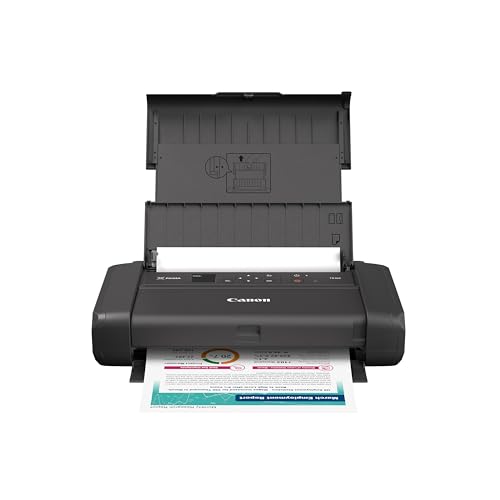
The Canon PIXMA TR160 solves a different problem from the other Canon models. It is a print-only machine that can travel, rather than an all-in-one intended to stay beside a computer. At 12.7 inches long, 7.3 inches wide, and 2.6 inches high, it is dramatically flatter than the desktop printers here. Its 4.5-pound weight also makes moving it between a home office, classroom, and vehicle realistic.
It prints documents and photos up to 8.5 by 11 inches and uses a five-color hybrid ink system. Canon specifically calls out sharp black text, rich color, square prints, and borderless prints. The 50-sheet paper tray is enough for a short run, but it is not designed for a stack of paperwork. There is no scanner or copier, so anyone who regularly digitizes documents should choose the Canon PIXMA TS6520 or an HP all-in-one instead.
The 1.44-inch monochrome OLED display shows ink levels, status, and settings. The printer works with the Canon PRINT app, Apple AirPrint, and Mopria Print Service, and Wireless Direct mode allows a compatible device to connect without a router. That last feature is particularly useful in temporary workspaces, hotels, or other places where the available Wi-Fi is inconvenient.
The TR160 is a specialist pick, not a smaller replacement for the TS6520. It gives up scanning, copying, and automatic duplex printing in exchange for portability. Its five-color system and full letter-size support make it more capable for color work than the thermal models, but its inkjet design is less convenient for someone who wants occasional maintenance-free black text. Choose it when carrying the printer is part of the plan, not merely a bonus.
7. HP LaserJet M110w: Best Monochrome Laser

Pros
- Up to 21 black-and-white pages per minute
- Very compact laser design
- Wireless printing from many device types
- HP Smart app support
Cons
- Black-and-white printing only
- No scanner or copier
- Uses original HP chip or circuitry cartridges
Best for: fast text documents, forms, reports, and small-team home offices.
The HP LaserJet M110w is the most convincing choice here if color is not part of the assignment. Laser printing suits people who produce reports, forms, invoices, and other text-heavy pages and want the printer to get out of the way quickly. HP lists a print speed of up to 21 black-and-white pages per minute in single-sided operation, which is considerably faster than the color inkjet models in this roundup.
Its listed dimensions are 13.63 inches wide, 7.45 inches long, and 6.26 inches high, with a weight of 9.02 pounds. HP calls it the smallest laser in its class, and the compact shape should work well on a crowded desk. It prints wirelessly from phones, PCs, tablets, Macs, Chromebooks, and Android devices, with AirPrint support included in the compatibility list.
The M110w is a printer only. It does not replace the scanner and copier built into the Canon PIXMA TS6520, HP Envy 6155, or HP Envy 6555e. Its black-and-white output also rules it out for color photos, school projects, and documents where color coding matters. That narrow purpose is exactly why it can be so effective: there are fewer features to navigate and no inkjet color system to manage.
HP's listing says the printer is intended to work only with cartridges containing original HP chips or circuitry, with periodic firmware updates maintaining that restriction. Buyers who need flexible cartridge choices should take that into account. For a home office that prints mostly text, the M110w is more appropriate than a color all-in-one. Readers comparing it with other monochrome machines may also benefit from the practical differences between laser printers for home paperwork.
8. TATTMUSE A285M: Best Thermal Flexibility

Pros
- Weighs 1.5 pounds
- Supports five thermal paper widths
- Bluetooth and USB-C connectivity
- No ink, toner, or ribbon required
Cons
- Black-and-white thermal output only
- Does not accept regular copy paper
- Computer printing requires a driver and USB connection
Best for: mobile users who print forms, lists, receipts, and documents away from a desk.
The TATTMUSE A285M is not a conventional home printer. It uses thermal paper, weighs 1.5 pounds, and is shaped for a backpack, briefcase, vehicle, or small work surface. That makes it useful for a very specific kind of printing, such as a boarding pass, receipt, invoice, recipe, list, or contract when carrying a normal inkjet would be inconvenient.
Its main advantage is media flexibility. The A285M supports 8.5 by 11-inch US Letter and A4 thermal paper, along with widths of 4.33 inches, 3.14 inches, and 2.08 inches. It supports both continuous roll paper and single-sheet thermal paper, with a built-in paper bin. The output is black and white only, and the listing clearly says regular copy paper is not supported.
Bluetooth connects the printer to an iPhone, Android phone, iPad, or tablet through the companion app. A laptop or desktop can connect through USB-C after the required driver is installed. The printer uses 5V, 2A charging, and the listing warns against using a charger with an output above 5V. Those details make setup more particular than the wireless inkjets, but they also explain how the A285M can stay small.
The thermal format is the deal breaker for anyone expecting color photos or standard office paper. The Canon PIXMA TR160 is the better mobile printer for color and conventional letter-size media, while the HP LaserJet M110w is better for regular black text at home. Choose the A285M when inkless operation, low carry weight, and multiple thermal paper sizes matter more than conventional print quality.
9. HP Envy 6555e: Best for Batch Scanning

Pros
- 35-sheet automatic document feeder
- Automatic two-sided printing
- 100-sheet input tray
- 2.4-inch color touchscreen
Cons
- Heaviest all-in-one in the group
- Larger footprint than the basic DeskJets
- Uses HP chip or circuitry cartridges
Best for: homes that scan and copy several pages at a time.
The HP Envy 6555e earns its place through one feature the other Envy in this comparison does not list: a 35-sheet automatic document feeder. That changes the experience for anyone digitizing forms, school packets, receipts, or multi-page paperwork. Rather than placing each sheet on the scanner glass, you can load a small stack and let the feeder handle the sequence.
It is a color printer, scanner, and copier with automatic two-sided printing, a 100-sheet input tray, and a 2.4-inch color touchscreen. HP lists speeds up to 10 pages per minute in black and 7 pages per minute in color. P3 technology is intended to keep photos and documents vibrant, while the HP app extends printing, scanning, copying, and fax functions to a phone, PC, or tablet.
The trade-off is size and weight. The Envy 6555e measures 17.05 inches long, 14.21 inches wide, and 6.73 inches high, and it weighs 16.3 pounds. That makes it the heaviest all-in-one in this list and a poor choice for a printer that must be moved often. Dual-band Wi-Fi helps it stay connected, but a larger desktop footprint is still required.
The HP Envy 6155 is lighter and similarly equipped for basic color printing, but it lacks a listed document feeder. The Canon PIXMA TS6520 is smaller in weight and has a useful OLED display, yet it also does not list an automatic feeder. For households that scan one page at a time, the 6555e is more machine than necessary. For recurring batches of paperwork, its feeder is the reason to choose it. Those building a broader home workspace can compare the features that matter when printing from a home office before deciding.
10. Gloryang Portable Printer: Best Travel Kit

Pros
- Inkless thermal printing
- Supports documents from 2 to 8.5 inches wide
- Bluetooth support for iOS and Android
- Carry case and thermal paper rolls included
Cons
- Thermal paper only
- Monochrome output
- Listed weight is higher than the A285M
Best for: travelers who want a ready-to-carry thermal printing kit.
The Gloryang portable printer is aimed at travel rather than the conventional home desk. It uses thermal printing, so there is no ink, toner, or ribbon to replace. The package includes a carrying case and three thermal paper rolls, with one roll pre-installed and two extra rolls listed. That makes it a more complete travel setup than a bare printer.
It supports thermal documents ranging from 2 inches to 8.5 inches wide, including letter-size work. The built-in paper bin helps keep the roll or sheet contained, and the compact design is intended for backpacks and briefcases. Gloryang says the machine can print photos, images, designs, and text, but the thermal format means the output remains monochrome rather than functioning like a color inkjet.
The printer connects to iOS and Android devices through Bluetooth and the Jadens Printer app. It can also work with laptops and computers after the driver is installed. The listing gives dimensions of 11 inches long, 4 inches wide, and 4 inches high, with a listed weight of 3.14 pounds. Its 1.7-inch thickness claim in the feature text describes the portable design, but the product information lists the full dimensions above.
The Gloryang is easier to recommend as a travel kit than as a household replacement. The TATTMUSE A285M weighs less and supports several paper widths, while the Canon PIXMA TR160 produces conventional color inkjet output on standard letter-size media. Choose Gloryang when a case, included thermal rolls, and simple mobile printing are more important than color or regular copy paper.

How to choose best small printer for home
The right compact printer depends less on the smallest published measurement than on the kind of paper and work it must handle.
All-in-one functions
A printer with scanning and copying can replace several separate tasks in a home. Look for an all-in-one if you regularly sign, duplicate, archive, or send documents. Print-only models such as the Canon PIXMA TR160 and HP LaserJet M110w are easier to place, but they cannot scan a form or make a copy.
Duplex printing
Automatic two-sided printing saves manual page turning on reports, schoolwork, and multi-page documents. It is included on the Canon PIXMA TS6520, Canon PIXMA TS4320, HP Envy 6155, and HP Envy 6555e. The DeskJet and portable models in this group do not list automatic duplex support, so they require more hands-on work for double-sided pages.
Paper capacity
A 60-sheet tray is adequate for occasional lists and short documents, while a 100-sheet tray reduces interruptions during larger home jobs. The 35-sheet automatic document feeder on the HP Envy 6555e serves a different purpose by feeding pages into the scanner. Thermal models use their own paper formats, so confirm the supported width before expecting letter-size documents.
Inkjet, laser, and thermal output
Color inkjet printers are the flexible choice for documents and photos. Laser printing is better suited to fast black text, while thermal printing avoids ink entirely but requires compatible thermal paper and produces black-and-white output. The paper and workload trade-offs for a small business printer are similar to those at home, especially when several people share one machine.
A compact printer is only a good fit if its paper type matches the documents you actually print.
Wireless connections
Dual-band Wi-Fi can help a printer work across modern home networks, while mobile apps make it easier to print from a phone. Apple AirPrint, Mopria, and brand-specific apps appear across the Canon and HP models. Portable thermal printers often use Bluetooth, and some require a USB connection plus a driver for computer printing.

Frequently asked questions
What is the best small printer for home use?
The Canon PIXMA TS6520 is the strongest general-purpose pick in this group. It combines color printing, scanning, copying, automatic two-sided printing, mobile support, and a compact desktop footprint.
Which compact printer is best for photos?
The Canon PIXMA TS6520, Canon PIXMA TS4320, and Canon PIXMA TR160 all list support for color photos and borderless printing. The TR160 is the portable choice, while the TS6520 and TS4320 also include scanning and copying.
Should I choose a laser printer for home documents?
Choose the HP LaserJet M110w if you mainly print black-and-white text and want the listed speed of up to 21 pages per minute. It is not suitable for color pages and does not include a scanner or copier.
Are thermal printers suitable for regular home printing?
Thermal printers work well for lists, receipts, boarding passes, forms, and other black-and-white documents when compatible thermal paper is available. They do not accept regular copy paper, and they are not a substitute for a color inkjet when photos or color documents matter.
Which printer is easiest to control without a phone?
The HP Envy 6155 and HP Envy 6555e have 2.4-inch color touchscreens. The Canon PIXMA TS6520 has a 1.42-inch monochrome OLED display, while the DeskJet models use icon LCD panels.
Do compact printers also scan and copy?
Many desktop all-in-ones do, including the Canon PIXMA TS6520, Canon PIXMA TS4320, HP Envy 6155, HP DeskJet 2955, HP DeskJet 2923, and HP Envy 6555e. The Canon PIXMA TR160, HP LaserJet M110w, TATTMUSE A285M, and Gloryang portable printer are print-only models in this comparison.

The bottom line
The Best small printer for home is the Canon PIXMA TS6520 for most households. Its automatic duplex printing, scanner, copier, color output, dual-band Wi-Fi, and 1.42-inch OLED display cover more daily tasks than the simpler DeskJets while taking up less practical space than a larger office all-in-one.
Choose the HP Envy 6555e instead if scanning multi-page paperwork is a regular chore because its 35-sheet automatic document feeder is the feature that separates it from the other home models. For fast black-and-white documents, the HP LaserJet M110w is the sharper fit, and the Canon PIXMA TR160 is the one to choose when portability matters more than scanning.
If you are undecided, buy the Canon PIXMA TS6520 unless you specifically need a document feeder, laser speed, or a printer that travels.
As an Amazon Associate we earn from qualifying purchases.