
A printer that sits unused for weeks still needs to work when a school form, shipping label, or signed document suddenly appears. The trouble is that compact home models, office machines, and photo-friendly all-in-ones can look similar while handling those jobs very differently.
We compared 10 products, including nine printers and one compatible cartridge set for an older HP OfficeJet family. The Best ink jet printer for most home offices is the HP OfficeJet Pro 8125e, while smaller households may prefer the Canon PIXMA TS6520. The range below covers basic home printing, frequent multi-page work, business documents, and replacement ink.
| # | Product | Award | Speed | Paper or key feature | Best for |
|---|---|---|---|---|---|
| 1 | HP OfficeJet Pro 8125e | Best overall | Up to 20 ppm black, 10 ppm color | 225-sheet tray, ADF, duplex | Home offices |
| 2 | Canon PIXMA TS6520 | Best for simple home printing | Not listed | Duplex, 1.42-inch OLED | Homes that want easy controls |
| 3 | HP OfficeJet Pro 9125 | Best for busy offices | Up to 22 ppm black, 18 ppm color | 250-sheet tray, duplex scan, fax | High-volume office work |
| 4 | Brother Work Smart 1360 | Best controls and connectivity | Up to 16 ppm black, 9 ppm color | 150-sheet tray, 20-sheet ADF | Cloud-connected households |
| 5 | HP OfficeJet Pro 8139 | Best home-office feature set | Up to 20 ppm black, 10 ppm color | 225-sheet tray, ADF, fax | Mixed home and work use |
| 6 | HP OfficeJet Pro 8125 | Best touchscreen workflow | Up to 20 ppm black, 10 ppm color | 225-sheet tray, ADF | Touchscreen-led printing |
| 7 | HP Envy 6155 | Best for home photos | Up to 10 ppm black, 7 ppm color | 100-sheet tray, 2.4-inch touchscreen | Homework and borderless photos |
| 8 | Canon PIXMA TS4320 | Best compact Canon | Not listed | Duplex, borderless printing | Small home setups |
| 9 | HP DeskJet 2955 | Best basic printer | Up to 7.5 ppm black, 5.5 ppm color | 60-sheet tray | Occasional documents |
| 10 | Smart Ink 952XL Combo | Best replacement cartridge set | Not applicable | Four cartridges, XL yields | Compatible older HP printers |
1. HP OfficeJet Pro 8125e: Best Overall

Pros
- Fast black and color printing
- Automatic document feeder and duplex printing
- 225-sheet input tray
- Dual-band Wi-Fi and mobile printing
- Useful web-page formatting features
Cons
- The included Instant Ink trial requires a subscription after the trial period
- Cartridge restrictions may matter to users who prefer third-party ink
- Larger than a basic home printer
Best for: a home office that needs fast documents, scanning, copying, and hands-off paper handling.
The HP OfficeJet Pro 8125e is the printer we'd put in the middle of a home office desk. It has the practical mix that matters more than a long feature list: a 225-sheet input tray, automatic document feeder, automatic two-sided printing, and enough speed to avoid turning a short report into a waiting exercise. It is built for documents, reports, presentations, and flyers rather than occasional single-page use.
Its rated speed reaches 20 pages per minute in black and 10 pages per minute in color. That gap is normal for an inkjet, but the black speed is the useful number for invoices, schoolwork, contracts, and drafts. The ADF is the other major advantage. Instead of placing every page on the scanner glass, you can feed a stack for copying or scanning, which makes this a more capable work machine than the Canon PIXMA TS6520 or Canon PIXMA TS4320.
The 8125e also has dual-band Wi-Fi, so it can connect over either 2.4GHz or 5GHz networks. HP's app supports printing, scanning, and copying from a phone, tablet, or computer, and the listed AI formatting feature is aimed at cleaning up web pages and emails before they reach the paper. Those details make the printer less fussy for mixed household use, especially when several people send jobs from different devices.
The weakness is ownership flexibility. The product information says the printer is intended to work with cartridges using original HP chips or circuitry, and firmware updates can maintain those restrictions. That is a meaningful limitation for anyone who wants to choose any compatible cartridge. The three-month Instant Ink trial also becomes a monthly service after the trial unless canceled. The HP OfficeJet Pro 8139 adds fax and a longer trial, while the 8125e remains the cleaner choice for most people who need a capable printer without moving up to a heavier office model.
2. Canon PIXMA TS6520: Best for Simple Home Printing

Pros
- Automatic two-sided printing
- 1.42-inch OLED status display
- Dual-band wireless connection
- Scans and copies as well as prints
- Supports borderless documents and photos up to 8.5 by 11 inches
Cons
- Uses a two-cartridge hybrid ink system
- No automatic document feeder is listed
- Slower office specifications are not provided
Best for: a household that wants straightforward printing, copying, and scanning without an office-sized chassis.
The Canon PIXMA TS6520 is the easiest printer here to understand at a glance. Its 1.42-inch monochrome OLED display shows ink levels, printer status, and settings without forcing you to open an app for every basic task. That screen is small, but it is a useful distinction from printers that rely almost entirely on a phone or computer.
Canon uses a two-cartridge hybrid ink system, with the product description promising sharp text and vivid color. The TS6520 is designed for both documents and photos, and it can print media up to 8.5 by 11 inches with or without borders. Automatic two-sided printing helps keep routine documents from becoming unnecessarily long, although the listing does not provide a rated pages-per-minute figure.
Wireless support is unusually complete for a home model. Dual-band Wi-Fi works on 2.4GHz or 5GHz networks, and mobile printing supports the Canon PRINT app, Apple AirPrint, and Mopria Print Service. Setup is presented as a quick process for a smartphone or computer. For a family printer, that combination is more important than a deep office feature list because it reduces the number of steps between a document and a finished page.
The main limitation is its handling capacity. There is no ADF listed, so multi-page scanning and copying means working page by page. The HP OfficeJet Pro 8125e is plainly stronger for a home office, and the Brother Work Smart 1360 is more productive when a stack of pages needs attention. Choose the TS6520 when the priority is a compact, approachable all-in-one for everyday documents and occasional photos. For a wider look at printers suited to household tasks, the features that matter most in a shared home printer are a useful next comparison.
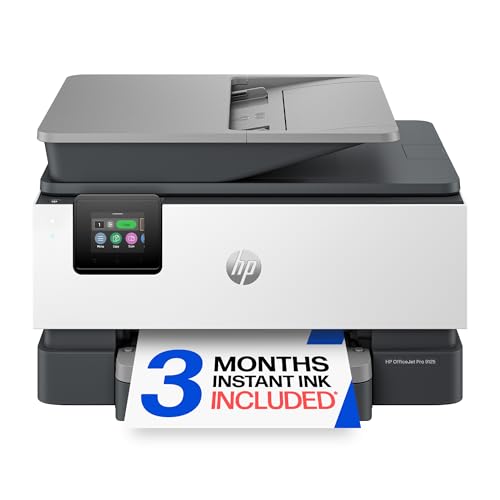
3. HP OfficeJet Pro 9125: Best for Busy Offices
Pros
- Fastest listed color and black speeds
- Automatic two-sided scanning
- 250-sheet input tray
- ADF, fax, copying, and scanning
- HP Wolf Pro Security
Cons
- Heavy and physically large
- Cartridge restrictions limit flexibility
- More printer than an occasional user needs
Best for: an office that regularly prints, scans, copies, and faxes multi-page documents.
The HP OfficeJet Pro 9125 is the clear step up when the printer is part of an office workflow rather than a household convenience. Its rated speed reaches 22 pages per minute in black and 18 pages per minute in color, the strongest figures in this group. That matters when several people are sending reports, presentations, brochures, or flyers instead of one person printing a page now and then.
Paper handling is equally important. The 250-sheet input tray holds more paper than the 8125e, Brother Work Smart 1360, or the smaller Canon and HP home models. Its ADF supports scanning and copying, and the product specifically lists automatic two-sided scanning as well as two-sided printing. That combination cuts down on page flipping when digitizing or reproducing a double-sided packet.
A 2.7-inch color touchscreen gives the printer a more comfortable control surface than the OLED display on the Canon PIXMA TS6520. Wireless printing works through dual-band Wi-Fi, and the HP app handles print, scan, copy, and fax jobs from a mobile device. HP also lists Wolf Pro Security, which is a sensible feature for a printer connected to an office network where documents may be confidential.
The compromise is size and weight. At 20.48 pounds, with a listed width of 17.3 inches and height of 10.94 inches, this is not a machine to squeeze onto a narrow shelf. Its original-chip cartridge requirement is another important boundary, and the three-month Instant Ink trial becomes a monthly service after that period unless canceled. The HP OfficeJet Pro 8139 is a better fit for a home office, but the 9125 earns its place when speed, duplex scanning, and paper capacity take priority. If your office is deciding between inkjet and a different printing method, the document workloads that favor a different printer design can help clarify the choice.
4. Brother Work Smart 1360: Best Controls and Connectivity

Pros
- Automatic duplex printing
- 20-sheet automatic document feeder
- 150-sheet paper tray
- USB and wireless connections
- Cloud app support and ink-use monitoring
Cons
- Slower listed speeds than the OfficeJet Pro models
- ADF is single-sided
- Uses a separate LC501 series ink family
Best for: a home or small office that prints from cloud services and wants physical controls.
The Brother Work Smart 1360 takes a practical, slightly old-school approach to the all-in-one printer. It includes a 1.8-inch color display, a 20-sheet single-sided ADF, automatic duplex printing, and both wireless and USB connections. That makes it a flexible choice for a household that does not want every interaction to pass through a phone app.
The 150-sheet paper tray is large enough for regular home-office use, while the ADF handles a modest stack of pages. Its listed speeds are up to 16 pages per minute in black and 9 pages per minute in color. That is behind the HP OfficeJet Pro 8125e and HP OfficeJet Pro 9125, but it remains a meaningful advantage over basic printers when several pages need to be produced in one sitting.
Brother's connectivity is the standout feature. The printer can print from and scan to cloud services such as Google Drive, Dropbox, Box, and OneDrive through its display. The Brother Mobile Connect app adds mobile printing, copying, scanning, and device management, while Page Gauge monitors ink usage. USB is useful as a fallback when wireless setup is inconvenient or when the printer will be attached to one main computer.
The Brother's weakness is that its ADF is single-sided, so double-sided originals require more manual work than they do on the HP OfficeJet Pro 9125. It also uses LC501 series ink, which means it is not interchangeable with the HP cartridges listed elsewhere in this roundup. This is a better fit than the Canon PIXMA TS6520 for users who handle paper stacks, but the HP 8125e remains faster and has a larger tray. Pick the Brother when cloud access, a clear color display, and connection flexibility matter more than maximum throughput.
5. HP OfficeJet Pro 8139: Best Home-Office Feature Set

Pros
- Automatic document feeder and duplex printing
- Fax, scan, copy, and print functions
- 225-sheet input tray
- 2.7-inch color touchscreen
- One-year Instant Ink trial
Cons
- Requires original HP chip or circuitry cartridges
- Large footprint for a household printer
- Monthly service follows the trial unless canceled
Best for: a home office that needs faxing as well as routine printing, scanning, and copying.
The HP OfficeJet Pro 8139 is the most complete home-office machine in HP's middle range here. It prints, scans, copies, and faxes, then adds automatic two-sided printing, an ADF, and a 225-sheet tray. For someone working from home, that is a useful set of capabilities because it handles both ordinary documents and the occasional form that still needs faxing.
Its listed speeds reach 20 pages per minute in black and 10 pages per minute in color. Those are the same headline figures as the HP OfficeJet Pro 8125, and both models include a 2.7-inch touchscreen, dual-band Wi-Fi, HP app support, and HP AI formatting tools for web pages and emails. The 8139's distinction is the fax function and the longer one-year Instant Ink trial.
The touchscreen is large enough to make common settings easier to find than they are on a basic icon LCD. The ADF saves time on multi-page jobs, while automatic duplex printing handles two-sided output without manual page turning. HP also lists Wolf Essential Security and more than 45 percent recycled plastic content. These features make it a more serious office appliance than the HP Envy 6155, even though both can serve a home.
The 8139 is not the right pick for someone who prints only a few sheets each month. Its footprint is 18.12 inches wide, 13.29 inches long, and 9.17 inches high, and the 17.6-pound body needs a stable place to live. HP's cartridge restrictions are also explicit, and the subscription trial changes to a monthly service after one year unless canceled. The HP OfficeJet Pro 9125 is faster and better for a busier office, while the 8125e is the simpler recommendation when faxing is not needed. The 8139 makes sense for the home worker who wants nearly every office function in one machine.
6. HP OfficeJet Pro 8125: Best Touchscreen Workflow

Pros
- 2.7-inch color touchscreen
- Automatic document feeder
- Automatic duplex printing
- 225-sheet paper tray
- Wireless printing and HP app support
Cons
- No fax function is listed
- Cartridge restrictions may be inconvenient
- Large footprint compared with home models
Best for: a home-office user who wants the 8125e's core workflow with a color touchscreen.
The HP OfficeJet Pro 8125 is very close to the 8125e, but the differences in the listing matter. This model has a 2.7-inch color touchscreen, automatic duplex printing, an ADF, and a 225-sheet input tray. It is a printer designed to be operated both from the panel and through the HP app, which is useful when a person at the desk wants direct control but other household members print from their phones.
Print speeds reach 20 pages per minute in black and 10 pages per minute in color. That is enough separation from the HP DeskJet 2955 and HP Envy 6155 to make the Pro name meaningful for recurring work. It also handles scanning and copying, while the ADF takes some of the friction out of multi-page documents.
Dual-band Wi-Fi supports both 2.4GHz and 5GHz connections, and HP says its wireless system can detect and resolve connection issues. The app supports printing, scanning, copying, and faxing from a mobile device, although fax hardware is not listed for this model. The AI formatting feature is aimed at trimming unwanted content from web pages and emails, a small convenience when printing directly from online sources.
The 8125's main weakness is that it sits between several more clearly defined choices. The 8125e is the stronger all-around recommendation, the 8139 adds fax and a longer trial, and the Brother Work Smart 1360 offers USB plus cloud connections. Like the other recent HP OfficeJet Pro models here, it is intended for cartridges with original HP chips or circuitry, and the three-month Instant Ink trial becomes a monthly service afterward unless canceled. Choose this model when the color touchscreen is central to how you work and you do not need fax hardware.
7. HP Envy 6155: Best for Home Photos

Pros
- 2.4-inch color touchscreen
- Automatic duplex printing
- Borderless photo support
- 100-sheet input tray
- P3 technology for vibrant color
Cons
- Slower than the OfficeJet Pro range
- Smaller paper tray
- Works only with cartridges using original HP chips or circuitry
Best for: a home user who prints homework, everyday color documents, and borderless photos.
The HP Envy 6155 is a home printer first. It does not try to compete with the OfficeJet Pro models on paper capacity or office throughput. Instead, it focuses on the jobs most families actually give a printer: homework, everyday color documents, copies, scans, and borderless photos.
Its rated speed is up to 10 pages per minute in black and 7 pages per minute in color. That is more than adequate for a few pages at a time, but much slower than the HP OfficeJet Pro 9125's 22 black and 18 color pages per minute. The 100-sheet input tray also makes its role clear. It is suited to normal household use, not a shared office where people expect a large stack of paper to remain loaded.
The 2.4-inch color touchscreen is one of the better control panels among the home-focused models. Automatic two-sided printing handles longer documents, and dual-band Wi-Fi supports wireless jobs from a phone, tablet, or computer. HP's P3 technology is intended to make printed documents and photos look more vibrant, while the HP app supports print, scan, copy, and fax functions from a smartphone. The product itself does not list fax hardware.
The most important drawback is cartridge control. HP says the printer will block cartridges using non-HP chips or circuitry, with periodic firmware updates maintaining those measures. That makes the Envy 6155 less flexible than a buyer might expect from a general home printer. It also has a narrower role than the Canon PIXMA TS6520, which offers a similarly home-oriented design with a small OLED display and support for borderless media up to 8.5 by 11 inches. Choose the Envy when the touchscreen and HP's photo-oriented features matter more than speed or broad cartridge choice. For readers focused mainly on photo output, the paper and color concerns that shape photo printing deserve attention before choosing any all-in-one.
8. Canon PIXMA TS4320: Best Compact Canon

Pros
- Automatic two-sided printing
- Compact design
- Supports borderless documents and photos
- Dual-band Wi-Fi
- Apple AirPrint and Mopria support
Cons
- No rated print speed is listed
- No display or ADF is listed
- Two-cartridge system limits color separation
Best for: occasional home printing where a small, simple all-in-one matters more than speed.
The Canon PIXMA TS4320 is the understated option in this group. Its job is to fit into a home setup and cover the basics: printing, copying, scanning, wireless connection, and two-sided output. Canon describes it as compact and easy to set up, which makes it a sensible choice for someone who does not want a large office machine occupying permanent desk space.
The printer uses a two-cartridge hybrid ink system designed for sharp text and vivid color. It supports documents and photos up to 8.5 by 11 inches, with or without borders. Automatic duplex printing is especially useful in a small home because it reduces the amount of paper a longer document consumes and avoids the manual flipping required by some entry-level machines.
Wireless support covers both 2.4GHz and 5GHz networks. The Canon PRINT app, Apple AirPrint, and Mopria Print Service provide several ways to send a document from a phone or tablet. The listing does not provide a print speed, tray capacity, display size, or ADF, so it would be a mistake to treat this as a high-throughput office printer.
That missing information is the TS4320's central weakness when compared with the Canon PIXMA TS6520. The TS6520 adds a 1.42-inch OLED display and explicitly lists ink-level and status information, while the HP DeskJet 2955 provides a 60-sheet tray and rated speeds. The TS4320 makes more sense when compactness, duplex printing, and easy mobile setup are the priorities. It is not the one we'd choose for frequent multi-page scanning or a busy household with several large print jobs.
9. HP DeskJet 2955: Best Basic Printer

Pros
- Compact all-in-one design
- Print, copy, and scan functions
- 60-sheet input tray
- Dual-band Wi-Fi
- HP app support
Cons
- Slowest listed print speeds
- Smallest paper tray in the printer group
- No automatic document feeder or duplex printing is listed
Best for: occasional color documents, recipes, letters, and simple household printing.
The HP DeskJet 2955 is the right kind of simple for a household that prints only when something demands it. It handles color printing, copying, and scanning, and its compact body is intended to fit into a home without taking over the workspace. The listed jobs include to-do lists, letters, financial documents, and recipes, which is a more honest description of its role than calling it a workgroup machine.
Its rated speed reaches 7.5 pages per minute in black and 5.5 pages per minute in color. Those are the lowest listed figures among the printers with published speeds, so patience is part of the package when printing a longer report. The 60-sheet input tray is also modest. That is enough for occasional work, but it means frequent users will refill it more often than they would the Canon PIXMA TS6520 or any OfficeJet Pro.
The control panel uses an icon LCD, and the HP app can print, scan, copy, or fax from a smartphone. The printer also includes dual-band Wi-Fi, with HP describing connection monitoring that can detect and resolve wireless issues. Its AI feature is aimed at formatting web pages and emails, including removing unwanted content before printing. HP lists at least 70 percent recycled plastic, along with ENERGY STAR and EPEAT certification.
The DeskJet 2955 gives up too much for a busy home office. Automatic duplex printing and an ADF are not listed, so the Brother Work Smart 1360 is a much better choice for multi-page documents. The HP Envy 6155 is also stronger for photos, with a touchscreen and borderless photo support. The DeskJet belongs with the occasional printer user who values a small, uncomplicated machine and does not need fast output. It is a basic answer to the question of which Best ink jet printer belongs in a lightly used home.
10. Smart Ink 952XL Combo: Best Replacement Cartridge Set

Pros
- Four-cartridge set
- Includes black, cyan, magenta, and yellow
- Listed compatibility with many older HP OfficeJet models
- XL cartridge format
- Customer support is listed
Cons
- Not a printer
- Compatibility is limited to specified HP families
- Auto-updates may affect compatible cartridge use
Best for: owners of compatible older HP OfficeJet printers who need a full replacement ink set.
The Smart Ink 952XL Combo is not a printer, so it should not be confused with the nine machines above. It is included for readers who already own a compatible HP OfficeJet and need replacement cartridges rather than a new all-in-one. The pack contains one black, one cyan, one magenta, and one yellow cartridge.
Compatibility is the first thing to verify. The listing names HP OfficeJet and OfficeJet Pro models including the 8702, 8710, 8720, 8730, 8740, and several related series. It does not list the newer HP DeskJet, Envy, or OfficeJet Pro models in this roundup as compatible. The Smart Ink cartridge set therefore belongs to a different ownership decision than the HP OfficeJet Pro 8125e or HP OfficeJet Pro 9125.
The listed yield is up to 2, 000 pages for each XL black cartridge and up to 1, 600 pages for each XL color cartridge. Those are manufacturer-listed maximums, not a guarantee of the pages every user will achieve. The product also advises turning off printer auto-updates because compatible cartridges may be affected by firmware changes. That is a crucial trade-off for anyone who wants to avoid interruptions.
The set makes sense only when the printer model is explicitly supported and the owner is comfortable checking firmware behavior. It is not a substitute for buying a printer, and it cannot be ranked on printing speed, scanning, or paper handling. For a new purchase, choose among the printers above. For an existing compatible OfficeJet, this four-color set is the relevant product in the list.
How to choose best ink jet printer
The right printer depends less on the number of features than on how often you print, what kind of documents you handle, and how much manual work you are willing to do.
Print speed
Print speed matters when a printer serves more than one person or handles multi-page reports. Black speed is usually the more useful figure for letters, forms, and ordinary documents, while color speed matters for presentations, flyers, and school projects.
The HP OfficeJet Pro 9125 leads this group with listed speeds of up to 22 pages per minute in black and 18 pages per minute in color. The OfficeJet Pro 8125e, OfficeJet Pro 8125, and OfficeJet Pro 8139 reach 20 black and 10 color pages per minute. Basic home printers such as the HP DeskJet 2955 are better suited to occasional output.
Automatic document feeding
An ADF lets you place multiple pages into the printer for scanning or copying. It is one of the clearest dividing lines between an occasional home printer and a machine suited to office work.
The Brother Work Smart 1360 has a 20-sheet single-sided ADF. The HP OfficeJet Pro models list ADFs, with the 9125 adding automatic two-sided scanning. The Canon PIXMA TS6520 and Canon PIXMA TS4320 do not list ADFs, so multi-page originals must be handled one page at a time.
If you regularly scan a stack of pages, an ADF matters more than a larger touchscreen.
Duplex printing and scanning
Automatic duplex printing puts ink on both sides of a sheet without requiring manual page flipping. It is useful for reports, schoolwork, and documents that would otherwise become unnecessarily long.
Every model should not be assumed to have it simply because the title says all-in-one. The Canon PIXMA TS6520, Canon PIXMA TS4320, Brother Work Smart 1360, HP Envy 6155, and OfficeJet Pro models explicitly list automatic two-sided printing. Automatic two-sided scanning is a separate capability, and the HP OfficeJet Pro 9125 is the clearest choice here for that workflow.
Paper capacity and footprint
A larger tray reduces refills, but it usually comes with a larger printer. The HP DeskJet 2955 has a 60-sheet tray, the HP Envy 6155 has 100 sheets, the Brother Work Smart 1360 has 150, and the OfficeJet Pro 8125e, 8125, and 8139 have 225. The OfficeJet Pro 9125 raises that to 250 sheets.
Measure the desk before choosing an office model. The HP DeskJet 2955 is listed at 16.73 inches wide, while the OfficeJet Pro 8125e is 18.11 inches wide and the OfficeJet Pro 9125 is 17.3 inches wide. A printer that cannot remain accessible is frustrating no matter how capable it is.
Wireless and mobile printing
Dual-band Wi-Fi gives a printer the choice of 2.4GHz or 5GHz networks. That can make setup easier in homes where one band is crowded or where the printer is placed farther from the router.
HP's app supports printing, scanning, copying, and device management from a mobile device. Canon supports the Canon PRINT app, Apple AirPrint, and Mopria Print Service on the PIXMA models. Brother adds cloud connections such as Google Drive, Dropbox, Box, and OneDrive, plus USB for a direct connection.
Ink compatibility
Ink compatibility is not a minor detail. Several HP models in this roundup state that they are intended to work only with cartridges using original HP chips or circuitry, and firmware updates can maintain those restrictions. The Smart Ink 952XL set, meanwhile, is designed for specified older HP OfficeJet families and is not a general replacement for the newer HP printers here.
Check the exact printer model and cartridge family before buying supplies. The cartridge number, chip requirement, and firmware behavior can determine whether a printer remains convenient over time.
Frequently asked questions
What is the Best ink jet printer for a home office?
The HP OfficeJet Pro 8125e is the strongest all-around fit because it combines a 225-sheet tray, ADF, automatic duplex printing, and speeds up to 20 pages per minute in black and 10 in color. Choose the HP OfficeJet Pro 8139 instead if faxing is part of the workflow.
Which printer is best for occasional home use?
The HP DeskJet 2955 is designed for basic printing, copying, and scanning, with a compact body and a 60-sheet tray. Its speeds are modest and it lacks the listed duplex and ADF features of the office models, but it fits occasional household documents well.
Which printer has the fastest listed color speed?
The HP OfficeJet Pro 9125 has the fastest listed color speed at up to 18 pages per minute. It also has a 250-sheet tray, automatic two-sided scanning, an ADF, and fax capability.
Do these printers print on both sides automatically?
The Canon PIXMA TS6520, Canon PIXMA TS4320, Brother Work Smart 1360, HP Envy 6155, and the HP OfficeJet Pro models explicitly list automatic two-sided printing. Automatic duplex scanning is a separate feature, and it is specifically listed for the HP OfficeJet Pro 9125.
Which printer has the best display?
The HP OfficeJet Pro 8125, HP OfficeJet Pro 8139, and HP OfficeJet Pro 9125 each list a 2.7-inch color touchscreen. The HP Envy 6155 has a 2.4-inch color touchscreen, while the Canon PIXMA TS6520 uses a 1.42-inch monochrome OLED display and the Brother Work Smart 1360 has a 1.8-inch color display.
Can the Smart Ink 952XL cartridges be used in these new HP printers?
The Smart Ink 952XL set is listed for older HP OfficeJet and OfficeJet Pro models such as the 8702, 8710, 8720, and related series. The listing does not identify the HP DeskJet, Envy, or newer OfficeJet Pro models in this roundup as compatible. Confirm the exact printer model before ordering.
Is a compact printer enough for multi-page scanning?
A compact printer without an ADF can still scan, but each page must generally be placed individually on the scanner glass. For recurring multi-page work, choose a model with an ADF, such as the HP OfficeJet Pro 8125e or Brother Work Smart 1360.

The bottom line
The Best ink jet printer here is the HP OfficeJet Pro 8125e for most home offices. It balances a 225-sheet tray, ADF, automatic duplex printing, mobile controls, and strong listed speeds without moving all the way up to the heavier HP OfficeJet Pro 9125. For a busy office that needs automatic two-sided scanning and faxing, the HP OfficeJet Pro 9125 is the better fit.
For ordinary household printing, the Canon PIXMA TS6520 is easier to live with, while the HP Envy 6155 is the more photo-oriented home choice. The Brother Work Smart 1360 deserves attention when cloud services, USB, and a physical color display matter more than maximum speed.
If you are undecided, choose the HP OfficeJet Pro 8125e for mixed work, the Canon PIXMA TS6520 for simple home use, or the HP OfficeJet Pro 9125 for a demanding office.
As an Amazon Associate we earn from qualifying purchases.