

A phone full of good pictures is not the same as a useful collection of memories. The right pocket printer turns a camera roll into planner stickers, scrapbook pieces, party keepsakes, and photos you can hand to someone immediately. The challenge is separating printers that make attractive little prints from those that are merely small.
Our Best mini photo printer pick is the KODAK Mini 2 Retro, thanks to its more durable 4PASS prints and unusually complete starter bundle. The rest of this list covers sticky ZINK models, inkjet alternatives, a creative dye sublimation printer, and one larger 4x6-inch option.
| # | Product | Award | Printing method | Print size | Best for |
|---|---|---|---|---|---|
| 1 | KODAK Mini 2 Retro | Best overall | 4PASS dye sublimation | Credit-card size | Durable everyday photos |
| 2 | KODAK Step | Best for stickers | ZINK | 2 x 3 inches | Journals and crafts |
| 3 | Nelko PP01 White | Best high-resolution inkjet | Inkjet | 2 x 3 inches | Detailed colorful prints |
| 4 | Liene Pearl N200 Pro | Best creative features | Thermal dye sublimation | 2 x 3 inches | AI edits and group printing |
| 5 | Liene M100 4x6 | Best for larger photos | Thermal dye sublimation | 4 x 6 inches | Albums and home display |
| 6 | Canon Ivy 2 White | Best compact ZINK printer | ZINK | 2 x 3 inches | Simple phone printing |
| 7 | Nelko PP01 Pink | Best colorful design | Inkjet | 2 x 3 inches | Planners and party favors |
| 8 | HP Sprocket 2nd Edition | Best for sharing | ZINK | 2 x 3 inches | Groups and print parties |
| 9 | Canon Ivy 2 Pink | Best compact pink printer | ZINK | 2 x 3 inches | Small personal prints |
| 10 | Canon Ivy 2 Bundle | Best equipped bundle | ZINK | 2 x 3 inches | New owners and gifting |
1. KODAK Mini 2 Retro: Best Overall

Pros
- 4PASS dye sublimation prints
- Protective lamination resists fingerprints, water, and fading
- Includes four cartridges and 38 sheets
- Works with compatible iOS and Android devices
Cons
- Prints take approximately 55 seconds
- Uses Bluetooth and the Kodak app
- Larger than the lightest ZINK alternatives
Best for: someone who wants small photos with a more finished, protected surface.
The KODAK Mini 2 Retro is the printer we would reach for when the print itself matters more than the novelty of making one. Its 4PASS process builds the image in three color layers, then adds a clear protective lamination layer. That extra finishing step gives the little credit-card-size photos a smoother, more substantial feel than many basic sticker prints.
The approximately 55-second print time is not instant in the strictest sense, but it is predictable. The payoff is a print designed to resist fingerprints, water, and fading, which makes this a better fit for wallets, albums, travel journals, and scrapbook pages that will be handled repeatedly. The Kodak Photo Printer app also provides the expected editing basics, including cropping and customization, without making the setup feel like a desktop printing project.
This model measures about 5 inches wide, 3 inches long, and 1 inch high, and weighs roughly 0.56 pounds. That is portable enough for a bag or larger pocket, though the KODAK Step and HP Sprocket 2nd Edition feel more naturally pocket-first. The included 38 sheets and four cartridges make it ready for a small event or trip rather than just a few test prints.
The weakness is the consumable system and the wait for each finished image. Someone who wants peel-and-stick prints for a fast collage may prefer the ZINK convenience of the Canon Ivy 2 White. The KODAK Mini 2 Retro wins when durability and print finish take priority, and it is the one we'd keep for everyday memory making.
2. KODAK Step: Best for Stickers

Pros
- ZINK paper has peel-and-stick backing
- Bluetooth and NFC connectivity
- Editing app includes collages, borders, stickers, and text
- Built-in rechargeable battery
Cons
- Starter pack includes only five sheets
- Battery is rated for 25 photos per charge
- ZINK prints lack the laminated finish of the Kodak Mini 2 Retro
Best for: crafters who want quick 2 x 3-inch stickers from a phone.
The KODAK Step is built around the satisfying part of mini printing: peel the backing and put the picture somewhere. Its ZINK paper contains dye crystals, so there is no separate ink cartridge to install. That keeps the workflow tidy for journals, lockers, notebooks, and party projects.
The 2 x 3-inch output is the familiar pocket-photo format, and the Kodak app gives the printer more personality than a bare print button. You can make collages, add filters, borders, stickers, and text, then send the result over Bluetooth. NFC is also listed as a connection option, giving compatible devices another way to begin pairing.
The compact printer weighs less than a pound and uses a rechargeable lithium-ion battery rated for 25 photos on a full charge. That is enough for a small gathering or an afternoon of journaling, but it is not the model we'd choose for a large batch. Its starter pack has five sheets, so the first setup is more of a quick introduction than a full creative session.
The KODAK Mini 2 Retro produces a more protected photo, while the KODAK Step is easier to treat as a sticker machine. The older HP Sprocket 2nd Edition offers stronger group features, but the Step's editing tools are more immediately useful for solo crafting. Choose it when peel-and-stick convenience matters more than archival handling.
3. Nelko PP01 White: Best High-Resolution Inkjet

Pros
- Advertised 600 DPI output
- Water-resistant, smudge-proof, and tear-resistant prints
- Ink cartridge can print up to 80 photos
- App supports collages, filters, stickers, text, and AI editing
Cons
- Requires ink cartridges
- Printing can take under 90 seconds
- Charging adapter is not included
Best for: students and crafters who want detailed 2 x 3-inch adhesive prints.
The Nelko PP01 White takes a different route from the ZINK printers here. It uses inkjet technology and claims 600 DPI output, with the goal of producing vivid color and fine detail on 2 x 3-inch sticky-backed paper. That makes it interesting for planners and labels where small text, borders, and decorations need to remain legible.
Its companion app is unusually busy in a useful way. It supports frames, filters, graffiti, borders, stickers, text, collages, and AI image editing. The printer connects to iOS and Android devices over Bluetooth, and the setup involves loading the paper, installing a cartridge, and pairing through the Nelko app.
Nelko says each ink cartridge can print up to 80 full-color photos. That gives the PP01 a different rhythm from cartridge-free ZINK models, though it also adds a maintenance step. The printer weighs about 0.6 pounds, making it easy to carry for school, travel, or a field trip. A USB charging cable is included, but the power adapter is not.
The advertised print time of under 90 seconds is slower than a quick sticker session, and anyone who dislikes replacing cartridges should look at the KODAK Step or Canon Ivy 2 White instead. The PP01 makes more sense for a user who wants app-led decoration and higher stated resolution. The pink version is functionally the same choice, with the finish being the main distinction.
4. Liene Pearl N200 Pro: Best Creative Features

Pros
- Thermal dye sublimation printing
- Includes 50 sheets and five cartridges
- InstaPic mode adds shoot-and-print operation
- AI editing, background removal, watermarks, and timestamps
- Supports multi-device pairing
Cons
- Full charge is rated for up to 27 stickers
- Heavier than the smallest models
- App has more features to learn
Best for: creative users who want a mini printer with more than basic filters.
The Liene Pearl N200 Pro is the most feature-rich mini printer in this group. It still makes 2 x 3-inch adhesive pictures, but the experience is aimed at people who want to play with the image before it leaves the phone. Its Liene Photo app includes frames, official stickers, watermarks, timestamps, background removal, and AI-assisted styling.
The unusual feature is InstaPic mode. The listing describes a shoot-and-print workflow with a built-in CCD camera and camera filters, allowing users to capture a moment without first selecting it from a phone album. That gives this printer a more social, party-friendly character than the straightforward Canon Ivy 2 models.
Printing uses thermal dye sublimation, and the bundle includes 50 sheets plus five cartridges. Liene also lists quick Bluetooth pairing and multi-device support, so several people can contribute photos at a gathering. A full charge is rated for up to 27 stickers, which is enough for a short session but less generous than the KODAK Step's stated 25 photos only by a small margin.
At about 5.69 inches long, 3.44 inches wide, 1.16 inches high, and 0.75 pounds, it is portable without being the smallest option. The Canon Ivy 2 Bundle is simpler and arrives with more paper and accessories, while the N200 Pro is the better fit for experimentation. Skip it if you want one obvious print button and no appetite for an involved app.
5. Liene M100 4x6: Best for Larger Photos

Pros
- Prints full 4 x 6-inch photos
- Thermal dye sublimation output
- Includes 100 sheets and three color cartridges
- Wi-Fi hotspot avoids outside network interference
- Supports up to five simultaneous connections
Cons
- Not a pocket-size 2 x 3-inch printer
- Requires a dedicated Wi-Fi connection
- Larger prints need more room to store and handle
Best for: households that want phone printing without giving up a conventional photo size.
The Liene M100 4x6 is the outlier here, and that is exactly why it earns a place. It does not make tiny stickers. It produces full 4 x 6-inch photos that look more at home in an album, frame, or envelope. If the small format feels too cramped for family shots or travel scenes, this is the obvious step up.
Its thermal dye sublimation process puts color into the paper and finishes the surface with protection against water, scratches, fingerprints, and fading. The package includes 100 sheets and three color cartridges, with the supplies arranged across the printer packaging and an additional box. That makes it suited to a larger batch of prints than the miniature models.
The M100 creates its own Wi-Fi hotspot, so a phone can connect directly without relying on an outside network. Up to five devices can connect at once, which is useful for a family event. The Liene app supports filters, contrast and brightness adjustments, square borders, print-status checks, and ID or visa photo layouts.
The trade-off is physical scale and workflow. It is a small home printer, not something to slip into a pocket beside a phone. Readers who want to explore larger photo printing for albums and display should start here, while anyone focused on stickers should choose the Liene Pearl N200 Pro or KODAK Step. The M100 is for people who want mini-printer convenience with a full-size result.
6. Canon Ivy 2 White: Best Compact ZINK Printer

Pros
- Very slim portable design
- ZINK printing needs no ink cartridges
- Peel-and-stick paper
- Bluetooth 5.0 connectivity
- Canon app supports direct customization
Cons
- Paper is sold separately in this configuration
- ZINK output is less protected than dye sublimation prints
- Print size is limited to small stickers
Best for: phone owners who want a simple, slim printer for occasional stickers.
The Canon Ivy 2 White is the clean, uncomplicated option in the lineup. It connects to a compatible smartphone or tablet through the Canon Mini Print app, uses ZINK paper, and produces peel-and-stick images without a cartridge drawer. The appeal is not a huge feature list. It is the low-friction path from phone gallery to sticker.
Canon says the Ivy 2 improves skin tones, contrast, and sharpness over the earlier model. Those changes matter in a 2 x 3-inch image, where a small shift in contrast can determine whether a face looks lively or flat. Bluetooth 5.0 handles the wireless connection, and the app provides the editing stage before printing.
The listed dimensions are about 4.7 inches long, 3.3 inches high, and 0.8 inches wide, with a stated weight of roughly 0.32 pounds. That slim profile is one of its strongest arguments. It is noticeably easier to tuck into a small bag than the Liene M100, and it is lighter than the Liene Pearl N200 Pro.
The plain package does not include the large paper and case selection found with the Canon Ivy 2 Bundle. The KODAK Mini 2 Retro gives a more durable finished print, while the Canon Ivy 2 White is easier to recommend for quick stickers and uncomplicated travel. If you want a compact ZINK printer and already know you prefer Canon's app, this is the sensible version.
7. Nelko PP01 Pink: Best Colorful Design

Pros
- 600 DPI stated resolution
- Sticky-backed 2 x 3-inch color prints
- App includes AI editing and creative tools
- Cartridge yield rated up to 80 photos
- Portable 0.6-pound design
Cons
- Needs ink cartridges
- Adapter is not included
- Print time is under 90 seconds
Best for: planners, craft projects, and users who prefer the pink finish.
The Nelko PP01 Pink is the same basic printer concept as the PP01 White, but it deserves its own place because the two are separate listings and the finish can matter when a printer lives on a desk. Under that color choice is a 2 x 3-inch inkjet printer aimed at colorful, adhesive projects.
The stated 600 DPI resolution is the headline specification. In practice, that makes the PP01 more interesting for small details than a printer designed only for loose snapshots. Its paper is described as smudge-proof, water-resistant, and tear-resistant, while the sticky backing suits calendars, scrapbooks, labels, and travel journals.
The Nelko app handles the creative work. It offers frames, filters, graffiti, borders, stickers, text, collages, and AI image editing. Bluetooth pairing works with iOS and Android phones, and the cartridge is rated for up to 80 full-color 2 x 3 photos. The printer weighs about 0.6 pounds, so it remains easy to carry even though the ink system adds a little more preparation.
The KODAK Step is faster to understand because there is no cartridge installation, and the Canon Ivy 2 is slimmer. The Nelko PP01 Pink makes the stronger case when its editing tools and stated resolution are more important than the simplest possible workflow. Choose the White model if color is irrelevant, but do not expect a performance difference between these two Nelko listings.
8. HP Sprocket 2nd Edition: Best for Sharing

Pros
- Multiple devices can connect for shared printing
- Bluetooth 5.0
- LED indicates whose photo is printing
- App supports albums and customization
- Includes ZINK paper
Cons
- Older second-generation design
- Starter supply is only 10 sheets
- Prints are limited to 2 x 3 inches
Best for: parties where several people need to send photos to one printer.
The HP Sprocket 2nd Edition is less about private journaling and more about passing the printer around. It supports multiple connected devices, and its LED light shows whose image is being printed. That small bit of feedback makes a real difference when several phones are sending pictures in the same room.
It uses 2 x 3-inch ZINK paper with peel-and-stick backing, so there is no ink cartridge to manage. HP includes paper in the box, and the Sprocket app adds photo customization and shared albums. The printer also has an augmented-reality feature that can display a virtual print queue through the app, a playful extra for a group event.
Bluetooth 5.0 and sleep mode help it stay ready without draining the battery while idle. It weighs about 0.38 pounds and measures approximately 4.63 inches wide, 3.15 inches long, and 0.98 inches high. That places it close to the Canon Ivy 2 in portability, though the Canon has the newer-feeling appeal of a more focused current model.
The age of the design shows in the small 10-sheet included supply and the more limited creative story compared with the Liene Pearl N200 Pro. Still, group printing is where the HP earns its spot. For readers comparing portable printers for trips and shared events, the Sprocket's multi-device support is more useful than a long list of solo editing effects.
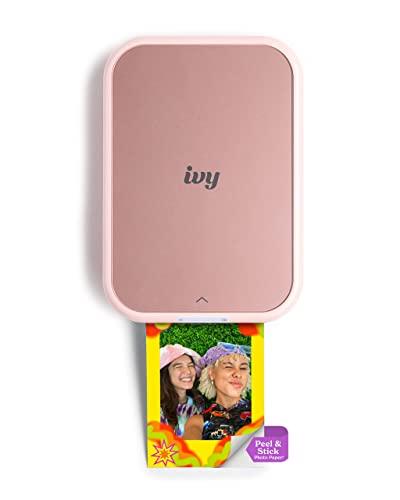
9. Canon Ivy 2 Pink: Best Compact Pink Printer
Pros
- Slim 2 x 3-inch ZINK printer
- No ink cartridges
- Peel-and-stick output
- Bluetooth 5.0
- Canon Mini Print app support
Cons
- Standard listing does not include a large paper bundle
- ZINK prints do not have dye sublimation lamination
- Same small print size as the White version
Best for: someone who wants the Canon Ivy 2 experience in a pink finish.
The Canon Ivy 2 Pink is a straightforward color variant of the Canon Ivy 2 family, and its strengths are the same. It is a thin, lightweight Bluetooth printer for 2 x 3-inch ZINK photos, with paper that peels into a sticker. For a phone user who wants a small creative accessory rather than a general-purpose printer, that is the right level of ambition.
The Canon Mini Print app lets you customize images before sending them over Bluetooth 5.0. ZINK technology keeps the printer free of ink cartridges because the color-forming material is embedded in the paper. That is convenient for short sessions and reduces the number of parts to carry.
The listed dimensions are about 4.7 inches long, 3.3 inches high, and 0.8 inches wide. The stated weight is roughly 0.55 pounds, which is still portable but heavier than the White listing's listed weight. The practical difference is small, and neither version competes with the larger Liene M100 for conventional photo printing.
The Canon Ivy 2 White is the cleaner neutral choice, while the Canon Ivy 2 Bundle is the more complete package. The pink model makes sense when the finish is part of the appeal and you want the standard printer rather than bundled accessories. If you are still deciding between a printer for stickers and a model for loose photos, the difference between adhesive snapshots and larger prints is the key decision.
10. Canon Ivy 2 Bundle: Best Equipped Bundle

Pros
- Includes 110 ZINK sheets
- Protective case included
- LED light bar
- USB charging cable included
- Bluetooth 5.0 and Canon app support
Cons
- Same 2 x 3-inch output as the standard Ivy 2
- Bundle is less compact once the case and paper are packed
- ZINK finish is not laminated dye sublimation
Best for: a new owner who wants the printer, paper, case, and cable together.
The Canon Ivy 2 Bundle is fundamentally the Canon Ivy 2, but the included accessories change how ready it feels out of the box. It comes with 110 ZINK sticky-backed prints, a protective case, an LED light bar, and a USB-A to USB-C charging cable. That is a much more complete starting point than the standard White or Pink listings.
The printer still uses Canon's Mini Print app, Bluetooth 5.0, and ink-free ZINK paper. The result is a small adhesive photo that can go onto a notebook, card, or wall. Canon also lists the Ivy 2's improved skin tones, contrast, and sharpness, so the bundle does not trade away the core print features for its extras.
The LED light bar adds a little visual feedback, while the case makes more sense for travel than desk storage. Canon says the printer can power up in as little as 45 minutes, which is helpful when a short charging window comes before a party or trip. The 110 included sheets are the central attraction, but they also make the whole package bulkier to carry than the bare printer.
The KODAK Mini 2 Retro remains the better pick for a protected photo surface, and the Canon Ivy 2 White is the more minimal purchase. This bundle is the practical choice for a first-time owner who wants fewer separate accessories to arrange. It is also a reasonable gift when the recipient is likely to start printing immediately.
How to choose best mini photo printer
The right mini printer depends less on the size of the device than on the kind of print you want to keep, stick, share, or edit.
Printing method
ZINK printers such as the KODAK Step, Canon Ivy 2, and HP Sprocket use paper with embedded color-forming crystals. They do not need ink cartridges, which keeps short printing sessions simple. Inkjet models such as the Nelko PP01 require cartridges, while dye sublimation models such as the KODAK Mini 2 Retro and Liene printers build color in layers and can add a protective finish.
Choose ZINK for simple stickers, inkjet for app-led detail, and dye sublimation when the finished photo needs a more substantial surface.
Print size
Most models here produce 2 x 3-inch images, a format that suits wallets, planners, scrapbooks, and small gifts. The Liene M100 produces 4 x 6-inch photos, which are easier to frame and more natural in an album. A larger print is not automatically better, but it gives faces, landscapes, and group shots more room to breathe.
Paper and finish
Peel-and-stick backing turns a photo printer into a labeling and decorating tool. Check whether the listing includes paper, how much is supplied, and whether the printer uses cartridges or embedded color technology. For handling and storage, the KODAK Mini 2 Retro's laminated 4PASS output has an advantage over ordinary small ZINK prints.
App and connection
Bluetooth is the common connection for pocket printers, while the Liene M100 creates its own Wi-Fi hotspot. App quality matters because cropping, borders, filters, text, and collages all happen before printing. The Liene Pearl N200 Pro goes furthest with AI editing, background removal, and InstaPic mode, while simpler models are easier to learn.
Battery and portability
A genuinely portable printer should fit into the bag you already carry, not require a separate case every time. Weight ranges from the slim Canon listings to the heavier Liene Pearl N200 Pro, and battery claims vary by model. Think about the number of prints needed in one session, since a printer rated for a couple dozen images may need a recharge at a larger gathering.

Frequently asked questions
Do mini photo printers need ink?
Not always. The KODAK Step, Canon Ivy 2 models, and HP Sprocket use ZINK paper with embedded dye crystals, while the Nelko PP01 uses ink cartridges and the Liene and KODAK dye sublimation models use cartridges designed for their printing process.
Are mini photo printer pictures sticky?
Several models in this roundup use peel-and-stick paper. The KODAK Step, Nelko PP01, Liene Pearl N200 Pro, Canon Ivy 2, and HP Sprocket are all designed around adhesive-backed small prints.
Can these printers work with iPhones and Android phones?
The listed models generally connect to compatible iOS and Android devices through their companion apps. The KODAK Step uses Bluetooth and NFC, the Canon Ivy 2 uses Bluetooth 5.0, and the Liene M100 connects through its own Wi-Fi hotspot.
Which printer makes the largest photos?
The Liene M100 is the only model here designed for 4 x 6-inch output. The other printers produce compact 2 x 3-inch images suited to stickers, journals, wallets, and small albums.
Are dye sublimation prints better than ZINK prints?
They serve different purposes. Dye sublimation can produce a more finished, protected surface, while ZINK avoids ink cartridges and makes the simplest peel-and-stick workflow. The KODAK Mini 2 Retro is the strongest example of the former, while the Canon Ivy 2 represents the latter.
Can several people print to one mini printer?
Some can. The HP Sprocket 2nd Edition supports multiple connected devices, and the Liene Pearl N200 Pro lists multi-device pairing. That feature is useful at parties, where waiting for one phone to finish sending each image quickly becomes frustrating.

The bottom line
The Best mini photo printer for most people is the KODAK Mini 2 Retro. Its 4PASS dye sublimation process, laminated finish, compact body, and included 38 sheets make it more versatile than the basic sticker printers. For fast peel-and-stick projects, the KODAK Step is the better fit, while the Liene M100 4x6 is the clear choice for people who want conventional photo size.
If you want the easiest choice, get the KODAK Mini 2 Retro for protected small photos or the Canon Ivy 2 Bundle for a ready-to-use sticker kit. An undecided reader should choose based on print size first, then printing method.
As an Amazon Associate we earn from qualifying purchases.