

A monitor can make a capable computer feel frustrating when text looks cramped, motion smears across the screen, or the stand leaves you hunched over your desk. The right choice depends less on a long feature list than on matching resolution, panel type, size, and adjustment range to the way you actually work.
Our picks cover fast 24-inch and 27-inch Full HD displays, sharper 4K screens, VA panels with stronger contrast, and a curved option for a more enveloping desktop. The Dell SE2726H 27-inch is our top pick, with the Dell S2725QS close behind for readers who want 4K detail.
Comparison
| # | Product | Award | Resolution | Refresh rate | Panel | Best for |
|---|---|---|---|---|---|---|
| 1 | Dell SE2726H 27-inch | Best overall | 1920 x 1080 | 144Hz | IPS | Everyday work and smooth motion |
| 2 | Dell SE2426H 23.8-inch | Best compact pick | 1920 x 1080 | 144Hz | IPS | Small desks |
| 3 | Dell S2725QS | Best 4K monitor | 4K UHD | 120Hz | IPS | Detailed work and media |
| 4 | Acer KB272 G0bi | Best simple 27-inch monitor | 1920 x 1080 | 120Hz | IPS | Office basics |
| 5 | Philips 221V8LB | Best small VA monitor | 1920 x 1080 | 100Hz | VA | Compact desks and media |
| 6 | Dell S2425HSM | Best adjustable 24-inch monitor | 1920 x 1080 | 144Hz | Not specified | Flexible desk setups |
| 7 | Samsung S36GD | Best curved monitor | 1920 x 1080 | 100Hz | Not specified | Immersive everyday use |
| 8 | Dell S2725QC | Best 4K connectivity | 4K UHD | 120Hz | IPS | Laptop workstations |
| 9 | Dell S2725HSM | Best adjustable 27-inch monitor | 1920 x 1080 | 144Hz | Not specified | Large-screen home offices |
| 10 | Philips 241V8LB | Best 24-inch VA monitor | 1920 x 1080 | 100Hz | VA | Reading and general work |
1. Dell SE2726H 27-inch: Best Overall

Pros
- 27-inch IPS screen with wide viewing angles
- 144Hz refresh rate and 1ms MPRT
- Two HDMI connections
- TÜV Rheinland 3-star eye comfort certification
- Thin bezels
Cons
- Full HD is less sharp at 27 inches than 4K
- Tilt adjustment is less flexible than the adjustable Dell models
Best for: anyone who wants a versatile 27-inch display for work, streaming, and responsive gaming.
The Dell SE2726H 27-inch gets the fundamentals right without making the desk feel complicated. Its 27-inch screen gives documents, browser tabs, and video a comfortable amount of space, while the IPS panel keeps the picture consistent when you lean back or move to the side. The thin bezels also make the screen feel less bulky, particularly on a tidy desk or beside a second display.
Motion is the reason this Dell rises above the ordinary office monitor. Its 144Hz refresh rate makes scrolling and cursor movement look noticeably more fluid than a conventional 60Hz screen, and the listed 1ms MPRT response specification is aimed at reducing visible blur in fast scenes. AMD FreeSync support helps the display coordinate its refresh with a compatible graphics card, which can reduce tearing during play.
The 1920 x 1080 resolution is perfectly practical for everyday work, but it is the compromise to understand. Text and fine interface elements will not look as crisp as they do on the 4K Dell S2725QS or Dell S2725QC. At 27 inches, Full HD spreads the same number of pixels over a larger area than a 24-inch monitor, so readers who spend all day with small text may prefer the Dell SE2426H or one of the sharper models.
Dell includes two HDMI connections, a 178-degree horizontal and vertical viewing angle, and a tilt-adjustable stand. The TÜV Rheinland 3-star eye comfort certification and reduced blue light feature are useful for long sessions, though they do not replace sensible brightness settings and regular breaks. The main ergonomic limitation is the stand: the Dell S2425HSM and Dell S2725HSM offer much more movement.
Choose this model if you want the broadest blend of speed, screen area, color consistency, and simple connectivity. Skip it if 4K text clarity is your priority or if your desk requires height, pivot, and swivel adjustment.
2. Dell SE2426H 23.8-inch: Best Compact Pick

Pros
- Compact 23.8-inch size
- 144Hz refresh rate and 1ms MPRT
- IPS viewing consistency
- Two HDMI connections
- TÜV Rheinland 3-star eye comfort certification
Cons
- Less workspace than a 27-inch display
- Tilt-only stand
- Full HD leaves less room for large multitasking layouts
Best for: a small desk, student workspace, or dual-monitor arrangement.
The Dell SE2426H 23.8-inch is the more compact sibling to the SE2726H, and its smaller panel makes a real difference on a shallow desk. It fits more easily beside a laptop, speaker, or notebook without forcing the keyboard too close to the edge. The 1920 x 1080 resolution also looks a little more concentrated at this size, making ordinary text and icons feel tidy without the scaling considerations that can arise on a larger Full HD screen.
This is not a slow office display. The 144Hz refresh rate makes rapid scrolling feel clean and helps games look more immediate, while the 1ms MPRT specification targets motion blur. AMD FreeSync support adds frame-rate synchronization for compatible systems. Those features are more than many work-focused monitors offer, and they make this a particularly sensible choice for someone who switches between spreadsheets and games.
The IPS panel provides a 178-degree viewing angle in both horizontal and vertical directions, so the image remains more dependable when you are not sitting exactly in the center. Color consistency is a strength here, though the data does not specify a color gamut or factory calibration. Like the larger Dell, it has thin bezels, two HDMI connections, and TÜV Rheinland 3-star eye comfort certification.
The trade-off is space. A 23.8-inch screen is comfortable for one main application, but side-by-side windows can feel crowded sooner than they do on the Dell SE2726H. The tilt-only stand also lacks the height, pivot, and swivel range found on the Dell S2425HSM. If you are planning a dual-monitor desk, the sizes that still work in tight spaces can help determine whether this compact format is the better starting point.
Pick the SE2426H when desk space and sharp-enough Full HD text matter more than sheer workspace. The larger Dell is the better single-screen choice, but this model is easier to place and easier to pair with another display.
3. Dell S2725QS: Best 4K Monitor

Pros
- 4K UHD detail on a 27-inch IPS panel
- 120Hz refresh rate
- 99% sRGB color coverage
- 1500:1 contrast ratio
- ComfortView Plus low-blue-light feature
Cons
- Needs more graphics power than Full HD
- No USB-C detail is provided
- Larger and heavier than the Full HD options
Best for: detailed office work, media, and general use where image clarity matters.
The Dell S2725QS is the clear choice when a 27-inch screen should make text and images look genuinely sharp. Its 4K UHD resolution gives four times the pixel count of a 1920 x 1080 display, so fine lettering, photographs, and detailed creative work have much more definition. It is the model we would put in front of someone who spends long hours moving between documents, timelines, high-resolution images, and video.
A 120Hz refresh rate keeps the experience feeling current rather than merely sharp. Scrolling through long pages is smoother than on a basic 60Hz monitor, and compatible games benefit from more fluid motion. AMD FreeSync Premium is included, while the feature list also cites a 0.03ms response time. Response figures can vary with measurement method, so the practical point is that this display is designed to combine high detail with responsive motion instead of treating 4K as an office-only feature.
The IPS panel is rated for 99% sRGB, which gives the S2725QS a stronger color specification than the Full HD Dell SE2726H. Its 1500:1 contrast ratio should provide more separation between lighter and darker areas, and the display is HDR-ready. That does not make it a dedicated HDR reference monitor, but it is a useful capability for films and compatible content. ComfortView Plus is designed to reduce harmful blue light emissions to 35% or less without sacrificing color accuracy.
Dell also mentions re-engineered sound with more output power and deeper frequency response than the previous generation. The screen has a modern ash white finish and thin bezels, though the monitor weighs 14.26 pounds and has a footprint about 24.08 inches wide. Make sure the computer can drive 4K at the refresh rate you want. A weaker graphics setup may not take full advantage of the panel, especially in demanding games.
Choose the S2725QS over the Dell S2725QC if you do not need the latter's single-cable USB-C laptop connection. Choose it over every Full HD model here when crisp text and fine image detail are the priority. It is the more demanding option, but it is also the more satisfying one for a detail-focused workstation.
4. Acer KB272 G0bi: Best Simple 27-inch Monitor

Pros
- 27-inch Full HD IPS panel
- 120Hz refresh rate
- Adaptive-Sync and FreeSync compatibility
- 250-nit brightness specification
- 1ms VRB response time
Cons
- Full HD is not especially dense at 27 inches
- Stand and connectivity details are limited
- Less eye-comfort detail than the Dell SE models
Best for: straightforward office use with smoother motion than a basic monitor.
The Acer KB272 G0bi keeps the proposition simple: a roomy 27-inch Full HD screen, an IPS panel, and a faster refresh rate for a desktop that feels more fluid than an old office display. It is a natural fit for browsing, email, documents, streaming, and casual play. The 16:9 layout works with familiar content and does not require special software or unusual scaling.
Acer lists a 120Hz refresh rate and 1ms VRB response time. The first makes window movement and scrolling feel smoother, while the second is a motion-response mode intended to reduce blur. Adaptive-Sync support is described as FreeSync compatible, allowing the display to match its refresh behavior with a compatible graphics card. That combination gives this office-oriented monitor a little more pace than its plain design suggests.
The 1920 x 1080 resolution is easy for most computers to drive, and the 250-nit brightness specification suits ordinary indoor environments. It will not provide the fine detail of the Dell S2725QS, and Full HD can look less dense across 27 inches than it does on the Dell SE2426H. The IPS panel should offer more consistent color from different seating positions than a narrow-viewing panel, but Acer does not provide a gamut figure in the supplied details.
The physical dimensions are about 24.07 inches wide and 17.44 inches high, with a listed weight of roughly 11 pounds. That is a substantial screen for a desk, so check the available depth before choosing it. The product data does not spell out an adjustment range or a broad port selection, which makes the Acer less compelling for a carefully engineered workstation than the Dell S2425HSM.
The KB272 G0bi makes sense for someone who wants a clean 27-inch canvas and responsive everyday motion without chasing 4K detail. Choose the Dell SE2726H instead if eye-comfort certification and two HDMI connections matter more, or step up to the Dell S2725QS if fine text is central to your work.
5. Philips 221V8LB: Best Small VA Monitor

Pros
- Compact 21.5-inch viewable screen
- VA panel with deeper blacks
- 100Hz refresh rate
- Adaptive-Sync support
- 178-degree viewing angles
Cons
- Smaller workspace than the 24-inch and 27-inch models
- VA viewing behavior may not suit color-critical work
- Full HD leaves limited room for multiple windows
Best for: compact workstations, media playback, and general desktop use.
The Philips 221V8LB is built for the desk that cannot comfortably accommodate a larger monitor. Its 22-inch class screen has a 21.5-inch viewable area, so it leaves more room for a keyboard, documents, or a second display. Full HD resolution is a sensible match for this size, keeping text reasonably defined while giving movies, shows, and everyday applications a familiar 16:9 canvas.
Its VA panel changes the look compared with the IPS Dells and Acer. Philips highlights brighter whites, deeper blacks, and 16.7 million colors, which can make films and darker scenes feel more substantial. The 178-degree horizontal and vertical viewing angles are broad on paper, but VA panels can still show contrast changes from extreme positions. For centered desk use, that is less of a concern than it would be for a screen viewed by several people.
The 100Hz refresh rate is a worthwhile step above basic office motion. Scrolling is more fluid, video playback feels less dated, and Adaptive-Sync is intended to keep fast action from stuttering when paired with a compatible system. This is not the high-refresh option for someone comparing it with the Dell SE2726H, but it is responsive enough for general work and casual play.
Philips also includes Flicker-Free operation and a VESA-compatible design, giving the monitor more mounting flexibility than a display with no stated mounting support. The listed dimensions are 19.4 inches wide, 14.5 inches high, and 8.7 inches deep. That compact footprint is a real advantage, although the smaller panel can make side-by-side documents feel cramped.
Choose the 221V8LB when black depth, compact dimensions, and a 100Hz refresh rate matter more than wide multitasking space. The Philips 241V8LB is the more comfortable single-screen option, while the Dell SE2426H is the stronger pick for IPS consistency and faster motion.
6. Dell S2425HSM: Best Adjustable 24-inch Monitor

Pros
- 23.8-inch Full HD screen
- 144Hz refresh rate and 1ms MPRT
- Height, tilt, pivot, and swivel adjustment
- Integrated dual 3W speakers
- 4-star TÜV-certified eye comfort feature
Cons
- Full HD has less workspace than a 27-inch screen
- Not as sharp as the 4K Dell models
- Speaker output cannot replace dedicated audio
Best for: home offices that need a flexible stand and built-in sound.
The Dell S2425HSM is the monitor to choose when the stand matters nearly as much as the panel. Its 23.8-inch Full HD screen is a manageable size for a typical desk, while height, tilt, pivot, and swivel adjustment let you position it for sitting, standing, portrait reading, or sharing the screen with someone nearby. That flexibility immediately separates it from the tilt-only Dell SE2426H.
The display is also quick. A 144Hz refresh rate makes motion feel smoother during scrolling and play, and the 1ms MPRT specification is designed to limit blur in fast content. AMD FreeSync support helps with frame pacing on compatible systems. It is not a 4K productivity monitor, but it is more capable across work and entertainment than a slow, fixed-position office screen.
Dell includes integrated dual 3W speakers, which is useful when desk space is limited or when you do not want separate speakers for occasional video calls and clips. The supplied data does not describe a full audio feature set, so treat these as a convenience rather than a replacement for dedicated speakers or headphones. HDMI connectivity keeps the monitor easy to connect to common computers and media devices.
The 1500:1 contrast ratio gives the Full HD image a stronger stated separation between light and dark areas than some basic IPS screens. Dell also lists a 4-star TÜV certification for eye comfort and reduced harmful blue light emissions while maintaining color quality. The monitor is about 21.17 inches wide and weighs 11.05 pounds, so its adjustable stand should be considered part of the desk footprint.
The S2425HSM is a better ergonomic tool than the SE2426H, even though both use a 23.8-inch Full HD format with fast refresh. Choose it for a home office where posture, portrait documents, and built-in audio matter. Skip it if you need 4K clarity or a much larger working area.
7. Samsung S36GD: Best Curved Monitor
Pros
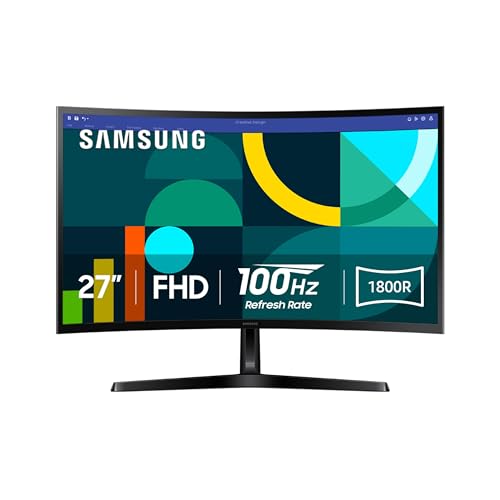
- 27-inch curved screen with 1800R curvature
- 100Hz refresh rate
- Eye comfort features for long sessions
- Game Mode and adjustable image settings
- VESA connectivity support is described
Cons
- Full HD is less detailed than the 4K options
- Curved design is not ideal for every workflow
- Panel type and detailed port specifications are not provided
Best for: immersive everyday viewing, streaming, and casual gaming.
The Samsung S36GD takes a different route from the flat displays here. Its 27-inch screen uses an 1800R curve that brings the sides a little closer to the viewer's field of vision. That can make games, films, and large browser windows feel more enveloping, especially when you sit directly in front of the display. It is a visual preference, but one that can change the character of a whole desk.
Samsung pairs the curve with a 100Hz refresh rate. The result should feel smoother than a standard 60Hz monitor when moving through webpages, navigating a desktop, or watching quick action. Game Mode can adjust image settings for play, and Samsung says the monitor can make dark scenes more visible through contrast and color adjustments. Those settings are useful for casual gaming, though this is not positioned as a high-refresh competitive display.
The Full HD resolution is easy to run and works well with ordinary video content. On a 27-inch panel, though, it cannot match the fine text and image detail of the Dell S2725QS or Dell S2725QC. The curved shape can also make straight lines in spreadsheets and design applications feel slightly different until you get used to it. Someone doing precision layout work may prefer a flat IPS monitor.
Samsung includes TÜV-certified eye comfort technology that reduces blue light and screen flicker. The monitor measures about 24.5 inches wide, 18.4 inches high, and 9.2 inches deep, with a listed weight of 8.4 pounds. The product information mentions added connection flexibility and VESA support, but it does not provide a complete port list, so check the listing carefully if a particular input is essential.
Choose the S36GD because you specifically want a curved 27-inch viewing experience, not because the curve solves every monitor problem. The Dell SE2726H is the more versatile flat-screen choice, while this Samsung is more distinctive for media and casual play.
8. Dell S2725QC: Best 4K Connectivity

Pros
- 4K UHD IPS display
- 120Hz refresh rate
- 99% sRGB coverage
- USB-C connection with up to 65W power delivery
- 1500:1 contrast ratio
Cons
- USB-C capability depends on the connected laptop
- Requires more graphics power than Full HD
- Larger and heavier than compact office monitors
Best for: laptop owners who want one cable for display and charging.
The Dell S2725QC is the workstation-oriented version of the 4K Dell pair. Its headline feature is USB-C connectivity with up to 65W power delivery, which can turn a compatible laptop connection into a much cleaner desk setup. One cable can carry the display signal while supplying power, reducing the collection of adapters and wires that usually gathers around a laptop stand.
The 27-inch IPS panel runs at 4K UHD resolution, so it is designed for detailed text, high-resolution images, and generous desktop space. Its 120Hz refresh rate keeps the interface responsive, and AMD FreeSync Premium supports smoother motion on compatible systems. The supplied feature list gives a 0.03ms response figure, but the more useful distinction is that this is a sharp productivity monitor that does not give up fluidity.
Dell specifies 99% sRGB coverage and a 1500:1 contrast ratio. That combination makes the S2725QC more appealing for photo work, web content, and video viewing than a basic Full HD monitor, though it is not presented as a professional wide-gamut reference display. HDR readiness adds compatibility with suitable content, while ComfortView Plus is intended to lower harmful blue light emissions to 35% or less without sacrificing color accuracy.
The monitor also has re-engineered sound with improved output and frequency response compared with the previous generation. It measures about 24.08 inches wide and weighs 14.79 pounds, so it needs a stable desk and more space than the Dell S2425HSM. Laptop owners should confirm that their computer's USB-C port supports video output and can accept the monitor's power delivery.
The S2725QC is the better choice over the S2725QS when a laptop-centered workstation benefits from one USB-C cable. Choose the S2725QS if conventional connections are enough and you prefer that model's simpler setup. For readers comparing displays with laptop accessories, the cable choices that keep a monitor setup tidy are worth considering before you arrange the desk.
9. Dell S2725HSM: Best Adjustable 27-inch Monitor

Pros
- Large 27-inch Full HD screen
- 144Hz refresh rate and 1ms MPRT
- Height, tilt, pivot, and swivel adjustment
- Integrated dual 3W speakers
- 4-star TÜV-certified eye comfort feature
Cons
- Full HD is less sharp at this size
- Heavy stand takes more desk space
- No 4K detail for close-up text work
Best for: a large, flexible home-office display with built-in audio.
The Dell S2725HSM gives the adjustable S2425HSM a larger 27-inch canvas. That extra screen area is useful when a single window needs room to breathe, when a video sits beside a document, or when you simply prefer a larger view from farther back. The stand supports height, tilt, pivot, and swivel adjustment, so the monitor can be positioned around your posture rather than forcing your posture around it.
Its 144Hz refresh rate and 1ms MPRT specification make it more responsive than a conventional office display. AMD FreeSync support is included for smoother frame pacing with a compatible graphics card. The 1500:1 contrast ratio should help the Full HD image retain stronger separation between bright and dark areas, which is useful for films and general entertainment.
The large panel's main limitation is resolution. At 1920 x 1080, the S2725HSM offers the same basic pixel count as the smaller S2425HSM, so text will not be as dense as it is on the 4K Dell S2725QS or S2725QC. The 27-inch size is better for viewing from a little farther away than for scrutinizing small text close up. If the monitor will sit directly in front of you for detailed writing, the smaller Full HD Dell or a 4K model may be more comfortable.
Dual 3W speakers are built in, making this a convenient all-in-one screen for calls, clips, and casual media. Dell also lists a 4-star TÜV certification and reduced blue light emissions while retaining color quality. The monitor is about 24 inches wide, 15.32 inches high, and 7.95 inches deep, with a listed weight of 12.63 pounds. Its substantial adjustable stand is useful, but it needs a desk with adequate depth.
Choose the S2725HSM over the Acer KB272 G0bi when ergonomic adjustment and built-in speakers matter. Choose the S2725QS instead when sharper text is more important than a fast Full HD workspace. This Dell is for the reader who wants a large, adaptable screen and is comfortable with its resolution limits.
10. Philips 241V8LB: Best 24-inch VA Monitor

Pros
- 23.8-inch Full HD screen
- VA contrast characteristics
- 100Hz refresh rate
- Adaptive-Sync support
- VESA compatibility and EasyRead mode
Cons
- Not as fast as the 144Hz Dell models
- VA panel is less suited to color-critical work
- Stand adjustment details are limited
Best for: reading, office work, and media on a medium-size screen.
The Philips 241V8LB is the more spacious member of Philips' VA pair. Its 23.8-inch screen gives documents and browser windows more breathing room than the 221V8LB, while the 1920 x 1080 resolution remains easy for almost any modern computer to handle. The three-sided virtually bezel-free design also makes the screen feel less enclosed and can work well in a multi-monitor arrangement.
The VA panel is tuned toward contrast. Philips describes brighter whites, deeper blacks, and 16.7 million colors, which gives films and photographs a richer starting point than a flat-looking office panel can provide. Its 178-degree viewing angles are broad, though users who need perfectly consistent color from extreme side positions should still favor an IPS model such as the Dell SE2726H.
A 100Hz refresh rate makes everyday movement smoother than on a 60Hz display, and Adaptive-Sync helps reduce stutter when the computer's frame rate changes. This is enough for general use and casual gaming, but it sits below the 144Hz Dell monitors in motion speed. The difference is most apparent to people who frequently play fast games or who have become accustomed to high-refresh scrolling.
Philips includes Flicker-Free operation, VESA support, and an EasyRead mode intended to make lengthy documents feel more like paper. Those features make the monitor well suited to reading-heavy work. Its listed dimensions are 21.3 inches wide, 16.4 inches high, and 8.7 inches deep, with a weight of about 6.4 pounds. The product data does not specify a broad stand adjustment range, so plan to position the desk or use the mounting option carefully.
Pick the 241V8LB over the smaller 221V8LB when you want a more comfortable single-screen workspace. The Dell SE2426H is the stronger option for IPS viewing consistency and 144Hz motion, while the Philips makes more sense for readers who prefer VA contrast and EasyRead mode.
How to choose best computer monitors
The best computer monitors are separated by a few practical traits that affect every hour you spend at the desk. Start with the panel size and resolution, then check motion, ergonomics, connections, and eye-comfort features.
Resolution and screen size
Full HD at 1920 x 1080 remains easy to drive and works well on 22-inch to 24-inch displays. At 27 inches, the same resolution gives you a larger workspace but fewer pixels per inch, so text and fine lines look less crisp than they do on a 4K screen.
A 4K UHD monitor is better for detailed documents, photographs, editing, and users who sit fairly close to the display. It also asks more from the computer, particularly when running games at high refresh rates. The Dell S2725QS and Dell S2725QC are the strongest choices when sharpness comes first.
Refresh rate and response
A 100Hz or 120Hz screen feels smoother than a basic 60Hz model when scrolling, dragging windows, and watching motion. The 144Hz Dell displays go further for responsive gaming and fast interface movement. Adaptive-Sync or AMD FreeSync can help reduce tearing when the monitor and graphics card work together.
Response figures should be read with some caution because manufacturers use different measurement methods. A listed 1ms MPRT or 1ms VRB figure points to a motion-focused mode, but the visible result also depends on the panel and settings.
A high refresh rate improves every scroll, but resolution determines how clearly you read what you are scrolling through.
Panel type and contrast
IPS panels are the safest general-purpose choice when viewing consistency and color stability matter. They are especially useful for shared desks, office work, and layouts where you are not always centered in front of the screen.
VA panels, such as the Philips 221V8LB and Philips 241V8LB, emphasize deeper blacks and stronger contrast. They can look more satisfying for films and dark scenes, but buyers doing color-sensitive work should pay close attention to viewing consistency and color specifications.
Stand and desk ergonomics
A tilt-only stand is adequate when the desk and chair already put the screen at the right height. Height, pivot, and swivel adjustment are much more useful when several people share a workspace, when you alternate between sitting and standing, or when portrait mode helps with long documents.
The Dell S2425HSM and Dell S2725HSM have the most flexible stands in this group. The adjustable hardware also takes up more room, so measure desk depth and width before choosing a larger model.
Connectivity and built-in features
Count the inputs you genuinely need. Two HDMI connections are handy for switching between a computer and another device, while USB-C with power delivery can simplify a laptop workstation considerably. The Dell S2725QC is the standout here with up to 65W power delivery through a single USB-C cable.
Built-in speakers are convenient for occasional audio, but dual 3W speakers will not replace a dedicated sound system. For a laptop desk, the connection options that simplify a two-screen workspace can matter as much as refresh rate.
Eye comfort
Long sessions are easier when brightness, flicker, and blue-light output are handled sensibly. TÜV certifications, Flicker-Free operation, and reduced blue light features appear across several picks, but they are not substitutes for adjusting the screen to the room and taking regular breaks.
The Dell models provide the clearest certification details in this group. Philips offers Flicker-Free operation on both VA models, while Samsung combines reduced blue light with reduced screen flicker.

Frequently asked questions
Is 27 inches too large for a Full HD monitor?
Not necessarily, but the viewing distance matters. A 27-inch Full HD screen offers a generous workspace, though text and fine details look less dense than they do on a 23.8-inch Full HD display. Choose 4K at 27 inches if crisp text is a top priority.
Is 120Hz useful for office work?
Yes. A 120Hz display can make scrolling, cursor movement, and window animation feel smoother even when you are not gaming. It is not essential for email or documents, but it is easy to appreciate once you use it.
Should I choose IPS or VA?
Choose IPS for consistent viewing angles and general-purpose color performance. Choose VA when deeper blacks and stronger contrast are more important, particularly for films and darker content. The Philips monitors use VA, while the Dell SE and S2725 models use IPS.
Do I need a 4K monitor for everyday work?
No. Full HD is sufficient for many office setups, especially on a 22-inch or 24-inch display. 4K becomes more compelling for detailed text, photography, large spreadsheets, editing, and users who want more desktop space without enlarging interface elements.
Is a curved monitor better for work?
A curved monitor can make a large screen feel more immersive and keep the edges closer to your natural field of view. It is a matter of preference, though, and some people prefer a flat screen for spreadsheets, drawing, and precise layouts. The Samsung S36GD is the curved option here.
Do monitor speakers replace desktop speakers?
They can handle basic system audio, video clips, and occasional calls. Integrated speakers generally have less depth and flexibility than separate speakers or headphones. The Dell S2425HSM and Dell S2725HSM include dual 3W speakers for convenience.
What does USB-C power delivery do on a monitor?
USB-C power delivery can send video and power through one cable when the laptop supports the required features. The Dell S2725QC supports up to 65W power delivery, which can reduce cable clutter on a compatible laptop workstation.
The bottom line
The Dell SE2726H 27-inch is our top choice among the best computer monitors because it combines a useful screen size, IPS consistency, 144Hz motion, two HDMI connections, and eye-comfort features without making the setup complicated. Its Full HD resolution is the clear weakness, so readers who care most about crisp text should choose the Dell S2725QS instead.
The Dell S2725QS is the sharper, more polished option for detailed work, media, and general use at 4K. The Dell S2725QC adds USB-C with up to 65W power delivery, making it the better fit for a laptop-centered desk. For a smaller workspace, the Dell SE2426H remains a sensible compact choice, while the Dell S2425HSM is the one to choose when stand adjustment matters most.
If you are undecided, choose the Dell SE2726H for flexible everyday use, or step up to the Dell S2725QS when clarity matters more than simplicity.
As an Amazon Associate we earn from qualifying purchases.