

A monitor that sits too low turns a normal workday into a slow neck exercise. The right fix is not always a larger screen. It may be a monitor with a genuinely flexible stand, or a riser that puts the display at eye level without replacing it. Our Best monitor height picks focus on height adjustment first, then image quality, movement, and desk practicality.
The Dell 24 Plus S2425HSM is the strongest all-around choice for most desks, while the Samsung Odyssey G5 adds sharper QHD detail for gaming and the BoYata Monitor Stand solves height problems for a display you already own. The list covers compact 23.8-inch and 24-inch screens, larger 27-inch models, a 4K option, and a standalone riser.
Comparison table
| # | Product | Award | Panel and resolution | Refresh and adjustment | Best for |
|---|---|---|---|---|---|
| 1 | Dell 24 Plus S2425HSM | Best overall | FHD IPS-style display, 1920 x 1080 | 144Hz, height, tilt, pivot, swivel | Everyday work and gaming |
| 2 | Dell 27 Plus S2725HSM | Best large FHD | FHD display, 1920 x 1080 | 144Hz, height, tilt, pivot, swivel | A larger adjustable screen |
| 3 | Acer SH243Y P1si | Best compact gaming | IPS, 1920 x 1080 | 144Hz, height, tilt, swivel | Small desks and fast games |
| 4 | Samsung Odyssey G5 G51F | Best QHD gaming | QHD, 2560 x 1440 | 180Hz, height, tilt, pivot | Detailed gaming and media |
| 5 | Acer SH273 P1si | Best large Acer | IPS, 1920 x 1080 | 144Hz, height, tilt, swivel | A roomy gaming workspace |
| 6 | ASUS VA24DQSB | Best office connectivity | IPS, 1920 x 1080 | 75Hz, height, tilt, swivel, pivot | Multi-device office desks |
| 7 | Amazon Basics 24-inch Monitor | Best simple office screen | IPS, 1920 x 1080 | 75Hz, tilt, VESA compatible | Basic home and office work |
| 8 | Dell 27 S2725QS | Best 4K picture | IPS, 3840 x 2160 | 120Hz, FreeSync Premium | Sharp text and creative work |
| 9 | ViewSonic VA2448-MHJ | Best ergonomic 24-inch | IPS, 1920 x 1080 | 120Hz, height, tilt, swivel, rotate | Smooth general-purpose use |
| 10 | BoYata Monitor Stand | Best standalone riser | Metal desktop riser | Adjustable height, 33.06-pound capacity | Raising an existing monitor |
1. Dell 24 Plus S2425HSM: Best Overall

Pros
- Full height, tilt, pivot, and swivel adjustment
- 144Hz refresh rate with AMD FreeSync
- Integrated dual 3W speakers
- TÜV-certified eye-comfort features
Cons
- FHD resolution is less spacious than QHD
- Single HDMI connectivity limits connection flexibility
Best for: someone who wants one adjustable monitor for work, streaming, and gaming.
The Dell 24 Plus S2425HSM gets the most important thing right: its stand gives you several ways to place the screen instead of forcing your posture to accommodate it. Height, tilt, pivot, and swivel adjustment cover the usual desk problems, whether your chair is tall, your desk is low, or you need to turn the display toward someone else. The 23.8-inch size also fits comfortably on a compact work surface.
Its 1920 x 1080 resolution is sensible at this size. Text remains easy to manage without demanding unusual scaling, while the 1500:1 contrast ratio gives darker images more separation than a flat-looking office panel. The 144Hz refresh rate is a meaningful step up from standard office screens when scrolling through long pages or playing games, and the listed 1ms MPRT response figure supports fast motion. AMD FreeSync helps reduce tearing when the frame rate changes.
Dell also includes two 3W speakers, which are useful for meetings, system sounds, and casual video without occupying desk space. The display has TÜV-certified comfort features and reduced blue-light emissions, so it is better suited to long sessions than a monitor with no eye-care mode. Dell Display and Peripheral Manager can also help organize a compatible Dell workspace, although that software advantage matters less if your computer is from another brand.
The weakness is resolution. The Samsung Odyssey G5 shows more detail, and the Dell 27 S2725QS is in another class for desktop space and 4K sharpness. The S2425HSM is the better fit when height control and easy everyday use matter more than packing the most pixels into the screen. Skip it if you need a large canvas for editing or several high-bandwidth video inputs.
For most people, this is the monitor we would keep. It combines a genuinely useful stand with a fast refresh rate, built-in audio, and a manageable 24-inch footprint.
2. Dell 27 Plus S2725HSM: Best Large FHD

Pros
- Full height, tilt, pivot, and swivel adjustment
- Larger 27-inch viewing area
- 144Hz refresh rate and AMD FreeSync
- Integrated dual 3W speakers
Cons
- FHD is less dense on a 27-inch screen
- HDMI is the only listed video connection
Best for: someone who wants a large screen with flexible positioning for desk work and entertainment.
The Dell 27 Plus S2725HSM is the larger companion to the top pick, and its main advantage is immediately clear when you have several windows open. A 27-inch panel gives documents, timelines, and browser tabs more physical room. The stand adjusts for height, tilt, pivot, and swivel, so the screen can be positioned around your seated posture rather than left at the default factory height.
It uses 1920 x 1080 resolution and a 1500:1 contrast ratio. That resolution is easy to drive and works well for ordinary office tasks, but it is not as crisp at 27 inches as the 4K Dell S2725QS or as spacious as the QHD Samsung Odyssey G5. The trade-off is straightforward: you get a larger viewing area without asking your computer to render a higher-resolution desktop.
Motion is stronger than the typical office display. The 144Hz refresh rate makes cursor movement and scrolling look more fluid, while the listed 1ms MPRT figure and AMD FreeSync are aimed at reducing visible tearing and blur during games. The built-in dual 3W speakers are another practical touch for a clean desk, though they are better treated as convenient monitor audio than as a replacement for dedicated speakers.
The main reason to choose this over the Dell 24 Plus S2425HSM is size, not image detail. The smaller Dell is easier to fit into a tight nook and looks denser at the same resolution. The 27-inch Acer SH273 P1si also offers a large 144Hz FHD format, but this Dell adds pivot adjustment and integrated speakers. Skip this model if you sit close and are sensitive to soft-looking text at 27 inches.
This is the right pick for a larger, calmer workspace where adjustable height matters as much as screen size.
3. Acer SH243Y P1si: Best Compact Gaming

Pros
- 3.93-inch height adjustment range
- 144Hz refresh rate with AMD FreeSync
- Tilt and 360-degree swivel
- Quick-release stand supports VESA mounting
Cons
- No built-in speakers are listed
- FHD leaves less workspace than QHD
Best for: a compact desk that needs proper height adjustment and responsive gaming motion.
The Acer SH243Y P1si is one of the more convincing small-screen choices here because the stand is not an afterthought. It provides a 3.93-inch height adjustment range, plus tilt from -5 to 25 degrees and a swivel range of plus or minus 360 degrees. That gives shorter and taller users much more room to find a comfortable eye line than a fixed office stand.
The 23.8-inch IPS display uses 1920 x 1080 resolution, a practical pairing for a compact screen. It gives text and interface elements a familiar scale, while the 16:9 layout suits video and games. Acer lists a 144Hz refresh rate, 1ms VRB response, and AMD FreeSync. Those features are aimed at fast movement, with FreeSync helping the monitor and compatible graphics hardware stay in step when frame delivery varies.
This Acer also has HDMI and VGA ports, which makes it easier to connect a modern computer and an older source. The quick-release stand can be removed for VESA wall mounting, a useful escape route if your ideal screen height is above what the desk allows. The zero-frame design keeps the front visually clean, especially in a two-screen arrangement.
The Dell 24 Plus S2425HSM is more complete for mixed use because it adds speakers and pivot adjustment. The Acer has the more clearly specified height range, though, and its 360-degree swivel is unusually flexible for a compact display. The ViewSonic VA2448-MHJ offers similar ergonomic breadth and 120Hz motion, but the Acer has the faster listed refresh rate. Skip this screen if you need built-in audio or a sharper QHD desktop.
For a small desk, this is a particularly easy monitor to position correctly. It is also a useful starting point for anyone researching how to build a comfortable dual-screen workspace without sacrificing gaming responsiveness.
4. Samsung Odyssey G5 G51F: Best QHD Gaming

Pros
- QHD 2560 x 1440 resolution
- 180Hz refresh rate and 1ms response time
- HDR10 support
- Height, tilt, and pivot adjustment
- Black Equalizer for dark game scenes
Cons
- Larger footprint than the 24-inch options
- No built-in speakers are listed
Best for: gaming at a 27-inch size where motion and image detail both matter.
The Samsung Odyssey G5 G51F is the most capable gaming display in this group, and the difference is not just its refresh rate. QHD resolution at 2560 x 1440 gives a 27-inch screen considerably more working detail than the FHD Dell and Acer models. Games look more defined, and a desktop can hold more information before you need to resize windows.
Its 180Hz refresh rate is the highest listed here. That can make quick camera movements and competitive play look cleaner when the graphics hardware can produce enough frames. Samsung also lists a 1ms response time and AMD FreeSync to limit tearing and stutter. HDR10 support adds a broader highlight and shadow presentation in compatible content, although the presence of an HDR mode alone does not make this a reference HDR display.
The stand supports height, tilt, and pivot adjustment, which are the controls that matter most for bringing a 27-inch gaming panel into the right viewing position. Black Equalizer is a useful gaming-specific feature because it can lift dark areas so details in shadows are easier to see. That is more purposeful than simply adding a collection of generic display presets.
The Dell 27 S2725QS is the stronger choice for 4K work, while the Dell 24 Plus S2425HSM takes less desk space and includes speakers. The Samsung is the one to choose when smooth gaming and QHD detail are the center of the setup. It is not the best fit for someone who wants a quiet office screen with integrated audio, and the larger 24.34-inch width and 20.5-inch height listed for the unit require a solid amount of desk room.
If you are deciding between sharpness and speed, the G5 is the most balanced gaming answer here. It is also the model to consider before moving to a larger display for more desktop room, since its QHD resolution keeps the 27-inch format feeling detailed without becoming enormous.
5. Acer SH273 P1si: Best Large Acer

Pros
- 3.93-inch height adjustment range
- 144Hz refresh rate with AMD FreeSync
- 360-degree swivel and broad tilt range
- Quick-release VESA-ready stand
Cons
- FHD resolution is stretched across 27 inches
- No speakers are listed
Best for: someone who wants a large, flexible gaming and office display without moving to QHD.
The Acer SH273 P1si takes the compact SH243Y P1si design and gives it a larger 27-inch screen. Its standout feature is the stand. A 3.93-inch height range, -5 to 25 degrees of tilt, and plus or minus 360 degrees of swivel make it unusually easy to set up for different chairs and desk heights. The quick-release design also lets you separate the screen from the stand for VESA mounting.
The panel is IPS with 1920 x 1080 resolution, so it provides broad viewing angles and a familiar FHD desktop. That combination is straightforward for office work and gaming, but the pixels are spread across a larger area than on the 23.8-inch Acer. Text and fine interface details will not look as dense as they do on the Samsung Odyssey G5, whose QHD resolution is the better match for a 27-inch screen.
Acer lists a 144Hz refresh rate, 1ms VRB response, and AMD FreeSync. Those specifications give the screen a more responsive feel than a conventional 60Hz office monitor and are useful for games with quick camera movement. HDMI and VGA inputs cover a current computer and an older source, though the connectivity is less expansive than the ASUS VA24DQSB.
The Dell 27 Plus S2725HSM is the more rounded 27-inch option because it includes speakers and pivot adjustment. The Acer counters with a clearly stated height range and full swivel movement. Choose the Acer if you expect to reposition the screen often or want to mount it later. Skip it if you prioritize text sharpness, built-in sound, or a more refined office feature set.
This is a practical large-screen pick for users who want the stand to do real ergonomic work. Its screen size is generous, but its FHD resolution means sitting a little farther back can make the image feel more natural.
6. ASUS VA24DQSB: Best Office Connectivity

Pros
- Height, tilt, swivel, and pivot adjustment
- HDMI, DisplayPort, VGA, and USB hub
- IPS panel with 178-degree viewing angles
- Flicker-free and low-blue-light features
- Built-in speakers
Cons
- 75Hz is slower than the gaming-focused displays
- Older VGA input shares space with modern connections
Best for: an office desk connecting several types of computers and accessories.
The ASUS VA24DQSB is built around office flexibility rather than gaming speed. Its stand provides 130mm of height adjustment, plus tilt from -5 to 35 degrees, 180-degree swivel, and 90-degree pivot. That last movement is particularly useful for portrait documents, coding, or long webpages, and it gives this 24-inch display more positioning options than many basic office monitors.
The 1920 x 1080 IPS panel has 178-degree viewing angles, so the picture remains more consistent when you are not sitting directly in front of it. Its maximum 75Hz refresh rate is modest beside the 144Hz Dell and Acer models, but it is still a small improvement for ordinary scrolling and video playback. Adaptive-Sync is intended to reduce tracing when supported by the connected system.
Connectivity is where the ASUS pulls ahead of most of this list. HDMI, DisplayPort, VGA, and a USB hub let it serve as a central screen for a newer desktop, an older laptop dock, or another legacy source. Integrated speakers further reduce the number of desk accessories. The TÜV Rheinland-certified flicker-free and low-blue-light features make sense for a screen intended for long office sessions.
The Amazon Basics 24-inch Monitor is simpler and the ViewSonic VA2448-MHJ is faster, but neither offers this same combination of USB connectivity and broad stand movement. The ASUS is not the pick for high-refresh gaming, and its large stand footprint may be more than a minimalist desk needs. Skip it if you only need one HDMI connection and a basic fixed workflow.
For office users who change computers or rotate between portrait and landscape, the VA24DQSB remains one of the most adaptable choices here. It is the kind of monitor that earns its desk space through flexibility rather than dramatic headline specifications.
7. Amazon Basics 24-inch Monitor: Best Simple Office Screen

Pros
- IPS panel with 1920 x 1080 resolution
- HDMI, DisplayPort, VGA, and audio connections
- Adjustable tilt and VESA compatibility
- Built-in speakers
- Energy Star certified
Cons
- The stand does not list height adjustment
- 75Hz refresh rate is basic for this group
Best for: straightforward home and office tasks with a monitor arm or wall mount option.
The Amazon Basics 24-inch Monitor makes sense when the screen itself needs to be uncomplicated. Its 24-inch IPS panel runs at 1920 x 1080, a sensible resolution for email, documents, meetings, and general browsing. IPS technology also helps keep colors consistent when someone is looking over your shoulder or when you shift in your chair.
The connection selection is better than the basic name suggests. HDMI, DisplayPort, and VGA cover current and older computers, while the listed 3.5mm audio connections provide a way to handle sound without relying entirely on the computer. Built-in speakers keep the desk uncluttered for calls and video. The 75Hz refresh rate is adequate for ordinary work, though it will not feel as fluid as the 120Hz ViewSonic or 144Hz Dell models.
Height is the catch for this article. The stand tilts from -5 to 23 degrees, but the supplied information does not list height adjustment. It is VESA compatible with a 100 x 100mm pattern, so you can add a compatible arm or mount if the default position is too low. That makes it a better candidate for an external height solution than for someone who expects the included stand to do everything.
The ASUS VA24DQSB is clearly stronger for ergonomic adjustment, and the ViewSonic VA2448-MHJ is the better choice when height, rotation, and 120Hz motion all matter. The Amazon Basics screen is more appropriate when you already have a monitor arm or when the desk height naturally puts the display in the right place. Skip it if you need a fully adjustable included stand.
For a simple home office screen, its useful ports and IPS panel are the main reasons to choose it. Just treat the stand as a tilt stand, not as a complete answer to monitor height.
8. Dell 27 S2725QS: Best 4K Picture

Pros
- 4K UHD 3840 x 2160 IPS display
- 120Hz refresh rate with FreeSync Premium
- 99 percent sRGB coverage
- HDR readiness and 1500:1 contrast ratio
- ComfortView Plus low-blue-light feature
Cons
- The supplied information does not list stand height adjustment
- Higher resolution requires more graphics power
Best for: sharp text, detailed images, and a 27-inch desktop with strong color coverage.
The Dell 27 S2725QS is the image-quality specialist in this roundup. Its 27-inch IPS panel uses 3840 x 2160 4K resolution, which gives text, photographs, and fine interface elements a visibly denser appearance than the FHD screens. It is a strong fit for a desk where crisp text and the ability to keep several windows open matter more than having the most aggressive gaming refresh rate.
Dell lists a refresh rate of up to 120Hz, FreeSync Premium, and a 0.03ms response figure. The combination is unusually ambitious for a general-purpose 4K display and should make compatible games and everyday scrolling feel smoother than a conventional 60Hz 4K screen. The 1500:1 contrast ratio and HDR readiness add depth to compatible content, while 99 percent sRGB coverage supports ordinary photo and design work.
ComfortView Plus reduces blue-light emissions to 35 percent or less without the strong color shift associated with some basic night modes. That is useful for an all-day screen, especially when paired with a sensible viewing distance and correct desk height. The ultra-thin bezel also keeps the design clean in a single-screen setup.
The important limitation is ergonomic information. The supplied features do not specify height, tilt, pivot, or swivel adjustment for the stand, so this is not as safe a recommendation for a desk where the screen currently sits too low. The Dell 24 Plus S2425HSM and ASUS VA24DQSB are better direct answers to a height problem. If the S2725QS fits your desk but needs lifting, an arm or riser becomes part of the setup. Readers comparing work-oriented screens may also want to consider how panel brightness affects a long office day.
Choose this Dell for 4K clarity first, then solve positioning with the desk or a mount. It is the best picture here, but not the most complete ergonomic package.
9. ViewSonic VA2448-MHJ: Best Ergonomic 24-inch

Pros
- Height, tilt, swivel, and rotation adjustment
- 120Hz refresh rate
- IPS 1920 x 1080 display
- Flicker-free and blue-light filter features
- HDMI and VGA inputs
Cons
- No DisplayPort or USB hub is listed
- No built-in speakers are listed
Best for: a compact all-purpose desk where ergonomic movement matters more than extra ports.
The ViewSonic VA2448-MHJ is easy to recommend for anyone who wants a 24-inch screen that can move in several directions. Its advanced ergonomic stand supports tilt, swivel, rotate, and height adjustment, so you can position it for a standard landscape desktop or turn it for a tall document. That flexibility is the main story, and it is more useful than a decorative stand that only tilts.
The IPS display uses 1920 x 1080 resolution and has a frameless design. At 24 inches, FHD keeps the interface familiar and does not demand much from the connected computer. ViewSonic adds 120Hz refresh, which gives scrolling and general movement a smoother feel than the 75Hz ASUS and Amazon Basics models. HDMI and VGA inputs cover a current computer and a legacy source.
Eye-care features include flicker-free technology and a blue-light filter. The screen also includes Game, Movie, Web, Text, and Mono presets, giving you quick starting points for different tasks. These modes cannot replace proper calibration, but they are useful when the same monitor moves between documents, video, and casual play.
The Dell 24 Plus S2425HSM offers 144Hz, speakers, and an equally broad range of stand movements, making it the stronger mixed-use pick. The ASUS VA24DQSB has more connection types and a USB hub. ViewSonic makes the most sense when 120Hz motion and a rotating stand are the priorities. Skip it if you need DisplayPort, USB accessories, or built-in audio.
This is a well-balanced ergonomic monitor for a smaller desk. It does not try to be a high-resolution creator display, but it gives you the controls that most directly affect how comfortably the screen sits in front of you.
10. BoYata Monitor Stand: Best Standalone Riser

Pros
- Height adjustment through a twist knob
- Metal construction with 33.06-pound capacity
- Storage space beneath the platform
- Non-slip pads
- Screwdriver included for assembly
Cons
- Raises a monitor without adding screen features
- Requires space on the desk beneath the riser
Best for: raising an existing monitor when replacing the display is unnecessary.
The BoYata Monitor Stand is the most direct fix for a screen that works well but sits too low. It is a metal desktop riser with a twist knob for changing height, so it can correct the position of a monitor without asking you to buy a new panel. That makes it especially useful for a fixed-height display, an all-in-one computer, or a screen whose built-in stand has reached its limit.
BoYata lists a 33.06-pound weight capacity, which gives the platform a clear structural rating for a monitor setup. Non-slip pads help prevent the stand from sliding across the desk. The design leaves storage space below the platform for a keyboard, notebooks, or other small office items, though that space only helps if your desk can accommodate the riser and the stored accessories.
Assembly uses two base plates and a support rod, with a screwdriver included. This is not a monitor arm, so it does not provide screen rotation, cable routing, or free-floating positioning. It simply lifts the display and gives you a new height range. The twist adjustment is more useful than stacking books, but it is still a desktop solution rather than a full ergonomic mount.
A height-adjustable monitor such as the Dell 24 Plus S2425HSM is cleaner if you are buying a new screen, and the ASUS VA24DQSB offers more movement from its included stand. The BoYata wins when the display you already own is worth keeping or when you need a straightforward way to raise a heavy monitor. Skip it if your desk is shallow or if you need the screen to swivel and pivot independently.
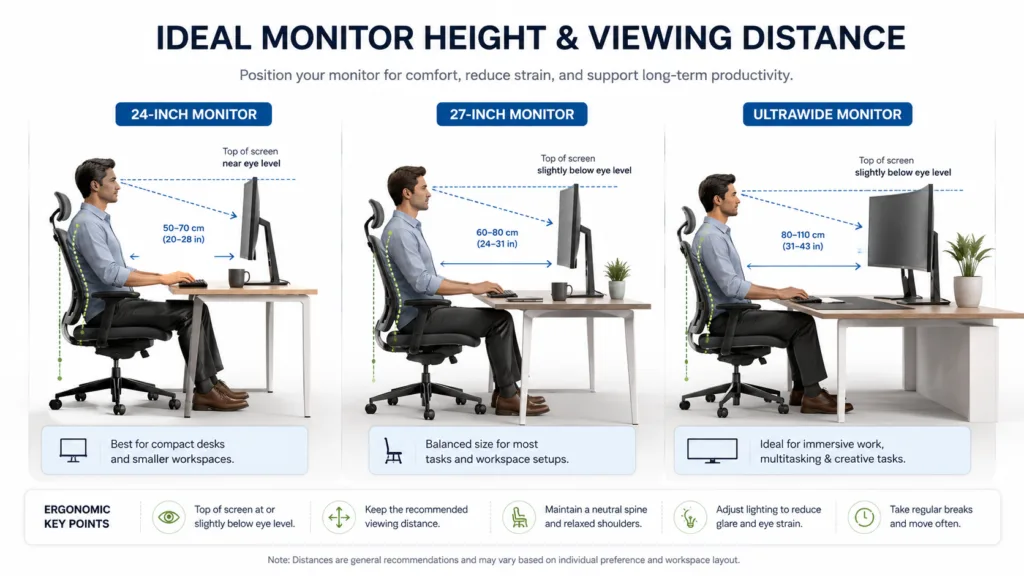
For an existing monitor with no useful height control, this is the simplest product in the roundup to understand. Set it on a stable desk, check the monitor's footprint, and use the adjustment to bring the top third of the screen closer to eye level.

How to choose best monitor height
The right monitor height depends on the stand, the screen size, your chair, and whether you want to adjust the display itself or raise it from below.
Height range
A stand with a measurable height range gives you room to match the screen to your chair and desk. The Acer SH243Y P1si and SH273 P1si list 3.93 inches of adjustment, while the ASUS VA24DQSB lists 130mm. That is far more useful than a stand described only as ergonomic. Look for a range that lets your eyes land near the upper portion of the display without forcing your neck to bend.
Tilt, swivel, and pivot
Height is only one part of positioning. Tilt helps aim the panel, swivel lets you share or reposition it, and pivot turns a landscape screen into portrait orientation. The Dell Plus models include height, tilt, pivot, and swivel, while the ViewSonic adds rotation and the ASUS lists all four major movements with specific ranges. A fixed stand can work when your desk and chair already line up, but it leaves fewer ways to correct glare or posture.
A monitor is not at the right height until your eyes, chair, and keyboard agree with one another.
Screen size and resolution
A 23.8-inch or 24-inch FHD display is generally easier to fit and keeps interface elements at a familiar scale. A 27-inch FHD screen gives you more physical viewing area, but text may not look as dense as it does on a 27-inch QHD or 4K panel. The Samsung Odyssey G5 uses 2560 x 1440, while the Dell S2725QS uses 3840 x 2160. Choose resolution based on how much detail you need and how much graphics power your computer can provide.
Refresh rate and response
Refresh rate affects how smoothly motion appears during scrolling, video, and games. The 75Hz office screens are suitable for ordinary productivity, while 120Hz, 144Hz, and 180Hz displays make movement look more fluid when the computer can supply the frames. A listed response figure and adaptive-sync support can help with gaming, but they do not compensate for a stand that leaves the screen in the wrong place.
Connections and mounting
Check the ports against the devices you actually use. HDMI is common, DisplayPort helps with newer computers, VGA serves older hardware, and a USB hub can keep accessories close at hand. VESA compatibility is important when the supplied stand does not raise the screen enough. The Amazon Basics model supports a 100 x 100mm mount pattern, and both Acer models have quick-release stands for VESA mounting.
Eye comfort and desk space
Flicker-free and low-blue-light modes can make long sessions more comfortable, but they work best alongside sensible screen placement and regular breaks. Also measure the stand footprint, not only the panel width. A broad base can consume space needed for a keyboard or notebook, while the BoYata riser adds storage below the screen but needs clear desk depth.
Frequently asked questions
What is the correct height for a computer monitor?
A useful starting point is to place the screen so your eyes land near the upper portion of the display while you sit upright. The exact position depends on the panel size, viewing distance, chair, and whether you wear progressive lenses. A height-adjustable stand or riser makes small corrections much easier.
Is a height-adjustable monitor better than a monitor riser?
A height-adjustable monitor usually offers more control because it can also tilt, swivel, pivot, or rotate. A riser is a practical solution when you already own a monitor or when the display has no useful stand adjustment. The BoYata Monitor Stand raises the screen but does not replace the movement of a full ergonomic stand.
Is a 27-inch FHD monitor too large?
A 27-inch FHD display can work well when you sit at a comfortable distance and want a larger physical image. Text and fine details will look less dense than on a 27-inch QHD or 4K panel. If sharp text and a large desktop are priorities, the Samsung Odyssey G5 or Dell S2725QS is a better fit.
Does refresh rate affect monitor height?
Refresh rate does not change the physical position of the screen. It affects motion smoothness, while the stand controls height, tilt, swivel, and pivot. A 144Hz or 180Hz gaming monitor can still be poorly positioned if its stand does not match your desk and chair.
Can a monitor arm solve a low monitor?
A compatible monitor arm can raise, lower, tilt, swivel, and rotate a display, provided the monitor supports the arm's mounting pattern and weight range. VESA compatibility is the key detail to check. The Acer models and Amazon Basics monitor list mounting support, while the supplied information for some other displays does not specify it.
Is 4K useful on a 27-inch monitor?
4K can make text, photos, and fine interface details look very sharp on a 27-inch panel. It also gives you more desktop information, but it asks more from the computer and may require display scaling. The Dell S2725QS is the 4K choice here, while the other 27-inch displays use FHD or QHD resolution.
The bottom line
The Dell 24 Plus S2425HSM is the Best monitor height choice for most people because its height, tilt, pivot, and swivel controls address the physical setup problem directly. Its 144Hz refresh rate, speakers, eye-comfort features, and compact 23.8-inch format make it useful beyond basic office work.
Choose the Samsung Odyssey G5 G51F if gaming detail and motion matter more than built-in audio or a small footprint. Its QHD resolution and 180Hz refresh rate make it the strongest performance-oriented option. If you already own a capable display, the BoYata Monitor Stand is the sensible alternative because it raises the screen without requiring a replacement.
If you are undecided, choose the monitor or riser that gives you the most useful height range for your actual chair and desk, then judge resolution and refresh rate second.
As an Amazon Associate we earn from qualifying purchases.