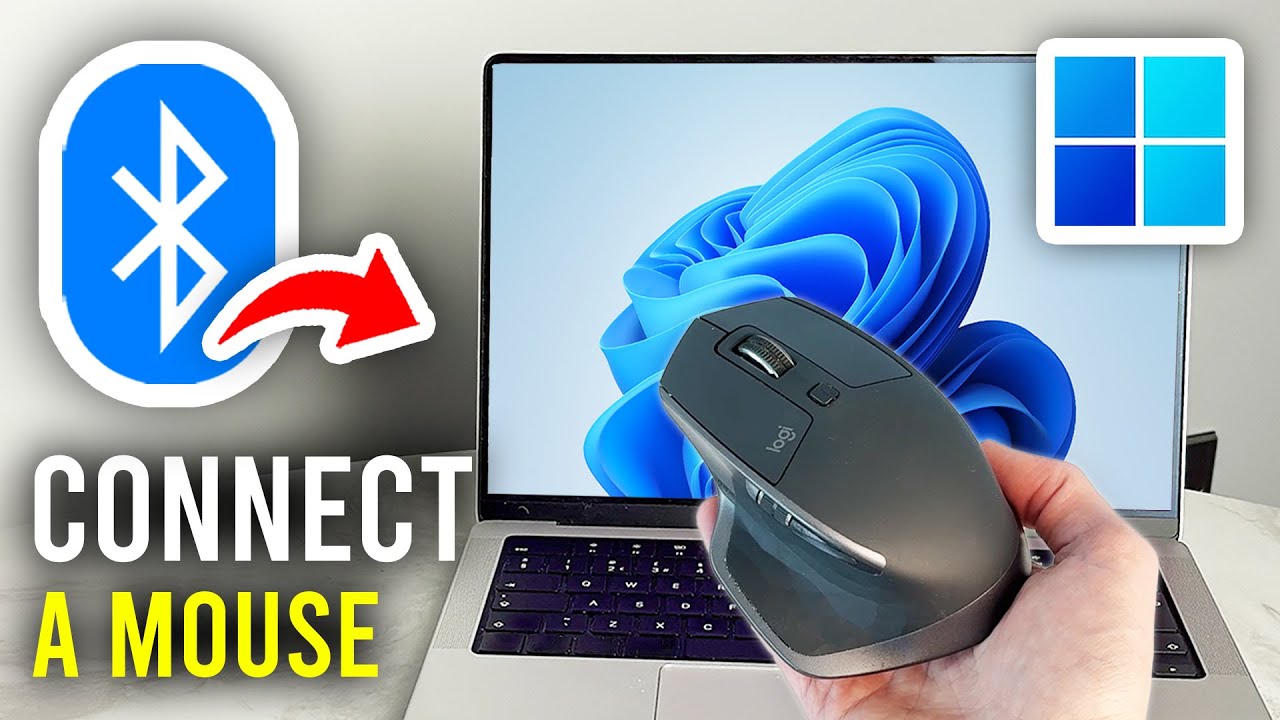

A laptop trackpad is fine for quick taps, but it becomes tiring when you are selecting cells, editing photos, or scrolling through long documents. A good Bluetooth mouse fixes that without taking up a USB port or forcing you to carry a receiver.
The Best Bluetooth Mouse for Laptop depends on the kind of laptop work you do. Compact models are easier to pack, larger mice are kinder to your palm, and a few add multi-device switching, adjustable sensitivity, or rechargeable power.
Our top pick is the Logitech M240 Compact Silent Bluetooth Mouse, while the rest of this list covers large hands, multi-device desks, rechargeable designs, and simple travel mice.
| # | Product | Award | Bluetooth | Key feature | Best for |
|---|---|---|---|---|---|
| 1 | Logitech M240 Graphite | Best overall | Bluetooth | Silent clicks, 18-month battery | Most laptop users |
| 2 | Logitech M720 Triathlon | Best for multi-device work | Bluetooth or receiver | Three-device switching | Laptop and tablet users |
| 3 | wegear WL300 | Best ergonomic budget design | Bluetooth 5.0 | Three DPI settings, six buttons | Longer work sessions |
| 4 | Logitech M240 Rose | Best colorful compact mouse | Bluetooth | Silent clicks, ambidextrous shape | Small bags and shared spaces |
| 5 | Lenovo WL310 | Best adjustable compact mouse | Bluetooth 5.0 | 1000 to 1600 DPI | Everyday precision |
| 6 | Logitech Signature M550 L | Best for large hands | Bluetooth Low Energy | SmartWheel, 24-month battery | Palm grip users |
| 7 | TECKNET Rechargeable Mouse | Best rechargeable option | Bluetooth 3.0 or 5.0 | Six DPI levels, dual connection | Users avoiding AA batteries |
| 8 | XBG B15Pro | Best for visible settings | Bluetooth 4.0 or 5.0 | LED status display, 500 mAh battery | Hybrid workstations |
| 9 | Logitech M196 | Best simple travel mouse | Bluetooth | Ambidextrous design, 12-month battery | Basic laptop navigation |
| 10 | Logitech MX Anywhere 2S | Best high-resolution tracker | Bluetooth or RF | Darkfield tracking, 4000 DPI | Detailed cursor work |
1. Logitech M240 Graphite: Best Overall

Pros
- Pairing does not use a USB port
- Click sound is reduced by 90 percent
- Ambidextrous shape suits left and right hands
- Battery life reaches up to 18 months
Cons
- Compact body may feel cramped for large hands
- No adjustable DPI button
- Uses a replaceable battery rather than charging by cable
Best for: laptop owners who want a quiet, uncomplicated Bluetooth mouse for daily work.
The Logitech M240 Graphite gets the important laptop decisions right. It is compact enough for a laptop bag, connects directly over Bluetooth, and keeps the click noise low in a library, meeting room, or bedroom. There is no receiver to lose and no need to sacrifice one of the increasingly scarce ports on a thin laptop.
Its 90 percent reduction in click sound is the feature you notice most. The click still has a familiar feel, but it does not dominate a quiet room. The ambidextrous design also makes the M240 easy to share or switch between hands. Its listed dimensions are about 3.90 inches long, 2.36 inches wide, and 1.54 inches high, with a weight of roughly 0.16 pounds. That makes it a travel-friendly mouse, though users with broad palms may find the low profile less supportive than the Logitech M550 L.
Battery management is equally practical. Logitech rates it for up to 18 months from its battery, with automatic sleep helping stretch that figure. Bluetooth range reaches up to 10 meters, which is more than enough for a laptop connected to a television or monitor across a room. Compatibility includes Windows, macOS, Linux, ChromeOS, iPadOS, and Android, so it is not tied to one laptop platform.
The limitation is the same trait that makes it easy to carry. The M240 is small, and it offers no side buttons, DPI control, multi-device shortcut, or rechargeable cell. The Logitech M720 Triathlon is a much stronger tool for people moving between computers, while the Lenovo WL310 offers more control over cursor speed. Those extras also make both less minimalist.
For ordinary laptop navigation, the M240 is the one we would keep. It is quiet, light, genuinely ambidextrous, and simple enough that pairing it takes almost no thought. Choose it unless you specifically need a large palm rest, extra buttons, or advanced tracking.
2. Logitech M720 Triathlon: Best for Multi-Device Work

Pros
- Switches between up to three computers
- Bluetooth and Unifying receiver support
- Six customizable buttons
- Hyper-fast scroll wheel can stop instantly
- Battery life reaches up to 24 months
Cons
- Right-handed design excludes left-handed users
- Larger and heavier than travel mice
- Logitech software is needed for full customization
Best for: people who use a laptop alongside another computer or tablet.
The Logitech M720 Triathlon is the most capable office mouse here, but it is not the one to throw into every small laptop sleeve. Its full-size, sculpted body fills the palm, and the rubber surface gives the hand a more secure resting place than the compact Logitech M240. The shape is right-handed, so left-handed users should skip it immediately.
Its defining feature is device switching. A button lets you move among as many as three computers or laptops, and Logitech FLOW can move the cursor, text, and files between compatible computers. Bluetooth handles laptops and tablets, while the Logitech Unifying receiver provides another connection route and can connect up to six compatible Logitech peripherals through one receiver. That flexibility matters on a desk where a laptop, desktop, and tablet share one workspace.
The scroll wheel is more useful than a normal click wheel for document-heavy work. It can move rapidly through long pages, then switch back to line-by-line scrolling when precision matters. Six customizable buttons provide room for browser navigation, application shortcuts, or repetitive office commands. The M720 supports Windows, macOS, ChromeOS, Linux, and iPadOS, and Logitech rates its battery for up to 24 months.
Compared with the Logitech Signature M550 L, the M720 is more versatile but less focused on a large, quiet palm-first shape. Compared with the M240, it is far more productive on a multi-computer desk, yet it takes up more room in a bag and feels less natural if you want a mouse that works equally well in either hand.
The main weakness is bulk, not performance. It weighs about 0.30 pounds and measures roughly 4.53 inches long by 2.91 inches wide, so it is a desk mouse that can travel rather than a travel mouse that happens to work at a desk. If you regularly move between two machines, its switching controls are worth prioritizing. If you use one laptop only, the M240 is simpler.
3. wegear WL300: Best Ergonomic Budget Design

Pros
- Sculpted grip supports extended use
- Three DPI settings cover browsing and precision work
- Six buttons include forward and back controls
- Silent buttons and scroll wheel
- Battery life reaches up to 24 months
Cons
- Side buttons are not recognized on Mac
- AA battery is not included
- Medium size is less convenient for very small bags
Best for: laptop users who want a fuller grip and shortcut buttons without moving to a premium multi-device mouse.
The wegear WL300 is shaped more like a small desktop mouse than a flat travel accessory. Its sculpted grip gives the palm somewhere to settle, and the forward and back buttons are useful when browsing long pages or moving through folders. That shape makes it a better candidate for several hours of work than the slim Logitech M240, although it is not as easy to squeeze into a crowded pouch.
Cursor control is adjustable through three settings: 800, 1200, and 1600 DPI. The lower setting allows more deliberate movement for detail work, while 1600 DPI reduces the distance your hand needs to travel across a broad display. The optical sensor is described as working across wood, leather, fabric, paper, and resin, which gives it useful flexibility away from a conventional mouse mat.
The WL300 also quiets all the main contact points. The left and right buttons and scroll wheel are designed for silent operation, so it suits an office or shared room. Its Bluetooth 5.0 connection uses Microsoft Swift Pair technology, and compatibility covers Windows 8, 10, and 11, macOS 10.10 and later, ChromeOS 11 and later, and Android 5.0 and later. The single AA battery is rated for up to 24 months, with sleep mode beginning after 30 seconds of inactivity.
There is one important Mac caveat. The side buttons are not recognized on Mac, which removes one of the WL300's most useful productivity features on that platform. The Lenovo WL310 also offers adjustable DPI in a more portable body, but it has fewer buttons and a narrower range of settings. The M720 remains the stronger choice for switching among several computers.
The WL300 makes most sense for a Windows laptop user who wants a quieter, more supportive shape. Skip it if you need an ambidextrous mouse, Mac side-button support, or the smallest possible travel profile. For everyone else, it adds practical control without turning into an elaborate workstation device.
4. Logitech M240 Rose: Best Colorful Compact Mouse

Pros
- Compact and light for laptop bags
- Silent clicks reduce distractions
- Works with left or right hands
- Direct Bluetooth pairing needs no dongle
- Supports a wide range of operating systems
Cons
- No side buttons or DPI adjustment
- Small shape may not suit large hands
- Replaceable battery is not rechargeable
Best for: travelers who want the M240 design in a rose finish.
The Logitech M240 Rose is functionally the same compact mouse as the graphite version, and that is a compliment. It disappears into a laptop bag, pairs without a receiver, and stays unobtrusive during quiet work. The rose finish is the distinguishing reason to choose it, especially if you want your accessories to be easy to identify in a shared workspace.
Its small, ambidextrous body measures about 3.89 inches long and 2.36 inches wide. The listed weight is roughly 0.04 pounds, making it exceptionally easy to carry. That low mass is helpful when you are moving between a café, classroom, and home desk, but it also means there is less body under the palm. Larger hands will get better support from the M550 L or M720.
The click sound is reduced by 90 percent while retaining the familiar click feel. Bluetooth range is rated at up to 10 meters, and Logitech lists support for Windows, macOS, Linux, ChromeOS, iPadOS, and Android. It can run for up to 18 months, helped by automatic sleep. The M240 also contains certified post-consumer recycled plastic, with the rose version listed at 37 percent.
The compromise is basic control. There are no programmable buttons, no adjustable DPI setting, and no way to switch between several paired computers with a hardware button. The Logitech M196 is similarly compact and ambidextrous, but its battery rating is 12 months and its clicks are not advertised with the M240's 90 percent reduction. The Lenovo WL310 gives you more cursor control, though its ergonomic shape is less minimal.
This is an easy recommendation for a student, traveler, or anyone who prefers a quiet mouse that does not look like office equipment. If the rose finish means nothing to you, choose the graphite M240 and get the same core experience. The only people who should avoid both are users who need a larger shell or extra controls.
5. Lenovo WL310: Best Adjustable Compact Mouse

Pros
- Bluetooth 5.0 connection needs no receiver
- Three DPI settings
- Quiet clicks suit shared spaces
- Compact, lightweight shape
- Works with Windows, Mac, and Chromebook
Cons
- No battery-life figure is provided
- Only the core mouse controls are listed
- Very low listed height may not suit every grip
Best for: users who want a compact Bluetooth mouse with simple sensitivity control.
The Lenovo WL310 sits between a flat travel mouse and a full ergonomic model. It is compact enough for a laptop bag, but its stated 4.2-inch length and 2.5-inch width give the hand more surface than the smallest Logitech models. The design is aimed at reducing wrist strain during longer sessions, while the low weight keeps it from becoming a burden on the move.
Its most useful control is the DPI switch. You can choose 1000, 1200, or 1600 DPI, with the lower setting giving more deliberate cursor movement and the higher setting helping the pointer cross a large screen quickly. That range is not intended for specialist gaming work, but it is useful when moving between spreadsheets, browser tabs, and detailed selections.
Bluetooth 5.0 provides direct connection to Windows PCs, MacBooks, Chromebooks, and Lenovo laptops without a USB receiver. Clicks are designed to be silent, which puts the WL310 in the same quiet-work category as the Logitech M240. The listed dimensions are 4.2 by 2.5 inches, and the product information lists a weight of 0.15 pounds.
Lenovo does not provide a battery-life figure in the supplied details, so buyers who want a long, clearly stated runtime should look at the M240, M196, M550 L, or M720 instead. The WL310 also lacks the WL300's side buttons and the TECKNET mouse's wider six-level DPI range. It is a more straightforward tool, and that is both its appeal and its limitation.
Choose the WL310 when compact size, quiet operation, and basic DPI adjustment matter more than extensive shortcuts. It is particularly sensible for someone who moves between a Windows laptop and a Chromebook. Users who need a rechargeable battery or a detailed battery indicator should step up to the XBG B15Pro or TECKNET.
6. Logitech Signature M550 L: Best for Large Hands
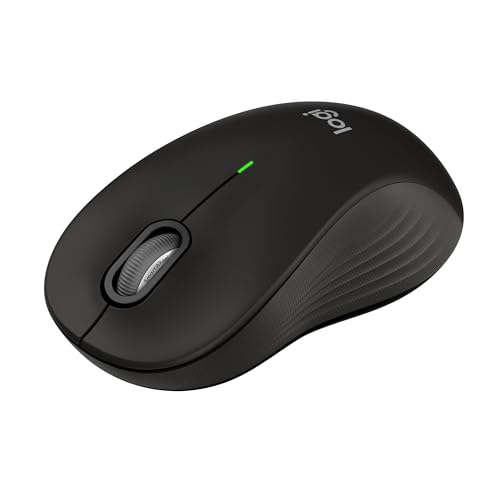
Pros
- Large body supports bigger hands
- Contoured shell and rubber side grips
- SmartWheel switches between fast and precise scrolling
- SilentTouch reduces click noise by 90 percent
- Battery life reaches up to 24 months
Cons
- Large shape is less travel-friendly
- Right-handed fit is more restrictive
- No multi-computer switching button
Best for: people whose hand overhangs compact laptop mice.
The Logitech Signature M550 L is the antidote to the cramped feeling common with laptop accessories. Its large shell, contoured shape, soft thumb area, and rubber side grips give the palm a stable place to rest. If the M240 feels like a fingertip mouse, the M550 L feels like a proper desktop pointer that can still accompany a laptop.
The SmartWheel is the standout control. A flick changes between precise line-by-line scrolling and fast movement through long web pages or documents. That means you do not have to hold down a modifier or accept coarse scrolling when you need to stop on a particular line. The wheel and buttons are also designed for quiet use, with Logitech claiming a 90 percent reduction in click noise through SilentTouch.
Connection options are unusually useful for a laptop mouse. Bluetooth Low Energy works directly with a laptop, while the Logi Bolt USB receiver provides an alternative connection when Bluetooth is inconvenient. The mouse supports Windows, macOS, Linux, ChromeOS, iPadOS, and Android. Its single AA battery is rated for up to 24 months, and the listed weight is about 0.25 pounds.
The M550 L does not offer the M720's three-device switching or six customizable buttons. It is also not the right fit for left-handed users, and its larger body takes up more room than the M240 or Lenovo WL310. For a clearer look at how shape affects daily computer use, the hand positions that make a mouse comfortable for long sessions are more important than a simple size label.
This is the better choice when comfort outranks portability. Large-handed users should choose it over the M240, while multi-device workers should choose the M720. Everyone else should check that the palm-first shape fits their desk and bag before committing.
7. TECKNET Rechargeable Mouse: Best Rechargeable Option
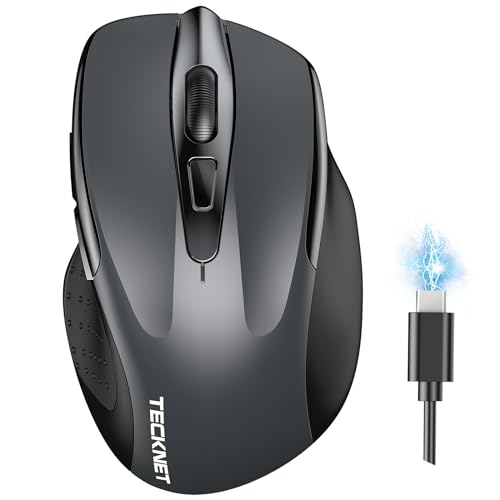
Pros
- Rechargeable battery avoids regular AA changes
- Bluetooth and USB wireless modes
- Six DPI levels from 800 to 4800
- Quiet operation
- Supports simultaneous dual-device connections
Cons
- Better suited to small and medium hands
- Side buttons are not compatible with macOS
- Connection may become unstable when battery is low
Best for: users who want rechargeable power and broad cursor-speed adjustment.
The TECKNET Rechargeable Mouse is built around flexibility. It can connect through Bluetooth 3.0 or 5.0, and it also supports a USB A wireless connection. Two devices can remain connected, with a switch controlling which one receives the cursor. That is useful for someone who moves between a laptop and a desktop without needing a three-device workflow like the M720.
Its six DPI levels cover 800, 1200, 1600, 2400, 3200, and 4800 DPI. At 800 DPI, cursor movement is more controlled and deliberate. At the upper settings, the pointer crosses a large display with less hand movement. Most laptop work will live in the middle of that range, but having six steps makes it easier to find a comfortable setting than the three-step Lenovo WL310.
The internal battery takes about 1.5 to 2 hours to charge and is rated for up to three months with two hours of daily use. A charging cable is included. The mouse is designed for quiet operation and works with Windows, macOS, ChromeOS, and Linux. The supplied details list a weight of roughly 0.32 pounds, which is heavier than the M240 and XBG B15Pro.
The Mac limitation deserves attention. Side buttons do not work with macOS, and the connection can become unstable when the battery is nearly depleted. The mouse is also described as better suited to small and medium-sized hands, so large-handed users should prefer the M550 L. In return, the TECKNET offers a rechargeable design and more sensitivity choices than nearly every simpler mouse here.
Choose it if charging is preferable to replacing batteries and you want both Bluetooth and USB connectivity. Skip it if you use a Mac and rely on side buttons, or if you prefer a very light travel mouse. Its 36-month registered warranty is a useful support detail, but the physical fit should come first.
8. XBG B15Pro: Best for Visible Settings

Pros
- LED display shows battery, DPI, and connection mode
- Bluetooth 4.0, Bluetooth 5.0, and 2.4GHz modes
- Rechargeable 500 mAh battery
- Five DPI settings
- Automatic sleep after five minutes
Cons
- Display adds complexity to a basic task
- Small shape may not suit larger hands
- Battery runtime is not stated
Best for: hybrid workers who want to see the mouse's current settings at a glance.
The XBG B15Pro takes a more information-heavy approach than the quiet minimalist mice in this list. Its built-in LED display shows the battery percentage, DPI level, and connection mode, so you do not have to guess whether the mouse is on Bluetooth or 2.4GHz. That is a genuinely useful idea for people who alternate between a laptop, tablet, and desktop.
It supports Bluetooth 5.0, Bluetooth 4.0, and 2.4GHz wireless, with switching between devices described as taking 0.8 seconds. The five DPI settings are 800, 1000, 1200, 1600, and 2400. This gives enough range for ordinary laptop work, light design tasks, and broad screens without pushing into the TECKNET's 4800 DPI maximum.
The B15Pro uses a built-in 500 mAh rechargeable battery and charges through USB-C. It sleeps automatically after five minutes of inactivity. The compact body measures about 4.55 inches long by 2.83 inches wide and weighs roughly 0.17 pounds. A contoured thumb rest, arched palm support, textured grip zone, and matte finish aim to make the small body more comfortable during long work periods.
The trade-off is that the supplied details do not state a battery runtime. The screen also adds a feature you may never use if you stay connected to one laptop. The TECKNET is the more conventional rechargeable choice, while the Logitech M720 is better for established multi-computer workflows and software customization. The B15Pro's advantage is seeing connection status without opening an app.
It is a good fit for someone who regularly changes modes and wants confirmation at the mouse itself. Users who prefer simple, proven controls should choose the Logitech M240 instead. Choose the B15Pro when the display and tri-mode connection are useful, not merely because they sound distinctive.
9. Logitech M196: Best Simple Travel Mouse
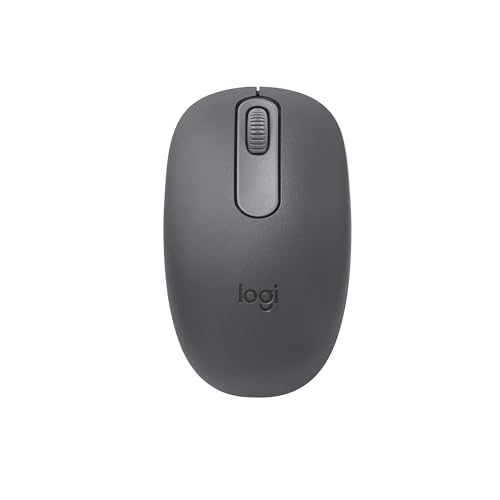
Pros
- Lightweight ambidextrous design
- Direct Bluetooth pairing
- Precise line-by-line scrolling
- Works across common laptop platforms
- Battery life reaches up to 12 months
Cons
- No silent-click claim or adjustable DPI
- No side buttons
- Compact body offers limited palm support
Best for: laptop and tablet users who need a basic mouse that travels easily.
The Logitech M196 is the straightforward option. It connects over Bluetooth without a dongle, fits into a small bag, and works for both left and right hands. There is no learning curve and no software layer to maintain. For someone replacing a trackpad with a physical pointer, that simplicity is the main attraction.
Its contoured body is about 3.9 inches long and 2.36 inches wide, with a listed weight of about 0.17 pounds. Optical tracking and line-by-line scrolling are designed to provide smooth cursor movement across nearly any surface. Those details make it a useful couch, classroom, or travel mouse, though the compact proportions do not provide the same palm support as the M550 L.
The M196 uses one AA battery and is rated for up to 12 months, with automatic sleep extending the time between changes. It pairs with Windows, macOS, ChromeOS, and other supported devices through Bluetooth. The plastic parts include certified post-consumer recycled plastic, listed at 67 percent for the graphite version.
The M240 is the more compelling Logitech compact mouse for quiet spaces because its click sound is reduced by 90 percent and its battery rating reaches 18 months. The M196 remains appealing when you want an uncomplicated design and do not care about silent clicks. Neither model includes adjustable DPI, programmable buttons, or multi-device switching.
Choose the M196 for basic navigation, especially if left-handed use matters. Skip it for long daily sessions if your hand needs a fuller shell, and choose the M550 L instead. It is a practical travel companion, not a productivity command center.
10. Logitech MX Anywhere 2S: Best High-Resolution Tracker

Pros
- Darkfield movement detection
- Up to 4000 DPI resolution
- Bluetooth and radio-frequency wireless
- Wireless operating distance reaches 33 feet
- Compact body for detailed work on the move
Cons
- Heavier than the other compact Logitech models
- No battery-life figure is provided
- Older design has fewer stated convenience features
Best for: users who need precise tracking across varied surfaces.
The Logitech MX Anywhere 2S is the specialist in this group. Its Darkfield movement detection and 4000 DPI resolution are the reasons to choose it, particularly if your laptop work moves beyond a standard desk mat. It is compact enough for travel, but its roughly 0.42-pound listed weight makes it substantially heavier than the M240 or M196.
The tracking system is the headline feature. Darkfield detection is intended to maintain cursor control across a broad range of surfaces, which is useful when a hotel desk, conference table, or café table is all you have. The 4000 DPI resolution gives the pointer a wider adjustment range than the M240, M196, or Lenovo WL310, helping with detailed selections and large high-resolution displays.
Wireless connectivity includes Bluetooth and radio frequency, and the listed operating distance is 33 feet. Those options make it adaptable to laptops and desktop setups, though the supplied information does not identify a battery runtime or charging detail. That missing information makes it harder to plan around than the Logitech M720's stated 24-month battery or the TECKNET's recharge cycle.
The MX Anywhere 2S is not as quiet-feature-focused as the M240, not as ergonomic for large hands as the M550 L, and not as transparent about settings as the XBG B15Pro. Its value comes from tracking capability and compact portability. If you are choosing among mice based on how a pointer behaves on different work surfaces, this is the most interesting option here.
Choose it for precision and surface flexibility, not for the simplest everyday experience. Most laptop users will find the M240 easier to live with, while designers and frequent travelers may appreciate the MX Anywhere 2S more. It is a focused tool with a clear reason to exist.
How to choose best bluetooth mouse for laptop
The right mouse should match your hand, laptop ports, working environment, and tolerance for batteries or charging. These are the factors that separate a comfortable daily tool from an accessory that stays in the drawer.
Hand size and shape
Compact mice save bag space but give the palm less support. The M240 and M196 suit fingertip or relaxed claw grips, while the M550 L and M720 are more appropriate for larger hands and palm grips. An ergonomic shape matters most when the mouse will be used for several hours at a time.
Check whether the shape is ambidextrous or right-handed. The M240 and M196 work for either hand, while the M720 and M550 L are designed around right-handed use. A contoured shell can feel secure, but only if the thumb rest lands naturally.
Bluetooth connection
Direct Bluetooth pairing keeps a USB port free, which is especially important on thin laptops. Bluetooth 5.0 appears on the Lenovo WL310 and Wegear WL300, while the M240 and M196 focus on simple pair and play connection. A mouse with Bluetooth and a receiver, such as the M720, M550 L, or TECKNET, gives you a fallback when a laptop's Bluetooth is unavailable.
For a laptop, a stable direct connection is usually more useful than an extra receiver you may lose.
Click noise
Silent clicks are useful in libraries, shared offices, video calls, and bedrooms. Logitech's M240 and M550 L specify a 90 percent reduction in click sound, while the WL300, WL310, TECKNET, and XBG also describe quiet operation. A silent scroll wheel is less common, so check for that detail if scrolling noise bothers you as much as button noise.
DPI and tracking
DPI changes how far the cursor moves for a given hand movement. Lower settings help with careful selections, while higher settings are convenient across large displays. The Lenovo WL310 offers 1000, 1200, and 1600 DPI, the WL300 offers 800, 1200, and 1600, and the TECKNET reaches from 800 to 4800 DPI.
Tracking technology matters when you work away from a mouse pad. The Logitech MX Anywhere 2S lists Darkfield detection and 4000 DPI, while the M196 describes optical tracking across nearly any surface. For normal browsing, a broad DPI range is less important than a stable sensor and a comfortable grip.
Battery and charging
Replaceable batteries are convenient when you need to keep working immediately, and several Logitech models list runtimes from 12 to 24 months. Rechargeable mice avoid carrying spare cells but need a charging routine. The TECKNET takes about 1.5 to 2 hours to charge and lists up to three months of use, while the XBG B15Pro has a 500 mAh battery but no stated runtime in the supplied details.
Device switching and buttons
A basic mouse is enough for one laptop. If you move between devices, the M720 can switch among three computers and supports FLOW, while the TECKNET supports two connected devices and the XBG B15Pro provides three connection modes. Extra buttons can speed up browser navigation, but check platform support because the WL300 and TECKNET list Mac limitations for side buttons.

Frequently asked questions
Does a Bluetooth mouse use a laptop USB port?
No. A Bluetooth mouse pairs directly with the laptop's Bluetooth connection, so it does not require a USB receiver. Models such as the M240, M196, and Lenovo WL310 are designed around direct pairing.
Is Bluetooth 5.0 important for a laptop mouse?
Bluetooth 5.0 can provide a modern connection standard, but the version alone does not determine comfort or tracking quality. A well-designed Bluetooth mouse with an older supported version can still be perfectly suitable for ordinary laptop work.
Which mouse is best for large hands?
The Logitech Signature M550 L is the clearest fit because it is a full-size model designed for larger hands. The Logitech M720 is another strong choice if you also need device switching and customizable buttons.
Are silent mice completely silent?
No. Silent mice reduce the sound of clicks rather than eliminating every mechanical or surface noise. The M240 and M550 L specify a 90 percent reduction in click sound, while several other models describe their buttons as quiet or silent without supplying a reduction figure.
Can these mice work with a MacBook?
Several can. The M240, M720, M550 L, M196, TECKNET, WL300, WL310, and XBG list macOS compatibility, though the WL300 and TECKNET note that their side buttons are not recognized on Mac.
Should a laptop mouse be rechargeable?
That depends on your routine. Rechargeable models such as the TECKNET and XBG B15Pro avoid disposable batteries, while the Logitech models with stated 12 to 24 month battery life reduce how often you need to think about power.
Can a Bluetooth mouse work without a mouse pad?
Many can, but performance varies by surface. The M196 is described as working across nearly any surface, the WL300 lists wood, leather, fabric, paper, and resin, and the MX Anywhere 2S uses Darkfield tracking for more demanding surface flexibility.

The bottom line
The Best Bluetooth Mouse for Laptop for most people is the Logitech M240 Graphite. It is quiet, compact, ambidextrous, easy to pair, compatible with a wide range of systems, and rated for up to 18 months of battery life. The rose version has the same capabilities if its finish better suits your setup.
Choose the Logitech M720 Triathlon when you work across several computers, or the Logitech Signature M550 L when a small mouse leaves your hand unsupported. The Lenovo WL310 and TECKNET cover adjustable sensitivity, while the MX Anywhere 2S is the specialist pick for high-resolution tracking.
If you are undecided, buy the M240 unless your hand size or multi-device workflow points clearly to another model.
As an Amazon Associate we earn from qualifying purchases.