

A mouse that clicks loudly in a shared office, runs out of power during a flight, or needs a USB receiver for every new laptop quickly becomes a daily nuisance. The right Bluetooth mouse should disappear into your routine while still feeling precise and comfortable.
Our best bluetooth mouse picks range from tiny ambidextrous travel models to full-size multi-device workhorses and one gaming specialist. Logitech M240 Compact Silent is the best starting point for most people, while the list also includes rechargeable options, ergonomic designs, and models with programmable buttons.
Comparison table
| # | Product | Award | Connectivity | Battery | Best for |
|---|---|---|---|---|---|
| 1 | Logitech M240 Compact Silent | Best overall | Bluetooth | Up to 18 months | Quiet everyday use and travel |
| 2 | Logitech Signature M550 L | Best for large hands | Bluetooth or Logi Bolt receiver | Up to 24 months | Comfortable full-size work |
| 3 | TECKNET Rechargeable Silent | Best rechargeable compact | Bluetooth or 2.4G USB A | About 3 months | Small to medium hands |
| 4 | Logitech M720 Triathlon | Best for three devices | Bluetooth or Unifying receiver | Up to 24 months | Multi-computer workflows |
| 5 | Lenovo Yoga Pro | Best ergonomic rechargeable | Dual Bluetooth | 2 to 3 months | Custom controls and comfort |
| 6 | Logitech M240 Compact Silent Off White | Best light travel mouse | Bluetooth | Up to 18 months | Portable ambidextrous use |
| 7 | Logitech M240 Compact Silent Rose | Best colorful compact mouse | Bluetooth | Up to 18 months | Quiet mobile work |
| 8 | Logitech G305 Lightspeed | Best for gaming | Lightspeed wireless | Up to 250 hours | Fast PC gaming |
| 9 | TECKNET Three-Device Silent | Best for three connections | Bluetooth or 2.4G USB A | About 3 months | Horizontal scrolling and multitasking |
| 10 | Lenovo WL310 Silent | Best simple ergonomic mouse | Bluetooth 5.0 | Not specified | Quiet laptop use |
1. Logitech M240 Compact Silent: Best Overall

Pros
- Bluetooth connection needs no dongle
- Click sound reduced by 90 percent
- Ambidextrous and easy to carry
- Works with Windows, macOS, Linux, ChromeOS, iPadOS, and Android
Cons
- Compact shape is less suitable for large hands
- Uses replaceable batteries rather than USB-C charging
- No extra buttons or adjustable DPI
Best for: someone who wants a quiet, uncomplicated mouse for a laptop or shared workspace.
The Logitech M240 Compact Silent gets the important everyday decisions right. It is small enough to slip into a laptop bag, quiet enough for a library or office, and simple enough that pairing does not become another task. Its symmetrical shape works for either hand, which makes it more flexible than the right-handed Logitech M550 L, M720 Triathlon, and Lenovo Yoga Pro.
Logitech says the M240 reduces click sound by 90 percent while keeping the same click feel. That is a useful distinction. Silent mice can sometimes feel soft or vague, but this model is designed to remove the noise without changing the familiar action. It connects over Bluetooth without a receiver and works up to 10 meters from the computer, giving it the cleanest setup in this group.
Battery life is rated at up to 18 months, helped by an automatic sleep feature. That is long enough that most owners will think about the mouse only when it needs a fresh battery. The M240 also supports Windows, macOS, Linux, ChromeOS, iPadOS, and Android, so it is a practical choice for households that switch between computers and tablets.
The limitation is its compact body. The dimensions are about 3.90 by 2.36 by 1.54 inches, and the mouse weighs about 0.16 pounds. That makes it excellent for portability but less relaxing for a large hand during long desktop sessions. It also has no side buttons, DPI control, or rechargeable battery. For a larger grip, the M550 L is the better fit. For nearly everyone else who wants quiet Bluetooth simplicity, this is the one we'd keep.
2. Logitech Signature M550 L: Best for Large Hands
Pros
- Full-size body suits larger hands
- Soft thumb area and rubber side grips
- SmartWheel switches between precise and fast scrolling
- Bluetooth and Logi Bolt receiver options
- Up to 24 months of battery life
Cons
- Larger and heavier than the M240
- Designed around a right-handed grip
- No rechargeable battery or programmable buttons
Best for: desktop users who want a quiet, palm-supporting mouse for long work sessions.
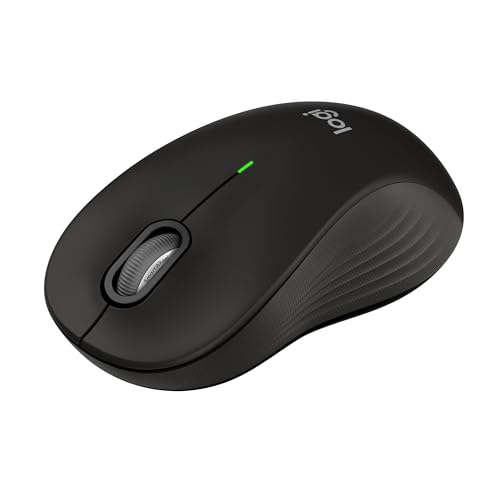
The Logitech Signature M550 L is the obvious step up when the M240 feels cramped. Its full-size shell is intended for larger hands, with a contoured shape, a soft thumb area, and rubber side grips that help keep the hand settled. It is not a travel mouse, but that extra space is exactly what makes it more comfortable at a permanent desk.
The SmartWheel is the standout control. A light scrolling mode moves line by line through documents, while a flick switches to fast scrolling for long web pages. That is more useful than a basic wheel when work involves spreadsheets, lengthy documents, or research. The wheel gives the M550 L a more deliberate feel than the plain M240, even though both mice keep clicks quiet with Logitech's SilentTouch design.
You can pair it through Bluetooth Low Energy or use the Logi Bolt USB receiver. Bluetooth is the cleaner route for laptops with limited ports, while the receiver gives you a useful fallback for a desktop or a computer without convenient Bluetooth. Compatibility covers Windows, macOS, Linux, ChromeOS, iPadOS, and Android. Its single battery is rated for up to 24 months, longer than the M240's stated 18 months.
The M550 L weighs about 0.25 pounds and lacks the M720 Triathlon's three-device switching and customizable buttons. It is also not the pick for left-handed users or anyone who wants USB-C charging. Still, for a large hand that spends hours moving through documents, it is more comfortable than the smaller Logitech models and simpler than the feature-heavy Lenovo Yoga Pro.
3. TECKNET Rechargeable Silent: Best Rechargeable Compact
Pros
- Rechargeable battery avoids disposable cells
- Bluetooth and USB A wireless modes
- Six DPI settings from 800 to 4800
- Quiet operation for offices and libraries
- 36-month registered warranty
Cons
- Better suited to small and medium hands
- Side buttons do not work with macOS
- Connection may become unstable when the battery is low
Best for: laptop users with small or medium hands who want charging and adjustable pointer speed.
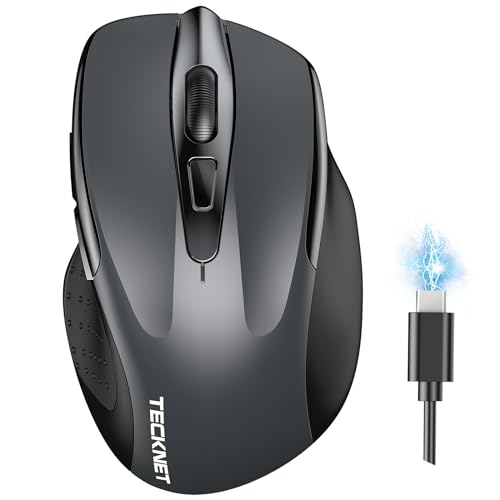
The TECKNET Rechargeable Silent gives a compact mouse a more flexible feature set. It can connect to one device through Bluetooth or a USB A connection, and a switch lets you move between the two. That is handy for someone who uses Bluetooth with a laptop but wants a receiver option for an older desktop.
Its six DPI settings run from 800 to 4800: 800, 1200, 1600, 2400, 3200, and 4800. Lower settings make slow, deliberate pointer movements easier, while higher settings cover broad screen movement with less hand travel. This is more control than the M240 offers, although it adds a button and a decision that some users will never need.
The internal battery takes about 1.5 to 2 hours to charge and is rated for about three months with two hours of daily use. The mouse is designed for quiet operation, and the broad Windows, macOS, Chrome, and Linux compatibility makes it suitable for mixed-device work. TECKNET also specifies a 36-month warranty when registered.
The trade-off is fit. The manufacturer says it is better for small to medium-sized hands, so it is not the compact rechargeable answer for everyone. Side buttons are not compatible with macOS, and TECKNET warns that a low battery can affect connection stability. The M240 is more straightforward, while the Lenovo Yoga Pro feels more substantial. Choose this TECKNET when charging and DPI adjustment matter more than a polished, minimal design.
4. Logitech M720 Triathlon: Best for Three Devices

Pros
- Switches between up to three computers
- Logitech Flow moves text and files between systems
- Six customizable buttons
- Hyper-fast scroll mode with instant stop
- Bluetooth and Unifying receiver support
Cons
- Right-handed shape limits flexibility
- Larger than compact travel mice
- Requires Logitech software for customization
Best for: people who work across multiple computers and want one mouse to follow them between screens.
The Logitech M720 Triathlon is built for a desk with more than one computer. A button on the mouse switches between up to three connected systems, and Logitech Flow can move the cursor, text, and files across compatible computers. That is a real productivity advantage for someone who moves between a work laptop, a personal computer, and a tablet or second laptop.
The body is full-size and shaped for the right hand, with a sculpted palm rest and rubber surface. It weighs about 0.30 pounds and measures roughly 4.53 inches long, 2.91 inches wide, and 1.77 inches high. Compared with the M550 L, it feels less like a single-purpose office mouse and more like a control center for a busy desk.
Scrolling is another strength. The wheel can move line by line or spin rapidly through long pages, with an instant-stop feature when you need to regain control. Six buttons can be assigned to shortcuts through Logitech software. Bluetooth works alongside the Logitech Unifying receiver, which can also connect up to six compatible Logitech peripherals through one USB port.
Battery life is rated at up to 24 months, but the mouse does not recharge over USB-C. Its right-handed shape and larger footprint also make it a poor choice for left-handed users or frequent travelers. The Lenovo Yoga Pro offers rechargeable power and configurable controls in a lighter body, but it switches between two Bluetooth hosts rather than three computers. Pick the M720 when multi-computer control is the main reason to buy.
5. Lenovo Yoga Pro: Best Ergonomic Rechargeable

Pros
- Rechargeable USB-C design
- Dual-device Bluetooth 5.1 pairing
- Six buttons with programmable controls
- Three on-the-fly DPI stages and software adjustment to 4000
- Metal scroll wheel supports two-way scrolling
Cons
- Right-handed design
- Supports two Bluetooth hosts rather than three
- Battery lasts 2 to 3 months between charges
Best for: right-handed users who want a comfortable rechargeable mouse with configurable controls.
The Lenovo Yoga Pro takes a more deliberate approach to ergonomics than the compact models. Its full-size shell has a thumb rest, soft side material, and a balanced right-handed shape. The result should feel more supportive for extended desktop work than the flat M240, while its 0.22-pound weight keeps it lighter than the M720 Triathlon.
This is also one of the more adjustable mice here. It has six buttons, programmable side and top controls, and a configurable scroll wheel. The blue optical sensor is specified for use on almost any surface, and DPI can be changed through three on-the-fly stages or adjusted in software up to 4000. Those controls make it more suitable for creative applications and shortcut-heavy workflows than the M550 L.
The mouse uses dual-device Bluetooth 5.1 pairing, with a button on the bottom for switching and pairing. Its rechargeable battery takes less than two hours to reach a full charge and is rated for two to three months before the next charge. USB-C charging is more convenient than replacing a cell, though the Logitech M720 lasts much longer between battery changes.
The Yoga Pro is not symmetrical, and it does not offer the M720's three-computer Flow system. It also asks the user to spend time configuring buttons to get the most from it. That is a strength for an enthusiast and unnecessary complexity for someone who wants a basic pointer. The right buyer is a right-handed laptop or desktop user who wants ergonomic shaping, a metal wheel, and rechargeable power in one mouse.
6. Logitech M240 Compact Silent Off White: Best Light Travel Mouse

Pros
- Small ambidextrous body
- No receiver required
- 90 percent reduced click sound
- Up to 18 months of battery life
- Broad operating system compatibility
Cons
- Not suited to large hands
- No rechargeable battery
- No extra buttons or speed adjustment
Best for: students and mobile workers who want an unobtrusive mouse for a laptop bag.
The Logitech M240 Compact Silent Off White has the same hardware and operating profile as the Graphite version, so its appeal is mainly its lighter finish. It is a small, ambidextrous mouse that makes sense for a laptop rather than a fixed workstation. At about 3.90 inches long, 2.36 inches wide, and 1.54 inches high, it takes up little room beside a compact keyboard.
Pairing is straightforward Bluetooth, with no dongle occupying a USB port. Logitech rates the wireless range at up to 10 meters, and the mouse works with Windows, macOS, Linux, ChromeOS, iPadOS, and Android. It also carries Works with Chromebook certification, which makes it a sensible companion for a Chromebook or tablet setup.
The click noise is reduced by 90 percent, and the same click feel is retained. That makes it a good fit for shared spaces where a standard mouse can sound surprisingly intrusive. The automatic sleep feature helps it reach the stated 18-month battery life, so travel users do not need to carry a charging cable just for the mouse.
The small shell is still the important caveat. Anyone with a large hand may find the M550 L more comfortable, and anyone who needs side buttons or DPI control should look at the TECKNET models. The Off White M240 is not a different performer from the Graphite model. It is simply the right pick when the M240 shape suits you and a pale finish works better with your setup.
7. Logitech M240 Compact Silent Rose: Best Colorful Compact Mouse

Pros
- Compact and ambidextrous
- Quiet clicks for shared spaces
- Bluetooth works without a receiver
- Up to 18 months of battery life
- Compatible with computers, tablets, and phones
Cons
- Compact body may feel cramped for large hands
- No USB-C charging
- No programmable controls
Best for: anyone who wants a quiet, portable Bluetooth mouse in a distinctive finish.
The Logitech M240 Compact Silent Rose is another finish variation of the M240, with the same compact shape and quiet operation. That makes it a particularly easy recommendation for students, commuters, and anyone who uses a mouse only when a laptop trackpad becomes tiring. The symmetrical design does not force a right-handed grip.
The technical case is familiar. It connects directly through Bluetooth, works at up to 10 meters, and supports Windows, macOS, Linux, ChromeOS, iPadOS, and Android. Its 90 percent reduction in click sound is useful in classrooms, offices, and late-night workspaces, where a normal click can disturb people nearby.
Logitech rates the battery for up to 18 months with automatic sleep. The mouse is also light enough for travel, though the listed dimensions and weight vary slightly in the product information compared with the other M240 listings. The shared features matter more here: this is a basic pointer designed to be carried, paired, and forgotten.
The M240 Rose cannot match the M720's shortcuts, the Yoga Pro's rechargeable battery, or the TECKNET Rechargeable Silent's DPI settings. It also is not a large-hand comfort mouse. Its advantage is that it keeps the uncomplicated M240 formula while adding a finish that is easier to distinguish from a desk full of black accessories.
8. Logitech G305 Lightspeed: Best for Gaming
Pros
- 12, 000 DPI HERO sensor
- 400 IPS tracking precision
- 1 ms Lightspeed report rate
- Up to 250 hours of continuous gameplay
- Lightweight 3.4-ounce design
Cons
- Uses a USB receiver rather than Bluetooth
- Gaming shape and controls are less office-focused
- AA battery adds a replacement step
Best for: PC gamers who prioritize responsive tracking over Bluetooth convenience.
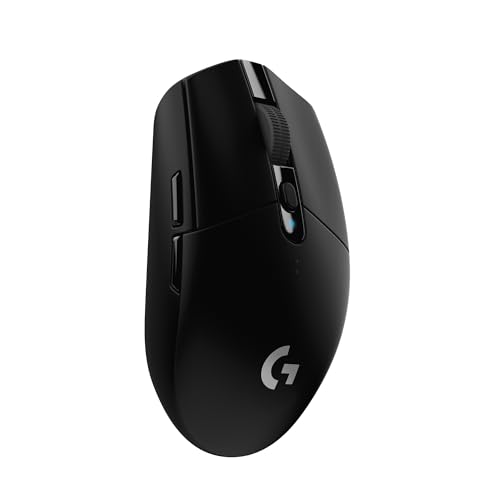
The Logitech G305 Lightspeed is the odd one out in this roundup because it is not a Bluetooth mouse. It uses Logitech's Lightspeed wireless system and a USB receiver, so it should not be the first choice for a tablet or a laptop with no spare USB port. It belongs here because its wireless performance is much closer to a wired gaming mouse than to a typical office model.
Its HERO optical sensor reaches 12, 000 DPI and tracks at up to 400 IPS. Those figures matter most for fast games, where a quick swipe should remain controlled and accurate. The 1 ms report rate is designed for competition-level responsiveness, a capability the ordinary Bluetooth models in this list do not target.
The G305 runs on one AA battery and is rated for up to 250 hours of continuous gameplay. Logitech also specifies an Endurance mode that can extend battery life up to nine months through Logitech G HUB software. At 3.4 ounces, it is light enough for high-sensitivity movement, and the built-in storage for the nano receiver helps when carrying it with a laptop.
For ordinary office work, the M240 is quieter and easier to pair. For a multi-device desk, the M720 is more useful. The G305's real weakness is therefore not performance but category fit: there is no Bluetooth connection, and the receiver must be available. If gaming responsiveness is the priority, it is the clear specialist. If Bluetooth is non-negotiable, skip it and consider what changes when you move from a receiver to Bluetooth.
9. TECKNET Three-Device Silent: Best for Three Connections

Pros
- Connects to two Bluetooth devices and one USB A receiver
- Side scroll wheel helps with wide spreadsheets
- Six DPI settings from 800 to 4800
- Rechargeable battery
- Quiet clicks and seven buttons
Cons
- Buttons are not programmable
- Side buttons do not work on macOS
- Heavier than the compact models
Best for: multitaskers who need three connections and frequent horizontal scrolling.
The TECKNET Three-Device Silent is the most practical choice here for a three-device setup that includes both Bluetooth and USB A. It can maintain two Bluetooth connections and one 2.4G receiver connection, then switch between them with one button. That is a useful arrangement for a work laptop, personal computer, and another Bluetooth device.
Its unusual side scroll wheel is the reason to choose it over the simpler TECKNET Rechargeable Silent. Horizontal navigation is much easier in wide spreadsheets, large web pages, and design canvases when it has a dedicated control. The metal scroll wheel also provides a smoother, more substantial feel than a basic plastic wheel.
DPI can be set to 800, 1200, 1600, 2400, 3200, or 4800, with LED blinks indicating the selected setting. The battery takes about 1.5 to 2 hours to charge and lasts about three months with two hours of daily use. It enters auto sleep after 10 minutes of inactivity, and the product supports Windows, macOS, Chrome, and Linux.
There are limits to the seven-button design. The buttons are not programmable, and side buttons do not work with macOS. At about 0.38 pounds, it is also substantially heavier than the M240. The M720 offers a more mature three-computer workflow, while this TECKNET wins when horizontal scrolling, rechargeable power, and three connection types matter more than software customization. For people moving between a laptop and desktop, the right setup for switching between several computers can make the choice easier.
10. Lenovo WL310 Silent: Best Simple Ergonomic Mouse

Pros
- Bluetooth 5.0 requires no receiver
- Silent clicks for quiet spaces
- Three DPI settings
- Ergonomic shape with portable dimensions
- Works with Windows, Mac, and Chromebook
Cons
- Battery details are not specified
- Only three DPI settings
- No multi-device switching or side buttons
Best for: laptop users who want a quiet, shaped mouse without extra connectivity hardware.
The Lenovo WL310 Silent occupies a sensible middle ground. It is more shaped than the flat compact mice, but it does not attempt to become a multi-device productivity tool. Its ergonomic design is intended to reduce wrist strain during extended use, while the compact dimensions keep it suitable for a laptop bag.
Bluetooth 5.0 provides the connection without a USB receiver, and Lenovo lists support for Windows PCs, MacBooks, Chromebooks, and Lenovo laptops. The three DPI settings are 1000, 1200, and 1600. That range is enough to choose between slower precision and faster general navigation, though it is less flexible than the six settings on either TECKNET model.
The silent clicks suit shared offices, late-night work, and classrooms. The mouse measures about 4.2 inches long and 2.5 inches wide, and the listed weight is 0.15 pounds. Those dimensions give it more presence than the M240 without making it a full-size desktop mouse like the M550 L or M720.
Lenovo does not specify battery type or battery life in the supplied information, so it cannot compete with the clear endurance claims of the Logitech options. It also lacks extra buttons, charging details, and device switching. Choose it for a straightforward, quiet ergonomic shape. For a rechargeable design with substantially more control, the Yoga Pro is the stronger alternative.

How to choose best bluetooth mouse
The right Bluetooth mouse depends less on a long feature list than on the shape of your hand, the devices you use, and how much control you need.
Hand size and shape
Compact mice are easy to carry and can work well with fingertip or claw grips, but they may force a large hand into a cramped position. Full-size models such as the Logitech Signature M550 L and Logitech M720 Triathlon provide more palm support. Right-handed ergonomic mice can reduce strain for some users, but an ambidextrous model is the safer choice for shared desks or left-handed use.
Bluetooth and device switching
A basic Bluetooth mouse connects directly to one computer and keeps a USB port free. Multi-device models add a switching button, with the M720 supporting up to three computers and the Lenovo Yoga Pro supporting two Bluetooth hosts. Some mice also include a 2.4G USB receiver, which is useful for desktops or computers with unreliable Bluetooth.
Bluetooth solves the port problem, but device switching solves the workflow problem.
Battery and charging
Battery life varies sharply by design. The M240 is rated for up to 18 months, while the M550 L and M720 reach up to 24 months. Rechargeable options such as the TECKNET models and Lenovo Yoga Pro avoid disposable cells, but their stated use between charges is measured in months rather than years. Check whether the mouse supports charging and whether a low battery can affect connection stability.
Click noise and wheel design
Silent clicks matter in offices, libraries, classrooms, and shared homes. Logitech specifies a 90 percent reduction for the M240 and M550 L, while the TECKNET and Lenovo models also emphasize quiet operation. Wheel design matters just as much for productivity: the M550 L and M720 offer fast scrolling, the Yoga Pro has a configurable wheel, and the larger TECKNET adds side scrolling for horizontal documents.
DPI and extra buttons
DPI controls change how far the pointer moves with the same hand movement. A low setting can help with detail work, while a high setting reduces movement across a large display. The TECKNET mice offer six settings up to 4800 DPI, the Yoga Pro can reach 4000 through software, and the WL310 provides 1000, 1200, and 1600. Extra buttons are useful for shortcuts, but confirm software and operating system support before relying on them.

Frequently asked questions
Do all of these mice use Bluetooth?
No. The Logitech G305 Lightspeed uses Logitech's Lightspeed wireless system and a USB receiver rather than Bluetooth. The other nine models list Bluetooth connectivity, although some also offer a 2.4G USB receiver.
Is a compact mouse comfortable for long work sessions?
That depends on hand size and grip. The Logitech M240 models are portable and ambidextrous, but larger hands may be more comfortable with the M550 L, M720 Triathlon, or Lenovo Yoga Pro.
Which mouse is best for switching between computers?
The Logitech M720 Triathlon supports up to three computers and adds Logitech Flow for moving text, files, and the cursor between compatible systems. The TECKNET Three-Device Silent also supports three connections, while the Lenovo Yoga Pro supports two Bluetooth hosts.
Which models are rechargeable?
The TECKNET Rechargeable Silent, TECKNET Three-Device Silent, and Lenovo Yoga Pro use rechargeable batteries. The Logitech M240, M550 L, M720, and G305 use replaceable batteries according to their supplied battery-life information.
Can these mice work with a Mac?
The Logitech M240, M550 L, M720, Lenovo Yoga Pro, both TECKNET models, and Lenovo WL310 list macOS compatibility. The TECKNET models note that their side buttons are not compatible with macOS, so the main pointer and click functions should not be confused with full feature support.
Does DPI matter for normal office work?
It can, but many office users will be happy with a moderate setting and never change it. DPI adjustment becomes more useful when you switch between detailed editing, large displays, fast browsing, or gaming.
Is a Bluetooth mouse good for gaming?
It can handle everyday games, but dedicated gaming wireless systems are designed for lower latency and faster reporting. The Logitech G305 uses a 1 ms Lightspeed report rate and a 12, 000 DPI HERO sensor, making it the specialist choice for PC gaming in this group.

The bottom line
The Best bluetooth mouse for most people is the Logitech M240 Compact Silent. It is quiet, ambidextrous, easy to carry, broadly compatible, and rated for up to 18 months of battery life. Choose the Logitech Signature M550 L instead if you have larger hands and spend most of your time at a desk.
For more demanding setups, the Logitech M720 Triathlon is the strongest multi-computer option, while the Lenovo Yoga Pro is the better rechargeable ergonomic pick. The Logitech G305 Lightspeed is the specialist for gaming, but remember that it is not a Bluetooth mouse.
If you are undecided, choose the M240 for portability, the M550 L for hand comfort, or the M720 for multiple computers.
As an Amazon Associate we earn from qualifying purchases.