

A bad mouse makes every small task feel inefficient: the pointer skips, the shell cramps your hand, or the receiver occupies the only convenient port. The right one disappears into your routine, giving you accurate control without demanding attention.
The Best wireless mouse options in this guide range from quiet Bluetooth models for laptops to fast gaming mice with programmable controls. We compared the meaningful differences in shape, connection type, battery life, sensor performance, and device switching.
Logitech M510 Full Size is our top pick for most people, with the Logitech G305, M720, M550 L, and gaming-focused Razer and Logitech G models filling out the range.
Comparison table
| # | Product | Award | Connection | Battery | Best for |
|---|---|---|---|---|---|
| 1 | Logitech M510 Full Size | Best overall | 2.4 GHz USB receiver | Up to 2 years | Comfortable everyday work |
| 2 | Logitech G305 Lightspeed Black | Best gaming value | LIGHTSPEED USB receiver | Up to 250 hours | Fast PC gaming |
| 3 | Logitech M185 Compact | Best simple compact mouse | 2.4 GHz USB receiver | Up to 1 year | Small hands and travel |
| 4 | Logitech G703 Lightspeed | Best ergonomic gaming mouse | LIGHTSPEED USB receiver | Up to 35 hours with RGB | Palm-grip gaming |
| 5 | Logitech M240 Silent | Best quiet Bluetooth mouse | Bluetooth | Up to 18 months | Quiet laptop work |
| 6 | HP X3000 G3 | Best multi-surface pick | 2.4 GHz USB receiver | Up to 15 months | Mixed desk surfaces |
| 7 | Logitech G305 Lightspeed White | Best lightweight gaming mouse | LIGHTSPEED USB receiver | Up to 250 hours | Portable gaming |
| 8 | Logitech Signature M550 L | Best large quiet mouse | Bluetooth or Logi Bolt | Up to 24 months | Larger hands |
| 9 | Razer Basilisk V3 X | Best customizable gaming mouse | HyperSpeed or Bluetooth | Up to 285 hours | Macros and extra controls |
| 10 | Logitech M720 Triathlon | Best multi-device mouse | Bluetooth or Unifying receiver | Up to 24 months | Switching between computers |
1. Logitech M510 Full Size: Best Overall

Pros
- Broad palm area and soft rubber grips
- Ambidextrous shape
- Back and Forward buttons
- Side-to-side scrolling and zoom
- Up to two years of battery life
Cons
- Larger than the travel-focused models here
- Advanced button functions require desktop software
- Uses a USB receiver rather than Bluetooth
Best for: someone who wants a comfortable full-size mouse for long work sessions.
The Logitech M510 Full Size is the mouse we'd hand to someone who wants to stop thinking about their mouse. Its contoured body, soft rubber grips, and broad palm area make it feel settled under the hand rather than perched on the fingertips. The shape is ambidextrous, though the side buttons are naturally more useful to right-handers.
It has three standard buttons plus Back and Forward controls, and those side buttons can be assigned to tasks such as switching applications or going full screen with Logitech software. Side-to-side scrolling and zoom are useful when moving through wide spreadsheets, photo libraries, or maps. Those controls give the M510 more flexibility than the simpler M185 and HP X3000 G3.
The 2.4 GHz connection uses a small Logitech Unifying receiver that can remain in a laptop. Its stated range is not listed in the supplied information, so we would not assume more than the reliable everyday connection Logitech describes. Battery life is rated at up to two years, with an on/off switch, smart sleep mode, and an indicator light helping reduce interruptions.
The weakness is its dependence on a USB receiver. That is easy on a desktop and less convenient on a thin laptop with limited ports. It is also not the lightest or smallest option, and left-handed users may find the side controls less natural. Pick the M510 when comfort and useful desktop controls matter more than Bluetooth or extreme portability.
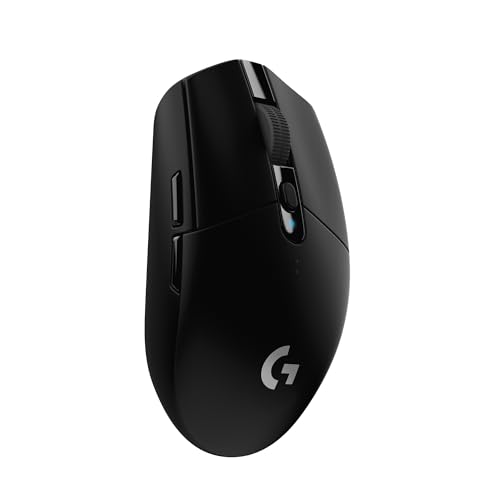
2. Logitech G305 Lightspeed Black: Best Gaming Value
Pros
- 1 ms LIGHTSPEED report rate
- HERO sensor with up to 12, 000 DPI
- Lightweight 3.4-ounce design
- Up to 250 hours from one AA battery
- Receiver storage inside the mouse
Cons
- No Bluetooth connection
- AA battery adds weight compared with rechargeable designs
- Compact shell may not suit large hands
Best for: PC gamers who want responsive wireless performance in a compact shell.
The Logitech G305 Lightspeed Black is the clearest step up from an ordinary office mouse for anyone who plays games. It has a compact, symmetrical shape and a lightweight mechanical design that weighs 3.4 ounces. That makes quick changes in direction feel easier than they do with the larger G703 or the feature-heavy Razer Basilisk V3 X.
The HERO optical sensor reaches up to 12, 000 DPI and is specified for 400 IPS precision. Most players will not use the maximum sensitivity, but the larger point is consistent tracking at the sensitivity they do choose. LIGHTSPEED wireless reports at 1 ms, a specification aimed at keeping wireless response competitive with wired devices.
One AA battery supports up to 250 hours of continuous gameplay. Logitech also states that Endurance mode in G HUB can extend battery life up to nine months, which suits someone who uses the mouse for work and occasional gaming. The USB nano receiver stores inside the mouse, a small but meaningful detail when the mouse travels with a laptop.
The G305 gives up Bluetooth, rechargeable operation, and the broader comfort of the G703. Its compact body is better for fingertip and claw users than for people who rest a large palm over the shell. For a deeper look at this category, the difference between fast wireless response and everyday office comfort is the decision to make. Choose the G305 when sensor performance and low weight matter most.
3. Logitech M185 Compact: Best Simple Compact Mouse

Pros
- Ambidextrous contoured design
- Compact for bags and tight desks
- Plug-and-play USB receiver
- Up to one year of battery life
- Works with Windows and Mac computers
Cons
- Only three main controls
- USB receiver required
- Small body is not ideal for large hands
Best for: small to medium hands that need a straightforward mouse for a laptop or office.
The Logitech M185 Compact is deliberately uncomplicated. Its contoured, ambidextrous body is easy to pick up and use, and the small shape makes more sense in a crowded workspace than the full-size M510. It is also a sensible companion for a laptop when the trackpad is tiring but a larger mouse would be awkward in a bag.
The connection is plug and play through a tiny 2.4 GHz nano receiver, with a stated range of up to 33 feet. There is no software setup needed for ordinary use, and the mouse works with Windows and Mac computers. The scroll wheel provides line-by-line movement, which is predictable for documents and web pages.
Battery life is rated at up to one year from the included AA battery. Smart sleep mode helps stretch that runtime, but the M185 does not provide the M510's extra side buttons, horizontal scrolling, or application shortcuts. The distinction is easy to feel during long office sessions, especially if you often move back and forward between pages.
The small body is the main limitation. Large hands may find it cramped, while anyone who wants quiet clicks should choose the Bluetooth M240 instead. The M185 is at its best as a simple, portable pointer for small or medium hands, not as a productivity command center.
4. Logitech G703 Lightspeed: Best Ergonomic Gaming Mouse

Pros
- Comfortable right-handed design
- HERO 25K sensor
- Six programmable buttons
- Optional 10-gram weight
- POWERPLAY charging support
Cons
- Battery life drops to up to 35 hours with default RGB
- Heavier than the G305
- POWERPLAY charging system is sold separately
Best for: right-handed gamers who prefer a substantial palm-grip mouse.
The Logitech G703 Lightspeed takes the familiar gaming mouse shape in a more substantial direction. Its rubber side grips and palm-friendly right-handed design make it a better match for a relaxed grip than the compact G305. The primary buttons use metal-spring tensioning, which is intended to keep their actuation feel consistent and responsive.
Its HERO 25K sensor offers 1:1 tracking, over 400 IPS, and sensitivity up to 25, 600 DPI, with no smoothing, filtering, or acceleration described in the supplied features. That is far more sensor range than most people need, but it gives players room to tune sensitivity precisely. Six programmable buttons provide more command flexibility than the G305.
The tradeoff is weight and battery behavior. The G703 weighs 95 grams, and its battery lasts up to 35 hours with default LIGHTSYNC RGB lighting. It accepts an optional 10-gram weight, which can make the mouse feel even more planted. The POWERPLAY wireless charging system can keep it charged while resting or playing, but that charging system is sold separately.
Compared with the G305, the G703 is more comfortable for broad palms and more adaptable for button-heavy games, but it is less nimble and less travel-friendly. The Razer Basilisk V3 X offers more controls and much longer battery figures, while the G703 has a simpler, more restrained layout. Skip it if you want a light fingertip mouse or dislike charging routines.
5. Logitech M240 Silent: Best Quiet Bluetooth Mouse

Pros
- Bluetooth connection without a dongle
- Click sound reduced by 90 percent
- Ambidextrous compact shape
- Up to 18 months of battery life
- Broad operating-system compatibility
Cons
- Compact shape is less comfortable for large hands
- No USB receiver option
- Basic button layout
Best for: laptop users who want quiet clicks and a receiver-free connection.
The Logitech M240 Silent solves two common laptop annoyances at once: click noise and missing USB ports. It pairs over Bluetooth without a dongle, and Logitech says its click sound is reduced by 90 percent while retaining the same click feel. That makes it a natural choice for libraries, shared offices, and late-night work.
The mouse is slim, ambidextrous, and small enough to carry in a bag. Its Bluetooth connection works up to 33 feet and supports Windows, macOS, Linux, ChromeOS, iPadOS, and Android. That broad compatibility is more useful than a high sensor number for people who move between a laptop, tablet, and desktop.
An energy-efficient auto-sleep feature helps the single battery last up to 18 months. The M240 is lighter than many full-size office mice at about 0.16 pounds, which helps with travel. Its compact proportions remain the central compromise, however, and extended use may feel less relaxed than the M510 or M550 L.
There is no USB receiver fallback, so a computer without Bluetooth will need a different model. The M550 L is the better quiet choice for large hands, while the M240 is easier to pack. If your laptop work involves keeping a small setup free of extra receivers, this is the more natural fit.
6. HP X3000 G3: Best Multi-Surface Pick

Pros
- 1600 DPI optical sensor
- Multi-surface LED tracking
- Side grips for control
- Up to 15 months from one AA battery
- Receiver stores inside the mouse
Cons
- Three-button layout
- USB-A receiver required
- Not designed for advanced customization
Best for: everyday work across desks and other commonly used surfaces.
The HP X3000 G3 is built around dependable utility. Its contoured shape is designed for either hand, and side grips give the shell a more secure feel than a smooth travel mouse. The three-button layout keeps the controls familiar, with an integrated scroll wheel and no learning curve.
Its 2.4 GHz USB-A connection reaches up to 30 feet, and the nano receiver stores inside the mouse for transport. The 1600 DPI optical sensor is a useful middle ground for general work, providing enough cursor speed for ordinary displays without turning a small movement into an oversized jump. HP also describes the blue LED system as suitable for movement across virtually any surface.
A single AA battery is rated for up to 15 months. That is shorter than the M510, M550 L, and M720, but still long enough to avoid frequent battery changes. The X3000 G3 also works with Windows PCs and laptops, Macs, and Chromebooks, so it is a practical shared household or office mouse.
The main limitation is what it does not do. There are no extra buttons, Bluetooth pairing, or gaming-focused controls, and USB-A can be inconvenient on newer laptops. The M185 is smaller, the M240 is quieter, and the M510 is more capable. Choose the HP when surface flexibility and uncomplicated control matter more than customization.
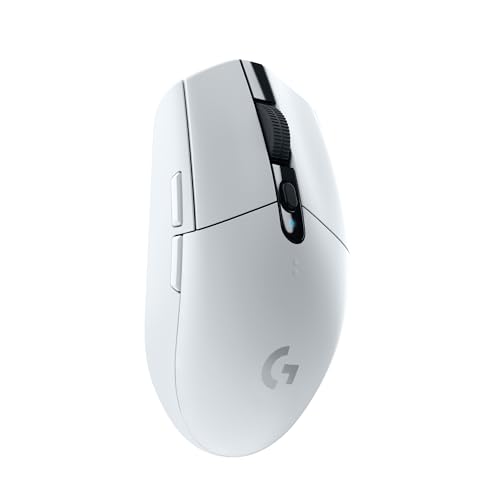
7. Logitech G305 Lightspeed White: Best Lightweight Gaming Mouse
Pros
- 3.4-ounce lightweight design
- 1 ms LIGHTSPEED response
- 12, 000 DPI HERO sensor
- Up to 250 hours on one AA battery
- Built-in receiver storage
Cons
- No Bluetooth mode
- AA-powered rather than rechargeable
- Compact shape may not suit broad palms
Best for: gamers who want a light portable mouse and prefer a white finish.
The Logitech G305 Lightspeed White has the same essential design as the black G305, including its lightweight 3.4-ounce body and compact classic shape. The white finish is the meaningful distinction in this list, making it a sensible match for a lighter desk setup while preserving the model's gaming performance.
LIGHTSPEED wireless provides a 1 ms response time, and the HERO optical sensor reaches 12, 000 DPI. Those numbers matter most in games where quick, repeatable cursor movement is important. The shell's low weight helps with broad swipes, while the built-in receiver storage keeps the mouse practical for a gaming laptop or travel bag.
A single AA battery supports up to 250 hours of continuous gaming. Logitech also specifies an Endurance mode that can extend operation to up to nine months through G HUB. That makes the G305 easier to live with than a short-runtime rechargeable gaming mouse, even though replacing a battery is less elegant than using a cable.
The same compromises apply as with the black version: there is no Bluetooth, and the compact shape can feel undersized for a large hand. The G703 is more supportive for palm grip, while the Basilisk V3 X offers more buttons and two wireless modes. Pick the white G305 when low weight and a portable receiver-based setup are the priority.
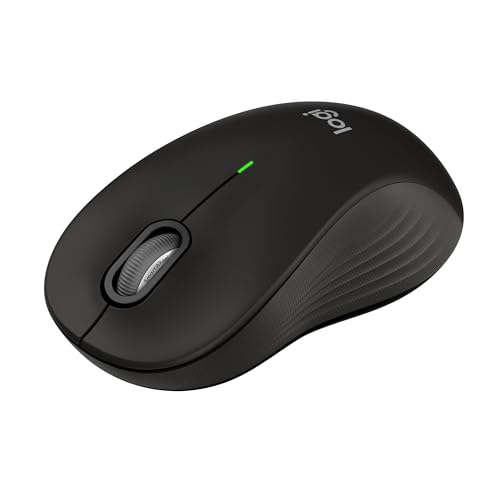
8. Logitech Signature M550 L: Best Large Quiet Mouse
Pros
- Designed for larger hands
- QuietTouch clicks reduce sound by 90 percent
- Bluetooth and Logi Bolt connectivity
- SmartWheel switches between scrolling modes
- Up to 24 months of battery life
Cons
- Right-hand-oriented comfort design
- No programmable side buttons
- Larger body is less travel-friendly
Best for: large-handed users who want quiet, comfortable scrolling.
The Logitech Signature M550 L is the office mouse to choose when smaller shells leave your palm unsupported. Its full-size body, contoured profile, soft thumb area, and rubber side grips are designed for larger hands. The result should feel more natural over long documents than the M240 or M185.
Its SmartWheel is the standout control. A flick switches between precise line-by-line scrolling and faster movement through long web pages, giving the wheel two useful personalities without adding extra buttons. QuietTouch technology reduces click noise by 90 percent, which puts it alongside the M240 as a strong option for shared spaces.
Connection choice is flexible. The M550 L supports Bluetooth Low Energy or a Logi Bolt USB receiver, letting users choose based on the computer and desk setup. It works across Windows, macOS, Linux, ChromeOS, iPadOS, and Android. Battery life is rated at up to 24 months from one AA battery.
The M550 L is not a gaming mouse, and its control layout is intentionally restrained. The M510 has more programmable shortcuts, while the M720 is the better tool for actively switching among three computers. Choose the M550 L when hand size, silent clicking, and smooth long-page scrolling are more important than extra commands.
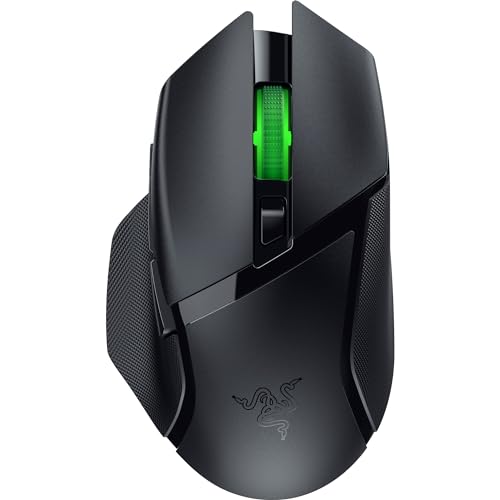
9. Razer Basilisk V3 X: Best Customizable Gaming Mouse
Pros
- Nine customizable controls
- HyperSpeed and Bluetooth modes
- 18, 000 DPI optical sensor
- Up to 285 hours on HyperSpeed
- Gen-2 switches rated for up to 60 million clicks
Cons
- Right-handed ergonomic design
- Software is needed for deeper customization
- RGB lighting adds complexity and power use
Best for: gamers who want many commands and flexible wireless modes.
The Razer Basilisk V3 X is the most adaptable gaming mouse here. Its right-handed ergonomic shape supports several grip styles, while nine customizable controls give it a clear advantage over the six-button G703 and the simpler G305. For games with abilities, inventory commands, or macros, those extra inputs can reduce keyboard travel.
Razer's 18, 000 DPI 5G optical sensor is designed for pixel-precise aim and tracking without spinouts. HyperSpeed wireless targets low latency, while Bluetooth provides a second connection mode and longer operating time. That two-mode setup is also useful when the same mouse serves a gaming desktop and a general-purpose laptop.
Battery life reaches up to 285 hours on HyperSpeed and up to 535 hours on Bluetooth, though usage conditions affect those figures. Gen-2 mechanical switches use gold-plated contact points and are rated for up to 60 million clicks. Chroma RGB supports 16.8 million colors and can respond to compatible games, but the lighting is a feature rather than a necessity.
The Basilisk is larger and more involved than the G305, and people who want a neutral ambidextrous shell should look elsewhere. Razer Synapse is needed to make the most of the controls and accuracy settings, which adds software overhead. Choose it when command access and connection flexibility matter more than a minimal desk setup.
10. Logitech M720 Triathlon: Best Multi-Device Mouse

Pros
- Switches among up to three computers
- Bluetooth and Unifying receiver support
- Six customizable buttons
- Hyper-fast scrolling
- Up to 24 months of battery life
Cons
- Designed for right-handed use
- Larger and heavier than compact models
- FLOW features require compatible software and setup
Best for: people who regularly work across multiple computers or tablets.
The Logitech M720 Triathlon earns its place through device switching rather than sensor speed. A button lets you move among up to three computers or laptops, and Logitech FLOW can move the cursor, text, and files between compatible computers. That makes it much more useful than a conventional mouse for a desk with a work computer, personal laptop, and tablet.
The full-size shell is sculpted for the right hand, with a rubber body and palm-rest grip. Six customizable buttons provide room for shortcuts, while the scroll wheel can move quickly through long documents or switch back to click-to-click scrolling with its instant-stop feature. Those controls give the M720 a more productive feel than the quieter M550 L.
It connects through Bluetooth or a Logitech Unifying receiver. The receiver can support up to six compatible Logitech peripherals, which helps keep a desktop setup tidy. Battery life is rated at up to 24 months, and compatibility covers Windows, macOS, ChromeOS, Linux, and iPadOS.
The M720 is not the mouse for left-handed users or people who want the smallest possible travel companion. Its multi-device features also make more sense once the supporting software is configured. The M510 is better for straightforward comfort, while the M720 is the pick for people whose work is spread across several screens and systems.

How to choose best wireless mouse
The right wireless mouse depends less on a long feature list than on the shape of your hand, the computers you use, and the kind of control your work or games demand.
Shape and hand size
A full-size mouse such as the M510, M550 L, or M720 gives the palm more support and usually feels better during long sessions. Compact models such as the M185 and M240 are easier to carry but can feel cramped for larger hands. Ambidextrous shapes suit either hand, while right-handed designs can provide more sculpted support and side controls.
Connection type
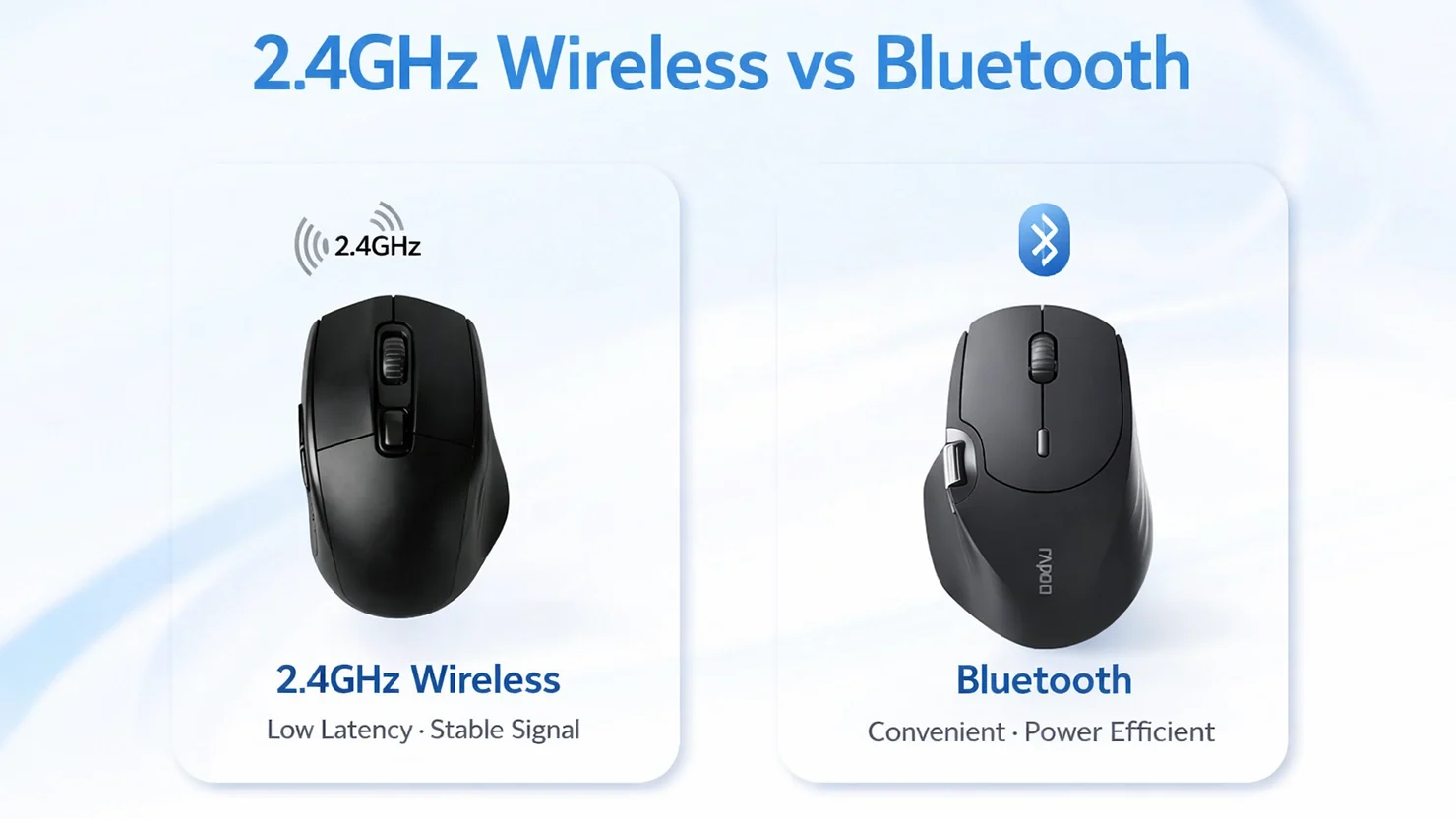
A 2.4 GHz USB receiver usually pairs quickly and offers a familiar desktop connection. Bluetooth avoids occupying a USB port and is particularly useful with laptops, tablets, and newer computers. Dual-mode models such as the M550 L, M720, and Basilisk V3 X are the most flexible when one mouse serves several kinds of device.
Choose Bluetooth for port freedom, a receiver for simple plug-and-play, and dual-mode hardware when the mouse has to move between both worlds.
Battery life
Battery figures vary from gaming-focused runtime with RGB to two-year office use. A mouse rated for months or years needs less attention, while a short-runtime model may suit someone who prefers a rechargeable workflow. Look at the stated mode carefully because lighting and wireless mode can change the result, as they do on the G703 and Basilisk V3 X.
Sensor and tracking
Office mice do not need extreme sensitivity. A reliable optical sensor, such as the HP X3000 G3's 1600 DPI sensor, is enough for documents and everyday navigation. Gaming mice add higher sensitivity and faster tracking, but the useful advantage is consistent movement at the sensitivity you prefer, not simply the largest number on the box.
Buttons and scrolling
Three buttons cover basic navigation. Side buttons on the M510 and programmable controls on the M720, G703, and Basilisk V3 X can save repeated keyboard commands. Smart scrolling on the M550 L and M720 is particularly useful for long pages, while quieter switches on the M240 and M550 L help in shared spaces. For a broader look at office use, the controls that make daily computer work easier are more important than gaming specifications.
Frequently asked questions
Is a wireless mouse better than a laptop touchpad?
A mouse usually gives more precise control and a more natural hand position for extended work. It also makes scrolling and repeated pointer movement less tiring for many users. Compact models such as the M185 and M240 add those benefits without taking much space.
Should I choose Bluetooth or a USB receiver?
Bluetooth is useful when you want to keep every USB port free, especially on a laptop or tablet. A USB receiver is simple to set up and works well on desktops and computers with USB-A ports. Dual-mode models offer both options when compatibility matters more than simplicity.
Are wireless gaming mice responsive enough for competitive games?
The Logitech G305, G703, and Razer Basilisk V3 X use wireless systems designed for fast response. The G305 and G703 specify a 1 ms LIGHTSPEED report rate, while the Basilisk V3 X uses HyperSpeed wireless. The best fit still depends on shape, grip, weight, and button layout.
How much battery life should a wireless mouse have?
For office use, a rating measured in months or years keeps maintenance low. The M510, M550 L, and M720 are specified for up to two years, while the M240 reaches up to 18 months. Gaming runtime depends more on the wireless mode and RGB settings, especially with the G703.
What mouse is best for large hands?
The Logitech Signature M550 L is specifically designed for larger hands and has a full-size shape with a broad comfort focus. The M510 and M720 also provide more palm support than the compact M185 and M240. A right-handed user may find the M720's sculpted body especially supportive.
Can one mouse work with several computers?
Yes. The M720 can switch among up to three computers, and Logitech FLOW can move the cursor, text, and files between compatible computers. The M550 L offers Bluetooth and Logi Bolt connectivity, while the Basilisk V3 X provides HyperSpeed and Bluetooth rather than the same three-computer workflow.

The bottom line
The Best wireless mouse for most people is the Logitech M510 Full Size. Its comfortable contoured shape, useful side controls, horizontal scrolling, and up to two years of battery life cover everyday work better than the simpler compact models. The USB receiver and larger body are real limitations, but they are easy to accept on a desktop.
For gaming, choose the Logitech G305 Lightspeed Black for its light body, 1 ms wireless response, and long battery runtime. The Logitech Signature M550 L is the better office choice for large hands and quiet clicking, while the Logitech M720 Triathlon makes more sense when switching among multiple computers is central to your routine.
If you are undecided, choose the M510 for general work, the G305 for gaming, and the M240 when a quiet Bluetooth mouse is the main requirement.
As an Amazon Associate we earn from qualifying purchases.