

A graphics card can be a straightforward upgrade until you discover that your case, power supply, monitor, and target games all impose different limits. Some cards here are compact upgrades for an older desktop. Others bring newer memory, upscaling features, and enough headroom for demanding 1440p play.
Our Best best budget graphics card picks span the old RX 580 and GT 1030 through current RTX 5060 and RX 9060 XT models. ASUS RTX 5060 Dual is the strongest all-around choice, while the other nine make more sense for specific cases, displays, budgets, or upgrade paths.
Comparison table
| # | Product | Award | VRAM | Architecture | Outputs | Best for |
|---|---|---|---|---|---|---|
| 1 | ASUS RTX 5060 Dual | Best overall | 8GB GDDR7 | NVIDIA Blackwell | HDMI 2.1b, DisplayPort 2.1b | Modern gaming builds |
| 2 | MOUGOL RX 580 | Best legacy upgrade | 8GB GDDR5 | AMD | HDMI, DP, DVI | Older desktops and three displays |
| 3 | MSI RTX 3050 Ventus | Best compact RTX 3050 | 6GB GDDR6 | NVIDIA Ampere | HDMI 2.1a, DisplayPort 1.4a | Small gaming PCs |
| 4 | Gigabyte RTX 3050 Windforce | Best dual-fan RTX 3050 | 6GB GDDR6 | NVIDIA Ampere | Not specified | Conventional desktop builds |
| 5 | Gigabyte RX 9060 XT Gaming | Best cooling features | 16GB GDDR6 | AMD RDNA 4 | HDMI 2.1b, DisplayPort 2.1a | High-refresh 1440p |
| 6 | ASRock Arc B580 Challenger | Best Intel option | 12GB GDDR6 | Intel Xe2-HPG | 3x DP 2.1, HDMI 2.1a | 1440p and multi-display setups |
| 7 | ASRock RX 9060 XT Challenger | Best 16GB performance | 16GB GDDR6 | AMD RDNA 4 | DP 2.1a, HDMI 2.1b | High-frame-rate gaming |
| 8 | ASUS RTX 3050 Dual | Best small-chassis RTX card | 6GB GDDR6 | NVIDIA Ampere | HDMI 2.1, DisplayPort 1.4a | Space-conscious upgrades |
| 9 | MSI GT 1030 LP | Best basic display upgrade | 4GB DDR4 | NVIDIA | HDMI 2.0b, DisplayPort 1.4a | Office PCs and light graphics |
| 10 | Gigabyte RTX 5060 Windforce | Best alternative RTX 5060 | 8GB GDDR7 | NVIDIA Blackwell | DisplayPort, HDMI | Larger gaming desktops |
1. ASUS RTX 5060 Dual: Best Overall

Pros
- Current Blackwell architecture
- DLSS 4 support
- Compact SFF-ready design
- Axial-tech cooling with 0dB technology
Cons
- Only 8GB of video memory
- 2.5-slot thickness needs careful clearance checking
- Newer features may not matter in older games
Best for: gamers building a modern system around current NVIDIA features.
The ASUS RTX 5060 Dual is the card we'd start with for a new gaming build. It has the most convincing blend of current features, manageable dimensions, and sensible cooling in this group. The Blackwell architecture and DLSS 4 give it a more current platform than the RTX 3050 cards, RX 580, or GT 1030, while the 8GB of GDDR7 keeps the memory configuration straightforward for mainstream gaming.
ASUS lists an OC mode of 2565 MHz and a default mode of 2535 MHz. Those clock figures matter less than the card's broader platform, but they show that this is an overclocked model rather than a plain reference configuration. DLSS 4 is the more meaningful feature for compatible games, since it can provide an upscaling and frame-generation route that older cards in this roundup do not offer.
The physical design is unusually useful for a current card. ASUS calls it SFF-ready, and the listed dimensions are 9 inches long, 4.8 inches wide, and 2 inches high, with a 2.5-slot design. Its Axial-tech fans use a smaller hub and barrier ring to push air downward, while 0dB technology can stop the fans during light workloads. That combination suits a quiet desktop that also needs real gaming cooling. For a broader view of how the surrounding PC affects graphics performance, the components that matter most around a graphics card are worth checking before you buy.
The weakness is the 8GB memory capacity. It is not as generous as the 12GB ASRock Arc B580 or the 16GB RX 9060 XT cards, so texture-heavy future games may put more pressure on settings. The card is also 2.5 slots thick, which makes it less convenient than the two-slot ASUS RTX 3050 Dual. Choose the ASUS RTX 5060 Dual when you want newer NVIDIA features in a relatively manageable package, and skip it if your priority is maximum memory capacity rather than platform support.
2. MOUGOL RX 580: Best Legacy Upgrade

Pros
- 8GB of video memory
- HDMI, DisplayPort, and DVI
- Supports three displays
- Dual fans and heat pipes
Cons
- Older 14nm design
- Requires a 6-pin power connector
- Recommended 500W power supply
Best for: upgrading an older standard desktop that still needs DVI or broad display compatibility.
The MOUGOL RX 580 is aimed at a very different buyer from the ASUS RTX 5060 Dual. It is a practical legacy upgrade for a desktop that needs more graphics capability but still relies on older display hardware. The combination of HDMI, DisplayPort, and DVI is its defining advantage here. That makes it easier to connect a mix of modern and older monitors without adapters.
This model has 8GB of GDDR5 and 2048 stream processors, with a listed 1206 MHz core clock. Those specifications place it well behind the newer cards in this roundup, but the memory capacity is still useful for older games and general graphics workloads. The card supports DirectX 12, Vulkan, and OpenGL 4.6, and the listing also identifies support for video editing, Blender acceleration, and streaming.
Fit is reasonable for a conventional mid-tower or Micro-ATX build, though its stated dimensions are 240 by 135 by 45mm. That means roughly 9.45 inches of length and a thickness close to 1.77 inches. It uses a dual-fan cooler with heat pipes and intelligent fan control, so the fans can remain quieter during light work and increase airflow under load. The required 6-pin connector and recommended 500W power supply deserve attention before installation.
This is not the card to choose for a new high-refresh gaming system. The MSI GT 1030 LP is easier to place in a very small office PC, while the RTX 3050 models offer newer ray-tracing and tensor hardware. The RX 580 makes sense when DVI, three-display connectivity, or compatibility with an older desktop matters more than modern features. If you are replacing an old system rather than upgrading it, the parts to prioritize in a basic gaming computer can help avoid pairing this card with an unsuitable platform.
3. MSI RTX 3050 Ventus: Best Compact RTX 3050

Pros
- Compact 7.4-inch length
- HDMI 2.1a outputs
- DisplayPort 1.4a
- Dual-fan Ventus cooling
Cons
- 6GB memory
- 96-bit memory interface
- Lower boost clock than the newer RTX 5060
Best for: a small gaming desktop that needs RTX features without a long card.
The MSI RTX 3050 Ventus is the most approachable RTX card for a space-limited build among the older NVIDIA options here. Its listed length is 7.4 inches, and its width is 4.3 inches, so it should be easier to accommodate than the long RX 9060 XT models. The dual-fan Ventus design also gives it a more substantial cooler than the single-fan MSI GT 1030 LP.
Its GPU runs at a listed 1492 MHz boost clock and uses 6GB of GDDR6 on a 96-bit interface. That memory setup is adequate for a modest gaming target, but it leaves less room for demanding texture settings than the 8GB RTX 5060 cards or the 12GB and 16GB alternatives. The Ampere architecture brings second-generation RT cores and third-generation Tensor cores, so it supports the kind of ray-tracing and AI-assisted features that the RX 580 does not.
Connectivity is well suited to a modern desk. MSI lists one DisplayPort 1.4a output and two HDMI 2.1a outputs. That is a useful arrangement for a primary gaming screen plus a television or second monitor, although it is not as flexible for older DVI equipment as the MOUGOL RX 580. Its compact body and light listed weight of about 1.28 pounds also make it less awkward to support inside a small case.
The ASUS RTX 3050 Dual is the more obviously small-chassis-oriented alternative because it has a two-slot design, while the ASUS RTX 5060 Dual is the much stronger step up for newer games. The MSI model is for buyers who need an RTX card that fits a shorter enclosure and do not need the memory headroom of the newer options. Skip it if your case can accept a longer card and you want a platform with more room for demanding games.
4. Gigabyte RTX 3050 Windforce: Best Dual-Fan RTX 3050

Pros
- Dual WINDFORCE fans
- 6GB GDDR6
- Ampere ray-tracing hardware
- Relatively short 7.5-inch design
Cons
- 96-bit memory interface
- Less memory than current alternatives
- Output details are limited in the listing
Best for: a standard desktop that needs a conventional dual-fan RTX 3050.
The Gigabyte RTX 3050 Windforce takes the same general GPU class as the MSI RTX 3050 Ventus and packages it around Gigabyte's two-fan WINDFORCE cooling system. That makes it a natural fit for a conventional desktop case rather than a tiny office chassis. Its listed dimensions are 7.5 inches long, 4.4 inches wide, and 0.1 inches high in the product information, though the unusual height entry is not useful for clearance planning.
The core platform is NVIDIA Ampere, with second-generation RT cores and third-generation Tensor cores. It has 6GB of GDDR6 on a 96-bit interface. Those numbers describe a card for moderate settings and mainstream resolutions, not a memory-heavy 1440p specialist. Compared with the older RX 580, its newer feature set is the stronger reason to choose it, while the RTX 5060 models are a clear step ahead for current-generation support.
The WINDFORCE design is the main differentiator from the compact MSI card. Two fans can spread cooling across the heatsink more effectively than a single small fan, and the 0.88-pound listed weight should not create much strain on a standard expansion slot. The card's 7.5-inch length remains manageable, so it does not demand the long chassis clearance required by the RX 9060 XT cards.
Choose this over the MSI RTX 3050 Ventus if you prefer Gigabyte's dual-fan layout and have a standard case. The MSI card is slightly shorter and has clearly listed HDMI and DisplayPort outputs, so it is the safer pick when port planning is the priority. This Gigabyte model is not the right choice for someone seeking a large memory buffer, and anyone building around a modern 1440p display should look toward the ASRock Arc B580 Challenger or an RX 9060 XT instead.
5. Gigabyte RX 9060 XT Gaming: Best Cooling Features

Pros
- 16GB GDDR6
- PCIe 5.0 support
- Performance and Silent BIOS modes
- Hawk fans and server-grade thermal gel
- Reinforced metal backplate
Cons
- Long 11.06-inch body
- Heavier than compact picks
- White finish may not suit every build
Best for: a spacious gaming PC that needs generous memory and configurable cooling.
The Gigabyte RX 9060 XT Gaming is one of the most capable cards in this roundup, and its physical design makes that clear. It is 11.06 inches long and weighs about 1.85 pounds, so this is not a casual drop-in upgrade for a cramped case. In a roomy gaming desktop, though, the extra size supports a more elaborate cooling system and a much larger memory pool than the RTX 3050 models.
The card has 16GB of GDDR6 and a 128-bit interface. That capacity is the important detail for modern games and creative applications that use large textures. It also supports PCIe 5.0, along with DisplayPort 2.1a and HDMI 2.1b through the updated Radeon display engine. Those connections are a better match for newer high-refresh displays than the older RTX 3050 cards.
Gigabyte combines Hawk fans with alternate spinning, composite copper heat pipes, a copper plate, 3D active fans, and screen cooling. The listing also calls out server-grade thermal conductive gel. Those are meaningful design choices because the cooler is doing more than simply placing two fans over a heatsink. Dual BIOS gives you Performance and Silent modes, and RGB lighting offers 16.7 million customizable colors through Gigabyte Control Center.
The ASRock RX 9060 XT Challenger offers the same 16GB memory capacity in a simpler dual-fan package, while the ASUS RTX 5060 Dual is shorter and easier to fit. The Gigabyte card earns its place for buyers who have room for it and care about cooling flexibility, reinforced structure, and display support. Skip it if your case has less than 11 inches of graphics clearance or if a compact two-slot design is more important than maximum memory.
6. ASRock Arc B580 Challenger: Best Intel Option

Pros
- 12GB GDDR6
- 192-bit memory bus
- Three DisplayPort 2.1 outputs
- 0dB silent cooling
- Metal backplate
Cons
- Requires an 8-pin power connector
- Recommended 650W power supply
- PCIe 4.0 x8 interface
Best for: 1440p gaming and multi-monitor systems that benefit from extra memory and display outputs.
The ASRock Arc B580 Challenger is the most interesting alternative to the NVIDIA and AMD cards here. Its 12GB of GDDR6 sits on a 192-bit bus, giving it a more generous memory configuration than the RTX 3050 and RTX 5060 models. Intel positions the Arc B580 around 1440p gaming, AI-assisted workloads, and modern content creation, which makes this card a strong fit for a system that needs more than basic 1080p output.
It uses Intel's Xe2-HPG architecture with 20 Xe cores and 160 XMX engines. The listed GPU clock is 2740 MHz, and the memory clock is 19 Gbps. Intel XeSS 2 and DirectX 12 Ultimate support add modern rendering tools, although actual results will still depend on game support and driver behavior. Buyers who want to explore a less familiar platform should understand that compatibility can matter just as much as the specification sheet.
The display hardware is excellent on paper. ASRock lists three DisplayPort 2.1 outputs, including one primary output supporting UHBR13.5, plus one HDMI 2.1a output. The card can support up to four displays and resolutions up to 8K. Its 0dB silent technology stops the dual fans under low load, while the metal backplate reinforces the PCB and adds an LED indicator.
At 249mm long, 132mm wide, and 41mm high, this is a two-slot card that needs meaningful room but is still much easier to place than the 11.06-inch Gigabyte RX 9060 XT Gaming. It requires one 8-pin connector and a recommended 650W power supply. The ASUS RTX 5060 Dual is the safer NVIDIA choice for DLSS 4, while the ASRock is more appealing for its 12GB memory and three DisplayPort outputs. Readers comparing platforms can also use the graphics features that matter for different PC builds as a useful checklist.
7. ASRock RX 9060 XT Challenger: Best 16GB Performance

Pros
- 16GB GDDR6
- RDNA 4 architecture
- Up to 3290 MHz boost clock
- 0dB silent cooling
- Two-slot design
Cons
- 249mm length still needs case clearance
- Requires an 8-pin connector
- Recommended 550W power supply
Best for: high-frame-rate gaming where 16GB of memory matters more than NVIDIA-specific features.
The ASRock RX 9060 XT Challenger is the straightforward performance pick for anyone who wants 16GB without moving to Gigabyte's larger cooling assembly. It uses AMD's RDNA 4 architecture and has 32 compute units, third-generation ray tracing, and second-generation AI accelerators. That is a far more current platform than the RX 580 or any RTX 3050 in this list.
The listed boost clock reaches 3290 MHz, with a 2700 MHz game clock. Those figures provide useful context for the card's design, but they should not be treated as a guarantee of a fixed frame rate in every game. The more practical advantage is the 16GB of GDDR6 running at 20 Gbps. The 128-bit interface is narrower than the Arc B580's 192-bit bus, yet the larger capacity can help when games or creative applications need more texture space.
ASRock specifies a two-slot body measuring 249mm by 132mm by 41mm. That is manageable in many mid-tower cases, but it is much longer than the RTX 3050 cards and demands a proper clearance check. A single 8-pin power connector is required, with a recommended 550W power supply. Dual fans and 0dB silent operation let the card stay quiet during light work, and the LED indicator adds a small visual accent without changing the card's main purpose.
The Gigabyte RX 9060 XT Gaming has the more elaborate cooler, dual BIOS, and reinforced structure, while this ASRock model is the more compact two-slot route to the same 16GB class. The ASUS RTX 5060 Dual is smaller and brings DLSS 4, but it has half the memory. Pick the ASRock for high-refresh gaming and large textures, and skip it if your case is short or your software specifically benefits from NVIDIA's feature ecosystem.
8. ASUS RTX 3050 Dual: Best Small-Chassis RTX Card

Pros
- Two-slot design
- Axial-tech fan design
- Steel bracket
- HDMI 2.1 and DisplayPort 1.4a
- Three-year warranty
Cons
- 6GB GDDR6
- Older Ampere architecture
- Less memory than newer alternatives
Best for: compact desktop upgrades that need a full two-slot RTX card.
The ASUS RTX 3050 Dual is built around fit and uncomplicated installation. Its two-slot design maximizes case compatibility while leaving room for a dual-fan cooler. At 7.9 inches long, 4.7 inches wide, and 1.5 inches high, it is not a low-profile card, but it is far easier to place than the large RX 9060 XT models. The steel bracket also adds useful support around the card's mounting edge.
Like the MSI and Gigabyte RTX 3050 cards, this model uses NVIDIA Ampere with second-generation RT cores and third-generation Tensor cores. It has 6GB of GDDR6. ASUS highlights improved FP32 throughput and power efficiency in the Ampere streaming multiprocessors, while the tensor hardware supports AI features such as DLSS. The result is a more modern feature set than the RX 580, though not the current Blackwell platform found in the RTX 5060 cards.
The port selection includes HDMI 2.1 and DisplayPort 1.4a. That is enough for a modern primary monitor and additional screen, though the MOUGOL RX 580 remains the better choice for a mixed HDMI, DisplayPort, and DVI setup. ASUS's Axial-tech fan design uses longer blades and a barrier ring to increase downward air pressure, and the listing includes a three-year warranty.
The MSI RTX 3050 Ventus is slightly shorter and lighter, while the Gigabyte RTX 3050 Windforce takes a similar dual-fan approach. The ASUS card stands out when a strict two-slot layout, steel bracket, and warranty are important. It is not the right pick for a new performance-oriented build, where the ASUS RTX 5060 Dual offers newer architecture and more memory. Choose this one for a constrained upgrade, not as the foundation of an ambitious gaming system.
9. MSI GT 1030 LP: Best Basic Display Upgrade

Pros
- Very short 5.91-inch length
- Single-fan design
- DisplayPort 1.4a and HDMI 2.0b
- 0.6-pound listed weight
Cons
- 4GB DDR4 memory
- 64-bit memory interface
- Not suited to demanding modern games
Best for: an office desktop that needs a discrete graphics output and modest acceleration.
The MSI GT 1030 LP is not competing with the RTX 5060 or RX 9060 XT on gaming performance. Its role is much simpler: add a discrete graphics card to a desktop where space, power, or basic display support matters. The listed length is just 5.91 inches, the weight is 0.6 pounds, and the single-fan design is far less imposing than the dual-fan cards elsewhere in this guide.
It uses a GeForce GT 1030 chipset with 4GB of DDR4 memory, a 64-bit interface, and a listed boost clock of 1430 MHz. Those are entry-level specifications. They can suit office work, video output, and light graphics tasks, but they do not provide the memory bandwidth or modern rendering hardware expected for demanding games. The product supports DirectX 12 and HDCP.
The output pair is practical for a basic desk: one DisplayPort 1.4a and one HDMI 2.0b. It does not offer the three-output flexibility of the MOUGOL RX 580, but it is much easier to fit into a small case. The slim physical design is the reason to consider it, not a promise of high frame rates.
The ASUS RTX 3050 Dual is a much better gaming upgrade if your case can accept a standard two-slot card. The GT 1030 LP is for an older office PC, a small desktop, or a system that simply needs another display connection. Anyone searching for a gaming-first upgrade should skip this card and move several places up the list.
10. Gigabyte RTX 5060 Windforce: Best Alternative RTX 5060

Pros
- Blackwell architecture
- DLSS 4 support
- 8GB GDDR7
- PCIe 5.0
- WINDFORCE cooling
Cons
- 8GB memory may limit texture headroom
- Cooling and dimensions need case planning
- Port details are less specific
Best for: a conventional gaming desktop that wants current RTX 5060 features.
The Gigabyte RTX 5060 Windforce is the direct alternative to the ASUS RTX 5060 Dual. It uses the same Blackwell generation, supports DLSS 4, and has 8GB of GDDR7 on a 128-bit interface. That gives it the modern platform we want from a new gaming card, especially when compared with the older RTX 3050 and RX 580 options.
Its listed dimensions are 7.83 inches long, 4.57 inches wide, and 1.57 inches high, with a listed weight of 1.6 pounds. That makes it shorter and thinner than the ASUS card's 2.5-slot design, at least according to the supplied product information. The two-card choice therefore comes down partly to physical layout. Gigabyte emphasizes its WINDFORCE cooling system, while ASUS provides more detail about Axial-tech fans and 0dB operation.
The card uses PCIe 5.0 and includes DisplayPort and HDMI video outputs. The listing does not specify the versions of those outputs, so buyers with a particular high-refresh or ultra-high-resolution display should confirm the exact connection requirements before ordering. Its 8GB memory capacity is suitable for the same broad class of games as the ASUS RTX 5060 Dual, but it is not as spacious as the 12GB Arc B580 or either 16GB RX 9060 XT.
The ASUS RTX 5060 Dual remains our first choice because its cooling details, SFF-ready positioning, and specified HDMI 2.1b and DisplayPort 2.1b outputs make the purchase decision clearer. Choose the Gigabyte card when its shorter conventional design better matches your case or build layout. Skip both RTX 5060 options if your priority is a large memory reserve rather than DLSS 4 and the current NVIDIA feature set.
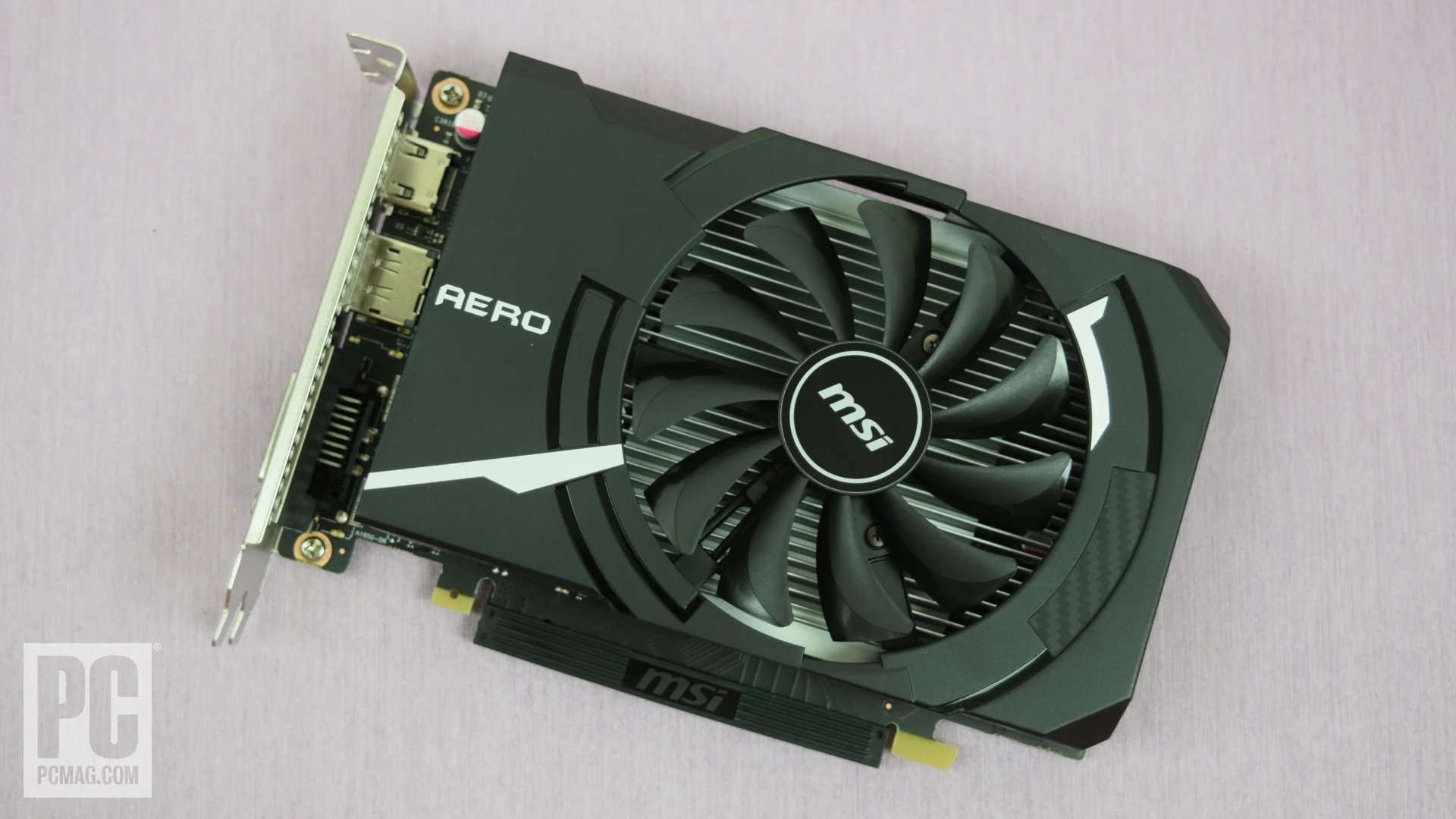
How to choose best budget graphics card
The right graphics card is determined by the games and displays you use, but case clearance, memory, power, and outputs can eliminate a choice before performance becomes relevant.
Video memory
Video memory stores textures, frame data, and other assets that the GPU needs close at hand. The 4GB DDR4 in the MSI GT 1030 LP is suited to basic display work, while 6GB on the RTX 3050 cards is a more appropriate floor for modest gaming. The 8GB RTX 5060 cards are current and capable, but the 12GB Arc B580 and 16GB RX 9060 XT cards offer more room for large textures and creative workloads.
Memory capacity is not the whole story. The memory type and interface also matter. GDDR7 gives the RTX 5060 cards a newer memory platform, while the Arc B580's 192-bit bus and the RX 9060 XT's 20 Gbps GDDR6 affect how data moves through the card.
GPU generation and features
Newer architectures can add useful capabilities beyond raw rendering speed. NVIDIA Blackwell brings DLSS 4 to the RTX 5060 models. Intel's Arc B580 supports XeSS 2, and AMD's RX 9060 XT uses RDNA 4 with third-generation ray tracing and second-generation AI accelerators.
Older cards can still be useful, especially for an existing desktop. The RX 580 supports DirectX 12, Vulkan, and OpenGL 4.6, while the GT 1030 is best treated as a basic display and light-graphics solution. If you want a broader look at current GPU feature trade-offs, the differences between modern graphics architectures provide useful context.
Case clearance
Measure the empty space from the rear expansion slots to the first obstruction in the case. The MSI GT 1030 LP is only 5.91 inches long, the RTX 3050 cards are around 7.4 to 7.9 inches, and the RX 9060 XT cards reach roughly 9.8 inches in the ASRock's listed metric dimensions or 11.06 inches for the Gigabyte model.
Slot thickness matters too. The ASRock Arc B580 and ASRock RX 9060 XT Challenger use two-slot designs. The ASUS RTX 5060 Dual uses a 2.5-slot design, which can affect nearby expansion cards even though its length is manageable.
A graphics card that fits the case but blocks your next expansion slot is not a compact upgrade.
Power requirements
Check the connector and recommended power supply before ordering. The MOUGOL RX 580 requires a 6-pin connector and lists a 500W minimum recommendation. The ASRock Arc B580 requires one 8-pin connector and recommends 650W, while the ASRock RX 9060 XT Challenger requires one 8-pin connector with a recommended 550W supply.
The supplied information does not provide a power recommendation for every card here. Do not infer that a small card has no power requirements. Confirm the connector, available cables, and power supply capacity for the exact model.
Display outputs
Choose outputs around the monitors you already own. The MOUGOL RX 580 is the most flexible for mixed setups because it includes HDMI, DisplayPort, and DVI. The ASRock Arc B580 has three DisplayPort 2.1 outputs plus HDMI 2.1a and supports up to four displays.
The RTX 3050 models provide HDMI and DisplayPort, while the MSI GT 1030 LP offers DisplayPort 1.4a and HDMI 2.0b. For a newer high-refresh display, the RTX 5060 and RX 9060 XT cards have the most current listed connection standards.

Frequently asked questions
Is 8GB of video memory enough for a budget graphics card?
Eight gigabytes is a practical capacity for many mainstream gaming systems, and both RTX 5060 models use 8GB of GDDR7. It gives less headroom than the 12GB ASRock Arc B580 or the 16GB RX 9060 XT cards, so buyers planning to use large textures should consider those options.
Which card is best for a small PC?
The MSI GT 1030 LP is the easiest card to fit because its listed length is 5.91 inches. For a small gaming PC, the MSI RTX 3050 Ventus and ASUS RTX 3050 Dual are more capable choices, but you still need to verify the case's slot and power clearance.
Do these graphics cards need an extra power connector?
Some do. The MOUGOL RX 580 uses a 6-pin connector, while the ASRock Arc B580 and ASRock RX 9060 XT Challenger each specify one 8-pin connector. The supplied product information does not state the connector requirements for every model, so check the exact listing and your power supply before installation.
Which card supports the most displays?
The ASRock Arc B580 has three DisplayPort 2.1 outputs and one HDMI 2.1a output, with support for up to four displays listed. The MOUGOL RX 580 also emphasizes triple-display support and includes HDMI, DisplayPort, and DVI, making it useful for mixed monitor collections.
Are the RTX 3050 cards still suitable for gaming?
They can suit modest gaming systems, particularly at mainstream resolutions and settings. Their 6GB GDDR6 capacity and Ampere feature set are behind the RTX 5060, Arc B580, and RX 9060 XT, so they are better for a constrained upgrade than a new high-endurance build.
Is the RX 580 a modern graphics card?
No. The MOUGOL model uses an older 14nm design with 8GB of GDDR5 and a 1206 MHz core clock. Its appeal is compatibility with older systems, DVI support, three-display connectivity, and its ability to provide a practical upgrade for an existing desktop.

The bottom line
The ASUS RTX 5060 Dual is the Best best budget graphics card choice for most new gaming builds in this group. Its Blackwell architecture, DLSS 4 support, 8GB of GDDR7, current display outputs, and SFF-ready design give it the strongest balance of modern capability and manageable size. The ASRock RX 9060 XT Challenger is the better alternative for buyers who want 16GB of memory and are comfortable with a longer card.
Choose the ASRock Arc B580 Challenger when 12GB of memory, three DisplayPort outputs, and 1440p-focused hardware matter more than NVIDIA's feature ecosystem. For an older desktop, the MOUGOL RX 580 remains the practical legacy option, while the MSI GT 1030 LP is reserved for basic display upgrades.
If you are undecided, buy the ASUS RTX 5060 Dual for modern gaming, or move to an RX 9060 XT when memory capacity matters most.
As an Amazon Associate we earn from qualifying purchases.