
A keyboard can make a new computer feel wrong before you have even opened your first game. Mushy keys, a cramped layout, poor rollover, or a cable that will not reach the right side of the desk are small problems that become irritating every day. The Best Budget Mechanical Keyboards solve different parts of that problem, from compact wired boards to wireless models with replaceable switches.
The list includes genuine mechanical keyboards, Hall Effect gaming keyboards, and a few membrane boards that imitate a mechanical feel. That distinction matters. The AULA F75 Pro is our top pick for the most complete experience, while the rest cover compact gaming, wireless flexibility, full-size layouts, and straightforward office typing.
Comparison table
| # | Product | Award | Layout | Connection | Switches or key feel | Best for |
|---|---|---|---|---|---|---|
| 1 | AULA F75 Pro | Best overall | 75%, 81 keys | Bluetooth 5.0, 2.4GHz, USB-C | Hot-swappable Reaper linear | Most people |
| 2 | Kisnt KN85 | Best wireless typing | 75%, 85 keys | Bluetooth 5.0, 2.4GHz, USB-C | Hot-swappable linear | Multi-device desks |
| 3 | AULA WIN68 HE | Best for competitive gaming | 60%, 68 keys | Wired USB | Hall Effect magnetic | Fast FPS play |
| 4 | AULA WIN60 HE | Best compact Hall Effect board | 60% | Wired USB | Hot-swappable magnetic | Small gaming setups |
| 5 | Redragon K671 | Best traditional mechanical | Full size | Wired USB | Hot-swappable red linear | First mechanical keyboard |
| 6 | Redragon K668 | Best full-size customization | 108 keys | Wired USB | Hot-swappable red linear | Macro-heavy desks |
| 7 | Logitech G213 | Best membrane alternative | Full size | Wired USB | Tuned membrane | Established software |
| 8 | Redragon K521 | Best simple full-size board | 104 keys | Wired USB | Mechanical-feeling | Basic gaming |
| 9 | GEODMAER 65% Keyboard | Best quiet compact option | 65%, 68 keys | Wired USB-C | Membrane, mechanical-feeling | Shared spaces |
| 10 | Guiheng 68-Key Keyboard | Best basic clicky board | 60%, 68 keys | Wired USB | Red mechanical switch | Occasional use |
1. AULA F75 Pro: Best Overall

Pros
- Three connection modes cover computers, tablets, and consoles
- Hot-swappable 3-pin and 5-pin switch support
- Knob handles lighting or media controls
- Five layers of filling help control hollow case noise
Cons
- Heavier and taller than the smaller wired boards
- Windows software is needed for deeper customization
- 75% layout leaves out the number pad
Best for: someone who wants one polished compact keyboard for gaming, typing, and multiple devices.
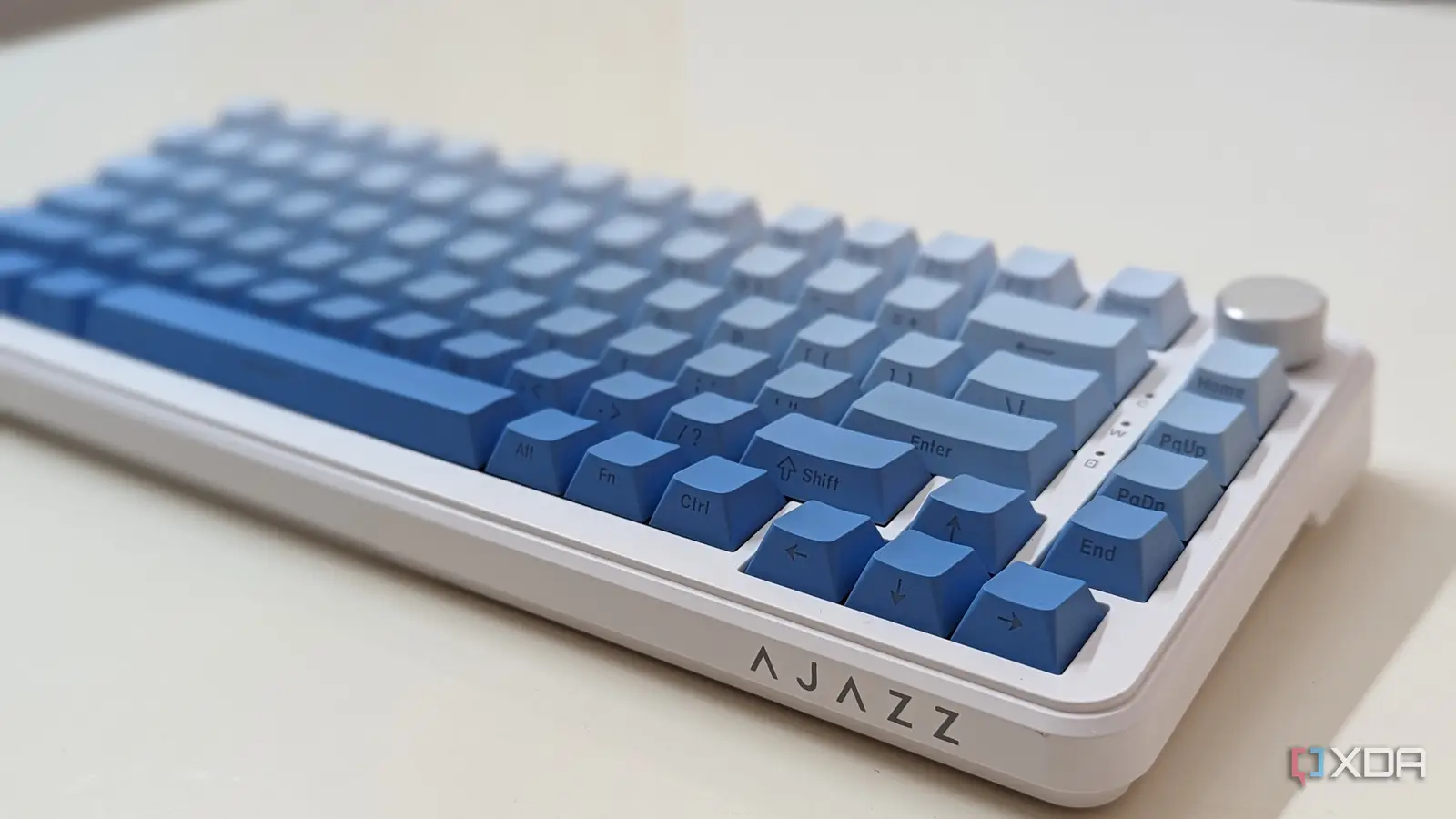
The AULA F75 Pro is the keyboard here that feels easiest to recommend without a long list of qualifications. Its 75% layout keeps the arrow keys and the useful navigation cluster while removing the number pad, so it gives a mouse more room without forcing you to relearn every shortcut. The 81-key arrangement is compact, but not aggressively stripped down like the 60% boards.
Its pre-lubricated LEOBOG Reaper switches are linear, and the board accepts both 3-pin and 5-pin replacements. That makes the stock setup approachable for gaming and typing, while leaving a clear upgrade path for anyone who gets interested in switch tuning later. The side-printed PBT keycaps are a practical touch too. Their legends are designed to let the lighting show through without relying on a thin surface treatment that quickly becomes messy.
The F75 Pro is unusually flexible away from the desk. Bluetooth 5.0, 2.4GHz wireless, and USB-C wired modes let it move between a desktop, laptop, tablet, or console, and the keyboard can connect with up to five devices. Its 4, 000mAh rechargeable battery is a useful part of that setup, though animated lighting will naturally make wireless use more demanding. A 16.8 million color RGB system, 16 preset effects, and 10 music rhythm effects give it plenty to configure.
The control knob is more useful than the usual decorative knob. In gaming mode it adjusts lighting and changes effects when pressed, while office mode turns it into a volume and playback control. Five layers of filling, an extended silicone pad, and single-key PCB slotting aim for a softer, less resonant typing sound. The weakness is size and height: at 2.25 pounds and roughly 12.7 by 5.6 inches, it is not the easiest board to throw into a bag. Choose the AULA F75 Pro if you want the broadest mix of build, customization, and connectivity. For more on the trade-offs between connection types, the practical differences between wired and wireless keyboards are worth considering before you buy.
2. Kisnt KN85: Best Wireless Typing

Pros
- Three connection modes and three Bluetooth channels
- 85-key layout retains function and arrow keys
- 4, 000mAh battery supports wireless use
- Hot-swappable 3-pin and 5-pin switch compatibility
- Multiple foam layers produce a deeper sound
Cons
- Number pad is absent
- Driver support is limited to Windows and wired or 2.4GHz use
- Requires care when charging
Best for: a typist or hybrid worker who wants a quieter, fuller-sounding wireless board without a number pad.
The Kisnt KN85 is the natural pick for someone who wants a compact keyboard but does not want the severe space-saving compromises of a 60% layout. Its 85 keys retain F1 through F12, the arrow keys, and common shortcuts. At about 13.7 by 5.5 inches, it still leaves more mouse room than a conventional full-size board.
The pre-lubricated BSUN linear switches use a 45 to 50gf actuation force, which gives the keys a smooth, relatively light press. The hot-swap sockets accept 3-pin and 5-pin switches without soldering, so the KN85 can grow with a user who wants a different sound or feel. Its gasket-mounted construction, base dampener, silicone pad, and five layers of sound-dampening foam are the more important details for everyday typing. They help explain why this board is aimed at a deeper, less clacky sound rather than a sharp click.
Wireless flexibility is the biggest reason to choose it over the wired Redragon models. Bluetooth 5.0 supports three channels, 2.4GHz provides a faster wireless connection, and USB-C keeps typing available while the battery is charging. The listed latency figures are 2ms over USB, 5ms over 2.4GHz, and 11ms over Bluetooth. Those distinctions matter most when switching between a gaming desktop and several general-purpose devices, not when writing a document on a tablet.
The 20 lighting effects can be adjusted from shortcuts or software, and the board supports key remapping and macros through its Windows driver. The catch is that the driver does not cover Mac, and animated lighting uses more battery than a static effect. Kisnt also advises charging with a 5V 1A charger or a computer USB port rather than a fast charger. The KN85 is a stronger typing board than the similarly sized AULA F75 Pro if sound dampening and an 85-key layout matter most, while the AULA has the more versatile knob and broader lighting controls. If your desk has several devices, the connection choices that make a wireless keyboard easier to live with deserve a close look.
3. AULA WIN68 HE: Best for Competitive Gaming

Pros
- Adjustable actuation from 0.02mm to 3.44mm
- 8, 000Hz polling rate and listed 0.3ms latency
- Per-key sensitivity adjustment
- Detachable USB cable
- Compact layout retains arrow keys
Cons
- Wired only
- Web driver works on Windows, not Mac
- 60% layout requires function combinations for many commands
Best for: a Windows gamer who wants fine control over actuation and rapid-trigger behavior.
The AULA WIN68 HE is built around a very specific idea: a keyboard should respond to the point where a key begins moving, not merely wait for a conventional switch to complete its travel. Its Hall Effect magnetic switches make adjustable actuation the headline feature, and the board is much more specialized than the ordinary mechanical keyboards in this roundup.
Actuation can be set from 0.02mm to 3.44mm, with each key adjustable in 0.1mm increments. In a fast shooter, a shallow setting can make repeated movement inputs feel immediate, while a deeper setting can reduce accidental presses during ordinary typing. The fast-trigger functions let a key reset as soon as it moves back through the configured point. That is useful for players who value rapid counter-strafing and repeated taps, though it takes time to find settings that do not feel twitchy.
AULA lists an 8, 000Hz polling rate and 0.3ms latency. Those numbers describe how frequently the keyboard reports input and how quickly the signal is presented, but they do not turn every game into a faster experience. The advantage is most relevant to competitive PC gaming, where a player is already sensitive to input timing and uses a high-refresh setup. The web driver also exposes RT, SOCD, DKS, MT, TGL, remapping, macros, and RGB controls.
The 68-key layout saves space while retaining arrow keys and basic function access through Fn combinations. It is easier to carry than a full-size board, and the detachable cable is convenient for travel or replacement. The important limitation is that the driver is Windows-only, so a Mac user will not get the full configuration experience. Compared with the AULA WIN60 HE, the WIN68 HE gives clearer layout information and a similarly compact format, while the WIN60 HE leans harder into the smallest footprint. Pick this one for competitive FPS play, not for someone who wants a quiet, wireless office keyboard. Readers comparing gaming-focused layouts can also see how compact boards change access to function and navigation keys.
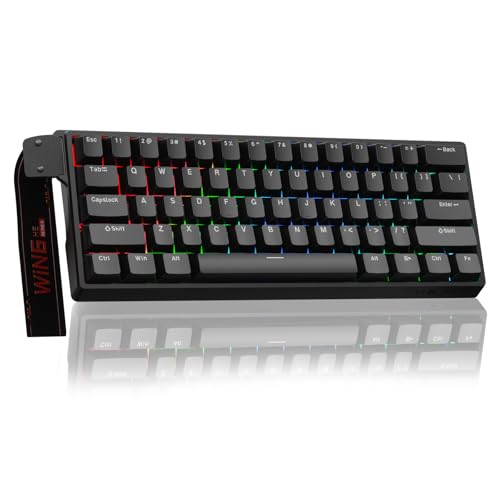
4. AULA WIN60 HE: Best Compact Hall Effect Board
Pros
- 60% footprint saves substantial desk space
- Magnetic switches support rapid trigger behavior
- 8, 000Hz polling rate
- Web-based customization avoids a software download
- RGB has 16.8 million customizable colors
Cons
- Wired connection only
- Small layout omits dedicated arrows and function keys
- Hall Effect features are more specialized than most typists need
Best for: a competitive player or traveler who wants a very small wired board with magnetic switches.
The AULA WIN60 HE takes the same broad Hall Effect approach as the WIN68 HE and puts it in a more minimalist 60% shell. That makes it attractive when desk space is tight or when the keyboard needs to travel. It is also the most focused gaming board here, with fewer concessions to general office use.
Its magnetic switches are hot-swappable, and AULA lists a rapid-trigger step distance of 0.02mm. That extremely shallow setting is intended for fast repeated input in games such as Valorant and CS2. The advantage is not that every keystroke becomes magically better. It is that the user can tune the point at which a key activates and resets, which can make movement and quick-stop inputs feel more controlled after some adjustment.
The board supports an 8, 000Hz polling rate and uses a web-based driver for remapping, macros, and lighting. A browser-based setup is convenient because it avoids a bulky installation and works from any device with an internet connection, at least for the functions described by the manufacturer. Dynamic RGB uses 16.8 million colors, and the lower light position is intended to illuminate the PBT keycaps rather than simply glow beneath the board.
The 60% layout is the real compromise. It leaves the desk clear, but arrow keys, navigation controls, and function-row commands require Fn combinations. That is manageable in a game and less pleasant in spreadsheet work or long-form editing. Compared with the AULA WIN68 HE, this version is the better travel companion, while the WIN68 HE is easier to use for everyday commands. Choose the WIN60 HE when compactness and rapid-trigger tuning matter more than wireless operation or a traditional layout.
5. Redragon K671: Best Traditional Mechanical
Pros
- Full-size layout with dedicated number pad
- Hot-swappable red linear switches
- Full-key anti-ghosting
- Macro editing and remapping
- 11 backlight modes with brightness and speed control
Cons
- Wired only
- Lighting color cannot be changed
- Included switch options are limited
Best for: a first mechanical keyboard buyer who wants a familiar full-size layout and straightforward customization.
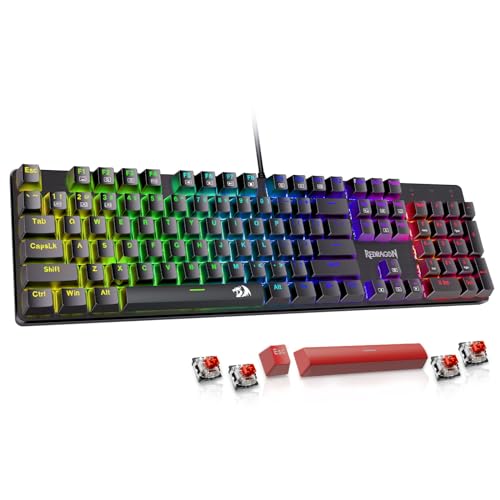
The Redragon K671 is the conventional starting point in this group. It has a full-size layout, a wired connection, red linear switches, and enough gaming controls to make the move from a standard office keyboard feel worthwhile. Its roughly 17.1 by 4.9-inch footprint is long, but that extra width buys a number pad and a familiar arrangement.
The red switches are designed to require less force and provide a smoother press than a clicky switch. That suits games, general typing, and shared rooms where a loud click would be distracting. The switches are hot-swappable, and Redragon includes four spare switches and two red keycaps for replacement. This is a useful introduction to switch maintenance, although users looking for a broad collection of included switch types will find the package fairly focused.
Anti-ghosting covers all keys, which helps when several game inputs are held together. Twelve multimedia shortcuts provide quick access to volume, media, email, and the calculator. Macro editing lets users remap keys, set shortcuts, or combine multiple functions, but the software controls the lighting effects rather than offering fully changeable colors. There are 11 backlight modes, five brightness levels, and adjustable light speed, so the board is configurable without being an RGB customization showcase.
The K671 is more practical than the mechanical-feeling Redragon K521 because it uses actual hot-swappable red switches, but it takes up more room and does not offer the K668's four dedicated hotkeys. The 24-month warranty is a reassuring part of the package. Skip it if your desk is narrow or you need wireless connectivity. For someone who wants a normal full-size board and a clear mechanical feel without a complicated setup, the K671 remains one of the safest picks in the Best Budget Mechanical Keyboards group.
6. Redragon K668: Best Full-Size Customization

Pros
- Full-size 108-key arrangement
- Four dedicated programmable hotkeys
- Hot-swappable 3-pin and 5-pin switches
- Up to 19 lighting modes
- Adjustable two-stage feet
Cons
- Wired only
- Takes up more desk depth than compact layouts
- Software is needed for deeper macro and lighting work
Best for: a full-size user who wants dedicated shortcuts and an easy route into keyboard customization.
The Redragon K668 is the full-size keyboard for people who actually use the extra keys. Its 108-key arrangement adds four dedicated hotkeys for mute, calculator, screen lock, and desktop access. Those controls are more convenient than assigning shortcuts to function combinations, especially on a work-and-game setup where the keyboard remains in use all day.
Redragon fits the board with red linear switches that are described as smooth and quiet, then makes them replaceable through sockets that accept most 3-pin and 5-pin switches. That gives the K668 more long-term flexibility than the membrane Logitech G213, whose key feel is tuned but not built around switch replacement. The board also includes two sets of mixed-color keycaps, allowing a change in appearance without replacing the whole key set.
Lighting is more developed than on the K671. There are up to 19 preset modes, with brightness and flow-speed controls plus a music-sync mode. The software can reassign the four hotkeys, create custom lighting effects, and program macros. This is a useful set of controls for game shortcuts or repetitive desktop tasks, though it does mean the most interesting functions are not all available from the keyboard alone.
The full-size design measures about 16.9 inches across and weighs close to 1.94 pounds. Two-stage feet help adjust the typing angle, but the board still needs a substantial amount of desk space. It is a better fit than the K671 for someone who will use the extra hotkeys and wants broader lighting control, while the K671 offers a simpler first-mechanical-keyboard experience. Choose the K668 if a number pad and dedicated shortcuts matter more than compactness.
7. Logitech G213: Best Membrane Alternative

Pros
- Full-size layout with dedicated media controls
- Five customizable lighting zones
- 16.8 million color lighting
- Integrated palm rest and adjustable feet
- Spill-resistant construction
Cons
- Membrane keyboard rather than a mechanical model
- Full-size body uses significant desk space
- Lighting is organized by zones rather than individual keys
Best for: someone who prefers a quieter, familiar key feel and wants mature desktop software.
The Logitech G213 belongs in this comparison because many people searching for an affordable mechanical keyboard really want a responsive gaming keyboard, not necessarily a mechanical switch under every key. The G213 uses a tuned membrane design with tactile feedback, so it feels different from the K671, K668, and other true mechanical boards here. It is quieter and more conventional, which can be an advantage in a shared room.
Its full-size layout includes dedicated media controls for play, pause, mute, volume, and track skipping. An integrated palm rest and adjustable feet make the board easier to use for long sessions, while the construction is designed to repel liquids, crumbs, and dirt. Those practical details matter more to an office user than a rapid-trigger mode.
Lighting is split into five customizable zones and can use more than 16.8 million colors. Logitech G Hub handles lighting synchronization with other Logitech G devices, game mode, and macro programming. The zone approach is less precise than per-key RGB on the AULA F75 Pro or Redragon K668, but the software environment is familiar and well organized for users already using Logitech hardware.
The G213 is also one of the largest boards here, at roughly 17.8 inches wide, and its integrated palm rest is not removable according to the supplied details. It makes a poor choice for a small desk and a questionable choice for anyone specifically seeking switch replacement. It makes sense for a buyer who values media controls, spill resistance, and a known software ecosystem above mechanical customization. If you are deciding between key feel types, the difference between a crisp mechanical press and a quieter membrane board is the first trade-off to settle.
8. Redragon K521: Best Simple Full-Size Board

Pros
- 104-key full-size layout
- Plug-and-play support across several platforms
- 19-key anti-ghosting
- One-touch lighting control
- Twelve multimedia shortcuts
Cons
- Mechanical-feeling construction is not the same as a mechanical switch
- Rainbow lighting is not fully color-customizable
- Wired only
Best for: a basic gaming or home-office keyboard for someone who wants a full-size layout and uncomplicated setup.
The Redragon K521 is designed for the buyer who wants the appearance and quick response of a gaming keyboard without getting involved in switch swapping or configuration software. It has 104 keys, a familiar full-size layout, and plug-and-play compatibility with Windows, Mac, PS4, PS5, and Xbox systems.
Its keys are described as mechanical-feeling rather than mechanical. That distinction puts it closer to the GEODMAER 65% Keyboard and Logitech G213 than to the K671. The feel can still be a sensible step up from a very soft office board, but it does not provide the same replaceable-switch path or mechanical switch behavior. Anyone expecting the unmistakable travel and sound of a red switch should choose the K671 instead.
The K521 supports 19-key anti-ghosting, which handles common multi-key combinations during games, and it includes 12 multimedia combinations for office and media controls. A dedicated button turns the backlight on or off. Lighting includes three breathing positions and four brightness positions, but the rainbow scheme is not the same as per-key or fully color-customizable RGB.
Its main strength is simplicity. There is no wireless pairing, battery management, or switch installation to think about, and it works across a broad selection of computers and consoles. The weakness is that its low-complexity design leaves less room for personalization than the K668 and less authentic key feel than the K671. Choose the K521 for a straightforward full-size board, especially when broad device compatibility matters more than enthusiast features.
9. GEODMAER 65% Keyboard: Best Quiet Compact Option

Pros
- Compact 68-key layout with dedicated arrow keys
- Quiet membrane construction
- Detachable USB-C cable
- 26-key no-conflict input
- Backlight brightness and breathing-speed controls
Cons
- Membrane key feel is not mechanical
- Supplied dimensions are inconsistent with a typical compact footprint
- Wired only
Best for: a shared workspace or laptop setup that needs a small, quiet board with gaming-style controls.
The GEODMAER 65% Keyboard is the quiet alternative to the clicky and linear boards in this list. It uses membrane technology with what the manufacturer calls an imitation mechanical feel, so it is not a mechanical keyboard in the strict sense. That makes it less interesting for switch enthusiasts but more suitable for a shared office, bedroom, or late-night setup.
Its 68-key layout keeps separate arrow keys while leaving out the number pad. A detachable Type-C cable is convenient for transport, and 26 keys can register without conflict during multi-key input. The board also includes 11 media buttons and a Windows lock shortcut, giving it a useful selection of gaming and desktop controls without a row of dedicated macro keys.
The backlight has always-on and breathing modes, with brightness and breathing speed adjusted through Fn combinations. Two-color injection-molded keycaps make the legends visible when the lighting is on, and UV treatment is intended to resist fading. The board is rated for more than 10 million keystrokes, though that figure is a durability claim rather than a guarantee of a particular long-term feel.
One oddity is the supplied product information, which lists dimensions that do not match the expected proportions of a 65% keyboard, so shoppers should not treat those measurements as a reliable guide to desk fit. The K521 gives you a more familiar full-size layout, while the GEODMAER is quieter and easier to carry. Pick this one when noise and compactness matter more than the deeper feel, sound, and customization of a real mechanical board.
10. Guiheng 68-Key Keyboard: Best Basic Clicky Board

Pros
- Compact 68-key layout
- Red mechanical switches
- All keys support no-conflict input
- Rainbow LED backlight
- Splash-proof design and adjustable feet
Cons
- Wired only
- Clicky sound may be intrusive
- Limited customization compared with the hot-swappable boards
Best for: an occasional gamer or typist who wants a compact wired mechanical board with a pronounced click.
The Guiheng 68-Key Keyboard keeps the formula simple. It has a compact layout, red mechanical switches, a long USB cable, and rainbow lighting. Unlike the GEODMAER, it is a true mechanical keyboard according to the supplied product details, and its clicky sound is part of the experience rather than something hidden behind a membrane imitation.
The 68 keys include the arrow keys and 10 multimedia functions, while all keys are described as no-conflict. That is enough for ordinary typing, common game combinations, and a small laptop or home-office desk. The compact body is also easier to carry than a full-size model, although the cable remains part of the setup because there is no wireless mode.
The keycaps use double-shot injection molding and a non-slip surface, with legends intended to remain visible under the rainbow LED backlight. A splash-proof design adds some everyday protection, and adjustable kickstand feet let the user change the typing angle. Those are useful basics, but the board does not offer the hot-swappable switch support, deep lighting software, or multiple connection modes found on the AULA F75 Pro and Kisnt KN85.
The main question is sound. The product description specifically calls out a loud click and crisp tactile feedback, so this is not the right board for a quiet shared room. The AULA WIN60 HE is more compelling for competitive gaming, and the Redragon K671 is more flexible for full-size work. The Guiheng makes sense for someone who wants a small, direct mechanical keyboard and does not need advanced customization.
How to choose best budget mechanical keyboards
The right keyboard depends less on lighting than on the layout, switch behavior, connection method, and software you will actually use every day.
Mechanical switch type
Linear switches press smoothly without a tactile bump, making them common on gaming keyboards such as the Redragon K671 and AULA F75 Pro. Clicky switches produce a sharper sound and more obvious feedback, as seen with the Guiheng board. Membrane models such as the GEODMAER and Logitech G213 can be quieter, but their key feel and replacement options are different.
Hot-swappable sockets are useful if you want to experiment later. Check whether the board accepts 3-pin, 5-pin, or both types of switches. Hall Effect magnetic switches are a separate category, with adjustable actuation and rapid-trigger controls aimed primarily at competitive gaming.
Layout and desk space
A full-size keyboard includes a number pad and is useful for data entry, accounting, and users who rely on dedicated navigation keys. A 75% layout keeps arrows and a compact navigation cluster, while 65% boards usually retain dedicated arrows in a smaller footprint. A 60% board saves the most room but moves many controls behind Fn combinations.
A smaller keyboard only saves space if you can reach its missing keys without slowing down your work.
Measure the available desk area, including room for the mouse. The F75 Pro and KN85 are good compromises for mixed work and gaming, while the WIN60 HE is better when every inch matters.
Wired and wireless connection
Wired USB is simple, stable, and does not require charging. It is the sensible choice for a fixed gaming desk or a keyboard that will not move. Wireless keyboards add convenience for laptops, tablets, and multi-device setups, but battery care and pairing become part of ownership.
The Kisnt KN85 and AULA F75 Pro offer Bluetooth, 2.4GHz, and USB-C. The F75 Pro can connect with up to five devices, while the KN85 provides three Bluetooth channels. Bluetooth is convenient for general typing, while 2.4GHz and wired modes are better suited to lower-latency use.
Actuation and gaming response
Traditional mechanical switches activate at a fixed point determined by their design. Hall Effect boards such as the WIN60 HE and WIN68 HE allow the actuation point to be changed, and rapid trigger can reset a key as soon as it begins moving upward.
Those controls are useful for competitive FPS players who understand why they want them. They are not essential for casual gaming, office work, or typing. A normal red linear switch can be easier to live with if you prefer predictable behavior and do not want to tune every key.
Software and customization
Look for the controls you will use rather than the largest lighting number. Macro editing, remapping, per-key lighting, media shortcuts, and switch replacement all offer different kinds of customization. The Redragon K668 has four dedicated programmable hotkeys, while the Logitech G213 is appealing when you already use Logitech G Hub.
Operating-system support matters too. The AULA WIN68 HE driver is for Windows, and the Kisnt KN85 driver is also limited to Windows for deeper controls. If you use a Mac, prioritize onboard shortcuts and features that do not depend on a Windows-only utility. Those considering a more specialized layout may also want to compare the features that matter in a gaming-focused keyboard.
Frequently asked questions
Are all of these keyboards mechanical?
No. The Redragon K671, Redragon K668, Guiheng 68-Key Keyboard, Kisnt KN85, AULA F75 Pro, AULA WIN60 HE, and AULA WIN68 HE are described as mechanical or magnetic mechanical models. The GEODMAER and Logitech G213 use membrane designs, while the Redragon K521 is described as mechanical-feeling.
Is a 60% keyboard suitable for office work?
It can be, but it requires comfort with Fn combinations for function-row, navigation, and sometimes arrow-key commands. A 75% board such as the AULA F75 Pro or Kisnt KN85 is easier for mixed office and gaming work because it keeps more dedicated keys.
Which keyboard is best for competitive FPS games?
The AULA WIN68 HE is the strongest fit because its Hall Effect switches support adjustable actuation, rapid-trigger functions, and per-key sensitivity settings. The AULA WIN60 HE offers similar magnetic-switch features in a smaller format.
Are hot-swappable switches important?
They matter if you want to change the key feel without soldering or replace an individual faulty switch. The K671, K668, KN85, and F75 Pro all provide a clearer upgrade path than non-hot-swappable boards.
Are wireless keyboards slower than wired keyboards?
Wireless performance depends on the connection mode. The Kisnt KN85 lists USB latency at 2ms, 2.4GHz at 5ms, and Bluetooth at 11ms. Wired USB remains the simplest option for consistent low-latency use, while Bluetooth is better suited to general typing and multi-device convenience.
What is the quietest keyboard here?
The membrane GEODMAER and Logitech G213 are the safer choices for lower noise than a clicky mechanical board. The Kisnt KN85 is designed for a deeper, less clacky sound, but its product information clearly says it is not silent.
Do RGB lights improve gaming performance?
No. RGB lighting changes the appearance of the keyboard and can make legends easier to see in a dark room, but it does not improve input response. The WIN60 HE and WIN68 HE are faster because of their Hall Effect controls, not because of their lighting.
The bottom line
The AULA F75 Pro is the strongest all-rounder in the Best Budget Mechanical Keyboards selection. Its 75% layout, three connection modes, hot-swappable switches, useful control knob, PBT keycaps, and dampened construction give it the broadest appeal. The Kisnt KN85 is the better alternative for someone who prioritizes a softer, deeper typing sound and an 85-key layout.
For competitive gaming, choose the AULA WIN68 HE or the smaller AULA WIN60 HE for adjustable Hall Effect actuation and rapid-trigger controls. For a familiar full-size layout, the Redragon K671 is the straightforward mechanical pick, while the Logitech G213 suits buyers who prefer a quieter membrane feel and mature software.
If you are still undecided, choose the AULA F75 Pro for mixed use, the AULA WIN68 HE for serious FPS play, or the Kisnt KN85 for wireless typing across several devices.
As an Amazon Associate we earn from qualifying purchases.