

A printer can be compact on paper and still consume half a desk once its tray, lid, and power cable are accounted for. The right choice depends on whether you need full-size color pages at home, a battery-powered document printer on the road, or a genuinely tiny machine for occasional thermal prints.
We compared the ten most relevant options across those use cases. The Canon PIXMA TR160 is our top pick for the Best compact printer, while the rest cover home scanning, fast black-and-white documents, and inkless travel printing.
Comparison table
| # | Product | Award | Print method | All-in-one features | Wireless | Best for |
|---|---|---|---|---|---|---|
| 1 | Canon PIXMA TR160 | Best overall | 5-color hybrid ink | Print only | Wi-Fi, Wi-Fi Direct | Portable full-size color printing |
| 2 | HP DeskJet 2955 | Best for basic home use | Color inkjet | Print, scan, copy | Dual-band Wi-Fi | Everyday household documents |
| 3 | Canon PIXMA TS6520 | Best Canon all-in-one | 2-cartridge hybrid ink | Print, scan, copy | Dual-band Wi-Fi | Duplex home printing |
| 4 | Canon PIXMA TS4320 | Best easy setup | 2-cartridge hybrid ink | Print, scan, copy | Dual-band Wi-Fi | Simple home printing |
| 5 | HP Envy 6155 | Best touchscreen | Color inkjet | Print, scan, copy | Dual-band Wi-Fi | Families and home offices |
| 6 | NDYIN N80 | Best inkless travel pick | Direct thermal | Print only | Bluetooth | Mobile document printing |
| 7 | Epson WorkForce WF-110 | Best color mobile printer | Inkjet | Print only | Wi-Fi, Wi-Fi Direct | Battery-powered color output |
| 8 | HP LaserJet M110w | Best monochrome speed | Laser | Print only | Wi-Fi | Small teams and reports |
| 9 | HP OfficeJet 250 | Best mobile all-in-one | Inkjet | Print, scan, copy | Wireless, router-free setup | Road-based office work |
| 10 | Gloryang Thermal Printer | Best thermal paper flexibility | Direct thermal | Print only | Bluetooth | Inkless travel printing |
1. Canon PIXMA TR160: Best Overall
Pros
- Light 4.5-pound portable design
- Prints full-size documents and photos
- Five-color hybrid ink system
- Wireless Direct mode works without a router
- 1.44-inch OLED status display
Cons
- Print-only design
- 50-sheet tray limits larger jobs
- Smaller display takes more button navigation
Best for: travelers and mobile workers who need full-size color printing without carrying a desktop printer.
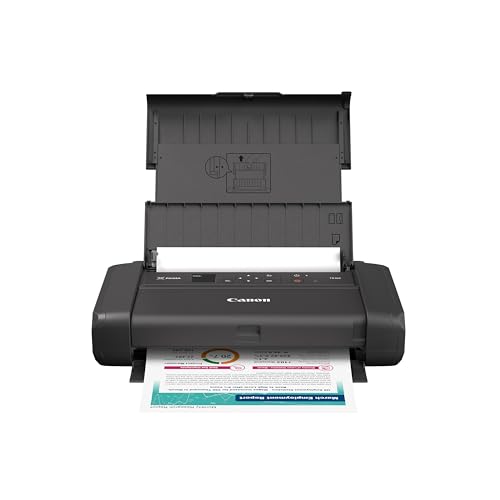
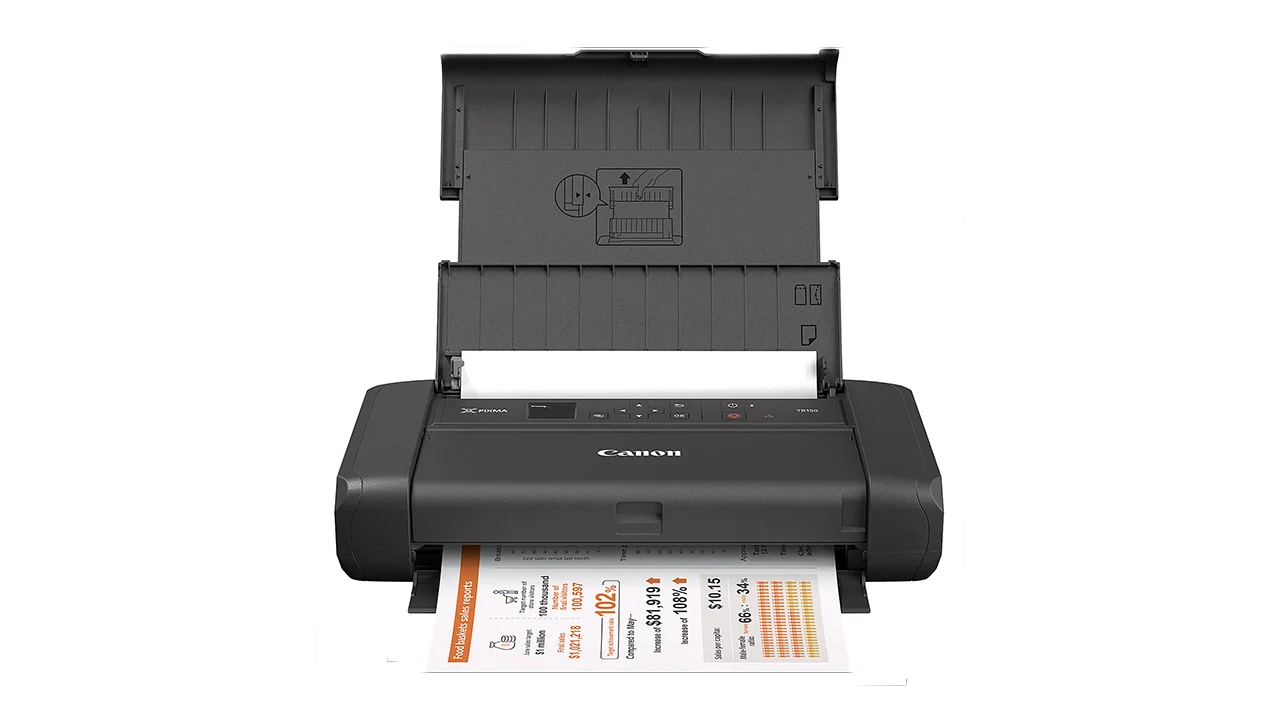
The Canon PIXMA TR160 is the easiest printer here to understand as a piece of travel equipment. At 12.7 inches wide, 7.3 inches deep, and only 2.6 inches high, it has the flat, bag-friendly shape that makes portable printing practical rather than merely possible. Its 4.5-pound weight also keeps it noticeably easier to carry than the larger home all-in-ones in this list.
Canon gives the TR160 a 50-sheet paper tray, so it is aimed at forms, reports, travel documents, and occasional photos rather than a full afternoon of printing. The useful distinction is that it accepts pages up to 8.5 by 11 inches. Its five-color hybrid ink system is designed for sharp black text and vibrant color, with square and borderless printing available. That makes it far more versatile than the thermal models, which require special paper.
Wireless setup is flexible. The Canon PRINT app, Apple AirPrint, and Mopria Print Service cover the main phone and tablet workflows, while Wireless Direct mode lets a compatible device connect without an existing router. The 1.44-inch monochrome OLED shows ink levels, printer status, and settings, giving the TR160 a small but useful control point when a phone is not convenient.
The weakness is the trade-off for that slim body. There is no scanner or copier, and the 50-sheet tray is modest beside the 100-sheet capacity of the HP Envy 6155. The TR160 also makes less sense as a permanent family printer than the Canon PIXMA TS6520. Choose it when portability and full-size color pages matter most. For a broader look at machines built around travel, see how to handle full-size documents away from a desk.
2. HP DeskJet 2955: Best for Basic Home Use

Pros
- Print, scan, and copy in one unit
- 60-sheet input tray
- Dual-band wireless connection
- Phone-based printing and scanning
- HP AI formatting for web pages and emails
Cons
- Slower than the laser option
- Basic icon LCD
- Intended for straightforward home tasks
Best for: households that need occasional lists, recipes, letters, scans, and color copies from one small machine.
The HP DeskJet 2955 is the practical home default in this group. It is not a travel printer, but its 16.73-inch width, 11.97-inch depth, and 6.06-inch height are reasonable for a printer that also scans and copies. The 7.55-pound body is easy enough to move between a shelf and a desk, though it is clearly less portable than the Canon PIXMA TR160.
Its 60-sheet input tray fits the way most households actually print. You can keep a small stack of paper loaded for school forms, recipes, financial documents, or a letter without feeding each sheet by hand. Print speeds reach 7.5 pages per minute in black and 5.5 pages per minute in color, which is suitable for short jobs but not a busy office queue.
The DeskJet 2955 also puts more of its usability in software than hardware. The icon LCD keeps the physical controls simple, while the HP app handles printing, scanning, copying, and faxing from a smartphone. Dual-band Wi-Fi automatically detects and resolves connection issues according to HP, and the AI feature can remove unwanted web-page content to avoid awkward layouts.
Compared with the Canon PIXMA TS4320, the DeskJet 2955 has a similar basic home role, but the HP app and web-formatting feature are the stronger fit for phone-led printing. The Canon offers automatic two-sided printing, which the listed DeskJet features do not include. The DeskJet is also not the right pick for frequent mobile use or fast reports. It suits a household that wants an uncomplicated all-in-one for short, ordinary jobs.
3. Canon PIXMA TS6520: Best Canon All-in-One

Pros
- Automatic two-sided printing
- Integrated scanner and copier
- Dual-band Wi-Fi
- 1.42-inch OLED display
- Borderless document and photo support
Cons
- Heavy for its footprint
- Larger than a portable printer
- Two-cartridge system is less flexible than the TR160's five-color system
Best for: home users who want duplex printing, scanning, copying, and photo support in one compact desktop unit.
The Canon PIXMA TS6520 is a compact all-in-one in function, although its 15.3-pound weight makes it a stay-on-the-desk machine. Its 14-inch width and 14.8-inch depth need real desk space, but the 6.7-inch height keeps it relatively low beneath a shelf or monitor riser. This is the kind of printer that earns its footprint by replacing a separate scanner and copier.
The two-cartridge hybrid ink system is tuned for sharp text and vivid color. The TS6520 handles documents and photos up to 8.5 by 11 inches, with borderless printing available. The most important everyday feature is automatic two-sided printing. It can reduce page handling for multi-page documents and makes duplex work much less fiddly than manually turning sheets.
A 1.42-inch monochrome OLED provides ink levels, printer status, and settings. That screen is small, but it is more informative than a row of unlabeled controls. Dual-band Wi-Fi supports both 2.4GHz and 5GHz connections, while the Canon PRINT app, Apple AirPrint, and Mopria cover common mobile workflows.
The TS6520 is a better home workstation than the Canon PIXMA TR160, but the TR160 wins decisively when the printer has to leave the house. The TS6520 also has a heavier, more permanent feel than the Canon PIXMA TS4320, despite the two models sharing many core features. Skip it if you need a battery-powered printer or a genuinely bag-sized design. Pick it when duplex printing and all-in-one capability matter more than carrying weight.
4. Canon PIXMA TS4320: Best Easy Setup

Pros
- Print, scan, and copy functions
- Automatic two-sided printing
- Dual-band Wi-Fi
- Canon mobile printing support
- Borderless output for documents and photos
Cons
- Heavy for a compact home printer
- Small monochrome display
- No battery-powered operation
Best for: home users who want a straightforward wireless printer with duplex output and basic scanning.
The Canon PIXMA TS4320 occupies almost the same physical space as the TS6520. It measures 14 inches wide, 14.8 inches deep, and 6.7 inches high, with a 14.8-pound weight. That means compact here describes the footprint and height, not portability. Plan to place it once and leave it there.
Its two-cartridge hybrid ink system produces sharp text and vivid color for the documents and photos this printer is intended to handle. It supports media up to 8.5 by 11 inches, including borderless output. Automatic two-sided printing is the feature that separates it from many basic home models because it handles the paper turn internally instead of requiring manual intervention.
Setup is designed around a phone or computer, with the Canon PRINT app, Apple AirPrint, and Mopria Print Service available. Dual-band Wi-Fi supports 2.4GHz and 5GHz networks, which gives it more flexibility than a printer limited to a single wireless band. The integrated scanner and copier make it useful for forms, signed pages, and household records.
The TS4320 and Canon PIXMA TS6520 are close siblings in capability, so the choice comes down to the controls and the role you expect it to play. The TS6520 has a slightly more premium presentation, while the TS4320 is the simpler recommendation for a household that wants to set up print, scan, and copy functions and get on with the job. If your main concern is finding a machine that fits on a constrained home surface, the dimensions that work in tight spaces deserve more attention than the word compact in a product title.
5. HP Envy 6155: Best Touchscreen

Pros
- 2.4-inch color touchscreen
- Automatic two-sided printing
- 100-sheet input tray
- Print, scan, and copy functions
- Dual-band Wi-Fi and HP app support
Cons
- Wide and deep for a mobile printer
- Uses original HP chip-equipped cartridges
- No battery operation
Best for: families and home offices that want a more capable control panel and a larger paper tray.
The HP Envy 6155 is the most home-office-oriented of the compact inkjet all-in-ones here. Its listed dimensions are 17.05 inches wide, 14.21 inches deep, and 5.35 inches high. The low height helps it fit beneath shelving, but the width and depth require more surface than the HP DeskJet 2955. At 11.2 pounds, it is movable, but not a printer you would pack for a trip.
HP equips it with a 100-sheet input tray, automatic two-sided printing, and print, scan, and copy functions. Print speeds reach up to 10 pages per minute in black and 7 pages per minute in color. Those figures put it ahead of the DeskJet 2955 for routine home documents, while the P3 technology is intended to keep printed documents and photos vibrant.
The 2.4-inch color touchscreen is the star feature. It gives the Envy 6155 a more direct interface than the icon LCD on the DeskJet 2955 and the small monochrome OLEDs on the Canon models. HP's app adds mobile printing, scanning, copying, and faxing, and dual-band Wi-Fi is designed to maintain the connection. Its AI formatting feature can remove unwanted web-page content before printing.
There is an important supply restriction in the product information. The printer is intended to work only with cartridges using original HP chips or circuitry, and firmware updates maintain those measures. That does not affect everyone, but it is a meaningful limitation for buyers who want broad cartridge flexibility. The Envy 6155 is the right fit for a family printing regularly from a desk, not for someone choosing the Best compact printer specifically to carry between locations.
6. NDYIN N80: Best Inkless Travel Pick

Pros
- Direct thermal printing needs no ink, toner, or ribbons
- Built-in 1500mAh rechargeable battery
- Supports US Letter and A4 thermal paper
- 203DPI output
- Weighs 1.7 pounds
Cons
- Cannot use ordinary paper
- Bluetooth is not supported for computers
- Charging adapter is not included
Best for: travelers who need inkless full-page documents from a phone or tablet.
The NDYIN N80 changes the compact printer equation by eliminating ink altogether. At 11 inches wide, 3.3 inches deep, and 2 inches high, it has an unusually narrow profile, and its listed weight is 1.7 pounds. The built-in 1500mAh battery is specified to print up to 160 sheets of 8.5 by 11-inch thermal paper after a full charge.
Direct thermal printing is a strong fit for contracts, invoices, boarding passes, and forms that need to be produced away from a desk. The N80 supports US Letter and A4 thermal paper, plus roll paper, folded paper, and tattoo transfer paper. Its 203DPI resolution is intended to keep text and simple graphics clear. It can print PDFs, Word files, images, and web pages from a phone.
The limitations are fundamental rather than hidden. Ordinary paper will not work, and the printer requires special thermal paper. Phones, tablets, iPhones, and iPads connect through Bluetooth using the Nada Print app. A laptop or desktop must use a USB-C cable and install a driver, because computer Bluetooth printing is not supported. The package includes a roll of US Letter paper, a USB-C cable, and a USB-C adapter, but the charging adapter itself is not included.
The N80 is far more travel-ready than the Canon PIXMA TS4320, but it cannot reproduce the same kind of inkjet color output or use standard sheets. It also has a narrower computer workflow than the Gloryang Thermal Printer. Pick the N80 for a traveler who values low carrying weight and full-page thermal documents. For a more general comparison of how mobile printing differs from desktop printing, the key question is the paper you are prepared to carry.
7. Epson WorkForce WF-110: Best Color Mobile Printer

Pros
- Built-in rechargeable lithium-ion battery
- Wireless printing from phones, tablets, and laptops
- Wi-Fi Direct support
- USB and AC charging options
- Color printing in a mobile form
Cons
- Heavier than the thermal travel models
- Older design
- Uses Epson Genuine Cartridges exclusively
Best for: mobile workers who need color output and want the flexibility to print from battery, USB, or AC power.
The Epson WorkForce WF-110 is a conventional color mobile printer rather than a thermal document machine. Its 12.2-inch width, 9.1-inch depth, and 8.5-inch height make it larger than the Canon PIXMA TR160 in every listed dimension, and its 4.6-pound weight is only slightly higher. It remains portable, but its shape is more like a small piece of office equipment than a flat travel accessory.
The built-in rechargeable lithium-ion battery gives it genuine independence from a wall outlet. Epson also supports charging through USB or an AC adapter, and the printer can operate on AC power. That flexibility matters in cars, temporary workspaces, and locations where battery use is not necessary for every job. An external accessory battery is available for greater print volume, according to the product details.
Wireless connectivity includes Wi-Fi and Wi-Fi Direct, with support for iPad, iPhone, tablets, smartphones, and laptops. Wi-Fi Direct is particularly useful when there is no convenient network to join. Unlike the NDYIN N80 and Gloryang Thermal Printer, the WF-110 uses conventional inkjet printing, so it is the better match for buyers who need color rather than inkless black-and-white pages.
Its biggest drawback is the cartridge restriction. Epson states that the printing system is designed exclusively for Epson Genuine Cartridges, and non-genuine ink could cause damage not covered by the limited warranty. The WF-110 also lacks the TR160's slimmer profile and the HP OfficeJet 250's scanner and copier. Choose it when mobile color printing is the priority and you want multiple charging methods.
8. HP LaserJet M110w: Best Monochrome Speed

Pros
- Up to 21 black-and-white pages per minute
- Small laser design
- Wireless printing from many device types
- Works with AirPrint, Android, Mac, PC, and Chromebook
- HP Smart app support
Cons
- Black-and-white printing only
- Print-only design
- Uses original HP chip-equipped cartridges
Best for: one to three people printing reports, forms, and other text-heavy black-and-white documents.
The HP LaserJet M110w is the clear specialist pick for fast text. Its 13.63-inch width, 7.45-inch depth, and 6.26-inch height make it one of the tidier desktop printers here, though the 9.02-pound weight is more substantial than its dimensions suggest. HP calls it the smallest laser in its class, and the design is focused on fitting into a small office rather than traveling in a bag.
The headline capability is a listed speed of up to 21 black-and-white pages per minute when printing single-sided. That is a different experience from the color inkjets, especially the HP DeskJet 2955 at up to 7.5 black pages per minute. For reports and work documents, the M110w's laser method and monochrome focus make more sense than carrying the color hardware of the Canon PIXMA TR160.
Wireless printing covers mobile devices, PCs, and tablets, with compatibility for Microsoft systems, Mac, AirPrint, Android, and Chromebook. The HP Smart app can handle repetitive tasks, scan to the cloud, and print or copy from a smartphone. The wireless connection includes a self-reset feature intended to help it stay connected.
The compromises are easy to see. It cannot print color, and it has no scanner or copier of its own. HP also states that it is intended to work only with cartridges using original HP chips or circuitry, with firmware updates maintaining that restriction. The HP LaserJet M110w beats every inkjet here for listed black-and-white speed, but the Canon PIXMA TR160 is the better choice for color and the HP OfficeJet 250 is the better choice for mobile scanning and copying.
9. HP OfficeJet 250: Best Mobile All-in-One

Pros
- Prints, scans, and copies on the go
- Battery included
- Router-free wireless setup
- Fast Charge reaches full charge within 90 minutes when off
- Supports many paper sizes
Cons
- Older model
- Larger footprint than the TR160
- Uses HP 62 series cartridges
Best for: field workers who need an all-in-one printer with scanning and copying away from a normal office.
The HP OfficeJet 250 remains distinctive because it combines a printer, scanner, and copier with a battery-powered mobile design. It measures 14.96 inches wide, 7.8 inches deep, and 3.6 inches high, and weighs 6.51 pounds. That is not as light or slim as the Canon PIXMA TR160, but it offers functions the Canon does not.
The included battery allows printing, scanning, and copying without a network connection. HP Auto Wireless Connect is designed to simplify setup from a laptop or mobile device, with or without a router. Fast Charge can charge the printer within 90 minutes while it is turned off, and the printer can also be powered from an AC source at home, in a car, or in an office.
Paper support is broad. The listed formats include letter, legal, statement, executive, cards from 3 by 5 inches through 5 by 8 inches, several photo sizes, and No. 10, Monarch, and 6 3/4-inch envelopes. That flexibility gives it a clear edge over the N80 and Gloryang Thermal Printer, both of which depend on thermal paper.
The OfficeJet 250's weakness is its age and bulk relative to newer portable designs. Its HP 62 series cartridges are another supply consideration, although HP says they provide high page yields within their class. The TR160 is easier to carry and better suited to mobile color printing, but the OfficeJet 250 is the one to choose when a scanner and copier must travel too.
10. Gloryang Thermal Printer: Best Thermal Paper Flexibility

Pros
- Inkless direct thermal printing
- Supports paper from 2 to 8.5 inches wide
- Built-in paper bin
- Bluetooth phone connectivity
- Carrying case and three paper rolls included
Cons
- Requires Gloryang thermal paper
- Cannot use ordinary paper
- Computer setup requires a driver
Best for: travelers and students who want an inkless printer with flexible thermal paper widths.
The Gloryang Thermal Printer is built around convenience in transit. The product information lists a 1.7-inch thickness, while the listed overall dimensions are 11 inches long, 4 inches wide, and 4 inches high. Its listed weight is 3.14 pounds, and the package includes a carrying case, charging cable, and three thermal paper rolls. A built-in paper bin also helps keep a loose roll from taking over a small work surface.
Like the NDYIN N80, it prints without ink, toner, or ribbons. The important difference is paper flexibility. Gloryang says the printer can handle documents from 2 to 8.5 inches wide and supports two ways to load thermal paper. That makes it more adaptable for receipts, notes, images, and full-width documents than a printer restricted to one sheet format.
Phones connect through Bluetooth using the Jadens Printer app, with support for iOS and Android. Laptops and computers can also use the printer after the driver is installed, but the computer workflow is not as immediate as phone printing. Gloryang says the printer can produce photos, images, design drawings, and text, so its role is broader than simple boarding passes.
The catch is the paper requirement. Ordinary, inkjet, and plain paper are not supported, and the product specifies Gloryang thermal paper. The NDYIN N80 is lighter and lists a 1500mAh battery with a stated 160-sheet capacity, while the Gloryang offers more flexible paper widths and a case in the package. Pick Gloryang when paper versatility matters more than the smallest possible carry weight.
How to choose best compact printer
The right compact printer depends on the gap between occasional home printing and genuinely mobile work. Start with the output you need, then check paper handling, power, wireless setup, and the physical footprint.
Print method
Inkjet printers such as the Canon PIXMA TR160 and Epson WorkForce WF-110 can produce color documents and photos on ordinary paper. Laser printing, as used by the HP LaserJet M110w, is aimed at fast black-and-white documents. Thermal printers avoid ink entirely but require compatible thermal paper, which changes how long printed documents remain suitable for display or storage.
A printer is only truly portable if its paper and power requirements fit the same trip.
Portability and dimensions
Look at all three dimensions, not just weight. The TR160's 2.6-inch height and 4.5-pound weight make it easier to pack than desktop all-in-ones, while the OfficeJet 250 adds bulk in exchange for scanning and copying. A printer that stays on a desk can be wider and heavier if its tray and scanner save repeated trips to another device.
Paper handling
A 50-sheet tray on the TR160 works for short jobs, while the DeskJet 2955 holds 60 sheets and the Envy 6155 holds 100. Thermal models require special paper, with the N80 supporting US Letter and A4 thermal sheets and Gloryang supporting widths from 2 to 8.5 inches. Check this factor before choosing an inkless design.
All-in-one features
A scanner and copier add useful capability for forms, signed documents, and household records. The Canon PIXMA TS6520, Canon PIXMA TS4320, HP DeskJet 2955, HP Envy 6155, and HP OfficeJet 250 include those functions. Print-only models take up less space or travel more easily, but they cannot replace a separate scanner.
Wireless and power
Dual-band Wi-Fi suits a permanent home network, while Wi-Fi Direct and router-free connections are more useful on the road. Battery operation separates the TR160, WF-110, N80, and OfficeJet 250 from ordinary desktop printers. Check computer compatibility carefully with thermal printers, since both the N80 and Gloryang require USB or a driver for computer use rather than relying on computer Bluetooth.

Frequently asked questions
Can a compact printer print full-size documents?
Yes. The Canon PIXMA TR160, NDYIN N80, HP OfficeJet 250, and Gloryang Thermal Printer support full-size document workflows, though the thermal models require special paper. The TR160 uses inkjet printing for pages up to 8.5 by 11 inches, while the N80 supports US Letter and A4 thermal paper.
Which compact printer is best for color photos?
The Canon PIXMA TR160 is the strongest mobile color option in this group because it uses a five-color hybrid ink system and supports borderless prints. For a stationary home printer, the Canon PIXMA TS6520 and HP Envy 6155 also support color documents and photos.
Do thermal printers need ink?
No. The NDYIN N80 and Gloryang Thermal Printer use direct thermal printing, so they do not require ink, toner, or ribbons. They do require compatible thermal paper, and ordinary printer paper cannot be used.
Which compact printer can scan and copy?
The HP DeskJet 2955, Canon PIXMA TS6520, Canon PIXMA TS4320, HP Envy 6155, and HP OfficeJet 250 can print, scan, and copy. The HP OfficeJet 250 is the most suitable of these for mobile all-in-one work because its battery is included.
Is a laser printer useful for a small workspace?
Yes, if your documents are black and white. The HP LaserJet M110w has a listed single-sided speed of up to 21 black-and-white pages per minute and supports wireless printing from phones, tablets, PCs, Macs, and Chromebooks.
Can these printers work without Wi-Fi?
Several can. The Canon PIXMA TR160 supports Wireless Direct mode, the Epson WorkForce WF-110 supports Wi-Fi Direct, and the HP OfficeJet 250 supports wireless setup with or without a router. The NDYIN N80 and Gloryang Thermal Printer use Bluetooth for phone printing.

The bottom line
The Best compact printer for most people is the Canon PIXMA TR160. It combines a genuinely portable 4.5-pound design with full-size color printing, a five-color ink system, mobile apps, and Wireless Direct mode. It does not scan or copy, so home users who need those functions should choose the Canon PIXMA TS6520 instead.
For mobile all-in-one work, the HP OfficeJet 250 remains the more capable travel tool, while the HP LaserJet M110w is the clear choice for fast black-and-white documents. The NDYIN N80 and Gloryang Thermal Printer make sense when inkless operation and travel convenience matter more than standard paper and color output.
If you are undecided, choose the Canon PIXMA TR160 for portable color pages, or the Canon PIXMA TS6520 for a compact home desk.
As an Amazon Associate we earn from qualifying purchases.