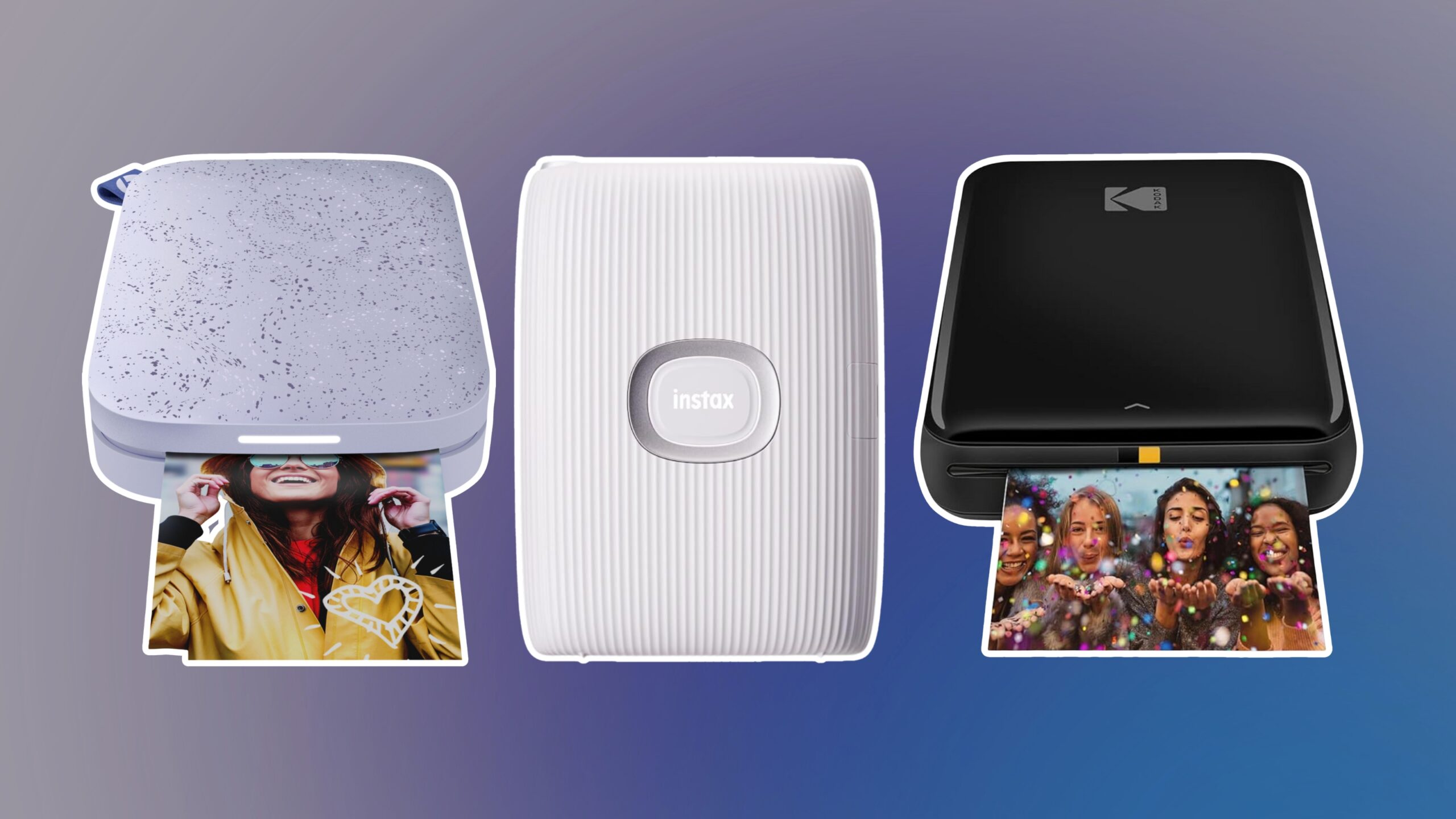

A printer can be physically small and still be awkward to live with. Deep paper trays, cramped controls, unreliable wireless connections, and inkjet models that do far more than you need are common sources of frustration. The Best small printer depends on whether you need an all-in-one for home, a mobile model for travel, or a compact machine dedicated to black-and-white documents.
We compared ten genuine options across those needs, including color inkjet all-in-ones, portable inkjets, a thermal printer, and a compact laser printer. Our top pick is the Canon PIXMA TS6520, while the list also includes more capable office models and genuinely portable alternatives.
Comparison table
| # | Product | Award | Print type | Key feature | Best for |
|---|---|---|---|---|---|
| 1 | Canon PIXMA TS6520 | Best overall | Color inkjet | Duplex printing, scanner, copier | Home and hybrid work |
| 2 | HP Envy 6155 | Best touchscreen | Color inkjet | 2.4-inch touchscreen, 100-sheet tray | Easy home printing |
| 3 | Canon PIXMA TR160 | Best portable inkjet | Color inkjet | 4.5 pounds, 50-sheet tray | Printing away from home |
| 4 | Canon PIXMA TS4320 | Best simple all-in-one | Color inkjet | Duplex printing, scan, copy | Basic home use |
| 5 | HP DeskJet 2955 | Best basic HP | Color inkjet | 60-sheet tray, wireless printing | Occasional documents |
| 6 | HP OfficeJet 200 | Best mobile work printer | Color inkjet | Battery included, 4.85 pounds | Cars, travel, and field work |
| 7 | NDYIN N80 | Best ink-free travel pick | Thermal | 203 dpi, rechargeable battery | Forms and travel documents |
| 8 | HP LaserJet M110w | Best compact laser | Black-and-white laser | Up to 21 ppm | Small teams |
| 9 | HP OfficeJet Pro 8139 | Best home office pick | Color inkjet | ADF, fax, 225-sheet tray | Busy home offices |
| 10 | HP Envy 6555e | Best for batch scanning | Color inkjet | ADF, duplex printing | Home document work |
1. Canon PIXMA TS6520: Best Overall

Pros
- Automatic two-sided printing
- Integrated scanner and copier
- Dual-band Wi-Fi
- Compact 6.7-inch height
- Supports borderless photos
Cons
- Two-cartridge ink system is less flexible than five-color designs
- Monochrome display is small
- Heavier than the portable models
Best for: home users who want one compact machine for documents, photos, scanning, and copying.
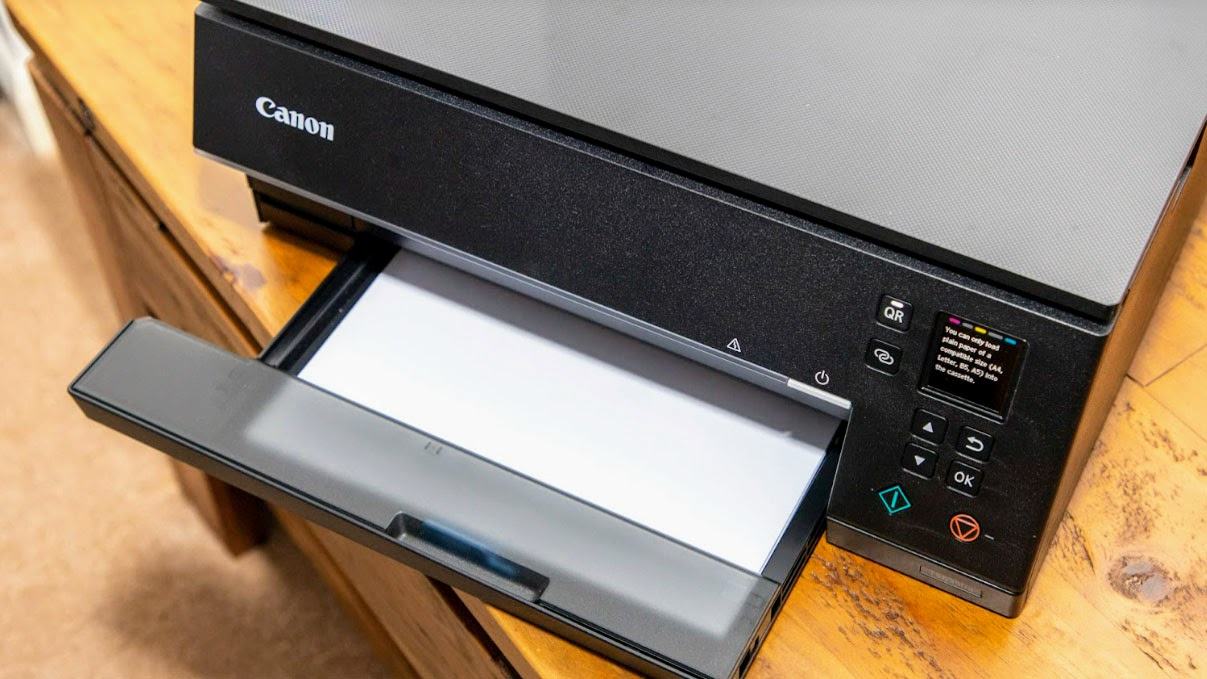
The Canon PIXMA TS6520 is the easiest printer here to recommend to a typical household. It has the familiar all-in-one shape, but it does not waste space on features that most people will never touch. Automatic duplex printing, scanning, copying, wireless printing, and support for borderless output cover the tasks that usually send people shopping for a home printer.
Its dimensions explain why it works well on a crowded desk. The body is 14.8 inches long, 14 inches wide, and 6.7 inches high, with a listed weight of 15.3 pounds. That is not portable, but the low height makes it easier to slide beneath a shelf. The 1.42-inch monochrome OLED display shows printer status, ink levels, and settings without requiring a phone for every small adjustment.
Canon uses a two-cartridge hybrid ink system, which is designed to keep black text sharp while producing vivid color. The printer handles documents and photos up to 8.5 by 11 inches, with or without borders. Automatic two-sided printing matters more than it sounds: it lets the printer handle ordinary schoolwork and household paperwork without manually turning every sheet.
The TS6520 also has dual-band Wi-Fi, supporting both 2.4GHz and 5GHz connections, along with Canon PRINT, Apple AirPrint, and Mopria Print Service. It is more versatile than the HP DeskJet 2955, and its control screen is less convenient than the HP Envy 6155's touchscreen. The Canon PIXMA TS4320 is a close alternative, but the TS6520 is the one we would keep for its broader balance of controls and everyday capability.
The weakness is its size and weight compared with the Canon PIXMA TR160 and NDYIN N80. It also lacks an automatic document feeder, so multi-page scanning remains a one-page-at-a-time job. Choose it if you want a complete home machine that stays relatively low and simple. Skip it if your printer has to travel or your scanning workload is heavy.
2. HP Envy 6155: Best Touchscreen

Pros
- Clear 2.4-inch color touchscreen
- Automatic two-sided printing
- 100-sheet input tray
- Print, scan, and copy functions
- Dual-band Wi-Fi
Cons
- No automatic document feeder
- HP cartridges use original HP chips or circuitry
- Larger footprint than the Canon PIXMA TS6520
Best for: home users who prefer controlling printer tasks from a color touchscreen.
The HP Envy 6155 feels more approachable than many small all-in-ones because its 2.4-inch color touchscreen gives the controls a clear visual hierarchy. Selecting a copy, checking settings, or navigating basic maintenance is more comfortable than working through a tiny monochrome panel. For a shared household printer, that simplicity is useful.
The printer supports color printing, scanning, copying, and automatic two-sided printing. Its 100-sheet input tray is large enough for routine household work without constant refilling. HP lists speeds of up to 10 pages per minute in black and 7 pages per minute in color, which suits homework, forms, recipes, and occasional borderless photos rather than a busy office queue.
At 17.05 inches long, 14.21 inches high, and 5.35 inches wide as listed, the dimensions are unusual enough to plan around carefully. Its relatively narrow width may help on a slim shelf, but the overall footprint still needs room for paper handling. The dual-band Wi-Fi is designed to maintain a connection and automatically address connection issues, while the HP app supports printing, scanning, copying, and fax functions from a phone.
HP's P3 technology is intended to produce documents and photos that look vibrant compared with the source display. The printer also includes an AI formatting feature for web pages and emails, intended to remove unwanted content and avoid awkward page layouts. Those features make the Envy 6155 more polished than the basic HP DeskJet 2955, while the Canon PIXMA TS6520 offers a lower-profile body and a similar all-in-one role.
The main limitation is the absence of an automatic document feeder. Anyone scanning a stack of pages will have to place each sheet on the scanner glass. HP also states that the printer blocks cartridges using non-HP chips or circuitry, with firmware updates maintaining those measures. This is a strong pick for a family printer with friendly controls, but it is not the right tool for frequent multi-page scanning.
3. Canon PIXMA TR160: Best Portable Inkjet
Pros
- Weighs 4.5 pounds
- Only 2.6 inches high
- 50-sheet paper tray
- Wireless direct mode
- Five-color hybrid ink system
Cons
- No scanner or copier
- Smaller paper capacity than desktop models
- Portable design favors documents over office throughput
Best for: travelers and mobile workers who need full-size color documents away from a desk.
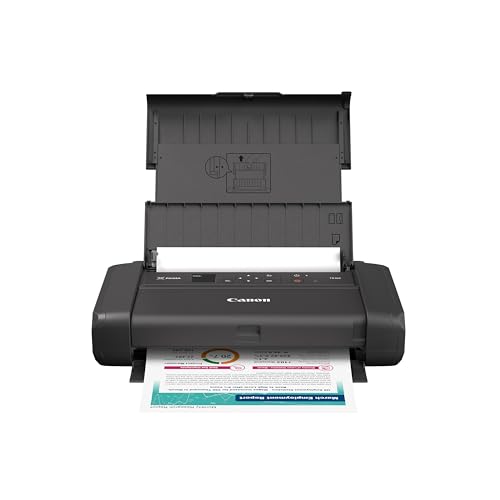
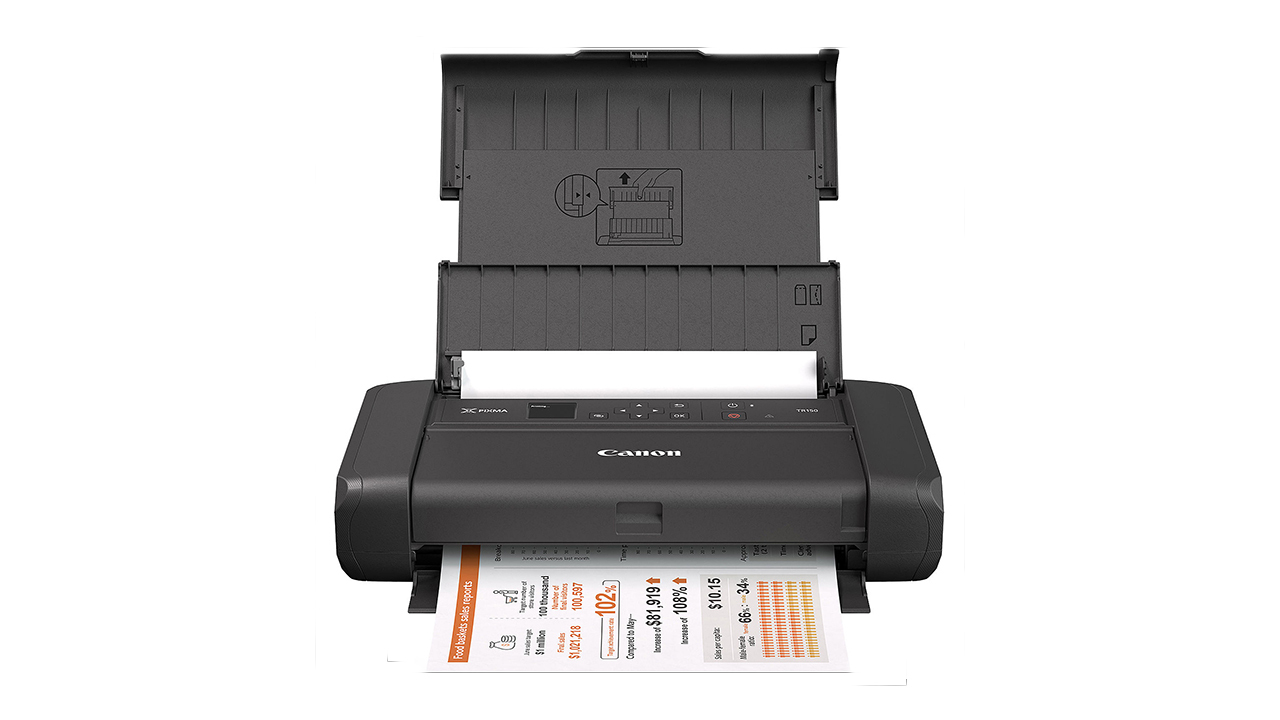
The Canon PIXMA TR160 is the clearest choice when “small” means genuinely movable. At 12.7 inches long, 7.3 inches wide, and just 2.6 inches high, it can fit in a backpack with room around it. Its 4.5-pound weight is still substantial enough to feel like a real printer, but it is far easier to carry than any of the desktop all-in-ones in this group.
This is a printer only. There is no scanner or copier, so it cannot replace the Canon PIXMA TS6520 as a household command center. What it does offer is a 50-sheet paper tray, support for documents and photos up to 8.5 by 11 inches, and a five-color hybrid ink system intended to produce sharp black text and rich color. Borderless output is supported as well.
The 1.44-inch monochrome OLED display shows ink levels, status, and settings. Canon PRINT, Apple AirPrint, and Mopria provide familiar ways to send jobs from phones and tablets. Wireless direct mode is particularly useful in hotels, cars, and temporary workspaces because it allows a compatible device to connect without a wireless router.
The TR160 is more capable for normal letter-size color printing than the NDYIN N80, which uses special thermal paper. It is also much lighter than the HP OfficeJet 200, though the HP includes scanning through its mobile workflow and has a battery included. For a person who prints contracts, forms, or photos while traveling, the TR160's full-size color output is the more flexible approach.
Do not choose it if you need to copy identification documents or scan signed forms. Its paper tray is also not intended for a long unattended queue. The right buyer is someone who values a compact body and color output more than all-in-one functions, and who wants a portable printer that behaves like a conventional inkjet.
4. Canon PIXMA TS4320: Best Simple All-in-One

Pros
- Automatic two-sided printing
- Scanner and copier included
- Dual-band Wi-Fi
- Supports borderless photos
- ENERGY STAR and EPEAT Silver certified
Cons
- No touchscreen listed
- Two-cartridge ink system
- Not suitable for portable use
Best for: households that need straightforward color printing, scanning, and copying in a compact desktop body.
The Canon PIXMA TS4320 is a deliberately uncomplicated all-in-one. It prints, scans, and copies, and its automatic duplex feature takes care of two-sided documents without a manual flip. That combination covers the basic household jobs without moving into the larger, more office-oriented designs farther down this list.
Its listed dimensions are 14.8 inches long, 14 inches wide, and 6.7 inches high, with a 14.8-pound weight. Those numbers put it in the same physical class as the Canon PIXMA TS6520. It should fit under a shelf or on a modest desk, but it needs a stable permanent spot rather than a place in a travel bag.
Canon describes the print system as a two-cartridge hybrid design for sharp text and vivid color. It supports paper and photos up to 8.5 by 11 inches, including borderless output. That makes it a sensible choice for household documents and occasional photo printing, though people who want more color separation may prefer the five-color system in the Canon PIXMA TR160.
Wireless setup is designed for smartphones and computers, with dual-band Wi-Fi, the Canon PRINT app, Apple AirPrint, and Mopria Print Service. It is close in function to the TS6520, and both models offer automatic duplex printing. The TS6520 has the more informative OLED display, while the TS4320's appeal is that it keeps the essential functions without asking the buyer to learn a complicated control system.
The absence of a touchscreen is the most obvious compromise. There is also no automatic document feeder, so copying or scanning several pages takes patience. Pick the TS4320 when you want a compact Canon all-in-one for ordinary home tasks and do not need advanced document handling.
5. HP DeskJet 2955: Best Basic HP

Pros
- Print, scan, and copy functions
- Dual-band wireless printing
- Compact design
- 60-sheet input tray
- Made with at least 70% recycled plastics
Cons
- Slowest listed print speeds among the standard all-in-ones
- No automatic duplex printing listed
- Icon LCD is less informative than a touchscreen
Best for: occasional home printing where basic color documents matter more than speed or advanced controls.
The HP DeskJet 2955 is aimed at the person who prints a recipe, letter, school worksheet, or financial document now and then. It is not trying to be a small office machine. Its appeal is the compact design and the inclusion of printing, scanning, copying, mobile printing, and wireless connectivity in one unit.
HP lists print speeds of up to 7.5 pages per minute in black and 5.5 pages per minute in color. Those figures make the DeskJet 2955 a poor fit for a long report or a shared household queue, but they are adequate for short jobs. The 60-sheet input tray also signals its intended use. It holds enough for routine tasks, but not enough to forget about paper management for a busy day.
The printer measures 16.73 inches wide, 11.97 inches long, and 6.06 inches high, with a weight of 7.55 pounds. The low height and lighter body help it occupy a small home workspace, although the width is greater than some readers may expect from a compact printer. An icon LCD provides a simple control panel, and the HP app handles printing, scanning, copying, and fax functions from a smartphone.
HP's AI formatting feature is designed to clean up web pages and emails before printing, while dual-band Wi-Fi is intended to maintain a stable connection. The design uses at least 70% recycled plastics and carries ENERGY STAR and EPEAT certification. Compared with the Canon PIXMA TS4320, it has a lighter body but does not list automatic two-sided printing, which is a meaningful difference for paperwork.
This is not the model for someone who wants fast output or easy multi-page scanning. HP also says it blocks cartridges using non-HP chips or circuitry. Choose it for light, uncomplicated household use, especially when the printer will spend most of its time idle and only occasionally produce a few pages.
6. HP OfficeJet 200: Best Mobile Work Printer

Pros
- Battery included
- Wireless printing without a router
- Weighs 4.85 pounds
- Supports many paper sizes
- Fast charging while switched off
Cons
- No scanner or copier
- Older design
- Uses a dedicated cartridge series
Best for: mobile professionals who need color documents from a car, backpack, or temporary workspace.
The HP OfficeJet 200 is built around a different idea of portability than the Canon PIXMA TR160. It includes a battery and is designed to print from a laptop, tablet, or phone without joining a network. That makes it a practical companion for field work, client visits, travel, and any situation where a normal wall-powered printer would be inconvenient.
Its body is 14.3 inches long, 7.32 inches wide, and only 2.7 inches high. The listed weight is 4.85 pounds, close to the TR160's 4.5 pounds. The battery can charge within 90 minutes while the printer is turned off, using AC power at home, in a car, or in an office. HP also includes support for a broad selection of paper sizes, from letter and legal to cards, photos, and envelopes.
This is a printer rather than an all-in-one, so there is no built-in scanner or copier. That omission is less serious for a field worker who receives finished PDFs than for a household that regularly needs to copy forms. HP's app supports printing and scanning from a smartphone, but app-based scanning cannot replace a physical scanner when accurate copies of paper originals are needed.
The OfficeJet 200 supports HP Auto Wireless Connect, allowing setup from mobile devices with or without a router. It uses Original HP 62 series cartridges, and HP claims those cartridges provide high page yields within their class. The Canon PIXMA TR160 is slimmer in overall footprint and uses a five-color system, while the OfficeJet 200's included battery makes it the stronger choice when power access is the deciding factor.
The design dates back to 2016, so it lacks the newer interface polish found in the HP Envy 6155 and HP OfficeJet Pro 8139. It is also strictly a print solution. Select it when mobility and battery operation matter more than scanning, copying, or modern touchscreen controls. Readers comparing travel models can also consider how a printer handles full-size documents away from a desk before choosing.
7. NDYIN N80: Best Ink-Free Travel Pick

Pros
- Direct thermal printing needs no ink, toner, or ribbon
- Bluetooth phone and tablet connection
- USB-C computer connection
- Rechargeable 1500mAh battery
- Weighs 1.7 pounds
Cons
- Requires special thermal paper
- Does not support ordinary paper
- Black-and-white thermal output is not a replacement for color inkjet printing
Best for: travelers who print forms, invoices, boarding passes, and other temporary documents.
The NDYIN N80 is the outlier in this roundup. It is a direct thermal printer, so there are no ink cartridges, toner cartridges, or ribbons to replace. That can make travel less complicated, particularly for someone who only needs documents and does not want to carry liquid ink or manage clogged cartridges.
Its listed dimensions are 11 inches wide, 3.3 inches long, and 2 inches high, with a 1.7-pound weight. The built-in 1500mAh rechargeable battery is rated for up to 160 sheets of 8.5 by 11-inch thermal paper after a full charge. The printer supports roll paper, folded paper, and tattoo transfer paper, and it can print PDFs, Word files, pictures, and web pages.
The important catch is the paper. The N80 supports US Letter and A4 thermal paper, not ordinary printer paper. The package includes a roll of US Letter paper measuring 7 meters, but the printer requires special thermal media for continued use. Its 203 dpi resolution is intended to provide clear output, but this remains a monochrome thermal solution rather than a photo printer.
For phones and tablets, the N80 uses Bluetooth through the Nada Print app. Computers connect through a USB-C cable and require a driver, because computer Bluetooth printing is not supported. That workflow is less universal than the Canon PIXMA TR160's AirPrint and Mopria support, but the N80 is dramatically lighter and avoids ink entirely.
Thermal documents can also fade or change with heat and handling, so this is not the printer we would choose for archival records or color presentations. It is best for temporary paperwork, travel forms, invoices, and specialized transfer work. If you need conventional letter-size color pages, choose the Canon PIXMA TR160 or HP OfficeJet 200 instead.
8. HP LaserJet M110w: Best Compact Laser

Pros
- Laser printing for black-and-white documents
- Up to 21 pages per minute
- Wireless printing from many devices
- Compact body
- Supports the HP Smart app
Cons
- Prints black and white only
- No scanner or copier
- HP cartridge restrictions apply
Best for: one to three people who mainly print professional black-and-white documents.
The HP LaserJet M110w makes sense when color is not part of the brief. It is a compact black-and-white laser printer designed for small teams, reports, and routine office documents. Laser output also suits buyers who want a printer that can sit between jobs without the same inkjet-oriented considerations.
HP lists a single-sided print speed of up to 21 black-and-white pages per minute. That is substantially faster on paper than the color inkjet models such as the HP DeskJet 2955 and HP Envy 6155. The printer works with mobile devices, PCs, tablets, Microsoft systems, Macs, AirPrint, Android, and Chromebooks, giving a small team several ways to submit a job.
The body measures 13.63 inches wide, 7.45 inches long, and 6.26 inches high. Its listed weight is 9.02 pounds. It is not as light as the Canon PIXMA TR160, but the compact footprint works well on a shelf or a small office desk. The wireless connection includes a self-reset feature intended to help the printer stay connected.
The HP Smart app can handle repetitive tasks, scan to the cloud, and print or copy from a smartphone. The printer itself does not include a scanner or copier, so those app features should not be mistaken for built-in hardware. Compared with the HP OfficeJet Pro 8139, the M110w gives up color, scanning, copying, faxing, an ADF, and a larger paper tray in exchange for a smaller, simpler black-and-white design.
HP states that this printer blocks cartridges using non-HP chips or circuitry, with firmware updates maintaining those measures. It is also not the right choice for photos, school projects with color graphics, or anyone who needs one machine to scan and copy. Pick it for a small team that prints text-heavy documents and wants speed in a restrained footprint.
9. HP OfficeJet Pro 8139: Best Home Office Pick

Pros
- Automatic document feeder
- Automatic two-sided printing
- 225-sheet input tray
- Print, scan, copy, and fax
- Up to 20 black-and-white pages per minute
Cons
- Largest and heaviest model here
- More capability than occasional users need
- HP cartridge restrictions apply
Best for: home offices that need fast color documents and frequent multi-page scanning.
The HP OfficeJet Pro 8139 is not small in the same sense as the Canon PIXMA TR160 or NDYIN N80. It earns a place here because it packs serious home-office functionality into a single wireless unit, rather than forcing a buyer to add a separate scanner or fax machine. For anyone managing paperwork every day, that difference matters more than a few inches of desk space.
Its feature set is the strongest in the roundup. It prints, scans, copies, and faxes, includes automatic two-sided printing, and has an automatic document feeder for multi-page jobs. The 225-sheet input tray is also far more useful for a working office than the 60-sheet tray in the HP DeskJet 2955. HP lists speeds up to 20 pages per minute in black and 10 pages per minute in color.
The 2.7-inch color touchscreen provides a phone-like interface for printer tasks. Dual-band Wi-Fi supports wireless printing, while the HP app extends printing, scanning, copying, and faxing to a phone. HP's AI formatting feature is intended to remove unwanted material from web pages and emails, and HP Wolf Essential Security is included to help protect the network.
The physical cost of all that hardware is clear. The OfficeJet Pro 8139 measures 18.12 inches wide, 13.29 inches long, and 9.17 inches high, and weighs 17.6 pounds. It is much larger than the HP Envy 6555e, though the 6555e has a smaller 100-sheet tray and a less office-focused design. Anyone setting up a dedicated home office should first consider which document handling features matter in a shared workspace.
The 8139 is excessive for a few pages a week, and its large body needs a proper surface with room for paper movement. HP says it uses more than 45% recycled plastic and restricts cartridges to those with original HP chips or circuitry. Choose it when the ADF, fax, speed, and paper capacity will be used regularly. For light household printing, the Canon PIXMA TS6520 is the more sensible shape and feature balance.
10. HP Envy 6555e: Best for Batch Scanning

Pros
- 35-sheet automatic document feeder
- Automatic two-sided printing
- 2.4-inch color touchscreen
- 100-sheet input tray
- Print, scan, and copy functions
Cons
- Larger and heavier than the HP Envy 6155
- No fax function listed
- HP cartridge restrictions apply
Best for: home users who scan or copy several pages at a time but do not need a full office printer.
The HP Envy 6555e occupies the middle ground between a basic home all-in-one and the office-focused HP OfficeJet Pro 8139. Its standout feature is the 35-sheet automatic document feeder. That makes it a much better fit than the Canon PIXMA TS6520 or HP Envy 6155 for scanning a short packet, copying several pages, or digitizing household paperwork.
HP lists speeds up to 10 pages per minute in black and 7 pages per minute in color. The 100-sheet input tray is appropriate for home use, and automatic two-sided printing helps with longer documents. The printer also handles color printing, scanning, copying, and mobile tasks through the HP app.
A 2.4-inch color touchscreen provides direct control, while dual-band Wi-Fi is intended to keep the connection stable. HP's P3 technology aims for vibrant documents and photos, and its AI-enabled formatting feature is designed to clean up web pages and emails. The printer measures 17.05 inches wide, 14.21 inches long, and 6.73 inches high, with a listed weight of 16.3 pounds.
That makes it significantly heavier than the HP Envy 6155, despite the similar home-oriented feature set. The 6555e's ADF is the reason to accept that extra bulk. It also beats the Canon PIXMA TS4320 for batch scanning, while the HP OfficeJet Pro 8139 is the better choice for faster work, faxing, and a much larger input tray. Readers focused on household printing can compare the features that separate occasional home use from heavier document work.
HP includes a three-month Instant Ink trial with HP+ activation, after which a monthly fee applies unless canceled. HP also states that cartridges using non-HP chips or circuitry will be blocked, with periodic firmware updates maintaining the restriction. Choose the Envy 6555e when the ADF is genuinely useful but the capacity and speed of a full home-office model would be unnecessary.
How to choose best small printer
The right Best small printer choice starts with the kind of paper work you actually do, then narrows down the hardware that can handle it without taking over the room.
Printer type
Color inkjet models are the most flexible choice for homes because they can handle text, graphics, and photos. Laser models such as the HP LaserJet M110w are better suited to frequent black-and-white documents and faster text output. Thermal models such as the NDYIN N80 avoid ink altogether, but they require special paper and are not a substitute for conventional color printing.
Physical footprint
Check width, depth, height, and weight rather than relying on the word “compact.” A low desktop printer may still need a broad surface, while the Canon PIXMA TR160 and HP OfficeJet 200 are shaped for bags and briefcases. Leave room for paper to enter and exit, and account for the space needed to open a scanner lid.
Duplex printing
Automatic duplex printing turns a printer from a basic output device into a more useful paperwork tool. It reduces manual handling for multi-page documents and is included on the Canon PIXMA TS6520, Canon PIXMA TS4320, HP Envy 6155, HP Envy 6555e, and HP OfficeJet Pro 8139. Do not assume every compact printer has it, especially portable models.
A printer is only small when it fits both the desk and the work you ask it to do.
Scanner and document feeder
A flatbed scanner is enough for occasional copies, photos, and single pages. An automatic document feeder changes the experience when you scan or copy several sheets. The HP Envy 6555e has a 35-sheet ADF, while the HP OfficeJet Pro 8139 adds an ADF alongside faxing and a larger input tray.
Wireless connections
Dual-band Wi-Fi can help a printer work across both 2.4GHz and 5GHz networks, while AirPrint, Mopria, and dedicated mobile apps make phone printing easier. Portable buyers should look for direct wireless modes or a battery. The NDYIN N80 connects to phones and tablets through Bluetooth but requires USB and a driver for computers.
Paper and output needs
Look at supported paper sizes and the type of output you need. The Canon PIXMA TR160 supports documents and photos up to 8.5 by 11 inches, while the HP OfficeJet 200 supports letter, legal, cards, photos, and envelopes. Thermal printers require compatible thermal media, so confirm that limitation before choosing one for normal office paper.
Frequently asked questions
What is the best small printer for home use?
The Canon PIXMA TS6520 is the strongest all-round choice for most homes. It combines color printing, scanning, copying, automatic two-sided printing, dual-band Wi-Fi, and support for borderless photos in a relatively low body.
Which small printer is easiest to move?
The Canon PIXMA TR160 and HP OfficeJet 200 are the most practical conventional portable inkjet choices. The NDYIN N80 is lighter still, but its thermal system requires special paper and is best for temporary black-and-white documents.
Do all small printers scan and copy?
No. The Canon PIXMA TR160, HP OfficeJet 200, and HP LaserJet M110w are print-focused models without a built-in scanner and copier. The Canon PIXMA TS6520, Canon PIXMA TS4320, and several HP all-in-ones include those functions.
Is a laser printer better for black-and-white documents?
A compact laser printer can be a better fit for frequent black-and-white work because the HP LaserJet M110w lists output up to 21 pages per minute. It is not suitable for color documents, photos, or scanning because it is a print-only black-and-white model.
What does an automatic document feeder do?
An automatic document feeder pulls multiple sheets through the scanner without requiring you to place each page on the glass. The HP Envy 6555e has a 35-sheet ADF, and the HP OfficeJet Pro 8139 combines an ADF with a 225-sheet input tray.
Can a portable printer work without Wi-Fi?
Some can. The Canon PIXMA TR160 offers wireless direct mode, the HP OfficeJet 200 can connect with or without a router, and the NDYIN N80 uses Bluetooth for phones and tablets. Computer support varies, so check whether the printer requires USB or a driver.
Are thermal printers suitable for photos?
The NDYIN N80 is not the right choice for conventional color photos. It uses direct thermal printing and special paper, making it better for forms, invoices, boarding passes, and temporary documents.
The bottom line
The Best small printer for most homes is the Canon PIXMA TS6520. It has the right mix of color printing, scanning, copying, automatic duplexing, mobile connectivity, and a manageable low profile. The HP Envy 6155 is the better alternative if a color touchscreen is more important than a smaller overall footprint.
For travel, choose the Canon PIXMA TR160 when you need conventional full-size color pages, or the NDYIN N80 when ink-free thermal printing and a very light body matter more. Home-office users should step up to the HP OfficeJet Pro 8139, while the HP Envy 6555e is the sensible middle ground for batch scanning.
If you are undecided, buy the Canon PIXMA TS6520 unless you specifically need portability, a document feeder, or black-and-white laser speed.
As an Amazon Associate we earn from qualifying purchases.