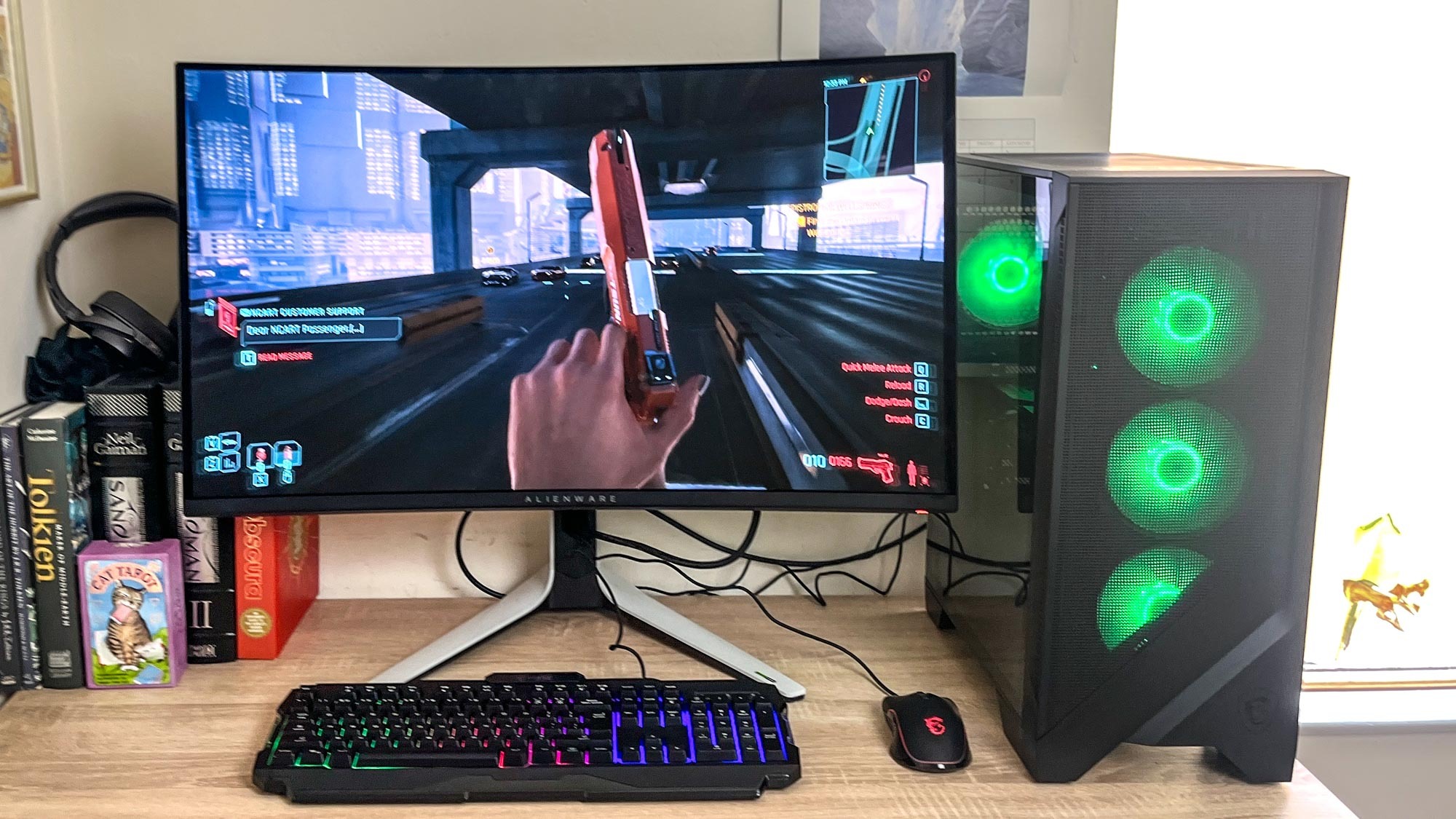

A gaming desktop should make demanding games feel easy, not leave you sorting through vague component claims and mismatched parts. The graphics card matters most for play, but memory, cooling, storage, wireless connectivity, and the power supply decide how pleasant the system is to live with.
We compared ten prebuilt towers ranging from practical 1080p systems to liquid-cooled RTX 5070 machines with substantial storage. The CyberPowerPC Gamer Master is our top pick for its balanced Ryzen 7 and RTX 5060 Ti combination, with the MSI Codex Z2 and ZOTAC MEK close behind for different priorities.
Comparison table
| # | Product | Award | Graphics | Memory and storage | Best for |
|---|---|---|---|---|---|
| 1 | CyberPowerPC Gamer Master | Best overall | GeForce RTX 5060 Ti 8GB | 16GB DDR5, 1TB PCIe 4.0 NVMe SSD | Balanced 1080p gaming |
| 2 | MSI Codex Z2 | Best RTX 5070 system | GeForce RTX 5070 | 32GB DDR5, 2TB NVMe SSD | AAA gaming and streaming |
| 3 | Alienware Aurora RTX 5070 | Best premium design | GeForce RTX 5070 | 32GB DDR5, 1TB SSD | A polished desktop setup |
| 4 | YAWYORE Ryzen 7 5700X | Best DDR4 gaming tower | GeForce RTX 5060 8GB | 32GB DDR4, 1TB NVMe SSD | Multitasking on a proven platform |
| 5 | Alienware Aurora RTX 5060 Ti | Best compact Alienware option | GeForce RTX 5060 Ti | 16GB DDR5, 1TB SSD | AlienFX lighting and a modern CPU |
| 6 | Skytech Azure 3 | Best liquid cooling | RTX 5070 12GB | 32GB DDR5 6000, 1TB Gen4 NVMe SSD | Sustained 1440p gaming |
| 7 | YAWYORE Ryzen 5 5600GT | Best starter tower | Integrated Radeon Vega graphics | 16GB DDR4, 1TB NVMe SSD | Mainstream games and future upgrades |
| 8 | Thermaltake View i570-170 | Best high-end CPU pairing | GeForce RTX 5070 | 32GB DDR5 6000, 1TB NVMe SSD | Gaming plus CPU-heavy work |
| 9 | Horizon Autherium Dragon | Best storage capacity | RTX 5070 OC 12GB | 64GB RAM, 2TB NVMe SSD and 8TB HDD | Large game libraries and creation |
| 10 | ZOTAC MEK RTX 5060 Ti | Best 16GB graphics memory | RTX 5060 Ti 16GB | 32GB DDR5 6000, 1TB NVMe SSD | 1080p and 1440p longevity |
1. CyberPowerPC Gamer Master: Best Overall

Pros
- Well-matched Ryzen 7 and RTX 5060 Ti hardware
- Fast PCIe 4.0 NVMe storage
- WiFi 6 and Bluetooth 5.3
- Useful mix of USB-C and USB-A ports
Cons
- 16GB of memory is the least generous fit for heavier multitasking
- RTX 5060 Ti has 8GB of graphics memory
- Keyboard and mouse are basic included accessories
Best for: players who want a straightforward, balanced Windows gaming tower.
The CyberPowerPC Gamer Master gets the important decisions right. Its Ryzen 7 8700F gives the system eight cores and a 4.1GHz listed clock, while the GeForce RTX 5060 Ti supplies a sensible graphics foundation for modern 1080p play. It feels like the kind of prebuilt that does not require an immediate parts swap before it becomes enjoyable.
The 1TB PCIe 4.0 NVMe SSD keeps Windows and games responsive, and it is a more useful starting point than a small boot drive that fills after a handful of large installations. Memory is 16GB of DDR5. That remains workable for gaming, but players who stream, keep many browser tabs open, or edit video will have less headroom than they would with the MSI Codex Z2 or ZOTAC MEK.
Connectivity is unusually complete for a practical tower. There are two USB-C 3.2 ports, four USB-A 3.2 ports, two USB-A 2.0 ports, wired LAN, WiFi 6, Bluetooth 5.3, and 7.1-channel audio. The graphics card provides one HDMI and two DisplayPort connections. Custom RGB lighting and a tempered side panel give it the expected gaming appearance without making the case the entire point.
The weakness is easy to identify: the RTX 5060 Ti version here has 8GB of graphics memory, and the system has only 16GB of RAM. The MSI Codex Z2 is the better choice for heavier 1440p gaming and streaming, while the CyberPowerPC is easier to recommend for a player focused on 1080p. CyberPowerPC also includes a one-year parts and labor warranty plus lifetime technical support, which adds useful reassurance for a first-time desktop buyer.
2. MSI Codex Z2: Best RTX 5070 System
Pros
- RTX 5070 graphics and Ryzen 7 processor
- 32GB DDR5 memory
- Spacious 2TB NVMe SSD
- Four-fan airflow design
Cons
- Larger footprint than a compact tower
- Brand details for some internal components are not specified
- Windows 11 Home is less suited to business-focused use
Best for: gamers who want strong graphics, ample memory, and room for a large game library.
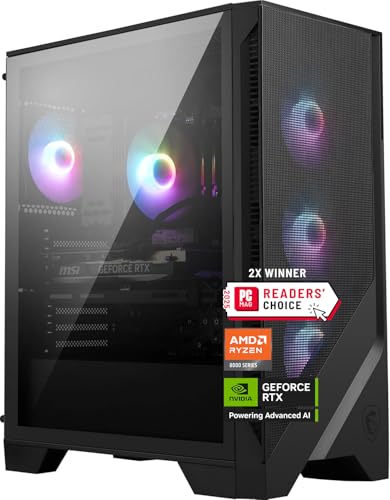
The MSI Codex Z2 is the cleanest performance step up from the CyberPowerPC Gamer Master. It pairs the same broad Ryzen 7 8700F class of processor with a GeForce RTX 5070, then adds 32GB of DDR5 and a 2TB M.2 NVMe SSD. That combination is aimed at someone who wants to install demanding games, stream, and multitask without immediately watching memory or storage disappear.
MSI lists the processor as an eight-core, 16-thread chip that boosts to 5.0GHz. For games, the RTX 5070 is the headline component, with Blackwell architecture, ray tracing support, and the graphics overhead to make higher settings more realistic. The 2TB drive is just as important for daily use. Modern games can consume a surprising amount of space, and this system leaves more breathing room than the 1TB drives used by most of the list.
Cooling is handled by an ARGB air cooler and four system fans, with three at the front and one at the rear. That is a sensible airflow arrangement for a performance tower. The case measures 19 inches high, 16 inches long, and 8.38 inches wide, so it is not a small desk companion. Plan the placement before ordering, especially if your desk has a narrow side compartment.
Compared with the Alienware Aurora RTX 5070, the MSI has twice the listed storage and a less distinctive chassis. The Alienware counters with its lighting system, performance profiles, and a 1000W Platinum rated power supply. The MSI is the more practical choice for a player who cares about game capacity and uncomplicated airflow. Skip it if visual design or a more guided software experience matters more than those fundamentals.
3. Alienware Aurora RTX 5070: Best Premium Design
Pros
- RTX 5070 graphics with 32GB DDR5
- 1000W Platinum rated power supply
- AlienFX lighting and custom profiles
- One-year onsite service
Cons
- Only 1TB of included storage
- Heavy 33.894-pound chassis
- Proprietary design may limit future changes
Best for: buyers who want a recognizable, polished gaming desktop with strong support.
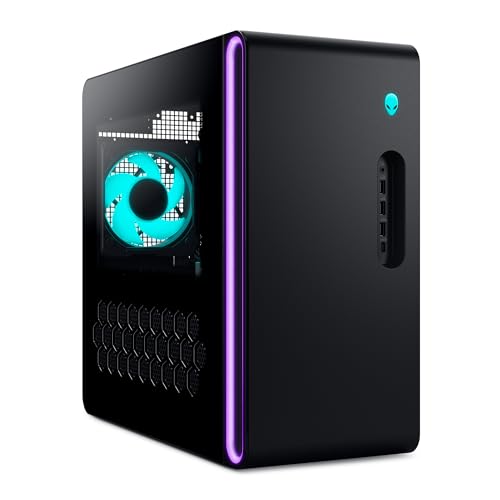
The Alienware Aurora RTX 5070 is the design-led alternative to the MSI Codex Z2. Its matte black Aurora chassis uses customizable AlienFX zones, including the stadium lighting that gives the system a distinctive presence under a desk or beside a monitor. This is not a generic case with a light strip added at the last minute. The lighting and software are part of the product's identity.
Inside, the configuration is serious. Intel's Core Ultra 7 265F is paired with 32GB of DDR5, a 1TB SSD, and Nvidia GeForce RTX 5070 graphics. Alienware describes the system as built for gaming, livestreaming, and multitasking, and the component mix supports that role. The 1000W Platinum rated power supply also gives the tower a substantial power foundation.
Alienware Command Center is useful for people who want profiles rather than a pile of separate utilities. It can control AlienFX lighting, provide performance modes, and create custom profiles for a game library. The Aurora measures 16.46 inches high, 18.05 inches long, and 7.76 inches wide. At 33.894 pounds, it is a heavy machine, but the relatively narrow width helps it fit beside a monitor in places where a broader case may not.
The MSI Codex Z2 gives you twice the SSD capacity, and the Skytech Azure 3 adds a 360mm liquid cooler. The Aurora answers with a higher-rated power supply, a more curated software layer, and Dell's one-year onsite service. Its 1TB drive is the obvious limitation, particularly for a large installed library. Choose it for the ownership experience and chassis design, not if maximum storage per component list is your only concern.
4. YAWYORE Ryzen 7 5700X: Best DDR4 Gaming Tower

Pros
- Eight-core, 16-thread Ryzen 7 processor
- 32GB of DDR4 memory
- RTX 5060 graphics with DLSS 4 support
- WiFi and Bluetooth included
Cons
- DDR4 platform is older than the DDR5 systems here
- Graphics card brand may vary
- 650W 80 Plus Bronze power supply
Best for: multitaskers who want a capable RTX 5060 tower without moving to DDR5.
The YAWYORE Ryzen 7 5700X is a useful reminder that a gaming desktop does not have to use the newest memory standard to be functional. The eight-core, 16-thread Ryzen 7 5700X reaches up to 4.6GHz, and 32GB of DDR4 memory gives it more multitasking room than the CyberPowerPC Gamer Master. For someone who keeps a voice chat client, browser, launcher, and game open together, that extra memory is meaningful.
Graphics come from a GeForce RTX 5060 with 8GB of GDDR7. The listing cites DLSS 4 multi-frame generation, ray tracing, and Reflex 2 latency optimization. Those features give the tower a contemporary gaming feature set, although the graphics card brand may vary. The 1TB M.2 NVMe PCIe SSD provides the expected quick loading behavior, while the MSI B550M-A PRO motherboard anchors the system on an older but familiar platform.
A 650W 80 Plus Bronze power supply is included, and built-in WiFi and Bluetooth handle wireless networking and peripheral pairing. The tower weighs about 24.95 pounds. The configuration is less visually refined than Alienware's Aurora and lacks the newer DDR5 foundation found in the MSI Codex Z2, but it has a sensible balance for gaming and general desktop work.
The key question is upgrade direction. The YAWYORE gives you 32GB immediately, but DDR4 is not the route to choose if you want the newest memory platform. The CyberPowerPC has a newer CPU and DDR5, while the YAWYORE counters with twice the memory. Pick the YAWYORE when multitasking matters now and you are comfortable with its older platform. Buyers planning extensive future changes should look at the AM5-based ZOTAC MEK instead.
5. Alienware Aurora RTX 5060 Ti: Best Compact Alienware Option
Pros
- Intel Core Ultra 7 265F processor
- RTX 5060 Ti graphics
- AlienFX lighting and Command Center
- One-year onsite service
Cons
- 16GB DDR5 is modest for intensive multitasking
- 1TB SSD leaves limited room for a large library
- Air cooling is less elaborate than the liquid-cooled alternatives
Best for: gamers who want Alienware design and software with a more moderate graphics configuration.
The Alienware Aurora RTX 5060 Ti shares the Aurora design with the faster RTX 5070 configuration, but its role is different. It is the entry point for buyers who like Alienware's lighting, profiles, and support but do not need the graphics hardware of the higher model. The clear side panel and stadium lighting make it more visually considered than most conventional towers.
Its Core Ultra 7 265F processor is paired with 16GB of DDR5, a 1TB SSD, and a GeForce RTX 5060 Ti. The processor gives the system plenty of general-purpose capability for games, streaming, and everyday work. The air-cooled design is simpler than the 240mm or 360mm liquid-cooled systems elsewhere in this list, which can be a benefit for buyers who would rather avoid adding a pump and radiator to the maintenance equation.
The Aurora chassis measures 16.46 inches high, 18.05 inches long, and 7.76 inches wide. The listed weight is 13.14 pounds, substantially lighter than the RTX 5070 Aurora. Its 500W Platinum rated power supply is matched to the configuration, but it leaves less power headroom than the 1000W unit in the RTX 5070 model.
The CyberPowerPC Gamer Master is the stronger all-round alternative for a buyer who wants more explicit connectivity and WiFi 6, while the ZOTAC MEK has twice the graphics memory and 32GB of DDR5. The Alienware's advantage is the integrated experience: AlienFX lighting, performance modes, game profiles, and onsite service. Skip it if you want the most memory or the easiest path to a large game collection.
6. Skytech Azure 3: Best Liquid Cooling

Pros
- RTX 5070 with 12GB of GDDR7
- Ryzen 7 7700X processor
- 360mm ARGB all-in-one cooler
- 32GB DDR5 6000 memory
Cons
- Large, heavy chassis
- Graphics card brand may vary
- Only 1TB of included storage
Best for: players who want a liquid-cooled RTX 5070 tower for sustained gaming sessions.
The Skytech Azure 3 makes cooling a central part of its design. A 360mm ARGB all-in-one cooler handles the Ryzen 7 7700X, while the case uses tempered glass and RGB lighting. It is the system for the buyer who wants a conspicuous gaming build rather than a quiet black box tucked under the desk.
The Ryzen 7 7700X is listed at 4.5GHz with a 5.4GHz turbo boost, and the GeForce RTX 5070 has 12GB of GDDR7. Skytech positions this combination for demanding games at 1440p, and the graphics memory gives it more breathing room than the 8GB RTX 5060 Ti cards in this roundup. The 32GB of DDR5 6000 memory is also a strong fit for current games, streaming, and ordinary creative work.
Storage is a 1TB Gen4 NVMe M.2 SSD. That is fast, but not especially spacious beside the MSI Codex Z2 or Horizon Autherium Dragon. Connectivity includes WiFi, HDMI, DisplayPort, USB 2.0, USB 3.0, and USB 3.2 ports, although the listing says additional port details may vary. It ships with a gaming keyboard and mouse, and Skytech lists a one-year parts and labor warranty with technical support.
The case is 17.8 inches high, 17.2 inches long, and 9.1 inches wide, with a listed weight of about 33.8 pounds. That width and weight make it less suitable for a cramped desk than the Alienware Aurora RTX 5070. The MSI Codex Z2 has more storage and a smaller width, but the Skytech is the better fit for someone who prioritizes the 360mm cooler and 12GB graphics memory.
7. YAWYORE Ryzen 5 5600GT: Best Starter Tower

Pros
- Six-core, 12-thread Ryzen 5 processor
- 1TB NVMe SSD
- Five 12cm ARGB fans
- Built-in WiFi and Bluetooth
Cons
- Uses integrated Radeon Vega graphics
- 16GB DDR4 memory
- 550W 80 Plus Bronze power supply
Best for: newcomers who need a usable desktop now and may add a graphics card later.
The YAWYORE Ryzen 5 5600GT is the outlier in this roundup because it does not include a discrete GeForce graphics card. Its Ryzen 5 5600GT uses integrated AMD Radeon Vega graphics, which makes this a starter tower rather than a direct rival to the RTX-equipped systems above. It can handle mainstream 1080p games at suitable settings, but it is not the right machine for demanding new releases at high visual quality.
The processor has six cores and 12 threads, with a listed 3.6GHz base clock and 4.6GHz turbo speed. That is enough for general desktop work, light content creation, and games that do not depend on a powerful GPU. The 16GB of DDR4 memory is a reasonable starting point, and the 1TB M.2 NVMe PCIe SSD gives the system quick storage rather than a slow mechanical boot drive.
Cooling is more elaborate than the graphics configuration might suggest. AMD air cooling is paired with five 12cm ARGB fans, with intelligent temperature control intended to keep heat managed. The MSI A520M-A PRO motherboard provides the platform, while built-in WiFi and Bluetooth cover wireless networking and device pairing. A 550W 80 Plus Bronze power supply is included.
The appeal is the open question of what you add later. A discrete graphics card would change the system's gaming ability, but the data does not specify a future card or a particular upgrade path beyond the motherboard and power supply details. The YAWYORE Ryzen 7 5700X is a much better immediate gaming machine, and the CyberPowerPC Gamer Master is the safer all-in-one choice. Choose this model only if integrated graphics are acceptable today.
8. Thermaltake View i570-170: Best High-End CPU Pairing

Pros
- Intel Core i9-14900KF processor
- RTX 5070 graphics
- 32GB DDR5 6000 memory
- 240mm closed-loop liquid cooling
Cons
- 1TB storage is limited for this class of system
- Fewer listed front-panel ports than some rivals
- Large performance-focused build
Best for: gamers who also run CPU-heavy creation, rendering, or multitasking workloads.
The Thermaltake View i570-170 is built around its processor. Intel's Core i9-14900KF sits beside a GeForce RTX 5070, 32GB of DDR5 running at 6000MT/s, and a 1TB NVMe M.2 SSD. For pure gaming, the GPU usually sets the ceiling, but a powerful Core i9 gives this tower a stronger case for video work, compiling, encoding, and other workloads that scale across CPU resources.
The memory configuration is well chosen for that mixed role. 32GB is enough room for games alongside creative applications, and the 6000MT/s specification is a useful match for a modern DDR5 system. Graphics outputs include DisplayPort and HDMI, while WiFi is built in. The listed front connections are two USB 3.0 ports, a headphone connection, and a microphone connection, so buyers with a large collection of wired devices should check their intended setup carefully.
Thermaltake uses a 240mm closed-loop liquid cooler and a case with a filtered, ventilated vertical radiator mount. That gives the Core i9 a more credible cooling arrangement than a basic air cooler. The system also includes RGB ToughRam memory and a power-supply cover, giving the internal layout a more finished appearance through the case window.
The Skytech Azure 3 uses a larger 360mm radiator and also has an RTX 5070, while the MSI Codex Z2 offers twice the SSD capacity. The Thermaltake's reason to exist is its Core i9, not a larger game library or a more compact chassis. It is a strong pick for a player who edits, renders, or streams heavily. If gaming is the only workload, the less CPU-heavy options make more sense.
9. Horizon Autherium Dragon: Best Storage Capacity

Pros
- 64GB of RAM
- 2TB NVMe SSD and 8TB hard drive
- RTX 5070 OC with 12GB
- 360mm liquid cooler and extensive fan setup
Cons
- Very large 35-pound chassis
- Core i9 model is not fully identified in the listing
- Large hard drive is slower than the NVMe SSD
Best for: users who need a huge local library for games, media, and creative projects.
The Horizon Autherium Dragon is the storage specialist. It combines 64GB of RAM with a 2TB M.2 NVMe SSD and an 8TB 7200RPM hard drive, giving it 10TB of listed capacity. That is a fundamentally different proposition from the 1TB towers in this roundup. Large game libraries, video projects, recordings, and media collections have somewhere to live without immediately requiring an external drive.
Its graphics card is an RTX 5070 OC with 12GB, and the listing says the factory overclock is intended to provide higher and more consistent frame rates. It supports ray tracing, DLSS 4, VR, and multi-monitor output through one HDMI and three DisplayPort connections. The system uses a Core i9 unlocked overclocking CPU with speeds up to 5.4GHz, although the exact processor model is not specified.
Cooling is ambitious. The system has a 360mm liquid cooler, eight fans for overall temperature control, and three fans on the GPU plus one in the power supply according to the listing. It also includes an 850W 80 Plus Gold power supply, USB-C 3.2, eight USB 3 ports, Ethernet up to 2.5Gbps, WiFi up to 2.4Gbps, and Bluetooth. Windows 11 Pro is installed, which adds a more business-oriented software foundation.
The trade-off is size. The tower measures 18 inches high, 17 inches long, and 18 inches wide, and weighs 35 pounds. The 8TB hard drive is excellent for capacity but slower than the NVMe drive, so current games and active projects should live on the 2TB SSD where possible. The ZOTAC MEK is neater for a smaller library and modern platform, while the Horizon wins decisively for storage. Pick it only if you have room for the chassis and a real need for that capacity.
10. ZOTAC MEK RTX 5060 Ti: Best 16GB Graphics Memory

Pros
- RTX 5060 Ti with 16GB of GDDR7
- Ryzen 7 9700X processor
- 32GB DDR5 6000 memory
- 360mm AIO cooler and WiFi 6E
Cons
- Only 1TB of SSD storage
- Larger than a basic office tower
- RTX 5060 Ti is below the RTX 5070 systems in raw GPU tier
Best for: gamers who want generous graphics memory and a modern AM5 platform.
The ZOTAC MEK RTX 5060 Ti takes an interesting middle path. Rather than using an RTX 5070, it gives the GeForce RTX 5060 Ti a full 16GB of GDDR7, then pairs it with AMD's Ryzen 7 9700X. That makes it a compelling option for 1080p and 1440p gaming where graphics memory capacity matters, particularly in games with detailed textures and longer expected ownership.
The Ryzen 7 9700X has eight cores, 16 threads, and a listed boost speed up to 5.5GHz. Its 32GB of DDR5 6000 memory is a strong match for current games and multitasking. Storage is a 1TB NVMe M.2 SSD, while the graphics card supports DLSS 4 multi-frame generation and real-time ray tracing. ZOTAC also lists HDMI 2.1b, DisplayPort 2.1b, and support for up to four displays.
The cooling setup is more advanced than its graphics tier suggests. A 360mm AIO liquid cooler uses three 120mm RGB fans, and the case has a magnetic easy-clean grill. A built-in digital display shows live system information and ambient temperature. WiFi 6E and Bluetooth 5.3 cover wireless connections, while the 850W 80 Plus Gold power supply provides a strong foundation for the configuration.
The MSI Codex Z2 and Skytech Azure 3 have RTX 5070 graphics, so they remain the stronger choices for buyers who want the highest GPU tier in this group. The ZOTAC answers with a newer Ryzen 7 9700X, 16GB of graphics memory, and a useful display panel. It measures 19.09 inches high and weighs 24.6 pounds, so it is not tiny. Choose it when graphics memory and platform freshness matter more than moving up to RTX 5070.
How to choose best gaming desktop
The right gaming desktop is determined less by a long feature list than by how the processor, graphics card, memory, storage, cooling, and case work together.
Graphics card
The graphics card has the greatest effect on gaming performance. An RTX 5070, such as the one in the MSI Codex Z2, Alienware Aurora RTX 5070, Skytech Azure 3, Thermaltake View i570-170, and Horizon Autherium Dragon, sits above the RTX 5060 and RTX 5060 Ti systems in this group.
Graphics memory matters too. The CyberPowerPC and Alienware RTX 5060 Ti systems list 8GB, while the ZOTAC MEK has 16GB. More graphics memory can help with high-resolution textures and demanding settings, but it does not turn a lower-tier GPU into a faster one.
Processor
A modern six-core processor is a reasonable starting point, while eight-core chips provide more room for streaming and multitasking. The Ryzen 7 8700F in the CyberPowerPC and MSI systems, Ryzen 7 9700X in the ZOTAC, and Core Ultra 7 265F in the Alienware towers all offer more headroom than the Ryzen 5 5600GT.
For CPU-heavy work, the Core i9-14900KF in the Thermaltake and the unlocked Core i9 configuration in the Horizon are the specialist choices. Do not choose a high-end processor solely because its name sounds impressive. Make sure the cooling system is also appropriate.
Memory
16GB is usable for gaming, but 32GB is a more comfortable target for new games, streaming, browsers, and background applications. The CyberPowerPC, Alienware RTX 5060 Ti, and YAWYORE Ryzen 5 5600GT use 16GB, while the MSI, Alienware RTX 5070, Skytech, Thermaltake, and ZOTAC offer 32GB.
The YAWYORE Ryzen 7 5700X has 32GB of DDR4, which helps today even though DDR4 is an older platform. The Horizon's 64GB is aimed at unusually heavy multitasking and large creative projects rather than ordinary gaming alone.
A strong gaming tower starts with a graphics card you will keep, then adds enough memory and cooling to avoid making that card wait.
Storage
A 1TB SSD is a practical minimum for Windows and several games, but large modern installations can consume it quickly. The MSI Codex Z2 stands out with a 2TB NVMe SSD, while the Horizon combines a 2TB NVMe drive with an 8TB hard drive.
Use the fastest SSD space for games you play regularly and active projects. A hard drive remains useful for recordings, media, and archives, but it is not a substitute for NVMe responsiveness. If you already have a large library, storage should be part of the decision rather than an afterthought.
Cooling and power
Air cooling is simpler and can be perfectly suitable, as shown by the Alienware RTX 5060 Ti. Larger liquid coolers in the Skytech, ZOTAC, and Horizon systems are more appropriate for sustained workloads and higher-power processors. The Thermaltake uses a 240mm closed-loop cooler for its Core i9.
Power supply capacity and rating should match the installed components. The Alienware RTX 5070's 1000W Platinum unit offers the largest stated reserve, while the CyberPowerPC and MSI list their connectivity and cooling in more detail than some rivals. Case dimensions matter too. A 35-pound, 18-inch-wide tower needs a very different home from a narrow desktop enclosure.
For a wider look at the difference between prebuilt categories, how prebuilt gaming towers differ from ordinary desktop PCs can help establish the basics. If you are still deciding between a tower and a portable system, what a gaming laptop gives up for portability is the more relevant comparison.
Ports and wireless connections
Check the actual connections before choosing a tower. The CyberPowerPC has USB-C, multiple USB-A ports, WiFi 6, and Bluetooth 5.3. The ZOTAC adds WiFi 6E, Bluetooth 5.3, HDMI 2.1b, and DisplayPort 2.1b with support for up to four displays.
The Horizon lists USB-C, eight USB 3 ports, 2.5Gbps Ethernet, WiFi, and Bluetooth. The Thermaltake's listed front connections are more limited. A desktop can use a hub, but a tower with the ports you need is simpler and leaves less clutter on the desk. Your choice of desk space and peripheral layout should inform the case size and port requirements.
Frequently asked questions
Is the CyberPowerPC Gamer Master a good first gaming desktop?
Yes. Its Ryzen 7 8700F, RTX 5060 Ti, 16GB DDR5, and 1TB PCIe 4.0 SSD form a balanced starting point for 1080p gaming. The main limitation is that 16GB of memory gives less multitasking headroom than the 32GB systems.
Which desktop has the most storage?
The Horizon Autherium Dragon has the most listed capacity, with a 2TB NVMe SSD and an 8TB 7200RPM hard drive. The MSI Codex Z2 has the largest single SSD at 2TB. The Horizon's hard drive is better suited to archives and media than games that need the fastest loading.
Is 16GB of RAM enough for gaming?
It is enough for many games, especially when you are not running several demanding applications at once. 32GB is more comfortable for streaming, browser tabs, recording, and newer titles. The CyberPowerPC and both Alienware configurations use 16GB, while several rivals include 32GB.
Which desktop is best for 1440p gaming?
The RTX 5070 systems are the strongest choices for 1440p in this group. The MSI Codex Z2, Alienware Aurora RTX 5070, Skytech Azure 3, Thermaltake View i570-170, and Horizon Autherium Dragon all use RTX 5070 graphics, with the Skytech and Horizon listing 12GB of graphics memory.
Is the YAWYORE Ryzen 5 5600GT a gaming PC?
It is a gaming-capable desktop, but it uses integrated Radeon Vega graphics rather than a discrete graphics card. That makes it suitable for mainstream 1080p games at appropriate settings, not a direct competitor to the RTX-equipped towers. It is best treated as a starter system that may later receive a graphics upgrade.
Does liquid cooling matter in a gaming desktop?
Liquid cooling can help manage heat from powerful processors during sustained workloads, especially in the Skytech, ZOTAC, Thermaltake, and Horizon systems. It is not automatically necessary for every gaming tower. A well-matched air-cooled system, such as the Alienware RTX 5060 Ti, can be the simpler choice.
How much SSD storage should a gaming desktop have?
1TB is a reasonable starting point, but it can fill quickly if you install several large games. The MSI's 2TB SSD is more comfortable, and the Horizon combines fast storage with a large hard drive. Keep frequently played games on the NVMe drive and use slower storage for media and archives.
The bottom line
The Best gaming desktop for most buyers here is the CyberPowerPC Gamer Master. Its Ryzen 7 8700F, RTX 5060 Ti, fast 1TB SSD, WiFi 6, and useful port selection create a balanced system without an obvious mismatch. Choose the MSI Codex Z2 instead if you want RTX 5070 graphics, 32GB of memory, and a 2TB SSD from the start.
The ZOTAC MEK RTX 5060 Ti is the more interesting alternative for buyers who value 16GB of graphics memory and a Ryzen 7 9700X, while the Horizon Autherium Dragon is the specialist pick for huge local storage. The Alienware Aurora RTX 5070 remains the style and support choice, and the Skytech Azure 3 is the liquid-cooled option for sustained 1440p play.
If you are undecided, choose the CyberPowerPC for balanced 1080p gaming, or move to the MSI Codex Z2 when higher graphics performance and storage matter more.
As an Amazon Associate we earn from qualifying purchases.