

A shipping label should take seconds to print, not a trip through a full-size printer, a sheet of adhesive paper, and a trimming session. The right thermal machine can turn a phone or laptop into a compact shipping station, while a tape label maker handles bins, folders, cables, and school supplies.
Our Best label printer picks cover both jobs. The NULLTONEX leads the shipping models with fast printing, dual connectivity, and a useful design app. The list also includes capable alternatives from Nelko, JADENS, Phomemo, Brother, Rollo, SUPVAN, and KNAON.
The NULLTONEX Thermal Shipping Label Printer is our top pick, with options ranging from high-volume 4 by 6 shipping printers to pocket-friendly tape label makers.
Comparison table
| # | Product | Award | Print format | Connectivity | Best for |
|---|---|---|---|---|---|
| 1 | NULLTONEX Thermal Shipping Printer | Best overall | 4 by 6 labels, 203 DPI | Bluetooth, USB | Small businesses |
| 2 | Nelko PL70E | Best app workflow | 1.54 to 4.1 inch labels, 203 DPI | Bluetooth, USB | Mixed home and shipping use |
| 3 | JADENS Bluetooth Printer | Best platform support | 1.57 to 4.1 inch labels, 203 DPI | Bluetooth, USB | Online sellers |
| 4 | Brother PT-D610BT | Best business tape maker | Labels up to 1 inch wide | Bluetooth, USB | Office organization |
| 5 | Phomemo 241BT | Best operating-system range | 1 to 4.6 inch labels, 203 DPI | Bluetooth, USB | Mixed-device households |
| 6 | Brother QL-820NWB | Best connectivity | Up to 300 DPI, labels up to 3 feet | Bluetooth, Wi-Fi, Ethernet, USB | Offices with several users |
| 7 | SUPVAN T50M Pro | Best for home organization | 3/4 to 2 inch labels | Bluetooth | Bins, bottles, and school supplies |
| 8 | Rollo USB Printer | Best wired workhorse | 1.57 to 4.1 inch labels, 203 DPI | USB | Desktop shipping stations |
| 9 | KNAON Thermal Printer | Best app template library | 1.5 to 4.2 inch labels | Bluetooth, USB | DIY labels and shipping |
| 10 | Nelko P21 | Best portable tape maker | Fixed tape formats | Bluetooth | Mobile labeling |
1. NULLTONEX Thermal Shipping Printer: Best Overall

Pros
- Prints up to 150 mm per second
- Bluetooth and USB connections
- 1, 800 plus templates in the app
- Supports roll and fanfold labels
- Includes 25 sheets of 4 by 6 labels
Cons
- Black and white printing only
- Bluetooth printing requires the FlashLabel Pro app
- The listed dimensions are larger than several rivals
Best for: small businesses that need a fast 4 by 6 shipping printer with phone and computer support.
The NULLTONEX Thermal Shipping Printer gets the important shipping-printer decisions right. It is built around standard 4 by 6 labels, connects to a phone over Bluetooth, and can switch to USB when a desktop workflow matters more than wireless convenience. That makes it a sensible single printer for a home office that alternates between marketplace orders and ordinary address or barcode labels.
Its 203 DPI direct thermal printhead is appropriate for shipping labels, where sharp text and scannable barcodes matter more than photographic detail. The claimed speed reaches 150 mm per second, or up to 72 4 by 6 labels per minute. Those figures are most useful when a seller has a stack of packages waiting, though actual output will depend on the source document and label handling.
The FlashLabel Pro app is a meaningful part of the package. It offers more than 1, 800 templates, over 300 fonts, and offline storage for designs, so the printer is not limited to labels exported from Amazon, Shopify, Etsy, or USPS. It accepts label widths from 1.57 to 4.3 inches, and the included 25 sheets give a new owner a way to check alignment before buying a larger supply.
The weakness is flexibility outside monochrome shipping work. There is no color output, and Bluetooth devices must use the app rather than pairing as a generic printer. The physical dimensions listed for the unit are also notably larger than the compact Nelko PL70E. Choose the NULLTONEX over the JADENS when speed and the larger template library matter more than a slightly more familiar setup path. It is the Best label printer here for a busy seller who wants one capable desktop machine.
2. Nelko PL70E: Best App Workflow

Pros
- Bluetooth printing from iOS and Android
- USB support for Windows, Mac, and Chrome OS
- Prints up to 150 mm per second
- Accepts roll and fanfold labels
- Compact desktop footprint
Cons
- Mac Bluetooth printing is not supported
- Documents must be saved as PDFs before app import
- Bluetooth requires the NELKO app
Best for: users who want a compact shipping printer with a clear phone-first workflow.
The Nelko PL70E is a straightforward 4 by 6 thermal printer, but its connection rules deserve attention before buying. iPhone and Android users print through the NELKO app, while Windows computers can use Bluetooth or USB. Mac users need USB, including Macs with M1 or M2 processors, so this is not the right pick for someone expecting universal wireless printing.
Print quality comes from a 203 DPI direct thermal system, and the advertised speed is 150 mm per second, or as many as 72 4 by 6 labels per minute. The printer handles both fanfold and roll labels, with supported widths from 1.54 to 4.1 inches. That covers standard shipping labels along with smaller barcode, address, and name labels.
The app workflow is less automatic than a standard system print dialog. Shipping platforms such as Amazon, eBay, Shopify, USPS, UPS, and Etsy require the label to be saved as a PDF, then imported into the NELKO editor. That extra step is manageable, but it matters when several packages need to go out quickly. The included USB drive contains drivers and instructional videos, which should help with initial setup.
At roughly 9 inches wide, 6 inches deep, and 5 inches tall according to the listed dimensions, the PL70E is easy to place on a desk. The JADENS offers a similar 203 DPI and 4 by 6 focus, while the Nelko is the more appealing choice for someone who prefers a compact app-centered routine. Skip it if Mac wireless printing is essential.
3. JADENS Bluetooth Printer: Best Platform Support

Pros
- Supports roll and fanfold labels
- Works with many shipping platforms
- Bluetooth and USB connectivity
- 203 DPI print resolution
- One-year warranty listed
Cons
- Phones need the JADENS app
- Label calibration is needed when changing sizes
- The unit weighs 2 kilograms
Best for: online sellers working across several marketplaces and shipping services.
The JADENS Bluetooth Printer is aimed squarely at online sellers. It supports shipping services and marketplaces including Endicia, Dazzle, ShipStation, ShippingEasy, Shippo, ShipWorks, Ordoro, eBay, Amazon, and Shopify. That broad list is more useful than a generic compatibility claim when a seller already has a particular fulfillment workflow.
Its Japanese thermal printhead produces 203 DPI output without ink or toner. The machine handles labels from 1.57 to 4.1 inches wide, including the familiar 4 by 6 shipping format. Bluetooth works with Windows 8 or later and Mac, while Android and iPhone users print through the JADENS printer app. USB supports Windows 7 and newer plus Mac OS 10.9 and newer.
Changing label sizes requires a long press of the feed button to identify and calibrate the stock. That is not a dealbreaker, but it means the printer is less convenient for someone who jumps constantly between shipping and small-format labels. The included setup videos and troubleshooting material should make the first installation less intimidating, and the listed one-year warranty adds a useful support path.
Compared with the Nelko PL70E, the JADENS has a more explicit shipping-platform focus, while the NULLTONEX is faster on paper and offers a larger stated template collection. The JADENS is the better fit for a seller whose priority is platform breadth rather than elaborate in-app design. Its 2 kilogram weight also makes it less appealing as a printer that moves around the house.
4. Brother PT-D610BT: Best Business Tape Maker

Pros
- Built-in QWERTY keyboard
- Large two-line color display
- Automatic cutter
- Stores up to 90 labels
- 175 business templates
Cons
- Labels are limited to 1 inch wide
- Larger and heavier than pocket label makers
- Not intended for 4 by 6 shipping labels
Best for: offices that need durable-looking tape labels and repeatable business templates.
The Brother PT-D610BT is a different kind of label printer from the shipping machines above. Its built-in QWERTY keyboard and full color display let a user create labels without reaching for a phone. That makes it especially practical at a shared desk, where a quick asset tag or cable label should not depend on one person's app.
The screen shows up to 20 characters across two lines, giving users a useful preview before printing. The automatic cutter keeps the finished labels consistent, and built-in memory stores up to 90 frequently used labels. Brother also includes 175 business-oriented templates for inventory and asset management, so repeated office tasks need less manual formatting.
Bluetooth and USB provide the connection options, while the design system includes 17 fonts, 17 styles, 160 frames, and 900 symbols. Labels can be up to 1 inch wide. That width is well suited to folders, shelves, cables, equipment, and storage containers, but it rules out the 4 by 6 shipping work handled by the NULLTONEX and Rollo.
The main compromise is physical size. The listed unit is 12.6 inches high, 10.2 inches long, and 4.8 inches wide, with a weight of 2.134 pounds. It is a desktop office tool, not something to carry between rooms. Choose it over the SUPVAN T50M Pro when typing speed, previewing, and repeatable business labels matter more than portability.
5. Phomemo 241BT: Best Operating-System Range

Pros
- Supports Windows, Mac, Chrome OS, and Linux
- Bluetooth and USB printing
- Accepts labels from 1 to 4.6 inches wide
- Prints up to 150 mm per second
- Supports common shipping platforms
Cons
- Computer users need a driver
- Chrome OS requires a browser extension
- Black and white output only
Best for: homes and small offices with a mix of computers and mobile devices.
The Phomemo 241BT stands out for the number of operating systems it covers. It supports mobile printing through Bluetooth with the Labelife app, while USB handles PC, Windows, Mac OS, Chrome OS, and Linux. Chrome OS needs the Labelife extension, and computer users need the appropriate driver, so the range is broad but not entirely plug and play.
For shipping, its 1 to 4.6 inch label range is unusually flexible among these picks. It can print 4 by 6 labels along with smaller text, barcode, QR code, and form labels. The direct thermal system prints monochrome output at a stated 203 DPI, and the claimed speed reaches 150 mm per second or 72 4 by 6 labels per minute.
The Labelife app offers templates for home and business work, and the printer works with eBay, Shopify, Amazon, Etsy, UPS, USPS, and FedEx. Phomemo recommends its own thermal paper for consistent results, which is worth remembering when choosing supplies. The unit is listed at about 1.59 pounds, though its stated dimensions are larger than the compact KNAON.
The Phomemo is more broadly compatible than the Nelko PL70E, especially for Linux and Chrome OS households. The NULLTONEX has a similarly stated speed and a larger template count, while the Phomemo accepts a slightly wider maximum label. It is a sensible choice when device variety is the problem, but less compelling if every print job will come from one Windows computer.
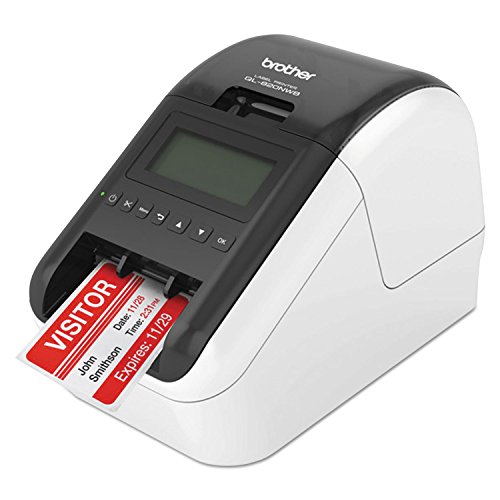
6. Brother QL-820NWB: Best Connectivity
Pros
- Bluetooth, Wi-Fi, Ethernet, and USB
- Standalone monochrome LCD
- Prints up to 110 labels per minute
- 300 DPI black text output
- Can print labels up to 3 feet long
Cons
- Much less focused on mobile shipping than newer rivals
- More substantial desktop hardware
- Black and red printing needs DK 2251 stock
Best for: offices that need several ways to connect one shared label printer.
The Brother QL-820NWB is the office infrastructure pick. It has Bluetooth, Wi-Fi, Ethernet, and USB, plus a USB host interface for a peripheral such as a scanner. That collection makes it easier to place the printer in a shared office rather than beside one specific computer.
A monochrome LCD allows standalone use, so some tasks do not require a computer. The printer reaches up to 110 standard address labels per minute with black text at 300 DPI. That resolution is higher than the 203 DPI shipping printers in this group, and it should produce clean small text on compatible Brother stock.
The QL-820NWB can print labels up to 3 feet long, expanding its use beyond ordinary addresses and package markings. It can also produce black and red labels when used with DK 2251 stock. This is a specialized feature, not color printing in the usual sense, but it can make warnings or classifications more visible.
Its age and office focus are the key limitations. The Rollo is a simpler dedicated USB shipping machine, while the QL-820NWB is the better fit for a networked workplace with several users and varied label jobs. Choose it for connectivity and standalone control, not for a lightweight phone-first setup.
7. SUPVAN T50M Pro: Best for Home Organization

Pros
- Compact 0.75 to 2 inch label range
- Free app with no registration
- More than 30 fonts and 50 frames
- Supports icons, barcodes, and QR codes
- Auto label size recognition
Cons
- Not suitable for 4 by 6 shipping labels
- Bluetooth app is central to operation
- Narrower label range than shipping printers
Best for: organizing containers, bottles, folders, cables, and classroom supplies.
The SUPVAN T50M Pro is the compact tape maker to choose when “label printer” means organizing a home rather than mailing packages. Its supported widths run from three quarters of an inch to 2 inches, a range that fits storage bins, food containers, folders, name tags, and many office supplies.
The free app is designed for quick visual editing. It includes more than 30 fonts, 50 frames, and 660 icons, with support for adding images from a phone, tablet, or computer. Auto label size recognition removes one common setup nuisance, especially for users who switch between square, round, address, cable, jewelry, and file labels.
Its direct thermal system needs no ink or toner, and the app is intended to produce clear monochrome labels. It can also handle QR codes, barcodes, logos, and product information. That gives it more range than a basic text-only tape maker, though it still cannot replace a 4 by 6 shipping printer such as the Phomemo 241BT.
The T50M Pro is listed at about 0.95 pounds and has a compact footprint, making it much easier to move than the Brother PT-D610BT. The tradeoff is that nearly everything depends on the app, and the label widths are too narrow for shipping cartons. Pick it for household order and school supplies, not an online shop's daily dispatch queue.
For larger folders and filing systems, the right label format matters as much as the printer. A guide to keeping file labels readable and easy to replace can help before choosing a tape width.
8. Rollo USB Printer: Best Wired Workhorse

Pros
- Fast 4 by 6 printing
- 203 DPI output
- USB setup for Windows and Mac
- Supports labels from 1.57 to 4.1 inches
- Compatible with major marketplaces
Cons
- USB only
- No included wireless connection
- Less useful away from a fixed desk
Best for: sellers who want a dedicated computer-connected shipping station.
The Rollo USB Printer takes the opposite approach from the Bluetooth models. It connects to a Windows or Mac computer over USB, uses a downloadable driver, and stays focused on dependable desktop shipping. That simplicity is appealing when a seller prints from one workstation and has no reason to involve a phone.
Its 203 DPI printhead and claimed 150 mm per second speed suit 4 by 6 shipping labels. Rollo says it can produce one 4 by 6 label per second, while the supported width range from 1.57 to 4.1 inches allows barcode, warehouse, sticker, and product labels too. The direct thermal design keeps ink and toner out of the workflow.
The printer works with FedEx, UPS, USPS, Rollo Ship Manager, ShipStation, ShippingEasy, Shippo, ShipWorks, Amazon, Shopify, Etsy, and eBay. The Rollo Ship app adds a shipping workflow, but the printer itself remains a conventional USB device. That makes it less flexible than the NULLTONEX or KNAON for mobile printing, yet potentially easier to keep consistent in a fixed office.
At about 2.2 pounds and just under 8 inches long according to the listed dimensions, it is compact enough for a shipping desk. The main weakness is not print capability but connection choice. The JADENS and Phomemo are better for wireless households, while the Rollo is the cleaner option for a dedicated wired station. It is also a useful reminder that choosing the right printer for a home office setup depends heavily on where documents originate.
9. KNAON Thermal Printer: Best App Template Library

Pros
- More than 3, 000 app templates
- Bluetooth and USB connections
- Supports Windows, Mac, Chrome OS, and Linux over USB
- Prints up to 180 mm per second
- Includes 10 test papers
Cons
- Bluetooth printing requires the FlashLabel Pro app
- Shipping PDFs must be imported into the app
- Listed weight is 2.75 pounds
Best for: users who want a large library of DIY templates alongside shipping support.
The KNAON Thermal Printer is built around its app library. FlashLabel Pro offers more than 3, 000 templates, 5, 000 icons, and 100 fonts, which gives it an unusually broad design range for a compact thermal printer. It can create shipping, mailing, barcode, thank-you, name, and other small labels rather than serving only as a package printer.
The machine supports paper widths from 1.5 to 4.2 inches and claims a maximum speed of 180 mm per second. Standard 4 by 6 shipping labels fit within that range, while smaller formats cover many home and business jobs. The printer connects by Bluetooth through the app, or by USB to Windows, Mac, Chrome OS, and Linux. Chrome OS needs the FlashLabel extension.
The app-centered workflow has one clear catch. Labels from shipping platforms need to be saved as PDF files, then imported into FlashLabel Pro. That adds a step compared with a normal computer print command. The built-in USB drive with drivers and tutorial videos should make initial setup easier, and the package includes 10 test papers.
The KNAON is compact, with listed dimensions of 7.17 by 3.9 by 3.43 inches, but its listed 2.75 pound weight is heavier than the Phomemo. It beats the Phomemo on stated speed and template count, while the NULLTONEX offers a more balanced shipping-first package. Choose KNAON when custom designs matter as much as address labels.
10. Nelko P21: Best Portable Tape Maker

Pros
- Pocket-friendly portable design
- Built-in rechargeable battery
- 203 DPI monochrome printing
- More than 750 templates
- Supports 29 languages in the app
Cons
- Does not work with computers
- Not compatible with Google phones running Android 14
- Continuous label tape is not supported
- Charging adapter is not included
Best for: mobile labeling at home, school, and small office spaces.
The Nelko P21 is the smallest and most mobile option here. Its listed weight is 0.72 pounds, and the compact body is designed to slip into a pocket or drawer. A built-in rechargeable battery means it can be used away from a desk, though the package does not include a charging adapter.
The P21 prints at 203 DPI using direct thermal technology, with black text on compatible tape. Color effects come from patterned label tape rather than color ink. The supported fixed label lengths include 14 by 40 mm, 14 by 50 mm, and 14 by 75 mm formats, so it is designed for tags and short labels rather than continuous tape or 4 by 6 shipping stock.
The NELKO app is unusually extensive for such a small machine. It includes more than 3, 600 icons, 700 borders, 5, 500 materials, over 750 templates, and 29 languages. It can create text, QR code, barcode, image, time, and border designs. The printer connects to iOS and Android through the app, but it does not work with computers.
Compatibility needs careful checking. Google phones running Android 14 are listed as unsupported, and iOS users need the latest app version for the intended experience. The SUPVAN T50M Pro is a better fit for wider household labels, while the P21 wins when the printer needs to travel. It is a focused pocket label maker, not a general shipping device.

How to choose best label printer
The right machine depends first on the labels you need, then on how you create them and where the printer will sit.
Label format
Shipping printers should support standard 4 by 6 labels and, ideally, smaller widths for barcodes and address tags. The NULLTONEX, Nelko PL70E, JADENS, Phomemo, Rollo, and KNAON all cover that shipping format. Tape makers such as the SUPVAN and Nelko P21 use narrower or fixed formats suited to organization.
Print resolution
A 203 DPI thermal printhead is common here and is sufficient for ordinary addresses, text, and shipping barcodes. The Brother QL-820NWB reaches 300 DPI for black text, which is more useful for smaller office labels than for a basic 4 by 6 workflow. Resolution cannot fix a poorly formatted source file, so document layout still matters.
Connection method
Bluetooth is useful when labels originate on a phone or tablet, but these printers generally require a companion app. USB is more predictable for a computer, and the Rollo makes that wired approach its entire design. Offices should consider Ethernet or Wi-Fi, which gives the Brother QL-820NWB a clear advantage.
A wireless label printer is only convenient if its app workflow matches the device that creates your labels.
Speed and workload
A claimed speed around 150 mm per second is common among the shipping models and is enough for regular small-business batches. The KNAON lists up to 180 mm per second, while the Brother QL-820NWB lists up to 110 standard address labels per minute. Occasional home labeling does not need the same throughput as a daily packing station.
App and template tools
App libraries matter for custom labels, not just shipping PDFs. The KNAON lists more than 3, 000 templates, the NULLTONEX lists more than 1, 800, and the Nelko P21 focuses on compact tape labels with more than 750 templates. For office users who prefer working directly on the printer, the PT-D610BT's keyboard, screen, memory, and built-in templates are more important than app counts.

Frequently asked questions
Do thermal label printers need ink?
No. The shipping and tape models in this roundup use direct thermal printing, which creates monochrome marks on compatible heat-sensitive labels or tape. That removes ink and toner from the normal workflow, but it does require the correct thermal media.
Can these printers make 4 by 6 shipping labels?
The NULLTONEX, Nelko PL70E, JADENS, Phomemo 241BT, Rollo USB, and KNAON support 4 by 6 shipping labels. The Brother tape makers and SUPVAN T50M Pro use narrower label formats and are intended for organization rather than package shipping.
Is Bluetooth printing automatic?
Usually not. Several models require labels to be opened or imported in a companion app. The Nelko PL70E, JADENS, Phomemo, and KNAON each describe app-based Bluetooth printing, so check the required software before assuming a phone can print directly.
Can a label printer work with a Mac?
The answer varies by model and connection. The Rollo supports Mac through USB, the Phomemo supports Mac through Bluetooth or USB, and the JADENS supports Mac through Bluetooth or USB. The Nelko PL70E supports Mac through USB, but its listing says Mac printing does not work over Bluetooth.
Are label printers useful beyond shipping?
Yes. Several shipping models accept smaller label widths for barcodes, mailing labels, name tags, and product labels. Tape-focused models such as the Brother PT-D610BT, SUPVAN T50M Pro, and Nelko P21 are better for folders, bins, cables, classroom supplies, and household organization.
Which printer is easiest for a shared office?
The Brother QL-820NWB has the strongest connection selection, including Bluetooth, Wi-Fi, Ethernet, and USB. The Brother PT-D610BT is easier for users who want a built-in keyboard and screen instead of relying on a phone or computer.

The bottom line
The NULLTONEX Thermal Shipping Printer is the strongest all-around pick for a small business shipping station. Its 203 DPI output, 150 mm per second claimed speed, Bluetooth and USB connections, broad label-width support, and FlashLabel Pro templates cover more everyday tasks than the simpler shipping models.
The Brother QL-820NWB makes more sense for a shared office that needs network connectivity, standalone controls, and higher-resolution black text. For home organization, the SUPVAN T50M Pro is the better fit, while the Nelko P21 is the one to choose when portability matters most.
If you are still deciding among the Best label printer options, choose the NULLTONEX for shipping volume, the Brother QL-820NWB for office connectivity, or the SUPVAN for household labels.
As an Amazon Associate we earn from qualifying purchases.