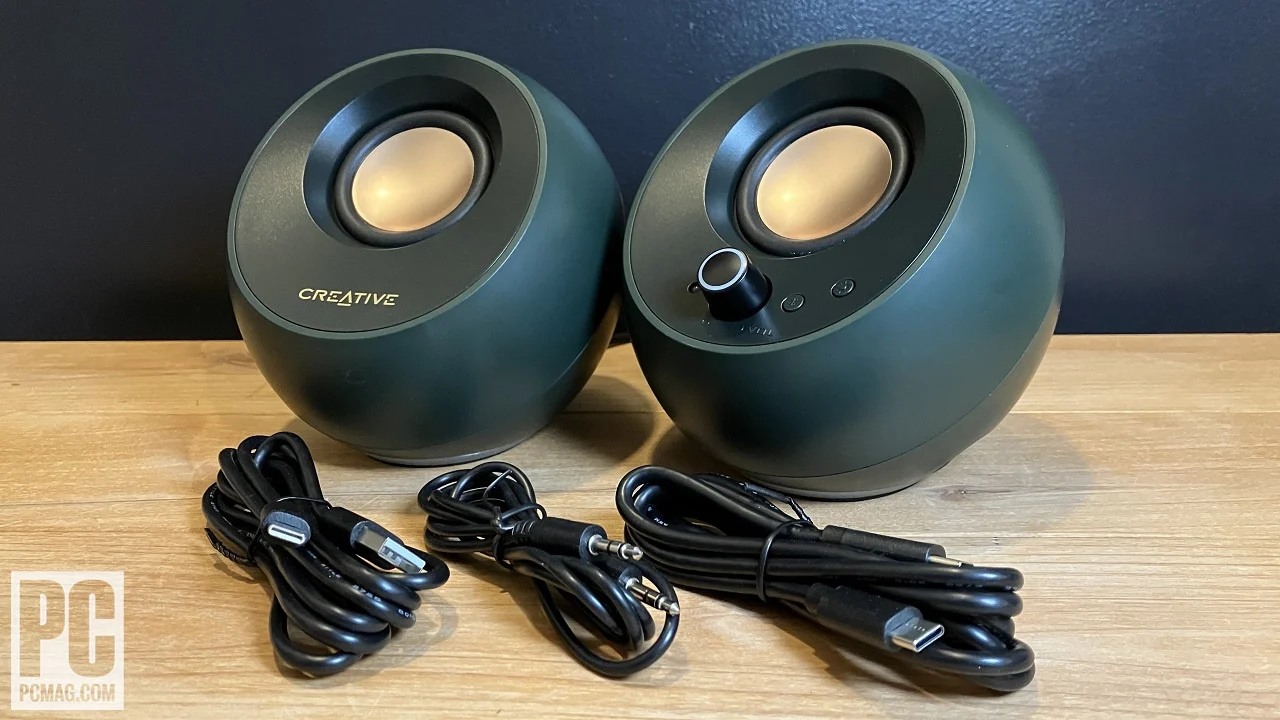

Laptop speakers are often thin, quiet, and aimed away from you. A small external set can make dialogue easier to follow, give music some space, and keep game audio from sounding like it is coming through a phone.
We compared 10 options ranging from tiny USB soundbars to full stereo bookshelf speakers. The Best laptop speakers depend on whether you want a clutter-free setup, wireless playback, conference-call features, or stronger low-end sound.
The Amazon Basics Stereo 2.0 is our top pick for most laptop users, while the other nine cover monitor mounting, Bluetooth, conferencing, compact desks, and room-filling stereo sound.
| # | Product | Award | Connection | Form factor | Best for |
|---|---|---|---|---|---|
| 1 | Amazon Basics Stereo 2.0 | Best overall | USB power, 3.5mm audio | Two speakers | Everyday laptop audio |
| 2 | XKX Monitor Clip Soundbar | Best space saver | USB, USB-C adapter | 9-inch soundbar | Monitor-mounted setups |
| 3 | Dell SP3022 Speakerphone | Best for calls | USB-A, USB-C | Desk soundbar | Meetings and hybrid work |
| 4 | Tylubio USB Bluetooth Soundbar | Best RGB soundbar | USB, USB-C, Bluetooth | 15.7-inch soundbar | Desk setups with lighting |
| 5 | LENRUE G11 | Best compact wired bar | USB, 3.5mm audio | 14.96-inch soundbar | Simple desktop audio |
| 6 | OHAYO 60W Stereo | Best for powerful sound | Bluetooth, AUX, RCA, USB | Two speakers | Music and gaming |
| 7 | Logitech Z207 | Best wireless stereo pair | Bluetooth 4.2, 3.5mm | Two speakers | Flexible multi-device use |
| 8 | Nylavee PC Soundbar | Best one-knob control | Bluetooth 5.0, AUX, USB power | 16.54-inch soundbar | Bedroom and office desks |
| 9 | LIELONGREN USB Soundbar | Best one-cable setup | USB audio and power | Mini soundbar | Plug-and-play simplicity |
| 10 | Amazon Basics AC Speakers | Best headphone-friendly pair | AC power, 3.5mm audio | Two speakers | Headphone switching |
1. Amazon Basics Stereo 2.0: Best Overall

Pros
- Separate left and right speakers create useful stereo width
- USB power keeps the setup simple
- Inline volume control is easy to reach
- Bottom radiators add some bass presence
Cons
- Requires both USB power and a 3.5mm audio connection
- No Bluetooth or headphone jack
- Small cabinets cannot match the OHAYO 60W Stereo for scale
Best for: laptop owners who want a straightforward stereo upgrade without a large desktop footprint.
The Amazon Basics Stereo 2.0 is the easiest recommendation when the laptop's built-in audio is the main problem. It is a conventional pair rather than a single bar, so voices, instruments, and game effects have more left-to-right separation. The speakers are small enough for a laptop table, but they still need room on both sides of the computer.
Power comes from a USB port, while audio enters through a 3.5mm auxiliary connection. That two-cable arrangement is less tidy than the one-cable LIELONGREN USB Soundbar, but it works with a wide range of laptops and avoids relying on a particular operating system's USB audio behavior. The inline volume control is also more convenient than reaching for the laptop's keyboard every time.
Each speaker measures about 3.94 inches long, 2.6 inches wide, and 2.88 inches high, with the pair weighing about 1.43 pounds. A metal finish and padded base help it feel more deliberate than a bare plastic desktop accessory. The bottom radiator is intended to add a springier bass character, though these cabinets remain compact and cannot produce the fuller low end of the OHAYO 60W Stereo.
The main weakness is connectivity. There is no Bluetooth, no headphone port, and no single-cable audio connection. The Logitech Z207 is a better fit if wireless playback matters, and the XKX Monitor Clip Soundbar is neater for a monitor-centered desk. Choose this pair when you want dependable everyday sound, visible stereo separation, and controls that do not get buried behind the laptop.
2. XKX Monitor Clip Soundbar: Best Space Saver
Pros
- Clip-on design preserves desk space
- USB-C adapter supports newer computers
- Adaptive channel switching keeps left and right orientation correct
- Front touch controls handle mute and volume
Cons
- USB audio and power are required
- Not compatible with monitors, TVs, or projectors
- A single bar has less stereo separation than two speakers
Best for: small desks where a monitor-mounted speaker is more practical than a pair of desktop units.
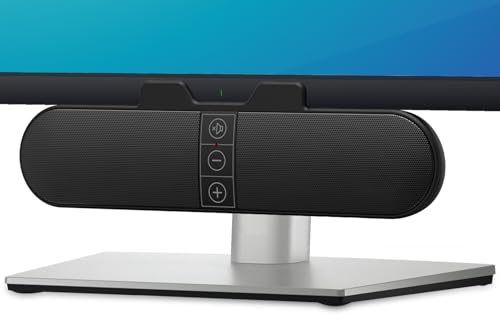
The XKX Monitor Clip Soundbar solves a physical problem that many small desks have: there is nowhere useful to put two speakers. Its clamp can sit on the top, side, or bottom of a monitor, and the design can also stand on the desk. That makes it a particularly sensible choice for a laptop connected to an external display.
At about 9.17 inches wide, 1.65 inches long, and 2.83 inches high, it is narrow enough to fit beneath many displays without taking over the front edge. The built-in USB-C to USB adapter is important for newer laptops that have moved away from full-size USB ports. The product is listed as compatible with Windows, macOS, ChromeOS, and Linux, but it is not intended to connect directly to a monitor, TV, or projector.
Its dual ultra-magnetic drivers and dual passive radiators are designed to produce louder sound with deeper bass than the thin speakers in a laptop. The G-sensor based adaptive channel switching is an unusual practical touch. If the bar is mounted above or below the monitor, it is intended to keep the left and right channels positioned correctly rather than forcing the user to accept reversed stereo.
The compromise is the soundbar shape. It cannot place sound as widely as the Amazon Basics Stereo 2.0, and the USB connection means you must select the correct playback device if the computer does not switch automatically. Its three front touch buttons are convenient, though physical knobs are easier to operate without looking. Pick the XKX when desk space and mounting flexibility matter more than a wide stereo image.
For readers arranging a complete desk, the question of how much room speakers need around a laptop setup can matter as much as the speaker itself. This is one of the few choices here that largely avoids that problem.
3. Dell SP3022 Speakerphone: Best for Calls

Pros
- Microsoft Teams and Zoom certification
- AI noise cancellation and full-duplex audio
- USB-A and USB-C connectivity
- Clear LED indicators for calls and mute status
Cons
- Designed more for conferencing than music
- Single-bar design has limited stereo width
- No Bluetooth or analog input is listed
Best for: home offices where meetings and two-way speech are more important than music playback.
The Dell SP3022 is not a conventional pair of laptop speakers. It is a compact speakerphone that makes sense when the computer is also your meeting room. The Microsoft Teams and Zoom certifications, dedicated Teams button, and status lights give it a more focused purpose than the Amazon Basics Stereo 2.0 or Logitech Z207.
The unit measures about 8.89 inches long, 2.79 inches wide, and 2.29 inches high, and weighs about 0.72 pounds. It can sit on a monitor base, beside a laptop, or next to a desktop. USB-A and USB-C support make it easier to connect across newer and older computers without an extra adapter.
Dell lists full-duplex audio with AI noise cancellation, allowing multiple people to speak at once while remaining heard clearly. That feature is more relevant to conference calls than to streaming shows. LED indicators show Teams status, call and hang-up functions, volume, and microphone mute, which reduces the chance of speaking while muted.
Music listeners should look elsewhere. The Dell does not offer the physical left and right separation of the OHAYO 60W Stereo, and the supplied data does not list Bluetooth or a 3.5mm input. It is also a specialized choice for anyone who rarely joins calls. For a laptop used mainly for meetings, though, the Dell's controls and microphone-focused design are more useful than extra bass.
4. Tylubio USB Bluetooth Soundbar: Best RGB Soundbar

Pros
- Bluetooth and USB connectivity
- Dual 5W full-range drivers
- Four selectable LED lighting modes
- Hybrid USB and Type-C plug-and-play cable
Cons
- No 3.5mm AUX input
- Long soundbar may not suit narrow desks
- Controls rely on multiple click patterns
Best for: users who want a clean under-monitor bar with wireless playback and customizable lighting.
The Tylubio USB Bluetooth Soundbar is built for a modern desk where a pair of satellites would feel out of place. Its horizontal shape sits beneath a monitor or laptop screen, and the 15.7-inch width gives it a broad visual presence without needing separate left and right cabinets. It is more of a setup statement than the discreet LIELONGREN USB Soundbar.
Two 5W full-range drivers are intended to improve vocal clarity across highs and mids, while the product emphasizes a dual-channel stereo presentation. The claim is modestly targeted rather than promising a separate subwoofer. For spoken content and casual music, the bar's size should help it sound less confined than very short mini bars, though the OHAYO 60W Stereo remains the more ambitious music option.
Connectivity is unusually flexible for a USB soundbar. A hybrid USB and Type-C connector carries power and digital audio on one cable, and Bluetooth is available when a wireless connection is more convenient. The supplied 1.8-meter cable gives useful routing room. Windows, Mac OS, Chrome OS, older desktops, and Type-C MacBooks are listed as compatible.
The control knob takes some learning. A single click switches between USB and Bluetooth, while double, triple, and quadruple clicks handle playback, lighting, and Bluetooth reset functions. Four lighting modes include flowing rainbow, breathing, single-color change, and fixed color, with an option to turn the lights off. Choose Tylubio if those features fit your desk; skip it if you need AUX or prefer controls that are immediately obvious.
5. LENRUE G11: Best Compact Wired Bar

Pros
- Wide 14.96-inch soundbar fits under a monitor
- USB-C adapter is included
- Separate USB power and 3.5mm audio are simple to understand
- Top volume knob and touch lighting control
Cons
- No Bluetooth
- No headphone port or microphone
- Requires both USB and 3.5mm connections
Best for: a wired desktop setup that needs a single compact bar rather than satellite speakers.
The LENRUE G11 is a conventional USB-powered soundbar with a useful under-monitor shape. At about 14.96 inches wide, 2.48 inches long, and 2.55 inches high, it occupies a long but shallow strip of desk. The cables are joined to reduce clutter, which is helpful on a laptop stand or a compact workstation.
Unlike the Tylubio, the G11 has no Bluetooth. It uses USB for power and a 3.5mm cable for audio, with a Type-C adapter included for compatible computers. That arrangement is not as minimal as a one-cable USB audio bar, but it is easy to diagnose when something is not working. The product lists compatibility with Windows, Mac OS, and Chrome OS.
LENRUE describes four large amplifier IC horns and a distortion-free, noiseless sound profile. The feature set also includes a top volume knob, which is more straightforward than the multi-click control on the Tylubio. Touch control handles the angular lighting, including switching the lights on or off without reaching behind the bar.
The G11 is not the choice for wireless listening or private headphone use. It also lacks a microphone, and the product specifically says it is not compatible with TVs or headphones. The Amazon Basics Stereo 2.0 offers a more natural stereo layout, while the XKX Monitor Clip Soundbar mounts directly to the monitor. Choose the G11 when a wide wired bar and simple physical volume control are the priorities.
6. OHAYO 60W Stereo: Best for Powerful Sound

Pros
- 30W by 2 power rating
- Separate tweeter and full-range driver in each speaker
- Bluetooth 5.3, RCA, AUX, and USB inputs
- MDF enclosures and rear bass ports
Cons
- Much larger than the compact soundbars
- Needs room for two speakers
- The strongest option here for a laptop is still a desktop-oriented system
Best for: music, games, and movies where a laptop setup needs a larger, more room-filling sound.
The OHAYO 60W Stereo is the clear outlier in this group. It is a pair of bookshelf-style speakers rather than a laptop accessory that disappears beneath the screen. That extra scale is useful when you want music and games to feel bigger, but it also means you need a desk wide and deep enough to place the speakers properly.
Each speaker uses a 0.75-inch carbon fiber silk dome tweeter and a 3-inch carbon fiber full-range driver. The product lists 30W by 2 distortion-free sound, rear bass ports, and an integrated independent sound card. Those components suggest a more complete range than the small single-driver bars, with the tweeter handling high frequencies and the larger driver carrying more of the mids and bass.
Connectivity is a major strength. Bluetooth 5.3 handles wireless devices, while RCA, AUX, and USB inputs cover computers, laptops, turntables, TVs, mixers, and other equipment. A front volume knob is easy to reach during a game or music session. The MDF wooden enclosure is intended to reduce box resonance, a more serious construction approach than the plastic mini bars in this roundup.
The listed dimensions are substantial, about 11.54 inches high, 6.89 inches long, and 9.37 inches wide. That makes the OHAYO a poor fit for a narrow laptop table and a better choice for a permanent desk or small-room audio system. The Logitech Z207 is easier to place and the Nylavee PC Soundbar takes less depth, but neither offers this same combination of separate cabinets and multiple inputs.
Anyone comparing speakers for a game-heavy setup may also want to consider how room-filling audio changes a gaming desk. Choose OHAYO when stronger output and flexible connections matter more than compactness.
7. Logitech Z207: Best Wireless Stereo Pair

Pros
- Bluetooth and 3.5mm wired input
- Easy-Switch can move between audio devices
- Headphone jack on the speaker
- Separate speakers provide stereo positioning
Cons
- Uses older Bluetooth 4.2
- Larger and heavier than the smallest soundbars
- Passive radiators cannot replace a dedicated bass system
Best for: people who want stereo speakers that can switch between a laptop and other Bluetooth devices.
The Logitech Z207 remains appealing because it behaves like a normal stereo pair while adding wireless convenience. You can connect a laptop by 3.5mm cable or use Bluetooth with a phone, tablet, television, or music player. The two cabinets give spoken audio and music more positional width than a single soundbar.
Logitech's Easy-Switch feature is the key differentiator. Pausing audio on one device and pressing play on another lets the speakers move between sources without repeatedly unplugging cables. Bluetooth 4.2 is older than the Bluetooth 5.0 connection in the Nylavee PC Soundbar and Bluetooth 5.3 in the OHAYO 60W Stereo, but the Z207 is still designed for basic wireless playback.
Each speaker has one active powered driver and one passive radiator for bass extension. Controls for pairing, power, and volume sit on the speakers, and a headphone jack provides a useful escape when others are nearby. The supplied dimensions are about 9.49 inches high, 4.88 inches long, and 3.54 inches wide, with a combined weight of about 2.88 pounds.
The Z207 is not especially compact, and its feature set is aimed at convenience rather than high-output listening. The Amazon Basics Stereo 2.0 takes less space, while OHAYO is the better fit for demanding music sessions. Pick Logitech when wireless switching and a headphone jack are more useful than the newest connection standard.
8. Nylavee PC Soundbar: Best One-Knob Control

Pros
- Bluetooth 5.0 and 3.5mm AUX
- USB-powered design
- Side knob controls the soundbar's functions
- Four speaker units and two bass diaphragms
Cons
- No internal battery
- Long 16.54-inch footprint
- No USB audio input is listed
Best for: office or bedroom desks that need Bluetooth and wired audio in one horizontal bar.
The Nylavee PC Soundbar takes the broad, low-profile approach and adds more wireless flexibility than the LENRUE G11. It measures about 16.54 inches wide, 2.36 inches long, and 2.76 inches high, so it fits naturally beneath a monitor but needs more horizontal room than the XKX. The soundbar is also listed at about 2 pounds.
Inside are four speaker units and two independent bass diaphragms. Nylavee says the cavity design is intended to maximize loudness, while double-layer neodymium magnets and mica fiber diaphragms are used for the speaker units. Those details point toward a fuller presentation than a very small laptop bar, though the single enclosure still cannot create the same separation as the OHAYO 60W Stereo.
Bluetooth 5.0 and 3.5mm AUX are the two audio paths. USB supplies power, and there is no built-in battery, so this is a desk speaker rather than a portable wireless unit. The side knob handles the functions, keeping the front of the bar uncluttered and making volume adjustments easier than keyboard shortcuts.
The Nylavee is less useful for someone who wants USB audio or a very small footprint. The Tylubio has USB and USB-C audio plus lighting, while Logitech offers separate speakers and a headphone jack. Nylavee makes sense for a bedroom or office where one bar, one knob, and two connection methods are the right balance.
For a broader comparison of how a single bar differs from separate desktop speakers, the layout is the first thing to settle. Nylavee is aimed at listeners who prefer the cleaner silhouette.
9. LIELONGREN USB Soundbar: Best One-Cable Setup

Pros
- One USB cable carries audio and power
- Dual 3W high-excursion drivers
- Passive radiator supports bass extension
- Works with Windows, macOS, ChromeOS, and Linux
Cons
- No Bluetooth or 3.5mm input
- Requires selecting USB2.0 device on some Windows systems
- A mini bar has limited stereo spread
Best for: anyone who wants the fewest cables and a small speaker that works across common computer platforms.
The LIELONGREN USB Soundbar is built around one appealing idea: plug in one cable and get sound. USB carries both audio and electrical power, eliminating the separate AUX lead used by the Amazon Basics Stereo 2.0 and LENRUE G11. That makes it a natural match for a laptop stand, mini PC, or a desk where cable clutter is particularly annoying.
The bar measures about 7.2 inches long, 1.46 inches wide, and 1.85 inches high, and weighs about 0.63 pounds. Its dual 3W high-excursion drivers and passive radiator are designed to produce louder sound, greater dynamic range, more bass, and lower distortion than basic laptop speakers. The short enclosure cannot offer the wide left-to-right image of separate speakers, but it is easy to position directly below a screen.
Compatibility covers Windows, macOS, Linux, and ChromeOS, provided the appropriate audio driver is installed. On Windows, the instructions say to select “USB2.0 device” as the playback device after connecting it. That is a small setup step, not a driver installation, but it is worth knowing if the computer does not switch automatically.
The trade-off is that USB is the only listed audio connection. There is no Bluetooth for a phone and no analog input for a device with a headphone jack. The XKX adds USB-C support through its adapter and the Logitech Z207 is much more versatile for wireless listening. Choose LIELONGREN when simplicity, low weight, and a single cable matter most.
10. Amazon Basics AC Speakers: Best Headphone-Friendly Pair

Pros
- Direct AC power avoids drawing power from the laptop
- Front headphone jack
- Front volume and standby control
- 3.5mm input works with common audio devices
Cons
- Requires a wall outlet
- No Bluetooth or USB audio
- Less portable than the USB-powered Amazon Basics pair
Best for: desktop users who want simple wired stereo sound and quick headphone access.
The Amazon Basics AC Speakers are the more traditional option from the same brand as the top pick. They use two separate cabinets and connect to an audio device through 3.5mm, but their power comes directly from a wall outlet. That can be useful when a laptop has limited USB ports or when you want the speakers to run without drawing power from the computer.
The pair is rated at 10W AC power, with 4.6 watts of total RMS power, or 2.3 watts per speaker. The listed frequency range is 68 Hz to 20 kHz. Those figures describe a basic full-range desktop system rather than a deep-bass setup, but the separate speakers should still give laptop audio more width and presence.
The front control combines power, standby, and volume, so there is no need to search behind the cabinets. A built-in headphone jack is the standout feature. It makes the speakers a practical hub for a desk where you move between room audio and private listening several times a day.
The cost of that simplicity is a wall cable and a less flexible connection set. The Amazon Basics Stereo 2.0 is easier to power from a laptop, Logitech adds Bluetooth, and the LIELONGREN has a cleaner single-cable design. Choose this pair when the front headphone jack and direct AC operation are more useful than portability.
How to choose best laptop speakers
The right laptop speaker is less about adding the most features and more about matching the connection, shape, and listening distance to the desk.
Connection type
USB-powered speakers are convenient when the laptop has a spare port, but they may still need a separate 3.5mm audio cable. USB audio models such as the LIELONGREN carry sound and power together, while Bluetooth options such as the Logitech Z207 and Nylavee avoid an audio cable altogether.
Check the ports on the laptop before choosing. USB-C adapters help, but a speaker with only analog input will not connect directly to every modern computer without the right dongle.
Stereo layout
Two separate speakers create genuine left and right placement, which helps music, games, and films feel wider. Soundbars are easier to position beneath a monitor, but their stereo image is more compact.
A pair also needs space on both sides of the laptop or display. If the screen sits on a narrow desk, a soundbar may sound less impressive on paper but work better in daily use.
The best speaker layout is the one that points sound toward your ears without stealing the space your hands need.
Power and output
USB power keeps small speakers portable and easy to place, but it limits the kind of system you can build around a laptop. AC-powered speakers avoid using a computer port, while larger powered pairs such as the OHAYO 60W Stereo are better suited to a permanent desk.
Do not read a power figure in isolation. Cabinet size, driver arrangement, passive radiators, bass ports, and listening distance all affect the result. The OHAYO's separate tweeter and 3-inch full-range driver give it a more ambitious design than a mini soundbar.
Desk footprint
Measure the space under and beside the display. The XKX is about 9.17 inches wide and can clip to a monitor, while the Tylubio and Nylavee stretch to about 15.7 and 16.54 inches wide. The Amazon Basics Stereo 2.0 needs less horizontal bar space but requires two speaker positions.
Depth matters too. A large pair can block a laptop stand or mouse area even when its width looks manageable. Soundbars generally make better use of shallow desks.
Controls and private listening
Front or top controls are easier to use than buttons hidden behind the speaker. The Amazon Basics Stereo 2.0 has an inline volume control, LENRUE has a top knob, and Nylavee uses a side knob. Logitech adds a headphone jack, while the Dell focuses on call and microphone controls.
If you switch often between room audio and headphones, a headphone jack may matter more than Bluetooth. If you take frequent meetings, the Dell SP3022's call indicators and Teams button are more relevant than bass hardware.
Frequently asked questions
Can laptop speakers connect through USB?
Yes. Some models use USB only for power and need a separate 3.5mm audio connection, while others carry both audio and power through USB. The LIELONGREN USB Soundbar uses one USB cable for both functions.
Are Bluetooth speakers suitable for laptops?
Bluetooth speakers can work well when wireless playback and connection flexibility matter. They may introduce a little more setup than a wired speaker, and Bluetooth performance depends on the laptop and the speaker, but models such as the Logitech Z207 and Nylavee support this connection.
Do laptop speakers need a separate power supply?
Not always. USB-powered models draw power from the computer, while AC-powered options such as the Amazon Basics AC Speakers plug into a wall outlet. Larger systems often use their own power connection because they are designed for stronger output.
Is a soundbar better than two speakers for a laptop?
A soundbar is usually easier to place, especially beneath a monitor or laptop screen. Two speakers provide more convincing stereo separation but require space on both sides of the desk. Choose based on the available layout and how much you care about stereo width.
Which laptop speakers are best for video calls?
The Dell SP3022 is the most specialized option for calls. It supports USB-A and USB-C, has full-duplex audio with AI noise cancellation, and includes visible call and mute indicators.
Can these speakers work with a phone?
Bluetooth models such as the Tylubio USB Bluetooth Soundbar, OHAYO 60W Stereo, Logitech Z207, and Nylavee PC Soundbar can connect to compatible phones. Wired models need the appropriate 3.5mm, USB, or USB-C connection.
The bottom line
The Best laptop speakers for most people are the Amazon Basics Stereo 2.0. Its separate speakers, USB power, 3.5mm input, inline volume control, and compact cabinets cover ordinary laptop work, streaming, and casual music without making the desk complicated.
Choose the OHAYO 60W Stereo when music and gaming deserve more scale, or the Dell SP3022 when meetings are the central use. The XKX is the smartest choice for a cramped monitor setup, while the LIELONGREN is the cleanest one-cable answer.
If you are undecided, choose separate speakers for stereo width and a soundbar for easier placement.
As an Amazon Associate we earn from qualifying purchases.