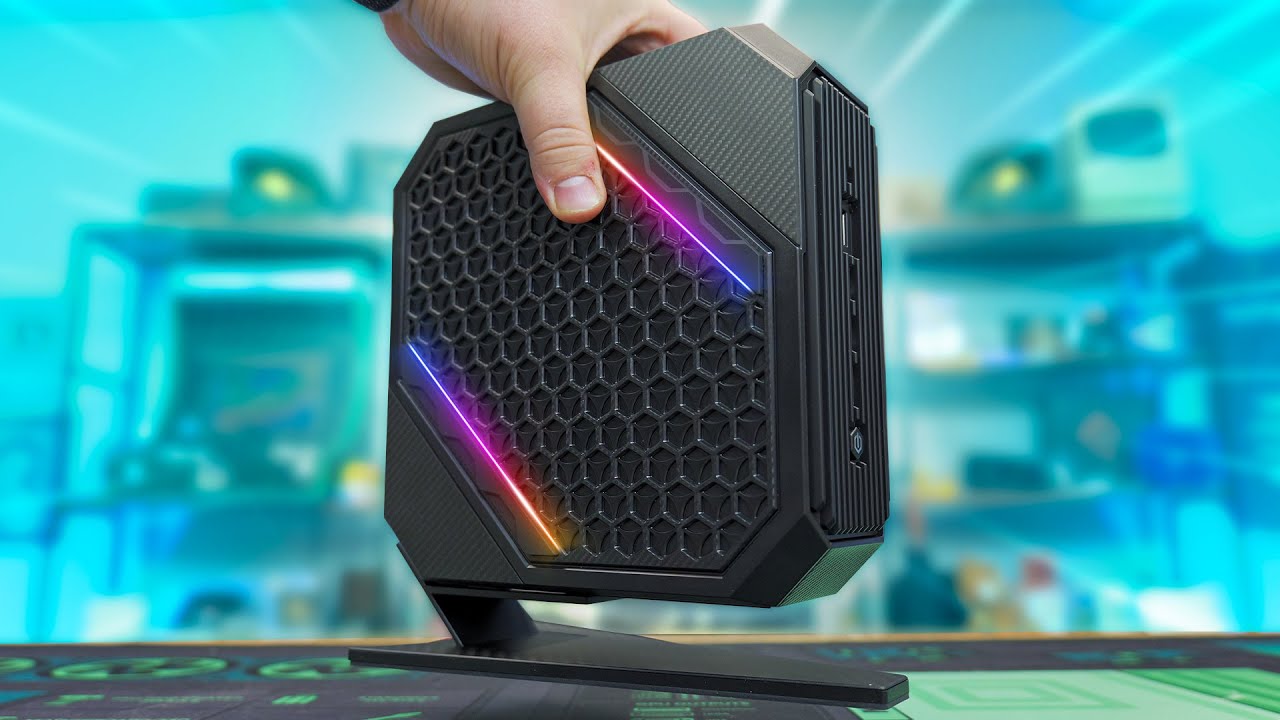

A mini PC can disappear behind a monitor, but its limitations become obvious the moment a game asks more of its integrated graphics. The Best mini gaming pc options are not miniature replacements for every tower. They are compact systems for esports, older games, emulation, streaming, and everyday work, with a few models pushing into credible 1080p gaming.
This group ranges from the exceptionally small KAMRUI Pinova P2 to the newer ACEMAGIC X3 with Radeon 780M graphics. Some prioritize memory and storage, while others offer faster networking, multiple display outputs, or better sustained performance.
For most buyers, the ACEMAGIC X3 is the strongest pick, while the GMKtec M6 Ultra 32GB is the better fit for a quieter, more conventional compact workstation with gaming capability.
| # | Product | Award | Processor | Graphics | Memory and storage | Best for |
|---|---|---|---|---|---|---|
| 1 | ACEMAGIC X3 | Best overall | Ryzen 7 H 255, 8 cores, 16 threads | Radeon 780M, 12 CUs | 16GB LPDDR5, 1TB NVMe PCIe 4.0 SSD | 1080p gaming and demanding compact setups |
| 2 | GMKtec M6 Ultra 32GB | Best for performance and expansion | Ryzen 5 7640HS, 6 cores, 12 threads | Radeon 760M | 32GB DDR5, 1TB PCIe SSD | Gaming and multi-monitor productivity |
| 3 | GMKtec M5 Ultra | Best connectivity | Ryzen 7 7730U, 8 cores, 16 threads | Radeon Graphics, 8 cores | 32GB DDR4, 512GB PCIe 3.0 SSD | Home offices, servers, and lighter gaming |
| 4 | BOSGAME P6 | Best for quiet multitasking | Ryzen 9 6900HX, 8 cores, 16 threads | Radeon 680M | 24GB LPDDR5X, 1TB PCIe 4.0 SSD | Editing, development, and esports |
| 5 | Getorli Ryzen 7 6800H | Best for home theater setups | Ryzen 7 6800H, 8 cores, 16 threads | Radeon 680M | 32GB LPDDR5, 1TB NVMe SSD | Media, office work, and casual gaming |
| 6 | KAMRUI E3B | Best for esports | Ryzen 7 7730U, 8 cores, 16 threads | Radeon Vega 8 | 16GB LPDDR4, 1TB NVMe SSD | Competitive games and portable setups |
| 7 | GMKtec M6 Ultra 16GB | Best compact upgrade path | Ryzen 5 7640HS, 6 cores, 12 threads | Radeon 760M | 16GB DDR5, 512GB PCIe SSD | Buyers planning future upgrades |
| 8 | KAMRUI Pinova P2 | Best for basic gaming and work | Ryzen 3 7330U, 4 cores, 8 threads | Radeon Graphics, 6 CUs | 16GB LPDDR4X, 256GB M.2 SSD | Small desks and older games |
1. ACEMAGIC X3: Best Overall

Pros
- Strongest integrated graphics in this group
- Radeon 780M is suited to 1080p play
- Fast storage and modern display outputs
- 2.5Gbps wired networking
- Two-year warranty
Cons
- Memory is soldered and cannot be upgraded
- Dual-fan cooling may be more noticeable under sustained gaming
- Retro styling is not for every desk
Best for: players who want the most capable integrated graphics in a compact PC.
The ACEMAGIC X3 is the easiest mini PC here to recommend to someone who actually wants to play modern games rather than simply keep a few older titles installed. Its Ryzen 7 H 255 combines eight cores and 16 threads with boost speeds up to 4.9GHz, but the more important part for gaming is the Radeon 780M. Its 12 compute units use RDNA 3 architecture and run at up to 2600MHz, giving it a clear graphics advantage over the Vega 8 and Radeon 680M systems lower down the list.
That advantage is useful at 1080p, where the X3 is positioned for games such as League of Legends, CS2, Genshin Impact, retro emulation, and casual AAA titles. It is still an integrated GPU, so expectations matter. This is not a tiny substitute for a desktop with a dedicated graphics card. Settings choices will remain part of the experience, especially in demanding games, but the X3 has the best graphics foundation in this particular selection.
The configuration is well balanced. The 16GB of LPDDR5 memory runs at 6400MT/s, and the 1TB NVMe PCIe 4.0 SSD gives games and applications useful room to grow. The memory is soldered, which removes the possibility of a later RAM upgrade, but the removable top cover provides access to PCIe storage expansion, with support listed up to 4TB. That makes the fixed memory the more important compromise to consider before buying.
Connectivity is unusually strong for a box this small. HDMI 2.1, DisplayPort 2.0, and USB4 support three independent displays, with the listed outputs reaching up to 8K at 60Hz or 4K at 120Hz. There are also six USB-A 3.2 ports, 2.5Gbps Ethernet, WiFi 6E, and Bluetooth 5.2. The cooling system uses dual fans, heat pipes, and copper fins, a sensible arrangement for a processor running at a full 54W TDP. Choose the X3 if gaming is the priority. Skip it if you need replaceable memory or a completely understated office PC.
2. GMKtec M6 Ultra 32GB: Best for Performance and Expansion
Pros
- Fast Zen 4 processor
- 32GB dual-channel DDR5 memory
- 1TB SSD with room for expansion
- USB4 and triple-display support
- Dual 2.5Gbps network ports
Cons
- Radeon 760M trails the ACEMAGIC X3 for graphics
- Six CPU cores are fewer than some Ryzen 7 options
- WiFi is listed as WiFi 6 rather than WiFi 6E
Best for: users who want a fast compact computer for gaming, work, and future memory upgrades.
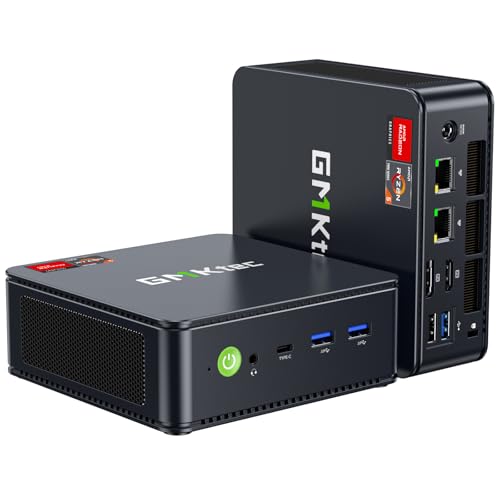
The GMKtec M6 Ultra 32GB feels like the most versatile all-rounder in the lineup. Its Ryzen 5 7640HS has six Zen 4 cores and 12 threads, with a 4.3GHz base speed and boost up to 5.0GHz. That combination gives it a newer CPU platform than the Ryzen 7 7730U machines, and it should feel particularly responsive in applications that benefit from quick single-core performance.
Its Radeon 760M graphics use eight compute units and run at up to 2600MHz. That makes the M6 Ultra suitable for moderate gaming, especially esports and less demanding games, though the Radeon 780M in the ACEMAGIC X3 remains the better choice for graphics-heavy play. The M6 is the one to choose when your day includes many browser tabs, editing work, coding, or several background applications alongside gaming.
The 32GB of dual-channel DDR5 memory is a meaningful advantage over the 16GB configuration of the other M6 Ultra. GMKtec says the SO-DIMM memory can be expanded to 128GB, and the 1TB M.2 PCIe 3.0 SSD can be supplemented with faster PCIe 4.0 storage up to 8TB. Those upgrade claims make this model unusually adaptable for a compact computer. Storage expansion is especially useful if you keep a large game library locally.
The display and port selection is also excellent. USB4 supports up to 8K at 60Hz, while HDMI 2.0 and DisplayPort handle 4K at 60Hz, allowing three simultaneous screens. Three USB 3.2 Gen 2 ports, one USB 2.0 port, dual 2.5Gbps LAN, WiFi 6, and Bluetooth 5.2 cover a wide range of desk setups. Compared with the GMKtec M5 Ultra, this model has a newer CPU and faster memory. Compared with the ACEMAGIC X3, it has a weaker integrated GPU but a more generous upgrade path. It is the better fit for a user who treats gaming as one part of a broader workload.
3. GMKtec M5 Ultra: Best Connectivity

Pros
- Eight-core, 16-thread processor
- 32GB dual-channel memory
- Dual 2.5Gbps Ethernet ports
- WiFi 6E and triple-display output
- Both memory and storage support expansion
Cons
- Radeon graphics are behind the M6 Ultra and X3
- DDR4 memory is older than the M6 Ultra's DDR5
- SSD is PCIe 3.0
Best for: compact gaming setups that also need fast networking and several displays.
The GMKtec M5 Ultra is less about chasing the highest gaming frame rate and more about making a small computer useful in a complicated setup. Its Ryzen 7 7730U has eight cores and 16 threads, with a 2.0GHz base speed and boost up to 4.5GHz when performance mode is enabled in the BIOS. That is ample CPU capacity for office work, browsing, streaming, light editing, and games that do not lean heavily on the GPU.
The integrated Radeon graphics have eight cores clocked at 2000MHz and support three displays. The M5 Ultra can handle 4K video playback and listed 4K at 60Hz output, but it is not as gaming-focused as the Radeon 760M in either M6 Ultra or the Radeon 780M in the ACEMAGIC X3. Buyers should see it as a capable everyday computer with gaming on the side, rather than a dedicated small gaming machine.
The 32GB of dual-channel DDR4 memory is installed as two 16GB modules and can be expanded to 64GB. Its 512GB M.2 2280 PCIe 3.0 SSD is the smaller starting point in this group, though the system supports dual-slot expansion up to 4TB. Those slots make the M5 more practical for users who want to add storage later without replacing the existing drive.
Networking is the standout feature. Two RJ45 ports support 2.5Gbps connections, which is useful for a home server, firewall, lab setup, or a wired gaming network with unusual requirements. WiFi 6E adds the 6GHz band, while USB-C, HDMI 2.0, and DisplayPort support three screens. The M5 Ultra beats the KAMRUI E3B on wired networking and memory capacity, but the E3B has a larger SSD and a similarly specified CPU. Pick the M5 Ultra when ports and network flexibility matter more than peak integrated graphics.
4. BOSGAME P6: Best for Quiet Multitasking

Pros
- Eight-core Ryzen 9 processor
- 1TB PCIe 4.0 SSD
- Three 4K display outputs
- Quiet operation claim under 36 decibels
- WiFi 6E and Bluetooth 5.3 support
Cons
- Radeon 680M is not the fastest gaming graphics here
- 24GB memory is onboard
- Bluetooth 5.3 requires a driver download
Best for: creators, developers, and players of esports games who value quiet operation.
The BOSGAME P6 is built around CPU-heavy work rather than maximum game graphics. Its Ryzen 9 6900HX provides eight cores and 16 threads, with boost speeds up to 4.9GHz. That makes it a compelling compact system for multitasking, 1080p video editing in DaVinci Resolve, coding, and running two or three lightweight virtual machines, all tasks specifically identified for this configuration.
Gaming is more limited by the Radeon 680M graphics. The P6 is suited to esports titles such as CS2 and other lighter games, but the ACEMAGIC X3 and both GMKtec M6 Ultra versions have newer or stronger integrated graphics. For a small PC that spends much of its time compiling code, editing photos, or driving a busy office, the P6's processor balance makes more sense than its gaming label suggests.
The 24GB of onboard LPDDR5X memory runs at 4800MT/s, and the 1TB M.2 NVMe PCIe 4.0 x4 SSD offers fast application and file access. A second M.2 drive can expand total storage up to 8TB, which is valuable for video projects and large media collections. The limitation is memory: because the RAM is onboard, there is no listed memory-slot upgrade path.
BOSGAME claims operating noise below 36 decibels, using phase-change materials, a CPU heatsink, and active cooling for memory and storage. HDMI, DisplayPort, and USB-C can each drive a 4K display at 60Hz, while dual 1Gbps Ethernet ports support networking experiments and home-server work. Bluetooth 5.3 requires the latest Intel driver and otherwise defaults to Bluetooth 5.2, a small but important setup detail. The P6 is a better quiet productivity machine than the Getorli, with a stronger CPU and faster storage, but the Getorli offers the same Radeon 680M graphics with 32GB of memory. Choose the P6 for CPU work and acoustic restraint, not demanding games.
5. Getorli Ryzen 7 6800H: Best for Home Theater Setups

Pros
- Eight-core, 16-thread processor
- 32GB LPDDR5 memory
- 1TB NVMe SSD
- Triple 4K display support
- Dual LAN ports and Bluetooth 5.3
Cons
- Radeon 680M is behind newer graphics options
- Memory is not listed as upgradeable
- WiFi 6 is not WiFi 6E
Best for: a compact media, office, and casual gaming computer with several displays.
The Getorli Ryzen 7 6800H is a sensible middle ground for someone who wants one small computer to handle work, media, and occasional games. The Ryzen 7 6800H has eight cores and 16 threads with boost speeds up to 4.7GHz, while its Radeon 680M graphics support 4K multimedia and lighter gaming. It is not the most exciting gaming option, but it has the kind of balanced specification that works well in a living room or home office.
Its 32GB of LPDDR5 memory runs at 6400MT/s, giving the system plenty of breathing room for multitasking. The 1TB NVMe SSD should be enough for a useful collection of applications and games, and dual M.2 2280 slots allow storage expansion up to 4TB. The product data does not list a memory upgrade path, so buyers who expect to keep the computer for demanding professional workloads should consider that fixed ceiling.
Three 4K screens can connect through HDMI, DisplayPort, and USB-C. Multiple USB 3.2 Gen 2 and USB 2.0 ports make it practical as a desk hub, while WiFi 6, Bluetooth 5.3, and dual LAN ports cover both wireless peripherals and wired network setups. The Bluetooth feature is a little more current than the BOSGAME P6's advertised connection, though the P6 has WiFi 6E.
Cooling uses a fan, dense fins, and dual copper heat pipes, with an emphasis on keeping noise low during sustained use. The Getorli is a better choice than the KAMRUI E3B for heavier multitasking because it has 32GB rather than 16GB of memory, but its Radeon 680M will not match the graphics performance of the ACEMAGIC X3. If your games are mostly esports, older releases, or emulated titles, the Getorli is a quiet and capable fit. If gaming is the central reason for buying, move up to one of the M6 Ultra models or the X3.
6. KAMRUI E3B: Best for Esports

Pros
- Eight-core, 16-thread Ryzen processor
- 1TB NVMe storage
- Triple 4K display output
- Six USB 3.2 ports
- Compact 1.08-pound design
Cons
- Vega 8 graphics are older
- 16GB memory is fixed
- One gigabit LAN is slower than the GMKtec systems
Best for: esports players who want a particularly small and portable desktop.
The KAMRUI E3B earns its place by being unusually easy to fit into a small setup. It measures 5.05 by 5.05 by 1.9 inches and weighs 1.08 pounds, so it can travel in a bag or sit behind a display without taking over the desk. That portability is useful for students, office workers, or anyone who wants a personal gaming system that can move between rooms.
The Ryzen 7 7730U supplies eight cores, 16 threads, 16MB of L3 cache, and boost speeds up to 4.5GHz. It has enough CPU capacity for a game, voice chat, browser tabs, and streaming tools running together. Vega 8 graphics clocked at up to 2000MHz are aimed at games such as League of Legends, CS:GO, and DOTA 2. They can also handle 4K output, but they are clearly behind the Radeon 760M and Radeon 780M options in this roundup.
The 16GB of LPDDR4 memory is paired with a 1TB NVMe SSD, a much more comfortable storage starting point than the Pinova P2's 256GB drive. Storage can expand up to 4TB, but the memory is not presented as replaceable. The E3B also includes HDMI, DisplayPort, and full-featured USB-C for three 4K displays, plus six USB 3.2 ports for controllers, external audio, and other accessories.
WiFi 6, Bluetooth 5.2, and gigabit Ethernet provide the core connections, though the single gigabit port is less flexible than the dual 2.5Gbps networking on the GMKtec M5 Ultra. The included VESA mount is handy for clearing desk space. Readers comparing compact systems can also consider the trade-offs between a small PC and a full desktop when a dedicated graphics card may be necessary. The E3B is right for lighter games and portability. Skip it if you want modern 3D games to be the main event.
7. GMKtec M6 Ultra 16GB: Best Compact Upgrade Path
Pros
- Ryzen 5 7640HS with up to 5.0GHz boost
- Radeon 760M graphics
- DDR5 memory can expand substantially
- USB4 and triple-display support
- Dual 2.5Gbps LAN
Cons
- Ships with only 16GB of memory
- Starts with a 512GB SSD
- Graphics remain integrated
Best for: buyers who want the M6 platform and expect to upgrade memory or storage later.
The GMKtec M6 Ultra 16GB uses the same important platform as the higher-ranked 32GB model. Its Ryzen 5 7640HS has six Zen 4 cores, 12 threads, a 4.3GHz base speed, and boost up to 5.0GHz. Radeon 760M graphics with eight compute units and a 2600MHz maximum clock make it a credible option for moderate gaming, and its CPU is newer than the Ryzen 7 7730U used by the M5 Ultra and E3B.
The difference is the starting configuration. This version has 16GB of dual-channel DDR5 memory and a 512GB PCIe 3.0 SSD. Sixteen gigabytes is enough for normal gaming and everyday work, but newer games, browser-heavy multitasking, and creative applications can make that capacity feel tighter. Fortunately, the SO-DIMM memory supports expansion to 128GB, and the system supports dual storage slots with PCIe 4.0 expansion up to 8TB.
The M6 Ultra's display capability is a strong reason to choose it over cheaper compact PCs. USB4 supports up to 8K at 60Hz, while HDMI 2.0 and DisplayPort support 4K at 60Hz, allowing three screens at once. Three USB 3.2 Gen 2 ports, a USB 2.0 port, dual 2.5Gbps Ethernet, WiFi 6E, and Bluetooth 5.2 give it an unusually useful set of connections for a small desk.
The 32GB version is the more convenient buy because it avoids an immediate memory decision, but this model leaves room to tailor the system later. It also has the same integrated graphics limitation, so an upgrade will improve multitasking more than it will transform gaming. If you want a compact computer for choosing the right Linux-ready hardware, its upgradeable memory and storage are useful traits, though the listed configuration is supplied for Windows use. Choose this M6 when expansion matters more than out-of-box capacity.
8. KAMRUI Pinova P2: Best for Basic Gaming and Work

Pros
- Very compact and light
- Triple 4K display output
- Quiet cooling design
- Two storage expansion slots
- VESA mount included
Cons
- Four-core processor is the weakest here
- Radeon graphics are intended for lighter games
- 256GB SSD fills quickly
Best for: basic games, office work, media playback, and very small desks.
The KAMRUI Pinova P2 is the smallest-feeling choice in this roundup, and its strengths are practical rather than flashy. The case measures about 5.05 by 5.05 by 1.63 inches and weighs about 1.26 pounds. An included VESA mount lets it sit behind a monitor, while the quiet cooling system is designed to remain unobtrusive during light work.
Its Ryzen 3 7330U has four cores and eight threads, with boost speeds up to 4.3GHz and a 15W TDP. That is enough for browsing, office applications, streaming, coding, and older or less demanding games. The integrated Radeon graphics use six compute units and can drive three 4K displays at 60Hz through HDMI 2.0, DisplayPort 1.4, and USB-C with DisplayPort Alt Mode. That display support is impressive, but it should not be mistaken for strong modern gaming performance.
The 16GB of LPDDR4X memory is fixed, and the 256GB M.2 SSD is the obvious constraint. It will work for Windows, everyday applications, and a modest selection of games, but a larger library will require storage expansion quickly. The P2 has two storage expansion slots, one M.2 2280 SATA or NVMe PCIe 3.0 slot and one M.2 2280 SATA slot, with support listed up to 4TB total.
Gigabit Ethernet, WiFi, Bluetooth, USB 3.2 Gen 2, and the triple-display arrangement make the P2 a capable office computer. It is a weaker gaming choice than the KAMRUI E3B, which has eight CPU cores and a 1TB SSD, but it is a good fit when physical size, low-power operation, and desk placement matter most. Buy it for older games and everyday computing. Skip it if you expect to install several demanding games or keep heavy applications open together.
How to choose best mini gaming pc
The right compact gaming computer depends on the balance between graphics capability, processor headroom, upgrade access, and the ports your desk actually needs.
Integrated graphics
Integrated graphics share system resources with the processor, so they determine which games a mini PC can handle comfortably. Radeon 780M is the strongest graphics option here, followed by Radeon 760M, while Radeon 680M and Vega 8 are better suited to esports, older games, and lighter settings.
Look for newer graphics architecture and more compute units when 3D gaming matters. A high-core-count CPU does not compensate for a weak integrated GPU in graphics-heavy games.
For mini gaming PCs, the graphics engine matters more than the Ryzen 7 or Ryzen 9 label on the case.
Processor cores and boost speed
More cores help with streaming, browser tabs, video work, and background applications. The eight-core Ryzen 7 and Ryzen 9 systems have more multitasking capacity than the four-core Pinova P2, while the Ryzen 5 7640HS brings newer Zen 4 cores and boost speeds up to 5.0GHz.
For gaming alone, processor speed is only part of the decision. For a mixed gaming and work machine, favor at least six cores and consider eight if you regularly edit video, compile software, or run virtual machines.
Memory capacity and upgrade access
Sixteen gigabytes is workable for current everyday gaming, but 32GB gives more room for launchers, browsers, voice chat, and creative software. Check whether the memory uses removable SO-DIMMs or is soldered LPDDR memory.
The two GMKtec M6 Ultra configurations show the difference clearly. The 16GB version can expand substantially, while the ACEMAGIC X3 has faster LPDDR5 memory but no memory-slot upgrade path.
Storage capacity
A 512GB SSD is a reasonable starting point, but large games can consume that space quickly. A 1TB drive is more comfortable for a mixed library and regular applications. Look for a second M.2 slot if you want to add storage without replacing the original drive.
The Pinova P2 has the most restrictive starting capacity here, although its two storage slots help. The BOSGAME P6 and GMKtec M6 Ultra models combine larger starting drives with useful expansion options.
Display and network connections
HDMI, DisplayPort, and USB-C can support multi-monitor desks, but check the stated resolution and refresh rate for each output. Three 4K displays are useful for work and media, but they do not make integrated graphics suitable for demanding games at 4K.
For online games, wired Ethernet can provide a steadier connection. The GMKtec M5 Ultra, both M6 Ultra versions, and ACEMAGIC X3 offer 2.5Gbps networking, while the KAMRUI E3B and Pinova P2 use gigabit Ethernet.

Frequently asked questions
Can these mini PCs run modern games?
They can run some modern games, but performance depends heavily on the integrated graphics and game settings. The ACEMAGIC X3 has the strongest graphics hardware in this group, while the M6 Ultra models are better suited to moderate gaming. The KAMRUI Pinova P2 is intended for older and lighter titles.
Which model has the strongest gaming graphics?
The ACEMAGIC X3 has Radeon 780M graphics with 12 compute units and RDNA 3 architecture. That gives it a stronger gaming foundation than the Radeon 760M, Radeon 680M, and Vega 8 systems in this selection.
Can these computers drive three monitors?
Yes. All eight products list support for three displays, although the exact outputs and capabilities differ. The ACEMAGIC X3 supports HDMI 2.1, DisplayPort 2.0, and USB4, while several other models use HDMI 2.0, DisplayPort, and USB-C.
Is 16GB of RAM enough for mini PC gaming?
Sixteen gigabytes is enough for ordinary gaming, browsing, and voice chat, but 32GB is more comfortable for heavy multitasking. Check the upgrade design before buying. The GMKtec M6 Ultra 16GB uses expandable DDR5 memory, while the ACEMAGIC X3 uses soldered LPDDR5 memory.
Which mini PC is best for video editing?
The BOSGAME P6 and GMKtec M6 Ultra 32GB are strong choices for mixed editing and general work. The P6 has an eight-core Ryzen 9 6900HX, 24GB of LPDDR5X memory, and a 1TB PCIe 4.0 SSD. The M6 Ultra has 32GB of DDR5 memory and a newer six-core Ryzen 5 7640HS.
Do any of these mini PCs support storage upgrades?
Yes. Several support additional M.2 storage. The GMKtec M6 Ultra models support dual slots and expansion up to 8TB, while the BOSGAME P6 supports an additional M.2 NVMe drive up to a listed total of 8TB. The ACEMAGIC X3, Getorli, KAMRUI E3B, and Pinova P2 also list storage expansion options.
Are mini gaming PCs quiet?
Noise varies with workload and cooling design. BOSGAME lists operation under 36 decibels, while Getorli and ACEMAGIC describe heat pipes and fin systems intended to control sustained temperatures. Any compact PC can become more audible during long gaming sessions because its cooling hardware has less space than a tower.
The bottom line
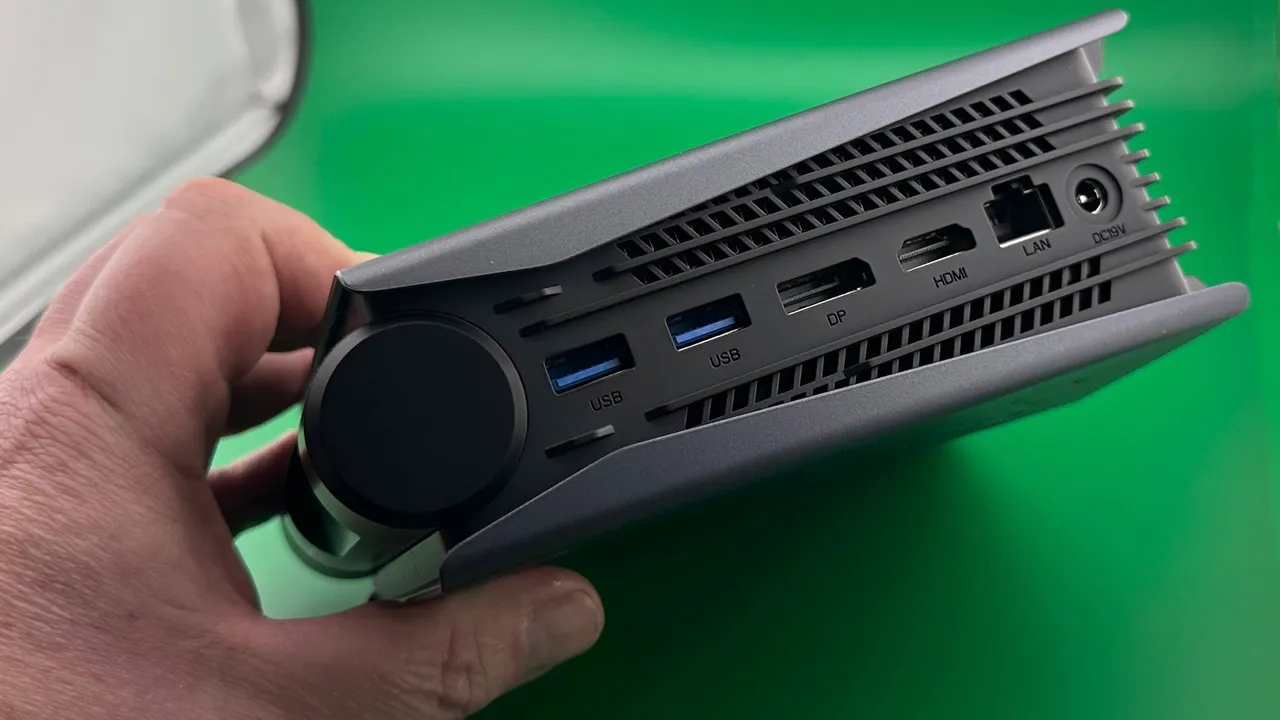
The Best mini gaming pc in this group is the ACEMAGIC X3 because its Radeon 780M graphics are the most suitable for 1080p gaming, and its display, storage, and networking options are unusually complete. Its soldered memory is the serious drawback, so it is not the right choice for buyers who want to expand RAM later.
The GMKtec M6 Ultra 32GB is the better alternative for a mixed work and gaming setup. It has expandable DDR5 memory, a 1TB SSD, dual 2.5Gbps networking, and a newer Zen 4 processor, while the BOSGAME P6 makes more sense for quiet CPU-heavy work and esports.
If you are undecided, choose the ACEMAGIC X3 for gaming first and the GMKtec M6 Ultra 32GB for long-term flexibility.
As an Amazon Associate we earn from qualifying purchases.