

A Linux mini PC has to do more than fit behind a monitor. It needs hardware that works cleanly with Linux, enough memory for your workload, useful display and network ports, and storage that will not feel cramped after a few updates. The wrong choice can leave you hunting for drivers or working around a processor that was never suited to your plans.
Our best mini pc for linux picks range from tiny low-power desktops to capable Ryzen systems with dual 2.5GbE networking. BOSGAME P4 Ultra is the one we would choose for most Linux users, while the other eight cover quiet everyday computing, home servers, triple-display workstations, and refurbished business hardware.
Quick comparison
| # | Product | Award | Processor | Memory and storage | Display support | Best for |
|---|---|---|---|---|---|---|
| 1 | BOSGAME P4 Ultra | Best overall | Ryzen 7 7730U | 16GB DDR4, 1TB PCIe SSD | Triple 4K | Linux desktops and servers |
| 2 | GMKtec M5 Ultra | Best for heavy multitasking | Ryzen 7 7730U | 32GB DDR4, 512GB PCIe SSD | Triple 4K | Developers and demanding work |
| 3 | ACEMAGIC K1 | Best quiet workstation | Ryzen 5 7530U | 16GB LPDDR4X, 512GB SSD | Triple 4K | Quiet offices and coding |
| 4 | GMKtec G10 | Best storage expansion | Ryzen 5 3500U | 16GB DDR4, 1TB SSD | Triple 4K | Storage-heavy Linux builds |
| 5 | GMKtec i3 NucBox G3 Pro | Best Linux server features | Core i3-10110U | 8GB DDR4, 256GB SSD | Dual 4K | Proxmox and network services |
| 6 | DreamQuest N95 | Best compact triple-display option | Intel N95 | 16GB DDR4, 512GB SSD | Triple 4K | Office multitasking |
| 7 | GMKtec G3S | Best simple desktop | Intel N95 | 8GB DDR4, 256GB SSD | Dual 4K | Browsing and media |
| 8 | HP EliteDesk 800 G2 | Best refurbished business PC | Core i5-6500T | 16GB DDR4, 240GB SSD | VGA and DisplayPort | Basic Linux office setups |
| 9 | Bmax B1 Plus | Best ultra-compact option | Celeron J3355 | 6GB LPDDR3, 128GB eMMC | Dual 4K | Light desktop use |
1. BOSGAME P4 Ultra: Best Overall

Pros
- Ubuntu 24.1 is installed
- Ryzen 7 processor has eight cores and 16 threads
- 1TB PCIe storage is generous for Linux projects
- Triple 4K output and dual 2.5GbE ports
- Memory and storage can be expanded
Cons
- Radeon graphics are not a substitute for a dedicated GPU
- Wi-Fi 6E and Bluetooth 5.2 support depend on the Linux distribution and drivers
- More capability than a basic browsing desktop needs
Best for: Linux users who want one compact system for work, development, storage, and multiple displays.
The first thing that separates BOSGAME P4 Ultra from the smaller everyday machines here is that it feels designed for Linux as a primary operating system rather than as an afterthought. Ubuntu 24.1 comes installed, so a user who wants to get straight into a Linux desktop has a clearer starting point. It is also flexible enough to run Windows if a particular application requires it.
The Ryzen 7 7730U is the right class of processor for a serious small workstation. Its eight cores and 16 threads, with boost speeds up to 4.5GHz, give compiling, virtualization, container work, and large browser sessions more room than the four-core Intel N95 systems in the GMKtec G3S and DreamQuest N95. The 16GB of dual-channel DDR4 is a sensible starting point, and BOSGAME says the memory can be expanded to 64GB. That matters for Linux users who expect to run several virtual machines or development tools together.
Storage is another strength. The installed 1TB M.2 NVMe PCIe 3.0 x4 SSD leaves room for a Linux installation, applications, local media, and project files without immediately requiring an upgrade. A second SSD can be added, which makes the P4 Ultra more useful as a home server or lab machine than a system with only one small drive. Its dual 2.5-gigabit Ethernet ports are equally practical for routing, firewall work, storage servers, or separating network traffic.
The graphics hardware is integrated Radeon Graphics with eight GPU cores, but the real advantage is the output selection. HDMI, DisplayPort, and USB-C can drive three 4K displays. That is a strong fit for a Linux workstation with terminals, documentation, and an editor spread across several screens. The weakness is simple: integrated graphics will not provide the same headroom as a discrete GPU for modern games or demanding 3D work. For a Linux desktop, coding setup, or small server that needs substantial CPU and network capacity, this is the most complete package in the group.
2. GMKtec M5 Ultra: Best for Heavy Multitasking

Pros
- Ryzen 7 7730U offers eight cores and 16 threads
- 32GB dual-channel DDR4 is ready for demanding multitasking
- Dual 2.5GbE ports suit server and firewall projects
- Wi-Fi 6E and Bluetooth 5.2
- Triple 4K display support
Cons
- The 512GB SSD is smaller than the BOSGAME P4 Ultra's drive
- Linux setup may require more attention than the Ubuntu-ready BOSGAME
- Integrated graphics limit serious gaming workloads
Best for: developers, homelab users, and Linux multitaskers who need substantial memory from the start.
GMKtec M5 Ultra is the closest rival to the BOSGAME P4 Ultra, and in one important respect it is the stronger machine. It includes 32GB of dual-channel DDR4, arranged as two 16GB modules, so it is better prepared for virtual machines, containers, browser-heavy research, and large development environments without an immediate memory upgrade.
Its Ryzen 7 7730U has eight cores and 16 threads, with a base frequency of 2.00GHz and a boost speed up to 4.50GHz. GMKtec describes a power-saving quiet mode and a performance mode controlled through the BIOS. That gives Linux users a useful choice between lower noise and more sustained performance, although a BIOS setting is not the same as a guarantee of constant high-speed operation under every workload.
Networking is a major reason to consider this model. The dual 2.5GbE ports can support a firewall, router, server, or network test box, while Wi-Fi 6E adds access to the 6GHz band where the network and Linux drivers support it. The machine also has USB 3.2, USB 2.0, HDMI 2.0, DisplayPort, USB-C with power delivery, display, and data support, plus a 3.5mm audio connection. Three displays can run at once, with 4K at 60Hz among the supported outputs.
The main trade-off against BOSGAME P4 Ultra is storage. The M5 Ultra starts with a 512GB M.2 PCIe 3.0 SSD, though its dual storage slots support expansion to 4TB. It is the better pick for someone who values memory and network flexibility over having a large drive already installed. Users focused on Linux gaming should set expectations carefully, since the Radeon graphics are still integrated. If your work revolves around virtual machines, coding, services, or several displays, the extra memory makes the M5 Ultra a compelling alternative.
3. ACEMAGIC K1: Best Quiet Workstation

Pros
- Six-core, 12-thread Ryzen 5 7530U
- Triple 4K display support
- 16GB LPDDR4X memory and 512GB SSD
- Dual M.2 storage slots
- Claimed operation under 30dB
Cons
- Memory is LPDDR4X rather than standard upgradeable DDR4
- No dual 2.5GbE feature is listed
- Integrated Radeon graphics are not intended for high-end gaming
Best for: Linux office users and developers who want a quiet, compact triple-display workstation.
The ACEMAGIC K1 takes a slightly different approach from the two Ryzen 7 systems. It uses a Ryzen 5 7530U with six cores and 12 threads, which is still a meaningful step above the quad-core machines in this roundup. For coding, office applications, web development, 4K streaming, and general Linux multitasking, it has a balanced specification rather than chasing the highest core count.
Its 16GB of LPDDR4X memory runs at 3733MT/s, paired with a 512GB SSD. That is enough for a normal Linux desktop with several applications open, and the memory capacity is more comfortable than the 8GB found in GMKtec G3S and GMKtec i3 NucBox G3 Pro. The important limitation is that LPDDR4X memory is not the same upgrade path as socketed DDR4. Buyers should choose this configuration with their longer-term needs in mind.
The K1 supports three 4K displays through HDMI 2.0, DisplayPort 1.4, and USB-C. That makes it suitable for a workstation where a terminal, browser, and editor each need their own screen. Dual M.2 2280 slots provide room to expand storage up to 4TB according to the listing, which is useful for Linux development environments, local backups, or a media library.
ACEMAGIC claims an operating noise level under 30dB, supported by an intelligent cooling system. Quiet operation is especially valuable when a mini PC sits beside a monitor or serves as a small always-on machine in a shared room. The K1 does not offer the BOSGAME P4 Ultra and GMKtec M5 Ultra combination of Ryzen 7 power and dual 2.5GbE networking, but it is a sensible middle ground. It also includes Windows 11 Pro and is listed as compatible with Linux, giving users flexibility during setup. Choose it when quiet workspace behavior and triple-display support matter more than maximum server-oriented connectivity.
4. GMKtec G10: Best Storage Expansion

Pros
- 16GB dual-channel DDR4
- 1TB SSD included
- Two M.2 2280 PCIe 3.0 storage slots
- Triple 4K display output
- 2.5GbE networking
Cons
- Ryzen 5 3500U is an older Zen+ processor
- Wi-Fi 5 is behind the wireless standard in the top picks
- Integrated Vega 8 graphics have limited gaming headroom
Best for: Linux users building a workstation or server that may need multiple storage drives.
The GMKtec G10 makes its case with storage flexibility. It arrives with 16GB of dual-channel DDR4 and a 1TB SSD, then adds two M.2 2280 PCIe 3.0 slots that can be expanded to a total of 16TB according to the product details. That is unusual flexibility in a small system and makes this model interesting for Linux users who keep local virtual machines, backups, media, or test environments.
The Ryzen 5 3500U is a 64-bit quad-core processor based on AMD's Zen+ architecture. It runs at 2.1GHz with boost speeds up to 3.7GHz and has a 15W TDP. It is not as quick or modern as the Ryzen 7 7730U in BOSGAME P4 Ultra or GMKtec M5 Ultra, but it remains a practical processor for desktop applications, services, file management, and light development. The Radeon Vega 8 graphics can handle playback and casual gaming, though the word casual matters here.
Display connectivity is stronger than the processor's age might suggest. HDMI 2.1 TMDS, DisplayPort 1.4, and full-function USB-C support three screens, including 4K at 60Hz. The USB-C port also handles power delivery, DisplayPort, and data. There are dual USB 3.2 ports, USB 2.0, audio, and 2.5GbE Ethernet. For a desk with several peripherals or a server that needs fast wired networking, the selection is useful.
The compromise is wireless connectivity. Wi-Fi 5 and Bluetooth 5.0 are functional, but they are not as current as the Wi-Fi 6E and Bluetooth 5.2 offered by the top two picks. The G10 also has older CPU architecture, so it is not the right choice for buyers chasing maximum compile speed or demanding graphics. It makes much more sense for someone who wants a Linux box that can grow through storage additions. If your setup depends on local files and multiple drives, planning storage around a small desktop can matter more than choosing the newest processor.
5. GMKtec i3 NucBox G3 Pro: Best Linux Server Features
Pros
- 2.5GbE Ethernet
- Linux, Proxmox, firewall server, and VMware compatibility listed
- Dual 4K display support
- Wi-Fi 6 and Bluetooth 5.2
- Secondary M.2 2280 NVMe slot
Cons
- Only 8GB of memory
- 256GB primary SSD is limited for a large lab
- Core i3-10110U has two cores and four threads
Best for: a compact Linux server, firewall appliance, or light office desktop.
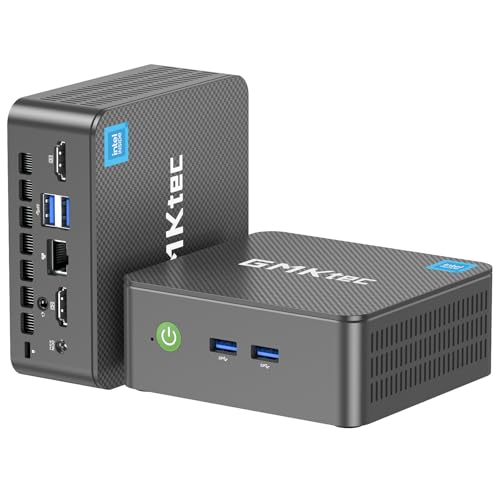
The GMKtec i3 NucBox G3 Pro is less about raw desktop speed and more about the features that make a small Linux box useful. The Core i3-10110U is a two-core, four-thread processor, so it does not compete with the Ryzen systems for compiling or heavy parallel workloads. For a lightweight desktop, network service, monitoring box, or dedicated server, it can still be a well-targeted choice.
The installed 8GB of dual-channel DDR4 and 256GB M.2 2242 SATA SSD are adequate for a straightforward Linux installation and everyday browsing. The second M.2 2280 NVMe PCIe slot is the more interesting detail. It lets the system grow into a larger storage setup without replacing the original drive, which can be useful when the mini PC becomes a local service host rather than a conventional desktop.
Networking is where this model earns its award. Its Intel i226 2.5GbE port offers more bandwidth than standard gigabit Ethernet, and the listing specifically identifies compatibility with Linux, Proxmox, firewall servers, Ubuntu, and ESXi VMware. Wake on LAN, PXE boot, RTC wake, and automatic power-on are also listed. Those functions matter when the machine will sit unattended, boot from a network, or restart as part of a home lab.
Two HDMI 2.0 outputs support dual 4K displays at 60Hz, while four USB 3.2 ports and a 3.5mm audio jack cover common peripherals. Wi-Fi 6 and Bluetooth 5.2 are welcome upgrades over the G10's wireless hardware. Still, 8GB of memory and a two-core CPU put a ceiling on virtualization. For a serious multi-VM host, BOSGAME P4 Ultra or GMKtec M5 Ultra is the better fit. For a compact server, firewall, or Proxmox experiment, this GMKtec has the right foundation. Users also considering Windows should compare how the operating system requirements affect choosing a small desktop operating system before committing to a Linux install.
6. DreamQuest N95: Best Compact Triple-Display Option

Pros
- 16GB DDR4 memory
- 512GB SSD
- Three 4K display outputs
- Dual Gigabit LAN
- Dual SSD support and 2.5-inch SATA bay
Cons
- Intel N95 is aimed at everyday workloads
- Wi-Fi 5 is not the newest wireless standard
- Dual LAN is gigabit rather than 2.5GbE
Best for: office users who need several displays and more storage than a basic N95 system provides.
The DreamQuest N95 is a sensible example of how much more useful an entry-level processor becomes when the surrounding configuration is not stripped down. The Intel N95 still has four cores and a maximum speed of 3.4GHz, but this model pairs it with 16GB of DDR4 memory and a 512GB SSD. That makes it better suited to a busy office desktop than an N95 mini PC with only 8GB of memory.
Linux and Ubuntu support are listed alongside PXE boot, Wake on LAN, RTC wake, and automatic power-on. Those features make the DreamQuest useful for unattended services as well as a normal desktop. The memory can be upgraded to 32GB, and the storage design includes dual SSD slots plus an extra bay for a 7mm-thick 2.5-inch SSD or hard drive. The listing gives a maximum of 4TB total through the dual SSD slots and up to 2TB for the SATA drive.
Its display arrangement is unusually capable for this processor class. Two HDMI ports, DisplayPort, and full-function USB-C can drive three 4K displays at 60Hz. That is more than enough for office documents, terminals, dashboards, and video playback. Four USB 3.2 ports and dual Gigabit LAN add practical flexibility, although network-heavy users will get more throughput from the 2.5GbE systems above.
The N95 is not the machine to choose for sustained compilation, complex editing, or a large collection of virtual machines. Its strength is a clear, practical configuration for desk work. Compared with GMKtec G3S, it has twice the memory, twice the SSD capacity, and a third display path. Compared with GMKtec i3 NucBox G3 Pro, it has less explicitly server-focused networking but more memory and storage out of the box. It is a good choice for a multi-monitor Linux office or information dashboard.
7. GMKtec G3S: Best Simple Desktop

Pros
- Intel N95 reaches 3.4GHz
- Dual HDMI 2.0 outputs support 4K at 60Hz
- AV1 decoding
- Wi-Fi 5, Bluetooth 5.0, and gigabit Ethernet
- USB 3.2 connectivity
Cons
- 8GB of memory leaves less room for multitasking
- 256GB SSD fills quickly with large files
- No triple-display support
Best for: a straightforward Linux desktop for browsing, documents, streaming, and light office work.
The GMKtec G3S is the uncomplicated pick in this roundup. Its Intel N95 has four cores, four threads, a 6MB cache, and a burst frequency up to 3.4GHz. That is enough for a responsive Linux desktop when the workload consists of a browser, documents, email, streaming, and a few ordinary utilities.
It includes 8GB of DDR4 memory and a 256GB M.2 2242 SSD. Those capacities are workable for a clean installation, but they leave less headroom than the 16GB and 512GB combination in DreamQuest N95. Users who regularly keep many browser tabs open alongside development tools may notice that limitation sooner. This is a system for focused everyday work, not a compact replacement for a workstation.
The two HDMI 2.0 outputs support two 4K displays at 60Hz. Intel UHD Graphics also supports 4K playback and AV1 decoding, which is helpful for current streaming and media files. USB 3.2, a 3.5mm audio jack, gigabit Ethernet, Wi-Fi 5, and Bluetooth 5.0 give it the expected connections for a home or office desk.
Against the DreamQuest N95, the G3S gives up memory, storage, and the third display option. Against Bmax B1 Plus, it has a newer and more capable processor, faster SSD storage, and a more modern USB interface. That makes the G3S the safer everyday desktop for buyers who do not need a server feature set. It should be skipped by anyone planning to run several virtual machines or maintain a large local media and project library.
8. HP EliteDesk 800 G2: Best Refurbished Business PC

Pros
- 16GB DDR4 memory
- Quad-core Core i5-6500T
- VGA and DisplayPort outputs
- Six USB 3.0 ports across front and rear
- Compact 7.2-inch square chassis
Cons
- Older sixth-generation processor
- 240GB SSD is limited
- Refurbished condition can vary
- No 4K display claim is listed
Best for: basic Linux office work where familiar business hardware and legacy display support matter.
The HP EliteDesk 800 G2 is the outlier here because it is refurbished business hardware rather than a newer consumer mini PC. That is not automatically a disadvantage. The EliteDesk line was built around office deployments, and this model has a practical port layout, a compact 7.2 by 7.2-inch footprint, and a height of 1.9 inches.
Its Core i5-6500T is an older quad-core processor with speeds up to 3.1GHz. It is behind the Intel N95 machines in newer platform features and behind the Ryzen systems in multi-threaded performance, but it remains suitable for a light Linux desktop, document work, web browsing, and simple services. The 16GB of DDR4 is helpful, and the two memory slots support up to 32GB according to the listing.
Connectivity is oriented toward an office. The front has two USB 3.0 ports, microphone and headphone connections, and USB-C. The rear adds four USB 3.0 ports, VGA, DisplayPort, and RJ-45 Ethernet. VGA is increasingly uncommon on new mini PCs, but it can be useful with an older monitor or projector. The listing includes a keyboard and mouse, though Linux users should confirm that their chosen distribution recognizes the hardware as expected.
The main concern is the refurbished condition and the inconsistent operating-system information in the listing. One feature says Windows 10 Pro 64-bit, while the supplied title mentions Windows 11 Pro, so buyers should treat the preinstalled OS details cautiously and plan their own Linux installation. The 240GB SSD is also tight for a multi-purpose system. HP EliteDesk 800 G2 is not the fastest pick, but it is a reasonable option for a simple Linux office computer with legacy display connections. Those building a more general household setup may also want to consider which desktop features help with everyday home tasks.
9. Bmax B1 Plus: Best Ultra-Compact Option

Pros
- Very small 4.25 by 4.13 by 1.42-inch design
- 0.49-pound weight
- Dual M.2 expansion slots
- Dual 4K HDMI output
- VESA bracket and quiet cooling system
Cons
- Celeron J3355 is the weakest processor here
- 6GB LPDDR3 memory limits multitasking
- 128GB eMMC storage is modest
- Gigabit Ethernet and Wi-Fi 5 are basic
Best for: a tiny Linux appliance, kiosk, lightweight browsing system, or secondary desktop.
The Bmax B1 Plus is about minimizing the computer itself. It measures 4.25 by 4.13 by 1.42 inches and weighs 0.49 pounds, so it can disappear behind a monitor using the included VESA bracket. That makes it attractive for a kiosk, thin client, basic media box, or small Linux appliance where physical space matters more than speed.
The Intel Celeron J3355 reaches up to 2.5GHz and is intended for light web browsing, document editing, and routine office tasks. Its 6GB of LPDDR3 memory is less generous than the 8GB offered by GMKtec G3S, and the 128GB onboard storage is the smallest in the group. A lightweight Linux distribution will make more sense here than a demanding desktop environment with many background services.
Storage expansion is the B1 Plus's strongest practical feature. It has two M.2 slots, one SATA and one NVMe, and the listing says storage can be expanded up to 2TB. That gives the small system a path beyond its onboard storage, though adding a drive will not change the limits of the Celeron processor or 6GB memory.
Dual HDMI outputs support 4K at 60Hz, and the system includes dual-band Wi-Fi, Bluetooth 5.0, and gigabit Ethernet. A smart fan and heat sink system are designed for quiet 24/7 operation, while the one-click restore function provides a quick recovery route. Compared with GMKtec G3S, the B1 Plus is much smaller but clearly slower and more constrained. It is best reserved for simple Linux tasks, signage, streaming, or a secondary machine. Anyone expecting a full desktop workload should move up to the N95 models.

How to choose best mini pc for linux
Linux is flexible, but a good mini PC still needs the right balance of processor support, memory, storage, display outputs, networking, and upgrade access.
Processor and graphics
The processor sets the ceiling for compiling, virtualization, browser multitasking, and server workloads. The Ryzen 7 7730U in BOSGAME P4 Ultra and GMKtec M5 Ultra has eight cores and 16 threads, while ACEMAGIC K1's Ryzen 5 7530U has six cores and 12 threads. Those are much stronger choices for demanding Linux work than the four-core Intel N95 or the older Celeron J3355.
Integrated graphics are common in this category. They are suitable for desktop rendering, video playback, and multiple monitors, but they are not equivalent to a dedicated graphics card. Radeon Vega 8 in GMKtec G10 and the Radeon graphics in the Ryzen 7 systems can handle more than basic Intel UHD graphics, but buyers should still keep gaming and 3D expectations realistic.
Memory capacity
Memory affects how comfortably Linux handles browsers, editors, containers, virtual machines, and background services. Eight gigabytes is usable for a basic desktop, while 16GB is a better starting point for general multitasking. GMKtec M5 Ultra stands out with 32GB, and BOSGAME P4 Ultra can be expanded to 64GB.
Check whether memory is socketed or soldered. The ACEMAGIC K1 uses LPDDR4X, while several other models use DDR4 SO-DIMM memory. Upgradeable memory gives a server or development machine a longer useful life, particularly if you expect to add virtual machines later.
For Linux, extra memory usually changes the experience more than a small difference in peak clock speed.
Storage and expansion
A 256GB drive can handle a clean Linux installation, but it becomes restrictive once you add development tools, virtual machine images, games, or local media. A 512GB or 1TB SSD gives a more comfortable starting point. BOSGAME P4 Ultra and GMKtec G10 both begin with 1TB drives, while DreamQuest N95 and ACEMAGIC K1 include 512GB.
Expansion matters just as much as initial capacity. GMKtec G10 has two M.2 2280 PCIe 3.0 slots, and GMKtec M5 Ultra supports dual storage expansion. DreamQuest N95 also adds a 2.5-inch SATA bay. Look for these options if the machine will become a file server, media host, or development lab.
Display outputs
Two 4K outputs are enough for most office desks, but three displays can transform a coding or monitoring setup. BOSGAME P4 Ultra, GMKtec M5 Ultra, ACEMAGIC K1, GMKtec G10, and DreamQuest N95 support three-display configurations according to their listings.
Pay attention to the connector mix. HDMI is convenient for televisions and common monitors, while DisplayPort is common on desktop displays. USB-C can carry display, data, or power, but its exact behavior depends on the system and the connected equipment. The HP EliteDesk 800 G2 is the only pick here with VGA, which may matter for older screens.
Network and Linux features
A gigabit Ethernet port is sufficient for ordinary browsing and many home services. A 2.5GbE port is more useful for NAS transfers, firewalls, virtualization hosts, and fast local networks. BOSGAME P4 Ultra, GMKtec M5 Ultra, and GMKtec i3 NucBox G3 Pro all offer 2.5GbE features.
For a server, look for Wake on LAN, PXE boot, automatic power-on, and multiple network ports. GMKtec i3 NucBox G3 Pro explicitly lists these features and names Linux, Proxmox, firewall server, Ubuntu, and ESXi compatibility. Wireless standards matter less for a wired server, but Wi-Fi 6E in the top Ryzen models is useful for a desktop that will rely on wireless networking.
Frequently asked questions
Can these mini PCs run Linux?
Yes. Several listings explicitly mention Linux or Ubuntu compatibility, including BOSGAME P4 Ultra, Bmax B1 Plus, DreamQuest N95, ACEMAGIC K1, and GMKtec i3 NucBox G3 Pro. Hardware support can vary by distribution, so check the current kernel and driver support for wireless, graphics, and suspend features before installing.
Which mini PC is best for Ubuntu?
BOSGAME P4 Ultra is the simplest Ubuntu-focused choice because Ubuntu 24.1 is listed as pre-installed. It also combines a Ryzen 7 7730U, 16GB of memory, a 1TB SSD, triple 4K output, and dual 2.5GbE networking. ACEMAGIC K1 is another good Ubuntu candidate for quieter office and development use.
Is 8GB of RAM enough for a Linux desktop?
Eight gigabytes is enough for browsing, documents, streaming, and light office work. It becomes restrictive with many browser tabs, virtual machines, containers, or large development tools. For those workloads, choose at least 16GB, such as the configurations in BOSGAME P4 Ultra, GMKtec G10, DreamQuest N95, and ACEMAGIC K1.
Which model is suitable for a Linux home server?
GMKtec i3 NucBox G3 Pro has the most explicit server-oriented feature set, including 2.5GbE, Wake on LAN, PXE boot, RTC wake, and automatic power-on. BOSGAME P4 Ultra and GMKtec M5 Ultra are stronger choices when the server will run several containers or virtual machines because they offer Ryzen 7 processors and more expansion potential.
Can these mini PCs run three monitors?
BOSGAME P4 Ultra, GMKtec M5 Ultra, ACEMAGIC K1, GMKtec G10, and DreamQuest N95 list triple-display support. The exact connector arrangement differs, so match HDMI, DisplayPort, and USB-C outputs to your monitors. GMKtec G3S, GMKtec i3 NucBox G3 Pro, HP EliteDesk 800 G2, and Bmax B1 Plus are better suited to two-screen setups based on the listed outputs.
Are mini PCs suitable for Linux gaming?
The Ryzen models with Radeon graphics are more capable for light or casual gaming than the Intel N95 and Celeron systems. None of these listings includes a discrete GPU, so demanding modern games will require reduced settings or a different class of computer. For a gaming-focused system, consider how small-form-factor gaming hardware handles graphics demands before choosing a general Linux mini PC.
Does a refurbished mini PC make sense for Linux?
A refurbished business PC can work well for basic Linux tasks, especially when it has adequate memory and standard desktop ports. HP EliteDesk 800 G2 has 16GB of DDR4, a quad-core processor, VGA, DisplayPort, and several USB ports. Its older platform, smaller SSD, and variable refurbished condition make it less suitable for demanding work than the newer models.

The bottom line
The Best mini pc for linux for most people is BOSGAME P4 Ultra. Its pre-installed Ubuntu 24.1, Ryzen 7 7730U, 16GB of memory, 1TB SSD, triple 4K support, and dual 2.5GbE ports give it the broadest range of useful Linux roles. GMKtec M5 Ultra is the better specialist pick when 32GB of memory and dual high-speed networking matter more than starting with a larger SSD.
For quieter office work, ACEMAGIC K1 is a strong middle ground. For a compact server, GMKtec i3 NucBox G3 Pro has the most relevant boot and network features, while GMKtec G3S and DreamQuest N95 make sense for simpler desktops. Choose the Bmax B1 Plus only when its tiny footprint is the main requirement.
If you are undecided, choose BOSGAME P4 Ultra for the widest Linux workload range, or GMKtec M5 Ultra if you already know you need extra memory for virtual machines and development.
As an Amazon Associate we earn from qualifying purchases.