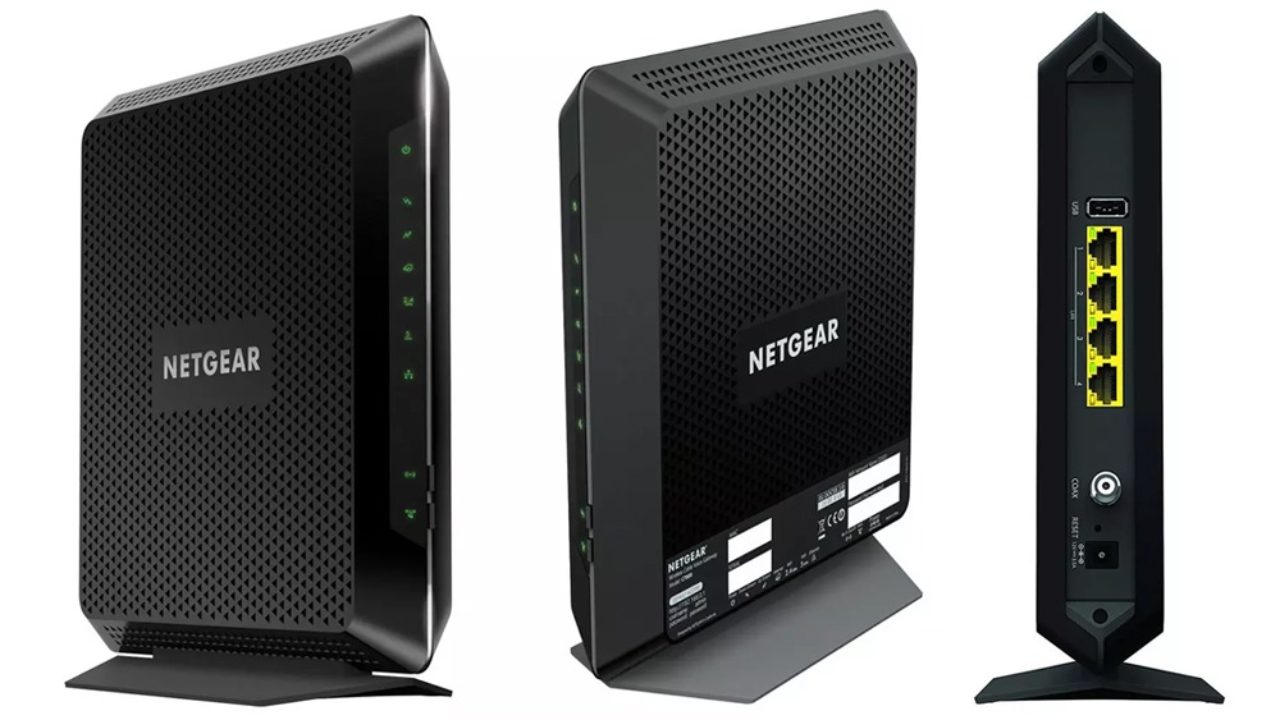

Cable internet can be fast at the street and frustrating in the house when an aging modem, separate router, and crowded wireless band are all fighting for attention. Replacing both boxes with one modem router combo can simplify activation, reduce cables, and give newer devices a cleaner wireless connection.
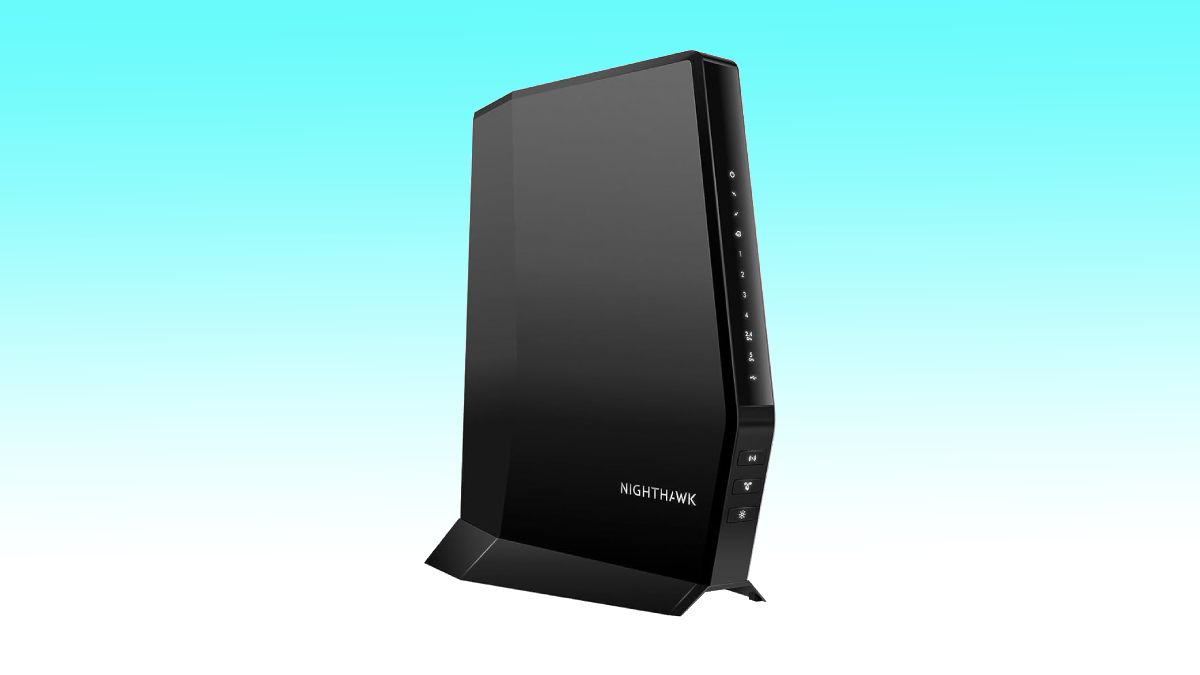
The Best modem router combo options here range from compact AX3000 models to a full Orbi mesh system. The top pick is NETGEAR CAX30, with the NETGEAR CAX80 close behind for multi-gig wired networking and the Orbi CBK752 for homes where one wireless point is not enough.
Comparison table
| # | Product | Award | Modem | Wi-Fi | Coverage | Best for |
|---|---|---|---|---|---|---|
| 1 | NETGEAR CAX30 | Best overall | DOCSIS 3.1, 32x8 | Wi-Fi 6 AX2700 | Up to 2, 000 sq. ft. | Most cable households |
| 2 | NETGEAR CAX30S | Best for included security | DOCSIS 3.1, 32x8 | Wi-Fi 6 AX2700 | Up to 2, 000 sq. ft. | Families wanting extra security tools |
| 3 | NETGEAR CAX80 | Best multi-gig hardware | DOCSIS 3.1 | Wi-Fi 6 AX6000 | Up to 2, 500 sq. ft. | Fast plans and wired devices |
| 4 | ARRIS SBG7600AC2 | Best DOCSIS 3.0 option | DOCSIS 3.0 | AC2350 | Not specified | Established cable plans |
| 5 | ARRIS G20 | Best simple Wi-Fi 6 upgrade | DOCSIS 3.1 | Wi-Fi 6 AX3000 | Not specified | Straightforward home networks |
| 6 | NETGEAR C7000 | Best for older cable tiers | DOCSIS 3.0 | AC1900 | Up to 1, 800 sq. ft. | Up to 800 Mbps plans |
| 7 | ARRIS G36 | Best ARRIS multi-gig pick | DOCSIS 3.1 | Wi-Fi 6 AX3000 | Not specified | Future-facing cable setups |
| 8 | ARRIS G34 | Best compact AX3000 combo | DOCSIS 3.1 | Wi-Fi 6 AX3000 | Not specified | Small spaces with wired gear |
| 9 | NETGEAR Orbi CBK752 | Best whole-home coverage | DOCSIS 3.1 | Wi-Fi 6 AX4200 tri-band | Up to 5, 000 sq. ft. | Large homes and dead zones |
| 10 | NETGEAR CAX80 Renewed | Best renewed multi-gig pick | DOCSIS 3.1, 32x8 | Wi-Fi 6 AX6000 | Up to 2, 500 sq. ft. | Buyers seeking CAX80 hardware |
1. NETGEAR CAX30: Best Overall

Pros
- DOCSIS 3.1 modem with 32x8 channel bonding
- Wi-Fi 6 coverage for up to 2, 000 square feet
- Four Gigabit Ethernet ports and a USB 3.0 port
- Port aggregation for compatible wired setups
- Nighthawk app makes setup and management straightforward
Cons
- Dual-band AX2700 wireless is less capable than the CAX80
- Not compatible with fiber, DSL, satellite, or bundled voice service
- NETGEAR Armor is a 30-day trial
Best for: cable households that want a capable Wi-Fi 6 replacement for two separate boxes.
The NETGEAR CAX30 gets the fundamentals right without turning a home network into a project. It replaces the cable modem and router in one enclosure, and the Nighthawk app guides the setup instead of leaving you to decode a paper manual. For a typical cable household, that combination of simple activation, current modem technology, and sensible wired connectivity is exactly what matters.
Its DOCSIS 3.1 modem uses 32x8 channel bonding, which gives it a more current foundation than the DOCSIS 3.0 models lower on this list. The dual-band Wi-Fi 6 system is rated AX2700 and is intended to cover up to 2, 000 square feet with up to 25 concurrent devices. Those figures are not promises through thick walls, but they point to the right use case: a medium-sized home with phones, televisions, laptops, consoles, and smart-home equipment sharing the connection.
The rear panel is unusually useful for a combo in this class. Four 1 Gigabit Ethernet ports cover desktop computers, game consoles, streaming players, and other fixed devices, while the USB 3.0 port can connect compatible storage. Port aggregation is also supported, though it requires compatible equipment and does not turn every single connection into a multi-gig link. WPA security support and built-in device security add sensible protection, and the optional NETGEAR Armor tools begin with a 30-day trial.
Compared with the ARRIS G20, the CAX30 offers more explicit wired flexibility and a better-defined coverage target. The NETGEAR CAX80 is the stronger choice for a multi-gig plan or a home with demanding wired devices, but its larger AX6000 platform is more than many households need. The CAX30 occupies the useful middle ground.
The weakness is provider and service compatibility. This is for major cable providers such as Xfinity, Spectrum, and Cox, not Verizon, AT&T, CenturyLink, DSL providers, satellite services, or bundled voice service. Buyers should confirm approval with the provider before activation. Choose it when you want one dependable cable gateway with modern wireless, four wired ports, and an uncomplicated app-led setup.
2. NETGEAR CAX30S: Best for Included Security

Pros
- DOCSIS 3.1 and 32x8 channel bonding
- Wi-Fi 6 AX2700 for up to 25 devices
- Four Gigabit ports plus USB 3.0
- WPA, WPA2, and WPA3 support
- Includes a 90-day NETGEAR Armor trial
Cons
- Same dual-band wireless class as the CAX30
- Coverage is limited to the same stated 2, 000 square feet
- Cable-only compatibility excludes fiber and DSL
Best for: families that want a mainstream Wi-Fi 6 gateway with a longer introductory security trial.
The NETGEAR CAX30S is the security-focused sibling to the CAX30. Its central hardware is familiar: a DOCSIS 3.1 cable modem, dual-band AX2700 Wi-Fi 6, four Gigabit Ethernet ports, and a USB 3.0 connection. The meaningful distinction is NETGEAR Armor, which comes with a 90-day trial here rather than the shorter trial attached to the CAX30.
That makes the CAX30S a practical fit for households that want to examine extra protection tools before deciding how they want to manage security. Armor is described as providing protection against hackers, malware, and identity theft, with coverage at home or on the go. The gateway also includes built-in security measures and updates, so the Armor trial is an added suite rather than the only line of defense.
The wireless hardware is rated AX2700 and is designed for up to 2, 000 square feet and 25 concurrent devices. Wi-Fi 6 is useful when several newer devices are active at once, but this remains a dual-band system. It does not offer the tri-band arrangement of the NETGEAR Orbi CBK752, nor the higher AX6000 wireless class of the NETGEAR CAX80. Four 1 Gigabit ports and port aggregation still make it well suited to a home office, console, television, and other wired equipment.
The Nighthawk app handles setup and network management, and WPA, WPA2, and WPA3 support gives the wireless side a current security baseline. Like the CAX30, the CAX30S is explicitly for cable providers such as Xfinity, Spectrum, and Cox. It is not compatible with Verizon, AT&T, CenturyLink, DSL providers, satellite services, or bundled voice service.
The main limitation is that the added security software does not change the CAX30S's wireless reach or throughput class. If you do not want to use the Armor tools, the CAX30 is the more direct match. If you do want a longer trial and the same strong everyday foundation, this is the one to choose.
3. NETGEAR CAX80: Best Multi-Gig Hardware

Pros
- AX6000 Wi-Fi 6 wireless platform
- One 2.5 Gigabit multi-gig port
- Four Gigabit Ethernet ports
- Supports port aggregation and USB 3.0
- Coverage up to 2, 500 square feet
Cons
- Physically larger and heavier than simpler combos
- Armor protection starts with a 30-day trial
- Not compatible with fiber, DSL, satellite, or bundled voice
Best for: cable users with multi-gig service, demanding wireless traffic, or several wired performance devices.
The NETGEAR CAX80 is the obvious step up when a standard Gigabit port layout feels restrictive. It combines a DOCSIS 3.1 modem with AX6000 Wi-Fi 6 and adds a 2.5 Gigabit port that can serve as a LAN or internet connection. That single port changes what the unit can do with a compatible service plan or high-speed local network equipment.
NETGEAR rates the wireless system for up to 6 Gbps and up to 30 devices, with coverage up to 2, 500 square feet in open layouts. Walls and floors can reduce that reach, as they do with every wireless gateway, but the larger wireless class gives this model more headroom than the AX2700 NETGEAR CAX30. It also remains compatible with Wi-Fi 5 and older devices, so upgrading the gateway does not require replacing the whole household's equipment.
The wired selection is the star. Four Gigabit Ethernet ports handle the usual fixed devices, while the 2.5 Gigabit port can connect a capable computer, switch, or internet service. Two Gigabit ports can also be aggregated for up to 2 Gbps in compatible arrangements. A USB 3.0 port adds another connection option for storage or other supported devices. The modem supports cable plans listed up to 10 Gbps with compatible providers, although actual service and device speeds depend on the provider and plan.
Setup runs through the Nighthawk app, with browser-based setup also available. Xfinity customers need to activate through the Xfinity app first. NETGEAR includes built-in security features and automatic firmware updates, while Armor begins with a 30-day trial. For households comparing how cable gateways differ from separate network equipment, the CAX80 is a useful example of what an integrated unit can handle without adding another box.
The drawbacks are practical rather than mysterious. The CAX80 measures 8.5 by 4.3 by 10.4 inches and weighs 4.45 pounds, so it needs more shelf space than the CAX30. It is also unnecessary for a modest cable tier and a handful of ordinary devices. Pick it when the 2.5 Gigabit port, AX6000 wireless, or expanded coverage target will actually be used.
4. ARRIS SBG7600AC2: Best DOCSIS 3.0 Option

Pros
- AC2350 Wi-Fi router with DOCSIS 3.0 modem
- Four Gigabit Ethernet ports
- Approved for cable plans up to 800 Mbps
- SURFboard Central app supports activation and management
- Parental controls include time limits and pausing
Cons
- DOCSIS 3.0 is behind the DOCSIS 3.1 models here
- Provider approval still needs to be checked
- Not compatible with fiber, DSL, or satellite service
Best for: cable households whose provider plan and equipment approval still align with DOCSIS 3.0.
The ARRIS SBG7600AC2 is the conventional choice in this group. It uses a DOCSIS 3.0 cable modem and an AC2350 wireless router, with four Gigabit Ethernet ports on the back. That combination remains workable for an approved cable plan up to 800 Mbps, but it does not have the newer DOCSIS 3.1 foundation found in the ARRIS G20, G34, and G36.
The important question is not whether AC2350 sounds fast on a box. It is whether the device matches the service tier and the provider's current approval list. For an established cable plan capped within the stated 800 Mbps range, the SBG7600AC2 can provide a single-box setup for wired and wireless devices. For a new, faster plan, the DOCSIS 3.0 modem may become the limiting factor sooner than a DOCSIS 3.1 model would.
ARRIS uses the SURFboard Central app for activation, wireless customization, device monitoring, and parental controls. The parental tools include time limits and the ability to pause internet access, which is more useful than a basic gateway that only broadcasts a network name. Four Gigabit ports also leave room for a computer, console, television, and another fixed device without an immediate switch.
The NETGEAR C7000 is the closest competitor here because it also uses DOCSIS 3.0, but the C7000 has a stated AC1900 wireless class and coverage up to 1, 800 square feet. The ARRIS has the stronger stated wireless tier and a more current product listing, while the DOCSIS 3.1 ARRIS G20 is the safer direction for a household planning a faster service tier. Readers with fiber should skip both and start with the connection requirements that make fiber networking different.
The SBG7600AC2's weakness is its age of technology, not its basic layout. It makes sense only when the provider confirms compatibility and the service plan does not call for DOCSIS 3.1. Choose it for a stable, approved DOCSIS 3.0 setup, not as a general upgrade for a rapidly changing internet connection.
5. ARRIS G20: Best Simple Wi-Fi 6 Upgrade

Pros
- DOCSIS 3.1 modem technology
- Dual-band Wi-Fi 6
- AX3000 wireless class
- Compatible with major providers including Xfinity, Spectrum, and Cox
- Simple single-unit setup
Cons
- Few detailed wired specifications are provided
- No stated coverage figure
- Provider approval remains necessary
Best for: households moving from older cable equipment to DOCSIS 3.1 and Wi-Fi 6 without chasing advanced ports.
The ARRIS G20 is the uncomplicated upgrade in the lineup. It replaces an older cable gateway with DOCSIS 3.1 and dual-band Wi-Fi 6, while keeping the product description focused on the basic job of getting a home online. There is no mesh satellite or elaborate multi-gig port story to sort through.
Its AX3000 wireless class sits above the AX2700 rating of the NETGEAR CAX30, though the two are close enough that placement, walls, client devices, and the internet plan will matter more than the label alone. The G20's Wi-Fi 6 support is useful for a home with newer phones and laptops sharing bandwidth, and the DOCSIS 3.1 modem gives it a more current base than the DOCSIS 3.0 ARRIS SBG7600AC2.
ARRIS lists compatibility with major internet service providers such as Xfinity, Spectrum, and Cox. The setup is still dependent on the provider accepting and activating the specific model, so checking before disconnecting an existing gateway is essential. The product is presented as a single cable modem and router rather than a separate modem plus wireless access point, which keeps the physical installation tidy.
The G20's problem is the amount of information left unspecified. The supplied details do not identify a coverage figure or a detailed Ethernet port count, so buyers with several wired devices have less to plan around than they do with the CAX30 or ARRIS G34. It is also not the right tool for fiber, DSL, or satellite service.
Choose the G20 when the priority is a clean move to DOCSIS 3.1 and Wi-Fi 6, and when a standard home network does not require unusual wired capacity. It is a calmer, less feature-heavy alternative to the CAX80, but it cannot match that model's multi-gig flexibility.
6. NETGEAR C7000: Best for Older Cable Tiers

Pros
- AC1900 wireless with up to 1, 800 square feet of coverage
- Supports up to 30 connected devices
- Intended for cable plans up to 800 Mbps
- Combines modem and router in one unit
- Works with major providers including Xfinity and Cox
Cons
- DOCSIS 3.0 and Wi-Fi 5 are older standards
- Not compatible with Spectrum according to the supplied compatibility details
- Renewed product condition requires extra care when checking the unit
Best for: a cable plan up to 800 Mbps where provider approval and older Wi-Fi equipment are not concerns.
The NETGEAR C7000 is a straightforward DOCSIS 3.0 gateway for a defined use case. It is intended for cable provider plans up to 800 Mbps and pairs the modem with AC1900 Wi-Fi. The stated wireless coverage is up to 1, 800 square feet for as many as 30 devices, making it a reasonable fit for a smaller home with ordinary connected equipment.
Wi-Fi 5 is not as current as Wi-Fi 6, but it still works with the broad mix of phones, televisions, computers, and smart-home products found in many homes. The key is keeping expectations aligned with the modem's DOCSIS 3.0 technology and the stated service ceiling. The ARRIS SBG7600AC2 offers a higher AC2350 wireless class in the same broad DOCSIS generation, while the ARRIS G20 is a better technical starting point for someone moving to newer cable service.
Compatibility deserves careful attention. The supplied details list Xfinity and Cox among the supported major providers, but exclude Spectrum, Verizon, AT&T, CenturyLink, DSL providers, satellite services, and bundled voice service. Provider qualification can change, so check the exact model before activation. This is not a universal gateway, and it should not be purchased on the assumption that every cable provider will accept it.
The C7000 is listed as renewed, which adds another consideration beyond its network standards. A buyer should inspect the unit, accessories, and activation status promptly, then confirm that the provider can register it. Those steps matter more here because a modem can look perfectly normal and still be unsuitable for a particular service account.
Its thin 1.7-inch width is easy to place, and the device combines the two main network boxes into one. Still, the older modem and wireless standards limit its future flexibility. It belongs on this list for households with an appropriate plan and provider, not for anyone trying to build around a new multi-gig connection.
7. ARRIS G36: Best ARRIS Multi-Gig Pick

Pros
- DOCSIS 3.1 modem
- AX3000 Wi-Fi 6 wireless
- Supports major providers including Xfinity, Spectrum, and Cox
- Designed for fast streaming, gaming, and browsing
- Compact vertical form factor
Cons
- Supplied details do not specify Ethernet ports
- No coverage figure is provided
- Wi-Fi class is below the AX6000 NETGEAR CAX80
Best for: ARRIS buyers who want DOCSIS 3.1 and Wi-Fi 6 in a compact single gateway.
The ARRIS G36 takes the same general approach as the G20 but is positioned as the multi-gig model in ARRIS's range. It combines a DOCSIS 3.1 modem with dual-band AX3000 Wi-Fi 6, giving it a current wireless and modem foundation without the bulk of a mesh system.
The AX3000 rating is well suited to everyday streaming, browsing, video calls, and gaming across newer devices. It does not carry the wireless headroom of the AX6000 NETGEAR CAX80, and the supplied information does not identify a dedicated multi-gig Ethernet port. That makes the G36 less compelling for a wired workstation or a network built around unusually fast local transfers.
ARRIS lists compatibility with major providers including Xfinity, Spectrum, and Cox. As with the other cable gateways here, the provider still needs to approve and activate the device. The G36 is not a fiber, DSL, or satellite solution, so service type should be checked before model comparisons begin. A quick look at the equipment choices for a Spectrum connection can help clarify that compatibility step.
The design is relatively compact at 10 by 3 by 8 inches, with a listed weight of 2 pounds. That vertical footprint should be easier to place than the heavier CAX80, especially near a coaxial outlet where shelf depth is limited. The trade-off is that the product data gives less detail about physical connections and wireless reach, making it harder to plan a large or heavily wired installation.
The G36 is best understood as a clean ARRIS alternative to the G20, not as a direct rival to a high-end multi-gig gateway. It has the newer modem standard and Wi-Fi 6, but buyers who need a specific high-speed Ethernet port should look elsewhere. Pick it for a compact, modern cable gateway when wireless devices do most of the work.
8. ARRIS G34: Best Compact AX3000 Combo

Pros
- DOCSIS 3.1 supports cable plans up to 2.5 Gbps
- AX3000 dual-band Wi-Fi 6
- Four 1 Gigabit Ethernet ports
- Compact 10 by 3 by 8-inch design
- Clear status LEDs and simple activation
Cons
- Ethernet ports are limited to Gigabit speed
- Not compatible with fiber, DSL, or satellite service
- Provider support must be confirmed
Best for: a compact home gateway with modern Wi-Fi 6 and several wired Gigabit devices.
The ARRIS G34 is one of the most balanced ARRIS models here. It uses DOCSIS 3.1, supports cable internet plans up to 2.5 Gbps, and adds dual-band AX3000 Wi-Fi 6. Its footprint is a manageable 10 by 3 by 8 inches, so it can fit on a shelf without the imposing shape of the larger CAX80.
The modem's stated capability gives it useful room for faster cable service, while the Wi-Fi 6 system is aimed at whole-home wireless use. Four 1 Gigabit Ethernet ports cover the standard set of wired devices, such as a desktop, console, television, and access point. That port count is more generous than the sparse detail supplied for the G20 and G36, but the ports themselves are not multi-gig.
This distinction matters. The G34 can support a cable plan listed up to 2.5 Gbps, yet a single wired device connected through a 1 Gigabit port cannot use more than that port's link capacity. Wireless performance also varies by client device and environment. The NETGEAR CAX80 is the more appropriate pick when a 2.5 Gigabit port and higher AX6000 wireless class are central to the setup.
The G34 uses simple LED indicators for power, upstream and downstream activity, and online status. Setup involves connecting the cable, powering on, activating with the provider, and then joining or customizing the wireless network. ARRIS identifies it as tested and qualified with Cox, Xfinity, and Spectrum, but the final check should still happen with the provider because support is model-specific.
Its weakness is the mismatch between a high modem ceiling and ordinary Gigabit wired ports. That is not a flaw for most homes, but it makes the G34 less compelling for someone buying specifically to build a multi-gig wired network. For a compact cable gateway with Wi-Fi 6, four wired connections, and a modern modem, it is one of ARRIS's cleanest choices.
9. NETGEAR Orbi CBK752: Best Whole-Home Coverage

Pros
- Covers up to 5, 000 square feet
- Includes a cable modem and Wi-Fi 6 satellite
- Tri-band mesh manages device connections
- Supports more than 40 devices
- Optional satellites can add 2, 500 square feet each
Cons
- Much larger and heavier than a single gateway
- Provider speed certifications are more limited than the modem's maximum
- NETGEAR Armor begins with a 30-day trial
Best for: large homes, multilevel layouts, and spaces where a single gateway leaves dead zones.
The NETGEAR Orbi CBK752 solves a different problem from the other products here. It is not simply a faster single box. The two-pack combines a cable modem with a Wi-Fi 6 satellite and is designed to spread wireless coverage through a large home. Its stated coverage reaches up to 5, 000 square feet, and each optional additional Orbi satellite can add another 2, 500 square feet.
That arrangement is valuable when the modem has to live near the coaxial outlet but the people using the network are several rooms or floors away. The system uses tri-band mesh technology to manage device connections, rather than asking every client to cling to one distant gateway. It supports more than 40 devices, which is a better fit for a busy home than a single access point placed at one end of the floor plan.
The wireless platform is AX4200 Wi-Fi 6, with enough capacity for streaming, video calls, gaming, and other concurrent activity. The cable modem uses DOCSIS 3.1 and supports plans up to 4 Gbps in the supplied specifications, while stated provider certifications include Spectrum and Cox up to 1 Gbps and Xfinity up to 900 Mbps download with 200 Mbps upload. Those provider-specific figures are important, since a modem's broad technical ceiling does not guarantee support for every available plan.
The Orbi app handles setup and management, and automatic firmware updates are included. NETGEAR Armor adds real-time security and VPN privacy tools with a 30-day trial. The system is made for use in the United States, and the provider must still approve the exact modem before activation. Buyers trying to decide between one gateway and multiple access points should focus on how wireless coverage changes across a larger home, not just the headline wireless number.
The downside is the physical system itself. The listed weight is 8.2 pounds, and the two units require more placement planning than a single CAX30 or G34. The CBK752 is also a poor fit for a small apartment where one central gateway already reaches every room. For a sprawling or obstructed home, though, the mesh design addresses the problem that more modem speed cannot fix.
10. NETGEAR CAX80 Renewed: Best Renewed Multi-Gig Pick

Pros
- AX6000 Wi-Fi 6 wireless
- Supports cable plans up to 6 Gbps
- One 2.5 Gigabit LAN or internet port
- Four Gigabit Ethernet ports and USB 3.0
- Coverage up to 2, 500 square feet
Cons
- Renewed condition makes inspection and activation especially important
- Large 10.4-inch-tall enclosure
- Not compatible with fiber, DSL, satellite, or bundled voice service
Best for: shoppers specifically seeking the CAX80 feature set in a renewed unit.
The NETGEAR CAX80 Renewed has the same core appeal as the new CAX80: a DOCSIS 3.1 modem, AX6000 Wi-Fi 6, and a 2.5 Gigabit port. It is designed for cable plans up to 6 Gbps and covers up to 2, 500 square feet with up to 30 concurrent devices. For someone who has already decided that the CAX80's hardware is the right fit, this version offers another route to that configuration.
The wireless specifications are still impressive on paper. AX6000 gives the gateway considerably more wireless capacity than the AX2700 CAX30 and more than the AX3000 ARRIS models. Wi-Fi 6 compatibility works with older Wi-Fi 5 devices, so the household can transition gradually. Actual performance depends on the client device, service plan, placement, and surrounding walls, but the hardware is built for a busy home rather than a lightly connected one.
Its wired layout is equally useful. Four 1 Gigabit ports cover ordinary fixed devices, the 2.5 Gigabit port can act as a LAN or internet connection, and two Gigabit ports can be aggregated for up to 2 Gbps in a compatible setup. A USB 3.0 port adds storage and peripheral flexibility. The Nighthawk app handles setup and management, while built-in security features and automatic firmware updates are included.
The distinction from the new NETGEAR CAX80 is the renewed condition, not the network architecture. That means buyers should pay close attention to the unit's physical state, included equipment, and whether the provider can activate the modem. It is also worth confirming that the return or support terms suit the purchase before replacing an existing working gateway.
The CAX80 chassis measures 10.4 by 8.5 by 4.3 inches and weighs 4.45 pounds, so this is not a discreet little box. It is also excessive for a modest service tier or a home where all devices use basic wireless. Choose the renewed model when the 2.5 Gigabit port and AX6000 wireless genuinely matter, and choose the new CAX80 when you want the same design without the extra condition check.
How to choose best modem router combo
The right gateway starts with your internet service and floor plan, then moves to wireless capacity and wired connections.
Provider compatibility
A modem router combo only works when the internet provider has approved its modem component. The products here are designed for cable service, with examples including Xfinity, Spectrum, and Cox, but support differs by model. None of these picks is a replacement for a fiber, DSL, or satellite gateway.
Check the exact model against the provider's compatibility list before buying. Also verify whether bundled voice service is supported, since several NETGEAR models explicitly exclude it.
DOCSIS generation
DOCSIS 3.1 is the newer modem standard represented by the NETGEAR CAX30, CAX80, ARRIS G20, ARRIS G36, ARRIS G34, and Orbi CBK752. It gives a gateway more room for current and future cable service tiers. DOCSIS 3.0 models such as the ARRIS SBG7600AC2 and NETGEAR C7000 can still suit an approved plan, but their service ceiling is more limited.
Choose DOCSIS 3.1 when you want the modem to remain useful as your cable plan changes.
Wi-Fi class and bands
AX2700, AX3000, AX4200, and AX6000 describe the wireless class, not the speed one phone will necessarily see. Newer Wi-Fi 6 devices can make better use of a current gateway, especially when several clients are active. The AX6000 CAX80 has more wireless headroom than the AX2700 CAX30, while the Orbi CBK752 uses tri-band mesh rather than relying on a single dual-band point.
A larger wireless number cannot overcome a gateway placed behind thick walls or at one end of a long home. If coverage is the issue, a mesh system can matter more than moving from one AX rating to another.
Ethernet ports
Count the wired devices you expect to keep connected. Four Gigabit ports, found on products such as the CAX30, CAX80, SBG7600AC2, and G34, are useful for desktops, game consoles, televisions, switches, and access points.
A 2.5 Gigabit port gives the CAX80 models a clear advantage for compatible multi-gig internet or local networking. Port aggregation can combine compatible Gigabit connections, but it does not make a single ordinary Ethernet device operate above its own link limit.
Coverage and mesh layout
Single gateways are easiest to install, but their coverage estimates assume an open layout. The CAX30 is listed for up to 2, 000 square feet, while the CAX80 reaches up to 2, 500 square feet. The Orbi CBK752 goes further with a modem and satellite designed for up to 5, 000 square feet.
For a compact apartment, a large mesh system may add unnecessary placement complexity. For a multilevel home or a layout with dead zones, the satellite can solve a problem that a faster modem will not.
Frequently asked questions
Can these modem router combos work with fiber internet?
No. The products in this roundup are cable modem router combos, and the supplied compatibility details exclude fiber service. Fiber customers need a router designed to connect to the provider's optical network terminal or fiber gateway.
Do I still need a separate router?
No. Each product combines a cable modem and a wireless router in one device. The Orbi CBK752 adds a satellite for mesh coverage, but it still starts as an integrated modem and router system.
Which combo is best for a large home?
The NETGEAR Orbi CBK752 is the strongest fit when coverage is the main concern. Its two-pack is designed for up to 5, 000 square feet and supports additional optional satellites. A single CAX80 can cover up to 2, 500 square feet, but a mesh layout is more suitable for distant rooms and multiple floors.
Is DOCSIS 3.1 better than DOCSIS 3.0?
DOCSIS 3.1 is the newer standard and generally gives a modem more room for higher cable service tiers. DOCSIS 3.0 can still be appropriate when the provider approves the modem and the plan fits its stated limits. The ARRIS SBG7600AC2 and NETGEAR C7000 are the DOCSIS 3.0 options here.
Do AX6000 speeds mean one device gets 6 Gbps?
No. AX6000 is a wireless class rating that describes total theoretical capacity across the system's bands. Real speeds depend on the client device, internet plan, distance, interference, walls, and network activity. The NETGEAR CAX80 has more wireless capacity than the AX2700 CAX30, but that does not guarantee a 6 Gbps connection to one phone or laptop.
Can I use these with bundled cable voice service?
Several products explicitly state that they are not compatible with bundled voice service. Check the exact modem model and your provider's requirements before replacing an existing voice-enabled gateway.
How many Ethernet ports should a modem router combo have?
Four Gigabit ports are a useful baseline for a home with a desktop, console, television, and another wired device. The NETGEAR CAX80 models add a 2.5 Gigabit port for compatible multi-gig connections. If you need more physical ports, a wired Ethernet switch can expand the network.
The bottom line
The NETGEAR CAX30 is the Best modem router combo for most cable households because it combines DOCSIS 3.1, Wi-Fi 6, four Gigabit ports, USB 3.0, and a clear app-based setup without requiring a mesh layout. The NETGEAR CAX80 is the better technical choice for a multi-gig service plan, a busy wireless home, or a network that can use its 2.5 Gigabit port.
For large homes with dead zones, the NETGEAR Orbi CBK752 is the smarter choice because its satellite coverage addresses placement rather than simply increasing modem capacity. The ARRIS G34 is a solid compact alternative when four Gigabit ports and AX3000 Wi-Fi 6 are enough.
If you are undecided, confirm provider compatibility first, then choose between the CAX30 for a normal home, the CAX80 for multi-gig hardware, and the Orbi CBK752 for whole-home coverage.
As an Amazon Associate we earn from qualifying purchases.