

A monitor can make a fast computer feel sluggish, turn a tidy desk into a cramped one, or leave you squinting at text by the end of the day. The right choice depends less on the logo and more on the panel, resolution, refresh rate, stand, and connections that fit your setup.
Our Best best monitor brands picks cover compact 22-inch screens, versatile 24-inch IPS models, high-refresh gaming displays, and sharp 4K options. The range includes monitors for work, entertainment, and competitive play, with meaningful differences between products that can look similar in a product listing.
The Dell 24 Monitor SE2426H is our top pick for its IPS panel, 144Hz refresh rate, 1ms MPRT response, wide viewing angles, and practical dual HDMI setup. The other picks range from compact everyday displays to Samsung's sharper QHD gaming screen and Dell's detailed 4K model.
Comparison table
| # | Product | Award | Panel | Resolution | Refresh rate | Best for |
|---|---|---|---|---|---|---|
| 1 | Dell 24 Monitor SE2426H | Best overall | IPS | 1920 x 1080 | 144Hz | Work and gaming |
| 2 | Samsung Odyssey G5 G51F | Best QHD gaming pick | Not specified | 2560 x 1440 | 180Hz | Detailed gaming |
| 3 | Dell 27 Monitor S2725QS | Best 4K monitor | IPS | 3840 x 2160 | 120Hz | High-detail work and play |
| 4 | Dell 27 Gaming Monitor SE2726HG | Best high-refresh 27-inch pick | Fast IPS | 1920 x 1080 | 240Hz | Competitive gaming |
| 5 | Dell 24 Plus Monitor S2425HSM | Best adjustable monitor | Not specified | 1920 x 1080 | 144Hz | Flexible desk setups |
| 6 | Acer 27-inch Monitor KB272 | Best 27-inch office monitor | IPS | 1920 x 1080 | 120Hz | Office work |
| 7 | Sceptre 22-inch Gaming Monitor | Best compact gaming monitor | Not specified | 1920 x 1080 | Up to 144Hz | Small desks |
| 8 | Philips 24-inch Monitor 241V8LB | Best VA office monitor | VA | 1920 x 1080 | 100Hz | Reading and media |
| 9 | Philips 22-inch Monitor 221V8LB | Best compact VA monitor | VA | 1920 x 1080 | 100Hz | Compact everyday use |
| 10 | Amazon Basics 27-inch IPS Monitor | Best connectivity | IPS | 1920 x 1080 | 75Hz | Mixed legacy connections |
1. Dell 24 Monitor SE2426H: Best Overall

Pros
- IPS panel with consistent color at wide angles
- 144Hz refresh rate suits work and gaming
- 1ms MPRT response for clearer motion
- Two HDMI inputs simplify switching devices
- Thin bezels work well in a multi-monitor setup
Cons
- Tilt adjustment is less flexible than the S2425HSM
- Full HD leaves less workspace than the QHD and 4K picks
Best for: someone who wants one compact monitor for everyday computing and smooth gaming.
The Dell SE2426H is the monitor we would put in front of most people. Its 23.8-inch size fits comfortably on a modest desk, while the IPS panel keeps colors and contrast more consistent when you are not sitting directly in the center. That matters when the screen is used for documents, video calls, and games rather than one fixed task.
The 1920 x 1080 resolution is sensible at this size. Text and interface elements remain easy to read without demanding a powerful graphics card, and the 144Hz refresh rate makes scrolling and motion feel much smoother than a conventional office display. Dell lists a 1ms MPRT response, which is aimed at reducing visible blur during fast movement. AMD FreeSync helps coordinate the display's refresh with compatible graphics hardware to reduce tearing.
Connectivity is straightforward, with two HDMI ports. The product also includes DisplayPort in its title, but the listed feature details specifically emphasize the two HDMI connections, so we would verify the exact rear-panel arrangement before planning a multi-device setup around it. The thin bezels are useful for a dual-screen arrangement, and the 178-degree horizontal and vertical viewing angles help keep the image consistent when a second person is looking on.
The limitation is the stand. Tilt is available, but the S2425HSM offers height, pivot, and swivel adjustments that make it easier to build a precise ergonomic setup. The Samsung Odyssey G5 G51F is also a better fit for shoppers who want QHD detail. Choose the SE2426H when you want the cleanest balance of responsive motion, IPS viewing angles, and manageable desk size.
2. Samsung Odyssey G5 G51F: Best QHD Gaming Pick

Pros
- QHD resolution gives games and text more detail
- 180Hz refresh rate keeps action fluid
- HDR10 adds support for brighter highlights and deeper shadows
- Height, tilt, and pivot adjustments improve positioning
- Black Equalizer can reveal detail in dark game scenes
Cons
- QHD demands more graphics power than Full HD
- The product details do not specify the panel type
Best for: PC gamers who want sharper imagery without moving to a 4K workload.
The Samsung Odyssey G5 G51F makes the biggest visible jump from the Full HD displays here. Its 27-inch screen uses a 2560 x 1440 QHD resolution, which provides substantially more image detail than 1920 x 1080. Fine textures look cleaner, text has more room to breathe, and a game world can show more useful detail without making every interface element tiny.
Its 180Hz refresh rate is a strong match for fast games. It gives the screen more opportunities to show a new frame, so camera movement and rapid turns appear smoother when the computer can keep up. The listed 1ms response time targets quick transitions, while AMD FreeSync helps limit tearing and stutter. HDR10 support adds compatible picture handling for brighter highlights and more nuanced shadows, though HDR support alone does not tell us how bright the panel gets.
This is also one of the more adaptable gaming displays in the group. The stand supports tilt, pivot, and height adjustment, which is a much better starting point than a stand that only tilts. Black Equalizer lets players lift detail in dark areas, a feature that can make opponents easier to spot in shadow-heavy scenes. For a broader look at choosing a display around fast-action play, the refresh and response details that matter during fast games are useful context.
The main uncertainty is panel type, which is not specified in the supplied product details. The Dell SE2426H has a clearly identified IPS panel and better suits mixed work use where viewing consistency is a priority. The Samsung is the one to choose when QHD sharpness and gaming features matter more than having every panel detail spelled out.
3. Dell 27 Monitor S2725QS: Best 4K Monitor

Pros
- 4K UHD resolution creates a highly detailed desktop
- IPS panel and 99% sRGB coverage support consistent color
- 120Hz refresh rate keeps motion smooth
- FreeSync Premium supports tear-free play
- ComfortView Plus reduces blue light while retaining color accuracy
Cons
- 4K needs more graphics power than Full HD
- The larger, heavier display needs a sturdy desk
Best for: creators, office users, and gamers who want sharp detail on a 27-inch screen.
The Dell S2725QS is the most detail-focused monitor here. A 27-inch IPS panel with 3840 x 2160 resolution gives documents, photos, and fine interface elements a much cleaner appearance than the Full HD options. It is the sort of screen that makes a spreadsheet, timeline, or high-resolution image feel less crowded because more information fits into the same physical area.
Dell lists 99% sRGB coverage, a 1500:1 contrast ratio, HDR readiness, and a refresh rate of up to 120Hz. The color coverage is useful for general photo work and content creation, while the contrast specification points to stronger separation between light and dark tones than a basic display. FreeSync Premium helps keep compatible game output synchronized, so this is not limited to static office work.
ComfortView Plus is designed to reduce harmful blue light emissions to 35% or less without sacrificing color accuracy. That is more useful than a heavily tinted reading mode when the same monitor has to handle documents and color-sensitive images. The thin bezel gives the display a modern look, and Dell also describes improved sound quality over the previous generation.
The trade-off is workload. Driving 4K at a high refresh rate asks more of the computer than the Full HD Dell SE2426H or Acer KB272. The Samsung Odyssey G5 G51F is the better gaming-focused alternative if QHD is a more practical target, while the S2725QS wins when crisp desktop detail is the priority. It is the right pick for a user who wants one polished 27-inch screen for work, media, and occasional gaming.
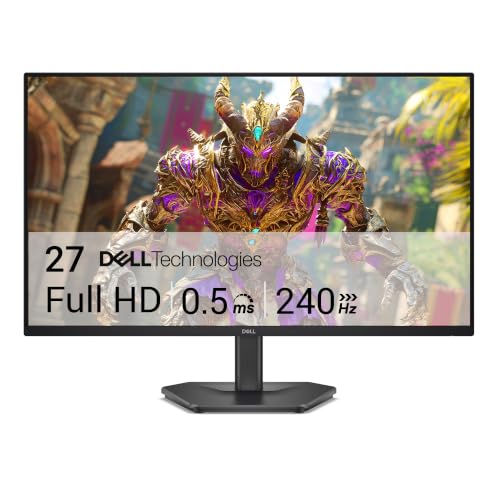
4. Dell 27 Gaming Monitor SE2726HG: Best High-Refresh 27-Inch Pick
Pros
- 240Hz refresh rate is built for competitive play
- Fast IPS panel provides wide-angle color consistency
- 0.5ms response specification targets reduced motion blur
- FreeSync Premium and HDMI VRR support smoother action
- 99% sRGB coverage gives games vivid color
Cons
- Full HD is less sharp on a 27-inch screen than QHD
- Stand adjustment is limited to tilt
Best for: competitive players who prioritize high frame rates over pixel density.
The Dell SE2726HG is about speed first. Its 27-inch Fast IPS panel runs at up to 240Hz, giving it the highest refresh rate in this group. That matters most in competitive games where a compatible computer can produce very high frame rates and where smooth camera movement is more important than extra desktop resolution.
Dell lists a 0.5ms response time, 99% sRGB color coverage, and wide IPS viewing angles. The response specification is aimed at keeping fast transitions crisp, while the color coverage prevents the screen from feeling washed out in ordinary games and video. FreeSync Premium and HDMI VRR are designed to reduce tearing across compatible PC and console sources.
The connection selection is practical for a gaming desk, with two HDMI ports and DisplayPort 1.4 listed in the product title. TÜV Rheinland 3-Star certification is also specified, with a focus on reducing blue light while preserving color. Those details make the monitor more comfortable for long sessions, though they do not turn it into an ergonomic office display.
The weakness is the pairing of 27 inches with Full HD. Images are not as dense as on the Samsung Odyssey G5 G51F, and the tilt-only stand lacks the height and pivot range found on several Dell alternatives. Choose the SE2726HG if 240Hz is the feature that matters most. Choose Samsung if you would rather have a sharper game world, or the SE2426H if you want a smaller, more balanced screen.
5. Dell 24 Plus Monitor S2425HSM: Best Adjustable Monitor

Pros
- Height, tilt, pivot, and swivel adjustments
- 144Hz refresh rate works for gaming and smooth desktop use
- Integrated dual 3W speakers
- 1500:1 contrast ratio
- 4-Star TÜV certification for eye comfort
Cons
- Full HD provides less workspace than the 4K Dell
- HDMI is the listed connectivity option
Best for: home offices that need a flexible stand and built-in audio.
The S2425HSM is the practical office alternative to Dell's more basic SE2426H. Both are 23.8-inch Full HD monitors with a 144Hz refresh rate and a 1ms MPRT response specification, but this model is built around adjustability. Height, tilt, pivot, and swivel movement let you position the screen around your chair and desk rather than forcing your posture to match a fixed stand.
The 1920 x 1080 display is easy to drive and sensible for this screen size. Dell also lists a 1500:1 contrast ratio, which should help separate darker text and images from the background. The 144Hz refresh rate makes cursor movement and scrolling feel more immediate than on a conventional 60Hz office panel, and AMD FreeSync adds support for smoother compatible gaming.
Two built-in 3W speakers make this a convenient all-in-one setup for calls, short videos, and casual listening. They will not replace dedicated desktop speakers, but they remove one more item from a crowded desk. The four-star TÜV certification is presented as an eye-comfort feature that reduces harmful blue light while retaining color quality.
The S2425HSM does not have the sharpness of the S2725QS or the QHD workspace of the Samsung Odyssey G5 G51F. Its listed connectivity is also centered on HDMI, so users with several source types should check compatibility before buying. It is the stronger choice over the SE2426H when the stand matters every day, and the better office fit for anyone who wants speakers without adding another device.
6. Acer 27-inch Monitor KB272: Best 27-Inch Office Monitor

Pros
- Spacious 27-inch IPS screen
- 120Hz refresh rate improves motion clarity
- Adaptive-Sync supports smoother compatible gaming
- 1ms VRB response specification
- 250 nits brightness is specified
Cons
- Full HD is less dense at 27 inches
- The supplied details do not describe an adjustable stand
Best for: office users who want a large IPS screen with smoother-than-basic motion.
The Acer KB272 makes documents and browser windows feel roomier by using a 27-inch panel. That extra physical area is comfortable for everyday multitasking, especially when the monitor sits far enough back on a desk. The IPS technology supports consistent color across wide viewing angles, which is useful when someone else is looking at the screen during a meeting.
Its 1920 x 1080 resolution is straightforward and easy for most computers to handle. Acer specifies a 0.311mm pixel pitch, which helps explain why the screen does not look as dense as a 24-inch Full HD display or the 27-inch QHD Samsung. A 250-nit brightness specification suits ordinary indoor office lighting, though a particularly bright room may call for a brighter display.
The 120Hz refresh rate is a welcome feature for scrolling, video playback, and casual gaming. Adaptive-Sync, described as FreeSync compatible, works with compatible graphics hardware to match the monitor's refresh behavior to the frame output. Acer also lists a 1ms VRB response mode, intended to reduce the appearance of blur in fast scenes.
The KB272 is less flexible than the Dell S2425HSM because the supplied details do not identify height, pivot, or swivel adjustment. The Samsung is a stronger gaming screen, and the Dell S2725QS is a better high-detail work display. Pick the Acer when a larger IPS workspace matters more than pixel density or advanced stand movement.
7. Sceptre 22-Inch Gaming Monitor: Best Compact Gaming Monitor

Pros
- Compact 22-inch footprint
- Up to 144Hz refresh rate
- Built-in speakers
- HDMI and DisplayPort connections are listed
- Blue-Light Shift supports longer viewing sessions
Cons
- Smaller screen than the 24-inch and 27-inch alternatives
- Panel type and response specification are not supplied
Best for: small desks, secondary gaming setups, and users who need a compact display.
The Sceptre E225W-FW144 is the easiest monitor here to fit into a tight space. Its 22-inch class size keeps the screen footprint modest, while the minimal-bezel design can work neatly in a dual-monitor arrangement. It is a sensible format for a dorm desk, a compact workstation, or a second screen that should not dominate the surface.
The display uses Full HD resolution and supports up to 144Hz, according to the product title. That combination keeps the pixel load manageable while giving compatible games and desktop motion a smoother presentation than a basic 60Hz panel. The supplied details do not specify the panel type or response time, so buyers who care about precise motion performance should look more closely at the listing before choosing it over the Dell or Acer models.
HDMI and DisplayPort are listed, giving it useful flexibility for a gaming PC and other modern sources. Integrated speakers keep the setup simple for system sounds, video calls, or casual playback. Blue-Light Shift is intended to reduce blue light emissions and eye strain during extended viewing, although comfort also depends on brightness, room lighting, and viewing distance.
The obvious compromise is scale. The Dell SE2426H gives you a larger 23.8-inch IPS screen with better-defined viewing-angle specifications, and the Dell SE2726HG is the more serious choice for 240Hz play. For a second screen or a compact gaming station, though, the Sceptre's smaller footprint and high refresh ceiling are its strongest reasons to buy.
8. Philips 24-Inch Monitor 241V8LB: Best VA Office Monitor

Pros
- VA panel produces deeper blacks and brighter whites
- 100Hz refresh rate is smooth for office work and video
- 178-degree viewing angles
- EasyRead mode helps with lengthy documents
- Virtually bezel-free on three sides
Cons
- Not as fast as the gaming-focused models
- VA panel is less suited to wide-angle color-critical work than the IPS picks
Best for: office work, reading, and media on a conventional 24-inch screen.
The Philips 241V8LB is a calm, sensible office monitor rather than a gaming specialist. Its 23.8-inch Full HD display gives text and windows a comfortable size, and the VA panel is designed to produce brighter whites and deeper blacks. That contrast advantage can make films, photos, and dark interface themes look more substantial than they do on a flat-looking basic panel.
Philips lists support for 16.7 million colors and 178-degree horizontal and vertical viewing angles. The wide viewing specification helps prevent obvious color shifts when the screen is viewed from the side. It is useful for shared workspaces, though an IPS display such as the Dell SE2426H remains the safer choice when consistent color from off-center positions is a primary concern.
The 100Hz refresh rate is a nice middle ground for scrolling, video, and everyday movement. Adaptive-Sync is included to help keep compatible motion fluid, but this is not aimed at the 180Hz and 240Hz gaming performance of the Samsung and Dell gaming models. The virtually bezel-free design on three sides also makes a pair of these screens easier to align.
EasyRead mode is the feature that makes the Philips particularly appealing to heavy readers. It is designed to create a more paper-like reading experience for long documents. For more guidance on choosing a display around text, posture, and long work sessions, the screen traits that matter during a full workday are worth considering. Skip this model if you need a highly adjustable stand or competitive gaming speed, but it is a comfortable fit for ordinary office use and media.
9. Philips 22-Inch Monitor 221V8LB: Best Compact VA Monitor

Pros
- Compact 21.5-inch viewable screen
- VA panel supports deeper blacks
- 100Hz refresh rate
- Adaptive-Sync helps reduce stutter
- 178-degree viewing angles
Cons
- Less workspace than the 24-inch Philips
- Smaller display is not ideal for dense multitasking
Best for: compact desks that still need Full HD resolution and smooth everyday motion.
The Philips 221V8LB is the small-space version of the 241V8LB. The 22-inch class display has a 21.5-inch viewable area, so it can fit where a 24-inch screen feels too imposing. It still provides 1920 x 1080 resolution, keeping text and images familiar while preserving a relatively compact footprint.
Its VA panel is specified to produce brighter whites, deeper blacks, and 16.7 million colors. That makes the display a reasonable choice for a mixture of documents, streaming, and general desktop work. The 178-degree viewing-angle specification helps keep colors consistent when the user is not perfectly centered, although the Dell IPS models remain stronger alternatives for wide-angle color consistency.
A 100Hz refresh rate gives scrolling and video a smoother feel than a standard office display. Adaptive-Sync is intended to keep rapid action fluid and reduce stutter when used with compatible hardware. That makes it more versatile than its compact size suggests, though it cannot match the high-refresh response focus of the Sceptre, Dell SE2726HG, or Samsung Odyssey G5 G51F.
The smaller screen is both the reason to choose it and its primary weakness. The Philips 241V8LB offers more room for side-by-side windows, while the Acer KB272 is better if a large screen is the goal. Choose the 221V8LB when desk depth and width are limited, or when a compact secondary monitor matters more than multitasking space.
10. Amazon Basics 27-Inch IPS Monitor: Best Connectivity

Pros
- 27-inch IPS display
- HDMI, DisplayPort, and VGA inputs
- Built-in speakers
- Adjustable stand
- VESA-compatible 100 x 100mm mounting pattern
Cons
- 75Hz refresh rate is the slowest here
- Full HD is relatively low-density on 27 inches
- Stand adjustment is limited to tilt
Best for: mixed-use desks that need modern and legacy video connections.
The Amazon Basics 27-inch IPS Monitor is the practical compatibility pick. It combines a large Full HD screen with HDMI, DisplayPort, and VGA inputs, which is useful when a desk includes a modern laptop, desktop computer, and an older device. Built-in speakers also keep the basic setup self-contained for meetings and everyday video.
The IPS panel is designed to produce rich colors that remain accurate across viewing angles. At 27 inches, the 1920 x 1080 resolution gives plenty of physical screen area, but it is not as dense as the 24-inch Full HD displays or the Samsung's QHD panel. Text can look less crisp at close viewing distances, so sitting the monitor a little farther back may make the presentation more comfortable.
The stand tilts from -5 to 20 degrees, and the monitor supports VESA mounting with a 100 x 100mm hole pattern. That makes it easy to move the display to an arm or wall mount if the included stand does not suit the desk. Energy Star certification is also listed, indicating that the monitor meets stated energy-efficiency requirements.
The 75Hz refresh rate is its biggest limitation. Every gaming-focused option here feels more responsive, and even the Philips models offer 100Hz. The Acer KB272 is the stronger 27-inch office alternative when smoother motion matters, while the Amazon Basics model makes more sense when VGA support, VESA mounting, or built-in speakers decides the purchase.
How to choose best monitor brands
The right monitor is determined by the work and games it needs to handle, not by the brand name printed on the bezel. Start with these factors before comparing individual models.
Resolution and screen size
Resolution controls how much detail the panel can show, while screen size controls how large that information appears. Full HD is practical on 22-inch and 24-inch monitors, where text remains reasonably dense and computers do not need to render as many pixels. On a 27-inch screen, QHD looks sharper, and 4K provides the most room for detailed work.
A 27-inch Full HD monitor can still be comfortable, especially when viewed from farther away, but it will not look as crisp as the Samsung Odyssey G5 G51F or Dell S2725QS. Match resolution to both viewing distance and graphics capability.
A larger screen is not automatically a clearer screen. At 27 inches, resolution becomes part of the comfort decision.
Panel type
IPS panels are usually the safer choice for consistent color across wide viewing angles. That makes them well suited to office work, shared screens, photo work, and mixed use. VA panels, such as those in the Philips 241V8LB and 221V8LB, emphasize contrast and deeper blacks, which can suit films and dark interfaces.
Panel type does not tell the whole story. Brightness, calibration, contrast, response behavior, and viewing position also affect the image. When the specifications are incomplete, avoid assuming that two screens with the same resolution will look identical.
Refresh rate and response
Refresh rate describes how often the monitor can update the image. The 75Hz Amazon Basics display is adequate for ordinary work, while 100Hz Philips models feel smoother during scrolling. The 120Hz Acer, 144Hz Dell models, 180Hz Samsung, and 240Hz Dell target progressively faster motion.
A high refresh rate only helps when the computer or console can supply enough frames. Response specifications also need context. MPRT and VRB figures often refer to particular motion modes, so they should be treated as indicators rather than a complete guarantee of blur-free performance.
Adaptive sync
Adaptive-Sync, AMD FreeSync, FreeSync Premium, and HDMI VRR are designed to synchronize the display's refresh behavior with compatible source hardware. This can reduce tearing and uneven motion when frame rates change.
Look for the sync technology that matches the computer or console. It is most useful in games, but smoother frame pacing can also improve video playback and general motion. A monitor such as the Dell SE2426H combines adaptive sync with 144Hz, while the Dell SE2726HG adds FreeSync Premium and HDMI VRR for a more gaming-oriented setup.
Stand and mounting
A monitor that cannot be positioned correctly can make a good panel uncomfortable. Tilt is the basic adjustment. Height, pivot, and swivel provide much more control, especially on a desk used for long work sessions or shared by several people.
The Dell S2425HSM stands out for offering height, tilt, pivot, and swivel adjustment. The Samsung Odyssey G5 G51F also offers height, pivot, and tilt. If the included stand is limited, check for VESA support before buying. The Amazon Basics monitor supports a 100 x 100mm VESA pattern.
Ports and speakers
Count the devices that will connect to the monitor before choosing. HDMI is common, DisplayPort is useful for many desktop PCs, and VGA matters mainly when older equipment must remain in service. The Amazon Basics monitor is the most flexible here because it lists all three.
Built-in speakers are convenient for calls and casual media, but they are not a substitute for dedicated audio. The Sceptre, Dell S2425HSM, and Amazon Basics models list integrated speakers. Check the available ports and source compatibility rather than assuming every monitor includes audio output or multiple input types.

Frequently asked questions
Is a 24-inch or 27-inch monitor better?
A 24-inch Full HD monitor is generally sharper at a typical desk distance because the same resolution is spread across a smaller area. A 27-inch screen provides more physical workspace, but QHD is a better match when you want sharper text and images at that size. The choice depends on desk depth, viewing distance, and whether you prioritize workspace or pixel density.
Is 144Hz useful for office work?
Yes. A 144Hz display can make cursor movement, scrolling, and window animations look smoother than a conventional 60Hz screen. It is most noticeable in games, but it does not hurt ordinary office use. The Dell SE2426H and Dell S2425HSM combine 144Hz with Full HD resolution for this mixed-use role.
Do I need 4K for a 27-inch monitor?
No, but 4K provides the sharpest image and the most detailed workspace among these picks. QHD is a useful middle ground, while Full HD is easier for a computer to drive and can keep text larger. The Dell S2725QS is the 4K choice, and the Samsung Odyssey G5 G51F provides QHD detail.
Are IPS monitors better than VA monitors?
Neither panel type is universally better. IPS usually offers more consistent color across wide viewing angles, while VA panels often emphasize stronger contrast and deeper blacks. Choose IPS for shared viewing and general color consistency, or VA when contrast and darker scenes are more important.
What refresh rate should a gaming monitor have?
A 120Hz or 144Hz monitor is a strong fit for general gaming, provided the computer can produce the required frame rate. Competitive players may prefer 180Hz or 240Hz, such as the Samsung Odyssey G5 G51F or Dell SE2726HG. Resolution still matters, so do not choose refresh rate without considering the graphics hardware.
Are built-in monitor speakers good enough?
They are convenient for system sounds, calls, and casual video, but the supplied specifications do not describe them as a replacement for dedicated speakers. The Dell S2425HSM lists dual 3W speakers, while the Sceptre and Amazon Basics models also include built-in speakers. Use external audio when music, films, or gaming sound quality is important.
Can I mount these monitors on an arm?
The Amazon Basics monitor explicitly supports VESA mounting with a 100 x 100mm hole pattern. The other product details supplied here do not specify VESA compatibility, so check the individual listing before ordering a monitor arm. A stand with height adjustment can also solve some positioning problems without a separate mount.
The bottom line
The Best best monitor brands shortlist starts with the Dell 24 Monitor SE2426H because it handles work and gaming without a glaring weakness. Its IPS panel, 144Hz refresh rate, 1ms MPRT response, wide viewing angles, and two HDMI inputs make it the easiest recommendation for a general-purpose desk.
Choose the Samsung Odyssey G5 G51F when sharper QHD gaming matters most, or the Dell 27 Monitor S2725QS when 4K detail is more important than keeping graphics demands low. Competitive players should look at the Dell SE2726HG for its 240Hz refresh rate, while compact desks are better served by the Sceptre 22-Inch Gaming Monitor or Philips 221V8LB.
If you are undecided, buy the Dell SE2426H for the most balanced mix of panel quality, smooth motion, and everyday usability.
As an Amazon Associate we earn from qualifying purchases.