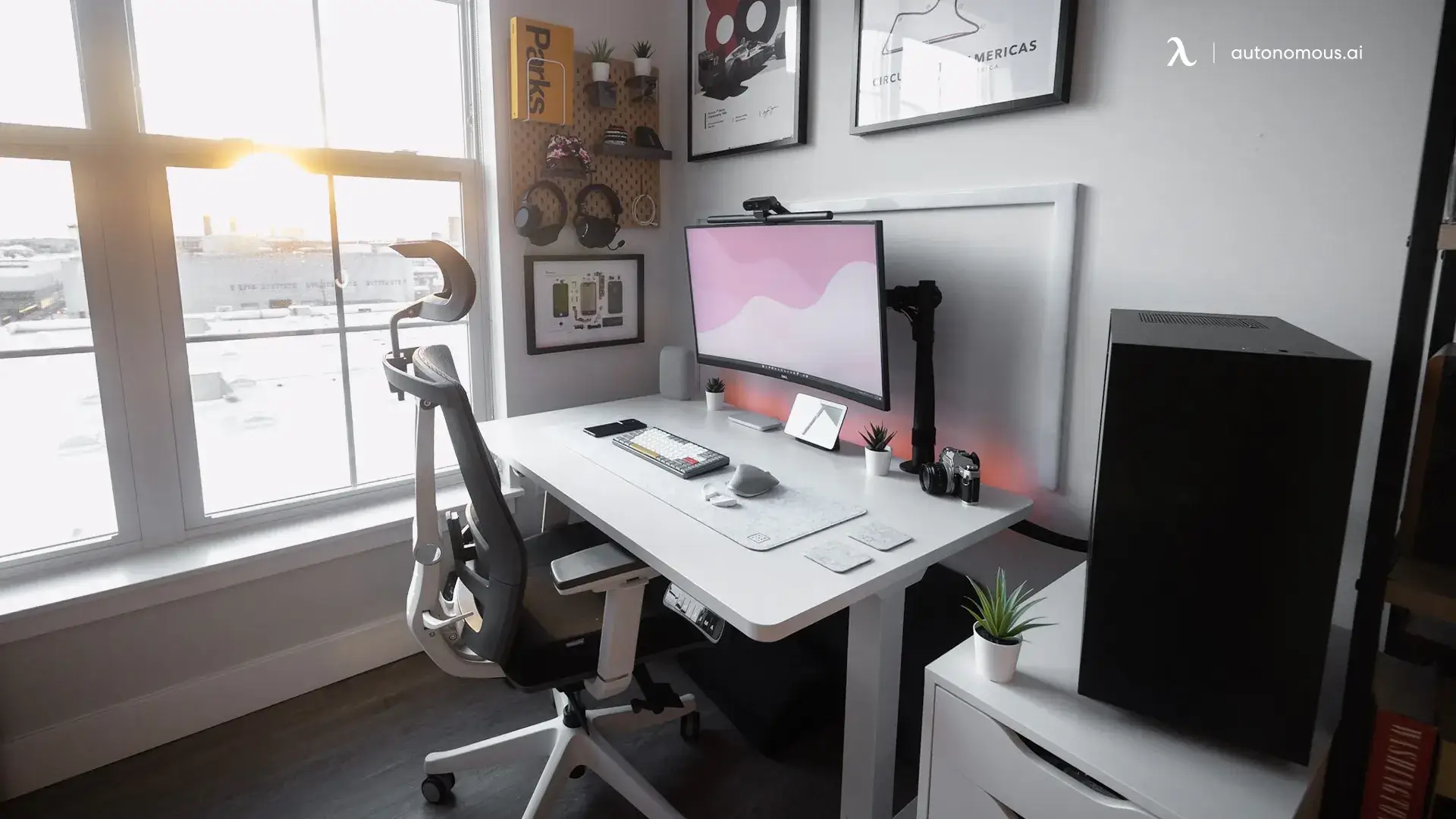

A home-office monitor has to make small text comfortable, fit the desk in front of you, and avoid turning every video call or spreadsheet into a squinting exercise. The wrong screen can also waste space: a 27-inch Full HD panel gives you a large image, but fewer pixels per inch than a smaller 24-inch display.
The Best monitors for home office in this list range from compact 21.5-inch models to a 34-inch ultrawide. Dell's S2725QS is our top pick for sharp text and flexible everyday work, while Samsung's ViewFinity S50GC is the strongest choice for running several windows side by side.
Comparison table
| # | Product | Award | Size | Resolution | Refresh rate | Panel or standout feature | Best for |
|---|---|---|---|---|---|---|---|
| 1 | Dell S2725QS | Best overall | 27 inches | 4K UHD | Up to 120Hz | IPS, 99% sRGB | Sharp text and versatile work |
| 2 | Dell S2725HSM | Best adjustable 27-inch | 27 inches | Full HD | 144Hz | Speakers, full ergonomic stand | Comfortable desk setups |
| 3 | Samsung ViewFinity S50GC | Best ultrawide | 34 inches | Ultra-WQHD | 100Hz | HDR10, PIP, PBP | Multitasking |
| 4 | Dell S2425HSM | Best compact adjustable | 23.8 inches | Full HD | 144Hz | Speakers, full ergonomic stand | Smaller desks |
| 5 | Dell SE2426H | Best compact IPS | 23.8 inches | Full HD | 144Hz | IPS, TÜV eye comfort | Everyday office work |
| 6 | Acer KB272 G0bi | Best 27-inch Full HD | 27 inches | Full HD | Up to 120Hz | IPS, Adaptive-Sync | Large general-purpose display |
| 7 | Samsung Essential S3 | Best curved 27-inch | 27 inches | Full HD | 100Hz | 1800R curve, eye comfort | Immersive desk work |
| 8 | LG 32MR50C-B | Best large curved screen | 32 inches | Full HD | 100Hz | VA, Reader Mode | Big text and casual use |
| 9 | Philips 241V8LB | Best reading features | 23.8 inches | Full HD | 100Hz | VA, EasyRead mode | Documents and email |
| 10 | Acer KB220Q H2bi | Best small monitor | 21.5 inches | Full HD | Up to 100Hz | Adaptive-Sync, ZeroFrame design | Tight workspaces |
1. Dell S2725QS: Best Overall

Pros
- 4K IPS image with 99% sRGB coverage
- Up to 120Hz with AMD FreeSync Premium
- ComfortView Plus and thin bezels
- Improved integrated sound
Cons
- Larger and heavier than the Full HD alternatives
- 4K needs more graphics output than basic office work requires
Best for: someone who wants crisp text and one monitor that can handle work and entertainment.
The first thing you notice about the Dell S2725QS is not its refresh rate. It is the density of the desktop. At 27 inches, 4K UHD gives documents, browser text, and detailed images a much cleaner appearance than the Full HD screens here. It is the monitor we'd keep for a home office where the display has to serve spreadsheets in the morning and creative or video work later.
Its IPS panel is rated for 99% sRGB, which gives ordinary web and office content a broad, consistent color range. The 1500:1 contrast ratio adds some depth, while HDR readiness can help compatible content, though this is still fundamentally a desktop monitor rather than a dedicated HDR cinema display. ComfortView Plus reduces harmful blue light emissions to 35% or less without sacrificing the stated color accuracy.
The refresh rate reaches 120Hz and AMD FreeSync Premium is included. That makes scrolling and pointer movement feel more fluid than a standard office screen, and it gives the Dell more flexibility than the Philips 241V8LB or Acer KB220Q H2bi. The response specification is listed as 0.03ms, but that figure should not distract from the bigger reason to choose this model: its 4K resolution makes fine work easier to inspect.
There are compromises. A 4K desktop can require scaling, and a basic laptop or small computer may not take full advantage of the resolution and refresh rate at the same time. It is also less space-conscious than the 23.8-inch Dell models. Still, for anyone who wants sharper text, accurate everyday color, thin bezels, and more useful life from a single display, this is the strongest all-rounder.
2. Dell S2725HSM: Best Adjustable 27-Inch

Pros
- 144Hz refresh rate and 1ms MPRT
- Height, tilt, pivot, and swivel adjustment
- Integrated dual 3W speakers
- TÜV-certified eye comfort
Cons
- Full HD is less sharp at 27 inches than 4K
- Its stand takes more desk room than simpler models
Best for: a home worker who prioritizes posture, built-in sound, and a larger screen.
The Dell S2725HSM solves a practical home-office problem that many monitors ignore: getting the screen into the right position. Its stand supports height, tilt, pivot, and swivel adjustment, so the panel can be raised for a sitting desk, turned for a portrait document, or moved toward a second person during a presentation. That flexibility matters more over a full workday than a flashy gaming mode.
The 27-inch Full HD panel has a 1920 by 1080 workspace and a 1500:1 contrast ratio. Text is perfectly usable at normal viewing distance, but it will not look as finely drawn as it does on the 4K Dell S2725QS. The reward is a straightforward desktop that is easier for a modest computer to drive. Its 144Hz refresh rate and 1ms MPRT also make scrolling, video, and casual games look fluid.
Dell adds dual 3W speakers, which are useful for calls, alerts, and background video without occupying more desk space. They are not a replacement for dedicated speakers or headphones, but the inclusion makes this a more complete workstation than the Acer KB272 G0bi. Dell's Display and Peripheral Manager can also help coordinate a Dell PC workspace.
The weakness is the familiar 27-inch Full HD compromise. If you sit close or spend the day reading dense text, the S2725QS is the clearer option. Pick the S2725HSM instead when adjustability and integrated audio matter more than pixel density. It is a particularly sensible fit for anyone refining how far back you should sit from a panel this size, since the stand lets you make that distance work in practice.
3. Samsung ViewFinity S50GC: Best Ultrawide

Pros
- 34-inch Ultra-WQHD workspace
- PIP and PBP for two sources
- HDR10 and 3000:1 contrast ratio
- Ambient light sensor and flicker reduction
Cons
- Takes substantial desk width
- 100Hz is lower than the fastest Dell models
Best for: multitaskers who want several applications visible on one screen.
The Samsung ViewFinity S50GC is the most useful display here for people who dislike window switching. Its 34-inch, 21:9 Ultra-WQHD panel gives you a broad horizontal canvas for a document, browser, and communication app. It feels more like two work areas joined together than a conventional 16:9 monitor.
Samsung pairs that width with a 3000:1 static contrast ratio and HDR10 support. The panel can show over one billion colors with compatible content, compared with the 16.7 million colors associated with typical SDR technology. Those features make design previews, photos, and video more involving, while the 300 cd/m² typical brightness is best suited to a controlled indoor room rather than harsh direct sunlight.
The connectivity is unusually useful for a home office. The monitor has two HDMI 2.2 inputs and one DisplayPort 1.2 input, while PBP can show two sources at native resolution and PIP can place one source over another. That is a real advantage over the Dell S2725QS if you regularly compare a work laptop with a desktop or another device. The 100Hz refresh rate keeps scrolling and video smooth without chasing gaming-first specifications.
The trade-off is physical. At 32.1 inches wide and 10.8 pounds, this is not a discreet screen for a shallow desk. Its flat design also gives a different feel from the curved Samsung Essential S3 and LG 32MR50C-B. If you have room and your work naturally divides across several windows, though, the ViewFinity is the clearest alternative to a dual-monitor arrangement. Readers considering two displays should also think about the desk space and alignment issues that come with adding a second screen.
4. Dell S2425HSM: Best Compact Adjustable

Pros
- Full ergonomic adjustment in a compact size
- 144Hz refresh rate and 1ms MPRT
- Built-in dual 3W speakers
- TÜV-certified eye comfort
Cons
- Full HD offers less room than a larger or 4K screen
- Heavier than simpler 24-inch monitors
Best for: a smaller desk that still needs a flexible stand and integrated sound.
The Dell S2425HSM is the smaller sibling to the 27-inch S2725HSM, but its compact footprint changes how it fits a workstation. The 23.8-inch panel is easier to place beside a laptop or on a narrow desk, and Full HD looks appropriately dense at this size. It is the Dell to choose when the monitor must stay substantial without taking over the work surface.
You get the same useful motion specifications as the larger model: 144Hz and 1ms MPRT. Those numbers are more than office work requires, but they make scrolling and moving windows feel immediate. AMD FreeSync helps keep compatible graphics output smooth, and the 1500:1 contrast ratio gives the image more depth than a basic office display.
The stand is the major reason to choose this model over the Philips 241V8LB. Height, tilt, pivot, and swivel adjustment let you place the screen for your chair instead of forcing your chair to match a fixed stand. Dual 3W speakers are built in, and Dell's four-star TÜV certification is aimed at reducing harmful blue light emissions while maintaining image quality.
The S2425HSM cannot match the S2725QS for fine detail or the ViewFinity S50GC for simultaneous windows. Its 11.05-pound weight also makes it less featherlight than the Acer KB220Q H2bi. For a compact workstation where ergonomics and simple audio matter, however, it is the more complete choice.
5. Dell SE2426H: Best Compact IPS

Pros
- IPS panel with wide 178-degree viewing angles
- 144Hz refresh rate and 1ms MPRT
- TÜV Rheinland three-star eye comfort certification
- Thin bezels
Cons
- Tilt adjustment is less flexible than the S2425HSM
- No integrated speakers are listed
Best for: everyday work when consistent color and a compact footprint come first.
The Dell SE2426H is a straightforward 23.8-inch monitor with a notably modern set of motion features. It uses an IPS panel, so colors should remain consistent across its stated 178-degree horizontal and vertical viewing angles. That is useful when a colleague is looking over your shoulder or when the screen sits slightly off-center.
Resolution is Full HD at 1920 by 1080, a sensible match for the size. The 144Hz refresh rate keeps cursor movement and scrolling smooth, while the 1ms MPRT specification targets motion clarity. Those capabilities make it more versatile than a traditional 60Hz office monitor, even if most email and word processing will not demand them.
Eye comfort is a clear focus. Dell cites TÜV Rheinland three-star eye comfort certification for reduced harmful blue light while preserving color quality. The thin bezels also make the screen less visually bulky and are helpful if you later place two monitors side by side. It is a cleaner multi-screen candidate than the thicker-looking curved displays.
The limitation is the stand. This model offers tilt, while the S2425HSM adds height, pivot, and swivel adjustment, plus speakers. The SE2426H is therefore best for a fixed chair and a simple desk rather than a constantly changing setup. Choose it for the IPS viewing consistency and uncomplicated footprint, not for ergonomic range.
6. Acer KB272 G0bi: Best 27-Inch Full HD

Pros
- 27-inch IPS panel
- Up to 120Hz refresh rate
- Adaptive-Sync support
- Near bezel-less ZeroFrame design
Cons
- Full HD is relatively modest for 27 inches
- The listed brightness is 250 nits
Best for: a general office display with a large panel and smooth motion.
The Acer KB272 G0bi gives you a roomy 27-inch screen without stepping up to an ultrawide format. Its IPS panel and 1920 by 1080 resolution are familiar territory for email, browser work, and documents. The larger image can be easier to read than a compact display, although text will not look as refined as it does on the 4K Dell S2725QS.
Acer lists a refresh rate of up to 120Hz and a 1ms VRB response time. That helps reduce the smeared feeling that can appear when moving windows or scrolling quickly. Adaptive-Sync support, described as FreeSync compatible, can also match the display's refresh behavior with a compatible graphics card for smoother video and casual gaming.
The ZeroFrame design keeps the bezels close to the edge, which makes the screen feel less enclosed and gives it a practical advantage in a multi-monitor arrangement. The 250-nit brightness is adequate for ordinary indoor work, but it leaves less headroom in a bright room than you might want. That makes placement and glare control important.
Compared with the Dell S2725HSM, the Acer gives up the adjustable stand, integrated speakers, and Dell's stated eye-comfort certification. Compared with the smaller Dell SE2426H, it gives you more physical screen area but the same Full HD pixel count. It is the right pick when a large, uncomplicated IPS display matters more than premium ergonomics.
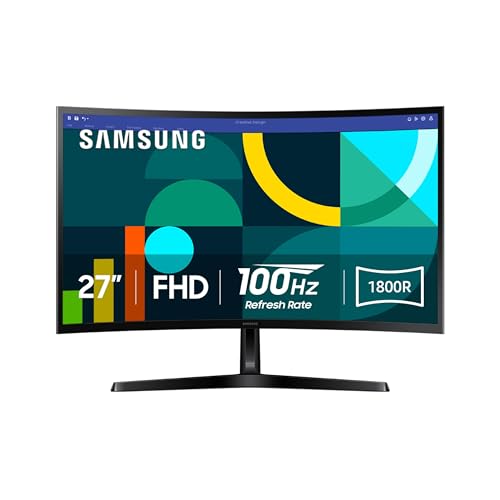
7. Samsung Essential S3: Best Curved 27-Inch
Pros
- 1800R curved screen
- 100Hz refresh rate
- TÜV-certified eye comfort features
- Game Mode and flexible image settings
Cons
- Full HD is not especially dense at 27 inches
- Curved screens are not ideal for every document workflow
Best for: someone who prefers an immersive curved screen for work and media.
The Samsung Essential S3 takes a different approach to the 27-inch office monitor. Its 1800R curve brings the edges slightly toward your field of vision, which can make a wide spreadsheet or long browser window feel more enveloping. It is a pleasant shape for mixed work and entertainment, although people who need perfectly straight lines for layout work may prefer a flat display.
The panel is Full HD, and Samsung gives it a 100Hz refresh rate. That is a useful step up for smooth scrolling, video, and general desktop movement without making the monitor feel gaming-focused. Game Mode can adjust image settings for games, but the same flexibility can help when switching between bright documents and darker media.
Eye comfort features are more relevant to office use. Samsung cites TÜV certification, reduced blue light, and reduced flicker for longer sessions. The monitor also supports image and contrast adjustments intended to make dark scenes easier to see. Those gaming touches are secondary, but they do not get in the way of normal productivity.
This model is less flexible than the Dell S2725HSM because the data does not list a height-adjustable, pivoting, or swiveling stand. The 27-inch Dell also has speakers and a faster 144Hz refresh rate. Choose the Samsung when the curve itself is part of the appeal and you want a relaxed, immersive screen rather than the most adjustable work tool.
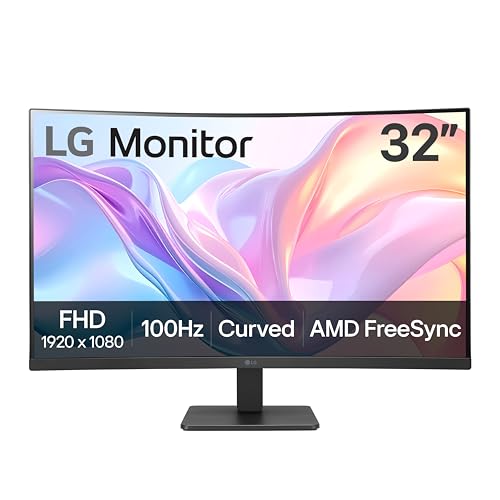
8. LG 32MR50C-B: Best Large Curved Screen
Pros
- Large 32-inch curved VA panel
- 100Hz refresh rate
- Reader Mode and OnScreen Control
- AMD FreeSync support
Cons
- Full HD resolution is spread over a large panel
- Stand adjustment is limited to tilt
Best for: users who want large on-screen text and a curved viewing experience.
The LG 32MR50C-B is the most screen you can get in a conventional 16:9 shape here. Its 32-inch curved VA panel makes documents, timelines, and dashboards physically large, which can be useful if you sit farther from the screen or regularly increase text size. It is less about fitting more information at once than making the information easy to see.
The resolution remains 1920 by 1080, so the image is not as crisp as the Samsung ViewFinity S50GC or Dell S2725QS. VA technology can provide a stronger sense of depth than a basic office panel, and the 100Hz refresh rate keeps everyday motion smooth. AMD FreeSync is included for compatible systems, with Dynamic Action Sync and Black Stabilizer aimed at gaming use.
LG's Reader Mode reduces blue light for longer reading sessions. OnScreen Control lets you split the workspace and adjust basic monitor options through a mouse-driven interface, which is more convenient than navigating buttons when arranging windows. The stand tilts, but there is no listed height, pivot, or swivel adjustment.
That limited stand is the LG's clearest weakness. The Dell S2725HSM is a better ergonomic tool, and the Acer KB272 G0bi offers IPS viewing consistency in a smaller 27-inch package. Pick the LG if you specifically want a large curved screen and are prepared to set it at the right height with the desk or a separate support.
9. Philips 241V8LB: Best Reading Features

Pros
- VA panel with deeper blacks and brighter whites
- 100Hz refresh rate
- EasyRead mode for lengthy documents
- Virtually bezel-free on three sides
Cons
- Less stand flexibility than the adjustable Dell models
- VA viewing can look different from IPS at an angle
Best for: document-heavy work on a compact 23.8-inch screen.
The Philips 241V8LB is built around a simple office routine: documents, browser tabs, email, and occasional video. Its 23.8-inch Full HD screen keeps text at a sensible size, while the VA panel is designed to produce brighter whites, deeper blacks, and more gradients. That contrast-focused presentation can make a dark document or video look more substantial than it would on a basic panel.
The standout feature is EasyRead mode. Philips describes it as a more paper-like experience for lengthy documents, which makes sense for people who spend hours in PDFs, word processors, or web pages. The monitor also includes a 100Hz refresh rate, so scrolling should look smoother than on a basic 60Hz display.
Its 178-degree horizontal and vertical viewing angles help preserve consistent color when you are not sitting directly in front. The virtually bezel-free design on three sides is also useful when adding a second screen. For ideas about how two displays change the way a desk needs to be arranged, the thin edges are a practical detail rather than just decoration.
The Philips does not offer the Dell S2425HSM's listed height, pivot, and swivel adjustment, and its VA panel is not the same choice as the Dell SE2426H's IPS technology. It is best for a centered, fixed setup where reading comfort and restrained design matter most.
10. Acer KB220Q H2bi: Best Small Monitor

Pros
- Compact 21.5-inch size
- Full HD resolution
- Up to 100Hz refresh rate
- ZeroFrame design and Adaptive-Sync support
Cons
- Smallest screen in the roundup
- No panel type or ergonomic adjustment is listed
Best for: a tight desk, secondary workstation, or compact home office.
The Acer KB220Q H2bi makes the most sense when desk depth and width are genuinely limited. At 21.5 inches, it is noticeably easier to place beside a laptop or on a small writing desk than the 27-inch and ultrawide models. Full HD resolution keeps text and images reasonably defined at this smaller size.
Acer lists a refresh rate of up to 100Hz and a 1ms response time. That gives the monitor smoother motion for scrolling, video playback, and casual gaming than its compact office label suggests. Adaptive-Sync support can also reduce tearing with a compatible graphics card.
The ZeroFrame design gives the panel a near bezel-less appearance and makes a second KB220Q easier to line up beside it. That is a useful trait for a compact two-screen workspace, even though the screen itself is not large. The listed dimensions are 19.4 inches wide and 15 inches high, which helps explain its appeal where every inch counts.
The compromise is capability. The data does not identify an IPS or VA panel, nor does it list height, pivot, swivel, or speaker features. The Dell SE2426H offers a similar Full HD workspace with IPS technology and wider stated viewing consistency. Choose the Acer when the smaller physical footprint is the deciding factor, not when you want the most refined image or the richest stand.
How to choose best monitors for home office
The right display depends on the relationship between desk space, viewing distance, text sharpness, and the number of windows you need open.
Resolution and pixel density
Resolution determines how much detail the screen can show, while pixel density determines how clean that detail looks at a particular size. Full HD works well on 21.5-inch and 23.8-inch monitors, but it looks less crisp when stretched across 27 or 32 inches. A 4K panel such as the Dell S2725QS is better for fine text, detailed images, and scaling multiple windows cleanly.
Screen size and aspect ratio
A 24-inch screen is easier to place and keeps Full HD reasonably sharp. A 27-inch model gives documents and interfaces more physical room, while a 32-inch display makes text large but can look softer at the same resolution. Ultrawide screens such as the Samsung ViewFinity S50GC are especially useful when your work involves several side-by-side windows.
Panel type and contrast
IPS panels generally make color consistency across wide viewing angles a priority, which suits shared workspaces and image-focused tasks. VA panels emphasize contrast, with deeper blacks and stronger separation between light and dark areas. Neither is automatically right for every office, so consider whether consistent color or richer contrast matters more.
Stand adjustment and ergonomics
Height adjustment is usually more useful than a high refresh rate during a long workday. Pivot is valuable for portrait documents, while swivel helps when sharing the screen. Tilt-only stands can work if your chair and desk height already line up, but a fully adjustable stand gives you more control over neck and eye position.
A sharp screen at the wrong height is still an uncomfortable workstation.
Refresh rate and eye comfort
A 100Hz to 144Hz refresh rate makes scrolling and cursor movement feel smoother, though office software does not require gaming-level speed. Flicker reduction, blue-light modes, and reader modes can be more directly useful for long reading sessions. They do not replace sensible brightness, regular breaks, and a screen positioned away from glare.
Frequently asked questions
Is 24 inches enough for a home office monitor?
Yes. A 23.8-inch Full HD monitor gives most desks a comfortable balance of workspace and compact size. It is especially suitable for documents, email, browser work, and a laptop-based setup.
Is 27-inch Full HD good for office work?
It can be, especially if you sit a little farther back or prefer larger text. Full HD is less dense on a 27-inch panel than it is on a 24-inch model, so the Dell S2725QS is a better fit for readers who prioritize crisp text.
Is 4K useful for home-office work?
4K can make text and interface elements look cleaner and gives you more detail for images and design work. It may require display scaling, and the computer must support the desired resolution and refresh rate.
Are curved monitors good for documents?
A curved monitor can make a wide screen feel more immersive and keep the edges within your field of view. Some people prefer a flat display for straight lines, page layout, and precise visual work.
Do I need a high refresh rate for office work?
You do not need 100Hz or 144Hz for email or word processing, but the smoother movement can make scrolling and window dragging feel more comfortable. It is a useful secondary feature rather than the main reason to choose a monitor.
What monitor size works on a small desk?
A 21.5-inch or 23.8-inch monitor is the safest starting point for a compact desk. Check the monitor's full width and stand depth, since the stand can occupy more room than the panel itself.
The bottom line
The Best monitors for home office depend on what your desk and daily software demand. The Dell S2725QS is the top choice for sharp text, accurate everyday color, and a flexible 27-inch display that can handle work and entertainment. The Dell S2725HSM is a better fit when stand adjustment and built-in speakers matter more than 4K detail.
For serious multitasking, the Samsung ViewFinity S50GC gives you a wide Ultra-WQHD workspace with PIP and PBP. On a smaller desk, the Dell S2425HSM or Dell SE2426H offers a more compact path to a polished everyday setup.
If you are undecided, choose the Dell S2725QS for clarity, the Samsung ViewFinity S50GC for multiple windows, or the Dell S2425HSM when ergonomics come first.
As an Amazon Associate we earn from qualifying purchases.