
A monitor can make a fast computer feel slow when text looks cramped, motion smears across the screen, or the stand leaves you hunched over your desk. The right choice depends on more than screen size. Resolution, refresh rate, panel behavior, connectivity, and adjustability all change how comfortable the display is to use.
Our Best PC Monitors picks range from a compact 22-inch gaming display to Samsung's wide 34-inch ViewFinity screen. Some are built for fast games, some are better office companions, and a few try to handle both jobs without making major compromises. The Dell 24 Plus S2425HSM is our top pick, with a particularly useful combination of smooth motion, built-in audio, and a fully adjustable stand.
Comparison table
| # | Product | Award | Resolution | Refresh rate | Screen size | Best for |
|---|---|---|---|---|---|---|
| 1 | Dell 24 Plus S2425HSM | Best overall | 1920 x 1080 | 144Hz | 23.8 inches | Work and everyday gaming |
| 2 | Samsung Odyssey G5 G51F | Best QHD gaming monitor | 2560 x 1440 | 180Hz | 27 inches | Detailed gaming |
| 3 | SANSUI 32-inch Curved Monitor | Best high-refresh display | 1920 x 1080 | 240Hz | 32 inches | Fast competitive games |
| 4 | Samsung ViewFinity S50GC | Best ultrawide | Ultra-WQHD | 100Hz | 34 inches | Multitasking |
| 5 | Acer KB272 G0bi | Best office monitor | 1920 x 1080 | 120Hz | 27 inches | General office work |
| 6 | SANSUI 27-inch USB-C Monitor | Best USB-C monitor | Not specified | 120Hz | 27 inches | Laptop desks |
| 7 | Samsung Essential S3 27-inch | Best curved office monitor | FHD | 100Hz | 27 inches | Comfortable everyday use |
| 8 | Samsung 32-inch Flat Monitor | Best large flat monitor | Not specified | 75Hz | 32 inches | Large-screen productivity |
| 9 | Sceptre E225W-FW144 | Best compact gaming monitor | 1920 x 1080 | 144Hz | 22 inches | Small desks |
| 10 | Sceptre C248W-1920RN | Best basic curved monitor | 1920 x 1080 | 75Hz | 24 inches | Simple home setups |
1. Dell 24 Plus S2425HSM: Best Overall

Pros
- 144Hz refresh rate suits gaming and everyday scrolling
- Fully adjustable stand with height, tilt, pivot, and swivel
- Integrated dual 3W speakers
- FreeSync support and 1ms MPRT response time
Cons
- Full HD resolution is less crisp than the QHD Samsung Odyssey G5
- Smaller viewing area than the 27-inch and ultrawide options
Best for: someone who wants one dependable monitor for work, entertainment, and gaming.
The Dell 24 Plus S2425HSM is the easiest monitor here to recommend to the widest range of people. It has a compact 23.8-inch footprint, but the stand is unusually versatile for this group. Height, tilt, pivot, and swivel adjustments let you position the screen properly instead of forcing your chair and keyboard to accommodate a fixed panel. That matters during a long workday, especially when the display is also used for games at night.
Its 1920 x 1080 resolution is well matched to the screen size. Text and windows have enough room for ordinary office work, while a modest graphics card does not have to push a demanding pixel count. The 144Hz refresh rate is the more interesting specification. It makes cursor movement, scrolling, and compatible games look noticeably more fluid than a standard 60Hz panel. Dell also lists a 1ms Moving Picture Response Time, AMD FreeSync, and a 1500:1 contrast ratio, giving this display a better motion-focused setup than the larger Samsung 32-inch Flat Monitor.
The built-in audio is another practical advantage. Two 3W speakers will not replace a dedicated sound system, but they handle alerts, video calls, and casual video without adding speakers to the desk. HDMI connectivity keeps the setup straightforward, and Dell's Display and Peripheral Manager software is intended to help manage a Dell PC workspace. The display also carries TÜV eye-comfort certification and uses reduced blue-light emissions without abandoning its normal color presentation.
The limitation is resolution. The Samsung Odyssey G5 G51F shows more detail at 2560 x 1440, and the Samsung ViewFinity S50GC is far better when several full-size windows need to remain visible. The Dell also lacks the sheer gaming speed of the SANSUI 32-inch model. Still, its combination of smooth refresh, built-in speakers, and stand adjustment is more useful to most people than a single extreme specification. It is the one we'd keep for a mixed home office and gaming desk.
2. Samsung Odyssey G5 G51F: Best QHD Gaming Monitor

Pros
- QHD resolution gives games and desktop text more detail
- 180Hz refresh rate and 1ms response time
- HDR10 support
- Height, tilt, and pivot adjustments
- Black Equalizer helps reveal dark game scenes
Cons
- No built-in speakers are listed
- QHD gaming demands more from the graphics card than Full HD
Best for: PC gamers who want a sharper 27-inch image without stepping up to an ultrawide.
The Samsung Odyssey G5 G51F makes the strongest case for choosing image detail over maximum refresh rate. Its 27-inch QHD panel runs at 2560 x 1440, which gives desktop text, game environments, and fine interface elements more definition than the Full HD screens in this roundup. At this size, the extra pixels are useful rather than decorative. Windows feel less crowded, and distant objects in games have a clearer shape.
Motion performance is still a priority. The 180Hz refresh rate keeps fast movement fluid, while the listed 1ms response time is aimed at reducing the delay and smearing that can distract during quick turns. AMD FreeSync synchronizes the monitor with a compatible graphics card to reduce tearing and stutter. The monitor also includes Black Equalizer, which lets players raise visibility in dark areas without simply making the whole picture equally bright.
HDR10 support adds the possibility of brighter highlights and more nuanced shadows in compatible content. It is not a substitute for a high-end HDR display, but it gives supported games and video another layer of image control. The adjustable stand offers tilt, pivot, and height changes, so this is more flexible on a desk than many fixed gaming monitors. That ergonomic range is one reason it edges past the SANSUI 32-inch monitor for a mixed gaming and productivity setup.
The trade-off is graphics demand. A computer that runs games comfortably at Full HD may need reduced settings to sustain high frame rates at QHD. The Dell 24 Plus S2425HSM is a more relaxed match for ordinary hardware, while the SANSUI can show more frames if speed matters more than sharpness. If your PC can make good use of 1440p, the G51F is the more balanced gaming screen. Readers choosing a display for a dedicated game setup can also compare the features that matter most for fast game play before settling on a refresh-rate target.
3. SANSUI 32-inch Curved Monitor: Best High-Refresh Display

Pros
- 240Hz refresh rate
- Large 32-inch curved screen
- 1ms MPRT response time and FreeSync
- 125% sRGB color gamut
- VESA compatibility
Cons
- Full HD is a low pixel density for a 32-inch screen
- No built-in speakers
- Stand only tilts
Best for: competitive players who prioritize very high refresh rates and a large view.
The SANSUI 32-inch Curved Monitor is the specialist pick in this roundup. Its headline feature is a 240Hz refresh rate, and that makes sense for players who want exceptionally fluid motion in games capable of producing very high frame rates. The 1ms MPRT response time and built-in FreeSync support reinforce that focus. It is a screen for speed first, not a general-purpose display that happens to have a gaming mode.
The 1500R curve gives the broad 32-inch panel a more enveloping shape. That can make a large screen easier to take in from a normal sitting position, though the effect depends on desk depth and viewing distance. The display uses 1920 x 1080 resolution, so games are relatively easy for a graphics card to drive at high frame rates. That is the practical reason to pair Full HD with 240Hz, even though the pixel density is visibly lower than the QHD Samsung Odyssey G5.
SANSUI lists 300 nits brightness, HDR technology, a 3500:1 contrast ratio, and a 125% sRGB color gamut. Those figures suggest a punchier image than a basic office monitor, while the 16.7 million listed display colors are standard for this type of display. HDMI and DisplayPort can reach the 240Hz refresh rate, and a DisplayPort cable is included. Anti-flicker and low-blue-light features add some comfort for long sessions.
The weak point is flexibility. The stand only tilts from minus 5 to 15 degrees, with no height, pivot, or swivel adjustment, and there are no speakers. The Samsung Odyssey G5 G51F is sharper and easier to use as a work monitor, while the Dell has a much more capable stand. Choose the SANSUI when 240Hz and a big curved view are the reason for buying. Skip it if you want crisp text, broad adjustability, or one display for serious office work.
4. Samsung ViewFinity S50GC: Best Ultrawide

Pros
- 34-inch 21:9 Ultra-WQHD workspace
- 100Hz refresh rate and FreeSync
- HDR10 support
- Picture-by-picture and picture-in-picture modes
- Two HDMI inputs and DisplayPort
Cons
- Large footprint needs a deep, wide desk
- 100Hz is slower than the dedicated gaming picks
- Stand adjustment details are limited
Best for: multitaskers who want multiple windows on one wide screen.
The Samsung ViewFinity S50GC changes the shape of a desktop rather than simply enlarging it. Its 34-inch Ultra-WQHD display uses a 21:9 aspect ratio, creating the horizontal space needed for a document, browser, and communication window to sit side by side. It is a more natural alternative to two separate screens for people who dislike a bezel in the middle of their workspace.
Samsung lists a 3000:1 static contrast ratio and 300 cd/m² typical brightness. HDR10 support and more than 1 billion colors can give compatible content greater tonal range than the 16.7 million colors listed for several other displays here. The main benefit for office work, however, is the width. A second screen changes how much desk depth you actually need, and how much distance a large monitor needs from your chair is worth considering before choosing a 34-inch panel.
The 100Hz refresh rate is a sensible middle ground. It makes scrolling and video smoother than 60Hz, and AMD FreeSync helps keep compatible games from tearing. This is not the screen for a player chasing every possible frame, but it is more than adequate for casual games alongside productivity. The virtually borderless design also helps if you later add another display.
Connectivity is unusually useful. There are two HDMI 2.2 inputs and one DisplayPort 1.2 input, plus picture-by-picture and picture-in-picture modes. Those features let two sources share the screen, which is useful for comparing a laptop with a desktop or monitoring one computer while working on another. The downside is physical rather than technical: at 32.1 inches wide, this monitor needs room. It is the right choice for a wide, organized desk, not a cramped corner.
5. Acer KB272 G0bi: Best Office Monitor

Pros
- 27-inch IPS screen
- 120Hz refresh rate
- Adaptive-Sync support
- 1ms VRB response time
- 250 nits brightness
Cons
- Full HD is less sharp at 27 inches than QHD
- The product information does not list built-in speakers
- Stand flexibility is not a standout feature
Best for: office workers who want a comfortable large screen with smoother motion than a basic 60Hz display.
The Acer KB272 G0bi is a straightforward office monitor with one useful upgrade over the usual basic display: its refresh rate reaches 120Hz. That makes scrolling through long pages, moving windows, and watching video feel more continuous. It is not marketed as a high-speed competitive gaming screen, but Adaptive-Sync support and the 1ms VRB response time give it enough motion capability for casual play.
The 27-inch IPS panel uses 1920 x 1080 resolution in a 16:9 layout. IPS is a sensible fit for a shared office because wide viewing angles help the image remain usable when you are not sitting perfectly centered. Full HD keeps the display easy to drive, though the image is not as crisp as the Samsung Odyssey G5's QHD panel at the same screen size. The 0.311mm pixel pitch is another reminder that this is a comfortable general display, not a fine-detail workstation monitor.
Acer lists 250 nits brightness, which is suited to an ordinary indoor room rather than a sunlit space. The 27-inch format gives spreadsheets and browser windows more breathing room than the Dell, while the 120Hz refresh rate is a meaningful step above the Samsung 32-inch Flat Monitor's 75Hz. Adaptive-Sync also helps smooth compatible games and video playback when the frame rate changes.
Its limitations are easy to understand. The resolution can make small text look less refined than it would on a QHD screen, and the listing does not identify built-in speakers. The stand is also less of a selling point than Dell's four-way adjustable design. If your priority is a clear, calm office display and you sit close to the screen, the Acer is sensible. For broader guidance on desk comfort, the monitor features that reduce strain during office hours are more important than chasing a headline refresh rate.
6. SANSUI 27-inch USB-C Monitor: Best USB-C Monitor

Pros
- USB Type-C input
- 120Hz refresh rate and 1ms MPRT response time
- Built-in dual 2W speakers
- 110% sRGB color gamut
- VESA mount compatibility
Cons
- The listed specifications do not identify the resolution
- USB-C power delivery capability is not specified
- Stand offers tilt but not height adjustment
Best for: laptop users who want a curved screen with USB-C connectivity and built-in audio.
The SANSUI 27-inch USB-C Monitor stands out because of its input selection. A USB Type-C port can make a laptop desk cleaner than one built around separate video and audio cables, although the listing does not state whether the port provides power delivery. That missing detail matters. Buyers should confirm their laptop and intended connection before assuming a single cable will handle every function.
The 27-inch curved screen reaches 120Hz and lists a 1ms MPRT response time, so it is more responsive than a conventional office display. Adaptive Sync is included for compatible systems. SANSUI also lists 300 nits brightness, a 4000:1 contrast ratio, 110% sRGB coverage, HDR, anti-glare treatment, anti-flicker, and low-blue-light features. These specifications make it a flexible everyday panel, though the product data does not specify its resolution, which is a serious omission for buyers comparing image sharpness.
Two built-in 2W speakers are useful for calls and casual video. HDMI 1.4 provides another connection route, while the 178-degree viewing angle helps when the display is shared. The monitor can tilt from minus 5 to 15 degrees and supports a 100 x 100mm VESA mount. That makes an arm or wall mount possible, and the thin bezel should work well in a two-screen arrangement.
The SANSUI is more distinctive than the Acer because of USB-C, but it is not as easy to evaluate on image detail because the resolution is not supplied. It also cannot match the Dell's height, pivot, and swivel adjustments. Choose it for a laptop-centered workspace where USB-C and speakers simplify the desk. Skip it if a known resolution and a highly adjustable stand matter more than connection convenience.
7. Samsung Essential S3 27-inch: Best Curved Office Monitor
Pros
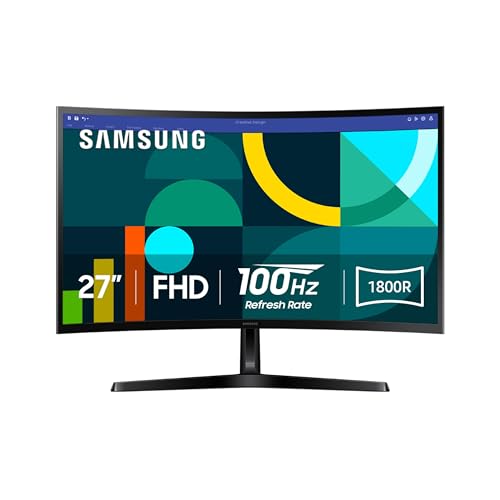
- 1800R curved 27-inch display
- 100Hz refresh rate
- Eye comfort features reduce blue light and flicker
- Game Mode and adjustable dark-scene contrast
- Broad everyday use case
Cons
- FHD resolution is less detailed than the QHD Odyssey G5
- The listing does not specify a response time
- Stand features are not as extensive as Dell's
Best for: people who prefer a curved screen for work, video, and casual gaming.
The Samsung Essential S3 27-inch is aimed at people who want a curved screen without moving into the larger ultrawide class. Its 1800R curve wraps the edges inward gently, which can make a broad desktop feel more cohesive when the monitor is viewed from the center. The effect is less dramatic than the 1500R curve on the SANSUI 32-inch display, and that makes the Samsung easier to live with for documents and ordinary web use.
The FHD resolution is adequate for common office tasks, streaming, and casual games. At 27 inches, it does not look as crisp as the QHD Samsung Odyssey G5, particularly when reading small text or working with detailed images. The 100Hz refresh rate is a worthwhile improvement over 60Hz, reducing the sense of drag during scrolling and quick scene changes. Samsung also includes Game Mode, with controls for color, contrast, and darker areas.
Comfort is a clear part of the design. Samsung says its eye-comfort technology is TÜV certified, reduces blue light, and minimizes screen flicker. Those features cannot fix poor lighting or an incorrect viewing position, but they are useful for someone who spends long periods reading or working. The curved format can also reduce the need to look toward the far corners of the panel.
This monitor loses ground to the Acer as an office-first recommendation because Acer specifies an IPS panel and a faster 120Hz ceiling. The Dell is a better ergonomic tool thanks to its more adjustable stand, while the Samsung adds the curved viewing experience. Choose the Essential S3 when that curve and eye-comfort focus are central to your decision. It is not the pick for fine image detail or serious high-refresh gaming.
8. Samsung 32-inch Flat Monitor: Best Large Flat Monitor

Pros
- Large 32-inch flat display
- Three-sided borderless design
- AMD FreeSync
- 75Hz refresh rate
- Flicker Free and Eye Saver modes
Cons
- 75Hz is slower than most other picks here
- Resolution is not specified in the listing
- Large footprint with limited listed stand information
Best for: users who want a large, flat screen for everyday computing and media.
The Samsung 32-inch Flat Monitor is about visual space rather than speed. A 32-inch panel gives documents, browser tabs, timelines, and media a generous canvas, and its flat shape is familiar for office work. The three-sided borderless design keeps the front of the monitor clean and makes a second display easier to align beside it.
Samsung lists a 75Hz refresh rate, which is modest but still smoother than a 60Hz screen for ordinary scrolling and video. AMD FreeSync helps synchronize the display and compatible graphics hardware to reduce tearing. Game Mode adjusts the image for games and can improve visibility in darker scenes, but this is not a replacement for the 120Hz, 144Hz, 180Hz, or 240Hz options elsewhere in the roundup.
The monitor also includes Flicker Free technology and Eye Saver Mode, which reduces emitted blue light. Those features suit long reading sessions, though the practical benefit still depends on brightness and room lighting. Samsung's product information does not specify the resolution, so buyers who care about text sharpness should verify that detail before purchasing. The missing resolution is the biggest information gap in an otherwise simple office display.
Compared with the Samsung Essential S3, this model gives up the curve but offers a larger flat canvas. The Acer is more compelling for faster motion, and the Dell is easier to position precisely. The Samsung 32-inch monitor makes sense when size and a clean multi-monitor appearance matter more than gaming performance. It is a poor fit for competitive players or anyone who expects a fully adjustable ergonomic stand.
9. Sceptre E225W-FW144: Best Compact Gaming Monitor

Pros
- 144Hz refresh rate in a compact 22-inch format
- Full HD resolution
- HDMI and DisplayPort connections
- Built-in speakers
- Blue-Light Shift technology
Cons
- Smaller screen than every other gaming pick here
- Basic physical footprint and stand design
- The listing does not identify a response time
Best for: gamers working with limited desk space who still want a high refresh rate.
The Sceptre E225W-FW144 solves a specific problem: getting a fast gaming display onto a small desk. Its 22-inch size is much less imposing than the 27-inch and 32-inch alternatives, while the 144Hz refresh rate gives games and scrolling a smoother feel than ordinary office panels. Full HD is also a sensible resolution for the size and for modest gaming hardware.
Connectivity is practical. The monitor includes HDMI and DisplayPort, and built-in speakers keep a simple setup from needing another audio device. Sceptre also includes Blue-Light Shift technology, intended to reduce blue-light emissions during long sessions. The nearly bezel-free design should work reasonably well in a dual-monitor arrangement, especially when desk width is limited but two screens are still useful.
The compact format is its main strength and its main compromise. A 22-inch screen leaves less room for expansive game interfaces, video timelines, or side-by-side windows than the Dell or Acer. It also lacks the immersive curve and physical scale of the SANSUI models. The listing does not provide a response-time specification, so buyers who play highly competitive games should not assume it matches the specialized 1ms displays.
The Dell 24 Plus S2425HSM is a more complete all-rounder, with a stronger stand and integrated 3W speakers, while the SANSUI 32-inch model goes much further on refresh rate and size. The Sceptre earns its place for a narrow desk, a secondary gaming station, or a user who prefers a smaller viewing area. If your desk can accommodate a larger panel, one of the 24-inch or 27-inch choices will be more comfortable for everyday work.
10. Sceptre C248W-1920RN: Best Basic Curved Monitor

Pros
- 24-inch 1800R curved screen
- 98% sRGB coverage
- Built-in speakers
- Two HDMI inputs and VGA
- VESA wall-mount ready
Cons
- 75Hz refresh rate is basic for gaming
- Older VGA connection takes space alongside newer inputs
- No height adjustment is listed
Best for: simple home offices and casual gaming setups that benefit from a curved screen.
The Sceptre C248W-1920RN is the uncomplicated curved option. Its 24-inch 1800R screen gives a small desk a little more visual immersion without the physical bulk of a 27-inch or 32-inch model. The 1920 x 1080 resolution is a natural match for this size, and the 98% sRGB claim points to a reasonably broad color range for ordinary work and entertainment.
Its 75Hz refresh rate is enough to make basic desktop motion feel smoother than 60Hz, but it is not in the same class as the E225W-FW144 or Dell. That distinction matters for games. Casual titles and everyday video are fine, while fast competitive play will benefit from a faster display. The 250 cd/m² brightness listed in the features is suited to a normal indoor room, not strong direct sunlight.
The port selection is broad for a basic monitor, with two HDMI inputs, VGA, and PC audio in. Built-in speakers help keep a small desk tidy, and VESA wall-mount readiness gives it a useful escape from its basic stand. Sceptre also lists a 0.27156mm pixel pitch and a lamp life of more than 30, 000 hours, though those details are less important to most buyers than the screen size and refresh rate.
The Samsung Essential S3 27-inch provides a more modern curved everyday experience, while the Dell is far better for ergonomic adjustment and faster games. The C248W-1920RN remains a reasonable fit when a simple curved screen, speakers, and flexible input options matter more than premium motion handling. Choose it for a straightforward home setup, not for a demanding gaming PC.
How to choose best pc monitors
The right monitor starts with the work and games you actually run, then narrows down the screen size, resolution, refresh rate, and connections that support them.
Resolution and pixel density
Resolution determines how much detail the monitor can show, while pixel density describes how tightly that detail is packed across the screen. Full HD works well on compact 22-inch and 24-inch displays and is easier for a computer to drive at high frame rates. QHD is a stronger fit for 27-inch screens because it keeps text and fine game details sharper.
Ultra-WQHD goes wider rather than simply adding height. It is useful for side-by-side windows, editing timelines, and multitasking, but it needs a desk with enough width. Check the graphics hardware as well, since higher resolutions require more rendering power in games.
Refresh rate and response time
Refresh rate tells you how often the screen can update each second. A 75Hz monitor is fine for documents and casual video, while 120Hz or 144Hz makes scrolling and games feel more fluid. Displays at 180Hz and 240Hz are aimed at fast games and only make full sense when the computer can produce similarly high frame rates.
Response-time claims need context because manufacturers use different measurements. A listed 1ms MPRT or VRB figure indicates an emphasis on motion clarity, but it does not by itself describe every aspect of panel behavior. Adaptive Sync or FreeSync is also useful because it helps the monitor and graphics card stay synchronized when frame rates fluctuate.
Buy the resolution that keeps text sharp, then choose the refresh rate your computer can actually sustain.
Screen size and shape
A 22-inch screen is practical on a narrow desk, while 24 inches is a comfortable middle ground for Full HD. A 27-inch screen offers more room for work, but Full HD can look less refined at that size than QHD. Thirty-two-inch displays are spacious and immersive, though they need more viewing distance and desk depth.
Curved screens can make wide panels feel more enveloping. A 1500R curve is more pronounced than 1800R, but neither is automatically better for office work. Ultrawide displays are useful when several windows must remain visible, while a flat panel is usually simpler to align in a multi-monitor arrangement.
Ports and speakers
Check the inputs before buying. HDMI is common, DisplayPort is useful for high refresh rates, and USB Type-C can simplify a laptop setup. Do not assume every USB-C port supplies power to a connected laptop, since that capability is not specified on every monitor.
Built-in speakers are convenient for alerts, calls, and casual media, but their presence does not guarantee strong sound. The SANSUI 27-inch model lists dual 2W speakers, while the Dell uses dual 3W speakers. If you plan to use headphones or external speakers, audio built into the monitor should be treated as a convenience rather than a deciding factor.
Stand and eye comfort
A stand that adjusts for height, tilt, pivot, and swivel makes it easier to keep the top of the screen near eye level. The Dell is the standout here. Basic tilt-only stands can work, but they may force you to raise the monitor with a separate arm or stand.
Flicker reduction, blue-light controls, anti-glare treatment, and ambient brightness adjustment can make long sessions more comfortable. They do not replace sensible brightness, regular breaks, and good room lighting. VESA compatibility is valuable when the included stand is limited or the desk needs a cleaner layout.
Frequently asked questions
What size monitor is best for a PC?
A 24-inch monitor is a versatile size for Full HD and works well on many desks. A 27-inch screen provides more workspace, but QHD is preferable when you sit close and care about sharp text. Larger 32-inch and 34-inch displays need more desk depth and viewing distance.
Is 144Hz useful for work?
Yes. A 144Hz refresh rate can make scrolling, cursor movement, and window animations look smoother even when you are not gaming. It is not essential for office software, but it can make a mixed work and entertainment setup feel more responsive.
Is QHD better than Full HD for a 27-inch monitor?
QHD generally produces sharper text and more detailed images on a 27-inch screen. Full HD is easier for a computer to drive and can be a sensible choice when gaming performance matters more than fine desktop detail. The Samsung Odyssey G5 is the QHD option here, while the Acer uses Full HD.
Do curved monitors help with eye strain?
A curve can make the edges of a wide screen feel closer to your natural field of view, but it is not a guaranteed solution for eye strain. Viewing distance, brightness, room lighting, and breaks matter just as much. The Samsung Essential S3 adds flicker reduction and blue-light controls alongside its 1800R curve.
Do I need DisplayPort for high refresh rates?
Not always. The SANSUI 32-inch monitor lists HDMI and DisplayPort support up to 240Hz, so either connection can reach its stated maximum. Always check the specific monitor and graphics card because the supported refresh rate can vary by port and resolution.
Can a monitor's built-in speakers replace desktop speakers?
They can handle alerts, video calls, and casual viewing, but built-in monitor speakers are usually intended for convenience. The Dell's dual 3W speakers and SANSUI's dual 2W speakers are useful when desk space is limited. Dedicated speakers or headphones remain the better choice for fuller sound.
Is a monitor arm worth using?
A monitor arm is useful when the included stand lacks height adjustment, when desk space is tight, or when you want to align two screens. Look for VESA compatibility and confirm the mount pattern before buying. The SANSUI 32-inch and 27-inch models and the Sceptre C248W-1920RN list VESA support.
The bottom line
The Dell 24 Plus S2425HSM is the strongest all-purpose choice among the Best PC Monitors here. Its 144Hz refresh rate, built-in speakers, and fully adjustable stand cover everyday work and gaming without demanding an oversized desk. Choose the Samsung Odyssey G5 G51F instead when QHD detail and a 180Hz gaming experience matter more than the Dell's broader convenience.
For specialized needs, the SANSUI 32-inch model is the high-refresh pick, while Samsung's ViewFinity S50GC is the clear choice for a wide multitasking workspace. If you are undecided, choose the Dell for mixed use, the Samsung Odyssey G5 for sharper gaming, and the ViewFinity when one wide screen needs to replace two.
As an Amazon Associate we earn from qualifying purchases.