

Moving photos from a camera card to a phone should take seconds, not a hunt through adapters, apps, and incompatible ports. The right reader also needs to match the cards you actually use, since a compact dual-slot model is a poor fit for someone still shooting on CompactFlash.
Our Best SD Card Reader picks range from tiny USB-C adapters to multi-format desktop readers, with several options that can read two cards at once. The UGREEN SD 4.0 Reader is the one we'd choose for demanding transfers, while the Acer Dual Interface Reader is the most broadly useful everyday option.
Comparison table
| # | Product | Award | Interface | Card slots | Best for |
|---|---|---|---|---|---|
| 1 | Acer Dual Interface Reader | Best overall | USB-A and USB-C | SD and microSD | Most laptops, phones, and cameras |
| 2 | Acer 3-in-1 Reader | Best with USB passthrough | USB-C and USB-A port | SD, microSD, USB-A | USB-C workstations |
| 3 | Anker USB-C Reader | Best compact pick | USB-C | SD and microSD | Phones and small laptop bags |
| 4 | Acer USB-A Reader | Best for older computers | USB-A 3.0 | SD and microSD | USB-A PCs |
| 5 | SmartQ C368 | Best multi-format USB-A reader | USB-A 3.0 | SD, microSD, MS, CF | Mixed older card collections |
| 6 | xdgeLoad USB-C Reader | Best for iPhone USB-C | USB-C | SD and microSD | iPhone 15 and newer |
| 7 | uni Dual Interface Reader | Best dual-interface design | USB-A and USB-C | SD and microSD | Camera and phone users |
| 8 | Suejezt 7-in-1 Reader | Best for legacy cards | USB-A and USB-C | SD, microSD, CF, MS, XD | Photographers with varied media |
| 9 | UGREEN SD 4.0 Reader | Best for UHS-II cards | USB-C | SD and microSD | High-speed camera workflows |
| 10 | SZHAIYIJIN iPhone Reader | Best for Lightning and USB-C | USB-C and Lightning adapter | SD, microSD, USB | Older iPhones and iPads |
1. Acer Dual Interface Reader: Best Overall

Pros
- USB-A and USB-C connectors cover most current devices
- SD and microSD slots can be used simultaneously
- USB 3.0 transfer rate reaches up to 5Gbps
- Compact aluminum body with protective port covers
Cons
- Does not support CF, MS, XQD, or CFexpress cards
- Thick device cases may interfere with insertion
- It cannot connect directly to a camera
Best for: someone who wants one compact reader for USB-A and USB-C computers, phones, and tablets.
The Acer Dual Interface Reader gets the fundamentals right without forcing you to pick a connector before leaving home. Its attached design carries both USB-A and USB-C, so it can move files to an older laptop one day and a modern phone or tablet the next. The cord keeps the reader from hanging directly off a port, which is more comfortable when the source device is sitting on a desk or in a camera bag.
Its USB 3.0 connection supports transfers up to 5Gbps, and the two slots accept standard SD and microSD cards. Both can be read and written simultaneously, a useful feature when a camera uses full-size SD while an action camera or drone uses microSD. The reader is not a camera interface, though. You remove the card and place it in the reader, rather than connecting the camera itself.
At about 2.8 inches long and 0.67 inches wide, this is small enough for a laptop sleeve. The aluminum construction should also handle regular travel better than a flimsy bare plastic dongle, while covers on both ends help protect the unused connectors. It works without drivers on Windows, macOS, and most Android devices, and the listed compatibility includes iPhone 15 and 16 models with USB-C.
The Acer Dual Interface Reader is more flexible than the Acer USB-A Reader and less specialized than the UGREEN SD 4.0 Reader. Its weakness is card support: it stops at the common SD and microSD families and does not handle CF, Memory Stick, XQD, or CFexpress. Choose it if your cards are conventional and your devices have mixed ports. Skip it if you need professional UHS-II throughput or legacy formats.
2. Acer 3-in-1 Reader: Best With USB Passthrough

Pros
- Reads SD and microSD cards together
- Adds a USB 3.0 port for peripherals or storage
- Up to 5Gbps transfer support
- Works with Windows, macOS, Chrome OS, and Linux
Cons
- USB-C host connection is not suitable for USB-A-only devices
- Does not support UHS-II, CF, MS, or XQD cards
- Thick cases can prevent full insertion
Best for: USB-C laptop and tablet users who also need a spare USB-A data port.
This Acer is the practical choice when a card reader needs to do more than read cards. Alongside SD and microSD slots, it includes a USB 3.0 port that can connect a mouse receiver, keyboard, or other USB-A device. That makes it more useful at a mobile workstation than the simpler Acer Dual Interface Reader, although it also makes the body less pocket-simple.
The card slots support SD, SDHC, SDXC, and other UHS-I cards, with simultaneous transfer from SD, microSD, and a USB device advertised at up to 5Gbps. That combination is handy when sorting camera files while keeping a peripheral connected. The reader transfers data from cards rather than acting as a direct camera connection, so the card still needs to come out of the camera.
A 15cm cable separates the reader from the host port, which helps keep the adjacent ports on a laptop usable. The aluminum shell is intended to dissipate heat during extended transfers, and the unit works without a driver on Windows, macOS, Chrome OS, and Linux. It is also listed for USB-C iPhone, iPad, and MacBook models.
The limitation is its host interface. The listing says it is not compatible with USB-A host devices, despite the extra USB-A port on the reader. That distinction matters, since the USB-A socket is for attached peripherals, not for plugging the reader into an older computer. The Acer 3-in-1 Reader beats the Anker USB-C Reader on flexibility, but the Anker is noticeably easier to carry. Pick this one for a USB-C desk setup that benefits from one extra port.
3. Anker USB-C Reader: Best Compact Pick

Pros
- Extremely small and light
- Separate SD and microSD slots
- Direct USB-C connection for phones and laptops
- Includes an 18-month warranty
Cons
- USB-C only
- No stated USB 3.0 transfer rate in the product details
- Device cases may need to come off
Best for: a phone or USB-C laptop owner who wants the smallest straightforward two-card reader.
The Anker USB-C Reader is the least fussy option here. It is a tiny two-in-one adapter with one standard SD slot and one microSD slot, and it plugs directly into a USB-C device without a separate cable. At roughly 1.65 inches long and 0.67 inches wide, it takes up almost no room beside a laptop or tablet.
That small size makes it particularly appealing for phone transfers. A traveler can keep it beside a phone and a microSD card, then open files without Wi-Fi or a separate hub. Anker lists compatibility with USB-C devices including MacBook and Galaxy models, but the reader does not include USB-A or Lightning connectivity.
The product information is refreshingly focused, but it also leaves out a specific USB 3.0 transfer claim. That means we would not choose it when a workflow depends on a documented high-speed interface. It is still well suited to occasional photo copies, document transfers, and moving files between standard SD and microSD media.
The Anker USB-C Reader is smaller than the Acer Dual Interface Reader and simpler than the Acer 3-in-1 Reader. Its weakness is the narrow connection choice and the lack of a stated transfer specification. People using a USB-C phone, tablet, or laptop who value minimal bulk should choose it. Those with mixed computers or large video transfers should move up the list.
4. Acer USB-A Reader: Best for Older Computers

Pros
- USB-A 3.0 supports transfers up to 5Gbps
- Reads SD and microSD cards simultaneously
- Aluminum body and attached cord
- Supports Windows, macOS, Chrome OS, and Linux
Cons
- Not compatible with USB-C or Lightning host devices
- Does not support CF, MS, XQD, or CFexpress cards
- Thick cases may block insertion
Best for: a desktop or laptop that still relies on USB-A ports.
If the computer has standard rectangular USB-A ports, the Acer USB-A Reader is a sensible dedicated tool. It avoids dongles and adapters, and its attached cord keeps the reader from placing leverage directly on the computer port. The design is especially suitable for a home desktop, where the reader can stay connected and ready for the next card.
The USB-A 3.0 interface is rated for up to 5Gbps and is backward compatible with USB 2.0 and USB 1.1. Its SD and microSD slots can read and write at the same time, so photographers can move files from two card types without repeated swapping. Supported card families include SD, SDHC, SDXC, MMC, RS-MMC, and UHS-I microSD formats.
This is a plug-and-play reader for Windows, macOS, Chrome OS, and Linux. The slim aluminum housing is designed for travel, though the reader is more limited than the Acer Dual Interface Reader because it cannot plug into USB-C equipment. It also transfers card data only and is not intended to connect directly to a camera.
The Acer USB-A Reader is a better fit than the uni Dual Interface Reader when every host device uses USB-A, but the uni is the more adaptable purchase for mixed gear. This Acer also lacks support for CF, Memory Stick, XQD, and other specialist formats. Choose it for a conventional SD or microSD collection and an older computer. Skip it if a phone or tablet is part of the regular workflow.
5. SmartQ C368: Best Multi-Format USB-A Reader

Pros
- Supports SD, microSD, MS, and CF cards
- Reads cards independently
- USB 3.0 and USB 2.0 compatibility
- Blue LED indicates powered status
Cons
- USB-A connection only
- Larger than the compact two-slot readers
- No UHS-II support is listed
Best for: photographers who still use CompactFlash or Memory Stick alongside SD cards.
The SmartQ C368 earns its place by supporting the formats the smaller readers leave behind. Its four-in-one design accepts SD, microSD, Memory Stick, and CompactFlash cards, making it a useful bridge between older cameras and newer devices. The independent card operation is important for anyone maintaining a mixed media drawer rather than a single current camera system.
SmartQ advertises USB 3.0 transfer speeds up to 5Gbps and compatibility with USB 2.0. The reader works with Windows, Mac OS, and Linux without drivers, so it is a straightforward desktop accessory. Its blue LED shows when the unit has power, a small but useful cue when the reader is tucked behind a monitor or computer.
At about 2.78 inches long, 1.67 inches wide, and 0.6 inches high, it is not as pocketable as the Anker USB-C Reader. The extra size is doing real work, however, because CF and Memory Stick slots need more room than a simple SD adapter. A cable organizer is included, and the memory card itself is not included.
The SmartQ C368 is the more useful tool than the Acer USB-A Reader for legacy camera owners, while the UGREEN SD 4.0 Reader is the better fit for modern UHS-II cards. Its biggest problem is the USB-A-only connection. Choose it if your computer accepts USB-A and your cards include CF or MS. Anyone using only current SD and microSD media can choose a smaller reader.
6. xdgeLoad USB-C Reader: Best for iPhone USB-C
Pros
- Designed around USB-C iPhone, iPad, and Mac use
- SD and microSD slots support two-way transfers
- No third-party app required
- Reinforced 3.2mm TPE cable
Cons
- USB-C only
- ABS construction is less substantial than aluminum designs
- Does not support legacy card formats
Best for: iPhone 15 and newer users moving photos or video from SD and microSD cards.
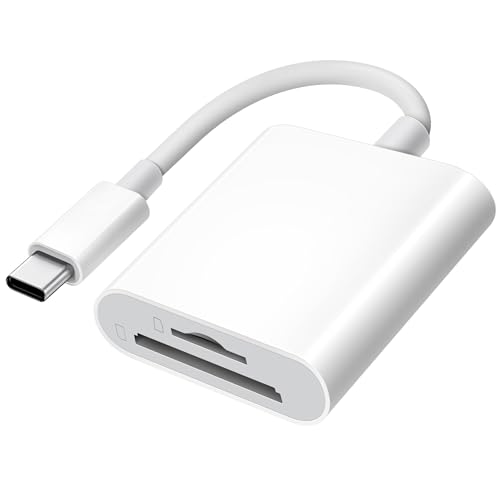
The xdgeLoad USB-C Reader is aimed at a specific modern workflow: take a card from a camera, plug the reader into a USB-C iPhone or iPad, and start viewing or importing files. It supports standard SD, SDHC, SDXC, microSD, microSDHC, and microSDXC cards. The two slots make it useful for a camera card and an action-camera card without carrying two adapters.
Its bidirectional transfer support lets a compatible phone or computer write back to the card as well as import photos and videos. The listing says no third-party application is needed, which keeps the process within the device's regular file and photo tools. Compatibility includes iPhone 15 and 16 models, several iPad generations, MacBook models, and other USB-C devices with OTG support.
The reader uses a single USB-C connection and a cable body made from TPE that is thickened to 3.2mm. That should be more reassuring for repeated packing than a very thin permanently attached lead. The ABS housing is light and smooth, but it does not have the same aluminum feel as the Acer or UGREEN options.
Compared with the Anker USB-C Reader, the xdgeLoad USB-C Reader makes its phone and tablet use more explicit and offers detailed two-way transfer support. The Anker is smaller, while the UGREEN SD 4.0 Reader is far faster on paper for compatible UHS-II cards. Skip this model if your main computer has USB-A or your camera uses CF. For USB-C iPhone owners working with ordinary SD and microSD media, it is the more focused pick.
7. uni Dual Interface Reader: Best Dual-Interface Design

Pros
- USB-A and USB-C connections
- Simultaneous SD and microSD access
- USB 3.0 transfer support up to 5Gbps
- Protective covers and attached cable
Cons
- Does not support CFexpress, XQD, MS, or Memory Stick
- Not compatible with Lightning devices
- It reads cards, not cameras directly
Best for: photographers who move cards between USB-A computers and USB-C phones or laptops.
The uni Dual Interface Reader is a strong alternative to the top Acer because it treats USB-A and USB-C as equal priorities. Its cable-based design is easy to place beside a laptop, and the covers on both ends help keep dust and liquid away from the unused connectors. That is a more travel-friendly arrangement than carrying a separate adapter for each computer.
Both interfaces are specified for up to 5Gbps and are backward compatible with USB 2.0 and USB 1.1. The SD and microSD slots can be read and written simultaneously, which helps when transferring from a camera card while checking another card from a dash camera, surveillance camera, or action camera. The reader does not connect directly to those cameras.
Compatibility covers SD, SDHC, SDXC, MMC, RS-MMC, microSDXC, microSD, and microSDHC cards. The USB-C side is listed for devices including iPhone 15 Pro models, MacBook, Surface, Galaxy, and other USB-C or USB-A systems. No driver or extra power supply is required on the listed supported systems, and uni includes an 18-month warranty.
The uni Dual Interface Reader is more versatile than the Anker USB-C Reader and a little more travel-ready than the Acer 3-in-1 Reader. It cannot match the UGREEN SD 4.0 Reader for UHS-II throughput and does not add a USB passthrough port. It is the right choice for a user who wants broad everyday compatibility, especially when the same card moves between an older computer and a modern phone.
People comparing card capacity with reader compatibility may also want to consider how smaller camera cards fit different shooting workflows, since a reader cannot make an unsupported card format work.
8. Suejezt 7-in-1 Reader: Best for Legacy Cards

Pros
- Supports SD, microSD, CF, MS, and XD formats
- USB-A and USB-C connectors
- Can read up to five cards simultaneously
- Individual green activity indicators
Cons
- Larger and more specialized than two-slot readers
- No specific UHS-II support is listed
- Extra slots are unnecessary for many users
Best for: photographers with SD, CompactFlash, Memory Stick, and XD cards in the same collection.
The Suejezt 7-in-1 Reader is the specialist in this group. It has two SD slots, two TF slots, one CF slot, one MS slot, and one XD slot. The listing says it can read five cards at once, which is unusually useful for a photographer consolidating media from several camera generations or organizing a large batch of cards.
Its USB-A and USB-C connectors cover current laptops, older PCs, tablets, phones, and MacBooks. The interface is rated for up to 5Gbps, with the qualification that actual transfer speeds depend on the device and accessory. Each slot has a green LED that indicates reading or data transfer, so it is easier to see which card is active than with a simple two-slot adapter.
The aluminum alloy body is designed for heat dissipation and regular carrying. This is not a tiny reader, but the larger enclosure is justified by the number of formats it accepts. Plug-and-play operation is listed for Windows, iOS, macOS, Android, and Linux, with no Wi-Fi, network connection, or driver required.
Against the SmartQ C368, the Suejezt 7-in-1 Reader adds USB-C, XD support, extra slots, and simultaneous access to more cards. Against the UGREEN SD 4.0 Reader, it gives up the clearly stated UHS-II focus. It is overkill for someone with one SD card and a laptop, and it is the reader to choose when a legacy card collection is the problem that needs solving.
For photographers moving many files after a shoot, it also helps to think about how a separate storage device handles large photo transfers once the cards are full.
9. UGREEN SD 4.0 Reader: Best for UHS-II Cards

Pros
- Supports UHS-II SD and microSD cards
- Up to 312MB/s transfer claim
- Reads and writes two cards simultaneously
- Aluminum shell and braided cable
Cons
- USB-C only
- Older or slower cards will not reach the headline rate
- No CF, MS, XD, or Lightning support
Best for: creators using UHS-II cards who want the fastest specified reader in this group.
The UGREEN SD 4.0 Reader is the clear performance pick. Its SD and TF slots support UHS-II cards, and UGREEN specifies transfers up to 312MB/s. That matters when moving large video files, RAW photo batches, or a full day of high-resolution footage. The number is a capability of the reader and compatible card and host setup, not a promise that every card will move at that rate.
Both slots can be used simultaneously for syncing, transferring, or copying between cards. The reader accepts UHS-II SD, SDHC, SDXC, microSD, microSDHC, microSDXC, MMC, and RS-MMC formats. That makes it more focused than the Suejezt 7-in-1 Reader, but substantially better suited to current high-performance SD workflows.
The aluminum alloy housing and braided cable suggest a more durable travel setup than a bare plastic adapter. It is driver-free for most laptops, tablets, iPhone 15 and 16 Pro models, and smartphones. Android phones need OTG support, so the phone's own compatibility still matters.
The UGREEN SD 4.0 Reader beats every other pick here when the card itself is UHS-II and transfer time matters. The Acer Dual Interface Reader is more flexible across host connectors, and the Suejezt reader supports many more legacy formats. UGREEN is USB-C only and does not include Lightning support, so it is not the universal option. Choose it for a modern camera workflow where fast card offload is the priority.
The card itself remains the other half of the equation, so the card features that matter for camera recording are worth checking before buying a high-speed reader.
10. SZHAIYIJIN iPhone Reader: Best for Lightning and USB-C
Pros
- Works with USB-C and Lightning Apple devices
- SD and microSD slots
- Supports two-way transfers
- No app required for the listed iOS workflow
Cons
- Lightning adapter has a 500mA peripheral limit
- Does not support hard drives or printers
- Not intended for Wi-Fi SD cards
Best for: households with both newer USB-C iPhones and older Lightning iPhones or iPads.
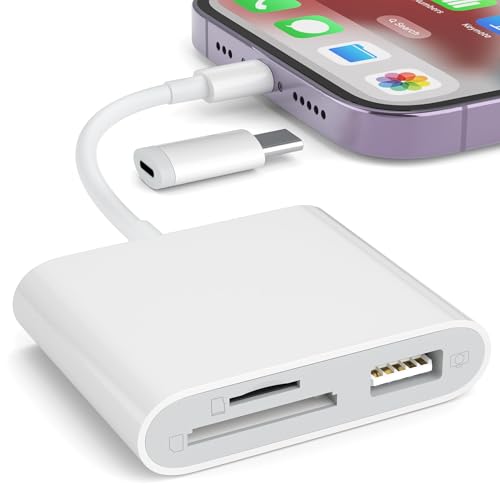
The SZHAIYIJIN iPhone Reader solves a compatibility problem that most of the list does not: it can serve newer USB-C devices and older Lightning Apple hardware. Its detachable USB-C to Lightning adapter lets the same reader work with iPhone 15 through 17 models, iPads, Android phones, Macs, and PCs, according to the listing.
The two card slots accept standard SD and TF, or microSD, cards. On compatible iOS devices, the stated workflow is to insert the card, connect the reader, open the Photos app, and use Import. It also supports two-way transfer for photos, videos, music, documents, and other files, so it is not limited to copying camera images into one direction.
The reader can also act as a Lightning-to-USB camera adapter for certain peripherals, though the listed maximum current is 500mA. It does not support printers or hard drives, and it does not support Wi-Fi SD cards. Those boundaries are important because the broad connector compatibility might otherwise suggest that it functions like a full mobile hub.
The SZHAIYIJIN iPhone Reader is more compatible with older Apple devices than the xdgeLoad USB-C Reader, while the xdgeLoad has a more focused USB-C design and reinforced cable. The UGREEN reader is the stronger choice for UHS-II speeds, but it cannot handle Lightning without another adapter. Choose SZHAIYIJIN when family devices span both Apple connector generations. Skip it if you need high-speed professional transfers or support for more than SD and microSD.
How to choose best sd card reader
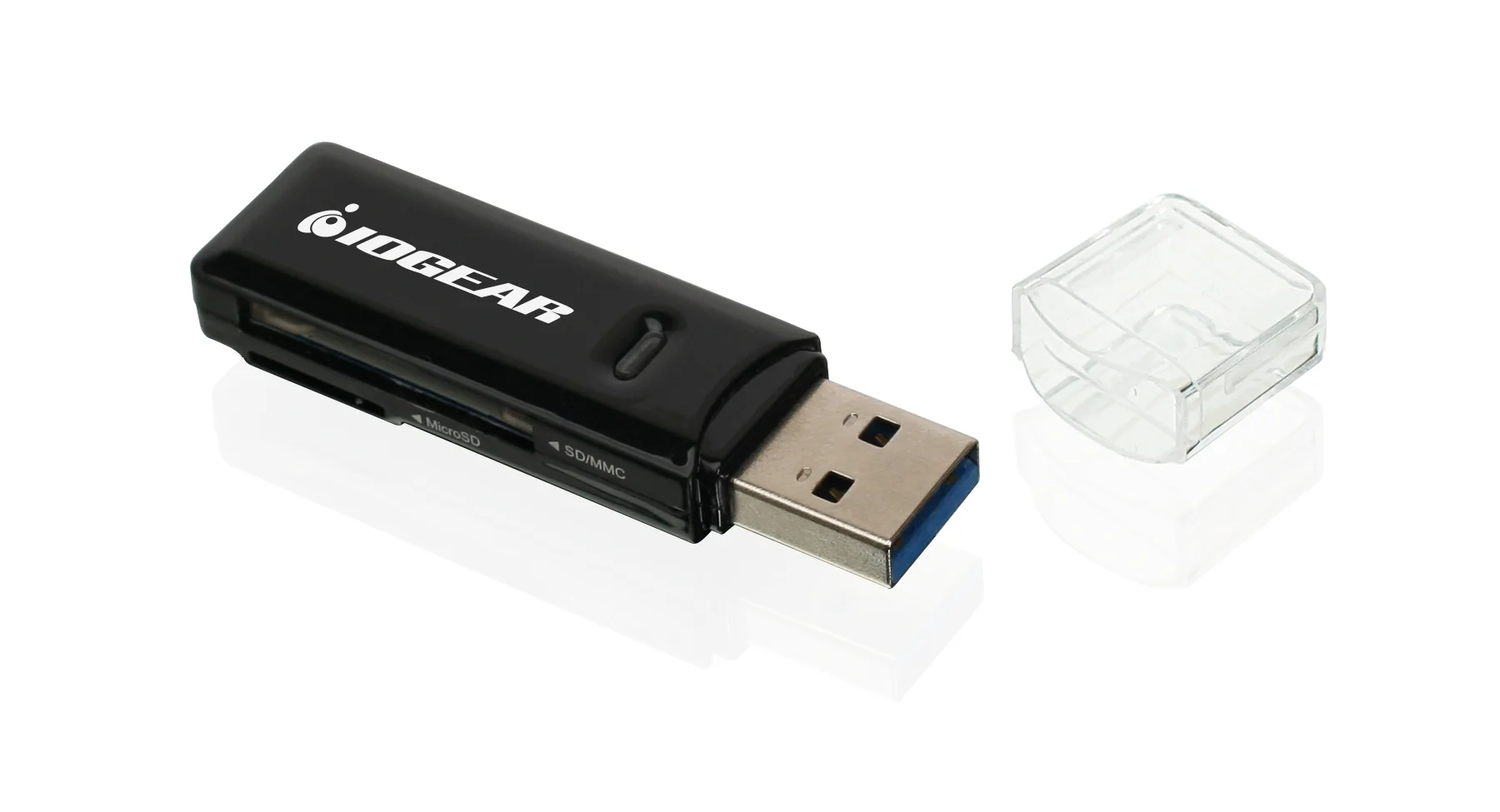
The right Best SD Card Reader depends less on its shape than on the cards, host ports, and transfer demands in your regular workflow.
Host connector
Start with the port on the device receiving the files. USB-C works with newer phones, tablets, and laptops, while USB-A remains common on desktops and older PCs. A reader such as the Acer Dual Interface Reader or uni Dual Interface Reader avoids choosing one connector, but Lightning users need a model with an appropriate Apple adapter, such as the SZHAIYIJIN iPhone Reader.
Card formats
Standard SD and microSD cover most current cameras, phones, action cameras, and drones. CompactFlash, Memory Stick, and XD require dedicated slots, so the SmartQ C368 or Suejezt 7-in-1 Reader makes more sense for older camera collections. Do not assume a reader supports CFexpress or XQD just because it accepts SD.
Transfer interface
A USB 3.0 reader can support up to 5Gbps, which is useful for large photo and video transfers when the computer and card are also fast enough. The UGREEN SD 4.0 Reader goes further with UHS-II support and a stated rate of up to 312MB/s. A reader without a stated transfer rate can still work well for occasional files, but it is harder to choose confidently for a demanding workflow.
A fast reader only helps when the card, reader, host port, and cable can all keep up.
Simultaneous card access
Dual slots are useful when a camera uses SD and another device uses microSD, or when files need to move between two cards. Some readers allow simultaneous reading and writing, while others simply provide two physical slots. If you only ever use one card, a smaller single-purpose design may be easier to carry.
Mobile device support
Phone compatibility involves more than the connector. USB-C phones and tablets may need OTG support, while iOS devices may use the Photos app or Files app for imports. Lightning accessories can also have power limits, as the SZHAIYIJIN reader's 500mA limit shows. Check the operating system and device port before choosing a reader for mobile use.

Frequently asked questions
Can these readers connect directly to a camera?
No. The Acer, uni, and similar readers are designed to read data from a memory card after it is removed from the camera. They are not direct camera-to-device interfaces.
Can a reader use an SD card and microSD card at the same time?
Several products here support simultaneous access, including the Acer Dual Interface Reader, Acer USB-A Reader, uni Dual Interface Reader, UGREEN SD 4.0 Reader, and Suejezt 7-in-1 Reader. The exact behavior can depend on the host device and operating system.
Which reader supports the fastest transfers?
The UGREEN SD 4.0 Reader has the strongest stated performance, with UHS-II support and transfers up to 312MB/s. The card, host port, and files also affect actual transfer speed.
Do USB-C readers work with Android phones?
They can, provided the phone supports USB OTG. The UGREEN listing specifically calls out OTG support for Android, and other USB-C readers list compatibility with many Android devices.
Can these readers work with Lightning iPhones?
The SZHAIYIJIN iPhone Reader includes a detachable USB-C to Lightning adapter and is the dedicated choice for Lightning devices. The USB-C-only readers in this roundup do not replace that adapter.
Do these readers support CompactFlash cards?
The SmartQ C368 and Suejezt 7-in-1 Reader support CompactFlash. The other products listed here focus on SD and microSD and should not be treated as CompactFlash readers.
Do I need a separate app to import photos?
Some products advertise plug-and-play use without a third-party app. On iPhone and iPad, the operating system's Photos or Files tools may handle the import, but the exact experience depends on the device and card format.

The bottom line
The Best SD Card Reader for most people is the Acer Dual Interface Reader. Its USB-A and USB-C connectors, simultaneous SD and microSD access, and stated 5Gbps USB 3.0 support cover the widest range of everyday computers and mobile devices. The UGREEN SD 4.0 Reader is the better specialist choice for UHS-II cards and large transfers, with a stated rate of up to 312MB/s.
Choose the SmartQ C368 or Suejezt 7-in-1 Reader if your camera collection includes CF, MS, or XD cards. Choose the SZHAIYIJIN iPhone Reader if Lightning compatibility is essential. If you are undecided, buy the Acer Dual Interface Reader unless your cards specifically require UHS-II or a legacy format.
As an Amazon Associate we earn from qualifying purchases.