

A PC VR setup can fail at the least dramatic part of the experience. The headset may be sharp but heavy, the tracking may need hardware on the walls, or the computer may not have the right outputs. Our Best best vr for pc picks separate complete headsets from the accessories and PC hardware that make them work.
The HTC Vive Focus Vision is the strongest all-round headset here because it combines DisplayPort PC VR, standalone operation, mixed reality, eye tracking, and a hot-swappable battery. The rest of the list covers ultrawide simulation headsets, a ready-made gaming PC, legacy hardware, and the cables and tracking equipment that complete particular systems.
Comparison table
| # | Product | Award | Display or connection | Tracking or refresh | Best for |
|---|---|---|---|---|---|
| 1 | HTC Vive Focus Vision | Best overall | 2448 x 2448 per eye | 90 Hz, inside-out | Flexible PC and standalone VR |
| 2 | CyberPowerPC Gamer Xtreme | Best complete PC setup | RTX 5070 12GB | Core i9, 32GB DDR5 | A ready-to-run VR computer |
| 3 | Pimax Crystal Super | Best for simulation detail | 3840 x 3840 per eye | Up to 90 Hz | Flight and racing simulators |
| 4 | INIU VR Link Cable | Best long link cable | USB 3.0 to USB-C | 16 feet, separate charging port | Quest PC VR play |
| 5 | Pimax Crystal Light | Best high-resolution value | 2880 x 2880 per eye | Up to 120 Hz | PC sim fans wanting clarity |
| 6 | HTC Vive XR Elite | Best compact mixed reality | 3840 x 1920 combined | 90 Hz, inside-out | A small hybrid headset |
| 7 | DPVR E4 | Best lightweight headset | 3664 x 1920 | 72, 90, or 120 Hz | Long PC gaming sessions |
| 8 | VR2 PC Adapter | Best headset adapter | DisplayPort conversion | SteamVR support | Connecting a VR2 headset to Windows |
| 9 | Oculus Rift S | Best legacy option | Sharper Rift optics | Oculus Insight tracking | Existing Rift S owners |
| 10 | HTC Vive Base Station 2.0 | Best external tracker | Room-scale sensor | Lighthouse tracking | Compatible Vive systems |
1. HTC Vive Focus Vision: Best Overall

Pros
- DisplayPort mode provides lossless PC visuals
- Standalone and PC VR modes in one headset
- Eye, hand, and low-light tracking
- Hot-swappable battery design
- Auto-IPD adjustment
Cons
- Large and heavy compared with the DPVR E4
- Requires a suitable DisplayPort connection for its highest-fidelity PC mode
- Advanced tracking features depend on supported software
Best for: someone who wants one headset for PC VR, standalone play, and mixed reality.
The HTC Vive Focus Vision is the headset we would choose when the owner does not want to be boxed into one kind of VR. It can run standalone experiences, stream PC VR, or connect directly through DisplayPort for a lossless image. That range matters because a cable is sensible for demanding simulation, while a self-contained headset is far more convenient for shorter sessions away from the desk.
Its display runs at 2448 x 2448 pixels per eye, with a field of view up to 120 degrees and a 90 Hz refresh rate. Those figures give text and cockpit instruments more definition than older PC headsets, while the wide view makes the image feel less like looking through goggles. Auto-IPD adjustment is another practical advantage. The lenses can align to the user's eyes without relying solely on a small manual slider.
Tracking is unusually broad. Four cameras support hand tracking, and the headset adds eye and low-light tracking, face and body tracker support, and scene understanding through a depth sensor. That makes the Focus Vision more capable for mixed reality and social applications than the simpler Pimax Crystal Light. Its open-back dual-driver speakers, noise and echo cancelling microphones, and 3.5 mm jack also give it a useful audio mix for games and communication.
The weakness is physical bulk. The listed dimensions and 5.5-pound package weight point to a substantial piece of hardware, and its feature set is more than a casual player needs. The direct PC mode also means the computer and cable arrangement deserve planning. Still, the hot-swappable battery is a meaningful advantage for longer standalone sessions. Choose this one if you want a flexible headset that can grow from ordinary PC VR into mixed reality.
2. CyberPowerPC Gamer Xtreme: Best Complete PC Setup

Pros
- Core i9-14900KF processor
- GeForce RTX 5070 with 12GB graphics memory
- 32GB DDR5 memory and 2TB PCIe 4.0 NVMe storage
- Three DisplayPort outputs and one HDMI output
- Liquid-cooled processor
Cons
- This is a desktop computer, not a headset
- WiFi 5 and Bluetooth 4.2 are older wireless standards
- Large 42.7-pound tower
Best for: a buyer who needs the PC as well as the headset for demanding VR games.
The CyberPowerPC Gamer Xtreme is the odd one out in a headset-heavy list, but it solves the problem many new VR buyers actually face: they have no computer capable of driving a modern headset. This tower arrives with Windows 11 Home, a keyboard and mouse, and the core hardware needed to start building a PC VR system.
The Core i9-14900KF gives it considerable CPU headroom, while the GeForce RTX 5070 supplies 12GB of graphics memory. VR workloads can punish a weak GPU because two views must be rendered at once, so the graphics card matters more than a generic gaming label. The 32GB of DDR5 memory is also a sensible foundation for current PC games and background applications. Its 2TB PCIe 4.0 NVMe SSD leaves room for a substantial library before storage management becomes a daily task.
Connection choices are well suited to headsets. There are three DisplayPort outputs and one HDMI output, alongside two USB-C 3.2 ports, four USB-A 3.2 ports, four USB-A 2.0 ports, wired LAN, WiFi 5, and Bluetooth 4.2. A wired network connection is particularly useful for headsets that stream PC VR, and the rear I/O should accommodate a headset, tracking hardware, and ordinary peripherals without immediately needing a hub.
The drawback is simple: it cannot replace the headset. A buyer who already owns a powerful PC should choose the HTC Vive Focus Vision or Pimax Crystal Super instead. The tower is also physically large at 42.7 pounds, so it needs a permanent place under or beside the desk. For someone starting from nothing, though, this is the cleanest route to a serious PC VR setup. Readers comparing desktops can also consider the hardware features that matter most for a gaming PC before pairing one with a headset.
3. Pimax Crystal Super: Best for Simulation Detail

Pros
- 3840 x 3840 resolution per eye
- 140-degree field of view
- QLED and Mini-LED display with local dimming
- 50 pixels per degree
- Eye tracking and dynamic field of view optimization
Cons
- Demands a powerful graphics card
- Designed primarily for a wired PC setup
- Its size and feature set are excessive for casual VR
Best for: simulation enthusiasts who prioritize cockpit detail and peripheral vision.
The Pimax Crystal Super is aimed at the person who notices every blurry gauge, distant apex, and edge-of-screen distraction. It is not trying to be the smallest headset in the room. Its reason for existing is the view, especially in a flight or racing simulator where reading instruments and spotting traffic outside the central image are part of the experience.
The headline resolution is 3840 x 3840 per eye, supported by aspherical lenses and a claimed 50 pixels per degree. That level of density is intended to reduce the screen-door effect and keep the image sharp across the lens rather than only in the center. The 140-degree field of view is just as important. Compared with the 120-degree maximum of the HTC Vive Focus Vision, it gives a simulator a broader sense of peripheral awareness.
The QLED and Mini-LED display uses local dimming to pursue bright highlights and darker blacks in the same scene. That is useful in a night drive, a dim cockpit, or any game with strong contrast. Refresh rates reach 90 Hz and beyond, while dynamic field of view optimization can reduce the rendering burden when the GPU cannot sustain every pixel at full detail. Eye tracking is part of the feature set, and the headset includes spatial audio and a noise-cancelling microphone.
This is a specialist choice, and the computer requirement is the catch even though the listing does not specify a minimum GPU. Rendering two 3840 x 3840 views at a high refresh rate is a serious workload, so pairing it with the CyberPowerPC makes more sense than using an aging desktop. The Pimax Crystal Light is easier to justify for many sim players, but the Crystal Super is the better pick for someone who wants the widest and sharpest image and is prepared to support it.
4. INIU VR Link Cable: Best Long Link Cable
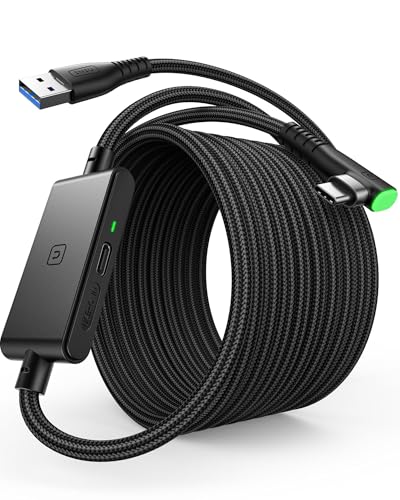
Pros
- 16-foot length gives useful room to move
- Separate USB-C charging port
- USB 3.0 data connection
- 90-degree USB-C connector
- Flexible FLYWEAVE coating and three-year support
Cons
- Designed for Oculus Quest 3, Quest 2, and Quest Pro
- It is not a headset or wireless solution
- Cable length can affect transfer speed
Best for: Quest owners who want a long wired connection to a gaming PC.
The INIU VR Link Cable is a practical accessory rather than a standalone VR product, but the right cable can determine whether a wired session feels usable. Its 16-foot length gives a player more room than a short desktop cable, especially when the PC sits beside a desk rather than directly behind the play area.
It uses USB 3.0 on the computer side and USB-C at the headset, with a separate USB-C charging port. The extra port is the key feature. A compatible power adapter can provide up to 3A power delivery while the cable carries data, helping the headset stay usable during longer sessions. INIU says its SmartProtect2.0 chip manages current around a 78 percent battery range, so this is meant to support play rather than function as a general phone or laptop charging cable.
The 90-degree USB-C connector sits more naturally against the headset, and the included buckle helps keep it from pulling directly on the port. The cable's FLYWEAVE coating is intended to resist wear, while the connector is described as surviving more than 45, 000 bend tests. Those details matter because a VR cable is dragged, stepped over, and repeatedly twisted in ways an ordinary USB lead is not.
Compatibility is the limitation. The listing specifically designs it for Oculus Quest 3, Quest 2, and Quest Pro, so buyers of the Focus Vision, DPVR E4, or either Pimax headset should not assume it is suitable. The 16-foot span can also affect transfer speed slightly. For Quest owners who want dependable wired PC play and a little more battery support, it is a sensible add-on. For a wider look at audio alongside a tethered setup, the features that help a headset stay comfortable during long sessions are worth considering too.
5. Pimax Crystal Light: Best High-Resolution Value

Pros
- 2880 x 2880 resolution per eye
- QLED display with local dimming and HDR
- Glass aspheric lenses
- Refresh rate up to 120 Hz
- Inside-out tracking and fixed foveated rendering
Cons
- Approximately 815 grams
- PC tethering is central to its design
- Less expansive field of view than the Crystal Super
Best for: PC sim players who want sharp images without stepping up to the Crystal Super's specification.
The Pimax Crystal Light makes a strong case for keeping the headset focused on PC VR. It does not try to be a standalone computer. Instead, it puts its hardware effort into the display, lenses, tracking, and rendering features that matter when a headset is attached to a gaming PC.
At 2880 x 2880 pixels per eye, it has enough resolution to make cockpit text and distant scenery more legible than older headsets. The QLED panel supports local dimming and HDR, which should help bright highlights stand apart from dark scenes. Glass aspheric lenses are designed to keep clarity toward the edges and reduce distortion. Its refresh rate can reach 120 Hz, giving fast head movement a smoother presentation when the connected PC can render at that pace.
Inside-out camera tracking avoids the external sensors required by older systems. Fixed 2.0 foveated rendering is intended to place more detail where the eyes are looking while easing the workload in peripheral areas. The headset also works with SteamVR setups and supports controllers such as Valve Index Knuckles and HTC Vive controllers, according to the listing. That makes it easier to consider as part of an existing PC VR room.
The main issue is weight. At approximately 815 grams, it is much heavier than the 285-gram DPVR E4, and the difference will be obvious during long sessions. It also lacks the Focus Vision's standalone and mixed reality flexibility. The Pimax Crystal Super offers a wider 140-degree view and higher resolution, but the Crystal Light is the more measured choice for a PC-focused sim rig. Pick it when visual clarity matters more than portability.
6. HTC Vive XR Elite: Best Compact Mixed Reality

Pros
- Standalone and PC VR operation
- Full-color passthrough and depth sensor
- Stepless IPD and diopter adjustments
- Included Deluxe Pack accessories
- Swappable battery and balanced counterweight
Cons
- Battery lasts up to two hours continuously
- Lower resolution per eye than the Pimax headsets
- Not as light as the DPVR E4
Best for: users who want a compact headset that moves between mixed reality and PC VR.
The HTC Vive XR Elite is a better fit for someone who thinks of PC VR as one part of a broader headset routine. It can connect to a VR-ready computer for low-latency PC games, but it also works as an all-in-one device. The included Deluxe Pack adds a face gasket, Deluxe Strap, temple clips, and a mixed reality gasket, giving the fit more flexibility than a basic headset package.
Its combined resolution is 3840 x 1920, or 1920 x 1920 per eye, with 19 pixels per degree. The field of view reaches 110 degrees and refresh rate reaches 90 Hz. Those figures are behind the Pimax Crystal Light for fine detail, yet they remain appropriate for general VR and mixed reality. Stepless IPD and diopter adjustments are particularly useful for getting the image aligned to the user's eyes rather than accepting a one-size setting.
Four wide field-of-view tracking cameras provide base-station-free room tracking, and the headset includes full-color passthrough with a depth sensor. Hand tracking can handle navigation and simple computer-style actions, although support depends on the VR title. Built-in speakers are integrated into the headset, and the swappable battery provides up to two hours of continuous power.
The XR Elite's compact idea is undercut somewhat by its listed 5.93-pound package weight, and the two-hour battery limit is not ideal for marathon standalone sessions. It also cannot match the Focus Vision's 2448 x 2448-per-eye display. Still, its adjustable fit, mixed reality cameras, included accessories, and PC connection make it a strong middle ground. Choose it if you want one headset for games, portable experiences, and room-aware mixed reality rather than a dedicated simulator display.
7. DPVR E4: Best Lightweight Headset

Pros
- Very light 285-gram headset design
- 3664 x 1920 Fast LCD display
- Refresh options up to 120 Hz
- 116-degree field of view
- Inside-out 6DoF tracking and flip-up design
Cons
- Fresnel lenses are less advanced than Pimax's aspheric lenses
- Requires a compatible PC and DisplayPort connection
- General fit claims may not suit every user
Best for: PC players who put low headset weight ahead of maximum resolution.
The DPVR E4 has one clear argument: it is light. At 285 grams, it is dramatically easier to keep on the head than the Pimax Crystal Light, which is listed at approximately 815 grams. That difference can matter more than a higher resolution when a session lasts several hours or the headset is shared among different players.
Its Fast LCD display has a combined resolution of 3664 x 1920, and the refresh rate can be set to 72, 90, or 120 Hz. The 116-degree field of view is broad enough to avoid a particularly narrow image, while adjustable IPD helps users find a usable lens position. Fresnel lenses do not have the same edge-to-edge ambition as the glass aspheric lenses in the Pimax models, but the E4's design is more approachable for ordinary SteamVR games.
Inside-out 6DoF tracking means no external base stations are required. The flip-up front lets the user glance at the room without removing the headset, which is a small but genuinely useful feature when checking a phone, keyboard, or another person. The listing also identifies support for more than 7, 000 SteamVR titles and gives minimum PC requirements of an Intel i5 or AMD R5 processor, 8GB of RAM, an NVIDIA GTX 1060 or better, Windows 10 or 11, DisplayPort 1.2, and USB 3.0.
That minimum specification is more useful than a vague claim of broad compatibility, though newer demanding games will need more headroom. The E4 cannot compete with the Crystal Super's 140-degree view or the Focus Vision's mixed reality tools. It is the one to buy when comfort and straightforward SteamVR access matter more than cutting-edge optical performance.
8. VR2 PC Adapter: Best Headset Adapter

Pros
- Designed for Windows PC and SteamVR
- Plug-and-play setup claim
- High-performance signal conversion module
- Metal housing for heat dissipation
- Includes a DisplayPort cable
Cons
- The listing uses inconsistent PV2 and VR2 naming
- It is only an adapter, not a headset
- Compatibility should be checked before purchase
Best for: a VR2 owner who needs a PC connection for SteamVR.
The VR2 PC Adapter exists for a very specific problem: taking a VR2 headset beyond its original console environment and connecting it to a Windows PC. The adapter is described as supporting SteamVR and a free helper app, giving compatible owners access to PC titles across racing, shooters, action, sports, horror, and puzzle games.
Its job is signal conversion rather than image creation. The listing says the high-performance IC module is intended to provide stable conversion, clear output, and low-latency response. A metal housing is used for heat dissipation, and a DisplayPort cable is included. Those details are reassuring for long sessions, but they do not remove the need for a suitable computer, the correct headset, and the required software setup.
The naming deserves attention. The title says VR2, while several feature lines refer to a PV2 headset. That inconsistency is a real reason to confirm the exact headset model before ordering. It is not a universal replacement for the DisplayPort connection on the HTC Vive Focus Vision, Pimax Crystal Super, or DPVR E4.
For the right owner, this adapter can expand an existing VR library without replacing the headset. For everyone else, it is an incomplete purchase. Choose it only when the VR2 compatibility is clear and the goal is specifically SteamVR access on Windows.
9. Oculus Rift S: Best Legacy Option

Pros
- Oculus Insight room-scale tracking
- Included Oculus Touch controllers
- Halo headband with fit wheel
- Access to the Oculus VR library
- No external tracking sensors required
Cons
- Older headset platform
- Requires a Facebook account according to the listing
- Listed item condition is used
Best for: an existing Rift S owner replacing a missing or damaged unit.
The Oculus Rift S was designed to make PC VR less intimidating. Its Oculus Insight tracking uses cameras on the headset rather than external sensors, and its Halo headband tightens with a fit wheel. Those choices still make sense for a first-generation room-scale setup, particularly when the buyer already owns the platform's controllers and games.
The headset's improved optics were intended to reduce the screen-door effect and provide brighter, more vivid color than the earlier Rift. The listing does not provide a resolution or refresh figure, so it would be misleading to compare it numerically with the Pimax Crystal Super or DPVR E4. Its real advantage is the established design: put on the headset, adjust the wheel, and let the inside-out tracking handle room orientation.
The included Oculus Touch controllers make interaction more natural than relying on a keyboard or gamepad. The product also provides access to games and exclusives in the Oculus store. That library remains relevant for existing users, though a buyer starting a new system should think carefully about the platform's age and software requirements.
The listing identifies the item condition as used, which is important for a headset that sits against the face and depends on working cameras, lenses, cable, and controllers. It also says a Facebook account is required to log in. New buyers should choose a current headset such as the Focus Vision or DPVR E4 unless compatibility with an existing Rift S setup is the priority. For that narrow use, it remains a workable legacy option.
10. HTC Vive Base Station 2.0: Best External Tracker

Pros
- Precision external tracking for compatible Vive systems
- Fits standard threaded mounting points
- Includes power adapter
- Compatible with Vive Pro, Pro Eye, Pro 2, and Cosmos Elite
- Eight-foot, two-inch power cord
Cons
- Only one base station is included
- Not compatible with every headset in this list
- Requires wall or stand placement
Best for: owners of compatible Vive headsets expanding or replacing a Lighthouse tracking setup.
The HTC Vive Base Station 2.0 is infrastructure, not a headset. It sends out the external tracking system used by selected Vive headsets, giving compatible controllers and headsets a fixed reference for room-scale movement. That can be preferable to camera-based tracking for a dedicated VR room, especially when the rest of the setup already uses Lighthouse hardware.
This package contains one base station and one power adapter. It fits standard threaded mounting points, and the included cord measures eight feet, two inches. Placement matters because the station needs a clear view of the play area and a secure position on a wall or stand. One station may be useful as a replacement or part of a larger setup, but buyers should not assume that one unit creates a complete room-scale system.
Compatibility is specific. The listing names Vive Pro, Vive Pro Eye, Vive Pro 2, and Vive Cosmos Elite. It does not list the Focus Vision, XR Elite, Pimax Crystal Super, Pimax Crystal Light, DPVR E4, or Rift S. Those headsets use different tracking approaches or requirements, so this is not a general upgrade for the entire roundup.
The unit weighs 1.04 pounds and measures 5.8 inches by 5.8 inches by 5.3 inches. Those dimensions are manageable, but the installation commitment is greater than simply plugging in a headset. Buy it when a compatible Vive system needs external tracking, not as an accessory for a new inside-out headset.

How to choose best vr for pc
The right PC VR setup depends on the headset's display, tracking method, connection, and the computer driving it. Start with the part that limits the experience most often, then make sure every accessory belongs to the same ecosystem.
Display resolution and lenses
Resolution affects the readability of cockpit instruments, distant objects, and small text. Pimax's Crystal Super leads this group at 3840 x 3840 per eye, while the Crystal Light offers 2880 x 2880 per eye. A higher figure is useful only when the PC can render it, so graphics performance and headset resolution need to be considered together.
Lens design changes how much of that resolution remains clear away from the center. The Pimax models use aspheric lenses, while the DPVR E4 uses Fresnel lenses. Look for a headset that matches the kind of content you play. Simulators benefit greatly from fine detail, while room-scale action games may benefit more from comfort and tracking.
Field of view
A wider field of view makes movement and peripheral awareness feel less restricted. The Pimax Crystal Super reaches 140 degrees, ahead of the Focus Vision at up to 120 degrees and the DPVR E4 at 116 degrees. Wide views can be especially useful in racing and flight simulators, but they also increase the rendering burden.
A wide field of view is useful only if your graphics card can keep the image smooth.
Refresh rate and PC performance
Refresh rate affects motion clarity and how comfortable quick head movement feels. The DPVR E4 offers 72, 90, and 120 Hz options, the Pimax Crystal Light reaches 120 Hz, and the Focus Vision reaches 90 Hz. The headset and computer must work together, because a high refresh setting does not help if the GPU cannot sustain the required frame rate.
The CyberPowerPC's RTX 5070 12GB, Core i9-14900KF, and 32GB DDR5 make it the most complete computer foundation in this group. The DPVR E4 lists a GTX 1060 as a minimum, but more demanding high-resolution headsets need substantially more headroom.
Tracking system
Inside-out tracking uses cameras on the headset and avoids external sensors. The Focus Vision, Crystal Light, XR Elite, and DPVR E4 use this style, while the Rift S uses Oculus Insight. External Lighthouse tracking, represented here by the HTC Vive Base Station 2.0, requires compatible hardware and careful placement but can suit a permanent Vive room.
Check the complete chain before buying. A base station cannot improve a headset that does not support it, and an inside-out headset does not need one.
Wired, standalone, and mixed reality features
DisplayPort connections can provide a direct, high-fidelity PC path. Standalone headsets such as the Focus Vision and XR Elite offer more freedom away from the computer, while mixed reality depends on passthrough cameras and depth sensing. A long USB link cable is useful for compatible Quest models, but it is not a universal PC VR cable.
For more context on choosing the headset itself, the differences between headset display and tracking systems are more important than chasing a single headline specification.

Frequently asked questions
Do all of these products include a VR headset?
No. The CyberPowerPC Gamer Xtreme is a desktop computer, the INIU VR Link Cable is a USB accessory, the VR2 PC Adapter is a signal converter, and the HTC Vive Base Station 2.0 is external tracking hardware. The other entries are headset products.
Which headset has the highest listed resolution?
The Pimax Crystal Super has the highest listed resolution at 3840 x 3840 pixels per eye. The Pimax Crystal Light follows at 2880 x 2880 pixels per eye. Both need a capable PC to make full use of those displays.
Do I need external base stations?
Not for the HTC Vive Focus Vision, Pimax Crystal Light, HTC Vive XR Elite, or DPVR E4, which use inside-out tracking according to their listings. The Oculus Rift S uses Oculus Insight tracking. The HTC Vive Base Station 2.0 is intended for compatible Vive headsets that use external tracking.
Is the INIU cable compatible with every PC VR headset?
No. The listing specifically designs it for Oculus Quest 3, Quest 2, and Quest Pro. Buyers with a Pimax, HTC Vive, or DPVR headset should check the required connection instead of assuming USB-C compatibility is enough.
Is the Pimax Crystal Super suitable for ordinary VR games?
Yes, it is described for gaming as well as flight and racing simulators. Its 140-degree field of view and very high resolution are most compelling in simulation, but they also increase the demands placed on the PC.
Which headset is easiest to wear for long sessions?
The DPVR E4 is the lightest listed headset at 285 grams. The Pimax Crystal Light is listed at approximately 815 grams, so it is a much heavier choice despite its sharper display. Head shape, strap adjustment, and lens alignment still affect personal comfort.
Can the CyberPowerPC Gamer Xtreme replace a headset?
No. It is a Windows 11 desktop with an RTX 5070, processor, memory, storage, and accessories. It can supply the computer side of a PC VR setup, but a separate headset and any required tracking hardware are still needed.

The bottom line
The Best best vr for pc pick is the HTC Vive Focus Vision because it covers the widest range of uses without forcing the buyer into standalone play or a permanent tracking installation. Its DisplayPort mode, 2448 x 2448-per-eye display, mixed reality sensor, and hot-swappable battery make it more adaptable than the specialist headsets.
For simulator enthusiasts, the Pimax Crystal Super is the more ambitious choice, with 3840 x 3840 resolution per eye and a 140-degree field of view. Buyers starting without a suitable computer should pair a headset with the CyberPowerPC Gamer Xtreme, while the DPVR E4 is the sensible alternative when low weight matters most.
If you are undecided, choose the Focus Vision for flexibility, the Crystal Super for simulator detail, or the DPVR E4 for comfort.
As an Amazon Associate we earn from qualifying purchases.