

A printer that scans well should not turn a simple school form or signed document into a maintenance project. The right all-in-one handles wireless jobs from a phone, copies a page without a computer, and keeps two-sided documents from becoming a paper shuffle. The wrong one is slow, cramped, or awkward to use before you have even reached the scanner glass.
We compared ten current home and home-office models, including compact color inkjets, cartridge-free tank printers, and a fast monochrome laser. The Best home printer scanner for most people is the Canon PIXMA TS6520, while the other picks make stronger cases for high-volume work, automatic document feeding, photos, or black-and-white productivity.
Comparison table
| # | Product | Award | Print type | Duplex | Document feeder | Best for |
|---|---|---|---|---|---|---|
| 1 | Canon PIXMA TS6520 | Best overall | Color inkjet | Automatic | Not listed | Everyday home printing |
| 2 | HP OfficeJet Pro 8139 | Best for busy home offices | Color inkjet | Automatic | Automatic | Frequent mixed documents |
| 3 | Epson EcoTank ET-2800 | Best cartridge-free design | Color ink tank | Not listed | Not listed | High-volume color printing |
| 4 | Brother Work Smart 1360 | Best compact ADF option | Color inkjet | Automatic | 20 sheets | Home and home-office tasks |
| 5 | Brother DCP-L2640DW | Best monochrome laser | Monochrome laser | Automatic | 50 sheets | Fast black-and-white work |
| 6 | HP DeskJet 2955 | Best basic compact pick | Color inkjet | Not listed | Not listed | Occasional home printing |
| 7 | Canon PIXMA TS4320 | Best for simple photo jobs | Color inkjet | Automatic | Not listed | Photos and two-sided pages |
| 8 | HP OfficeJet Pro 8125e | Best home-office alternative | Color inkjet | Automatic | Automatic | Reports and presentations |
| 9 | Canon PIXMA TR4720 | Best fax-equipped compact model | Color inkjet | Automatic | Automatic | Home paperwork |
| 10 | HP Envy 6555e | Best touchscreen home model | Color inkjet | Automatic | 35 sheets | Photos and family documents |
1. Canon PIXMA TS6520: Best Overall

Pros
- Automatic two-sided printing
- Dual-band wireless connectivity
- Compact footprint
- Sharp text and vivid color output
- Simple OLED status display
Cons
- Uses a two-cartridge hybrid ink system
- No automatic document feeder listed
- Monochrome display is small
Best for: households that want a straightforward color printer, scanner, and copier in one compact body.
The Canon PIXMA TS6520 is the printer we would put in the most homes. It covers the common jobs without making the control panel feel like a small office machine. Print a recipe from a phone, copy a form, scan a receipt, or send a two-sided document and the basic workflow stays uncomplicated.
Canon gives it dual-band Wi-Fi, so it can connect over either 2.4GHz or 5GHz networks. That matters when a home has crowded wireless traffic or the printer sits farther from the router. The Canon PRINT App, Apple AirPrint, and Mopria Print Service extend the same convenience to phones and tablets. The built-in scanner handles scanning and copying, while automatic two-sided printing keeps longer documents from becoming a stack of single-sided pages.
This model uses a two-cartridge hybrid ink system, which is a sensible fit for ordinary documents and occasional color images. Canon says it supports documents and photos up to 8.5 by 11 inches, with borderless printing available. A 1.42-inch monochrome OLED shows ink levels, status, and settings. It is not a large touchscreen, but the restrained interface suits someone who would rather use a phone for complicated jobs.
The 14-inch width and 14.8-inch depth make the TS6520 easier to place than the much larger HP OfficeJet Pro 8139. The Brother Work Smart 1360 has an edge when multi-page scanning matters because it includes a 20-sheet automatic document feeder, but the Canon is the cleaner choice for households that mostly scan one page at a time. Its weakness is exactly that missing feeder, and people who routinely digitize several-page packets should skip it.
For everyday color printing, simple scanning, and a tidy desk, the Canon PIXMA TS6520 is the most balanced pick here. It is also a good starting point for readers comparing the practical differences between printing, scanning, and copying at home.
2. HP OfficeJet Pro 8139: Best for Busy Home Offices

Pros
- Automatic document feeder
- Automatic two-sided printing
- 225-sheet input tray
- Fast black and color printing
- Large color touchscreen
Cons
- Large desk footprint
- Uses original HP cartridge circuitry
- More machine than occasional users need
Best for: home offices that print reports, forms, presentations, and mixed color documents throughout the week.
The HP OfficeJet Pro 8139 is the most capable color inkjet here for a home office that actually feeds it work. Its automatic document feeder changes the experience of scanning or copying a small packet. Instead of placing every sheet on the glass, you can load the pages and let the machine handle the sequence.
The rated output reaches up to 20 pages per minute in black and 10 pages per minute in color. Those figures put it well ahead of the Canon PIXMA TS6520 for routine document batches. Automatic two-sided printing adds another practical advantage, and the 225-sheet input tray means fewer interruptions when a home office is working through reports or presentation handouts.
A 2.7-inch color touchscreen gives this model the clearest standalone controls in the group. HP also supports print, scan, copy, and fax tasks through its app, with dual-band Wi-Fi handling wireless connections. The listed functions make it a genuine all-in-one rather than a printer with a scanner attached as an afterthought. HP AI formatting can remove unwanted content from web pages and emails before printing, which is useful when browser pages contain sidebars or stray navigation elements.
The 18.12-inch width and 17.6-pound body demand a dedicated surface. That is the cost of the larger tray and office-oriented hardware, not a flaw for the intended buyer, but it makes the OfficeJet Pro 8139 a poor fit for a narrow shelf. It also only accepts cartridges with original HP chips or circuitry, so anyone wanting broad cartridge flexibility should look elsewhere.
Compared with the HP OfficeJet Pro 8125e, this model is the stronger choice when its faster listed color output and one-year Instant Ink trial fit the workflow. The 8125e remains a sensible alternative, but the 8139 is the one to keep near a busy desk.
3. Epson EcoTank ET-2800: Best Cartridge-Free Design

Pros
- Cartridge-free ink tank design
- Up to 4, 500 black pages listed
- Up to 7, 500 color pages listed
- Wireless all-in-one functionality
- Compact and relatively light
Cons
- Slower listed output
- Ink filling requires more attention than cartridges
- No automatic document feeder listed
Best for: households that print color pages regularly and want to refill tanks less often.
The Epson EcoTank ET-2800 takes a different approach from every cartridge model in this roundup. Its tanks are filled from bottles, so there are no small ink cartridges to remove and replace. That makes the printer particularly appealing to a household that prints frequently enough for repeated cartridge changes to become annoying.
Epson lists output of up to 4, 500 black pages and 7, 500 color pages, and says the included ink can last for up to two years. Those are manufacturer estimates, so actual results depend on what gets printed, but the central advantage is clear: the ET-2800 is built around longer intervals between ink replacements. It also reduces cartridge waste by avoiding the disposable cartridge format.
The printer uses Epson Micro Piezo Heat-Free Technology and is rated for up to 10 ISO pages per minute. That is considerably slower than the Brother DCP-L2640DW, whose monochrome laser engine reaches up to 36 pages per minute, but the Epson is the better match when color output matters. It handles documents and photos, while the wireless all-in-one design covers printing, scanning, and copying from a home network.
At 16 inches wide, 17 inches deep, and 11.4 pounds, the ET-2800 is not tiny, although its weight makes it easier to move than the heavier office models. The trade-off is a more deliberate refill process and the absence of an automatic document feeder in the supplied details. Epson also recommends genuine ink to support print quality and performance, and warns that non-genuine ink can cause damage not covered by its limited warranty.
The Epson is a smarter fit than the Canon PIXMA TS6520 for consistent color volume. The Canon is easier for light, mixed household use, while the ET-2800 makes more sense for a family printing worksheets, projects, and color pages week after week.
4. Brother Work Smart 1360: Best Compact ADF Option

Pros
- 20-sheet automatic document feeder
- Automatic two-sided printing
- 150-sheet paper tray
- Color display
- Cloud app connections
Cons
- ADF is single-sided
- Slower color output than the HP OfficeJet Pro models
- No fax function listed
Best for: home users who scan short multi-page documents but do not need a full office-sized machine.
The Brother Work Smart 1360 occupies a useful middle ground. It is more document-friendly than a basic flatbed all-in-one because its 20-sheet single-sided automatic document feeder can take care of a short packet. It is also less imposing than the large HP OfficeJet Pro machines, which makes it easier to live with in a shared workspace.
Brother lists print speeds up to 16 pages per minute in black and 9 pages per minute in color. That is enough for normal home-office queues, although the HP OfficeJet Pro 8139 remains quicker for black documents. Automatic duplex printing helps the Brother make better use of paper, and the 150-sheet tray is a meaningful step up from the smaller trays on entry-level home printers.
The 1.8-inch color display provides direct access to print, copy, scan, and device settings. Brother also supports cloud connections such as Google Drive, Dropbox, Box, and OneDrive, while the Brother Mobile Connect app handles mobile printing, scanning, and management. USB is available alongside wireless networking, which gives it a useful fallback if a computer needs a direct connection.
The 13.5-inch length and 15.4-inch width keep the body reasonably compact, though its 16.8-pound weight is still substantial for a small desk device. The ADF handles only single-sided pages, so duplex source documents still need manual attention. Buyers who mostly scan one sheet at a time can avoid paying for a feature they will not use, while households with short forms and receipts will appreciate it.
The Brother Work Smart 1360 is more versatile than the Canon PIXMA TS4320 because of its feeder and cloud workflow. It gives up some simplicity to get there, but that is a worthwhile exchange for a home office that scans paperwork every week.
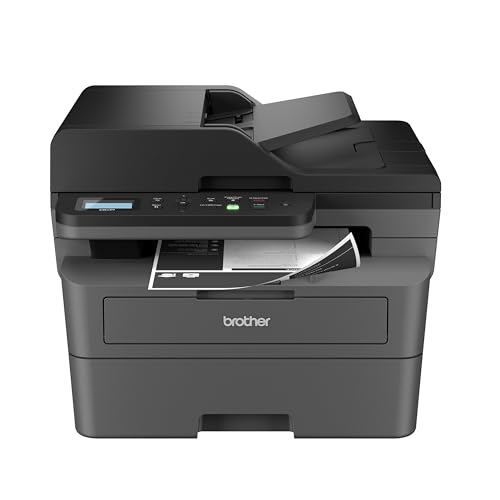
5. Brother DCP-L2640DW: Best Monochrome Laser
Pros
- Fast black-and-white printing
- 50-sheet automatic document feeder
- Automatic duplex printing
- Ethernet and dual-band Wi-Fi
- Mobile management app
Cons
- Black-and-white output only
- Heavier than the color inkjet models
- No fax function listed
Best for: people who care more about fast text documents and multi-page scanning than color photos.
The Brother DCP-L2640DW is the clear specialist in this group. It does not print color, but it is much better equipped for a home office that mostly produces forms, invoices, school pages, and other black-and-white documents. Laser output also suits people who may leave the printer unused for stretches and then need a clean text job immediately.
Its rated print speed reaches up to 36 pages per minute, which is in another class from the inkjets here. The 50-page automatic document feeder is the largest listed feeder in the roundup, making it the strongest pick for multi-page copying and scanning. Brother lists scan speeds up to 23.6 images per minute in black and 7.9 images per minute in color, although its printing remains monochrome.
Connectivity is unusually flexible for a home model. Dual-band wireless, Ethernet, and USB are all supported, so it can serve a household network, a wired office setup, or one directly connected computer. The Brother Mobile Connect app provides mobile printing, scanning, and device management, and the printer works with Alexa. Automatic duplex printing rounds out a feature set designed around document throughput.
This is a bigger, heavier machine at 16.1 inches wide, 15.7 inches deep, 12.5 inches high, and 25 pounds. It is not the model to choose for borderless family photos or colorful school projects. The Canon PIXMA TS6520 is a much more flexible home printer, while the Brother wins decisively when every important page is black and white.
For readers deciding between color convenience and document speed, the Brother belongs in the latter camp. Those focused on the features that matter in a home laser document setup should start here.
6. HP DeskJet 2955: Best Basic Compact Pick

Pros
- Very light and compact
- Wireless print, scan, and copy functions
- Dual-band Wi-Fi
- Simple icon LCD
- High recycled-plastic content
Cons
- Slowest listed print speeds here
- 60-sheet input tray
- No automatic document feeder listed
Best for: occasional home printing such as recipes, letters, lists, and homework pages.
The HP DeskJet 2955 is for the household that needs a printer nearby but does not want a bulky office appliance. At 7.55 pounds, it is dramatically easier to move than the Brother laser or either OfficeJet Pro. Its compact design also makes sense on a shallow shelf or a desk shared with other equipment.
The functions are basic but useful: color printing, copying, scanning, mobile printing, and wireless connectivity. HP lists dual-band Wi-Fi and an icon LCD control panel rather than a color touchscreen. That keeps the machine simple, though users who prefer detailed controls on the printer itself will find the Canon PIXMA TS6520's OLED display more informative.
Output is rated at up to 7.5 pages per minute in black and 5.5 pages per minute in color. Those figures are adequate for a few pages at a time, but the HP OfficeJet Pro 8125e is a much better choice for reports or regular batches. The 60-sheet input tray also signals the intended workload. It is enough for everyday household jobs, not a week of documents waiting in a queue.
HP's formatting tools can remove unwanted content from web pages and emails, and the app supports print, scan, copy, and fax functions from a mobile device, although fax hardware is not listed for the printer itself. The body uses at least 70 percent recycled plastics and carries ENERGY STAR and EPEAT certification. Cartridge operation is tied to HP chips or circuitry, which may matter to users who want more freedom in supplies.
The DeskJet 2955 is easier to recommend than a larger model when space and occasional use are the priorities. Skip it if you need an automatic feeder, automatic duplex printing, or quick multi-page output. For a small household printer that mostly waits until someone needs a form, it keeps the experience uncomplicated.
7. Canon PIXMA TS4320: Best for Simple Photo Jobs

Pros
- Automatic two-sided printing
- Borderless photo support
- Dual-band wireless
- Canon PRINT App support
- Compact design
Cons
- No automatic document feeder listed
- Two-cartridge ink system
- Slower document output than office-focused models
Best for: home users who want an easy color printer for photos, forms, and two-sided documents.
The Canon PIXMA TS4320 is a familiar home-printer shape with a useful emphasis on photos. It handles borderless prints and documents up to 8.5 by 11 inches, so it can cover snapshots, school projects, recipes, and standard forms without needing a separate photo device. Its automatic two-sided printing is equally useful for longer documents.
Like the Canon PIXMA TS6520, it uses a two-cartridge hybrid ink system that aims for sharp text and vivid color. Dual-band Wi-Fi supports both 2.4GHz and 5GHz networks, while the Canon PRINT App, Apple AirPrint, and Mopria Print Service cover common mobile workflows. The integrated scanner handles copies and scans, though the supplied information does not list an automatic document feeder.
The TS4320 is a compact all-in-one, measuring 14 inches wide and 14.8 inches deep. Its 14.8-pound weight is manageable, but it is not as easy to lift around as the 7.55-pound HP DeskJet 2955. Canon also identifies it as EPEAT Silver and ENERGY STAR certified, a useful detail for households that care about the environmental profile of their office equipment.
There is some overlap with the TS6520, and the TS6520 is the stronger all-purpose recommendation because its 1.42-inch OLED provides printer status and ink information. The TS4320 makes more sense when borderless photo printing and simple setup matter more than a richer on-device interface. Buyers who scan multi-page documents should choose the Brother Work Smart 1360 instead.
This is a sensible pick for a home that prints a mix of color pages and occasional photos. It keeps the workflow familiar and compact, without pretending to be a high-volume office machine.
8. HP OfficeJet Pro 8125e: Best Home-Office Alternative

Pros
- Automatic document feeder
- Automatic duplex printing
- 225-sheet input tray
- Dual-band wireless
- Mobile print, scan, and copy support
Cons
- Large footprint
- Cartridge restrictions
- The supplied tray detail is incomplete
Best for: home-office users who need a broad document feature set and regular color output.
The HP OfficeJet Pro 8125e brings the same basic office logic as the 8139 to a slightly different position in the range. It is built for color documents, reports, presentations, and flyers, not just the occasional page. The automatic document feeder is the feature that changes its usefulness most, especially when scanning or copying several pages in succession.
HP lists speeds up to 20 pages per minute in black and 10 pages per minute in color. Automatic two-sided printing and a 225-sheet input tray support longer work sessions without constant intervention. For a home office, that combination is more meaningful than a decorative control panel because it reduces the number of times you need to stand over the printer.
The model uses dual-band Wi-Fi and HP's app for printing, scanning, copying, and fax-related mobile workflows. HP AI formatting can clean up web pages and emails before they are printed, which helps when the original digital layout is cluttered. The body measures about 18.11 inches wide, 13.29 inches long, and 9.17 inches high, so it needs a proper table rather than a narrow side shelf.
The HP OfficeJet Pro 8139 is the better pick when its faster color specification and longer included Instant Ink trial are important. The 8125e still has the same key office ingredients, including the feeder and large tray. HP also restricts it to cartridges with HP chips or circuitry, a real limitation for anyone who dislikes supply lock-in.
Choose the 8125e when a home office needs dependable color document handling but does not need the top model in this pair. Readers with a smaller work area should look at the Brother Work Smart 1360 before committing to this larger chassis.
9. Canon PIXMA TR4720: Best Fax-Equipped Compact Model

Pros
- Print, copy, scan, and fax functions
- Automatic document feeder
- Automatic two-sided printing
- 100-sheet paper capacity
- Alexa supply notifications
Cons
- Slow listed document speeds
- No color display listed
- Older design than the newest picks
Best for: households that still need faxing alongside regular printing, copying, and scanning.
The Canon PIXMA TR4720 earns its place through a feature many modern home printers omit: built-in fax. It is a four-function wireless all-in-one with print, copy, scan, and fax hardware, making it useful for home paperwork that still has to move through a traditional office workflow.
The automatic document feeder and automatic two-sided printing are the practical highlights. The 100-sheet capacity is smaller than the 225-sheet trays on the HP OfficeJet Pro models, but it is enough for ordinary household work. Canon also supports borderless documents and photos up to 8.5 by 11 inches, so the TR4720 is not limited to plain black text.
Its listed speeds are modest: approximately 8.8 images per minute for a black letter document and 4.4 images per minute for a color letter document. A 4 by 6-inch borderless photo is listed at approximately 65 seconds. Those figures make the TR4720 a poor choice for long queues, but speed is less important when the printer's main job is occasional forms, copies, and faxed paperwork.
The 11.7-inch length makes it shorter front to back than the Canon PIXMA TS6520, though its 17.2-inch width still requires some lateral desk space. Alexa can send low-ink notifications and place a smart reorder if enrolled, and Canon lists a one-year limited warranty. There is no color touchscreen listed, so the HP Envy 6555e is more inviting for people who want a modern on-device interface.
The TR4720 is not the quickest or most polished model here, but its automatic feeder and fax make it more useful than a basic home inkjet for the right household. Choose it when faxing is a real requirement, not merely a feature that sounds reassuring.
10. HP Envy 6555e: Best Touchscreen Home Model

Pros
- 2.4-inch color touchscreen
- 35-sheet automatic document feeder
- Automatic two-sided printing
- Borderless photo support
- P3 color technology
Cons
- No fax function listed
- Slower than OfficeJet Pro models
- Cartridge restrictions
Best for: families that want easy touchscreen controls, photos, and an automatic feeder in one home all-in-one.
The HP Envy 6555e is aimed at the family desk rather than the production-minded office. Its 2.4-inch color touchscreen makes common tasks easier to find than the icon LCD on the HP DeskJet 2955, and its 35-sheet automatic document feeder gives it a useful advantage for homework packets, household forms, and short scan jobs.
HP lists output up to 10 pages per minute in black and 7 pages per minute in color. That is a comfortable level for home use, but the HP OfficeJet Pro 8139 is clearly faster when a work queue grows. Automatic two-sided printing helps the Envy handle longer documents, while the 100-sheet input tray is appropriate for normal family workloads.
Photo work is one of this model's stronger areas. HP says its P3 technology produces documents and photos that look as vibrant as they do on screen, and the printer supports borderless photos. Dual-band Wi-Fi and the HP app cover wireless printing, scanning, copying, and mobile management. The body is 17.05 inches wide, 14.21 inches long, and 6.73 inches high, so it is broad but relatively low.
The Envy 6555e uses HP cartridges with HP chips or circuitry, and firmware updates maintain that restriction. There is no fax function listed, which separates it from the Canon PIXMA TR4720. It is also not the right machine for heavy document throughput, where the Brother DCP-L2640DW or an OfficeJet Pro is more capable.
For a family that values a friendly screen and occasional photo printing, the Envy is a pleasant fit. Its feeder gives it more flexibility than the Canon PIXMA TS4320, while its color-oriented design keeps it more approachable than the office-first models.
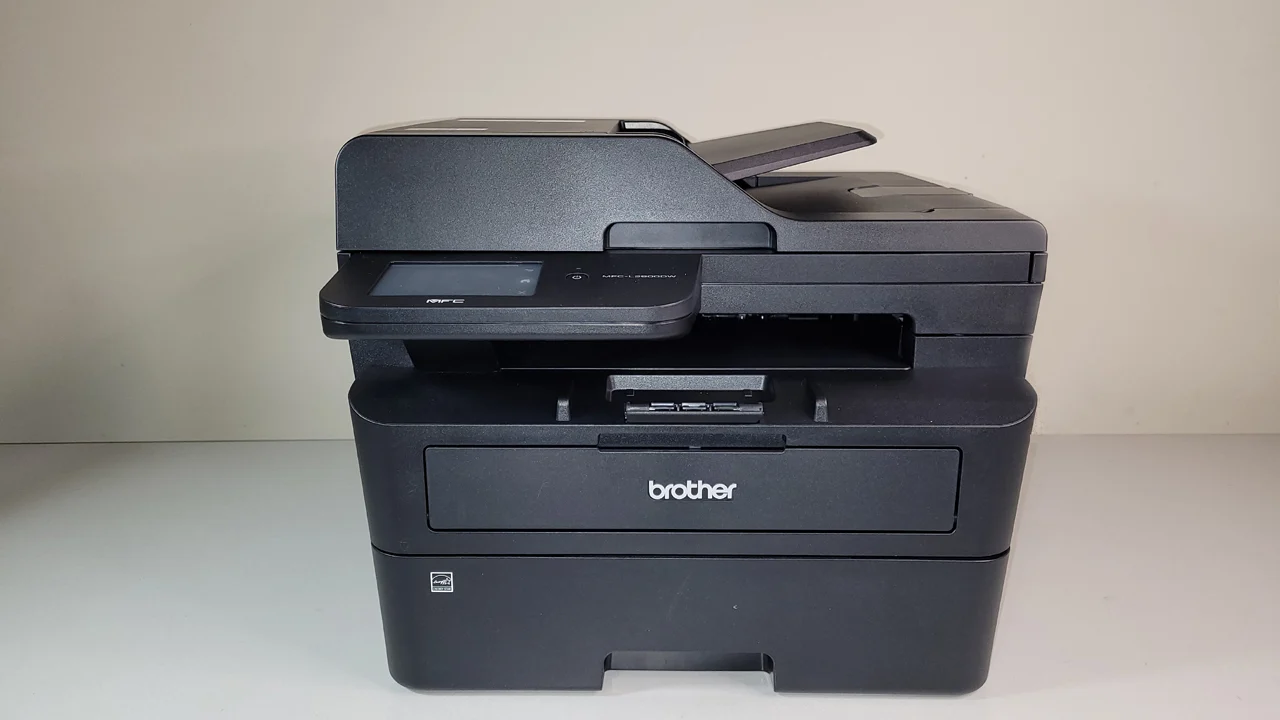
How to choose best home printer scanner
The right all-in-one depends on the balance between document volume, color work, scanning convenience, and the space available for the machine.
Print type
Color inkjets are the most flexible choice for family documents, photos, worksheets, and borderless images. Monochrome laser printers such as the Brother DCP-L2640DW are better suited to fast text output when color is unnecessary. Ink tank designs such as the Epson EcoTank ET-2800 are aimed at households that print color regularly and want fewer refill interruptions.
Automatic document feeder
A flatbed scanner is fine for a single photo, receipt, or signed page. An automatic document feeder matters when you scan or copy several sheets in one session. Look at both capacity and direction: the Brother DCP-L2640DW lists a 50-sheet feeder, while the Brother Work Smart 1360 lists a 20-sheet single-sided feeder.
For multi-page scanning, the automatic document feeder matters more than a faster first page.
Duplex printing
Automatic duplex printing turns a printer from a single-page tool into a more efficient document machine. It prints on both sides without asking you to flip the paper manually, which is especially helpful for reports, schoolwork, and multi-page forms. The Canon PIXMA TS6520, Brother Work Smart 1360, Brother DCP-L2640DW, and HP Envy 6555e all list automatic two-sided printing.
Wireless connections
Dual-band Wi-Fi can make a difference in homes with busy wireless networks because the printer can connect over either 2.4GHz or 5GHz. Mobile support is also important, since Canon, HP, and Brother each provide app-based printing or scanning workflows. If wireless reliability is a concern, the Brother DCP-L2640DW adds Ethernet and USB alongside its dual-band wireless connection.
Ink or toner system
Cartridge printers are familiar and usually simple to refill by replacing a cartridge. Tank printers use bottles and can hold substantially more ink, but filling them requires more care. Laser models use toner and are particularly effective for black text. Before choosing, check the manufacturer's supply requirements, since HP specifies original chip or circuitry requirements for several models in this roundup.
Desk footprint
Measure the available surface, including room for paper to enter and exit. The HP OfficeJet Pro 8139 and 8125e are wide home-office machines, while the HP DeskJet 2955 is much lighter and easier to place. A compact body is useful, but a smaller printer may also have a smaller paper tray or lack an automatic document feeder.
If scanning paperwork is the main task, consider how feeder capacity changes multi-page scanning at home. For a work-focused setup, the features that separate a home office printer from a basic home model are also worth checking before choosing.
Frequently asked questions
What is the best home printer scanner for most people?
The Canon PIXMA TS6520 is the strongest general-purpose choice in this group. It combines color printing, scanning, copying, automatic two-sided printing, dual-band Wi-Fi, and mobile support in a compact design. Its main limitation is the lack of a listed automatic document feeder.
Which printer is best for scanning multiple pages?
The Brother DCP-L2640DW has the largest listed automatic document feeder at 50 sheets. The Canon PIXMA TR4720 lists an automatic document feeder as well, while the Brother Work Smart 1360 includes a 20-sheet single-sided feeder. Choose based on whether you need color output, faxing, or fast black-and-white documents alongside scanning.
Should I choose an ink tank printer for home use?
An ink tank printer makes sense when the household prints color pages regularly. The Epson EcoTank ET-2800 lists up to 4, 500 black pages and 7, 500 color pages, but it is slower than the laser and requires bottle refills. Occasional users may prefer the simpler cartridge workflow of the Canon or HP models.
Is a laser printer good for scanning?
Yes. The scanner and copier are separate functions from the laser print engine, and the Brother DCP-L2640DW combines them with a 50-sheet automatic document feeder. It is a particularly strong option when scanned documents are mostly black and white and print speed matters.
Do these printers support printing from a phone?
The models in this roundup include mobile workflows through their respective apps or wireless services. Canon lists the Canon PRINT App, Apple AirPrint, and Mopria Print Service on its PIXMA models. HP and Brother also list app-based printing and scanning, with wireless connectivity handled through home networks.
Do I need an automatic document feeder?
You do not need one if you mainly scan single photos, receipts, or occasional pages on the scanner glass. An ADF becomes useful for several-page forms, homework packets, and document copying. The HP Envy 6555e, HP OfficeJet Pro models, Brother models, and Canon PIXMA TR4720 offer a stronger scanning workflow than models without a listed feeder.
The bottom line
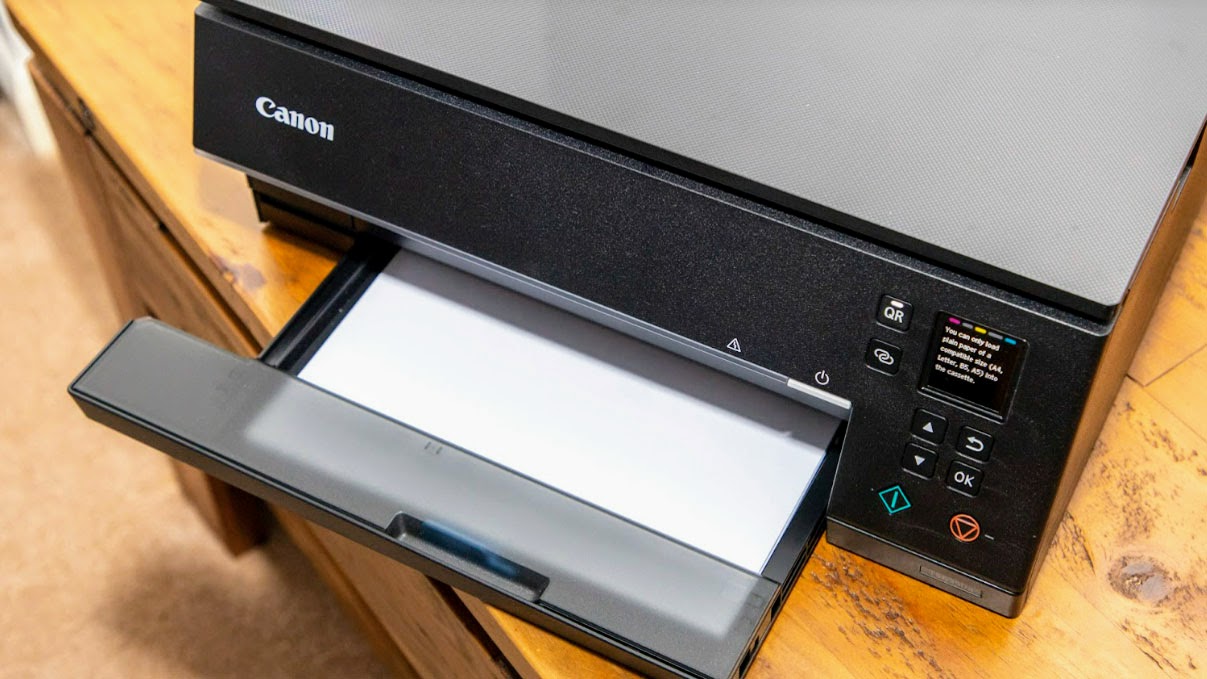
The Best home printer scanner for most households is the Canon PIXMA TS6520. It combines automatic duplex printing, dual-band wireless, mobile support, color output, scanning, and copying without the bulk of the HP OfficeJet Pro models. Its missing automatic document feeder is the one weakness to consider before buying.
For a busy home office, choose the HP OfficeJet Pro 8139, with its 225-sheet tray, automatic document feeder, and faster listed output. For fast black-and-white work, the Brother DCP-L2640DW is the better specialist, while the Epson EcoTank ET-2800 stands out for frequent color printing with a cartridge-free tank system.
If you are undecided, choose the Canon PIXMA TS6520 for everyday mixed use, the Brother DCP-L2640DW for document-heavy work, or the Epson EcoTank ET-2800 when regular color volume is the priority.
As an Amazon Associate we earn from qualifying purchases.